



Service Level Agreements (SLAs) are critical for B2B customer support. They define response and resolution time expectations, ensuring accountability and trust. Here’s the process to set up SLA management effectively:
- Define SLA Goals: Choose key metrics like First Response Time (FRT), Next Response Time, and Resolution Time. Use historical data to set realistic targets that align with your team’s capacity.
- Segment SLAs: Tailor SLAs based on customer tiers, issue priorities, and business impact. For example, VIP customers might need faster response times than standard accounts.
- Handle SLA Pauses & Escalations: Use status-based pauses when waiting on customers or third-party inputs. Automate escalations with alerts to prevent breaches.
- Automate with AI: Leverage AI tools for real-time monitoring, AI-powered ticket routing and prioritization, and predictive insights to streamline SLA compliance.
- Review & Improve: Regularly analyze SLA performance, adjust targets for business changes, and share transparent reports with customers to build trust.
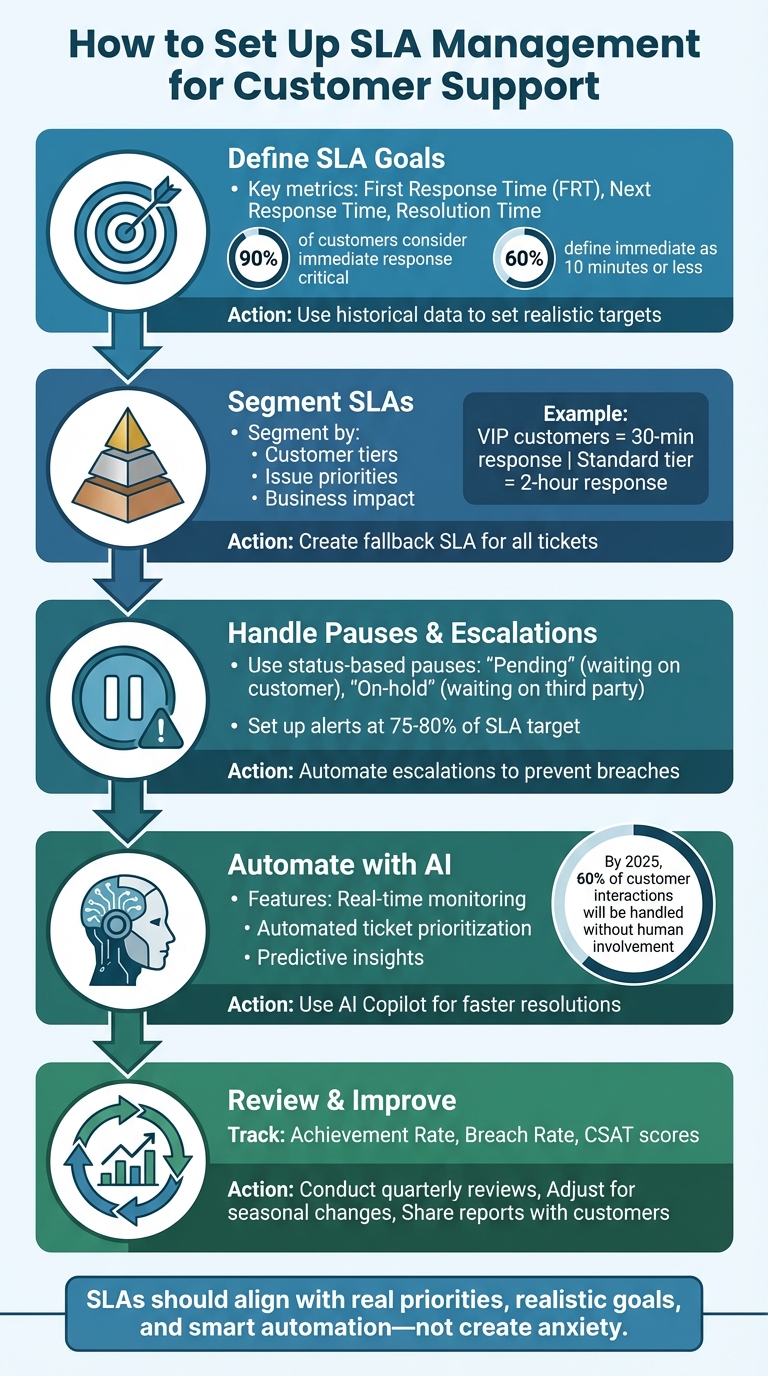
5-Step SLA Management Setup Process for Customer Support Teams
Step 1: Define Your SLA Goals and Metrics
Choose the Right SLA Metrics to Track
To create effective SLAs for your B2B support, start by identifying the metrics that matter most. One of the most crucial is First Response Time (FRT), which measures the time from when a ticket is created to the first agent response. Why is this so important? Because 90% of customers consider an "immediate" response critical, and 60% define "immediate" as 10 minutes or less. This metric sets the tone for the entire customer interaction.
Another key metric is Next Response Time, which tracks how quickly your team replies to follow-up messages from customers. This ensures ongoing conversations don’t drag on unnecessarily. For cases that take longer – sometimes days or weeks – Periodic Update metrics are essential. They guarantee that customers receive regular updates on their tickets, even when a full resolution isn’t ready. Finally, there’s Resolution Time, which measures the total time from ticket creation to closure. The key is to choose metrics that align with both customer expectations and your team’s capabilities. Once you’ve identified the right metrics, use historical data to set achievable targets.
Set Realistic Targets Using Historical Data
Your SLA targets should reflect what your team can consistently deliver – not overly ambitious goals that lead to constant failures. Start by analyzing historical data to understand your team’s performance on different types of issues. For instance, if "how-to" questions typically get a reply within 2 hours, but more complex issues like "network configuration" take 6 hours, set separate SLA targets for each. This avoids applying a one-size-fits-all approach, like a blanket 1-hour response time, which may be unrealistic for technical problems.
It’s also important to test these targets against recent ticket volumes. For example, if high-priority tickets currently average a 45-minute first response, setting a 30-minute target might overburden your team. Instead, aim for something achievable, like 1 hour, and focus on gradual improvements. Remember, your benchmarks should be based on your team’s actual performance, not generic industry averages that may not reflect your unique customer base or staffing levels. Realistic targets help ensure your SLAs align with customer satisfaction.
Connect SLAs to Customer Satisfaction and Retention
SLAs aren’t just about speed – they’re about building trust and keeping customers happy. Meeting SLA targets consistently can reduce churn, avoid duplicate contacts, and improve overall satisfaction. For example, slow first responses often lead customers to reach out through multiple channels, creating frustration and duplicate tickets.
To measure the impact of your SLAs, track their correlation with Customer Satisfaction (CSAT) scores and First Contact Resolution rates. If your team is meeting response time goals but CSAT scores remain low, it could signal that agents are rushing through tickets without fully resolving them. By reviewing response times alongside CSAT and resolution rates, you can strike the right balance between speed and quality. Once your team consistently hits its targets, you can even highlight your SLA guarantees in marketing campaigns to attract customers who value fast and reliable support.
sbb-itb-e60d259
Step 2: Segment SLAs by Customer Type and Issue Priority
Create SLAs for Different Customer Tiers
Not every customer should have the same SLA expectations. High-value accounts and enterprise clients often require faster responses compared to customers on a basic plan. To reflect this, design your SLA policies to prioritize these key accounts over entry-level plans.
You can use ticket properties like Customer Tier, Priority, Organization, or Tags to automatically activate specific SLA policies. For example, enterprise-level clients might need a 30-minute first response time with regular updates, while standard-tier customers could have a 2-hour response window. To ensure no ticket is overlooked, include a fallback SLA as your final rule, offering at least a baseline response time for all cases. These tailored targets build on the foundational SLA framework you’ve already established.
Business hours are another critical factor. Enterprise clients may expect 24/7 support, while standard-tier customers typically align with local office hours – for instance, Monday through Friday, 9:00 AM to 5:00 PM. This distinction helps avoid SLA breaches during weekends or holidays when your team isn’t available.
Adjust SLAs Based on Issue Type and Business Impact
Once you’ve segmented customers, refine SLAs further by considering the type of issue and its impact on the business. Not all problems require the same urgency – a routine question doesn’t carry the same weight as a system outage. Leverage tags like "billing", "bug", or "network configuration" to automatically categorize issues and assign appropriate SLA targets.
For instance, routine inquiries might have a 2-hour first response goal, while technical issues could demand a 30-minute response. High-priority issues should be addressed quickly, whereas lower-priority matters can have a more relaxed timeline. For critical technical problems that impact revenue, focus on metrics like Resolution Time or Requester Wait Time to ensure the issue is resolved promptly.
Handle Multi-Stakeholder and Time-Zone Differences
As you refine your SLA strategy, consider the added complexity of multiple internal teams and global operations. B2B support often involves collaboration across departments like Support, Finance, and Sales. In these cases, Group SLAs – also known as Operational Level Agreements (OLAs) – can help measure how long each team holds responsibility for a ticket.
Industry experts highlight: "Group SLAs help create accountability between your internal teams by defining and measuring how long tickets are assigned to a specific group."
For global customers, set up localized schedules based on the team managing the ticket. For example, if your European support team operates Monday through Friday, 9:00 AM to 5:00 PM CET, their SLA clock should align with those hours, pausing over weekends or outside their working hours. Measure response times in working hours, not calendar hours. For example, a 24-hour reply deadline for a team working 8-hour days translates to 3 working days.
Finally, revisit the SLA pause best practices discussed earlier to manage pending ticket statuses effectively.
Step 3: Handle SLA Pauses, Escalations, and Exceptions
Set Up SLA Pauses for Customer Waiting Periods
In the B2B world, support cases rarely follow a straight path. Customers often need time to gather details, test solutions, or secure internal approvals. If your SLA clock keeps ticking during these waiting periods, it could lead to inaccurate breach records that don’t reflect your team’s actual performance.
The key here is to use status-based pauses. Many modern platforms allow SLA timers to pause and resume based on ticket status. For instance, set tickets to "Pending" when awaiting customer input or "On-hold" when waiting on a third-party vendor or internal team. This ensures the SLA clock stops automatically and resumes only when the next action is required, such as a customer response or a resolved dependency.
Keep in mind that different SLA metrics react differently to pauses. For example, "Agent Work Time" typically stops in both "Pending" and "On-hold" states, while "Requester Wait Time" pauses only during "Pending". If you’re working with older systems, you might need to take additional steps to enable pauses. Some platforms even let you customize rules at the metric level, offering more flexibility for managing priorities.
Once you’ve set up these pauses, the next step is to create automated escalation workflows to stay ahead of potential issues.
Build Clear Escalation Rules and Workflows
Relying on memory for escalations is risky. Instead, automate the process by setting up workflows that trigger based on time or specific ticket conditions. For example, you can implement a two-step notification system: send a "Due Soon" alert when a ticket approaches 75–80% of its SLA target, and escalate it to management if it breaches the SLA.
But notifications alone aren’t enough. Escalation rules should also drive action. Automated workflows can increase a ticket’s priority (e.g., from "High" to "Critical"), assign it to a senior team, or move it to a different group for faster resolution. For internal dependencies, you can set response time goals for teams like Finance or Engineering to prevent internal delays from affecting external SLA performance.
Additionally, make sure your escalation rules align with your team’s working hours. If your team operates Monday through Friday, 9:00 AM to 5:00 PM, configure the system to count only those hours so weekends and holidays don’t trigger unnecessary escalations. For reopened tickets, decide upfront whether to calculate SLAs from the original creation date or the reopen date to keep reporting consistent.
Once escalations are automated, you’ll need a plan to handle exceptions effectively.
Manage Exceptions Without Breaking SLA Accuracy
Even with robust automation, there will be cases that don’t fit standard SLA policies. For example, a high-value customer might require special handling, or a routine ticket might escalate into a critical issue.
This is where priority-based SLA policies come in. These allow you to adjust SLA targets based on the ticket’s urgency. If a ticket’s priority shifts mid-process – say from "Normal" to "Urgent" – you can apply stricter SLA timelines automatically. Reporting tools should also reflect whether metrics are calculated from the ticket’s original creation date or the point when the priority changes for accurate performance tracking.
For truly unique scenarios, enable manual SLA adjustments. If a client is unavailable due to unforeseen circumstances, managers can pause the SLA timer for that specific ticket without altering global settings. This creates flexibility while maintaining compliance.
Finally, integrate exception handling with your pause rules. When tickets are marked as "Pending" or "On-hold", the SLA clock stops. This prevents external delays from distorting your metrics and ensures your performance data stays reliable.
Step 4: Automate SLA Management with AI
Automate SLA Assignment and Monitoring
Streamline SLA assignment by using automation to instantly apply the right policy based on factors like customer tier, priority, issue type, or source. Automation tools analyze ticket details at the time of creation, assigning the appropriate SLA policy without the need for manual input. For instance, a ticket from a VIP customer marked as "Critical" can automatically trigger a stricter SLA compared to a standard request from a lower-tier user.
AI takes this a step further by improving prioritization through AI-driven sentiment analysis. If a customer’s message includes signs of frustration, AI can escalate the ticket’s priority, ensuring the correct SLA is applied. Additionally, AI-powered auto-responses can meet first-response time metrics, helping maintain compliance even during peak periods or outside standard business hours. This creates a seamless, automated SLA tracking system.
To avoid leaving any tickets untracked, set up fallback SLA rules for cases that don’t fit predefined criteria. This ensures every customer request is accounted for. Rank SLA policies from most restrictive to least restrictive so that urgent or VIP cases are evaluated first. These automated assignments integrate smoothly with escalation processes, which are discussed in the next section.
Set Up Alerts and Automated Escalations
Waiting for an SLA breach to act is simply too late. Instead, set up proactive alerts, such as "Due Soon" or "Nearing Non-Compliance", to notify agents when tickets are approaching 75–80% of their allotted resolution time. These warnings allow teams to prioritize at-risk tickets before violations occur.
Tiered alerts and automated escalations can reassign tickets, elevate their priority, or route them to specialized teams as deadlines approach. Multiple alerts ensure continuous visibility into SLA performance.
Make sure alerts align with business hours to avoid unnecessary notifications outside of working times, such as 9:00 AM–5:00 PM, Monday through Friday. For internal processes, implement Group SLAs (also known as Operational Level Agreements) to track how long tickets remain with specific departments. This ensures internal delays don’t lead to external SLA breaches and complements earlier workflows for pause and exception handling. Beyond alerts, AI can provide valuable insights to further refine SLA management.
Use Predictive Insights for SLA Management
AI-powered platforms can predict potential SLA breaches before they happen. Real-time monitoring identifies which metrics are at the highest risk of violation, helping agents focus on the most urgent cases.
AI Copilot tools can analyze past tickets and knowledge base content to suggest responses that speed up resolution times, reducing the risk of SLA breaches. Some systems even generate response templates based on previous interactions, enabling teams to meet deadlines without sacrificing quality. For large teams managing thousands of tickets, AI-driven dashboards provide a clear view of SLA performance, highlighting bottlenecks and helping managers make informed staffing decisions.
Predictive insights also enable dynamic case reassignment to balance workloads across agents, preventing burnout and ensuring consistent SLA compliance.
Step 5: Review and Improve Your SLA Program
Conduct Regular SLA Performance Reviews
Regularly reviewing SLA performance is crucial to keep your service delivery on track. Use Achievement Rate (the percentage of tickets meeting SLA terms) and Breach Rate (the percentage that fail) as your primary indicators of SLA health. Filter these metrics by channel, tag, and date to get a clearer picture of performance trends.
When analyzing SLA data, distinguish between individual performance issues – which may require agent training – and systemic challenges that point to broader problems like inefficient workflows or inadequate self-service options. For instance, if multiple agents struggle with the same issue, the root cause might be a lack of proper documentation rather than individual shortcomings. Focus on "Warning" and "Due Soon" alerts to identify recurring challenges before they escalate into breaches. Limit your focus to a few meaningful metrics that directly influence behavior and outcomes instead of trying to track every possible data point.
Here are some key metrics to guide your reviews:
| Review Metric | Purpose | Improvement Area |
|---|---|---|
| Achievement Rate | Tracks compliance with SLA policies | Resource allocation and staffing |
| Breach Rate | Highlights failed commitments | Process bottlenecks or unrealistic goals |
| First Response Time | Measures speed of initial engagement | Triage processes and automation |
| Full Resolution Time | Assesses end-to-end efficiency | Agent skills and escalation workflows |
| CSAT (Customer Satisfaction) | Links speed with quality | Empathy and quality of support |
If SLA breaches are frequent, analyze whether they stem from volume spikes, downtime, or staffing issues. Use breach data to identify recurring problems, such as questions that could be addressed through a better knowledge base or AI chatbot. This approach frees up agents to handle more complex inquiries. These insights help you fine-tune your SLA policies, especially during busy periods.
Adjust SLAs for Seasonal and Business Changes
SLA policies should evolve with your business. Use performance reviews to adapt your SLAs to seasonal fluctuations and changing demands. For example, during peak periods, you may need to tighten response times to meet heightened customer expectations.
Analyze historical data to identify patterns and set realistic targets for busy seasons. Plan for scalability – adjust response times and staffing levels to handle higher volumes during peak times and scale back during slower periods. Conduct formal SLA reviews quarterly or bi-annually, rather than waiting for a crisis to trigger changes. This proactive approach prevents "SLA drift", where outdated terms no longer align with actual service needs.
Involve both technical teams and business leaders in these reviews. Combining quantitative data with qualitative feedback ensures your SLAs not only meet technical standards but also deliver business value. For instance, shift focus from metrics like server uptime to customer-centric indicators such as transaction success rates during high-traffic events.
Share SLA Reports with Customers
Transparency is key to building trust. Share performance data with customers through online dashboards, allowing them to verify SLA compliance in real time without needing to request reports. Focus on a handful of impactful metrics – such as First Response Time, Full Resolution Time, and Customer Satisfaction – rather than overwhelming them with too much data.
"Fewer metrics are usually better – a smaller number will provide a more manageable amount of data to analyze for performance assessment".
Review these reports with customers periodically to ensure the metrics remain relevant. Include clear explanations of what happens in the event of a breach, such as the application of service credits, to reinforce accountability. Write reports in plain language so they’re easy for non-technical stakeholders to understand. Many modern platforms simplify this process by offering tools to track metrics like "Time to first response" and "Time to close" in SLA hours, making it easy to generate professional reports.
Providing customers with real-time access to performance dashboards not only enhances transparency but also strengthens your partnership. It shows confidence in your service delivery and transforms SLA management from a compliance task into a proactive way to build stronger customer relationships. This transparency completes the improvement cycle, aligning your SLA program with both customer expectations and business goals.
Conclusion: Build SLA Management That Scales with Your Team
Managing SLAs effectively starts with aligning them to what your customers genuinely need. Design multi-tiered SLAs that focus on high-value customers, categorize targets by channel and issue type, and set appropriate tiers for each. Use historical data to establish benchmarks that are both realistic and achievable. This customized approach creates a solid base for scaling through automation.
Once this foundation is in place, AI-powered tools can take SLA management to the next level. These tools can monitor workflows, reprioritize tasks dynamically, and offer predictive insights. By 2025, it’s estimated that 60% of customer interactions will be handled without human involvement, allowing support agents to focus on more complex challenges. This shift from reactive problem-solving to proactive strategies is what sets successful, scalable teams apart from those that struggle to keep up.
Flexibility is key to an effective SLA program. Regularly review your performance metrics and adjust targets as your services evolve. Be mindful of the "watermelon effect", where metrics might look good on the surface but fail to reflect actual customer satisfaction. Sharing real-time performance dashboards can help build trust and minimize unnecessary follow-ups.
"SLAs are essential – but they shouldn’t feel like a burden. When they’re built around real priorities, realistic goals, and smart automation, they become a tool for alignment, not anxiety." – Chalom Malka, Co-founder & CEO, Siit
With the right SLA management system, your team can grow alongside changing customer expectations while reducing manual effort through AI. When done right, SLAs become more than just a compliance requirement – they become a strategic asset. They help protect customer retention, improve satisfaction, and enable your team to deliver reliable, measurable service at scale. By integrating these practices into your SLA program, you can create a framework that’s both scalable and customer-focused.
FAQs
How does AI help ensure SLA compliance in customer support?
AI takes the hassle out of SLA compliance by turning it into a smooth, proactive process. It keeps an eye on tickets in real time, spotting potential breaches before they happen. When risks are detected, timely alerts are sent to agents or managers, giving teams the chance to tackle issues before they escalate. AI also adjusts priorities on the fly – for instance, moving critical cases to the front of the line or pausing SLA timers when a case is on hold – ensuring that SLA tracking reflects the true status of each issue.
But it doesn’t stop there. AI digs into historical ticket data to identify bottlenecks and predict which cases might miss their deadlines. This allows managers to make better decisions about staffing, routing, or tweaking SLA metrics. Automation also steps in to cut down on manual work and prevent false breach reports. By incorporating AI-driven tools like generative assistants, customer support teams can boost efficiency, meet deadlines more consistently, and stick to SLA requirements – all without unnecessary complications.
What should I consider when segmenting SLAs by customer tier?
When dividing SLAs by customer tier, it’s essential to adjust response and resolution times to match the specific value and needs of each account. Several factors come into play here. For instance, contract value or revenue contribution often dictates priorities – enterprise accounts might need faster responses. Similarly, strategic importance plays a role, particularly for accounts tied to renewals or upselling opportunities. The support plan level is another critical consideration, as premium plans typically come with stricter SLA requirements.
You’ll also want to weigh the business impact of the issue – a critical outage demands far more urgency than a low-priority request. The type and complexity of the issue matter as well, with technical bugs requiring different handling than, say, billing questions. And of course, priority or severity levels (critical, high, medium, low) should guide your approach.
Other elements, like time-zone differences, are crucial to ensure support aligns with the customer’s business hours. Additionally, historical SLA performance can inform adjustments – accounts with frequent SLA breaches may need recalibrated expectations or extra resources. For example, a high-priority enterprise account might guarantee a 30-minute first response for critical issues, while a standard-tier account could allow up to 4 hours for routine matters.
By aligning SLA policies with these factors and leveraging automation to adjust targets as cases evolve, you can maintain efficient SLA management while keeping operations straightforward.
How do SLA pauses and escalations help prevent breaches?
SLA pauses are designed to temporarily halt the timer when a case is outside the support team’s control. This could happen for several reasons – waiting for a customer to respond, dealing with cases outside standard business hours, or transferring tickets between teams. Once the reason for the pause is resolved, the timer picks up where it left off. This approach ensures the SLA clock only tracks the time spent actively working on the case, avoiding unnecessary breaches caused by delays that are out of anyone’s hands.
Escalations come into play when a case risks breaching its SLA. They reroute such cases to higher-priority queues or specialized agents who can address them more effectively. During this process, deadlines can be adjusted, or new SLAs can be applied to better fit the situation. Importantly, the original timer is paused during the escalation, preventing unwarranted violations while keeping everyone accountable. Together, pauses and escalations help ensure SLA metrics remain precise and flexible, all without the need for constant manual intervention.






