Want faster response times without overwhelming your team? A well-designed SLA policy can help. But here’s the catch: unrealistic goals can lead to chaos and burnout. The solution? Balance customer expectations with achievable targets. Here’s how:
- Start with data: Review current response times, agent workloads, and bottlenecks.
- Set realistic goals: Use tiered SLA levels based on ticket urgency and team capacity.
- Leverage AI: Automate ticket routing, prioritize tasks, and dynamically adjust SLAs.
- Prevent burnout: Pause SLA clocks during off-hours and use tools to reduce repetitive tasks.
- Monitor and improve: Track performance in real-time and review SLA policies quarterly.
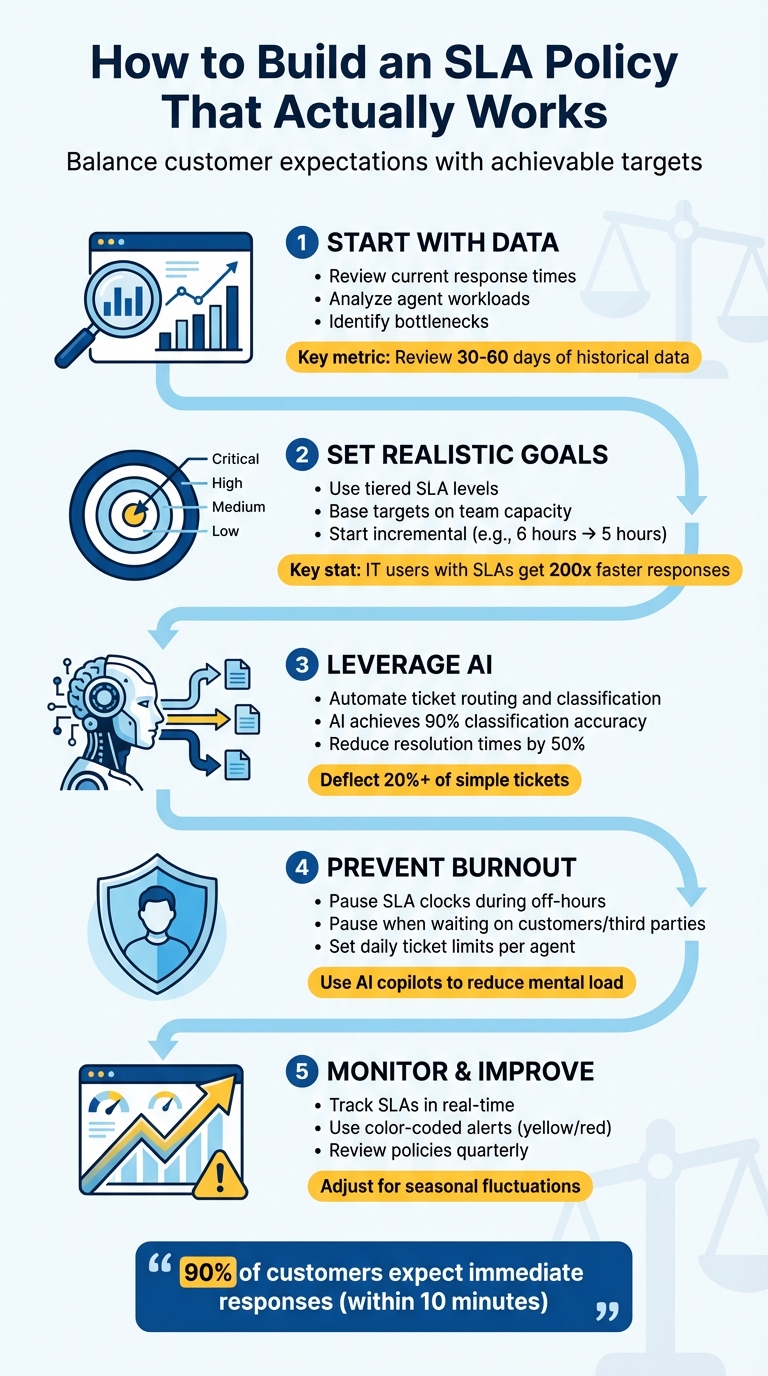
5-Step Framework for Building Balanced SLA Policies That Improve Response Times
Review Your Current Response Times and Agent Workload
Before tweaking any SLA targets, it’s crucial to assess your current performance. Skipping this step and making changes without proper data can lead to immediate setbacks.
Start by calculating your average response and resolution times. Break down your tickets into categories – such as billing issues, bugs, account access, or product questions – to identify which ones consume the most time. For instance, production bugs or tickets involving third parties might frequently push SLA limits, while simpler requests close much faster.
Once you’ve done that, dive into historical data to pinpoint patterns and performance gaps.
Review Historical Data
Analyze ticket data from the past 30–60 days to uncover trends in averages, breach rates, and recurring issues. Don’t stop at surface-level numbers – dig deeper into breach rates during specific hours and days to identify gaps. For example, if SLAs are regularly missed between 2:00 PM and 4:00 PM, it’s likely a coverage issue, not a performance flaw. Similarly, if "Critical" priority tickets sit unassigned as long as "Low" priority ones, your prioritization system may need an overhaul.
Pay close attention to Agent Work Time, which measures how long tickets remain in "New" or "Open" statuses. This metric shows how much effort agents put into resolving tickets, excluding periods when tickets are "On-hold" or "Pending." If Agent Work Time is low but Requester Wait Time is high, the problem might lie in routing delays, assignment inefficiencies, or tickets idling in shared inboxes.
Find the Bottlenecks
Bottlenecks often arise from issues like unassigned tickets lingering in queues or uneven workload distribution. For example, if tickets are routed without considering agent availability, some agents may be overwhelmed while others have capacity to spare.
Another common problem is ticket bouncing – especially with complex cases like billing disputes or bug reports. When these tickets are initially sent to general support agents, they often get passed around before reaching the right specialist, wasting valuable SLA time. To avoid this, use historical data to identify such categories and route them directly to Tier-2 support or specialists from the start.
Lastly, confirm that your SLA clock pauses during off-hours and waiting periods. If the timer keeps running during nights, weekends, or while waiting for a customer response, it skews the metrics unfairly. As Ritu John from Hiver explains:
"If waiting states don’t pause the clock, SLAs end up tracking delays your team cannot control, which quickly erodes trust in the metric."
Fix these configuration issues before setting new SLA targets. If not, your team might start ignoring SLA alerts altogether. Once bottlenecks are clearly identified, you’ll be in a better position to adjust your SLA targets to match your team’s actual working conditions.
Set Realistic and Tiered SLA Targets
After identifying bottlenecks and assessing your team’s baseline performance, the next step is setting SLA targets that are practical and achievable. The goal is to strike a balance – targets shouldn’t be so strict that they overwhelm your team, nor so lenient that they leave customers feeling overlooked.
Start by analyzing your recent ticket data to establish baseline response and resolution times. For example, if your team’s average first response time is six hours, don’t immediately jump to a one-hour SLA. Instead, aim for incremental improvements – adjusting the target from six to five hours, and refine further as your team’s processes evolve. This approach ensures that your SLA targets are grounded in reality. As Stella Inabo advises:
"An overambitious SLA with ridiculous requirements and benchmarks will lead to failure. Instead, involve support agents in the drafting process."
Create SLA Levels Based on Customer Impact
Not all tickets carry the same level of urgency. A tiered SLA system allows your team to prioritize high-impact issues while managing lower-priority requests more efficiently. Many teams use categories such as Critical, High, Medium, and Low to organize their SLAs.
- Critical issues: These include production outages or security breaches, which require the fastest response times. Such tickets often need 24/7 tracking and should bypass regular queues, going directly to the next available agent.
- High-priority issues: Examples include billing disputes or bugs affecting multiple customers. These can be addressed during regular business hours but with tighter targets.
- Medium and Low-priority requests: These might involve feature questions or account updates, which can have more flexible response windows.
To avoid over-complicating your system, group tickets into 5–8 categories based on the effort and urgency they demand. For instance, a password reset shouldn’t share the same SLA as a complex production bug. If two issue types require similar effort and follow the same workflow, they can share an SLA. Use historical data to identify categories that consistently take longer, such as third-party escalations or billing disputes, and consider routing those directly to specialists.
Interestingly, one study found that IT users with response-time SLAs experienced response speeds 200 times faster than those without such agreements. Additionally, ensure your SLA clock pauses automatically when a ticket is marked "Waiting on Customer" or "Waiting on Third Party." This prevents your team from being penalized for delays outside their control.
Match SLA Targets to Team Capacity
SLA tiers should reflect your team’s capacity. Rather than assigning tickets on a fixed rotation, distribute them based on the current workload to avoid overwhelming agents.
For most ticket types, configure SLA timers to run only during business hours. However, for critical issues requiring 24/7 coverage, adjust targets according to your staffing levels.
You might also consider using percentage-based alerts instead of fixed-time reminders. Notifications at 25%, 50%, and 75% of the SLA duration can help your team stay on track for any ticket type. Regularly audit your SLA performance – if a specific ticket type frequently breaches its SLA or needs manual overrides, it might require its own dedicated policy or an adjustment to the existing targets.
| Metric Type | Metric Name | Description |
|---|---|---|
| Reply | First Reply Time | Time between ticket creation and the first human response. |
| Reply | Next Reply Time | Time between a customer’s follow-up and the next agent response. |
| Resolution | Requester Wait Time | Total time a ticket spends in New, Open, and On-hold statuses. |
| Resolution | Agent Work Time | Total time an agent actively works on a ticket (New and Open statuses). |
| Internal | Group Ownership Time | How long a ticket is assigned to a specific internal group. |
Use AI for Automation and Dynamic SLA Management
Once you’ve set realistic SLA targets, the next step is to use AI to keep those targets on track without overburdening your team. Instead of depending on manual ticket sorting or guesswork, AI tools can classify, route, and prioritize tickets as soon as they arrive. This eliminates the delays caused by tickets being bounced around unnecessarily.
AI systems leverage your team’s historical ticket labeling patterns and can classify new tickets with up to 90% accuracy. They can also cut resolution times by as much as 50%. For B2B support teams managing intricate customer relationships, this translates to faster responses without increasing staff. Let’s dive into how AI automates triage and dynamically adjusts SLAs.
AI-Powered Auto-Triage and Routing
Automated triage takes over tasks that would otherwise eat up agents’ time. Instead of requiring agents to manually review incoming tickets and assign priorities, AI analyzes each ticket instantly. It classifies issues based on factors like sentiment, customer tier, and issue type. For instance, if a high-priority ticket with negative sentiment comes in, AI can apply a stricter SLA and route it directly to a senior agent.
AI also balances workloads by routing tickets in real time, predicting potential SLA breaches, and triggering escalations when a ticket is nearing 80–90% of its SLA time. This ensures that no single agent is overwhelmed while others have light workloads. As Deon Nicholas, President of Forethought, puts it:
"Your agents aren’t the source of the problem… the efficiency of the workflows for your agents, knowledge, and customers is the problem."
For critical tickets, automated reassignment rules can ensure no ticket remains unassigned for more than 15 minutes or goes without a public reply for over 60 minutes.
AI-powered deflection tools can also handle straightforward inquiries – like password resets or procedural questions – before they even reach an agent. While basic deflection tools may only address 1–2% of tickets, advanced AI systems can deflect 20% or more within weeks. This reduces the noise in agent queues, improving first-response times.
Dynamic SLA Adjustments
AI doesn’t just automate triage; it also fine-tunes SLA targets on the fly. Static SLAs fail to account for the complexity of real-world scenarios, but AI-driven systems adapt in real time. They adjust SLA targets based on variables like customer renewal risk, ticket complexity, or sentiment.
For example, Supportbench offers dynamic SLA features that automatically tighten response targets when a customer’s renewal is imminent, ensuring they receive priority attention during critical periods. Similarly, AI can identify complex tickets – such as those involving third-party escalations or bug investigations – and assign them to Tier-2 specialists. This prevents such tickets from consuming their entire SLA time in a general queue.
By using percentage-based triggers (e.g., at 25%, 75%, and 90% of SLA time), teams can maintain visibility across all ticket types. Whether a ticket has a 2-hour or 48-hour SLA, this method ensures timely notifications without overwhelming the team with alerts.
AI copilot tools further boost efficiency by surfacing relevant knowledge base articles and macros automatically, helping agents resolve tickets faster. The end result? A support operation that stays compliant with SLAs while keeping agent workloads manageable.
sbb-itb-e60d259
Prevent Agent Burnout with Balanced SLA Policies
It’s not enough to set achievable SLA targets; you also need to prioritize your team’s well-being. SLA policies that overlook agent stress can lead to what’s known as the "watermelon effect" – where metrics appear fine on the surface, but the internal strain on your team is immense.
A well-rounded SLA policy ensures both customer satisfaction and agent health. This involves safeguards like protecting agents from being penalized for delays beyond their control, leveraging AI to ease mental fatigue, and allowing flexibility during high-pressure periods. As Sam Chandler, Customer Success Consultant, puts it:
"An agent who is trying to maintain their Time Service Factor goal by getting through as many requests as possible might be incurring more ticket touches or lower satisfaction scores by rushing through tickets without fully resolving customers’ issues."
The shift toward Experience Level Agreements (XLAs) is a step in this direction. XLAs focus on customer satisfaction and productivity rather than just speed, emphasizing that quality trumps quantity. This approach acknowledges that long-term success depends on supporting the people behind the metrics.
Include Agent Well-Being Metrics
To create balanced SLAs, it’s essential to include metrics that reflect agent workload and stress. Traditional SLA policies often focus on customer-facing metrics like resolution time, ignoring the toll on agents. To address this, incorporate agent-focused metrics into your SLA framework. For instance, analyze historical data to assess agent capacity and set daily ticket limits to prevent overload.
Another strategy is to use pausable metrics like "Agent Work Time" or "Pausable Update." These metrics ensure the SLA clock stops when a ticket is in "Pending" or "On-hold" status, so agents aren’t unfairly penalized for delays caused by waiting on customer responses or third-party vendors. Without these pause rules, agents may feel pressured to rush through tasks.
Automated pause rules are another practical safeguard. For example, during holidays, weekends, or planned maintenance, ensure the SLA clock halts. If your team doesn’t work weekends, the clock shouldn’t run on Saturdays and Sundays. This prevents agents from returning on Monday to a backlog of breached tickets through no fault of their own.
Use AI Copilot Assistance
AI tools can significantly reduce the mental load on agents, especially when dealing with complex, multi-threaded tickets. AI copilots can summarize case histories and pull relevant knowledge base articles instantly, saving agents from the exhausting task of piecing together information manually.
For example, Supportbench’s AI Co-Pilot suggests responses based on previous cases and the knowledge base. This not only speeds up resolution time but also ensures consistency and accuracy. By automating repetitive tasks, agents can focus on delivering quality service without compromising on speed.
Build Flexibility Into SLA Policies
Rigid SLA policies can add unnecessary pressure, especially during unpredictable situations. Supervisors should have the ability to adjust SLAs to account for challenges like staff absences or system outages.
During high-demand periods – think Black Friday or Cyber Monday – temporary SLA policies can help manage the increased workload without permanently raising expectations. Once the busy season ends, revert to standard SLAs, ensuring agents aren’t held to unsustainable targets year-round.
Additionally, clear and specific language in SLA policies can reduce anxiety. Vague phrases like "as soon as possible" can leave agents unsure of what’s expected. Instead, use precise timeframes like "within 12 hours" to set clear boundaries. This clarity helps agents prioritize tasks and reduces stress.
Monitor, Report, and Improve SLA Performance
Creating an SLA policy is just the start – you need to monitor and adapt it based on real-time data. Without regular tracking, even the best-designed SLA can fall out of sync with your team’s capabilities or your customers’ expectations.
As Sam Chandler, Customer Success Consultant, explains:
"An SLA is not a stand-alone feature that you can set and forget. If you think of your workflow as a puzzle, SLAs are just one piece along with triggers, macros, and automations."
Managing SLAs effectively means staying vigilant, using real-time insights, and being open to refining your approach as things evolve.
Track SLAs in Real Time
Real-time dashboards are a game-changer for SLA management, allowing your team to take action before breaches occur. For example, adding a "Next SLA Breach" column to agent views and sorting tickets in ascending order ensures the most urgent cases are always front and center.
Visual cues like color-coded badges – yellow for "due soon" and red for "breached" – make it easy to spot urgent tickets at a glance. Automated alerts can also help by notifying your team when a high-priority ticket is within 30–60 minutes of breaching, giving you time to reassign or escalate as needed.
Real-time tracking doesn’t just prevent breaches; it also sheds light on staffing issues. For instance, if breaches consistently occur at specific times or on certain days, it might signal a need for more coverage during those periods. Group SLAs, which measure internal ticket handling times, can also help identify bottlenecks. This kind of real-time data allows you to make smarter, more strategic adjustments.
Review and Adjust SLAs Quarterly
While real-time tracking addresses immediate issues, SLA policies also need periodic reviews to stay relevant. A quarterly review can help ensure your targets align with your team’s capacity and customer expectations. Look at metrics like achievement and breach rates to identify trends. If breaches are increasing, it may be time to tweak your SLAs or redistribute resources.
Involve your team during these reviews – they work within these policies daily and can provide valuable insights into what’s effective and what’s causing unnecessary friction. Customer feedback is equally important. Research shows that 90% of customers consider an "immediate" response important or very important, with 60% defining "immediate" as 10 minutes or less. If your SLA targets don’t meet these expectations, you’ll need to either adjust your response times or communicate more clearly about what customers can expect.
Don’t forget to account for seasonal fluctuations. If your team faces predictable surges – like during Black Friday, Cyber Monday, or end-of-quarter renewals – implement temporary SLA policies to handle the extra workload. Once the busy period ends, revert to your usual targets. This approach keeps your team from being overwhelmed year-round while ensuring high service levels during peak times.
Conclusion
Creating effective SLA policies means striking the right balance between what customers expect and what your team can realistically deliver. As Deon Nicholas, President of Forethought, explains:
"Your agents aren’t the source of the problem… the efficiency of the workflows for your agents, knowledge, and customers is the problem."
AI plays a key role in improving these workflows. By automating repetitive tasks – like handling simple inquiries, routing tickets accurately, or offering instant access to knowledge bases – AI frees up your agents to focus on complex, high-priority customer issues that genuinely need a human touch.
Strong SLA policies don’t remain static. They evolve by leveraging real-time data and undergoing regular reviews. Combining realistic goals, tiered priorities, and AI-powered automation allows your support team to consistently meet customer expectations without overloading your agents. This approach not only improves response times but also ensures your operation stays adaptable to changing demands.
Start by setting a baseline, establish achievable targets, and let AI handle the routine so your team can focus on what truly matters.
FAQs
How can AI improve SLA management while keeping agents productive?
AI is transforming SLA management by simplifying essential support tasks and cutting down on manual effort. For instance, it can monitor tickets in real-time, spotting potential delays before they escalate into SLA breaches. On top of that, AI can rank tickets by urgency or the importance of the customer, ensuring that time-sensitive or high-priority issues are handled promptly.
AI also brings another advantage: using historical data to fine-tune staffing and distribute workloads more evenly. This not only helps meet SLA goals but also reduces the risk of overworking agents. By automating routine tasks, improving ticket routing, and sending proactive alerts, AI enables quicker response times and creates a more efficient and balanced support system.
How can I maintain SLAs without causing agent burnout?
To keep SLAs on track without overburdening your team, it’s crucial to set realistic, achievable targets that match your agents’ capacity. One effective strategy is breaking SLAs into segments based on factors like customer priority levels or the urgency of issues. This approach helps ensure high-priority tickets get the attention they need while keeping workloads balanced.
Leverage AI-powered tools for automation to handle repetitive tasks like ticket triage, routing, and workload distribution. These tools free up your team to focus on more complex, high-value problems. On top of that, creating a supportive work culture is key. Clearly define roles, steer clear of micromanaging, and address burnout signs early to keep your team engaged and productive.
By blending smart SLA strategies with automation and prioritizing agent well-being, you can improve response times while maintaining a motivated and effective team.
How often should we review and update SLA policies?
SLA policies should be revisited at least once every quarter – or anytime there are major shifts in your services, team structure, or what your customers expect. Keeping these policies up to date helps ensure they align with your business goals and how things actually operate.
Regularly reviewing SLA targets gives you the chance to spot areas that need improvement, adjust to changing customer demands, and avoid putting unnecessary pressure on your support team. The goal is to strike a balance: meeting customer expectations while ensuring your agents can manage their workloads effectively.