


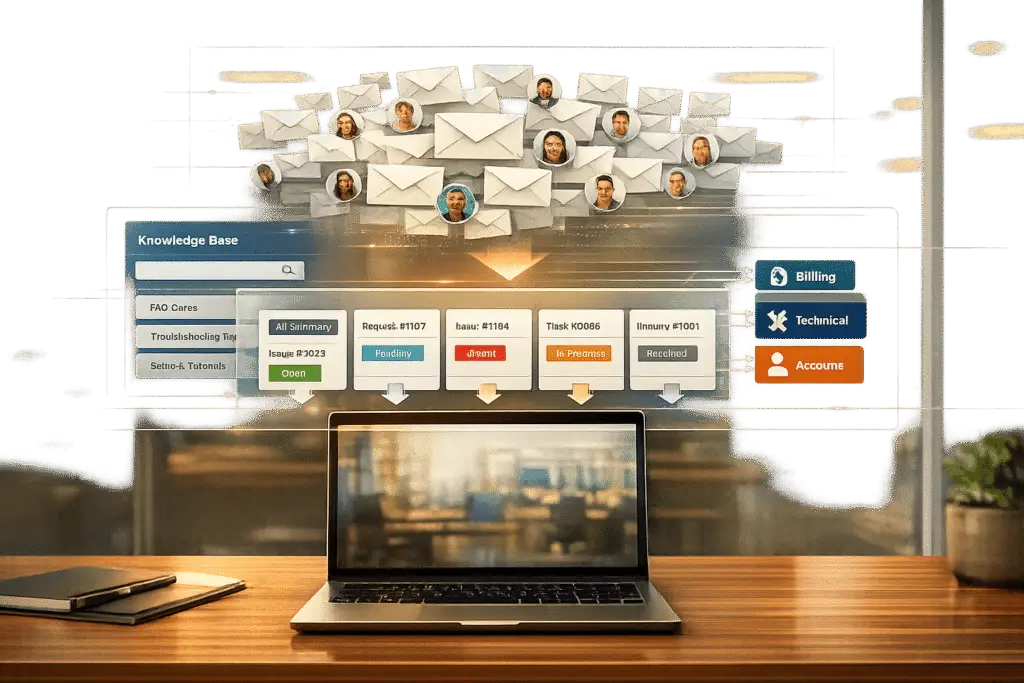
CC chaos in B2B support is a productivity killer. It wastes time, buries critical information, and creates confusion over accountability. This happens because teams rely on endless email threads to manage complex cases, often involving too many stakeholders. The result? Delays in response times, missed SLAs, frustrated customers, and burned-out agents.
Here’s how to fix it:
- Switch to a unified ticketing system: Replace cluttered email chains with organized workflows. Assign clear ownership, track progress, and prevent duplicate responses.
- Set up clear routing rules: Automate ticket assignment based on keywords, customer priority, or issue type to avoid unnecessary CCs.
- Leverage AI tools: Use AI to summarize long threads, detect urgency, and prioritize tasks. This reduces manual effort and improves accuracy.
- Build a knowledge base: Reduce repetitive queries by creating helpful, easy-to-access resources for both customers and agents.
- Monitor key metrics: Track reply-all rates, duplicate responses, and decision delays to ensure ongoing efficiency.
The result? Faster resolutions, happier customers, and less stress for your team. Focus on simplifying workflows, reducing inbox clutter, and driving accountability.
The Real Costs of Large Email Chains in B2B Support
Long, disorganized email chains don’t just cause headaches – they drain productivity, impact revenue, and distract teams from their core work. Breaking down these costs is essential to finding solutions.
Delays and Fragmented Communication
Messy email chains often scatter important information, burying crucial messages under an avalanche of routine exchanges. As one analysis highlights:
"The problem is that 60–70% of those emails never needed to be emails in the first place. They’re status checks, password resets… repetitive, low-complexity messages that bury the handful of emails that actually require a human brain." [4]
This constant back-and-forth isn’t just annoying – it’s expensive. Switching between tasks can take an average of 23 minutes to refocus, leading to a 20–40% drop in productivity [4]. For teams juggling multiple platforms like Slack, email, helpdesks, and CRMs without a unified system, things can spiral quickly. Northflank shared their struggles:
"Before Plain, managing support across email and Slack was chaotic. We were constantly losing track of conversations, and it was hard to escalate issues to engineering." [5]
Without proper tools to track and prioritize, teams risk sending duplicate replies, or worse, conflicting responses from automated and human agents. These delays ripple out, affecting service-level agreements (SLAs) and customer satisfaction, which we’ll touch on next.
Impact on SLAs and Customer Retention
Slow responses can be catastrophic for SLA compliance and customer relationships. Companies that respond to leads within an hour are 7x more likely to qualify those leads compared to those that wait just 60 minutes longer [4]. In B2B settings, where deals often involve multiple stakeholders and can represent millions in recurring revenue [2], every delay increases the risk of losing a customer.
The damage isn’t limited to response times. When email deliverability drops below 90%, the fallout is immediate:
"When email deliverability drops below 90%, sales teams miss critical opportunities. For many organizations, this invisible problem costs thousands in lost pipeline each month." – Allegrow [2]
On the flip side, well-coordinated communication can drive 40% more revenue compared to fragmented approaches [2]. But when emails pile up in cluttered chains without clear prioritization, even high-value customers can be left waiting. Missed SLAs and delayed responses not only frustrate clients but also increase the risk of churn. And the impact doesn’t stop there – these inefficiencies take a toll on internal teams, too.
Agent Burnout and Wasted Effort
Endless email threads don’t just slow down your processes – they wear down your team. Employees who CC their managers on more than 60% of operational emails are 44% more likely to experience burnout [6]. Constant interruptions and decision-making create "attention residue", making it harder to focus on complex tasks like debugging.
Unnecessary "reply-all" emails are another productivity killer, accounting for 68% of misdirected messages and adding an average of 2.7 minutes to task completion per email [6]. Mis-CC’d stakeholders aren’t spared either – they lose 4.3 minutes per day to context switching and take 37% longer to return to focused work [6].
For businesses handling 120 emails daily, manually processing repetitive queries can rack up $25,500 annually in labor costs [4]. Worse, inefficient escalation paths often pull engineers away from development work, slowing innovation. The solution? Streamlined workflows and AI tools that reduce administrative burdens. As digital productivity coach Mia from Alibaba aptly puts it:
"Email is not a collaboration tool – it’s a coordination protocol. Treat it as such." [6]
sbb-itb-e60d259
Consolidating Communication with Unified Ticketing Systems
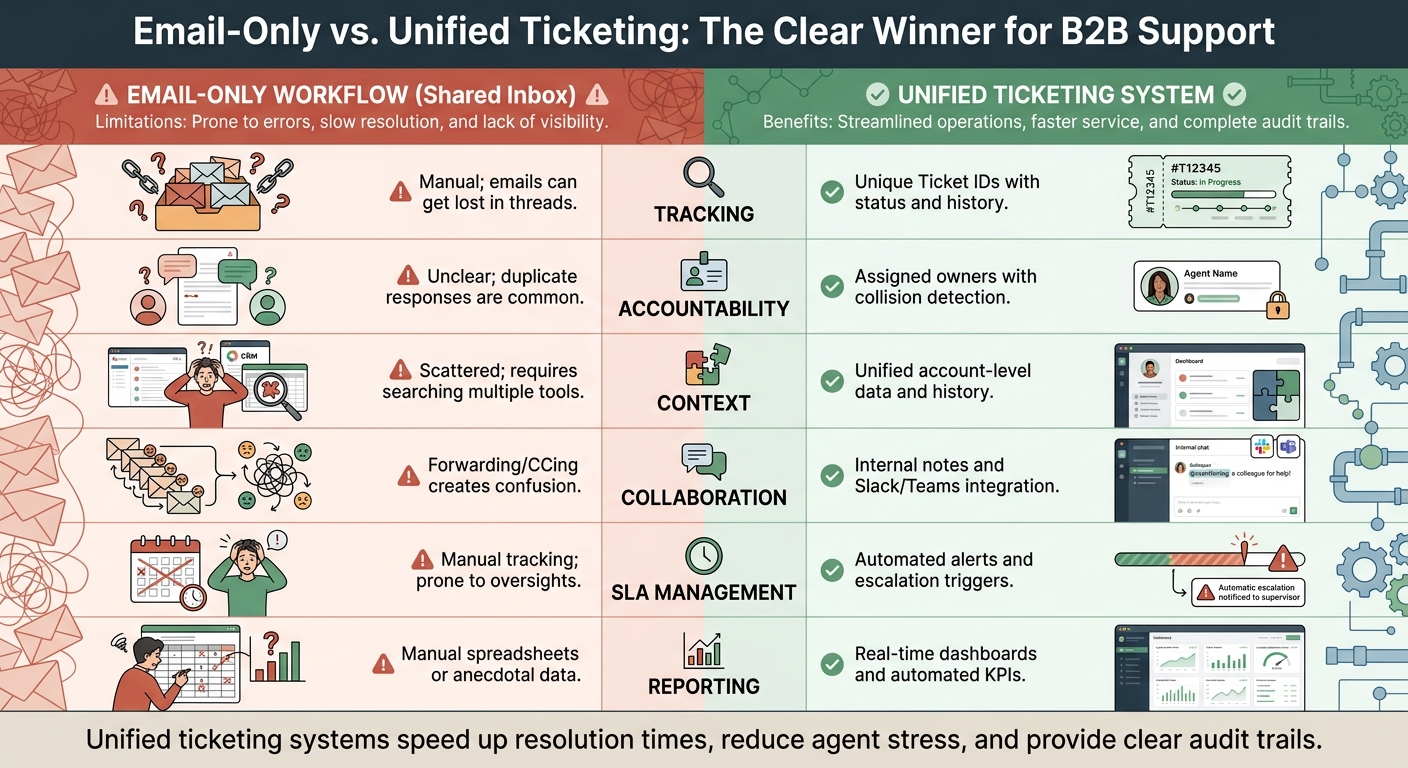
Email-Only vs Unified Ticketing System: Feature Comparison for B2B Support
The first step to tackling the chaos of CCs and endless email threads is moving away from shared inboxes. Instead, a unified ticketing system transforms every email into a manageable ticket with a unique ID, clear status, and assigned owner. This approach turns cluttered inboxes into streamlined workflows where nothing slips through the cracks, and everyone knows their responsibilities.
Benefits of Unified Ticketing Systems
Centralizing communication brings immediate benefits. In traditional email setups, accountability is often murky, and duplicate responses happen far too often. Unified systems solve this with collision detection – a feature that alerts agents when someone else is already handling a response. This avoids the awkward situation of sending mixed messages to a customer.
Another major advantage is having full account-level context. Instead of digging through scattered email threads or juggling multiple tools, agents can access a consolidated view of the customer’s history across platforms like email, Slack, Microsoft Teams, and live chat. This eliminates the "translation tax" – the time and effort spent copying chat logs or email histories into a centralized system.
Collaboration also gets a boost. Internal notes and side conversations allow team discussions to stay private while keeping all relevant context intact. As Supportbench aptly states:
"Your support system should reduce burnout, not cause it. Should scale with your business, not against it" [7].
With these advantages in mind, here’s how to streamline your email workflows.
Steps to Consolidate Email Workflows
To move away from email-based workflows without disrupting support operations, follow a structured approach to consolidate communication channels. Start by centralizing all intake points – email, Slack, Teams, web chat – into a single triage process. This eliminates "monitoring fatigue", where agents constantly switch between platforms to keep up with incoming messages.
Next, automate ticket routing based on the content and customer priority. For instance, tickets mentioning "API error" can be routed directly to engineering, while issues from "Enterprise" customers are sent to senior team members. This ensures urgent matters get the attention they need without delays.
During the transition, assign queue managers to oversee and redirect low-priority tickets, keeping the system unclogged [7]. Rotate these responsibilities among team members to prevent burnout while everyone adjusts to the new process. Finally, enable two-way syncing with tools like Slack or Teams. This keeps technical discussions off the customer-facing side but links them to the ticket for easy reference later.
Example: Unified vs. Email-Only Workflows
Here’s a side-by-side look at how unified systems compare to traditional email setups:
| Feature | Email-Only Workflow (Shared Inbox) | Unified Ticketing System |
|---|---|---|
| Tracking | Manual; emails can get lost in threads | Unique Ticket IDs with status and history |
| Accountability | Unclear; duplicate responses are common | Assigned owners with collision detection |
| Context | Scattered; requires searching multiple tools | Unified account-level data and history |
| Collaboration | Forwarding/CCing creates confusion | Internal notes and Slack/Teams integration |
| SLA Management | Manual tracking; prone to oversights | Automated alerts and escalation triggers |
| Reporting | Manual spreadsheets or anecdotal data | Real-time dashboards and automated KPIs |
Switching to a unified ticketing system not only speeds up resolution times but also reduces stress for agents and ensures a clear, dependable audit trail for every interaction.
Creating Clear Workflows with Routing Rules
Streamlining communication starts with setting up clear routing rules. By centralizing communication and cutting down on unnecessary CCs, you ensure that the right team members are involved at the right time, without overloading inboxes.
Auditing Current Workflows for Gaps
Before diving into new routing rules, take a hard look at your current workflows. Where do things break down? One common issue is overlapping automated and manual replies, which often leads to manual CCing as a quick fix to figure out who’s handling what [1].
In October 2025, Eloquens tackled this exact problem with their "CC Configuration with Smart Filters" workflow. This system assigned an AI to manage the primary support@company.com inbox while human managers monitored a separate manager@company.com address. The "Smart Filters" could detect when a manager responded manually and would stop the AI from sending further replies on that thread [1]. This approach eliminated duplicate responses and kept communication streamlined.
Another area to assess is whether your system can differentiate between automated and manual actions. If it can’t, redundant messages are probably clogging up your process. A common mistake is relying too heavily on the main support email for both automated workflows and manual responses, which creates confusion. By auditing these gaps, you can decide if adding a dedicated intervention email or other fixes is necessary. Eloquens’ example shows how such adjustments can dramatically improve clarity and efficiency.
Setting Up Role-Specific Routing Rules
Once you’ve identified problem areas, it’s time to create routing rules tailored to your team’s needs. Assign tickets based on criteria like issue type, priority, and customer value using AI-powered ticket routing. A simple First In, First Out (FIFO) system with priority lanes can make a big difference, cutting triage delays by 60-80% [8].
For instance, route "API error" tickets directly to engineering, while "Enterprise" customer issues go straight to senior staff. If both AI and human agents are working on the same thread, set up a separate email for manual interventions. Use tools like "Smart Filters" to detect when a human has replied, automatically halting further AI responses to avoid redundancy [1].
As one expert put it:
"The teams with the fastest response times are not the ones that sacrifice quality. They are the ones that have systematically removed friction from their workflows, eliminated unnecessary steps, and equipped their agents with the right tools and information" [8].
Here’s a quick look at some routing methods and their benefits:
| Routing Method | Best For | Key Benefit |
|---|---|---|
| Keyword-Based | Billing, specific errors | Quickly sorts tickets to specialists |
| Customer Tier | Enterprise vs. SMB | Ensures high-value clients get priority |
| Skills-Based | Complex technical issues | Reduces time spent on escalations |
| Sentiment-Based | Urgent or angry customers | Helps retain at-risk accounts |
Using Internal Collaboration Channels
Instead of relying on CC-heavy email chains, tools like Slack or Microsoft Teams can speed up internal discussions. These platforms allow for quick side conversations while keeping all relevant ticket information easily accessible.
To keep things organized, reserve the main support email for the ticketing system’s automated intake. Use a separate email for manual interventions to avoid overlap and confusion [1]. This setup ensures that customer-facing communication stays clean and professional, while internal teams can collaborate efficiently behind the scenes.
Using AI to Simplify Email Management
Managing email overload, especially in B2B support, can feel like an endless battle. But AI is stepping in to help cut through the noise. Tools powered by AI can summarize conversations, identify urgent matters, and even route tickets automatically. The result? Less time wasted and fewer errors.
AI-Powered Email Summarization
Long email chains often hide crucial details behind polite exchanges. AI summarization tools tackle this by zeroing in on the important stuff: decisions, deadlines, commitments, and unresolved questions [9].
The goal isn’t just to condense text but to preserve the thread’s meaning. As the Jace AI team puts it:
"Summarizing is not about shortening a thread; it is about preserving decisions, commitments, and constraints so you can act without re-reading everything" [9].
These tools also clean up the clutter – removing repeated quoted text and email signatures – before diving into the content. This not only saves processing power but also boosts accuracy [10].
For B2B teams, this means new agents can jump into complex threads without needing to read every single message. AI generates a structured summary – often as an internal note – that highlights key details like the current status, major decisions, stakeholders involved, and next steps [9][10]. Some tools even let you use your own API keys, giving you greater control over privacy and costs [10]. Companies using these solutions report an impressive 336% ROI and save over 1.5 hours per user each week [12].
However, AI isn’t magic. If the emails themselves are unclear – using phrases like "the thing we discussed" or "the attached document" – the AI will struggle too. As Eva Tang warns:
"If the humans in the thread were confused, the AI will be too. Garbage in, garbage out" [10].
To avoid this, teams can implement shared prompts like "Handoff Summary" or "Decision Log", making it easier for agents to trigger AI summaries with a single click [10]. Beyond text, AI can also assess tone and urgency, giving a fuller picture of the situation.
Sentiment and Intent Detection
AI can read between the lines – literally. It detects tone, urgency, and even frustration within email threads. For example, it can spot when a conversation shifts from formal to casual, helping agents maintain professionalism or re-engage key decision-makers [9].
This is especially useful for distinguishing between routine issues, like refund requests, and more serious cases, such as an upset customer at risk of leaving [10]. When AI picks up on heightened frustration or urgency, it can escalate the case to senior staff or adjust service level agreements to ensure faster responses. It can even process attachments – like PDFs, contracts, or screenshots – to fill in gaps that might not be mentioned in the email body [9].
In sensitive situations, a review-first workflow is key. AI can draft responses based on the context, but a human should double-check critical details – like dates or figures – before hitting send. As Artic Sledge emphasizes:
"If sending the wrong reply could damage a relationship, create a legal liability, or trigger a financial consequence – it stays human" [11].
With these capabilities, AI doesn’t just stop at summarizing or detecting tone – it also helps streamline task allocation.
Automating Prioritization and Assignment
Efficient support relies on clear routing and filtering, and AI takes this a step further by automating prioritization and ticket routing. It can auto-assign cases based on expertise, tag issues, and adjust SLAs dynamically – cutting out the need for manual triage. For example, it can route technical issues like "API error" directly to engineering or flag high-priority customer concerns for senior staff, following predefined routing rules.
To avoid conflicts between AI and human interventions, "Smart Filters" can detect when a human has stepped into a thread, signaling the AI to stop automated responses [1].
Interruptions from email can cost knowledge workers over 23 minutes as they try to refocus [11][12]. AI-driven prioritization reduces this by ensuring agents only see what truly needs their attention. You can also set rules to automatically generate summary notes when conversations hit a certain length or are reassigned to new agents [10]. Regularly reviewing automation metrics can help fine-tune these thresholds [11]. Keeping manual intervention channels separate ensures smooth operations without overlap.
Controlling Access with Role-Based Permissions
Once communication is streamlined through unified systems and AI, the next step is controlling access to ensure that the right people receive relevant information – without overwhelming anyone. Overuse of CCs can flood inboxes and create confusion about responsibilities. While the intention might be to keep everyone in the loop, this often results in inbox chaos and unclear accountability. Setting up role-based permissions addresses this by ensuring only the necessary individuals access the information they need, minimizing unnecessary noise.
Balancing Transparency and Information Overload
The challenge lies in maintaining transparency without creating information overload. This balance can be achieved by differentiating between visible CCs and internal followers.
- CCs are ideal for keeping external stakeholders informed but can unintentionally reveal agent email addresses and clutter customer-facing email threads.
- Internal followers, on the other hand, allow team members – like managers or subject matter experts – to monitor cases discreetly without being visible to customers.
| Feature | CCs (Visible) | Followers (Internal/Hidden) |
|---|---|---|
| Intended Users | End users and agents | Agents and admins only |
| Visibility to End User | Visible in the email thread | Hidden – identity remains confidential |
| Comment Access | Public comments only | Public and internal notes |
| Main Purpose | External stakeholders/collaborators | Internal supervisors or subject matter experts |
To further secure communications, blocklists can be implemented to restrict specific email addresses or domains from accessing sensitive threads. If an unexpected third party replies to a ticket, the system can flag the interaction for manual review before granting access. Additionally, trimming recipient lists as cases progress helps reduce unnecessary clutter in inboxes [13].
Once access protocols are in place, the next focus should be on effectively managing internal and external notes.
Using Internal and External Notes Effectively
Keeping internal notes separate from customer-facing communications is crucial for maintaining clarity. Internal notes give agents a secure space to discuss strategies, share context, or highlight issues without exposing sensitive information to customers. For example, using designated manager email addresses for internal discussions helps ensure these notes stay private and don’t interfere with customer-facing threads.
Some systems add an extra layer of control by automatically keeping replies internal when the customer isn’t included in the "To" or "CC" fields. These systems can also log internal notes whenever a CC is added or removed, creating a clear record of who was involved and when [14]. Training agents to use "Reply" instead of "Reply All" is another simple but effective way to keep internal discussions private.
Supportbench’s role-based permissions make it easier to maintain this separation. With these tools, customers only see what’s relevant to them, while internal insights and discussions remain secure and confidential.
Building a Knowledge Base to Reduce Email Volume
Streamlining communication is just the start – building a strong knowledge base can take your support efficiency to the next level by cutting down on unnecessary email traffic. When customers and agents have access to clear, well-organized documentation, repetitive questions are answered without anyone needing to hit "Reply All." Instead of re-explaining the same issue across multiple emails, agents can point users to existing resources, saving time for everyone.
The trick is to focus on creating and maintaining articles that address the most common and impactful issues. Inefficient workflows can cost up to $10,000 per employee every year in lost productivity [16]. A well-structured knowledge base helps tackle this problem by intercepting repetitive inquiries before they turn into email chains.
Turning Resolved Cases into Knowledge Base Articles
A goldmine for knowledge base content lies in your resolved support cases. When an agent solves a tricky issue via email, that solution shouldn’t be forgotten – it should be turned into a resource that others can use. By documenting these cases, you reduce the chances of similar questions clogging inboxes in the future. Ideally, the agent who resolved the case should draft the article while the details are still fresh. Then, they can generalize the solution into a guide that applies to a broader audience [15].
To prioritize effectively, use a matrix to identify high-impact cases. Start with:
- Priority 1: High-volume, challenging issues like billing errors or complex troubleshooting.
- Priority 2: High-volume, straightforward questions like password resets or basic feature usage [15].
Analyze 90 days of email data to categorize topics and identify gaps in your knowledge base [15].
Organize your articles into clear categories for easy navigation:
- Reference: Factual information.
- Procedural: Step-by-step guides.
- Troubleshooting: Diagnostic workflows.
- Policy: Rules and guidelines.
- Contextual: Background details [15].
For platforms like Supportbench, use concise paragraphs, clear headings, and logic-based formats like "If A, then B" to enhance search accuracy [17]. Templates help maintain consistency, ensuring faster resolutions and easier updates [15][17].
Top-performing support teams aim for a coverage rate of over 90%, meaning most support topics have corresponding articles [15]. To keep content relevant, review at least 80% of articles every 90 days. Major updates, like new product releases or pricing changes, should trigger immediate revisions. Regularly updated content ensures your knowledge base stays reliable [15].
Measuring Knowledge Base Effectiveness
Creating articles is only half the battle – you also need to measure their impact. Start by tracking the deflection rate, which shows how many support requests are resolved through self-service [18][19]. However, deflection alone isn’t enough. Pair it with the resolution rate to ensure customers aren’t abandoning the process out of frustration [18].
For internal use, measure research time – how long it takes agents to find answers. If agents can’t locate the right information in under 30 seconds, your knowledge base needs better organization [8]. For AI-powered systems, monitor the AI draft edit rate (aim for under 20%) and the KB hit rate (AI drafts citing knowledge base articles in over 85% of cases) [15].
Key metrics to track include:
| Metric Type | Performance Indicator | Target Goal |
|---|---|---|
| Leading | Coverage Rate (topics with KB content) | >90% [15] |
| Leading | Content Freshness (reviewed in <90 days) | >80% [15] |
| Lagging | AI Draft Edit Rate | <20% [15] |
| Lagging | KB Hit Rate (AI drafts using KB sources) | >85% [15] |
Supportbench simplifies this process by automatically tracking which articles are cited in AI-generated responses, flagging outdated content, and identifying gaps in documentation. This creates a continuous improvement loop: agents resolve cases, the system spots patterns, and new articles are generated – all without manual effort or added costs.
Tracking Metrics to Maintain Improvements
Once you’ve streamlined your workflows, the next step is making sure those improvements stick. Tracking key metrics is essential to keeping your B2B support operations efficient and responsive. Without ongoing measurement, even the best systems can revert to chaos as old habits resurface. The right metrics will help you identify whether your communication is actually improving or if the same issues are just manifesting in new ways.
Key Metrics to Track
One of the first metrics to keep an eye on is the reply-all rate – the percentage of emails where "Reply All" is used instead of replying to the relevant person. Ideally, this rate should be 12% or lower, though the average tends to hover around 28% [6]. A high reply-all rate often signals misassigned CCs, leading to unnecessary responses. In fact, 68% of unnecessary "reply-all" threads stem from misassigned CCs, with each misassigned email adding an average of 2.7 minutes to task completion time [6].
Another important metric is CC-only thread longevity. The goal here is for 85% or more of CC-only messages to generate no replies within 48 hours [6]. This indicates that CC is being used correctly – as a tool for passive awareness rather than active discussion. If CC-only messages are sparking replies, it’s a red flag that someone who should have been in the "To" field was mistakenly relegated to CC.
Track duplicate response trends to catch coordination issues early. Aim to keep duplicate response rates at 2% or lower, compared to the average of 17% [20]. Duplicate responses can confuse customers and waste time, especially when conflicting information is sent. For teams using AI-human hybrid workflows, this metric also sheds light on whether your automation tools are effectively recognizing when a human has already stepped in.
Lastly, monitor decision latency, which measures how long it takes to reach a conclusion based on the number of "To" recipients. Each additional "To" recipient increases decision time by 1.7 seconds [6]. For complex decisions, having more than three people in the "To" field can exponentially delay consensus [6]. Keeping the decision-making group small – ideally three or fewer – helps ensure faster responses and clearer accountability.
| Email Collaboration Metric | Typical Team (2023-24) | High-Performing Team |
|---|---|---|
| Daily Emails Received | 121 | 59 |
| Hours per Day on Email | 3.1 | 1.2 |
| Average Response Time (hrs) | 5.6 | 1.6 |
| Missed Deadlines (%) | 34 | 12 |
| Duplicate Responses (%) | 17 | 2 |
Source: Analysis based on Mailmodo and Help Scout, 2024 [20]
These metrics form the foundation for real-time dashboards, offering immediate insights into team performance.
Using Dashboards for Real-Time Insights
Dashboards are a powerful tool for identifying bottlenecks before they become major issues. Instead of waiting for monthly reports, real-time dashboards allow you to drill down into data by product line, region, or customer segment to pinpoint specific problem areas [3]. For example, if one product line consistently shows higher duplicate response rates, you can immediately review routing rules or agent training for that segment.
Platforms like Supportbench’s B2B helpdesk come with built-in dashboards that automatically track metrics, highlighting cases with too many participants, long resolution times, or SLA breaches. Teams using these tools report an average 42% reduction in response times [3] by leveraging real-time data to make quick adjustments. The goal isn’t to micromanage every detail but to create visibility so your team can act purposefully rather than reactively.
Auditing and Refining Processes
Real-time monitoring is only part of the equation – regular audits ensure your processes remain effective over time. Start by breaking down response time into stages: detection, triage, queue wait, research, composition, and review [8]. This granular view shows exactly where delays occur. For instance, if queue wait times are consistently high, it might be time to adjust routing rules or allocate more resources to specific teams.
When analyzing response times, use medians instead of averages, as averages can be skewed by outliers like complex cases or weekend delays [8]. Review routing rules every 90 days to ensure emails are reaching the right specialists – like automatically routing API errors to engineering – without requiring manual triage [8]. Additionally, update templates for your 10-15 most common questions weekly to keep them accurate and reduce time spent composing responses [8].
For teams using AI-human workflows, make sure your AI tools are accurately detecting human intervention to avoid redundant automated replies [1]. As the Relay Team aptly puts it:
"A fast wrong answer creates more work than a slower correct one" [8].
Incorporate audit findings into your AI system to ensure it evolves alongside your operational needs. Regular audits not only highlight friction points but also help fine-tune workflows and routing rules, keeping your operations efficient and effective.
Conclusion
Managing large email chains doesn’t have to derail your B2B support efforts. By implementing strategies like unified ticketing systems, AI-powered tools, streamlined routing workflows, and well-maintained knowledge bases, you can eliminate the chaos that drains resources and erodes customer trust. The numbers speak for themselves: AI-handled interactions cost around $0.50, compared to $6.00 for human agents [3]. Even better, self-service options through knowledge bases reduce costs further, with interactions averaging just $0.10 to $0.25 [3].
To avoid conflicts in hybrid workflows, where both AI and human responses overlap, consider configuring smart filters. These can detect when a human steps into a conversation and automatically pause AI processing [1]. Another option is assigning separate email addresses for AI-driven and manual responses, ensuring clear communication without confusion.
Keep an eye on key metrics like reply-all rates, the longevity of CC-only threads, duplicate responses, and decision delays. Regular audits of your routing rules and workflows will help maintain efficiency and adapt to changing needs.
Every improvement you make builds on the last. With 80% of B2B interactions now happening digitally and involving an average of 62+ touchpoints [3], customers expect faster, more consistent communication. By centralizing email management, automating repetitive tasks, and equipping your team with the right tools, you can transform your support system into a competitive advantage.
Start small – whether it’s implementing a unified ticketing system, refining routing rules, or enhancing your knowledge base. These changes add up quickly, freeing your team from inbox overload and allowing them to focus on delivering the kind of exceptional support that keeps B2B customers loyal.
FAQs
How do we migrate from email chains to tickets without disrupting customers?
To move from email chains to a ticketing system without hiccups, start by enabling automated email-to-ticket conversion. This lets incoming emails be instantly transformed into tickets, keeping communication organized and flowing smoothly. Set your system to automatically categorize, prioritize, and route tickets to the right team or agent. Features like intelligent routing and contextual responses powered by AI can further streamline the process, reducing delays and ensuring customers experience uninterrupted, efficient support.
What routing rules cut CCs without slowing escalations?
Effective routing rules help keep email chains organized and ensure escalations happen quickly. Automating email routing based on factors like issue type, stakeholder role, or team workload can make a big difference. Incorporate skills-based routing and SLA management to ensure high-priority tickets land with the right team members. By setting clear guidelines for handoffs and prioritization, you can cut down on excessive CCs while keeping escalations smooth and efficient.
When should AI draft replies vs. require human review?
AI-generated replies work best for routine, low-risk, or straightforward tasks, such as handling common customer support questions. However, human review becomes critical when dealing with sensitive, complex, or high-stakes matters – think legal, financial, or highly personalized concerns. For situations that directly affect customer trust or your brand’s reputation, having human oversight ensures the response is accurate, empathetic, and aligned with your company’s values. In short, leverage AI for speed and efficiency, but let humans take the lead when quality and trust are on the line.






