
Support teams waste valuable insights when resolved tickets stay hidden in ticket histories. AI now changes this by transforming those solutions into knowledge base articles – saving time, cutting costs, and improving customer self-service portals.
- AI-generated articles reduce self-service costs by 85% for recurring issues.
- Businesses report 73% time savings and 77% cost reductions compared to manual article creation.
- AI tools analyze ticket histories, redact sensitive data, and create structured, easy-to-read articles.
By automating knowledge creation, companies lower ticket volumes, speed up resolutions, and preserve expertise for future use. This guide explains how to prepare ticket data, use AI tools effectively, and ensure quality through human review.
The result? Fewer tickets, faster resolutions, and a scalable support system.
How to Automatically Create Knowledge Base Articles using AI Agent
sbb-itb-e60d259
Why Convert Solved Tickets into Knowledge Articles
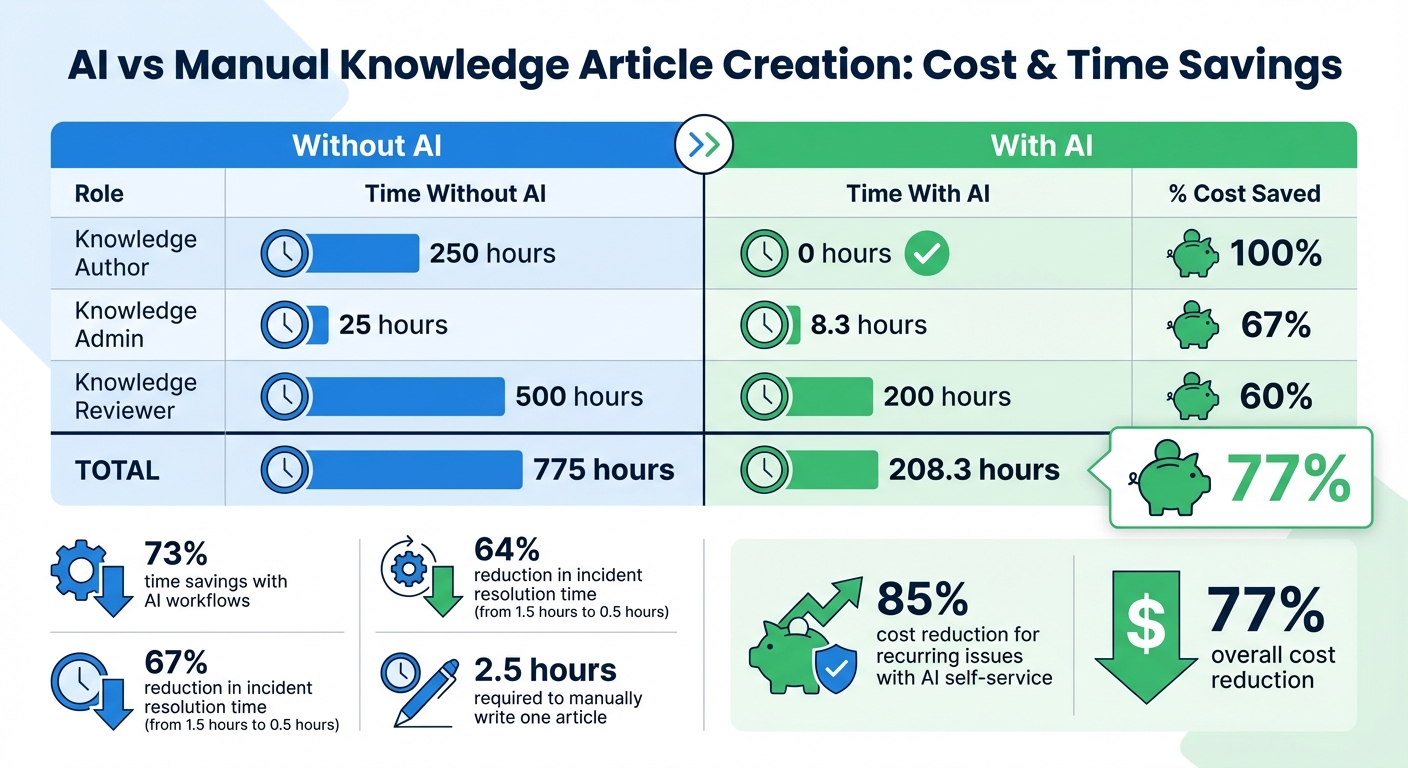
AI vs Manual Knowledge Article Creation: Time and Cost Comparison
Every time your support team resolves a ticket, they’ve tackled a problem that someone else is likely to encounter. So, the question is: will your next customer need to wait for an agent to solve the issue again, or can they find the solution instantly?
Turning resolved tickets into knowledge articles transforms each solution into a resource for future use. Instead of treating tickets as one-off interactions, you’re creating a growing library of solutions available 24/7. This approach delivers clear benefits, including fewer tickets, faster resolutions, and better cost efficiency. Let’s break it down.
Reducing Ticket Volumes Through Self-Service
A robust knowledge base serves as your first line of defense against incoming support requests. When customers can find answers on their own, they don’t need to reach out to your team. AI makes this process scalable by spotting trends in recurring issues, suggesting which articles to create, and even predicting potential spikes in inquiries before they happen [1]. This shift from reactive to proactive support not only improves customer satisfaction but also significantly lowers costs.
Improving First-Contact Resolution Rates
Better access to organized solutions also means agents can resolve issues faster on the first try. When handling complex tickets, time spent searching for information adds up quickly. AI-generated articles empower agents with instant access to reliable solutions through tools like context-aware searches that understand natural language queries [1][3]. The results are striking: AI-powered ticket routing and triage can cut incident handling time from 30 minutes to 10 minutes, and overall resolution time from 1.5 hours to just 0.5 hours – a 67% reduction in effort [2]. These aren’t small gains; they represent a complete overhaul in efficiency.
Cost-Effective Knowledge Management
Manually creating knowledge articles is time-intensive and costly. Writing just one article requires about 2.5 hours of a knowledge author’s time [2]. Multiply that by the number of articles in your database, and the hours – and costs – add up fast.
| Role (for 100 Articles) | Time Without AI | Time With AI | % Cost Saved |
|---|---|---|---|
| Knowledge Author | 250 hours | 0 hours | 100% |
| Knowledge Admin | 25 hours | 8.3 hours | 67% |
| Knowledge Reviewer | 500 hours | 200 hours | 60% |
| Total | 775 hours | 208.3 hours | 77% [2] |
AI eliminates the bottleneck of manual documentation by enabling one-click generation of articles directly from ticket histories [3]. This not only saves time but ensures that real-time solutions are preserved and readily available.
Preparing Your Tickets for AI Processing
AI can only work with the data you provide. If your ticket data is messy, inconsistent, or incomplete, the knowledge articles generated will reflect those issues. Before automating article creation, make sure your support tickets are structured in a way that AI can easily interpret and process.
Ensuring Data Cleanliness and Consistency
Start by standardizing your note-taking practices. Clearly document the problem, actions taken, and the final resolution. This ensures the AI has accurate and structured information to work with.
"Encouraging clear and concise note-taking practices will generally improve the quality and accuracy of the generated summaries." – Eric Klimuk, Founder and CTO of Supportbench
Include key details like error messages, troubleshooting steps, sentiment changes, and any contributing factors to provide full context. Don’t forget to transcribe all communication channels – whether phone calls, chat logs, or emails – so the AI has a comprehensive view of the case.
Consistency in tagging is equally important. For example, if one agent uses "product-issue" and another uses "prod_issue", your training data becomes fragmented. To avoid this, create a shared document outlining all approved tags and their definitions. This ensures everyone sticks to the same terminology. You can also use AI-powered tagging tools to automatically apply consistent labels, reducing human error and keeping categorization reliable, even during busy times.
Once your data is clean and consistently tagged, you can identify tickets that are most valuable for AI-driven knowledge creation.
Selecting High-Value Resolved Tickets
After standardizing your data, focus on tickets that provide the most impact. Not every resolved ticket needs to be turned into a knowledge article. Prioritize those that address high-frequency issues or involve complex, time-consuming resolutions. These are the tickets that can deliver the greatest return when added to your knowledge base.
Frequent use of macros can also highlight valuable content. If agents repeatedly send the same responses, those answers should already exist in your knowledge base. Additionally, look for Full Case Closure Summaries that document the entire lifecycle of a ticket – from the initial issue to the final resolution. Filtering for tickets with a confirmed resolution ensures that the resulting articles are based on proven solutions.
Once your tickets are well-prepared, you’re ready to move on to the step-by-step AI conversion process in the next section.
Step-by-Step Guide to AI Ticket-to-Article Conversion
Well-organized tickets can be transformed into knowledge base articles that reduce ticket volumes and empower customers with self-service solutions.
Step 1: Pick High-Impact Resolved Tickets
Start by identifying tickets that address recurring issues and lack existing documentation. Focus on tickets marked as "Resolved" with high customer satisfaction (CSAT) scores – ideally 4 or 5 stars. This ensures the solution was both effective and well-received.
To streamline the process, use semantic clustering to group similar tickets. Instead of converting every ticket, choose a "representative ticket" from each cluster. For example, if you have multiple tickets about VPN timeouts, pick the one with the clearest resolution notes and the highest CSAT score. Set filters to exclude tickets with incomplete information, short comments, or missing timestamps. This ensures only the most useful tickets are processed.
Once you’ve identified high-value tickets, the next step is to summarize them into concise, AI-generated overviews.
Step 2: Create AI Summaries of Ticket History
Use AI tools to generate summaries of selected tickets. These summaries should capture the full case history, including the problem statement, environment or conditions, root cause, and resolution steps. By connecting the AI to reliable sources like your help desk, internal wikis (e.g., Confluence or Notion), and product manuals, you reduce errors and avoid inaccurate information, often referred to as AI "hallucinations."
Step 3: Outline Articles with AI Prompts
Once the ticket summaries are ready, use AI prompts to draft a structured article outline. Specify the format you want, such as: "Title, introduction, numbered troubleshooting steps, and conclusion." Keep the tone professional yet approachable, and request minimal technical jargon for non-technical audiences.
Organize the content using Knowledge-Centered Service (KCS) principles. Standard sections like Issue Description, Environment, Root Cause, and Resolution make it easy for readers to find what they need. Treat the AI-generated draft as a starting point – subject matter experts should review and refine it to ensure technical accuracy, correct links, and alignment with your brand’s voice.
Step 4: Add Keywords and Metadata
Improve the article’s searchability by including relevant keywords, tags, and metadata. Consider the terms your customers are likely to use, which may differ from your team’s internal language. Include common error messages, product names, and action verbs like "reset", "configure", or "troubleshoot."
To maintain a clean knowledge base, use AI tools to scan for duplicate entries before publishing. This ensures customers find a single authoritative answer for their questions, avoiding redundancy.
Step 5: Review and Publish to the Knowledge Base
Before publishing, conduct a thorough human review. Check the content for technical accuracy, tone consistency, proper formatting, and functional links. Use a checklist to ensure nothing is overlooked.
Start with a small batch of 50–100 articles and have subject matter experts review them. This pilot phase helps you refine your AI prompts, spot common errors, and build trust in the system. Once the process is polished, you can scale up and automate more tasks, allowing your team to focus on complex customer issues instead of repetitive documentation.
AI Prompts for Article Drafting
Once you’ve got clean, high-value ticket data, the next step is turning it into actionable articles. The key to success? Crafting precise AI prompts. The way you phrase your prompts directly impacts the quality of the AI-generated content. Well-structured prompts help the AI deliver clear, organized articles that align with your brand’s tone, acting as the perfect bridge between raw ticket data and polished knowledge articles.
Prompts for Summarizing Problems and Solutions
When summarizing ticket data, it’s important to guide the AI to extract critical details rather than churn out vague overviews. A good prompt ensures the AI identifies the initial problem, diagnostic steps, contributing factors, and final resolution.
Here’s an example of an effective prompt:
"You are a patient technical support engineer. Review ticket #4782 and extract the following: (1) the initial problem the customer reported, (2) the diagnostic steps the agent performed, (3) any contributing factors or root causes identified, and (4) the exact resolution that solved the issue. Tailor the tone for non-technical audiences. Avoid jargon and keep each section succinct."
This prompt is highly effective because it assigns a persona (patient engineer), defines the audience (non-technical readers), and sets clear constraints for tone and structure.
You can also adjust your prompts based on the type of summary you need. For example:
- A "Full Case Closure" summary captures the entire resolution process.
- A "Current State" summary highlights unresolved issues and outlines next steps.
This flexibility allows you to create content tailored to both fully resolved issues and ongoing troubleshooting cases. Once the summary is ready, structured prompts can help format the content into a polished article.
Prompts for Structuring Articles
Clear formatting is crucial for reader-friendly articles, and prompts can help guide the AI to organize content effectively. For instance:
"Generate a help center article with the following structure: (1) a clear title that includes the main error message, (2) a two-sentence introduction explaining the benefit of solving this issue, (3) a numbered list of troubleshooting steps ordered from easiest to hardest, and (4) a ‘Best Practices’ table with three expert tips. Use a friendly and professional tone."
This prompt combines formatting instructions, goal orientation, and constraints to produce an article that’s easy to navigate and immediately helpful. If you’re working with B2B teams using tools like Slack, you can also use prompts to summarize lengthy threads into concise, topic-driven summaries.
| Component | Purpose | Example |
|---|---|---|
| Persona | Sets the tone and style | "You are a patient technical support engineer." |
| Audience | Tailors technical depth | "Write for a non-technical small business owner." |
| Goal | Defines the desired outcome | "Teach the user how to export data as a PDF." |
| Constraints | Sets boundaries and rules | "Avoid jargon; keep steps under 10 words." |
| Format | Defines the visual layout | "Present the final solution as a numbered list." |
"The success of harnessing the full potential of generative AI depends on the user’s ability to craft effective prompts." – Dorottya Pála, UX Designer, uxstudio [4]
Quality Assurance and Common Pitfalls
AI can churn out drafts at lightning speed, but speed doesn’t always mean accuracy. In fact, leading AI models have a factual accuracy rate of about 68.8%, which means they get things wrong roughly a third of the time [5]. That’s why treating AI-generated content as a high-risk source is crucial. Instead of skimming, a structured review process is essential to catch errors like fabricated data, outdated information, and tone inconsistencies before the content reaches your audience. Below, we’ll dive into the steps to ensure quality and avoid common missteps.
Human Review Checklists for Accuracy
Every AI-generated article needs a thorough human review before publication. Start by double-checking factual details – numbers, dates, product names, and recommendations should all be verified against internal resources or live product data. Test links to ensure they work and lead to the correct pages. This step not only improves accuracy but also streamlines support operations.
Next, focus on tone and brand voice. AI often produces content that feels generic or robotic, which can clash with your established style. Reading the content aloud can help you spot awkward transitions, repetitive phrases, or unnatural wording. Ensure the language aligns with your preferred terminology (e.g., using "customers" instead of "clients") and avoids any banned jargon.
Finally, make sure the content aligns with the intended search intent. Even if an article reads well, it might fail to address the specific question or problem from the original support ticket. If the content doesn’t fully solve the user’s issue, it won’t help reduce ticket volumes effectively.
Avoiding Common Pitfalls
One of the biggest risks with AI is hallucinated data – where the AI fabricates quotes, statistics, or citations without real sources. For example, it might attribute unsupported data to organizations like the CDC [6]. Always verify claims against primary sources, and if a fact can’t be confirmed, it’s better to remove it [6].
Outdated information is another frequent issue. AI training data often reflects older product features, pricing, or regulations. Cross-referencing with up-to-date documentation is key to avoiding these mistakes.
Structural issues are also worth keeping an eye on. AI can bury important information, repeat phrases unnecessarily, or create lists with inconsistent formatting. Compliance risks are another concern – AI may unintentionally generate unqualified advice in areas like medicine, law, or finance, which could lead to legal or reputational problems [5]. Automated tools can help with tasks like plagiarism detection (aim for less than 10% similarity [6]) and redacting personal information, but human oversight is essential for nuanced fact-checking.
"AI is an incredibly helpful drafting tool, but it has its limitations… it can’t reliably fact-check its own hallucinations, understand nuance in particularly complex scenarios, or catch subtle errors that can erode reader trust." – Search Engine Land [6]
Manual vs. AI Workflows: A Comparison
Balancing the strengths and weaknesses of manual and AI-driven workflows is the key to creating high-quality content efficiently. Here’s a breakdown:
| Feature | Manual Article Creation | AI-Driven Article Creation |
|---|---|---|
| Speed | Slow; hours spent on research and drafting | Fast; drafts completed in minutes |
| Accuracy | High; based on human expertise | Variable; prone to errors and hallucinations [5] |
| Cost | High; labor-intensive | Low; reduces costs with automation [1] |
| Tone & Voice | Consistent with brand | Generic; requires human refinement [6] |
| Scalability | Limited during high demand | Easily handles large volumes [1] |
| Risk | Low; errors are human oversights | High; systemic inaccuracies can scale [5] |
The best results come from a hybrid approach. Let AI handle the initial draft and formatting, then rely on human reviewers to verify facts, refine tone, and add personal touches or expert insights. This method balances speed, quality, and cost, making it a smart choice for scaling content production without sacrificing credibility.
Using AI Article Creation in Supportbench

Supportbench empowers B2B support teams with AI-driven tools that simplify knowledge management from start to finish. Its AI KB Article Creation feature transforms the often tedious process of documenting ticket solutions into an efficient, integrated workflow. By adhering to Knowledge-Centered Service (KCS) principles, the platform enables agents to create knowledge base articles as part of their regular workflow – capturing solutions while details are still fresh. This eliminates the need to switch tools or disrupt their momentum.
Using the AI KB Article Creation Feature
Supportbench takes the ticket-to-article process to the next level with its AI-powered feature. Here’s how it works: once a case is resolved, an agent can identify tickets with clear problems and solutions. With a simple action, they activate the AI KB Article Creation tool directly within the resolved case. The AI then analyzes the entire case history, including emails, notes, and responses, to extract the main issue and its resolution. It automatically fills out key fields like subject, summary, problem/solution, and keywords.
This automation tackles one of the most common challenges in documentation – the dreaded blank page.
Agents can fine-tune the AI-generated draft using Supportbench’s user-friendly editor, which feels just like composing an email. The editor even supports copying and pasting images, making it perfect for creating technical guides with screenshots or diagrams. Before publishing, agents can assign role-based security to designate articles as internal or customer-facing, ensuring sensitive information stays protected while helpful guides reach the right audience.
"Supportbench’s AI KB Article Creation from Case History is a game-changer for KCS… This drastically lowers the barrier to content creation, making KCS adoption much easier." – Nooshin Alibhai, Founder and CEO, Supportbench
Managing Your Knowledge Base Efficiently
Once articles are published, the benefits don’t stop there. Supportbench’s AI Agent-Copilot ensures that every article becomes a valuable resource by indexing it immediately. Agents working on new cases receive proactive suggestions for relevant articles, creating a feedback loop where each new addition enhances future efficiency.
For customer-facing solutions, Supportbench integrates AI bots directly into your website widget. The Customer QA AI Bot and AI Custom KB Bot pull information from your knowledge base to provide instant, conversational responses – even before a customer submits a ticket. This means that an article created from a resolved case can start addressing similar inquiries right away, with no extra configuration needed.
Considering that U.S. knowledge workers lose an average of 5.3 hours per week waiting for critical information [7], this instant accessibility saves time for both your team and your customers.
Conclusion
Transforming resolved tickets into knowledge base articles creates a self-sustaining support system that cuts costs, scales effectively, and speeds up issue resolution. With 83% of B2B leaders acknowledging that AI is already reshaping customer service operations [1], the real question isn’t if you should adopt AI-driven knowledge creation, but how soon you can make it happen.
The numbers speak for themselves: AI workflows can save 73% of the time and reduce costs by 77% when producing 100 articles [2]. Even more compelling, AI-generated self-service content offers an 85% cost reduction for recurring issues compared to manual agent handling [2]. These changes are redefining the way modern support teams function.
Supportbench’s AI KB Article Creation feature eliminates the usual hurdles of knowledge management by simplifying documentation while ensuring insights stay current. Paired with AI-driven search, proactive article recommendations, and customer-facing bots, every article becomes a powerful tool to deflect tickets, streamline agent workflows, and enhance customer satisfaction – without requiring extra configuration. This approach stands in stark contrast to traditional methods, highlighting why AI is becoming essential.
Sticking to outdated processes comes at a high price – slower support and higher costs – leaving companies vulnerable as AI-equipped competitors pull ahead. As Mark Cuban wisely said:
"Artificial Intelligence, deep learning, machine learning – whatever you’re doing if you don’t understand it – learn it. Because otherwise, you’re going to be a dinosaur within 3 years" [1].
The time to act is now. Start with high-volume ticket categories, turn key cases into articles, and track deflection rates. The ROI will naturally pave the way for broader adoption.
FAQs
Which resolved tickets should we turn into knowledge base articles first?
Start by reviewing resolved tickets that tackle recurring or high-volume issues. These types of tickets often reveal the most common challenges customers face. Addressing them first ensures that frequently asked questions are handled upfront, making it easier for users to find answers without needing support.
Also, pay close attention to tickets involving complex troubleshooting or problems that tend to come up repeatedly. Turning these into self-service content can significantly cut down on ticket numbers while boosting the overall efficiency of your customer support team.
How can we stop AI from adding incorrect or fabricated details to articles?
To minimize errors in AI-generated articles, it’s crucial to blend human oversight with robust safeguards such as fact-checking and validation prompts. Incorporating tools like citation verification systems and ensuring the AI references trustworthy sources can make a big difference. By combining human review, technological checks, and careful source validation, we can tackle the issue of AI-generated inaccuracies, often referred to as hallucinations, in large language models.
What review process should we use before publishing AI-written articles?
To maintain high standards, it’s crucial to carefully review AI-generated articles for accuracy, clarity, and alignment with your organization’s expectations. While AI can produce content quickly, it may occasionally include errors or miss important details. That’s where human oversight becomes essential.
Take the time to edit and verify the content, checking for any factual inaccuracies or omissions. Collaborating with subject matter experts or experienced editors can help identify and correct mistakes, ensuring the information is reliable and credible. This process not only upholds your organization’s reputation but also ensures the content adheres to industry guidelines and aligns with your broader goals.