


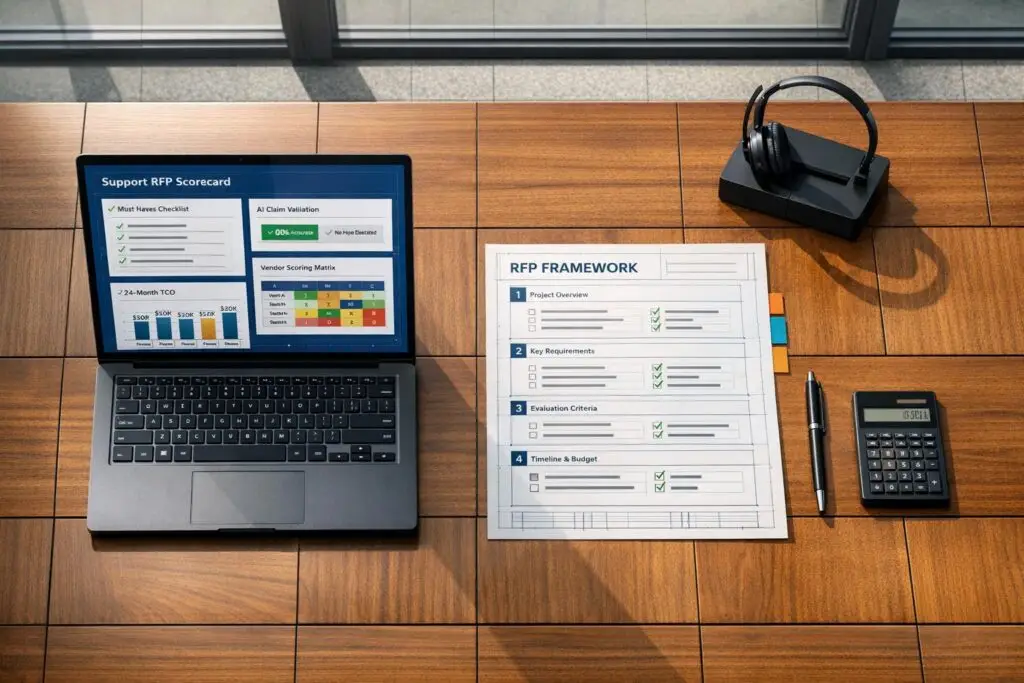
Most failed software projects start with a bad RFP. A bloated, unclear Request for Proposal (RFP) can lead to wasted budgets, delays, and tools that don’t solve your team’s problems. Here’s how to avoid that:
- Focus on core needs: Clearly define must-have features like case management, SLA tracking, and escalation workflows.
- Avoid unnecessary extras: Separate essential features from "nice-to-haves" using a tiered support system to prevent overspending on flashy, underused tools.
- Test AI claims: Ask vendors specific, measurable questions about accuracy, escalation logic, and safeguards like hallucination controls.
- Score vendors objectively: Use a consistent scoring system to compare technical capabilities, compliance, and costs.
- Plan for total costs: Request a 24-month Total Cost of Ownership (TCO) estimate, including API fees and retraining costs.
Why it matters: Poorly defined RFPs contribute to 61% of failed AI projects, with an average loss of $340,000 per cycle. A clear, focused RFP ensures you choose software that aligns with your goals and delivers measurable results.
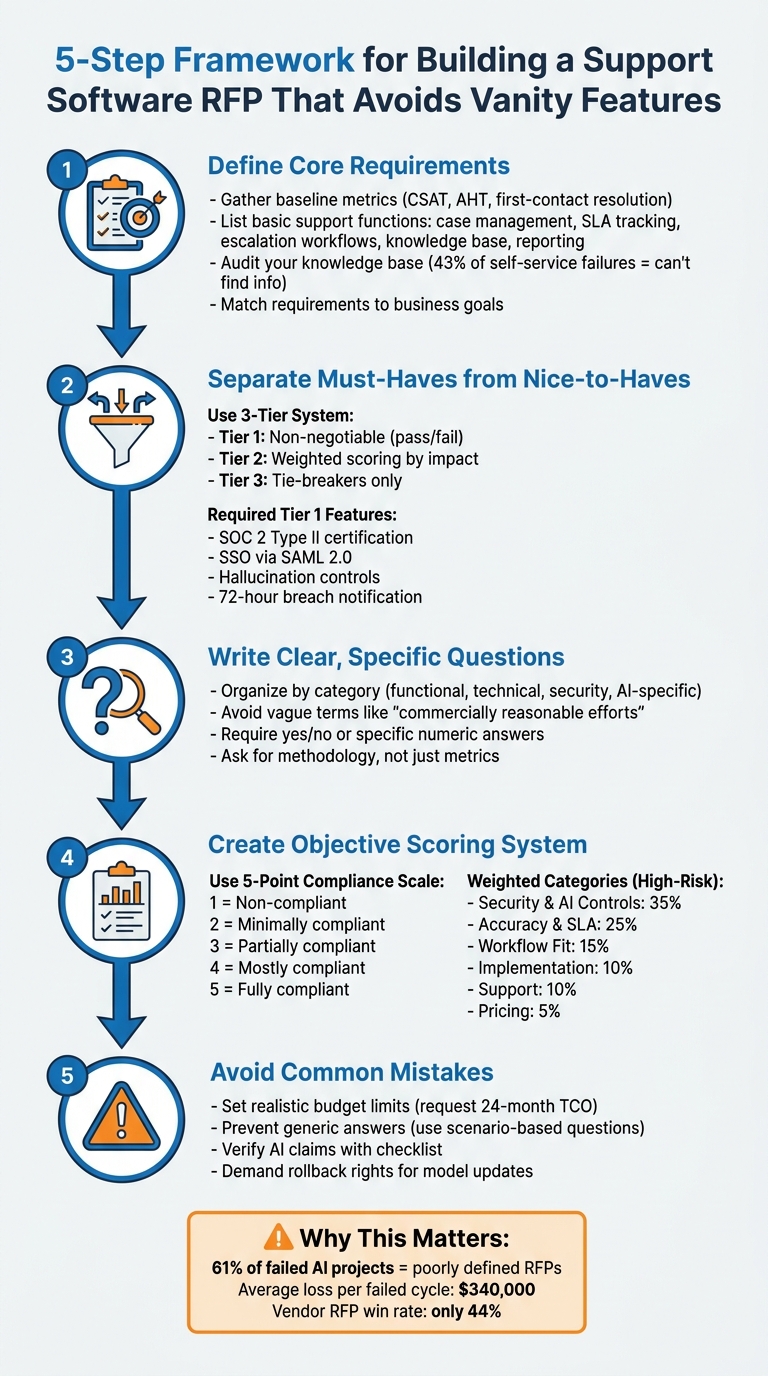
5-Step Framework for Building an Effective Support Software RFP
How to Manage a Software Vendor RFP Process [Enterprise Software and SI Procurement Best Practices]
sbb-itb-e60d259
Define Your Core Support Requirements
The first step is to pinpoint your team’s exact needs. This involves distinguishing between the essential functions and the AI-powered enhancements that could significantly improve daily operations. Using the challenges outlined earlier as a guide, focus on defining the core support requirements that truly matter.
Start by gathering baseline metrics like CSAT, CES, and NPS, Average Handle Time (AHT), and first-contact resolution rates. These numbers are critical for setting realistic success criteria and calculating ROI after implementation [2]. For instance, if you don’t know how much time your team spends handling repetitive questions, how can you measure whether an AI feature is worth the cost?
List Your Basic Support Functions
Your RFP should address the key support functions that keep your team running smoothly. These include:
- Case management
- SLA tracking
- Escalation workflows
- Knowledge base management
- Reporting for complex support environments [2][3]
These core elements are the backbone of any solid support operation.
Don’t forget to define your escalation logic early. Establish clear triggers, like shifts in customer sentiment or low confidence scores, and set strict limits on AI-human transition cycles. This prevents endless escalation loops, which can drain SLA budgets and frustrate customers [2].
Add AI Features That Solve Real Problems
Once your foundational functions are in place, focus on AI features that address your team’s biggest pain points. Start by categorizing your top 10–15 support intents into three groups: fully autonomous resolution, agent-assisted (Copilot), and direct human routing [2].
Here’s a breakdown of useful AI features and the problems they solve:
| AI Feature Category | Specific Capability | Problem Solved |
|---|---|---|
| Agent Copilot | Real-time drafting, translation, summaries | Reduces high AHT and overcomes language barriers |
| Customer-Facing Bot | FAQ resolution, intent recognition | Handles high volumes of repetitive inquiries |
| Case Automation | Ticket tagging, automated routing | Eliminates manual triage bottlenecks and errors |
| Predictive Analytics | Sentiment detection, shift alerts | Identifies churn risks and escalates frustrated users faster |
Before diving into AI features, audit your knowledge base. AI tools amplify the quality of your existing content – they don’t replace it. Since 43% of self-service failures happen because customers can’t find relevant information, a weak knowledge base will undermine even the most advanced AI system [2].
"The AI amplifies your KB quality; it does not replace it."
Match Requirements to Business Goals
With your core functions and targeted AI capabilities defined, align these requirements with your larger business goals. This ensures the tools you choose deliver long-term value. Gather input from key stakeholders like customer support, IT, operations, security, legal, and leadership teams to make sure the requirements reflect the organization’s real needs – not just flashy features [2][3].
Your requirements should also align with your growth strategy. Are you in a high-growth phase, needing to scale without adding more staff? Or are you focused on efficiency, managing costs with a steady or shrinking team size? [3]
Finally, define success in measurable terms. Avoid vague goals like "improve efficiency." Instead, set specific targets like "Reduce AHT by 50% for billing inquiries" or "Achieve a 60% AI resolution rate by Month 6" [4]. This pushes vendors to offer practical solutions rather than generic promises.
Separate Required Features from Nice-to-Haves
Once you’ve outlined your core requirements, it’s time to split features into two categories: the ones you absolutely need and the ones that are just nice to have. This step ensures you don’t waste money on flashy extras that might look great in a demo but don’t actually help your operations.
A three-tier system can help you make these decisions. Here’s how it works:
- Tier 1: Non-negotiable features. If a vendor can’t provide these, they’re out of the running.
- Tier 2: Features that get a weighted score based on their impact.
- Tier 3: Tie-breaker features that are good to have but won’t make or break your decision [5].
This method not only helps you list out your must-haves but also gives you a clear process for evaluating everything else. Start by defining your essential Tier 1 features, then weed out any unnecessary extras.
List Your Required Features
Your Tier 1 list should include features that are critical for your software and cloud service operations. For example:
- Security and compliance: SOC 2 Type II certification, SSO via SAML 2.0, data residency compliance.
- AI safeguards: Hallucination controls, prompt injection defenses, and breach notifications within 72 hours [2][5].
"A feature score of 5/5 for ‘natural language understanding’ tells you nothing about what the system does when a customer deliberately tries to manipulate it."
- Adarsh Kumar, CTO & Co-Founder, Kommunicate [2]
Spot and Skip Vanity Features
Vanity features are those bells and whistles that seem appealing during a sales pitch but don’t actually improve your workflow. Some examples include:
- Over-the-top UI customization options.
- Non-essential mobile apps.
- Promises like "supports multiple languages" without proof of accuracy [2].
Be cautious of vendors who offer vague SLA commitments instead of specific targets like 99.5% uptime. Also, watch for demo setups that don’t use your actual data or knowledge base [2].
Real-world examples highlight the risks of falling for vanity features. In February 2026, the Washington State Department of Licensing implemented an AI phone system that delivered English with a heavy Spanish accent to Spanish-speaking callers – a clear case where a multilingual claim didn’t hold up in practice [2]. Similarly, Air Canada faced legal trouble after its chatbot invented a bereavement refund policy, showing the dangers of AI systems acting without proper human oversight [2].
Build a Requirements Scoring Table
To compare vendors effectively, create a scoring table. Mark Tier 1 features as pass/fail, assign points to Tier 2 features based on their importance, and use Tier 3 features as tie-breakers.
| Feature Category | Tier 1 (Pass/Fail) | Tier 2 (Weighted Points) | Tier 3 (Tie-breaker) |
|---|---|---|---|
| Security | SOC 2 Type II, RBAC, 72-hour breach notification | Data encryption at rest and in transit (15 pts) | White-labeling options |
| AI Functionality | Hallucination controls, prompt injection defense | Native CRM integrations with >1,000 API requests/minute (20 pts) | AI-powered response suggestions |
| Integration | SSO via SAML 2.0, data residency compliance | Custom workflow builders (15 pts) | Multi-language support for non-core regions |
This table makes it easy to compare vendors side-by-side. Vendors that don’t meet all Tier 1 requirements should be eliminated immediately. For those that fall short on Tier 2 features, the scoring system helps quantify how much value they might lack [5].
Write Clear RFP Questions
When drafting RFP questions, clarity is everything. Precise, data-driven questions help you avoid distractions from unnecessary features and ensure vendor responses align with your core needs. Considering that proposal teams invest an average of 23.8 hours on a single RFP response – often involving nine or more contributors – every question should aim to extract actionable, measurable information [7].
Stay away from vague terms like "commercially reasonable efforts", "best endeavors", or "promptly." These phrases are meaningless without specific targets. Instead, focus on asking for concrete thresholds, methodologies, or evidence. For example, rather than asking if a vendor supports escalation, request details like the exact confidence threshold that triggers a human handoff or the maximum number of AI-to-human-to-AI transitions allowed per ticket before permanent human intervention is required [2].
"Reject any contract using ‘timely notification’ or ‘promptly’ without a numeric commitment." – Adarsh Kumar, CTO & Co-Founder, Kommunicate [2]
Organize Questions by Category
Organizing your RFP into well-defined categories makes it easier to evaluate vendors. Start with functional capabilities, focusing on specific AI tasks like agent copilots, chatbots, ticket tagging, and case automation [2][3]. Follow this with technical requirements and integrations, where you assess whether the software offers bi-directional CRM sync or only read-only access [6][3].
Separate security and compliance into two parts: standard SaaS requirements (e.g., SOC 2 Type II, SSO) and AI-specific risks like data leakage prevention, prompt injection defense, and PII redaction [2]. Include a section on escalation and handoff logic, detailing how the system manages failures and what data (e.g., conversation history, knowledge base articles) gets passed to human agents [6][2].
Other key categories to include:
- Success Metrics and Reporting: Ask vendors to explain their methods for calculating accuracy and containment rates.
- Implementation and Maintenance: Cover timelines for going live, training needs, and who handles model updates.
- Total Cost of Ownership: Capture recurring costs like API fees and internal resource demands beyond the license fee [4][6].
Once your categories are set, dive into AI-specific questions to validate vendor claims.
Ask Specific Questions About AI
AI vendors often make bold claims about automation and intelligence, so your questions should test these assertions rigorously. For example, when vendors mention high containment or resolution rates, ask them to define their methodology. A vendor claiming 90% containment under one definition could perform identically to another citing 65% under a different calculation [2][6].
For automation assessment, ask vendors to clarify how they measure "containment" versus "resolution" and whether they count sessions without human requests as "contained" [2]. Regarding triage and escalation, request details on the escalation false-negative rate – how often the AI fails to escalate tickets it should have [6]. For reporting and quality, go beyond customer satisfaction scores by asking for response-level quality metrics, such as accuracy, tone, and compliance with policies [6].
Address agentic capabilities by requesting a list of actions the AI can perform independently and how these outputs are validated before integration [2]. On model drift and maintenance, ask how the vendor monitors accuracy as customer language and company policies evolve. Keep in mind that the cost difference between a system with 70% accuracy and one with 95% accuracy can be 3–5x [4].
Require Clear Yes/No Answers
To avoid ambiguous responses, standardize the answer format. For feature availability, ask vendors to choose from: "Out-of-the-box", "Requires Customization", "Third-party Integration," or "Not Available" [4][7]. This ensures transparency about what’s included versus what requires extra work or cost.
For security and compliance, stick to yes/no questions. For example, ask: "Will our conversation data be used to train shared models?" and ensure the answer is reflected in the Master Service Agreement, not hidden in the Terms of Service [2]. When evaluating uptime commitments, demand specific numeric targets like 99.5% uptime and financial remedies for P1 incidents, including mass hallucination events [2].
Develop a scoring system to flag non-committal answers. For instance, a vendor claiming "the AI always escalates appropriately" without defining the logic should raise concerns. Similarly, avoid vague commitments like "prompt notification" of breaches – insist on a defined window, such as 72 hours [2][6]. When vendors present production evidence, ask for the number of active enterprise customers using specific features today – not just whether the features are technically supported [2].
| RFP Category | Standard SaaS Question | AI-Specific RFP Question |
|---|---|---|
| Uptime/Availability | What is your guaranteed uptime? | What is your "available but degraded" performance policy? [2] |
| Security | Do you have SOC 2 Type II? | How do you prevent cross-tenant data leakage at the retrieval layer? [2] |
| Updates | How often do you push updates? | Do we have contractual rollback rights if a model update degrades accuracy? [2] |
| Accuracy | Is the system accurate? | What is your escalation false-negative rate? [6] |
Create a Scoring System for Vendor Proposals
Once you’ve outlined your detailed requirements, the next step is to establish a scoring system to evaluate vendor proposals. A numerical scoring system ensures an objective and consistent evaluation process, reducing the risk of bias or subjective decision-making [8]. Without it, you might find yourself justifying a choice based on flashy presentations rather than actual operational fit.
Here’s why this matters: the success rate for vendors winning RFPs is only 44%, and they typically spend around 24 hours crafting each response [9]. These proposals are designed to impress, so a well-defined scoring system helps you cut through the marketing language and focus on measurable factors, like performance metrics, compliance with requirements, and long-term value.
Score Based on Performance Metrics
To avoid being swayed by superficial features, prioritize operational performance. Key metrics to evaluate include response times, cost per agent, scalability, and first-contact resolution rates [9][2]. For AI-specific capabilities, focus on metrics like containment rate, deflection rate, hallucination rate, and accuracy baselines [2][3]. These indicators reveal the real-world impact of the vendor’s solution.
Use a 5-point compliance scale to score each proposal:
- 1: Non-compliant
- 2: Minimally compliant
- 3: Partially compliant
- 4: Mostly compliant
- 5: Fully compliant
This method ensures consistency and removes subjectivity from the evaluation process. For example, if a vendor claims "high accuracy" but fails to provide specific numbers or methodologies, they might score only a 2. Link this scoring process back to your requirements table to maintain alignment across all evaluation stages. Focus on critical factors like security, accuracy, and operational fit, rather than simply choosing the lowest price [8][10].
"RFP scoring is the process of assigning numerical values to proposal responses, allowing you to compare vendors on a consistent scale. It replaces opinion with a structured, data-based approach and reduces the risk of bias." – Andrew Martin, Responsive [8]
Establish non-negotiable disqualification criteria for essential requirements. For example, if a vendor cannot guarantee that your conversation data won’t be used for shared model training or lacks a documented incident response plan, they should be disqualified immediately – regardless of price [2]. This ensures that you’re not wasting time on proposals that introduce unacceptable risks.
| Category | Standard Weight | High-Risk Weight (Regulated/Agentic) |
|---|---|---|
| Security, Data Handling & AI Controls | 25% | 35% |
| Accuracy, Controllability & SLA Commitments | 20% | 25% |
| Workflow Fit, Escalation & Integrations | 20% | 15% |
| Implementation Readiness & Maturity | 15% | 10% |
| Support Quality & Incident Response | 10% | 10% |
| Pricing and Commercial Terms | 10% | 5% |
Use a Vendor Comparison Table
A vendor comparison table is a practical way to organize scores across evaluation criteria. It highlights each vendor’s strengths and weaknesses at a glance. Structure your table around three main pillars:
- Technical: Includes functionality, security, and scalability.
- Financial: Covers Total Cost of Ownership (TCO) and return on investment (ROI).
- Vendor Viability: Assesses track record and compliance [9].
This approach ensures a balanced evaluation, rather than relying solely on features emphasized in marketing materials. For AI-specific capabilities, track metrics like intent recognition accuracy, containment methodologies, and the ability to handle degraded or incorrect responses (the "third state") [2][3]. Additionally, document control mechanisms such as defenses against prompt injection, protections against cross-tenant data leakage, and rollback rights for model updates [2][3].
To simplify decision-making, use a traffic-light system for final scores:
- Green: 4.0 and above
- Yellow: 3.0 to 3.9
- Red: Below 3.0
This visual system makes it easy for stakeholders to identify vendors worth further consideration. It’s worth noting that 61% of enterprises with failed AI deployments attribute the problems to poorly defined procurement specifications [1]. A structured scoring system ensures alignment with your requirements, reducing such risks.
Compare Price Against Features
When evaluating price, look beyond the initial cost. Assess the 3-year Total Cost of Ownership (TCO), including implementation, training, and update fees [1]. Be sure to account for ongoing model optimization costs and potential overage charges for exceeding interaction volumes [1]. A vendor with a low base price but high additional fees for integrations or updates could end up being 30–45% more expensive than one with transparent pricing [1].
Standardize the definition of key metrics like "containment rate" across vendors before comparing their claims. Some vendors may define containment loosely – counting any session without human intervention as "contained" – while others might require confirmed resolution [2]. For instance, a vendor reporting 90% containment under a loose definition might be less effective than one reporting 65% under a stricter standard. Overlooking these details contributes to the $340,000 average cost of failed AI customer service procurement cycles [1].
Balance capabilities against control features. A vendor offering impressive automation but lacking strong hallucination controls could harm customer trust and require constant manual oversight [2].
"A live model that produces stale, inaccurate, or tone-deaf responses is worse than downtime because it actively damages customer trust before anyone notices." – Kommunicate [2]
Lastly, prioritize rollback rights as a critical safeguard. If a vendor introduces a model update that degrades performance, you need the ability to revert to a previous version without penalties [2]. This is especially important for AI systems, where updates can sometimes lead to unexpected issues that only surface after extensive use.
Avoid Common RFP Mistakes
Even the most well-thought-out RFPs can fall short if they lead to inflated costs, unclear vendor responses, or unchecked AI claims. Building on earlier guidance about crafting clear RFP questions and vendor scoring, here are some common mistakes to avoid to keep your procurement process on track.
Set Realistic Budget Limits
One of the biggest errors you can make is not sharing your budget range. For example, if you don’t specify something like "$80,000–$150,000 for MVP plus first-year maintenance", vendors might either overbid or underbid. This can lead to hidden costs – such as LLM API fees, retraining, or infrastructure expenses – that quickly spiral out of control. In fact, ongoing AI support costs often surpass the initial development investment within 18 months. For instance, a system with a $100,000 build cost and $4,000 monthly operating expenses will hit $196,000 by the end of its second year [4].
"Anyone can underbid the discovery phase to win the deal – ask for the rate card and assumptions for ‘phase 2: scaling, retraining, drift handling, and the third use case.’ That is where unexpected costs occur." – ZTABS Team [4]
To avoid surprises, require vendors to provide a 24-month Total Cost of Ownership (TCO) estimate, including hosting, API usage, and maintenance. Additionally, ask for "Phase 2" rate cards upfront, detailing costs for scaling, retraining, and addressing model drift. Be cautious of vendors promising rapid 2–4 week deployments; enterprise-grade rollouts often take 1–3 months, which can lead to unexpected labor costs during the extended setup phase [2].
Prevent Generic Vendor Answers
Beyond budgeting, the quality of vendor responses is critical. Ambiguous answers make it nearly impossible to evaluate or compare vendors effectively. To avoid this, structure your questions to focus on methodologies rather than vague metrics.
For example, instead of asking, "Does your AI support multiple languages?", require vendors to differentiate between languages the system can parse and those with proven, production-level accuracy and active enterprise customers [2]. Similarly, replace "Is your system secure?" with a more specific request: "Provide a summary of annual independent penetration testing and confirm a 72-hour numeric commitment for breach notifications" [2].
Avoid vague terms like "commercially reasonable efforts" or "timely notification." Instead, ask for clear, measurable commitments. For AI-specific capabilities, inquire what the system does when it cannot determine intent or find a reliable answer. This forces vendors to address the "third state" – when AI is functioning but not performing well [2].
"A vendor citing 90% containment under one definition and another citing 65% under a second may be performing identically." – Adarsh Kumar, CTO & Co-Founder, Kommunicate [2]
Use scenario-based questions to get a clearer picture of vendor capabilities. For instance, ask vendors to explain the maximum number of AI-to-human-to-AI transitions allowed per ticket before permanently assigning the case to a human. This helps prevent escalation loops that could drain your SLA budget [2]. Additionally, require that AI-generated responses include citations or links to source documents for quick verification [11].
Verify AI Claims with a Checklist
To ensure every AI claim is legitimate, use a detailed verification checklist. Poorly defined procurement specifications are responsible for 61% of failed AI deployments [1].
Start by verifying data training clauses. Make sure vendors clearly specify in the MSA (not buried in the Terms of Service) whether they will use your conversation data to train shared AI models [2][4]. If opting out isn’t an option, consider it a dealbreaker.
For security, insist on SOC 2 Type II compliance, which demonstrates effective controls over a minimum six-month period – not just Type I certification [2]. Also, request a summary of annual independent penetration testing and ask whether the vendor conducts red-team exercises to test system vulnerabilities. Find out what is logged when anomalous input is detected [2].
Demand clarity on performance measurement methods. The AI industry lacks a standard definition for containment rates. Some vendors count a conversation as "contained" if a human isn’t requested, while others require a confirmed resolution [2]. Ask vendors to explain how they measure accuracy and provide a documented baseline tailored to your use case.
Lastly, ensure your contract includes rollback rights for AI updates. If a model update results in degraded performance – like generating hallucinations or outdated responses – you need the ability to revert to a previous version without penalties. This safeguard protects your system from actively harming customer trust [2].
Conclusion
Creating a support software RFP that avoids unnecessary features starts with clearly defining your core requirements, separating must-haves from nice-to-haves, and establishing clear evaluation criteria for vendor proposals. Begin by mapping your top 10–15 support intents and reviewing your knowledge base thoroughly – 43% of self-service failures happen when customers can’t find relevant content [2]. Focus on the specific tasks the software needs to accomplish instead of getting lost in long feature lists. Also, prioritize security measures like SOC 2 Type II certification and ensure contracts explicitly prohibit the use of your conversation data for shared model training.
A weighted scoring system can help you prioritize key factors such as security and data handling, allocating up to 35% of the score for high-risk deployments. Ask vendors to provide a 24-month Total Cost of Ownership estimate that includes API fees and model retraining costs [2][4]. Replace vague terms like "commercially reasonable efforts" with measurable commitments, and set clear disqualification rules for vendors who fail to meet your non-negotiable standards. As Adarsh Kumar, CTO & Co-Founder of Kommunicate, puts it:
"Selecting an AI customer support vendor is a risk management decision. The buyers who get it wrong don’t usually pick bad technology. They pick good technology without the contractual protections" [2].
These steps not only simplify vendor evaluation but also ensure a solid operational foundation. When assessing vendors, look for AI-native solutions specifically designed for B2B support – like Supportbench. These platforms address critical needs like model evaluation, data dependency, and retrieval-augmented generation while offering transparent pricing that grows fairly with your team. Supportbench provides practical AI tools such as agent copilots, case summaries, and automated knowledge base article creation – all with clear, scalable pricing.
Choose a vendor that aligns with your business goals, whether that means improving customer experience or cutting operational costs. Avoid being sidetracked by flashy features that add little value. By following these steps, you’ll protect your budget, hold vendors accountable, and position your support team for lasting success.
FAQs
What should my Tier 1 must-haves be?
When creating a Request for Proposal (RFP) for support software, it’s crucial to zero in on features that address your core operational needs. These essentials ensure your team can work efficiently while delivering measurable results. Here’s what to prioritize:
- Functional Capabilities: Look for features like ticket management, automation tools, and AI-powered triage to streamline workflows and handle customer inquiries effectively.
- Security Requirements: Ensure the software protects customer data and complies with relevant regulations to maintain trust and avoid legal issues.
- Service Level Agreements (SLAs): Include measurable targets, such as guaranteed uptime or response times, to hold the vendor accountable for performance.
- Scalability and Integrations: Choose a system that can grow with your business and integrates seamlessly with your existing tools, so you’re not paying for features you don’t need.
- Reporting and Analytics: Robust reporting tools are essential for tracking performance and identifying areas for improvement.
By focusing on these features, you’ll set a solid foundation for evaluating and selecting the right support software for your needs.
How can I prove an AI vendor’s accuracy claims?
When evaluating vendors, prioritize measurable benchmarks and real-world performance data over flashy demos. Ask for specific metrics such as resolution rates, accuracy percentages, or results from pilot tests. To validate their claims, request ongoing performance reports, validation results, or even third-party evaluations. This approach ensures their promises are backed by solid, operational evidence – not just polished marketing materials.
What costs belong in a 24-month TCO?
When calculating the 24-month TCO for support software, it’s important to account for both initial and recurring expenses. Here’s what typically makes up the total investment:
- Subscription fees: These are the monthly or annual payments required to use the software.
- Implementation costs: One-time charges for setting up the software, including installation and configuration.
- Add-on features: Optional tools like AI integrations or workforce management capabilities that enhance functionality but come at an extra cost.
- Operational costs: Expenses related to training your team, ongoing maintenance, and scaling the software as your needs grow.
By considering all these factors, you’ll get a clear understanding of the total investment required over two years.
Related Blog Posts
- How do you run a helpdesk RFP for Canadian organizations (scorecard + requirements)?
- How do you choose a helpdesk for regulated or high-risk B2B customers (scorecard)?
- How do you write a helpdesk vendor evaluation checklist for Support Ops (2026)?
- Zendesk vs. Supportbench: Comparing TCO and Enterprise Features in 2026






