


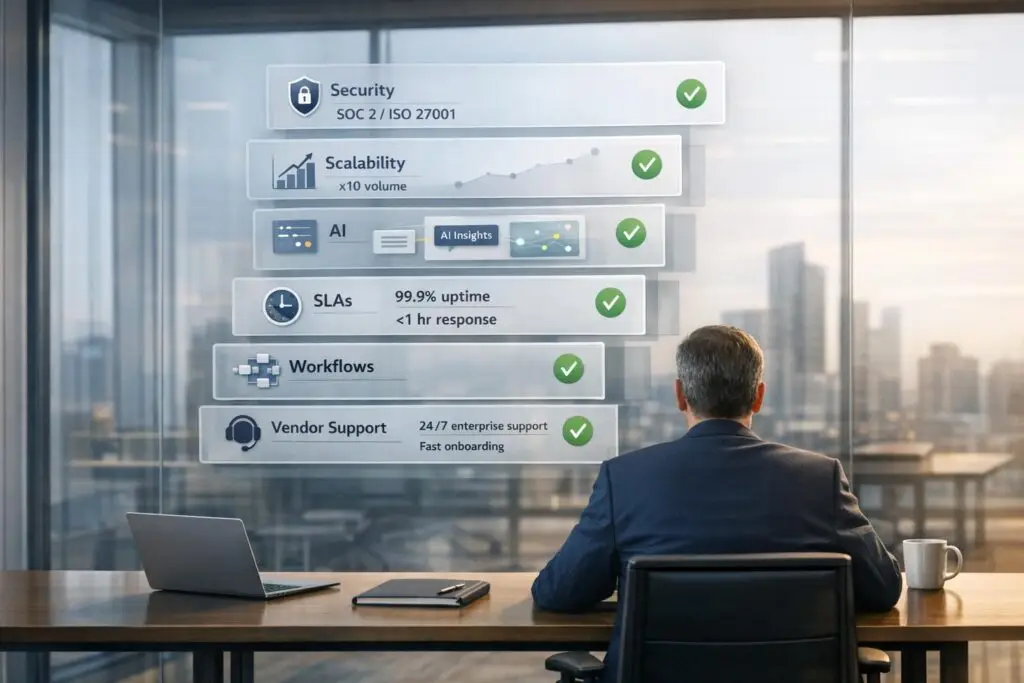
When buyers ask for an "enterprise-grade" support platform, they want tools that handle growth, meet strict security standards, and simplify complex workflows. It’s not about having the most features – it’s about ensuring the platform can scale, comply with regulations, and operate efficiently under pressure. Here’s what to focus on:
- Scalability: Can the platform handle increasing users, data, and complexity without performance issues?
- Security & Compliance: Look for SOC 2 Type II, ISO 27001, and industry-specific certifications like HIPAA or FedRAMP.
- AI Capabilities: AI should automate tasks like ticket routing, triage, and resolution while reducing manual labor.
- Performance Guarantees: Uptime of 99.9%+ and clear SLAs ensure reliability during high-demand periods.
- Workflow Management: Features like dynamic SLAs, multi-team collaboration tools, and clear escalation paths improve efficiency.
- Vendor Support: 24/7 availability, dedicated success managers, and clear roadmaps are a must.
- Implementation: Smooth onboarding with minimal IT involvement and phased rollouts reduce disruptions.
The goal is to choose a platform that meets your current needs and grows with your business, avoiding unnecessary complexity or costs. Use a weighted checklist to evaluate vendors and simulate real-world challenges during demos to make the best choice.
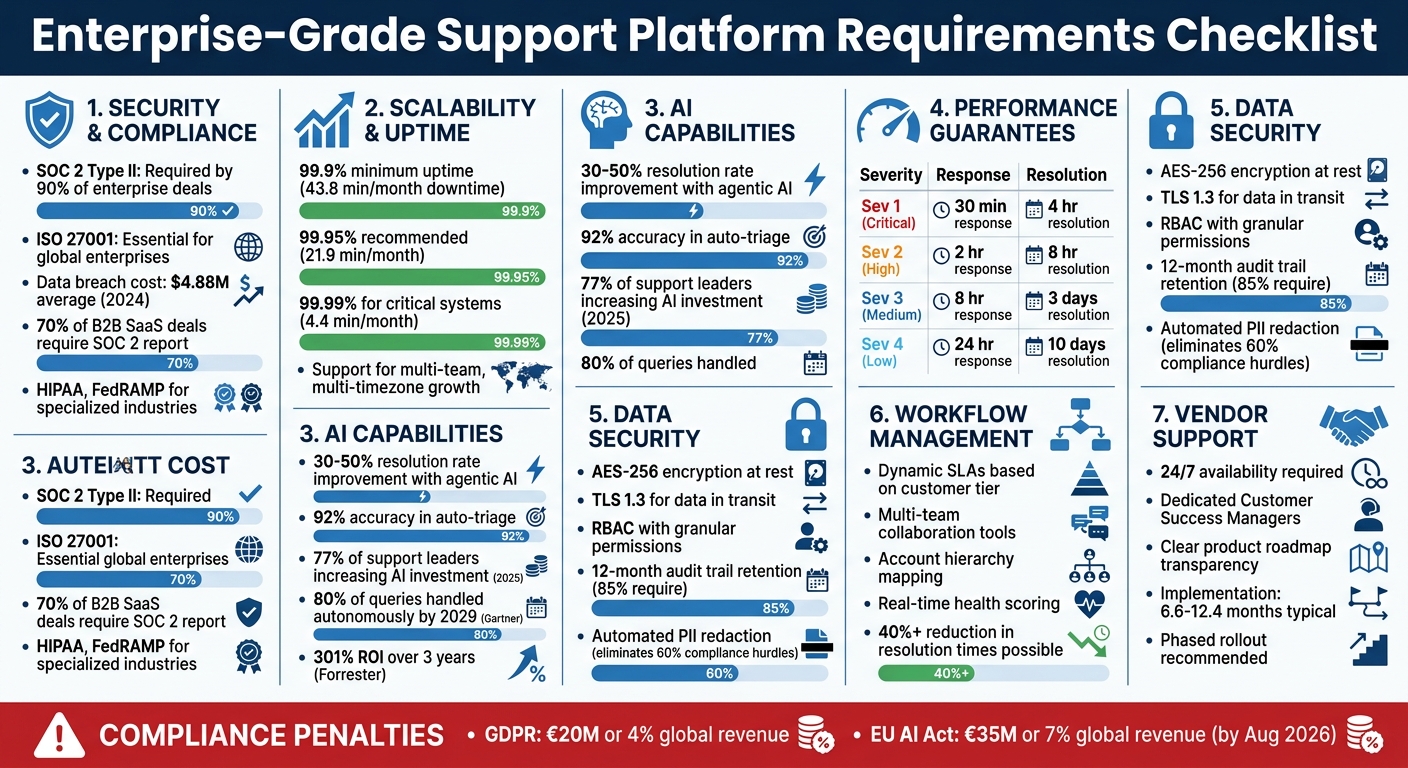
Enterprise-Grade Support Platform Requirements Checklist
Security and Compliance Requirements
Security is a cornerstone in today’s SaaS landscape. Over 70% of B2B SaaS deals now require a SOC 2 report, and the average cost of a data breach in 2024 has climbed to $4.88 million [5]. When assessing platforms, it’s critical to make security and compliance a top priority from the very beginning.
Each industry has its own set of security demands. For instance, a healthcare company managing Protected Health Information (PHI) will have different needs than a financial services firm handling payment data. That said, some standards have become nearly universal: SOC 2 Type II compliance is now a requirement for 90% of enterprise deals [7], and 70% of global enterprise buyers are impacted by data residency requirements [7].
Required Certifications and Audits
SOC 2 Type II is no longer optional – it’s mandatory. This certification proves that security controls have been consistently maintained over a 6–12 month period [5][6]. While SOC 2 Type I only confirms controls exist at a specific point in time, Type II demonstrates long-term reliability.
For platforms targeting global or European-based enterprises, ISO 27001 certification is essential [5]. Specialized industries bring additional demands: healthcare organizations handling PHI need HIPAA compliance [5][8], and platforms working with U.S. government agencies must secure FedRAMP authorization [6]. Regular third-party penetration testing is another must-have for enterprise platforms [7].
Compliance standards are becoming stricter. For example, the inclusion of the "Confidentiality" criterion in SOC 2 reports surged from 34% to 64.4% in 2024, reflecting growing concerns about intellectual property leaks [5]. Notably, companies with strong data privacy practices see a 62% higher success rate in competitive enterprise bids [5].
Certifications are just the baseline. To ensure comprehensive protection, it’s equally important to evaluate the platform’s underlying architecture.
Core Data Security Features
Certifications alone don’t guarantee security – technical safeguards play a big role too. For stored data, AES-256 encryption is the gold standard, protecting sensitive information like customer records and backup archives [7]. For data in transit, TLS 1.3 is now the minimum expected standard, replacing older, less secure protocols [7].
Role-Based Access Control (RBAC) should go beyond simple "admin" and "user" roles, allowing granular permissions at the module and document levels. Integration with identity providers like Okta or Microsoft Entra ID via SAML 2.0 or OIDC ensures that corporate password policies and multi-factor authentication (MFA) are consistently applied [7].
For platforms using AI, automated PII redaction is crucial. By identifying and masking Personally Identifiable Information (PII) in conversation logs and AI model inputs, this feature can eliminate 60% of compliance hurdles during the procurement process [7].
Platforms should also maintain tamper-resistant audit trails for at least 12 months, as required by 85% of enterprise teams [7]. These logs track user logins, data access, changes to records, and permission updates, creating a clear "paper trail" for audits and investigations.
Regional Compliance Standards
Operating globally introduces additional layers of complexity. Laws like the European Union’s GDPR, California’s CCPA/CPRA, and various data residency regulations require platforms to store and process data within specific geographic regions [7][8]. For example, merely storing data in the EU isn’t enough if U.S.-based systems process it, as this could breach residency rules [9].
Platforms must also disclose their third-party subprocessors (e.g., OpenAI, Anthropic, or AWS) and notify customers of any changes [9][6]. This transparency is a core GDPR requirement, allowing buyers to evaluate whether their data might be used for training models by downstream vendors.
Under GDPR’s Right to Erasure, platforms must provide ways for customers to delete their data within a set timeframe (usually 30 days) and issue certificates of destruction [9][10]. In industries like healthcare or finance, additional agreements like Business Associate Agreements (BAA) for HIPAA compliance or PCI-DSS standards for payment data are mandatory [10][6].
The penalties for non-compliance are steep. GDPR fines can reach EUR 20 million or 4% of global turnover [10], while violations under the EU AI Act – fully enforceable by August 2026 – can result in fines up to EUR 35 million or 7% of global revenue [10]. With stakes this high, verifying a platform’s compliance measures isn’t just a formality – it’s a critical part of managing risk.
sbb-itb-e60d259
Scalability and Performance Standards
Building on earlier discussions about compliance and security, this section dives into how platforms should scale and perform under real-world challenges. An enterprise-grade support platform must be capable of handling growth without compromising speed or reliability. This becomes critical as ticket volumes increase, teams expand globally, and workflows grow more intricate.
Uptime and Availability Guarantees
For enterprise infrastructure, 99.9% uptime is the minimum standard, which translates to no more than 43.8 minutes of downtime per month [11]. However, for customer-facing workflows where every minute of downtime impacts revenue, aiming for 99.95% uptime (21.9 minutes of downtime monthly) is more suitable. In highly regulated environments requiring real-time decision-making, 99.99% uptime is often necessary, limiting downtime to just 4.4 minutes per month [11].
Uptime isn’t just about being able to connect. Service Level Agreements (SLAs) should define availability as the ability to deliver successful responses within agreed latency limits, with error rates below 0.1% [11]. Scheduled maintenance should be limited to four hours per month, with at least 48 hours of advance notice. Emergency maintenance should count toward this cap to ensure accountability [11].
Contracts should also include self-executing service credits, which apply automatically to the next billing cycle when SLAs are breached, eliminating the need for manual claims. Many standard agreements only offer credits worth 10% of monthly fees for downtime – an amount often negligible during major outages [11]. To ensure accountability, negotiate for "termination-for-cause" clauses, allowing contract termination if SLAs are missed three times within a 12-month period [11].
| Severity Level | Definition | Initial Response | Resolution Target |
|---|---|---|---|
| Severity 1 – Critical | Service unavailable; >5% error rate | 30 minutes (24/7) | 4 hours |
| Severity 2 – High | Major feature unavailable; no workaround | 2 hours (24/7) | 8 hours |
| Severity 3 – Medium | Performance issues with workaround | 8 hours (Business hrs) | 3 business days |
| Severity 4 – Low | General questions or documentation | 24 hours (Business hrs) | 10 business days |
Beyond uptime, platforms must also support the growth of teams and increasingly complex workflows.
Support for Team Growth and Complex Workflows
Efficient scaling requires accommodating rapid team expansion across departments and time zones without performance degradation. Organizations using agentic AI and copilots – systems designed to autonomously manage multi-step workflows – have reported resolution rate improvements of 30–50% compared to traditional automation [2].
Enterprise platforms should support multi-tiered workflows, department-specific approvals, conditional logic, and event triggers. Features like queue segmentation, robust permission settings, and dedicated queue managers are essential for ensuring tickets are routed correctly and don’t clog the system. A 2020 survey revealed that over half of managed service providers struggled to meet deadlines or hire qualified technical staff – issues that can often be mitigated through robust automation [4].
Platforms should also integrate seamlessly with CRMs, ERPs, and internal systems to maintain a complete customer context. Consolidating tools like ticketing, remote monitoring, and asset management into one platform eliminates data silos and reduces context switching, which can slow agents during high-demand periods.
As organizations grow, maintaining consistent performance during peak activity becomes even more critical.
Performance During Peak Activity
During high-demand periods – such as flash sales, product launches, or quarterly reporting – enterprise platforms must maintain fast response times and reliable service. Mark Sherwood from Shopify emphasizes the importance of clarity during such moments:
"If you can’t explain the current status in one sentence, you don’t understand it yet. That rule kept everyone focused and prevented noise" [12].
Establishing clear protocols for different severity levels (Sev 1 to Sev 4) before onboarding enterprise accounts ensures predictable handling during surges [12]. Platforms should also offer proactive updates, such as broadcasting known issues, to reduce incoming ticket volumes when systems are under pressure [12].
Without 24/7 availability and fixed resolution timelines, disruptions can lead to revenue loss. To prepare, map out critical stress points in advance and test platform stability under simulated high-demand conditions. AI-powered support platforms can handle repetitive, high-volume inquiries – tasks that typically consume 60–70% of agent time [2]. This allows human agents to focus on resolving complex issues, ensuring consistent service levels even during demand spikes.
AI-Native Features and Automation
Advanced AI capabilities are reshaping enterprise support operations, setting new benchmarks for performance and scalability.
Enterprise platforms have evolved significantly – from basic scripted chatbots (Gen 1) and read-only copilots (Gen 2) to the more advanced AI agents (Gen 3). These agents can autonomously read, write, and take action across integrated systems, aiming to reduce cognitive effort, cut costs, and improve metrics like First Contact Resolution (FCR) and Customer Satisfaction (CSAT).
By 2025, 77% of support leaders plan to increase their AI investments, while 91% of customer service leaders will face mounting pressure to deploy AI solutions by 2026 [13][14]. Gartner predicts that by 2029, AI agents will handle 80% of standard customer service queries autonomously, potentially cutting service costs by 30% [13]. Forrester‘s Total Economic Impact studies also show that AI-powered support can yield a 301% return on investment (ROI) over three years [14]. These figures underscore a shift in the conversation: it’s no longer about whether to adopt AI, but about identifying which features set modern platforms apart from outdated tools.
Automated Ticket Management
Intelligent triage systems are transforming ticket management by automatically routing inquiries to the right agent based on factors like intent, sentiment, and language [14]. This reduces inefficiencies and boosts FCR. Beyond routing, AI-powered tools can auto-summarize lengthy ticket histories and conversation threads, enabling agents to quickly grasp the context without wading through pages of information [13]. Predictive analytics further enhance efficiency by forecasting key metrics like CSAT, Customer Effort Score (CES), and FCR before a case is closed, allowing managers to step in proactively if a situation appears to be heading in the wrong direction [13].
For example, Supportbench integrates predictive CSAT and CES scoring directly into its case list, alongside AI-driven FCR detection, addressing one of the more challenging metrics to measure without manual input.
From a technical standpoint, platforms that use knowledge graphs rather than solely relying on Retrieval-Augmented Generation (RAG) offer a deeper understanding of complex relationships. These knowledge graphs can connect details like customer contracts, tier changes, or billing rules, making it easier to answer "why" questions with precision. Hybrid systems that combine RAG with knowledge graphs have been shown to reduce the risk of AI hallucinations by around 40% [13].
AI Agent Assistance Tools
AI copilots are streamlining workflows by cutting down on manual searches and speeding up resolution times. These tools integrate data from various systems like CRM, billing, and product logs to help agents navigate complex issues, such as pricing changes or subscription renewals [13]. The best copilots can draft accurate replies, suggest relevant macros, and identify helpful knowledge base articles [13][14].
Take Bolt as an example: in 2024–2025, the company integrated approximately 200,000 historical tickets and its product backlog into an AI platform. This integration linked support issues directly to engineering workflows, cutting ticket resolution times by over 40% and improving customer retention by 25% [13]. Elec Boothe, Director of Support Engineering & Risk, shared:
"Within just two weeks, we successfully imported around 200,000 Zendesk tickets and 800 knowledge base articles along with 12 workflows… cutting ticket resolution times by more than 40%" [13].
Similarly, Skedulo reduced ticket management overhead from 30% to 5% by implementing AI for triage and knowledge management, automating 30% of its APAC ticket volume [13]. These examples highlight the power of AI systems that can go beyond merely suggesting actions to actually executing them – like processing refunds or updating customer details.
| Feature | Gen 2 (Copilot) | Gen 3 (Enterprise AI Agent) |
|---|---|---|
| Primary Function | Summarize and draft replies | Execute end-to-end workflows |
| System Access | Mostly read-only | Read, Write, and Act (CRUD) |
| Human Involvement | Requires human intervention | Autonomous for routine actions |
| Data Structure | RAG (Help Center articles) | Knowledge Graph (Interconnected entities) |
Self-Service AI for Customers
Modern self-service AI tools are now capable of resolving customer issues independently, such as processing refunds, updating subscriptions, or adjusting account settings. These systems aim to reduce operational costs while improving user satisfaction [13]. They also maintain consistency by deploying a unified AI model across web, mobile, social, and messaging channels in over 50 languages [14].
Transparency is key. Platforms should provide direct links to the knowledge base articles used to generate answers, allowing customers to verify the information’s accuracy. As Inkeep put it:
"If the platform does not show customers where an answer came from, you have no mechanism for verifying accuracy at scale. Source citations are not a nice-to-have feature – they are the primary quality control mechanism." – Inkeep [15]
Confidence-based escalation is another critical feature. AI systems should calculate a confidence score for every response and escalate cases to a human agent – complete with full conversation history – when confidence is low. Additionally, knowledge gap detection can identify unanswered questions, highlighting areas where documentation needs improvement.
Looking ahead, by August 2026, transparency and traceability will become mandatory for many AI systems under the EU AI Act. Features like decision logs and audit trails will be essential for enterprise-grade platforms [13]. Role-Based Access Control (RBAC) will also be vital to ensure AI doesn’t access sensitive information, such as executive-level data. As Neelabja Adkuloo from DevRev pointed out:
"A black box is a liability, not an asset." – Neelabja Adkuloo, DevRev [13]
Collaboration and Workflow Management
Managing enterprise B2B cases is no small feat. These cases often require input from multiple departments – spanning everything from support to billing – and frequently involve teams working across different time zones. Without proper collaboration tools, workflows can quickly descend into chaos, with endless email threads, lost information, and redundant efforts.
Modern platforms have changed the game by integrating collaboration directly into case management systems. Features like internal tagging allow team members to loop in colleagues without disrupting customer-facing conversations. Meanwhile, shared workspaces act as a central hub where team members can access the full case history, assign tasks, and add private notes that remain hidden from customers. This setup helps teams avoid duplicating work and keeps important context from getting lost in scattered Slack threads or emails.
But collaboration isn’t just about communication – it’s also about efficiency. Enter adaptive SLAs.
Flexible SLA Management
Traditional, one-size-fits-all SLAs just don’t cut it for the complexities of B2B relationships. Dynamic SLAs adjust response times based on key customer details, like the stage of their contract, their sentiment, or their account value. This ensures that your team can consistently meet expectations without having to manually reprioritize every unique situation.
Take Supportbench’s dynamic SLA engine as an example. It can automatically escalate cases based on factors like customer health scores, contract value, or upcoming renewal dates. This ensures that high-risk accounts get the attention they need before minor issues snowball into major churn risks.
However, efficient collaboration goes beyond SLAs. Seamless escalation paths and role-specific access are equally important for managing complex workflows.
Multi-Team Collaboration Tools
B2B cases often require input from multiple departments, making clear escalation paths essential. Advanced platforms support multi-level escalations, assigning clear ownership at every stage and eliminating confusion about where a case should go next. Additionally, role-based permissions ensure that team members only access the information they need. For example, billing specialists can view payment data, while engineers focus on technical logs – keeping sensitive data secure.
A great example of improving collaboration comes from Granicus, which consolidated multiple project management tools into a single system in 2025. This move significantly improved visibility across teams and eliminated redundant workflows. Sherrie Besecker, Creative Technology Manager at Syneos Health, highlighted the impact:
"Historically, for us, our greatest challenge was getting full visibility into timelines. Our reliance on disconnected management systems and manual processes resulted in inefficiencies and redundancies across our workflows." [16]
Another critical feature for enterprise platforms is account hierarchies. Many B2B customers operate with parent-child company structures, such as a global account overseeing multiple subsidiaries. Without the ability to map these hierarchies, teams are forced to treat subsidiaries separately, which can lead to inconsistent policies and missed opportunities to identify patterns across the organization.
Complete Customer Visibility
When it comes to managing enterprise accounts, teams need more than just a list of open tickets. A consolidated customer dashboard brings together support history, usage data, contract details, and health scores, giving agents a complete picture of the customer. This allows them to spot trends – like a spike in ticket submissions, a drop in product usage, or an upcoming renewal date – before responding.
Health scoring is another game-changer. By leveraging AI to analyze sentiment, ticket volume, and product engagement, platforms can automatically flag at-risk accounts. Instead of relying on manual updates to spreadsheets, these systems surface churn risks in real time. On top of that, KPI dashboards provide insights into metrics like CSAT, First Contact Resolution, and Customer Effort Score, helping leadership identify trends and take proactive steps.
Supportbench even takes transparency a step further by offering customizable dashboards that can be shared with clients. These dashboards display SLA performance, ticket resolution times, and satisfaction scores, allowing customers to see the same metrics your team uses to measure success [4]. This kind of openness builds trust and strengthens relationships.
Reporting, Vendor Support, and Implementation
When considering a platform’s operational reliability and scalability, it’s equally important to evaluate its reporting capabilities, vendor support, and implementation process. These elements ensure the platform delivers measurable outcomes and aligns with your long-term goals.
Flexible Reporting and Dashboards
Enterprise teams require more than just basic metrics like ticket counts. Customizable dashboards enable you to track performance against specific service objectives across regions and departments. Whether it’s monitoring SLA compliance in real time, analyzing satisfaction scores, or identifying historical trends, these tools help you uncover deeper insights beyond day-to-day fluctuations.
For global teams, department-level reporting is indispensable, offering a clear view of performance across different units. Additionally, integration with BI tools ensures your support metrics feed seamlessly into the company’s broader analytics framework. Without these capabilities, it becomes difficult to link customer support performance to tangible business outcomes.
Vendor Stability and Support Quality
Strong vendor support is non-negotiable. Look for providers offering 24/7 availability, clear escalation paths, and guaranteed resolution timelines. Enterprise clients should also expect dedicated Customer Success Managers (CSMs) who focus on the long-term health of the account, not just immediate issues [1]. As Nooshin Alibhai, Founder and CEO of Supportbench, notes:
"Enterprise clients operate under higher stakes. Downtime can result in SLA violations, compliance issues, or lost revenue." [1]
In addition to reliable support, roadmap transparency is crucial. Vendors should clearly outline their plans for platform development, ensuring they are adapting to technological advancements and scaling to meet your future needs. During the evaluation phase, ask to review their product roadmap to confirm alignment with your goals [1].
Simple Implementation and Integration
Even the most advanced platform can fall short if the implementation process is poorly executed. For enterprises, deployment timelines can range from 6.6 months for midsize companies to up to 12.4 months for larger organizations [18]. To avoid disruptions, prioritize platforms that allow IT-free configuration, enabling non-technical team members to manage updates, such as adjusting routing rules or editing knowledge base articles, without developer intervention [3].
A smooth rollout requires careful planning. Assemble a cross-functional project team with representatives from key areas like IT, finance, sales, and operations, along with an executive sponsor and project manager [17][19]. Also, focus on a solid data migration strategy – audit your existing data, eliminate duplicates, and map legacy fields to the new system before launch [17][19]. Keep in mind that about 70% of organizations need some level of customization during enterprise software implementation, so allocate time and resources accordingly [18].
Thorough testing is essential. Conduct unit tests, integration tests, and User Acceptance Testing (UAT) to identify potential issues before going live [17][18]. A phased rollout – starting with a single department or running the new system alongside the old one – helps gather performance data and iron out challenges before a full-scale launch [17][19]. Finally, ensure enhanced support during the launch phase to address unexpected issues and provide your team with confidence as they transition to the new platform [17].
Use these considerations as a guide to evaluate how well a platform aligns with your enterprise’s specific needs.
How to Use This Checklist
Building on the performance, security, and AI features discussed earlier, this checklist helps you evaluate vendors systematically. It combines key areas – security, scalability, AI functionalities, and workflow management – into a structured assessment approach.
Start by rating each vendor on a 10-point scale across the categories mentioned above: security, scalability, AI capabilities, workflow management, and reporting. Next, assign weights to these categories based on your operational needs. For instance, if you operate in a highly regulated sector like healthcare or finance, you might allocate 40% of the total score to security and compliance. On the other hand, an eCommerce company dealing with seasonal traffic surges might prioritize scalability and performance, assigning it 35% of the weight [3].
To avoid unnecessary expenses, divide your requirements into "must-have now" and "must-have later" features. This ensures you’re not overpaying for functionalities you won’t use immediately while still choosing a platform that can adapt as your needs evolve [3]. A weighted scoring matrix can help you maintain objectivity and focus on your priorities, preventing distractions from flashy sales presentations that don’t address your specific workflows.
When evaluating vendors, go beyond their standard demos by introducing scripted "bad day" scenarios. For example, simulate a major outage, a sudden tripling of ticket volume, or an API failure. Observe how the platform handles escalations, routing, and real-time alerts under pressure. This approach reveals how the system performs during challenges, not just under ideal conditions [3][12].
For AI features, ensure the platform’s AI can autonomously complete tasks – like issuing refunds or updating account settings – rather than just recommending actions. This ensures the AI aligns with your workflow needs. Modern AI systems with auto-triage capabilities can achieve about 92% accuracy in categorizing and routing requests [20]. Additionally, check if the AI is "repository-aware", meaning it can access your specific documentation and codebase to deliver accurate, context-driven responses [20].
Lastly, define success metrics upfront. As mentioned earlier, establish KPIs such as reducing resolution times, improving SLA compliance, or minimizing manual workload [1][20]. These metrics should guide both your evaluation and post-implementation tracking. As Supports.live aptly put it:
"The real cost of a poor platform is not the subscription fee; it is the operational drag" [3].
FAQs
Which enterprise certifications do we actually need?
Key enterprise certifications often cover SOC 2 Type II compliance, data residency options, detailed audit logs, and protocols for managing personally identifiable information (PII). These elements play a crucial role in maintaining security, meeting compliance requirements, and managing risks effectively within enterprise support systems.
What AI automations should be non-negotiable?
Efficient enterprise support platforms leverage AI automations to streamline operations and address complex needs. Key features include:
- Advanced knowledge retrieval with source citations: This ensures accurate and trustworthy information is easily accessible.
- AI-driven triage and routing: Automates the process of directing requests to the right teams or individuals, saving time and reducing errors.
- Automated escalation paths: Handles critical issues by ensuring they are escalated promptly to the appropriate level of support.
- Comprehensive audit logs: Provides detailed records of activities, enhancing compliance and reinforcing security.
These tools are designed to support the intricate demands of enterprise environments, delivering both efficiency and reliability.
How do we stress-test a vendor during demos?
When evaluating a vendor, it’s essential to dig deeper than surface-level features. Focus on measurable performance metrics like resolution rates, escalation workflows, and security compliance. These numbers give you a clear picture of how the vendor operates under pressure.
Ask for scenario-based testing that mirrors real-life challenges. For example, test how their system handles complex situations like multi-stakeholder collaboration or compliance requirements such as SOC 2. This approach helps you see how their solution performs in realistic settings.
By doing this, you can uncover potential weaknesses in areas like scalability, security, or AI accuracy – long before committing to a decision.






