



Enterprise customers demand audit trails to ensure transparency, compliance, and trust in AI systems. Without them, businesses risk penalties, lost deals, and regulatory failures. Here’s what matters most:
- Why Audit Trails Are Critical: They provide proof of AI decisions, ensure compliance with regulations like the EU AI Act, and reduce risks in industries like healthcare and finance.
- Key Elements to Track: Log who, what, when, where, and why for every action. Include user identities, timestamps, policy enforcement, and AI-specific metadata like model versions and prompts.
- Data Integrity: Use tamper-proof methods like append-only storage and cryptographic hash chaining to prevent alterations.
- Security Measures: Implement role-based access control (RBAC), multi-factor authentication, and regular access reviews to protect logs.
- Automation and Scalability: Automate data capture with AI tools, standardize formats like JSON, and plan for growing data volumes with tiered storage systems.
Building a compliant audit trail isn’t optional – it’s essential for earning customer trust and meeting enterprise standards. Let’s explore how to put this into action.
Data Auditing: Enterprise-Grade Security for Your Business
sbb-itb-e60d259
Core Elements of an Enterprise Audit Trail
An audit trail isn’t just a collection of logged events – it’s a carefully designed system that records who did what, when, where, and why. These details are essential for meeting compliance requirements and earning customer trust.
Data Points to Track: Who, What, When, Where, Why
When it comes to identity tracking, it’s important to differentiate between human users and machine accounts. For AI-related activities, this means logging both the user initiating the action and the system executing it, as required by SOC 2 CC6.1 [7][10]. Logs should include user ID, role, IP address, and device details for every interaction [7][10].
Action logging needs to be precise, down to the field level. This includes tracking the type of action, before-and-after values, and any APIs or tools involved [10][2]. For AI systems, metadata like model name, version, prompt hashes, and document sources should also be logged, along with policy enforcement results (e.g., detection of sensitive data like PII) [6]. Security-related events – such as login attempts, permission changes, and token activities – are critical for complete traceability [10][7].
Temporal data must include high-precision timestamps with time zone information. Using trusted timestamping methods, such as RFC 3161, can reduce audit resolution times by 60% [10][11]. Context logging adds another layer of detail by capturing information like the source system, API endpoint, and business rationale (e.g., linked workflows, approval notes, or AI reasoning). Correlation IDs can further enhance traceability by assigning unique trace IDs to every event [10][1].
Immutable and Sequential Logging Requirements
A true audit log must be unalterable. An append-only architecture ensures that no records are deleted or updated – new information is simply added, preserving a permanent history [13][14]. Without this level of traceability, compliance becomes a major challenge.
Tamper-evidence is achieved through cryptographic hash chaining, where each record includes the hash of the previous one. This ensures that any unauthorized changes disrupt the sequence, making tampering immediately obvious [9][1][12]. To further safeguard logs, use WORM (Write Once, Read Many) storage or S3 Object Lock to prevent alterations, even by administrators [9][12]. Automated lifecycle configurations can help meet regulatory retention requirements, such as 7 years for SOX and 6 years for HIPAA [10].
"Audit logs serve as the definitive record of ‘who did what, and when.’ These records must be accurate and, most importantly, immutable." – Confluent [12]
Security and Role-Based Access Control
Securing the audit trail itself is just as important as the data it contains. Role-based access control (RBAC) enforces the principle of least privilege, ensuring users only have the minimal permissions necessary for their role [15][16]. This reduces the risk of log tampering and mitigates damage if internal accounts are compromised.
RBAC should be integrated with enterprise identity providers to maintain consistent policies [15][16]. Multi-factor authentication (MFA) adds an extra layer of protection – implement 2FA for financial roles and 3FA for system administrators. Emergency access protocols, or "break-glass" procedures, should include automatic logging and post-incident reviews [17]. Regularly reviewing access privileges, ideally every quarter, ensures they align with current responsibilities [17][7].
Organizations that adopt robust security measures like RBAC report a 96% drop in unauthorized access incidents [17]. To further safeguard logs, database permissions should explicitly deny UPDATE and DELETE operations for the logging role, making it technically impossible for the system to alter its own history [9][14].
These elements form the backbone of an enterprise-grade audit trail. In the next section, we’ll dive into how to build an audit trail that satisfies these standards and meets the expectations of enterprise customers.
How to Build an Audit Trail That Meets Enterprise Standards
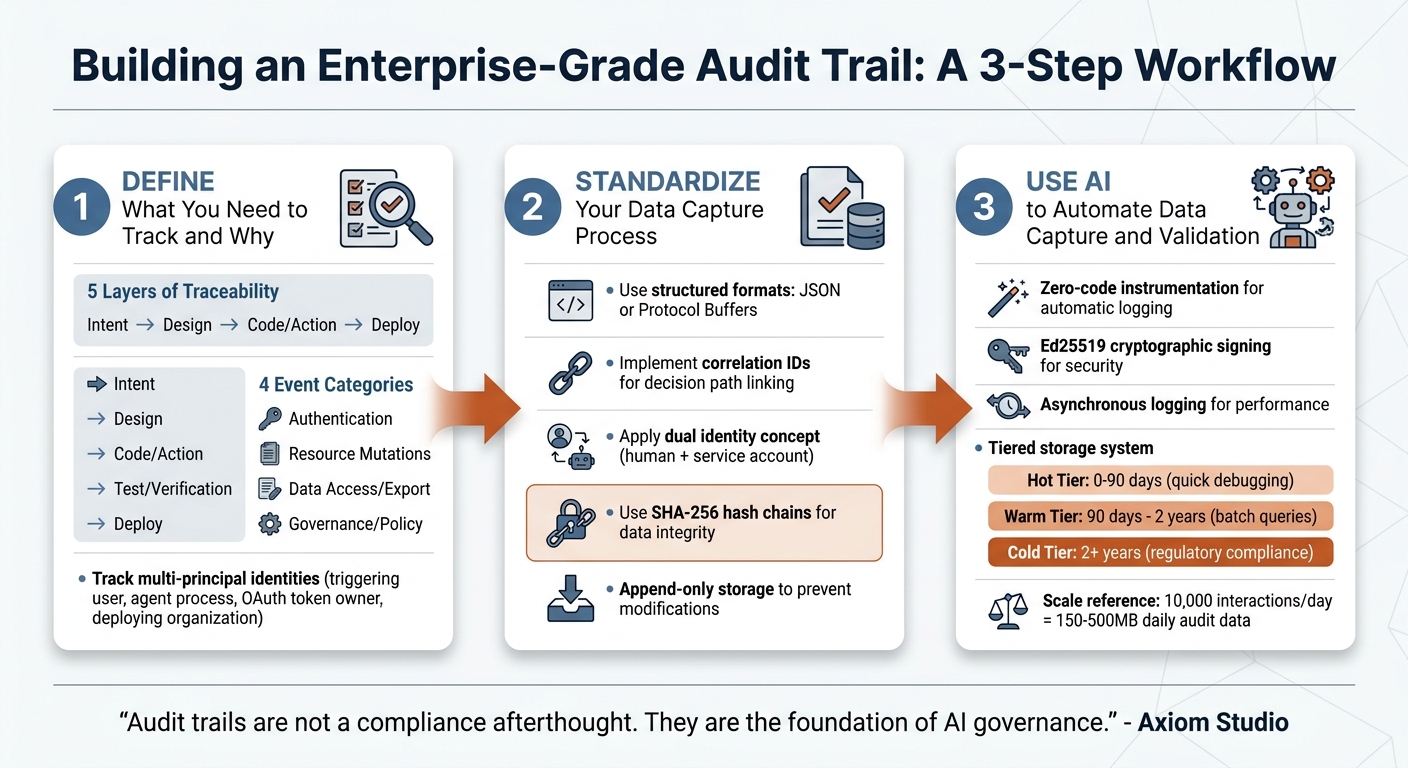
3-Step Process to Build an Enterprise-Grade Audit Trail
Bridging the gap between “the system worked” and “we can prove it was authorized” is a challenge for many B2B SaaS companies [7]. To meet enterprise standards, it’s crucial to define, standardize, and automate your audit trail.
Step 1: Define What You Need to Track and Why
Start by inventorying your systems, including AI agents, service accounts, and workflows. Assess their risk levels and decision types to determine the necessary audit details [11].
Then, focus on the five layers of traceability that enterprise auditors look for:
- Intent: Why was the action taken? (e.g., business needs, customer requests, or prompts)
- Design: Why was a specific approach chosen? (e.g., architecture decisions, trade-offs)
- Code/Action: What changed, and which system produced it? (e.g., file changes, model usage)
- Test/Verification: How was correctness verified? (e.g., test results, human reviews)
- Deploy: When and how did the change reach production? (e.g., deployment timestamps, commit hashes) [19].
Divide events into four key categories:
- Authentication: Logins, MFA updates, or API key changes
- Resource Mutations: State changes, role assignments, or permission updates
- Data Access/Export: Accessing PII, generating reports, or bulk exports
- Governance/Policy: Policy evaluations, compliance flags, or risk scores [14][1].
Also, account for multi-principal identities by tracking the triggering user (e.g., a support agent), the agent process (workload identity), the OAuth token owner, and the deploying organization. Every action must link back to a specific policy decision, including the matched rule and policy version snapshot [7][18][3]. This level of detail elevates a basic log to an enterprise-grade audit trail.
Step 2: Standardize Your Data Capture Process
Once you know what to track, standardize your data capture for consistency. Use structured data formats like JSON or Protocol Buffers instead of unstructured log lines. This approach supports automated analysis and integrates easily with governance tools [1][9]. Standardization is especially critical given that while 88% of organizations are expected to use AI in at least one business function by 2025, only 20% will have a mature governance model for autonomous systems [6].
Incorporate correlation IDs to link the entire decision path, from the initial trigger to the final output [1][9]. For instance, if an AI agent responds to a customer query, the correlation ID ties together the request, model invocation, knowledge retrieval, policy check, and generated response.
To meet compliance requirements like SOC 2 CC6.1, apply a dual identity concept. This means recording both the triggering identity (human) and the executing identity (e.g., service account or OAuth token). A compliance-ready record should include actor identity, policy decision outcomes, matched rule metadata, approval requirements, and execution status [7][18].
To ensure data integrity, use SHA-256 hash chains to preserve record order. For sensitive information like customer prompts containing PII, store SHA-256 hashes instead of raw text. This creates a verifiable audit trail without exposing sensitive data [6]. Additionally, use append-only storage or database policies to prevent deletion or modification of audit records [9][6].
Step 3: Use AI to Automate Data Capture and Validation
With standardized processes in place, leverage AI to handle data capture and validation. AI-driven tools with zero-code instrumentation can automatically log inputs, outputs, tool calls, and reasoning traces in real time – capturing data that traditional logs might miss, such as chain-of-thought reasoning, model versions, and prompt context.
For added security, use Ed25519 cryptographic signing to create unforgeable links between AI operations and their behaviors [11]. Implement asynchronous logging to ensure audit data is recorded without slowing down response times [1].
Automate evidence bundling by packaging evaluation evidence (e.g., test results, scores) with configuration snapshots into immutable artifacts for auditors [9]. For efficient storage, create tiered retention systems:
- Hot Tier: Stores data for 0–90 days for quick debugging
- Warm Tier: Retains data for 90 days to 2 years for batch queries
- Cold Tier: Keeps data for over 2 years to meet long-term regulatory requirements [9].
"Audit trails are not a compliance afterthought. They are the foundation of AI governance." – Axiom Studio [19]
At a scale of 10,000 interactions per day, expect to generate 150MB to 500MB of daily audit data [1]. Tiered storage systems help manage this volume while adhering to regulations – 6 years for HIPAA, 7 years for SOX, and up to 10 years for high-risk AI systems under the EU AI Act [9][11].
Common Mistakes in Audit Trail Implementation and How to Avoid Them
Even well-intentioned audit trail projects can stumble if crucial design elements are overlooked. The most frequent missteps fall into three key areas: scalability issues, compliance oversights, and poor usability. These challenges can undermine performance, regulatory adherence, and the overall utility of your audit system – each of which is essential for success.
Failing to Plan for Growth and Scale
One common mistake is underestimating how much data will need to be logged as systems evolve. Teams often start by manually logging events, but as new features are added, they may neglect to include corresponding audit events [20]. For context, a single AI agent interaction can generate between 5KB and 50KB of audit data. Multiply that by 10,000 interactions daily, and you’re looking at 36GB to 182GB of data annually [1][9]. Without proper planning, storage costs can spiral, and system performance can take a hit.
To avoid this, design your infrastructure to handle three to five times your current data volume [10]. Utilize a tiered storage approach to strike a balance between cost and accessibility. Implement asynchronous, non-blocking data capture to keep latency low – ideally between 5ms and 20ms per interaction [1][6]. A centralized audit logging SDK can also enforce schema validation and ensure consistent data collection across services, helping to prevent the fragmentation that often occurs when teams log events manually [20]. These steps will position your system to scale effectively.
Missing Compliance and Regulatory Requirements
Another pitfall involves failing to meet compliance standards. Logging entire payloads, for example, can inadvertently store sensitive information such as passwords, personally identifiable information (PII), or health records – potentially violating regulations like GDPR and HIPAA [20][7]. Additionally, logs that can be edited or deleted undermine their credibility. As Yaro Labs puts it:
"An audit log that can be edited is not an audit log" [14].
Regulations are becoming stricter. For instance, the EU AI Act, effective February 2025, mandates keeping records for the AI system’s lifetime plus an additional 10 years [1]. In 2024 alone, GDPR fines exceeded €1.2 billion [4]. Failing compliance audits can cost enterprise SaaS platforms between $180,000 and $420,000 annually [8].
To address these challenges, use tamper-evident storage methods. For sensitive data like customer prompts containing PII, store SHA-256 hashes instead of raw text [6]. Always log both the triggering identity (e.g., the human user) and the executing identity (e.g., OAuth token or service account) to meet SOC 2 CC6.1 requirements [7]. These measures not only ensure compliance but also build the trust necessary for enterprise partnerships.
Poor Search and Reporting Capabilities
Beyond compliance, an audit trail must also be usable. Inconsistent logging formats across services can make it nearly impossible to piece together events from different microservices [20][13]. Without correlation IDs to track requests through various systems – HTTP, queues, workers – it becomes difficult to reconstruct a complete "decision chain" [13][1]. Additionally, raw JSON logs can be hard to interpret, slowing down operations and eroding trust [5].
Organizations with well-designed audit trails resolve compliance audits 60% faster [10]. Transparent systems equipped with agent traces can achieve a 50% ticket deflection rate, compared to just 23% for opaque systems. They also improve first-contact resolution rates from 45% to 80% [5]. To achieve these outcomes, normalize events from various sources (like CRMs or AI models) into a unified, queryable schema [10][6]. Include "before/after" state differences – excluding sensitive fields – to make the system more explainable [13]. Finally, conduct quarterly audit drills to ensure your data remains accurate and complete as volumes grow [10][18].
Conclusion: Building Trust Through Complete Audit Trails
In today’s AI-driven B2B support landscape, audit trails aren’t just nice to have – they’re a must. They serve as both a compliance requirement and a way to stand out in competitive markets, directly influencing enterprise sales, customer confidence, and operational performance. As Trussed AI aptly states:
"A well-maintained audit trail is a competitive asset, not just a compliance checkbox" [6].
By ensuring transparency, audit trails make incident resolution smoother and deflect tickets more effectively. This leads to quicker support responses and lower costs, showcasing their dual advantage: operational efficiency and regulatory compliance.
The regulatory landscape is also pushing this necessity forward. With stricter rules in place, verifiable audit trails are no longer optional – they’re now a non-negotiable for vendor selection. Supporting this trend, the search term “AI audit trail” has seen an explosive 867% year-over-year growth, signaling how critical this has become for organizations [9].
To build effective audit trails, focus on three key elements: immutability, automation, and transparency. Immutability ensures data integrity through append-only storage and cryptographic safeguards. Automation streamlines data capture and validation using AI. Transparency provides clear explanations of decision-making processes. As Coverge highlights:
"The demand is shifting from ‘can we build an AI agent?’ to ‘can we prove our AI agent is doing the right thing?’" [9].
FAQs
How do I decide what to log first?
To build a solid foundation for security and compliance, begin by logging the most crucial and sensitive activities. These include user logins and logouts, account changes, permission updates, access to sensitive data, and modifications to critical resources. Tracking these actions is vital for compliance, security investigations, and diagnosing issues effectively.
Prioritize events that have legal, security, or operational importance. Once these are covered, you can gradually expand your logging scope. This approach keeps your audit trail focused and easy to manage while addressing the most pressing concerns first.
How can we prove audit logs weren’t altered?
To ensure audit logs remain trustworthy and unaltered, implement tamper-evident or immutable mechanisms like cryptographic hash chains (e.g., SHA-256). These chains work by including a hash of the previous log entry in each new one, making any tampering immediately noticeable.
Additionally, store logs in append-only formats and secure, independently verifiable locations. This approach further safeguards their integrity. Using cryptographic signatures adds another layer of reliability, enabling auditors or investigators to confirm that logs have not been modified.
How do we log AI prompts without storing PII?
To keep AI prompts logged without storing any Personally Identifiable Information (PII), you can rely on techniques like privacy-preserving redaction and data minimization. This means removing or anonymizing sensitive details before saving the data. By doing so, logs can still document decision-making processes without revealing user-specific information.
Additionally, it’s crucial to implement strict data retention policies and protect logs using encryption and controlled access. These steps not only safeguard sensitive data but also ensure compliance with privacy regulations while maintaining a reliable audit trail.
Related Blog Posts
- Audit Logs: Why They Are Non-Negotiable for Regulated Industries
- Customer portal design checklist for regulated industries (audit, RBAC, logs)
- How to collect logs securely from customers (portal upload best practices)
- How to implement change approvals in support workflows (without ITSM bloat)
Evaluating help desks for a B2B team?
Supportbench is all-inclusive from $32 per agent per month, with migration and onboarding included. See pricing or book a 20-minute demo.






