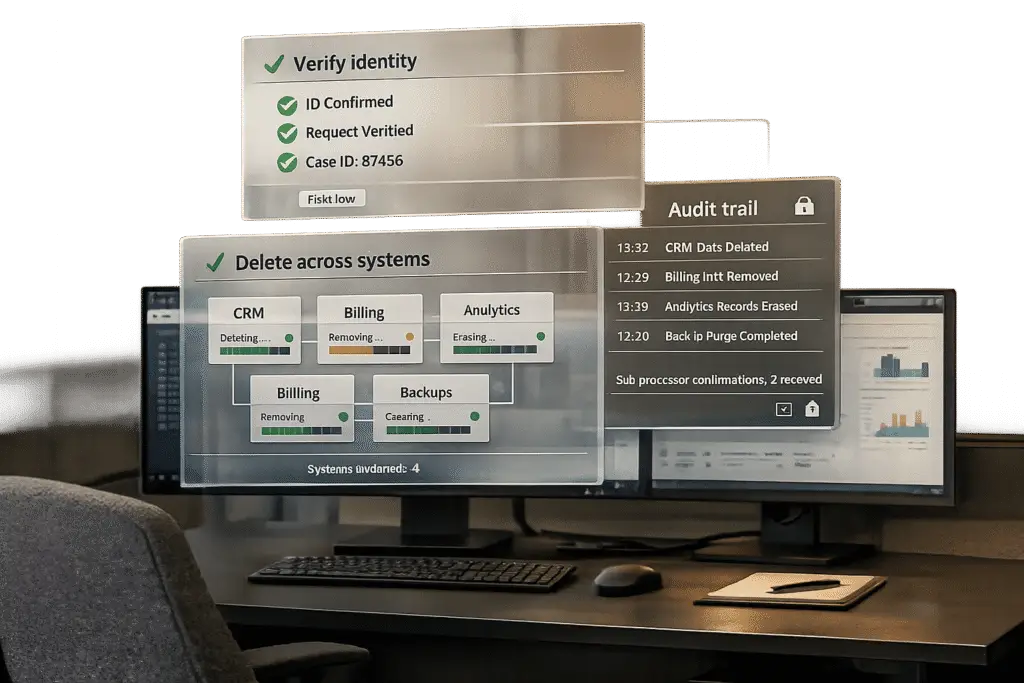
Handling customer data deletion requests isn’t just a technical task – it’s a legal requirement. Here’s what you need to know upfront:
- Legal Deadlines: GDPR mandates a 30-day response; CCPA allows 45 days.
- High Stakes: Non-compliance can result in fines up to €20 million (GDPR) or $7,500 per violation (CCPA).
- Key Steps: Map all systems holding customer data, verify requester identity, execute deletions across all platforms (including third-party processors), and maintain a detailed audit trail.
- Common Pitfalls: Forgetting sub-processors, mishandling backups, or relying on "soft deletes" that don’t meet legal standards.
The process requires a seamless customer support management system, defined roles, and robust documentation. Automating repetitive tasks and using AI tools can save time, reduce errors, and ensure compliance.
Customer Data Deletion Requests: What B2B Teams Need to Know
What Are Data Deletion Requests?
A data deletion request – commonly referred to as the "Right to Erasure" or "Right to be Forgotten" – is a formal request for the permanent removal of personal data from your systems [1][2]. This right is protected under GDPR Article 17 and extends to California residents through the CCPA/CPRA. For B2B teams, it’s critical to note that work-related contact details are also considered personal data. This means professional emails, like name.surname@company.com, fall under these regulations, making B2B businesses equally responsible [11].
Importantly, simply flagging a record as "deleted" (a soft delete) doesn’t meet the legal requirements. The data must be permanently erased or irreversibly anonymized [8][2].
"Soft deletes don’t satisfy the erasure right – you need genuine hard deletion." – GDPRScoreCheck [8]
Types of Data Covered by Deletion Requests
When handling a deletion request, you’re dealing with more than just the basics. The scope includes all data tied to the individual, such as account profiles, support tickets, usage logs, form submissions, and even data shared with external sub-processors [1][2].
This is where things get tricky. A typical B2B SaaS company in 2026 works with eight or more sub-processors, and a valid request means ensuring all of them delete the relevant data as well [2]. One expert put it clearly:
"Your DELETE FROM users is the easiest 5% of the work. The hard part… is the fanout to the eight to fifteen sub-processors a modern SaaS quietly accumulates." – Sadhana M S, TA Expert, withRemote [2]
For analytics or reporting data, irreversible anonymization can be used as an alternative to deletion. However, pseudonymization – where personal data is replaced with a token but can still be re-linked – doesn’t meet the legal standard [1][2][8].
Legal Limits and SLA Timelines
Not all data can be deleted immediately. Certain records, like transaction or tax-related data, must be retained for 5 to 10 years due to legal requirements [2][11]. Similarly, data involved in ongoing fraud investigations or legal claims must be preserved. If data falls under these exceptions, you’re obligated to inform the requester and provide the legal justification in writing [1][8].
For all other data, the timeline for compliance begins as soon as the request is received. Here’s a comparison of major regulations:
| Regulation | Acknowledgment Deadline | Response Deadline | Extension |
|---|---|---|---|
| GDPR (EU/UK) | 48 hours recommended | 30 calendar days | +2 months for complex cases |
| CCPA/CPRA (California) | 10 business days | 45 calendar days | +45 days |
| VCDPA (Virginia) | Not specified | 45 calendar days | +45 days |
| DPDP Act (India) | Not specified | Without undue delay | Not specified |
A quick note about backups: deleting individual data from backups is typically impractical. The standard approach is to let backups naturally expire – usually within 30 to 90 days – while keeping a record of deleted IDs. This ensures that deletions are re-applied if a backup is ever restored [1][2].
Next, we’ll dive into a step-by-step process to help you handle these requests effectively.
sbb-itb-e60d259
Handling GDPR Right to Erasure Requests with Confidence
How to Build a Repeatable Workflow for Data Deletion Requests
Inconsistent processes can lead to serious compliance issues. A standardized approach is crucial for managing deletion requests efficiently and maintaining compliance.
Mapping Where Customer Data Lives
Before you can delete customer data, you need to know exactly where it resides. Start by identifying every system that interacts with customer data – this includes your primary database, CRM, billing tools, email platforms, analytics systems, error tracking tools, and AI providers. Go deeper: SaaS companies often rely on multiple sub-processors that store customer data, such as Stripe for billing, PostHog or Mixpanel for analytics, and Sentry for error tracking [2]. Don’t overlook application logs, data warehouses (like Snowflake or BigQuery), and AI conversation histories, which may also contain hidden PII [13].
To stay organized, create a register that lists each system, the type of data it handles, whether it acts as a controller or processor, and the specific deletion method required – whether that’s an API call, a SQL job, or manual steps through an admin console [4]. Keep this register updated regularly.
Once you have a complete inventory, you can assign clear responsibilities for managing deletion requests.
Assigning Roles and Responsibilities
Clearly defined roles help avoid delays and ensure accountability. Here’s a suggested breakdown of responsibilities:
| Role | Primary Responsibilities |
|---|---|
| Privacy Team / DPO | Intake of requests, identity verification, coordinating across teams, and delivering the final response [12] |
| IT / Engineering | Locating data across systems, executing deletions, and managing backups [12][2] |
| Data Owners | Reviewing exceptions and approving deletions for their specific systems [12] |
| Legal | Handling complex exceptions, such as legal holds, tax retention requirements, or fraud investigations [12] |
| Vendor Management | Notifying third-party sub-processors and ensuring they confirm deletion [12] |
| Customer Support | Receiving initial requests and escalating them to the Privacy Team [12] |
To handle edge cases, establish a clear escalation path. For example: Privacy Team Lead → Chief Privacy Officer → Legal Counsel → Executive Leadership [12]. This ensures that no request gets stuck or overlooked.
With roles assigned, the next step is to centralize tracking for all requests.
Centralizing Request Tracking in Your Support Platform
Using general queues for deletion requests can lead to missed deadlines. Instead, create a dedicated intake channel, such as a specific web form or an email address like privacy@company.com, that feeds directly into a compliance workflow [1][12].
Every request should be logged immediately with a unique case ID, timestamp, requester’s identity, and verification status. Your support platform then becomes the single source of truth, showing the status of each request – whether it’s received, verified, in progress, completed, or flagged for legal exceptions. Centralized tracking not only ensures transparency but also provides documentation if regulators request proof of your compliance efforts.
To strengthen your workflow, consider maintaining a separate deletion_requests table outside your main production database. This table can help track records that should remain deleted, even if data needs to be restored from a backup [2].
Step-by-Step: How to Handle a Data Deletion Request
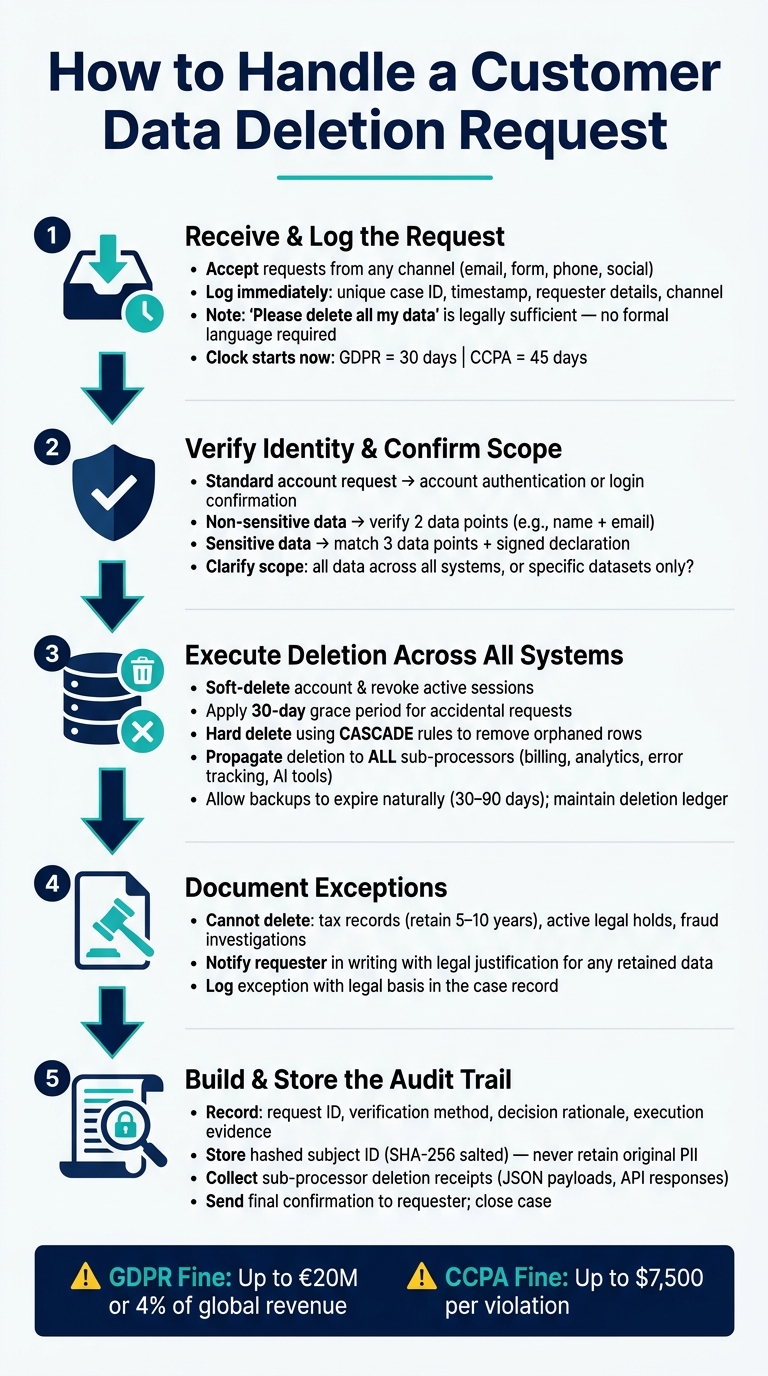
Customer Data Deletion Request Workflow: Step-by-Step Compliance Guide
Once you’ve outlined your workflow and assigned roles, the process of handling data deletion requests boils down to three main actions: receive and classify, verify and scope, and execute and document. These steps ensure compliance while syncing with the workflow and audit trail you’ve already established – building toward the compliance record discussed later.
Receiving and Classifying the Request
Requests to delete data can come in through various channels – email, web forms, phone calls, or even social media. A request doesn’t need to explicitly mention terms like "GDPR Article 17" or "CCPA" to be valid. For instance, a simple "please delete all my data" is enough to trigger legal obligations [6][4].
Start by logging every request with a unique case ID, timestamp, requester details, and the channel it came through. This log also sets the clock ticking on your response deadlines. For example, GDPR requires a response within 30 calendar days, while CCPA allows 45 calendar days but mandates acknowledgment within 10 business days [1][10]. Even if the law doesn’t specify a timeframe, aim to acknowledge the request within 48 hours and record all relevant details.
Once the request is logged, the next step is to verify the identity of the requester and define the scope of the deletion.
Verifying Identity and Confirming Scope
Before making any changes to data, you need to confirm that the person making the request is actually who they claim to be. The level of verification required depends on the sensitivity of the data:
| Data Sensitivity | Verification Requirement |
|---|---|
| Account-based request | Account authentication or login confirmation [10] |
| Non-account, non-sensitive | Verify using at least 2 data points (e.g., name + email) [10] |
| Sensitive data | Match 3 data points + signed declaration under penalty of perjury [10] |
Document the verification process in the case record to maintain accuracy and accountability [4].
After confirming identity, clarify the scope of the request. Is the individual asking for all personal data to be deleted across all accounts and products, or just specific datasets? If the customer has multiple accounts or data stored across different systems, this step becomes even more critical. Missteps here – whether under-deleting or over-deleting – can lead to compliance failures or data integrity issues.
Once identity and scope are verified, you’re ready to move on to the actual deletion process.
Performing Deletions and Documenting Exceptions
The deletion process typically follows a structured pipeline. Start by soft-deleting the account and revoking any active sessions. Then, apply a 30-day grace period to allow for reversals in case the request was accidental or involved an account takeover. After this, initiate the hard deletion by using database CASCADE rules to remove orphaned rows containing personal data [2].
"Your ‘DELETE FROM users’ is the easiest 5% of the work." – Sadhana M S, Cadence Blog [2]
Next, ensure the deletion is propagated across all sub-processors, including billing platforms, analytics tools, and error trackers. If any system fails to process the deletion, reattempt it as necessary [2][3]. For backups, allow them to expire naturally (usually within 30–90 days) but maintain a deletion ledger – a record of erased identifiers. If a backup is restored, this ledger ensures deletions are re-applied before the data becomes active again [5][2].
In cases where data cannot be deleted – such as transaction records required for tax compliance (often retained for 5–10 years) or data tied to ongoing legal claims – document the legal basis for retention. Inform the requester in writing about what is being kept and why [1][2][8]. Proper documentation of exceptions is critical, as undocumented instances can undermine the entire compliance program.
How to Build and Maintain a Compliant Audit Trail
Deleting data is only part of the equation; you also need to prove the deletion while avoiding the retention of sensitive information. A well-structured audit trail not only confirms every deletion but also ensures compliance with regulations. This is especially critical when you consider the steep penalties for non-compliance – up to €20 million or 4% of global annual revenue under GDPR, and fines of up to $7,500 per violation under CCPA [1][2].
What Every Audit Trail Entry Should Include
Each entry in your audit trail should act as a standalone packet of evidence, clear enough for regulators or internal reviewers to understand at a glance. Here’s a breakdown of what these entries should typically include:
| Audit Trail Component | Key Data Points |
|---|---|
| Request Metadata | Request ID, timestamp, intake channel, and applicable jurisdiction (e.g., GDPR, CCPA) |
| Verification Log | Details on identity verification (e.g., MFA, email confirmation), results, and timestamps |
| Decision Record | Legal justification for the deletion or exceptions (e.g., "retained for 7-year tax obligation") |
| Execution Evidence | Hashed subject ID, system-level logs, job IDs, and sub-processor receipts |
| Confirmation | Final response date to the requester and status of third-party notifications |
One major challenge is proving the deletion occurred without holding on to the original personal data. To address this, create a tombstone record using a SHA-256 salted hash of the original user ID. This provides a stable, irreversible identifier [2].
System-Level Logging and Compliance Reporting
System-generated logs are your best ally for tracking every deletion action. These logs should include timestamped API responses, job IDs, or webhook payloads. And don’t stop at your primary database – extend this logging to every sub-processor in your ecosystem, such as billing platforms, analytics tools, and error trackers. Automate the collection of receipts from these systems by attaching JSON objects with sub-processor responses. This approach helps you build a defensible audit trail [2][4].
Running Periodic Audits to Validate the Process
A theoretical process won’t hold up under scrutiny if it’s never tested. Every 90 days, conduct tabletop exercises to simulate different scenarios: a routine deletion request, an identity verification dispute, or a request involving a legal hold. These exercises can uncover issues like overlooked systems, missing receipts from sub-processors, or undocumented exceptions [4].
Additionally, run scripts periodically to check for orphaned rows in related tables after a parent record is deleted. This can confirm that your ON DELETE CASCADE rules are functioning as intended, helping you identify and fix problems before regulators do [2]. By combining regular audits with automated checks, you can transform your deletion workflow into a reliable and fully auditable process. This kind of audit trail not only ensures compliance but also sets the stage for smarter, more efficient deletion workflows in the future.
Using AI to Speed Up and Improve Data Deletion Workflows
AI-driven solutions are transforming how organizations handle data deletion, making the process faster and more secure. Traditional manual workflows just can’t keep up with the growing demand. With data subject access requests (DSARs) increasing by 43% annually and each request costing an average of $1,524 to process manually, the financial and operational strain is undeniable [9]. For companies handling dozens of these requests monthly across various systems, manual methods quickly become unsustainable. AI steps in to significantly cut both time and costs, streamlining every stage of the deletion process. Here’s how AI is reshaping this critical workflow.
AI for Detecting and Routing Deletion Requests
The first hurdle in a data deletion workflow is identifying the request itself. Customers rarely use formal language like, "I am submitting a data deletion request under GDPR Article 17." Instead, they might say, "Please delete my account" or "I want my data removed." This is where AI-powered intent classifiers shine. These tools can recognize deletion requests across emails, chats, and support tickets with an impressive 92% accuracy in under 200 milliseconds [1]. Once identified, AI routes these requests directly to a dedicated data subject rights (DSR) queue, bypassing general support triage. This minimizes compliance delays and ensures requests are handled promptly.
Automating Repetitive Steps with AI
Even after routing, many repetitive tasks remain, such as verifying identities, tagging cases, notifying sub-processors, and defining the scope of the request. AI can handle most of these tasks automatically. For instance, automated pipelines distribute a single deletion command to all relevant sub-processors – billing platforms, analytics tools, error trackers, and more – simultaneously [2][3]. By using a job orchestrator to trigger deletion APIs in parallel, organizations can reduce the average completion time from six weeks to just 24 hours [3].
Supportbench‘s AI automation simplifies this process further by routing cases, initiating actions, and documenting every step, all without requiring IT intervention.
"The hard part in 2026 is not the database delete. It is the fanout to the eight to fifteen sub-processors a modern SaaS quietly accumulates, plus the audit log paradox: you must prove you deleted the user without retaining anything that identifies them." – Sadhana M S, Cadence [2]
AI doesn’t stop at automation – it also ensures thorough documentation and compliance tracking.
Using AI to Generate and Improve Audit Logs
AI not only speeds up data deletion but also strengthens compliance documentation. Automated systems can generate structured deletion certificates immediately after a request is completed. These certificates include key details like request IDs, pseudonymized subject identifiers, timestamps for each stage, and confirmation receipts from all sub-processors [5].
Beyond initial logging, AI performs follow-up verification checks 24 hours after completion. By re-querying all connected systems, it can flag any lingering personal data – whether from a forgotten microservice or an overlooked cache. This proactive approach helps organizations address compliance gaps before regulators have a chance to spot them [5][7].
AI’s ability to automate, verify, and document every step of the deletion process makes it an essential tool in managing modern data workflows.
Conclusion: Key Practices for Handling Data Deletion Requests
Effectively managing data deletion requests boils down to three main elements: a clear workflow, a strong audit trail, and intelligent automation. Together, these components help reduce manual effort and build trust with customers.
The stakes are high – manual processing costs average $1,524 per request, and DSARs are increasing at a rate of 43% annually. Without a repeatable system, these costs can spiral, not to mention the risk of hefty GDPR fines.
Here are some critical steps to consider: Start by mapping all customer data, including data held by sub-processors. Maintain records of hashed identifiers in audit logs to confirm compliance without retaining sensitive personal data. Additionally, document any exceptions, clearly stating the legal basis for retention. These actions create the foundation for a secure and scalable deletion process, particularly in AI-driven B2B environments.
Automation plays a crucial role in strengthening these processes. System-generated logs, for instance, carry more weight with regulators than manual records.
"Auditors don’t trust spreadsheets. They trust system-generated logs. A timestamped API response confirming deletion is worth a thousand screenshots." – Truto Blog [9]
AI technology takes this to the next level by detecting requests with 92% accuracy in under 200 milliseconds [1], sending deletion commands to sub-processors simultaneously, and conducting automated checks to ensure no data is overlooked. When combined with reliable workflows and thorough audit trails, these practices enable support teams to handle requests efficiently while staying compliant.
FAQs
What counts as “personal data” in a B2B deletion request?
When handling a B2B deletion request, "personal data" refers to any information that can identify or be connected to an individual. This includes details like their name, email address, phone number, physical address, account profile information, support ticket content, usage logs associated with their user ID, and payment information. However, data that has been completely anonymized and cannot be linked back to a specific person is not considered personal data.
How do we delete data from backups without breaking retention rules?
To manage data deletion from backups while complying with retention rules, start by addressing data in live systems. Delete or anonymize personal data there as soon as possible. Then, let backups expire naturally according to your documented retention policies.
Here’s how to approach it effectively:
- Identify all systems that store personal data.
- Establish retention policies that align with relevant regulations.
- Implement a schedule to regularly delete expired backups.
This method avoids the complexities of directly editing backups, which is often impractical or even prohibited, while ensuring compliance with data protection requirements.
What should we store in an audit trail without keeping identifiable data?
To keep an audit trail while avoiding the storage of identifiable data, focus on documenting actions without including personal information. Here’s how:
- Timestamps: Record the exact time of requests and actions for accurate tracking.
- Anonymized Identifiers: Use methods like hashed user IDs or pseudonyms to reference users without revealing their identity.
- Action Details: Log specifics about data deletion or anonymization processes carried out.
- Confirmation Records: Maintain proof of actions taken, but ensure no personal details are included.
Steer clear of storing raw personal information such as names, email addresses, or physical addresses. This approach helps uphold privacy standards and ensures compliance.
Related Blog Posts
- How do you export Pylon conversations, tickets, and customer data (step-by-step)?
- Customer portal file retention policies: what to keep, for how long, and why
- How to verify identity and authorization for sensitive support requests
- How to evaluate support software for compliance (HIPAA, SOC2, GDPR basics)