


Managing executive escalations can make or break customer relationships. These situations often involve high-value accounts, SLA risks, or critical customer issues. Without a structured system, teams risk delays, miscommunication, and customer churn. Here’s how to handle escalations effectively using a three-part framework:
- Triage: Quickly assess and prioritize cases based on factors like revenue impact, sentiment, and urgency. Use AI-driven sentiment analysis to flag risks early and ensure consistent prioritization.
- Communication: Align stakeholders with clear roles, structured updates, and decision-ready briefs. Transparency and timely updates build trust.
- Resolution: Streamline workflows with defined steps – diagnose, reassign, approve, and execute. AI can handle routine tasks, while humans focus on complex decisions.
This guide transforms chaotic escalations into predictable workflows, protecting customer trust and improving team efficiency.
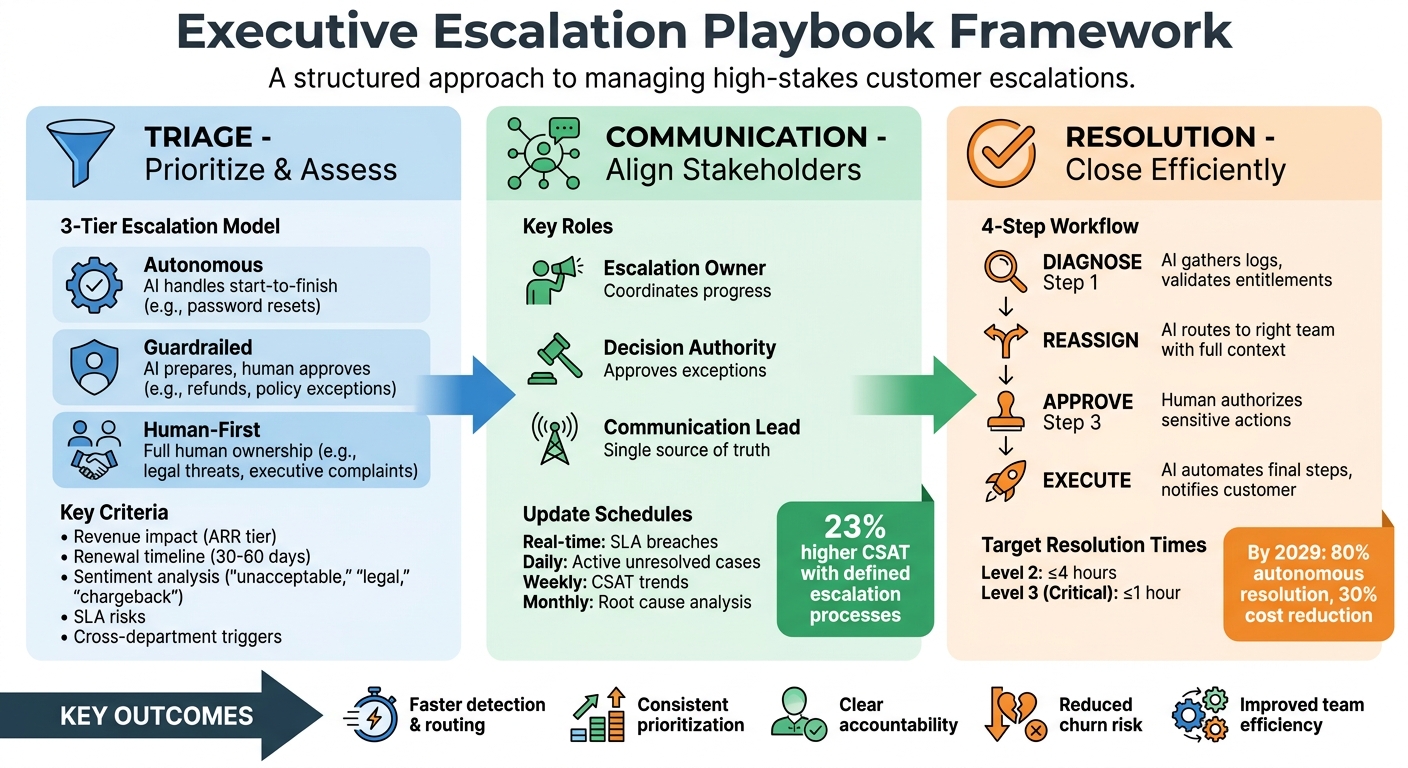
Executive Escalation Framework: Triage, Communication, and Resolution Workflow
Managing Customer Escalations Effectively
sbb-itb-e60d259
Triage: How to Prioritize and Assess Escalations
Handling escalations effectively requires more than just reactive measures – it demands a structured approach. At its core, triage is about evaluating multiple factors simultaneously, such as customer value, sentiment, technical urgency, and operational risks, rather than relying solely on an individual agent’s judgment.
"Escalation handling has historically been both manual and subjective. One agent recognizes severity instantly; another misses the signal… As you scale, that inconsistency becomes a tax on your org." – Ameya Deshmukh, EverWorker [1]
AI platforms streamline this process by analyzing key signals like ARR tier, proximity to renewal, sentiment (flagging phrases like "unacceptable", "legal", or "chargeback"), and operational data such as repeated ticket reopens or stalled resolutions. This ensures critical issues are flagged and routed to the right teams without clogging the system with non-urgent alerts. The objective? To address problems before SLA breaches occur or customer trust erodes. Let’s dive into the criteria that define executive-level escalations.
Setting Triage Criteria
Clear criteria are essential for identifying which issues warrant executive attention. Factors like revenue impact, strategic importance of the account, renewal timelines (e.g., within 30–60 days), and cross-department triggers (legal, compliance, or security) should all be considered. For example, a $500,000 ARR account at risk of cancellation is far more pressing than a $5,000 customer requesting a minor feature.
AI tools play a vital role here, spotting patterns in sentiment and technical severity. Combining factors like high ARR, negative sentiment, and SLA risks can minimize false positives. Establish thresholds to ensure consistency – for instance, automatically escalating refund requests over $10,000 or legal contract exceptions, regardless of sentiment. By feeding these criteria into AI systems, you can ensure consistent prioritization and routing across the team.
3-Tier Escalation Model
Not every escalation needs to land on an executive’s desk. A three-tier escalation model helps clarify responsibilities and keeps workflows efficient:
| Escalation Lane | AI Role | Human Role | Typical Use Case |
|---|---|---|---|
| Autonomous | Handles start-to-finish | None (audit only) | Password resets, basic "how-to" queries |
| Guardrailed | Prepares context and drafts actions | Approves or denies sensitive decisions | Refunds above thresholds, complex account changes |
| Human-First | Gathers and organizes context | Full ownership and resolution | Legal threats, executive-level complaints, major outages |
For guardrailed cases, AI gathers the necessary details and drafts actions, leaving final approval to a human. These could include decisions on credits, policy exceptions, or account changes. Human-first cases, such as security breaches or high-profile customer complaints, require full ownership by senior team members or executive sponsors. While AI provides context and tracks progress, humans drive the resolution.
To prevent dropped cases, ensure explicit ownership is confirmed as cases move between tiers. AI can help track transitions and monitor accountability, reducing the risk of "silent failures" where escalations stall without resolution.
Documenting the Triage Process
Every escalation should come with a detailed, structured case brief. This brief should include:
- A concise 1–3 sentence summary
- Issue classification (e.g., technical outage, billing dispute, contract exception)
- Key account details (ARR, SLA level, renewal date)
- Troubleshooting logs and actions taken
- A recommended next step
AI-generated summaries can save time by automatically capturing timestamps, sentiment shifts, and ownership changes. This transparency ensures that when cases reach executives or engineering teams, the context is clear and actionable. Platforms like Supportbench automate this documentation, updating case briefs with every new activity, so agents don’t have to maintain logs manually.
Additionally, set up triggers to detect unresolved loops – such as cases with five or more interactions or customers returning within 24–72 hours for the same issue. Tracking severity and ensuring visibility throughout the escalation process is crucial for seamless transitions and effective resolutions. Documentation isn’t just about record-keeping; it’s the backbone of smooth communication and resolution, ensuring every team member has the information they need to act decisively.
Communication: Keeping Stakeholders Aligned and Informed
Once triage is complete, clear and structured communication becomes the backbone of successful escalations. Without it, teams risk duplicating efforts, sending mixed messages to customers, and leaving stakeholders frustrated. The key lies in using structured templates, assigning clear roles, and maintaining regular updates to close any information gaps.
"Escalations are predictable. Treat them as engineered workflows, not exceptions." – Ameya Deshmukh, EverWorker [1]
Organizations with defined escalation processes see up to 23% higher customer satisfaction scores [5]. These companies don’t treat communication as an afterthought – it’s baked into their workflows. When everyone knows who’s responsible, when updates will come, and what decisions are pending, escalations move faster and with less friction.
Escalation Communication Templates
Every escalation handoff should include a decision-ready brief that ensures no one starts from scratch. A solid template should cover these five key elements:
- Customer summary: A concise overview of the issue.
- Account context: Details like ARR tier, SLA status, and region.
- Troubleshooting log: A record of steps already taken.
- Key artifacts: Relevant materials like error logs, screenshots, or configurations.
- Next steps and call to action: A clear plan for moving forward.
AI tools can help draft these briefs by analyzing ticket history and sentiment, ensuring consistency even during high-pressure situations. For instance, Cynet boosted its CSAT score from 79 to 93 and cut resolution times nearly in half by using AI-generated case intelligence. This approach gave Tier 1 agents all the necessary context before escalating to senior engineers [3].
When transitioning from AI to human resolution, fallback messaging is essential. Be transparent about the handoff. For example: "I’m connecting you with our senior technical team who specializes in this exact issue. They’ll review your case within the next two hours and provide a detailed action plan by 5:00 PM ET today." This kind of communication builds trust while the resolution is in progress [2].
Assigning Communication Roles
Unclear responsibilities lead to confusion. To avoid this, define three specific roles for every escalation:
- Escalation owner: Oversees progress and coordinates across teams.
- Decision authority: Approves policy exceptions, refunds, or contract changes.
- Communication lead: Acts as the single source of truth for updates.
"With heightened awareness and a shared language, your team will start to realize that much of what they have been interpreting as interpersonal friction has actually been perfectly healthy role-based tension." – Liane Davey, Author and Team Effectiveness Advisor [4]
The escalation owner ensures the case stays on track, while the decision authority handles significant customer-impacting decisions. Meanwhile, the communication lead makes sure all updates – whether internal or external – are consistent, preventing conflicting messages. Assign these roles at the start of each escalation and document them in the case brief to eliminate any ambiguity.
Setting Update Schedules
With 73% of customers expecting faster service post-escalation, timely updates are non-negotiable [5]. Tailor update schedules based on the severity of the escalation:
- Real-time alerts: For SLA breaches or critical technical blockers.
- Daily check-ins: For unresolved active cases.
- Weekly reviews: For tracking customer satisfaction trends and escalation volumes.
- Monthly analyses: For identifying root causes and updating policies.
Avoid vague deadlines like "as soon as possible." Instead, set clear timeframes. For example: "We need a decision by 3:00 PM ET Wednesday to protect the release plan and avoid a two-week delay." AI can help by flagging stalled tickets and triggering internal alerts or customer status updates [1].
Use status indicators (Red/Yellow/Green) to provide instant clarity on whether an escalation is meeting SLA targets. Aim for resolution times of four hours or less for Level 2 escalations and one hour or less for Level 3 (critical) escalations [5]. By maintaining this cadence, stakeholders stay engaged, and customers feel reassured – even if the technical resolution takes time.
With communication running smoothly, the next step is to focus on resolving escalations as quickly as possible.
Resolution: How to Close Escalations Efficiently
Resolution is where all the effort in triage and communication pays off. The objective? Close cases with as few gaps as possible, even when multiple teams or executive decisions are involved. A structured workflow is the key to ensuring nothing gets overlooked.
"Escalation excellence isn’t about moving faster in chaos – it’s about designing a system that prevents chaos from forming." – Ameya Deshmukh, EverWorker [1]
The best resolution workflows strike a balance between speed and control. By using AI for routine tasks and reserving human input for critical decisions, teams can close cases faster and create a feedback loop that reduces repeat escalations. This method ties together triage and communication, paving the way for smooth resolutions.
4-Step Resolution Workflow
Every escalation should follow these four stages: Diagnose, Reassign, Approve, and Execute. Each step has a clear goal and defined handoff process.
- Diagnose: Before human intervention, AI steps in to gather logs, validate entitlements, confirm identities, and perform initial troubleshooting. This ensures the case is "decision-ready", saving specialists from starting from scratch.
- Reassign: AI routes the issue to the right team – whether it’s Tier 2 support, engineering, or billing. The handoff includes a detailed brief with account context (like ARR tier and SLA status), troubleshooting logs, and suggested next steps. This eliminates the frustration customers feel when they have to repeat themselves [1][2].
- Approve: For sensitive actions like refunds or policy exceptions, AI suggests resolutions based on policies, while humans provide final approval. This keeps control in place while still moving faster than manual processes [2].
- Execute: Once approved, AI automates the final steps – opening tickets, applying credits, updating systems, and notifying the customer. By 2029, AI is expected to autonomously resolve 80% of common customer service issues, contributing to a 30% reduction in operational costs [2].
| Workflow Stage | AI/Automation Role | Human Role | Outcome Benefit |
|---|---|---|---|
| Diagnose | Collects logs, artifacts, and sentiment signals. | Reviews structured brief. | Prevents redundant troubleshooting. |
| Reassign | Routes based on specialist capacity and issue type. | Accepts ownership of the case. | Reduces re-triage and idle time. |
| Approve | Proposes resolution (e.g., credit) based on policy. | Provides final authorization. | Maintains control over high-risk actions. |
| Execute | Updates systems (CRM, Billing) and notifies customer. | Oversees complex exceptions. | Faster final resolution and closure. |
Tracking Progress and Outcomes
After resolution, tracking its impact is critical for ongoing improvement. Beyond standard metrics like resolution time and CSAT scores, focus on specific areas like handoff quality. For instance, monitor how quickly Tier 2 specialists act after receiving a case. Delays here might indicate incomplete briefs or incorrect routing [1].
Predictive CSAT is another powerful tool. AI analyzes sentiment in emails, chats, and calls in real time to score resolution health. This acts as an early warning system, allowing teams to address issues before trust erodes, rather than relying solely on post-resolution surveys [1][6].
Dynamic SLAs adjust based on factors like ticket age, queue load, and severity. AI flags cases at risk of SLA breaches, ensuring high-value accounts (based on ARR tier and renewal timelines) get priority. This approach helps prevent churn by focusing on the most critical escalations [1].
Decision logs also play a key role. These logs track every approval, override, and exception during the process. For example, a high frequency of overrides – when humans reject AI-recommended solutions – can signal that the AI needs retraining or that policies have shifted [7].
De-escalating and Learning from Cases
Closing a ticket isn’t the end of the story. While post-resolution surveys offer direct feedback, AI can uncover patterns that surveys might miss. For example, AI might identify "repeat-contact loops", where customers return within 24–72 hours about the same issue. Recognizing these loops early can prevent future frustration by triggering quicker escalations [1].
"The KPI win is not only in deflection. It’s in escalation quality – the speed and accuracy of the human resolution once the baton is passed." – Ameya Deshmukh, EverWorker [2]
AI also highlights knowledge gaps – cases where existing documentation failed to provide a solution. These insights feed directly into updating the knowledge base, turning it into a dynamic resource with version control and source authority rules. Treating documentation as a living resource helps avoid similar escalations in the future [1].
Customer health scoring goes beyond technical fixes, combining escalation data with account value, renewal timelines, and historical sentiment. This gives account managers a clear view of which customers might need extra attention, even after their issue is resolved. A closed ticket doesn’t always mean a satisfied customer, and health scores help bridge that gap before it leads to churn [1].
To avoid customers getting stuck in endless back-and-forths, set max turn limits where AI automatically escalates with a summary after a set number of interactions. Similarly, confidence gating ensures that low-certainty AI responses are routed to humans for clarification if needed [2].
With a streamlined resolution process in place, the next step is tackling the common pitfalls that can disrupt even the best-designed escalation workflows.
Common Pitfalls and How AI Can Prevent Them
Escalation workflows often encounter three core challenges: inconsistent processes that slow detection, emotional reactions that damage trust, and tracking gaps that leave cases unresolved. These issues can lead to miscommunication, frustrated customers, and wasted team resources.
AI steps in to tackle these problems by replacing subjective decision-making with objective, data-driven detection and enforcing consistent playbooks. By streamlining triage, communication, and resolution, AI helps prevent these common pitfalls and ensures smoother workflows.
Avoiding Inconsistent Processes
Even with a structured framework, lapses in consistency can still occur. Without standardized playbooks, agents may rely on memory or personal judgment, leading to delays, misrouted cases, or context loss during handoffs. AI helps by analyzing signals like intent, sentiment, and SLA risks to trigger escalations based on data, not guesswork.
For example, instead of waiting for an agent to pick up on a customer mentioning "legal action" in an email, AI flags high-risk language such as "unacceptable", executive complaints, or cancellation threats. It then routes the case to the right specialist with a detailed brief, including timelines, artifacts, and necessary context. AI also tracks whether the assigned resolver accepts the task, ensuring a consistent and predictable escalation process.
Managing Emotional Responses
High-stakes escalations often come with heightened emotions, which can lead to reactive mistakes. Missteps in communication can frustrate customers further, especially when automation feels impersonal or adds unnecessary steps. AI minimizes these risks by identifying emotional triggers early. It evaluates sentiment and urgency to detect frustration, repeated complaints, or legal threats, providing agents with structured briefs and fallback messaging to maintain trust.
When AI spots repetitive "looping" behavior – where customers repeatedly raise the same issue – it can escalate the matter before frustration boils over. Additionally, AI equips agents with tailored empathy scripts, helping them handle sensitive interactions with clarity and compassion.
Multi-Level Tracking Without Gaps
Escalations often fail when ownership is unclear or communication breaks down. AI ensures accountability through closed-loop monitoring. It tracks task ownership and prompts regular customer updates, preventing cases from being forgotten. For instance, automated reminders can alert agents about cases that haven’t been updated within a set timeframe. AI can also flag tickets at risk of SLA breaches based on factors like ticket age, severity, and queue load.
Dynamic SLAs further enhance tracking by adjusting priorities based on customer tier, renewal timelines, or historical sentiment. This ensures high-value accounts receive prompt attention, eliminating unaccepted assignments and guaranteeing every escalation has a clear owner driving it toward resolution.
The table below highlights common pitfalls and how AI solutions address them to ensure smooth escalation handling:
| Pitfall | AI Solution | Impact |
|---|---|---|
| Late Detection | Real-time sentiment & urgency analysis | Enables early intervention to reduce churn risk |
| Context Loss | Auto-generated structured case briefs | Prevents agents from starting from scratch, reducing handling time |
| Unclear Ownership | Ownership confirmation & tracking | Ensures every task is accepted and managed |
| Communication Debt | Automated customer update prompts | Keeps stakeholders informed and builds trust |
Conclusion
Handling executive escalations effectively requires a combination of structured triage, clear communication, and streamlined resolution processes to safeguard key accounts.
Supportbench’s AI tools play a pivotal role by identifying escalations early through sentiment and urgency analysis, automating the collection of relevant context, and ensuring consistent ticket routing and prioritization. Looking ahead, projections suggest that by 2029, agentic AI could autonomously resolve 80% of common issues, potentially cutting operational costs by 30% [2]. These improvements not only enhance efficiency but also sharpen the accuracy and responsiveness of support teams. However, the true measure of success isn’t just about deflecting issues – it’s about achieving quality resolutions: ensuring speed and precision when human intervention is required.
"Escalation excellence isn’t about moving faster in chaos – it’s about designing a system that preempts chaos." – Ameya Deshmukh, EverWorker [1]
FAQs
What signals should trigger an executive escalation?
Executive escalations come into play when high-risk or high-impact issues arise that frontline support teams cannot resolve. These could include unresolved complex problems, significant customer dissatisfaction, breaches of service-level agreements (SLAs), or critical system outages.
To manage this effectively, AI tools can play a crucial role. They can identify early warning signs, such as negative customer sentiment or potential policy violations. This ensures that only the most urgent cases – like major outages, legal complications, or extreme dissatisfaction – are escalated to executives. At the same time, frontline teams can focus on resolving less critical issues with confidence and efficiency.
How do we set AI escalation thresholds without too many false alarms?
To cut down on false alarms when setting AI escalation thresholds, rely on AI to evaluate a mix of risk factors, like customer sentiment, response delays, and case history. Establish clear triggers, such as SLA breaches or signs of customer frustration, to make escalation decisions more precise. Regularly review the data from escalations and tweak thresholds based on feedback and performance metrics. This approach helps maintain accuracy while keeping alert fatigue in check.
What escalation metrics should leaders track beyond CSAT and resolution time?
Leaders should track more than just CSAT and resolution time. Metrics like customer sentiment, response delays, case history, SLA breaches, and high-risk ticket indicators flagged by AI provide deeper insights. These metrics allow for early detection of potential problems and enhance escalation management in challenging support scenarios.






