


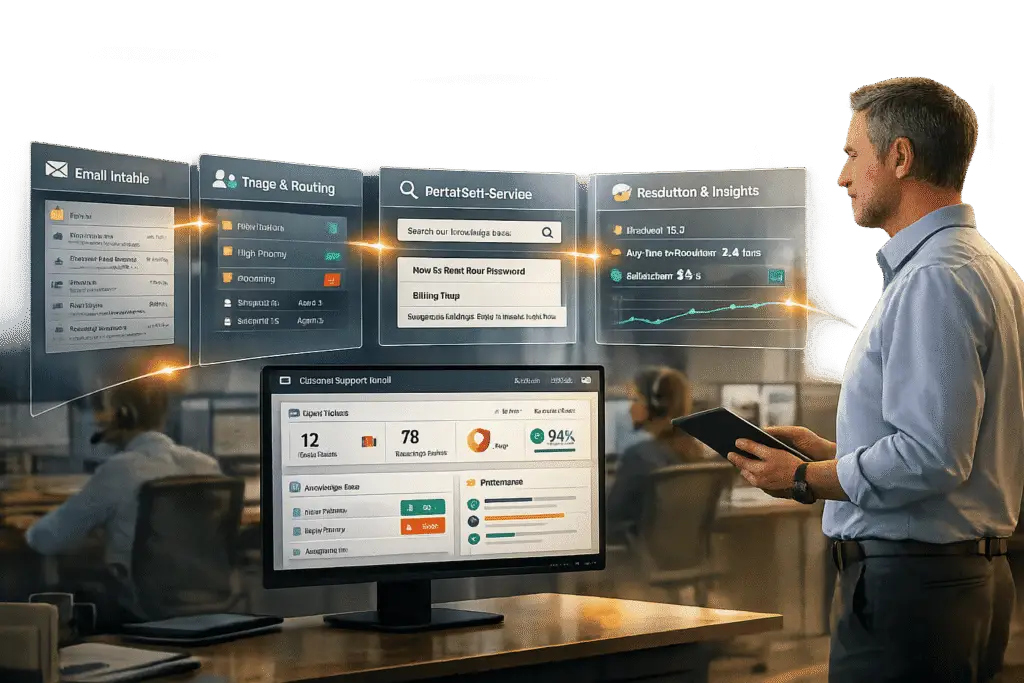
Migrating from email-only support to a customer portal can streamline communication, reduce manual workload, and improve customer satisfaction. Here’s the process in a nutshell:
- Audit Current Workflows: Identify inefficiencies in email-based support, such as delayed responses, lost tickets, and high manual effort.
- Set Clear Goals: Define measurable targets, like reducing response times or increasing customer satisfaction.
- Align Stakeholders: Secure internal buy-in by highlighting the portal’s advantages, such as automation and centralized access.
- Plan Communication: Inform customers about the transition, its benefits, and how it will work.
- Design the Portal: Customize features for business needs, like role-based access and self-service tools.
- Pilot the Migration: Test the portal with select customers to gather feedback and resolve issues.
- Train Support Teams: Ensure agents are comfortable using the new system before launch.
- Launch Gradually: Roll out the portal in phases, monitor adoption, and address customer concerns.
- Optimize Post-Launch: Use feedback and data to refine the portal and expand its capabilities.
This structured approach ensures a smooth transition while minimizing disruptions and maximizing the portal’s effectiveness.
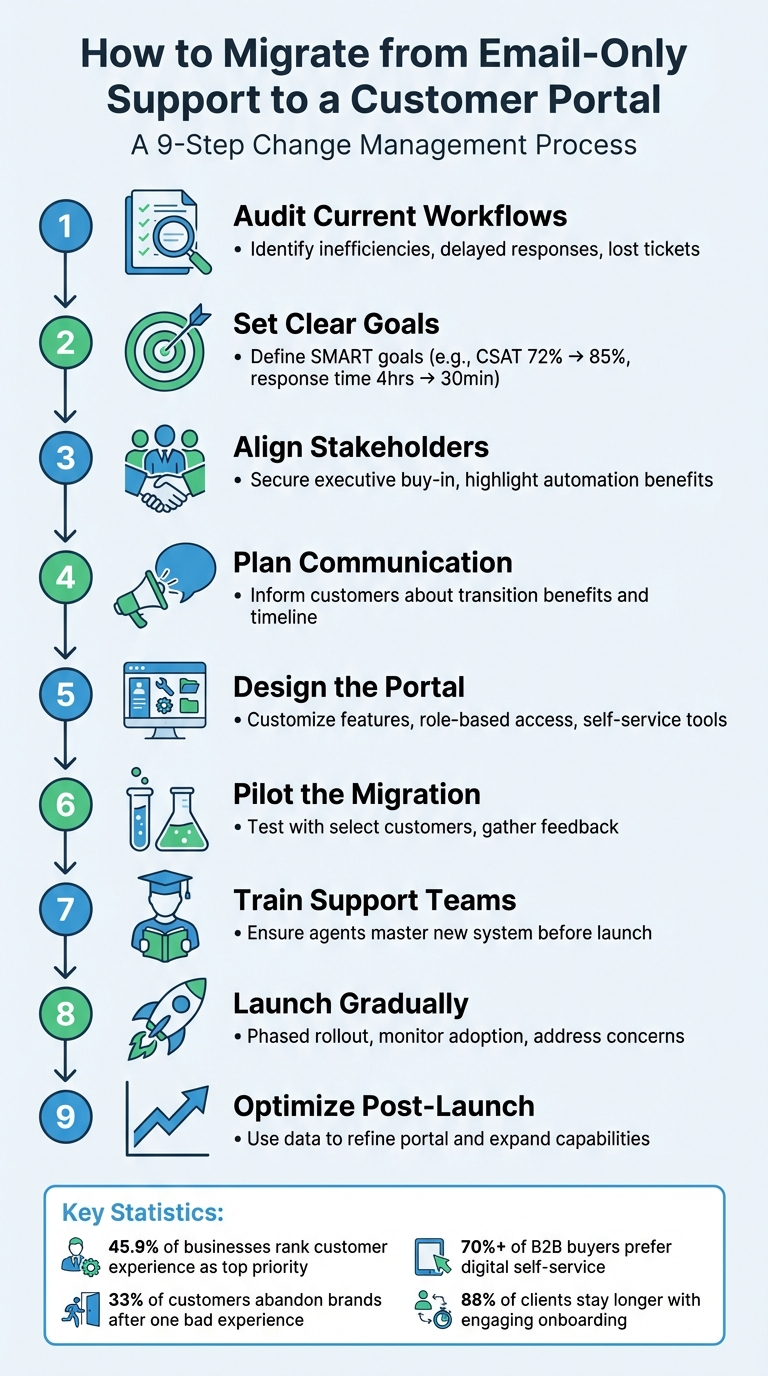
9-Step Customer Portal Migration Process: From Email Support to Self-Service
Assess Current Workflows and Set Migration Goals
To ensure a smooth transition, start by pinpointing existing issues in your email workflows and defining what success will look like post-migration.
"Switching platforms is a strategic move – one that should be guided by data, not frustration."
- Eric Klimuk, Founder and CTO, Supportbench [1]
Audit Your Email Support Operations
Take a deep dive into your current email workflow. Map out every step – from the moment a customer inquiry comes in to when it’s resolved. Pay attention to response times and recurring patterns. For instance, are some requests always delayed? Do tickets fall through the cracks when multiple agents are involved? And are customers sending follow-ups because they can’t track their original queries?
Also, don’t overlook hidden costs. Things like API limits, extra user fees, and manual tasks that could be automated can drain your resources. Check your current contract for renewal terms and cancellation policies to avoid surprises.
Gather input from everyone involved – frontline agents, IT staff, and management. They’ll often highlight practical issues that technical data might miss, like workflow bottlenecks, security risks (such as GDPR or SOC 2 compliance), or budget constraints.
Once you’ve identified inefficiencies, you’ll be in a better position to set meaningful goals for your migration.
Set Measurable Goals
Use the insights from your audit to establish SMART goals – specific, measurable, achievable, relevant, and time-bound. For example, aim to boost customer satisfaction (CSAT, CES, and NPS) from 72% to 85% within six months or cut first-response times from 4 hours to 30 minutes.
Remember, customer experience is a growing priority for businesses, with 45.9% ranking it as their top focus for the next five years. And the stakes are high – 33% of customers will abandon a brand after just one bad experience [4]. Your goals should reflect these realities.
Track metrics like self-service portal adoption (e.g., aiming for 60% of customers to use self-service within three months), first-contact resolution rates, and reductions in support costs per ticket. Start monitoring these KPIs right away to establish a baseline. This data will be crucial for measuring success once the migration is complete.
sbb-itb-e60d259
Build Stakeholder Alignment and Communication Strategy
Migrating to a new portal impacts everyone – from support agents managing tickets to the customers submitting them. Without proper alignment and clear communication, even the most carefully planned transition can face significant challenges.
Secure Approval from Internal Teams
Use insights from your workflow audit and goal-setting process to align internal teams. Highlight the drawbacks of email-only support, such as outdated interfaces, limited ROI, and restricted AI capabilities, while emphasizing the advantages of a modern portal – faster resolutions and better automation [3]. Explaining the "why" behind the change helps teams see its value.
Get executive buy-in early on. Leadership support ensures resources are allocated, and the project remains a priority [3]. Assign a dedicated project lead to oversee the transition and assess its impact on customer experience.
"Understanding the ‘why’ of the switch should make your priorities for a new platform clearer." – Intercom [3]
Expect some resistance. Team members may hesitate due to comfort with existing workflows or concerns about losing features [3]. Address these concerns by creating a feedback channel where employees can ask questions and voice concerns during the transition [3]. Additionally, identify "super users" – team members who quickly adapt to the new portal – and empower them to mentor others [5].
Don’t overlook technical details. Conduct an integration audit before the migration to ensure compatibility with third-party systems like CRM platforms, accounting tools, and SLA trackers [2]. Involve key stakeholders, including IT teams, finance, frontline agents, and management, in planning sessions. Their input can uncover potential misalignments that technical specs might miss [1]. Consider this: companies with robust training programs report 218% higher income per employee, and 94% of employees are more likely to stay at companies that invest in their development [5].
Plan Customer Communication
Your customers need to understand what’s changing, when it’s happening, and how it benefits them. Frame the migration as an upgrade, offering faster resolutions, self-service options, and improved accessibility [1].
"Strong internal and external messaging helps ensure the new system feels like an upgrade, not a disruption." – Eric Klimuk, Founder and CTO, Supportbench [1]
Establish communication checkpoints, such as commitment meetings, cutover dates, and a "hypercare" period immediately after launch [6]. Be transparent about changes – new login procedures, updated support email addresses, or different ticket submission methods. Equip your support team with response templates to ensure consistent and accurate messaging [1].
Schedule the migration during a quieter business period with lower ticket volumes to minimize service disruptions [1]. To ensure a smooth transition, keep the old email system running alongside the new portal for a short time to monitor stability and avoid missed communications [1]. Have a rollback plan ready, such as reactivating legacy email routing, in case of critical issues [1].
Start tracking key metrics like response times and customer satisfaction scores from day one of the portal launch. This data will help confirm whether the migration is delivering the promised improvements [1].
With internal alignment and customer communication strategies in place, you’re ready to design a portal tailored to your B2B needs.
Design and Prepare the Customer Portal
Once your internal teams are aligned and your customer communication strategy is in place, it’s time to build a portal that can handle the intricate demands of B2B support. These portals need to accommodate complex account structures, often involving multiple stakeholders under a single business account.
Customize the Portal for B2B Needs
Start by focusing on account-level management. Unlike B2C, where the emphasis is often on individual users, B2B portals should track interactions at the account level. Implement role-based access control (RBAC) and integrate it with your existing permission systems. This ensures that only authorized users can view sensitive information like contract pricing, invoices, or support tickets.
Make the portal feel like a seamless part of your brand by white-labeling it. Customize fonts, colors, and logos to match your brand identity. Don’t forget mobile compatibility – field technicians and managers should have full access to the portal on their smartphones.
Include robust self-service tools. A well-organized knowledge base, FAQs, and automated onboarding workflows are essential. In fact, over 70% of B2B buyers now prefer digital self-service channels for account management and issue resolution [7]. Additionally, create a centralized hub where customers can securely access everything from invoices and payment history to technical manuals. To make communication easier, integrate tools like Slack Connect and Microsoft Teams for native messaging, reducing reliance on email.
Once the portal is tailored to meet your customers’ needs, you can elevate it further by incorporating advanced AI capabilities.
Add AI-Powered Features
AI can completely reshape how your support team tackles complex B2B challenges, especially when transitioning from email-based support. Start by using machine learning and natural language processing for automated ticket classification and routing, ensuring issues reach the right agents quickly.
Adopt a tiered approach to automation. Focus AI efforts on the most common support requests that drive high ticket volumes [8]. Begin with a shadow mode for 10–14 days, where AI drafts responses for agent review. This builds trust while ensuring accuracy before full deployment.
Take automation a step further by enabling AI to handle entire workflows, such as processing refunds, resetting passwords, or updating account details. Enhance the portal with AI-driven ticket summarization to help agents quickly understand the context of complex issues. Predictive tools like CSAT (Customer Satisfaction) and CES (Customer Effort Score) can also identify potential problems before they escalate. According to Gartner, 85% of leaders will explore customer-facing Generative AI, and by 2029, agentic AI is expected to autonomously resolve most common customer issues [8].
"AI changes the curve by resolving high-frequency issues instantly and preparing context for agents on escalations, reducing both handle time and backlog." – Christopher Good, EverWorker
Prepare for Data Migration and Testing
Decide early on whether to migrate all historical records or focus only on active, essential data. Ensure the portal supports bulk import/export via API or internal migration tools. Define how metadata like tags, timestamps, and requester details will transfer to the new system.
Before migrating, clean and standardize your data. Audit historical email records to remove duplicates and inconsistencies. Conduct small, targeted migration tests in a staging environment to catch formatting issues or system incompatibilities. Always have a rollback plan in place to maintain continuity in case of unexpected problems.
Use the staging environment for user acceptance testing (UAT). This allows your support team to simulate daily tasks – like ticket handling, escalations, and reporting – without affecting live data. Check that connected tools, such as CRM systems, SLA trackers, and analytics dashboards, are fully functional. Test key features like automated alerts for overdue tickets and escalation rules to ensure everything runs smoothly before the official launch.
"A trial run is your safety net. Before fully committing, simulate real workflows to catch friction points and ensure team readiness." – Supportbench
Once system compatibility is verified, finalize preparations to minimize risks during the migration launch. With a well-designed portal, AI features in place, and thorough testing complete, you’ll be ready to roll out the portal to pilot customers in a phased migration.
Run Phased Migration and Pilot Testing
Rolling out changes in phases reduces risks and allows for adjustments based on practical use. Start with a focused pilot program, gather feedback, and expand gradually.
Run Pilot Programs with Select Customers
Select pilot participants who represent your actual user base. Include a mix of customers from different segments to account for diverse needs. Focus on customers who frequently interact with your support team – they’re familiar with your current workflows and can provide meaningful feedback [9]. Include both new and long-time customers to understand how users at different points in their journey engage with the updated interface [9].
"Choosing the right sample for pilot testing is not just a step – it’s the foundation for refining the customer experience." – Damian Grabarczyk, Co-founder, PetLab Co. [9]
Recruit loyal customers who are invested in your brand; they’re often more willing to provide detailed, actionable feedback [9]. Make sure the sample size is large enough to catch technical issues and usability problems but small enough to manage efficiently for quick iterations [10].
During the pilot phase, run the new portal alongside your legacy email system. This setup allows users to switch back to the old method if critical issues arise [9][1]. Monitor for duplicate tickets appearing in both systems, as this could signal routing misconfigurations. Track key metrics like response times, resolution times, and satisfaction scores from the very beginning [1].
Set up a centralized feedback system, such as a spreadsheet or dashboard, to organize issues by department. Assign an impact score (1–5) to each issue [11][12]. Address high-priority problems immediately, while reviewing lower-priority ones monthly [11]. Add a temporary "Feedback" tab to the new portal to collect real-time user input as they navigate the system [2]. Conduct daily check-ins during the pilot phase to address new issues as they arise [1].
Once the pilot concludes, use the insights to focus on training your support teams, ensuring they can fully leverage the new portal’s features.
Train Support Teams on Portal Tools
Get your frontline agents involved in the process early to encourage adoption [1][13]. Use a sandbox or staging environment where they can practice ticket handling, escalations, and reporting without affecting live data. This hands-on experience helps identify usability issues and lets agents familiarize themselves with the workflows before the official rollout [1][13].
"Your agents are the first to notice friction – missing features, sluggish response, confusing UI. Make space for daily check-ins or pulse surveys during the rollout week to surface issues early." – Eric Klimuk, Founder and CTO, Supportbench [1]
Ensure all channels – emails, contact forms, widgets – are properly connected to the new portal, so nothing routes exclusively to the legacy system [1]. Additionally, make sure Service Level Agreements (SLAs) are visible and enforceable in real time within the portal to avoid service disruptions during the pilot phase [1].
Thorough training at this stage sets the foundation for a smooth and effective post-launch experience.
Launch and Drive Customer Adoption
Execute the Launch
Plan your final cutover for low-traffic times, like weekends, to minimize any disruptions [1]. Before going live, double-check that all ticket sources – such as email, contact forms, and widgets – are correctly routing to the new portal [1]. Make sure integrations with CRMs and analytics tools are functioning properly, and set up real-time SLA tracking with automated alerts for overdue tickets right from the start [1].
Start by notifying your internal teams – like engineering and finance – about the changes. Then, provide your clients with clear, step-by-step instructions on how to log in and submit tickets using the new system [1]. For added safety, run the old email system alongside the new portal for a short period. Be prepared with a rollback plan, like reactivating legacy email routing, in case of critical issues during the transition [1].
"Deciding to switch platforms, providers, or tools is a big step – especially when it directly affects your team’s efficiency, your clients’ experience, and your company’s long-term goals." – Eric Klimuk, Founder and CTO of Supportbench [1]
Once the portal is live, shift your attention to highlighting its benefits to customers.
Promote Portal Benefits to Customers
Focus on tangible advantages, such as a 20% boost in productivity or 24/7 access to ticket history, instead of making generic claims [16]. Present the portal as an all-in-one solution for support, resources, and services, rather than a patchwork of tools [19].
Use every possible channel – emails, print materials, meetings – to position the portal as the go-to resource for support [19]. Keep your messaging simple and clear, avoiding technical jargon. Use scannable formats and include direct calls to action like "Make the switch!" [19]. Highlight how the portal meets the growing demand for digital self-service by offering immediate access to information and support, anytime. Research shows that 88% of clients are more likely to stay with a business when provided with engaging onboarding materials [18].
To encourage adoption, try strategies like "nudge series" (targeted emails for inactive users) and "CS plays" (success call scripts) to transition users from email to the portal [15]. Offer incentives, such as early access to new features or recognition on a community board, for customers who switch to the portal within the first 30 days [16]. Use interactive tools like walkthroughs, tooltips, and in-app tutorials to guide users through their first ticket submission on the portal [14][16].
Monitor Adoption and Fix Issues
As customers start using the portal, monitoring their experience becomes crucial. Track key metrics from day one, including login rates, ticket volumes, response times, and CSAT scores [1]. Pay attention to "Time to First Value" (TTFV) and "Feature Activation Rates" to spot users who might be struggling with the new system [15]. Duplicate tickets appearing in both the old email system and the portal could indicate routing issues that need immediate attention [1].
During the first week, hold daily check-ins with support agents to identify any interface or workflow problems [1]. Offer live support or dedicated chat assistance to help customers navigate the new portal during the early weeks. Establish regular feedback loops with both agents and users to quickly address any issues.
"Don’t let your churn numbers kick off your product adoption strategy; instead, proactively balance product adoption from early stages." – Cris Thome, Global B2B SaaS PMM Leader [15]
Respond promptly to customer feedback, and equip your support team with pre-written response templates to ensure consistent and reassuring communication. Monitor metrics like "Knowledge Base Search Frequency" and "Transfer Rates" to catch potential friction points before they hurt customer satisfaction [20]. Keep in mind that 75% of customers may leave due to complicated onboarding experiences [17], so make simplicity and responsiveness your top priorities during this phase.
Post-Migration Optimization and Improvement
Analyze KPIs and Customer Feedback
Once your portal is live, the work doesn’t stop there. To ensure it continues to meet your business needs and outperforms your previous email system, you need to monitor its performance and gather feedback consistently.
Begin by focusing on key performance metrics like Net Promoter Score (NPS), Customer Satisfaction (CSAT), First-Response Time (FRT), Mean Time to Resolution (MTTR), and First Contact Resolution (FCR). These metrics will help you measure both customer satisfaction and operational efficiency [1]. To demonstrate return on investment (ROI), use this formula:
(Financial Gains – Migration Cost) / Migration Cost [22].
Your support agents can be a goldmine of early feedback. They’re often the first to notice issues like confusing interfaces, missing features, or slow response times – problems that could turn into customer complaints if left unresolved [1]. Conduct weekly check-ins during the first month after launch, then transition to monthly reviews as the system stabilizes. Use automated dashboards to monitor ticket volume and flag potential issues, such as duplicate tickets, which may indicate routing problems or customer confusion.
Consider creating a super-user program, where influential employees act as peer mentors and provide valuable insights to your technical team [26]. Establish dedicated support channels, like Slack or Microsoft Teams, for real-time troubleshooting, and keep your documentation updated based on these ongoing learnings [48, 50]. It’s worth noting that 55% of CRM initiatives fail because teams neglect this type of continuous feedback loop [25].
Armed with this feedback, you can take the next step: integrating AI tools to make your system even more efficient.
Expand AI Capabilities for Efficiency
Once your portal has stabilized, it’s time to introduce AI-driven tools to reduce manual workloads and improve issue management. AI can help with real-time sentiment and trend analysis, flagging potential problems early so you can adjust your support strategy proactively [23]. For example, predictive AI can identify "high-touch" customers – those who frequently contact support – and enable targeted outreach to address their needs before issues arise [23]. You can also use AI to manage queue depth and handle time through automated alerts [23].
AI can further optimize your knowledge base by identifying documentation gaps based on recurring search queries or ticket themes [23]. This ensures your support materials stay relevant and up-to-date.
"Your work to develop and improve the user experience doesn’t end on the day you go live." – AWS Prescriptive Guidance [23]
AI-driven dashboards can track agent utilization, helping you balance workloads effectively. For added security and smoother authentication, consider implementing voice biometrics [23]. To avoid disruptions, test new AI features in a sandbox environment before rolling them out system-wide [1].
Refine and Scale Support Operations
With AI streamlining processes, you can focus on refining workflows and scaling your portal to serve a broader customer base. Use insights from KPIs and AI analysis to encourage greater adoption of the portal. Compare the Total Cost of Ownership (TCO) of your portal versus your previous email-only system to highlight cost savings. Resource tagging can also help allocate costs by department, fostering accountability [22]. Additionally, track system uptime to ensure compliance with service-level agreements (SLAs) [22].
Implement a 30-day "Hypercare" period after each major expansion to provide intensive support, resolve issues quickly, and fine-tune operations [25]. As your portal grows, balance performance with cost by leveraging AI platforms that offer real-time recommendations for resource allocation. This approach helps avoid over-provisioning while maintaining high service quality [24]. By 2027, 70% of enterprise workloads are expected to be hosted in the cloud, making these optimizations even more critical [24].
"The real value of cloud migration is not in how much is moved, but in what the business gains." – Clara Angotti, Founder and CTO, Next Pathway [21]
Finally, monitor migration velocity to track how quickly customers are transitioning to the portal. Keep an eye on resource effort per ticket to document efficiency improvements over time [42, 43]. These insights will guide future enhancements, attract new customers, and help you build a forward-thinking, AI-driven support operation.
Conclusion
Shifting from email-only support to a centralized portal is a transformative move that demands thoughtful planning, clear communication, and ongoing refinement [3]. This guide has outlined the blend of technological upgrades and people-focused strategies necessary to make such a transition successful.
Start by crafting a solid plan. Define your goals, pinpoint inefficiencies like time-intensive manual processes, and evaluate your current workflows before choosing the right platform [2]. Then, focus on the human side of change management. Address employee concerns and explain the purpose behind the shift. It’s worth noting that 94% of employees are more likely to stay with companies that invest in their development, and robust training programs can significantly improve productivity [5].
Modern portals bring AI and automation into the mix, offering round-the-clock availability, automating repetitive tasks, and enabling proactive customer support – capabilities email systems simply can’t deliver [28][29][30]. However, these tools work best when paired with human expertise, ensuring a balanced approach.
To make the migration truly successful, prioritize continuous improvement. Collect feedback from both customers and support agents [2][27], track performance metrics from the start to identify and address issues quickly [1], enlist internal advocates to encourage adoption [5], and use phased rollouts to refine processes [2][1].
A well-managed migration brings clear rewards: quicker response times, reduced costs per resolution, and happier customers – all while modernizing your support system. As Clara Angotti, Founder and CTO of Next Pathway, aptly states:
"The real value of cloud migration is not in how much is moved, but in what the business gains" [21].
With the right strategy, your portal can evolve into a powerful tool that grows alongside your business.
FAQs
How long does an email-to-portal migration usually take?
Email-to-portal migrations can vary in duration based on the project size and complexity. Smaller projects typically take about 1 to 3 days to complete. However, larger migrations may require anywhere from 2 to 4 weeks, influenced by factors like the amount of data being moved, provider throttling limits, and the overall complexity of the migration process. Proper preparation and thorough planning are key to keeping things on track and minimizing delays.
What should we do with tickets and email history during the move?
To make the transition to a support portal seamless, start by forwarding all active support emails to the new system. This ensures no incoming tickets are missed during the switch. Next, import historical ticket data and activity logs into the platform before it goes live. This step is crucial for maintaining context, so agents and customers have access to past interactions. Finally, conduct a pilot test to confirm data accuracy. Verify that ticket relationships, statuses, and histories have been transferred correctly and nothing important has been left behind.
How do we get customers to actually use the portal instead of emailing?
To get customers to embrace your support portal, make sure it’s the simplest and most efficient option available. Highlight key benefits, such as faster response times and convenient self-service tools. These features can make a strong case for why the portal is worth using.
A user-friendly design is critical. If accessing and navigating the portal feels effortless, customers are more likely to use it. During the transition phase, actively promote the portal. Share its advantages through emails, notifications, or even tutorials. You can also sweeten the deal by offering perks like quicker issue resolutions for those who use the portal.
Finally, reliability is non-negotiable. Keep technical issues to a minimum. When customers experience smooth, uninterrupted support through the portal, they’ll trust it as their go-to solution.
Related Blog Posts
- How do you build a change management plan for switching helpdesks (adoption + resistance)?
- How do you migrate portals and forms from JSM to a better customer portal experience?
- Customer portal vs email support: when self-service helps and when it backfires
- Customer portal rollout plan: onboarding customers without overwhelming them






