
Launching a customer portal can improve support efficiency and customer relationships, but many users abandon portals quickly due to poor onboarding experiences. A phased rollout strategy is key to avoiding confusion and ensuring success. This requires creating a seamless customer support management system that integrates with your existing workflows. Here’s how:
- Start Small: Begin with essential features that deliver immediate value, avoiding feature overload.
- Phased Approach: Roll out to power users first, then high-value segments, and finally all customers. This allows for feedback and adjustments.
- Leverage AI: Use automation for repetitive tasks, predictive tools for self-service, and insights to refine the experience.
- Measure Success: Track KPIs like ticket deflection, time-to-value, and customer satisfaction to monitor impact.
- Focus on Usability: Provide clean interfaces, role-based access, and guided experiences to make onboarding smooth.
How to Onboard Your Clients from Start to Finish
sbb-itb-e60d259
Preparation: Set Goals and Assess Customer Needs
Before diving into portal configuration, it’s essential to establish clear goals and understand your customers’ needs. Laying this groundwork ensures a smooth rollout, avoids overwhelming users, and delivers immediate, measurable benefits. This stage helps pinpoint which features to prioritize and sets the foundation for evaluating ROI post-launch.
Set Clear Objectives and Success Metrics
Begin by defining your business objectives in alignment with your support operations. Typical goals might include reducing repetitive ticket volume, speeding up onboarding processes, or cutting costs per support interaction. Each objective should be tied to a measurable KPI. For example:
- If your aim is ticket deflection, track the percentage drop in repetitive inquiries like password resets or order status checks.
- For onboarding efficiency, monitor metrics like time-to-value and days to account activation.
The financial benefits of these efforts can be striking. For instance, a portal that deflects just 200 tickets per month – assuming a $5 cost per ticket – saves $12,000 annually [5]. Studies also show that customer portals can slash service workloads by up to 63%, while companies with robust self-service tools often see a 20% boost in Net Promoter Scores (NPS) [5]. To gauge the portal’s impact, start by measuring current KPIs like average resolution time and ticket volume. This baseline lets you calculate ROI and fine-tune your approach after launch.
| Business Objective | Measurable Success Metric (KPI) |
|---|---|
| Reduce Support Workload | Portal deflection rate; % drop in routine tickets [5] |
| Improve Support ROI | Cost per ticket saved (e.g., $5/ticket); Annual savings [5] |
| Enhance Customer Satisfaction | CSAT, CES, and NPS scores [5] |
| Accelerate Onboarding | Time-to-value; Days to account activation [1] |
| Drive Portal Adoption | Portal usage rates; Ticket-after-portal rate [5] |
| Improve Agent Productivity | First-contact resolution rate; Reduced agent burnout [5] |
Once your objectives are clear, the next step is to understand the specific needs and challenges of your customers.
Identify Customer Needs and Pain Points
To uncover customer frustrations, analyze data from support tickets, chat logs, and feedback collected across various channels. Dive into NPS/CSAT comments, sales call transcripts, and product usage analytics. When the same issue surfaces across multiple sources, it’s a clear signal that it needs attention.
For example, a mid-sized SaaS company found that 40% of their support tickets revolved around ten recurring feature setup questions. By introducing an in-app knowledge base with tooltips and AI-suggested articles, they reduced technical queries about those features by 55% within three months [5]. This kind of targeted improvement starts with identifying the "top 10" repetitive questions and addressing them in your portal.
You can also use AI assistant logs to identify gaps in your content. When users search for help but find no resources, those queries point directly to missing documentation or features. As Junu Yang, Founder of Usercall, puts it:
"Customer insight analysis is not about collecting more feedback. It’s about systematically transforming qualitative and quantitative signals into strategic clarity" [6].
Additionally, focus on emotional cues in customer feedback. Words like "overwhelmed" or "uncertain" often signal churn risks and should be addressed as priorities.
With these insights in hand, the next step is ensuring your portal is built on clean, reliable data.
Clean Data and Map Portal Features
Poor-quality data is a costly problem, with 98% of companies affected and annual losses reaching up to $12.9M [8][9]. To avoid these pitfalls, start by profiling your data – this means scanning for missing values, inconsistent formats, and duplicate records across your CRM and ERP systems. Standardize naming conventions and formats (like ISO country codes or phone number formats) to ensure consistency.
Deduplicate records to prevent redundant communications and multiple accounts for the same customer. Use AI-powered tools or rule-based logic to identify and merge duplicate entries. Additionally, validate and enrich incomplete records using trusted data repositories.
Next, create a data mapping template to align fields from your legacy systems with your portal. Define transformation rules for formatting or calculations and test the mapping on a small, diverse data sample before full implementation. Clean, accurate data not only enhances the user experience but also supports the AI-driven personalization features you may introduce later. As DataLark emphasizes:
"Clean master data isn’t just an IT concern – it’s a strategic asset" [7].
Configure Your Customer Portal
Once you’ve got clean data and clear goals, it’s time to configure your customer portal. This step is where all the planning turns into actionable tools that directly enhance how your customers interact with your business. It’s not just about adding a ticket submission form – it’s about creating a portal that supports your customers’ workflows in meaningful ways.
Customize Features for Complex Workflows
For B2B customers, one-size-fits-all systems won’t cut it. They need tools that reflect how their organizations operate. Start by setting up role-based permissions and account hierarchies that align with your customers’ internal structures. This setup allows different stakeholders – like procurement managers, accounts payable teams, and field technicians – to access only what they need, while also enabling automated multi-level approvals.
Take it a step further with dynamic SLAs that adjust based on account priorities. For instance, a high-value customer nearing contract renewal might have a tighter SLA to ensure faster issue resolution. Another feature to consider is predictive search with fuzzy matching and synonym support. This is especially useful for technical users trying to locate parts with partial numbers, vendor references, or certifications like UL or ISO.
Here’s a real-world example: A European logistics company introduced an AI-powered portal in 2025, complete with real-time tracking and proactive delay alerts. In just six months, they saw a 52% drop in "where is my order?" tickets and a noticeable boost in customer satisfaction [5].
Once the features are in place, the next step is ensuring your portal integrates seamlessly with your existing systems.
Connect with Existing Systems
Integration is what turns your portal into a tool that drives real business results. By syncing it with your ERP system, you can provide customers with instant access to inventory levels, contract-specific pricing, freight costs, and credit status. This eliminates the need for customers to call support just to confirm basic information. As B2B ecommerce expert Laura Buzin puts it:
"Integration with ERP systems is what transforms a portal from a convenience to a competitive advantage" [10].
To make this happen, you can use native connectors, middleware, or custom APIs. Low-code integration platforms can also speed up the process, cutting development time by 70% and reducing costs by 30% [12]. Before syncing systems, establish clear rules about which system holds the “source of truth” for different types of data. For example, let your ERP system manage inventory data while your CRM handles deal statuses. Performing data cleansing and normalization beforehand will help avoid errors from spreading across systems [11].
Use AI to Automate Processes
AI can take your portal’s efficiency to the next level by automating repetitive tasks and freeing up agents to focus on more complex issues. Tools like natural language processing (NLP) can triage tickets, while auto-tagging simplifies categorization. Predictive search also makes self-service easier, helping customers find what they need faster.
AI can even prioritize tickets based on factors like customer sentiment, account value, or SLA deadlines, ensuring that high-priority cases get immediate attention. For agents, AI-generated case summaries provide instant context, saving time that would otherwise be spent digging through emails or chat logs.
Another great feature is article mapping, which suggests related resources based on what a customer is viewing. For example, someone reading about “cancellation” might also see links for “pausing a subscription” or “downgrading your plan” [5].
The results speak for themselves: AI-driven automation can speed up first response times by 37% and resolve issues 52% faster [13]. This means routine Level 1 issues can be handled through self-service, leaving agents free to tackle more critical cases.
| Feature Category | AI Application | Business Impact |
|---|---|---|
| Ticket Triage | NLP & Urgency Assessment | Reduces routing errors and ensures SLA compliance [14] |
| Self-Service | Predictive Search & Article Mapping | Cuts down L1 tickets and "where is my order?" inquiries [5] |
| Insights | Auto-clustering & Sentiment Analysis | Identifies recurring issues and measures customer distress [13] |
| Agent Efficiency | Case Summaries & Auto-tagging | Speeds up resolutions and improves reporting [13] |
With your portal fully configured, the next step is rolling it out in phases to maximize its impact across your customer base.
Phased Rollout Plan: Step-by-Step Implementation
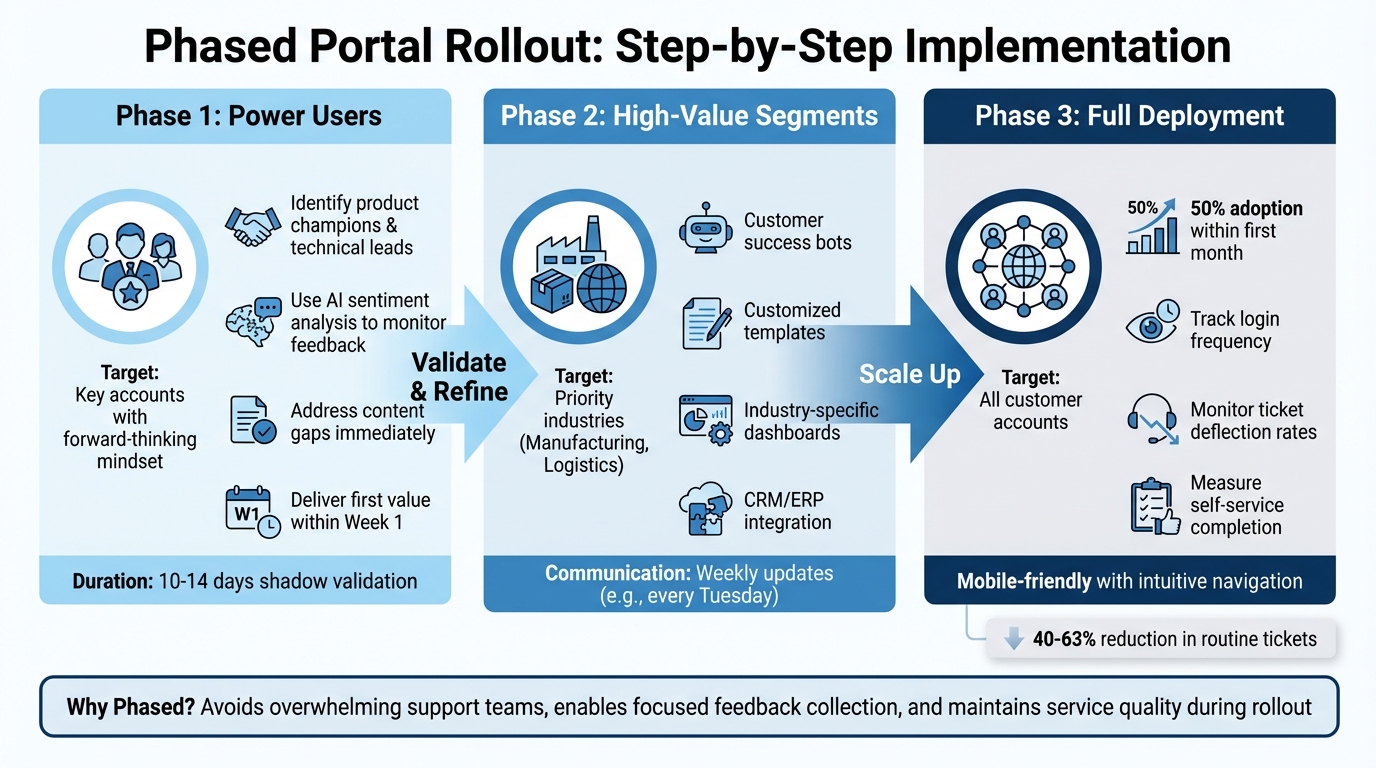
Customer Portal Rollout: 3-Phase Implementation Strategy
A phased rollout ensures you avoid overwhelming your support team with a surge of "how-to" questions from your entire customer base at once [5]. It also gives you the opportunity to gather focused feedback and fine-tune features before scaling up. By breaking deployment into three stages – power users, high-value segments, and full deployment – you can build trust, maintain service quality, and improve the user experience. This step-by-step approach ties back to earlier discussions on portal configuration and AI-powered tools.
Phase 1: Start with Select Power Users
Kick things off with a small group of key accounts who are already highly engaged with your product and open to providing feedback. These customers should have a forward-thinking and proactive mindset, which often drives early adoption [17]. Within each account, identify a product champion to promote the portal internally and technical leads to assist with setup and troubleshooting [16][2].
Leverage AI-driven sentiment analysis and predictive CSAT tools to monitor how these users interact with the portal. This allows you to detect and address potential issues early on [15]. For instance, if analytics reveal frequent "no result" searches for certain topics, address those content gaps immediately [5]. This feedback loop helps refine the portal and ensures it delivers first-value within the first week, such as a working prototype or a data audit report, to instill early confidence [2].
Phase 2: Expand to High-Value Customer Segments
Once the portal has been validated by power users, extend its availability to priority customer segments. This could include industries like manufacturing or logistics, which often require more complex workflows. At this stage, introduce advanced features such as customer success bots, customized templates, and industry-specific dashboards to enhance usability [15]. Tailor the portal’s functionality to specific industries and roles for maximum relevance [1].
Before automating fully, run a 10–14 day shadow validation period. During this time, let internal teams or AI draft responses for human review to ensure accuracy and build trust with these key accounts [18]. Integrate the portal with existing systems like CRM or ERP platforms to streamline data entry and reduce friction [1]. Keep clients informed with consistent updates – sending them weekly, such as every Tuesday – so they know what to expect [2].
Phase 3: Deploy to All Customer Accounts
The final phase involves gradually rolling out the portal to your entire customer base, aiming for 50% adoption within the first month [5]. Track key performance metrics like login frequency, ticket deflection rates, and self-service completion rates to measure success. As with earlier phases, ensure the rollout aligns with your CRM and ERP systems for a smooth transition.
Since many users will access the portal via their phones, make sure it’s mobile-friendly, with intuitive navigation, tappable buttons, and readable text [5].
| Rollout Phase | Target Audience | Key Features/Actions |
|---|---|---|
| Phase 1: Power Users | Small group of key accounts | Use AI tools to gather feedback; refine core features. |
| Phase 2: High-Value Segments | Priority industries (e.g., Logistics) | Add advanced workflows, bots, and custom templates. |
| Phase 3: Full Deployment | All customer accounts | Gradual rollout; track adoption and performance metrics. |
Onboard Customers Without Overwhelming Them
After launching the portal to your target audience, the next big hurdle is ensuring the onboarding process is smooth and approachable. Why? Because 74% of potential customers walk away from a business due to challenges during onboarding [19]. On the flip side, an effective onboarding process increases customer loyalty by 50% [19]. The goal here is to keep early interactions straightforward and productive, building on the phased rollout to deliver immediate value without overwhelming complexity.
Design Simple Interfaces and Guided Experiences
A clean, intuitive interface is the foundation of a smooth onboarding experience [1]. Keep the knowledge base organized with clear categories and straightforward titles [5]. Incorporate AI-driven guided tours to help new users navigate core features during their first login. Predictive search can also enhance this experience by suggesting relevant articles in real time [5].
For mobile users, ensure the portal is easy to use: text should be readable, navigation shouldn’t require pinpoint precision, and buttons should be large enough to tap comfortably [5]. Since 67% of customers prefer self-service tools over speaking to a human agent [5], accessibility features like high contrast themes and screen reader support are essential for improving usability and satisfaction.
Apply Role-Based Security for Relevance
Make onboarding feel personalized by using role-based access to show users only the tools and features they need [1]. For example, a marketing manager doesn’t need to see sales pipeline data, and a logistics coordinator doesn’t need financial dashboards cluttering their view. Adaptive questionnaires and automated rules engines can further refine the experience by tailoring the portal to specific industries, company sizes, or regions [1].
You can also tap into CRM data to pre-fill forms and create personalized modules, cutting down on repetitive data entry. This not only saves time but also leaves a positive first impression. By focusing on relevance and personalization, users are more likely to feel comfortable and supported during onboarding.
Offer Support During the Transition
AI chatbots can be a game-changer for handling routine questions during onboarding [5]. Whether it’s resetting passwords, navigating the portal, or explaining features, these bots can tackle common issues while escalating more complex ones to your support team.
Keep an eye on portal analytics to spot searches that return no results – these gaps signal missing content that needs attention [5]. Addressing these gaps promptly can make a big difference. Customer portals have been shown to reduce service workloads by up to 63% [5] when users can easily find the answers they’re looking for. By providing immediate and effective support, you can set the stage for a positive long-term relationship with your customers.
Communicate Effectively for Portal Adoption
A customer portal is only as successful as its users’ ability to find value in it. If customers don’t know about the portal or struggle to use it, its potential impact diminishes. A well-structured, phased communication plan ensures users stay informed and engaged without feeling overwhelmed. The key? Build awareness, provide clear guidance, and maintain momentum throughout the rollout.
Build a Phased Communication Plan
Start by creating buzz about the portal before it even launches. Promote it across multiple channels: showcase it on your website, add it to employee email signatures, and include mentions in automated email responses [5]. This gradual approach spreads awareness without bombarding customers with a single, overwhelming announcement.
When it’s time to launch, take a step-by-step approach with your communications. Begin with targeted emails to power users, then move on to high-value customer segments, and finally, roll it out to everyone. Each message should focus on the portal’s benefits and include simple, easy-to-follow access instructions.
To ensure a consistent experience, involve your sales, marketing, and support teams early. Their coordinated efforts will align messaging across all customer touchpoints [1]. Additionally, automated notifications can keep users informed about real-time updates, like ticket status changes, upcoming invoices, or new feature releases [15]. This phased and coordinated communication strategy lays the groundwork for a smooth portal adoption process.
Use AI Sentiment Analysis for Feedback
AI-powered sentiment analysis tools can help you monitor customer reactions in real time. With an accuracy rate of 96% [20], these tools can identify how users feel about specific features, such as login speed or navigation. This insight allows you to pinpoint what’s working and what needs improvement.
Take Atom Bank as an example: by leveraging sentiment analysis, they reduced contact center "failure demand" by 30% and earned a 4.7/5 rating on the App Store. They achieved this by focusing on the features that mattered most to their users [20].
If the analysis reveals that customers feel "uncertain" rather than "dissatisfied", you can adjust your communication strategy to include proactive how-to guides and reassurance. As Junu Yang, Founder and Qualitative Research Practitioner at Usercall, explains:
"Emotional signals often predict behavior better than functional complaints. Words like ‘overwhelmed,’ ‘confident,’ ‘risky,’ or ‘relieved’ indicate deeper drivers" [6].
For strongly negative feedback, set up automated alerts to immediately notify your customer success team. This allows them to address issues quickly and effectively [20].
Collect Feedback and Make Improvements
Sentiment analysis is just the beginning. To refine the portal experience, you need to act on user feedback. Use surveys and form analysis to gather input, then analyze trends to identify areas for improvement. Combine this data with insights from customer interviews, NPS comments, support tickets, and usage analytics to uncover recurring patterns [6].
Portal analytics can also reveal key improvement areas. For example, monitor "searches with no results" or articles with high views but low satisfaction ratings. These are clear indicators of gaps in content or functionality that need immediate attention [5].
Every piece of feedback should drive one of three outcomes: a product update, a UX improvement, or a change in messaging [6]. This approach ensures that your communication strategy evolves based on real customer needs, not assumptions.
Monitor Performance and Optimize Continuously
Launching a customer portal is just step one. To ensure its success, you need to monitor its performance regularly. This helps you identify problem areas, measure ROI, and confirm its overall value. Once the basics are in place, the next focus is on tracking user engagement and improving support efficiency.
Track Key Metrics and User Behavior
Start by keeping an eye on the adoption rate – the percentage of customers who incorporate the portal into their daily activities. Combine this with the activation rate, which tracks how many users hit their first "aha moment" (like downloading an invoice or tracking an order for the first time) [21][23]. These numbers reveal whether users are finding value in the portal.
Engagement is another key area to measure. The stickiness ratio (Daily Active Users divided by Monthly Active Users) shows how often customers return to the portal [21]. Additionally, tracking feature adoption rates helps you understand which tools are popular and which might need improvement.
For support efficiency, monitor the ticket deflection rate, which measures how many issues customers solve on their own compared to the total inquiries. Customer portals can cut routine support tickets by 40% to 63% [5]. For example, if 200 tickets are deflected each month at an average cost of $5 per ticket, that saves $12,000 annually [5]. Also, check the first-contact resolution rate to see how often users solve their issues on the first visit without needing extra help.
Lastly, keep an eye on NPS, CSAT, and CES metrics to gauge customer loyalty, satisfaction, and ease of use. Companies with effective self-service tools often see a 20% boost in NPS [5]. AI-powered dashboards can simplify these measurements by combining factors like login frequency, feature usage, and activity levels into a single customer health score (on a 0–100 scale) [22].
Adjust Based on Customer Feedback
Metrics alone don’t tell the full story. Use customer feedback to make data-driven adjustments. AI-driven funnel analysis can help identify stages where users drop off (especially if the exit rate is over 50%) [24]. Session replay tools can highlight issues like repeated clicks on non-responsive elements or quick exits from certain pages, signaling potential confusion in the user interface [25].
Set up alerts for strongly negative feedback so your customer success team can step in before users churn. Machine learning can also flag accounts at risk of cancellation by identifying patterns such as declining logins, reduced feature usage, or a rise in support tickets [24][26]. This proactive approach allows you to address problems before they escalate.
Use these insights to refine your SLAs, workflows, and portal features. For example, a mid-sized SaaS company introduced targeted in-app tooltips and knowledge base articles in 2024. Within three months, they saw a 55% reduction in specific support tickets [5]. Similarly, analyzing searches that yield no results can highlight content gaps, guiding the creation of new documentation [5].
Compare Before-and-After KPIs
To highlight the portal’s impact, compare its performance to the pre-rollout phase. A simple table of key metrics can provide clear evidence of ROI, making it easier to secure ongoing investment for updates.
| Portal Impact | Pre-Rollout (Manual) | Post-Rollout (Portal) |
|---|---|---|
| Tickets per Month | 500 tickets/month | 300 tickets/month (40% deflection) |
| Cost per Resolution | $5.00 (Average) | $0.00 (Self-service) |
| Monthly Support Cost | $2,500 | $1,500 ($1,000 savings) |
| Customer Preference | Low (Wait times) | High (67% prefer self-service) |
For instance, in 2024, a European logistics company launched an AI-powered portal offering real-time shipment tracking and proactive delay alerts. Within six months, they saw ticket volume drop by 52%, alongside a noticeable improvement in customer satisfaction scores [5]. These comparisons not only validate the portal’s success but also provide direction for future improvements, ensuring it continues to deliver value as your customer base expands.
Conclusion
Rolling out a customer portal successfully requires careful planning, a gradual implementation strategy, clear communication, and ongoing fine-tuning. Start by defining your goals and addressing customer pain points. Then, build the portal with AI-driven automation and system integrations to create a centralized hub of information. Use a phased launch – starting with power users, expanding to high-value segments, and eventually rolling out to all accounts. This approach helps identify and resolve issues early, ensuring a smoother experience for full-scale adoption.
Effective onboarding is the cornerstone of customer retention. Poor onboarding can lead to a 67% early abandonment rate [3], but a well-structured process can triple client lifetime value and cut support requests by half [3]. Introduce features gradually through progressive disclosure, implement role-based security to show users only what’s relevant, and guide them to their first "aha moment" quickly. These steps lay a solid foundation for keeping users engaged.
Communication is equally important. A phased communication plan helps customers grasp the portal’s benefits without overwhelming them. Collect feedback at key intervals – such as Day 7, Day 30, and Day 90 – to address pain points and close any gaps in content or functionality.
For B2B accounts with complex needs, portals offer transparency on project timelines, cutting down "status update" emails by as much as 50% [4]. This allows support teams to focus on high-value interactions that require human expertise. Portals can also reduce routine support ticket volumes by 40% to 63% [5], creating significant cost savings over time.
Continuous evaluation is essential to maintain and improve the portal’s performance. Track metrics like adoption rates, ticket deflection, and customer satisfaction to measure success. Comparing KPIs before and after implementation can help prove ROI and secure future investments. As Daniel Herman puts it:
"Done right, a portal becomes the default digital touchpoint for your customers – not just a ‘nice extra’" [4].
When executed well, a customer portal evolves into a powerful, AI-driven platform that deepens customer relationships while streamlining operations and reducing costs. It’s more than just a tool; it’s a transformative asset for your business.
FAQs
What should my portal MVP include?
Your portal MVP should center around features that make life easier for users, cut down on support requests, and deliver clear value without overcomplicating things. Here’s what to include:
- Account management tools: Let users check their order status, review billing history, and track support tickets effortlessly.
- Self-service features: Provide FAQs and simple automation to handle common tasks without needing manual assistance.
- Secure login: Ensure data privacy and allow for personalized user experiences with a strong, secure login system.
- Communication basics: Use notifications to keep users updated on important information or changes.
By sticking to these essentials, your portal can provide a smooth and user-friendly experience right from the start.
How do I choose customers for each rollout phase?
To ensure a smooth onboarding experience, focus on selecting customers who are ready, engaged, and have account characteristics that align with your goals. Start by targeting early adopters or customers who are already actively engaged – they’re more likely to provide useful feedback and adapt quickly.
It’s also smart to prioritize accounts with simpler needs. This reduces the risk of complications and helps you fine-tune your process before scaling up. Make sure these customers are not only willing but also equipped to actively participate and handle any necessary adjustments along the way.
Roll out your onboarding in stages. Begin with a small, manageable group, use their experiences to refine your approach, and then gradually expand. This step-by-step method ensures you can address challenges early and create a more effective and streamlined process for everyone involved.
Which KPIs prove portal ROI fastest?
Reducing customer support tickets and achieving cost savings are two of the fastest ways to showcase the ROI of a portal. For instance, cutting ticket volume by 40–63% not only eases the workload but also trims operational costs. To put it into perspective, saving 200 tickets annually – at $5 per ticket – translates to a savings of $12,000 each year.