



Switching helpdesks is a complex process that goes beyond just implementing new software. It requires careful planning to manage both the technical and human aspects of the transition. Without a proper change management plan, you risk data loss, system errors, decreased productivity, and resistance from your team – all of which can lead to unhappy customers and poor ROI.
Here’s how to approach it effectively:
- Evaluate your current helpdesk: Identify pain points, gaps, and hidden costs. Understand what’s not working to define clear goals for the new system.
- Set measurable goals: Use metrics like First Response Time (FRT) and Customer Satisfaction (CSAT) to track success.
- Address resistance early: Conduct a change impact assessment to understand how different roles will be affected. Create a plan to tackle objections and concerns.
- Engage stakeholders: Involve team leaders, IT, and finance early. Use champions within teams to build trust and encourage adoption.
- Communicate clearly: Use a phased communication plan to keep everyone informed at every stage.
- Provide tailored training: Offer role-specific training with sandbox environments for hands-on practice.
- Monitor adoption: Track metrics like adoption rates, proficiency, and operational KPIs to measure success.
A phased rollout with ongoing support, feedback channels, and regular audits ensures a smooth transition while keeping your team and customers satisfied.
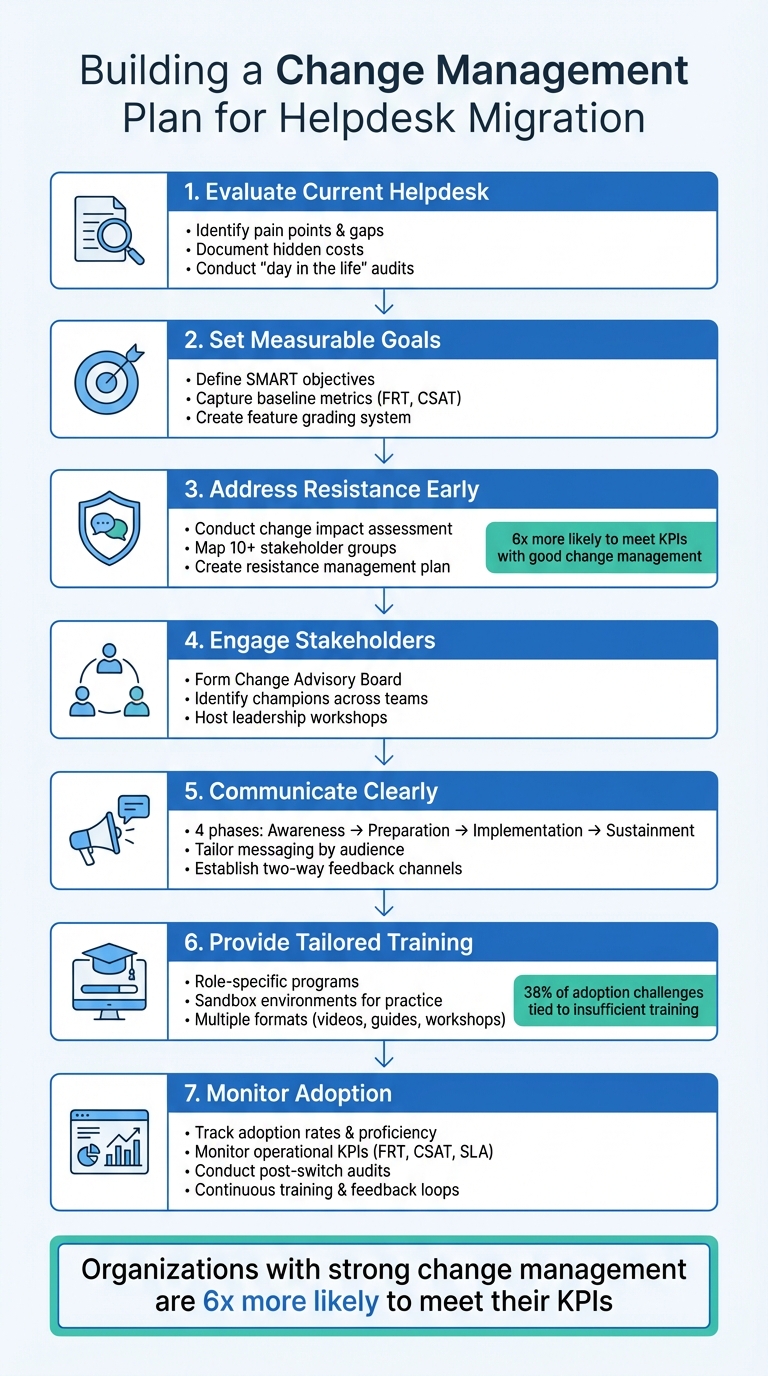
7-Step Change Management Plan for Helpdesk Migration
Assess Your Current Helpdesk and Define Your Transition Goals
Switching helpdesks isn’t just about picking a new tool – it’s about solving the problems you’re currently facing and setting clear goals for what you want to achieve. A thorough evaluation of your current system helps you identify what’s not working and lays the groundwork for a smoother transition.
Identify Pain Points and Operational Gaps
Start by documenting the issues in your current setup. Are slow-loading interfaces, frequent crashes, or downtime disrupting your team’s workflow? These performance issues not only frustrate agents but also slow down your operations. Beyond that, look for functionality gaps – like missing automation tools, poor reporting capabilities, or integration challenges. These gaps often lead to inefficient manual processes and data silos.
Don’t forget to uncover hidden costs. Legacy platforms often come with unexpected expenses, such as API caps, seat limitations, or restricted reporting features that weren’t obvious at the time of purchase. High agent turnover and “tool fatigue” can also signal deeper problems, especially if your vendor lacks accountability, seen in rotating account managers or unclear escalation paths.
"The first step in considering a new help desk platform is to clearly understand your objectives. Are you seeking cost savings or enhanced functionality?"
- Christian Sokolowski, Vice President of Customer Support, Rebuy Engine
To pinpoint where your current system falls short, conduct a “day in the life” audit. Interview agents and supervisors, asking them to walk you through their workarounds – like custom macros or personalized views – that compensate for system limitations. These insights will show exactly where your helpdesk is failing.
Set SMART Goals for the New Helpdesk
Once you’ve identified the problems, set specific and measurable goals for your new system. For instance, aim to reduce onboarding time from six weeks to one or cut First Response Time (FRT) by 30%.
Capture baseline data for key metrics like FRT, Customer Satisfaction (CSAT), ticket resolution time, and reopen rates before switching systems. These benchmarks will help you track the success of your transition and prove the value of the new helpdesk.
It’s also helpful to create a grading system for features, separating the “must-haves” from the “nice-to-haves”. Involve stakeholders from support, IT, and finance early on to ensure you’re addressing real operational needs, not just technical specs. This collaborative approach will also inform your communication and training plans later on.
Evaluate AI-Native Benefits
Modern helpdesks with AI capabilities can address many of the shortcomings of older systems. Features like intelligent triage and routing automatically categorize tickets and assign them to agents based on skill and workload, saving time and improving efficiency. AI-powered copilots can assist agents by surfacing similar historical tickets and suggesting responses, which is especially useful for new hires.
AI can also improve quality assurance by analyzing 100% of interactions, offering deeper insights than manual reviews. Workforce management tools powered by AI help optimize staffing levels by forecasting ticket volumes in real time, reducing both overstaffing and understaffing issues.
When assessing AI features, define metrics to measure their impact. For example, track macro utilization rates, automated routing accuracy, or reductions in manual triage time. To ease the transition, let agents test these AI tools in a sandbox environment before fully rolling them out. This hands-on experience can build confidence and reduce resistance.
Next, focus on mapping out how these changes will affect stakeholders to minimize pushback during the transition.
Map Stakeholder Impacts and Address Resistance
Once you’ve identified the current challenges and set your goals, the next step is mapping out how the changes will affect stakeholders. This is a crucial part of managing resistance during any transition.
Switching helpdesk systems impacts more than just your support team. Agents might worry about losing familiar workflows, IT teams may anticipate integration hurdles, and customers expect seamless operations throughout the process.
Conduct a Change Impact Assessment
Start by creating a matrix that links process changes – like workflows, automations, routing logic, and reporting – to each role group in your organization. For each group, rate the impact as low, medium, or high.
Your stakeholder map should cover at least ten groups: support agents, team leads, support managers, IT/platform teams, data analysts, knowledge management, customer success, product/engineering escalations, learning and development, and finance leadership. Each group has its own concerns. For instance:
- Agents may worry about increased workloads or losing the workarounds they’ve relied on for years.
- IT teams might be concerned about integration gaps and potential data quality issues.
- Leadership will likely focus on visibility into adoption rates and return on investment (ROI).
Organizations that excel in change management are six times more likely to meet their key performance indicators (KPIs) compared to those with poor change management practices. Even moving from "poor" to "fair" improves the likelihood of success by 30%.
Create a Resistance Management Plan
Resistance often comes from uncertainty or fear of reduced efficiency. Addressing these concerns head-on is essential. As David Lewin, a professor at UCLA Anderson School of Management, puts it:
"Businesses will have to overcome resistance to change by explaining why the change is needed to the people who actually undertake the change".
Anticipate common objections and prepare clear responses. For example:
- If agents are worried about a steep learning curve, share "before-and-after" demos to show how AI features can take over repetitive tasks, freeing them for more engaging work.
- If IT teams are concerned about data migration risks, provide technical audits and establish clear escalation paths.
Establish feedback loops early on. Use tools like pulse surveys, focus groups, or dedicated Slack channels where agents can report issues or flag inaccurate AI responses. This approach not only validates their input but also allows for quick adjustments.
"Buy in doesn’t mean people have to like it. It just means they are agreeing to try it."
- Dana Otto, Senior Manager of Change Management, Zendesk
Engage Key Stakeholders Early
Getting the right people involved from the beginning builds trust and alignment. Form a Change Advisory Board with representatives from support, IT, finance, and customer success. This group can help assess goals and remove structural barriers.
At the same time, create a network of champions – well-respected agents with strong credibility and curiosity across shifts and locations. These champions act as advocates, coaching their peers, raising concerns to the project team, and helping to adapt the change for each team.
Host leadership immersion workshops where managers experience a "day in the life" of an agent using the new system. This hands-on experience helps managers better support their teams and communicate the value of the tools.
Finally, establish a centralized information hub – like a SharePoint or Confluence site – to house FAQs, timelines, and project updates. This ensures everyone knows where to find the latest information. Involving agents in co-creating AI guidelines, workflows, and training materials further fosters a sense of ownership and commitment to the new system.
Develop Communication and Training Strategies
After mapping stakeholder impacts and crafting your resistance management plan, the next step is making sure everyone understands the changes and knows how to use the new system effectively. Lack of communication and inadequate training are some of the main reasons helpdesk transitions stumble – 38% of adoption challenges are tied directly to insufficient training.
Good communication fosters clarity, while training equips people with the skills they need – both crucial for easing resistance and speeding up adoption.
Create a Phased Communication Plan
Communicating effectively isn’t about sending out a one-time email. It requires a phased, structured approach that aligns with the transition journey. A strong communication plan typically includes four stages:
- Awareness: Share the reasoning and goals behind the change.
- Preparation: Provide training schedules and access to sandbox environments.
- Implementation: Share login details and support contact information.
- Sustainment: Celebrate wins and establish feedback channels.
Tailor your messaging to different audiences: agents might need updates on workflow changes, while finance teams may want to see ROI projections. Use a centralized portal to house all updates and resources, and prepare managers early with talking points and toolkits to help them answer questions consistently and advocate for the change.
From the start, establish two-way feedback channels. Instead of just pushing out updates, create spaces – like pulse surveys, focus groups, or forums – where employees can raise concerns or ask questions. As Dana Otto, Senior Manager of Change Management at Zendesk, emphasizes:
"It’s absolutely critical to communicate with the groups affected by the change plan."
One key point: avoid sharing tentative plans prematurely. While transparency is important, announcing plans that might change can create uncertainty and reduce trust.
Design Tailored Training Programs
Clear communication sets the stage, but effective training ensures people are ready to work within the new system. Training should address the specific needs of different roles, reflecting the concerns and challenges identified earlier.
A generic, one-size-fits-all approach won’t work. Support agents, data analysts, and admins all have unique responsibilities that require tailored training. Start with a needs assessment to pinpoint knowledge gaps for each group.
Offer a mix of formats – like videos, guides, live workshops, and one-on-one coaching – to suit different learning preferences. Incorporate "day in the life" scenarios to make training relevant and practical. Sandboxes are especially helpful, allowing employees to practice real workflows without affecting live data. For AI-driven features, side-by-side "before-and-after" demos can show how automation simplifies repetitive tasks, giving agents more time for meaningful work. Lisa Kelly from Zendesk’s Documentation Team explains:
"Showcase how AI works with side-by-side, before-and-after demos contrasting agent experiences with and without AI. This demonstrates how AI handles tedious parts of agents’ jobs."
Supervisors need extra training that goes beyond basic features, focusing on coaching techniques and strategies to guide their teams through the transition. Timing matters, too. As Erin Hueffner, Content Marketing Manager at Zendesk, points out:
"Training should take place after those impacted are aware of what is coming, or the end result will be confusion and your change plan could fail."
Launching training too early – before employees understand the reasons and benefits of the change – can lead to confusion and resistance.
Use AI for Training and Feedback Analysis
AI tools can make training more efficient by personalizing learning and tracking progress in real time.
AI assistants and coaching bots can answer repetitive questions, guide employees through new workflows, and adapt training materials to specific roles. These platforms also track adoption metrics, monitor usage patterns, and analyze feedback from surveys, emails, and chat logs. This data helps pinpoint areas where additional support is needed, allowing you to address resistance early.
AI-powered Quality Assurance tools can evaluate tickets for empathy, accuracy, and tone, giving agents instant feedback and tracking their improvement over time. Use this feedback in a "You Said, We Did" approach, where you act on aggregated insights to show employees their concerns are being heard and addressed.
One challenge to keep in mind: 63% of organizations cite human factors as the biggest hurdle in implementing AI and other technologies. The issue isn’t the technology itself – it’s ensuring people know how to use it effectively. As Ashmita Shrivastava, Content Marketing Manager at Moveworks, explains:
"AI isn’t just part of the changes taking place – it’s also an effective change enabler."
AI skills also have a short shelf life – estimated at just 3 to 4 months. This means training can’t be a one-and-done effort. Maintain ongoing support through live resource hubs and office hours to assist new hires and address unexpected challenges. Shift the focus of training from just technical "how-to" steps to building AI literacy, helping employees recognize patterns and apply AI effectively in their daily workflows.
sbb-itb-e60d259
Execute the Transition and Monitor Adoption
With your communication and training strategies in place, it’s time to roll out the new helpdesk. The success of this transition depends heavily on how you execute it and how well you track adoption. A phased rollout approach can help you reduce risks, test the waters, and build confidence before fully scaling.
Plan and Execute a Phased Rollout
A phased rollout is like easing into cold water – it lets you start small and expand gradually. Begin with a pilot group and use sandbox testing so agents can practice key tasks without affecting live customers. This cautious approach supports the communication and resistance management efforts already laid out.
Keep the legacy helpdesk running during testing to prevent service interruptions and ensure tickets are routed correctly. On launch day, double-check that all channels – emails, contact forms, widgets – are fully integrated into the new system. To minimize disruptions, schedule the final cutover during quieter business hours when ticket volumes are lower.
One company managed to achieve a seamless migration with zero downtime and even cut costs by 50% using this strategy.
To make the transition smoother, lean on champions who can provide real-time support to their peers across shifts and departments. Also, have a clear rollback plan ready in case of major system issues, such as reactivating the legacy system or using backup email routing.
Encourage Adoption with Incentives and Support
Getting your team to use the new system is one thing, but getting them to fully embrace it is another. Incentives and recognition programs can go a long way in maintaining enthusiasm and rewarding early adopters. Highlight top performers during team meetings, share their success stories in internal communications, and offer shout-outs or small awards to agents who excel with the new system. These gestures build on the earlier training efforts.
Offer "white-glove" support during the initial weeks by providing dedicated help sessions for those who are struggling or hesitant. This hands-on assistance shows leadership’s commitment to the transition and reassures users that help is always available.
Track key operational metrics like First Response Time (FRT), Customer Satisfaction (CSAT), resolution times, and SLA compliance to measure the system’s impact. Share these wins with your team to keep morale high. Additionally, create feedback channels – such as a Slack group or internal forum – where agents can raise concerns or share suggestions.
As Eric Klimuk, Founder and CTO of Supportbench, puts it:
"A high-performing helpdesk doesn’t stay that way by accident. Ongoing review, iteration, and user collaboration ensure it stays fit for purpose as your business evolves."
Monitor Adoption and Track KPIs
Measuring the right metrics will help you gauge whether the transition is on track and where extra support might be needed. Pay attention to adoption indicators like the percentage of the team actively using the new helpdesk (Adoption Rate), how quickly team members reach target usage levels (Speed of Adoption), and how well they implement new workflows (User Proficiency).
Operational metrics like ticket volume trends, first-response times, resolution times, SLA compliance, and any incidents during the transition are also crucial. Tracking compliance can make meeting project goals three times more likely. Don’t forget to monitor employee engagement and sentiment using tools like Employee Net Promoter Scores (eNPS) and pulse surveys.
Dana Otto, Senior Manager of Change Management at Zendesk, highlights the challenge of this process:
"Measuring change management is one of the most difficult parts of the process because you’re measuring people and their emotions, which is hard to quantify."
In the days following the migration, conduct health checks to spot and fix any early issues. For example, duplicated tickets could signal routing problems.
Lisa Kelly from Zendesk’s Documentation Team sums it up perfectly:
"Successful AI adoption is an iterative process that requires ongoing attention, agent feedback, and continuous refinement."
From here, focus on maintaining and building on these improvements to ensure long-term success.
Sustain Success After Implementation
Once the new system is up and running, the real work begins. Maintaining success means keeping a close eye on performance, offering ongoing training, and actively monitoring feedback. A smooth launch is just the first step; the real challenge is ensuring the system continues to meet your team’s needs and deliver value over time.
Perform a Post-Switch Audit
After the rollout, it’s essential to audit the system to make sure everything is working as expected. Start by comparing pre- and post-migration data to confirm all records transferred accurately. Check permissions to ensure sensitive information is only accessible to authorized users, and verify that reporting dashboards reflect both historical and current data correctly.
Create a dedicated channel where users can report issues like broken links, missing attachments, or mislabeled fields. Organize a retrospective with key teams to review what worked well and identify areas for improvement. Document any fixes and lessons learned in a centralized knowledge base to avoid repeating mistakes during future updates.
"Post-migration isn’t just about catching bugs. It’s about restoring usability, validating trust, and proving the value of your new system."
Take Rossi Residencial, for example. In July 2025, this Brazilian construction company successfully migrated four SAP environments to a cloud platform. The project, led by Eric Klimuk in collaboration with Sky.One and Google Cloud, included a thorough pre-migration assessment and a detailed post-migration validation. The result? Their first zero-downtime migration, cutting infrastructure costs by 50% and avoiding any unavailability incidents during the transition.
Once the system is validated, the focus should shift to ongoing education and support.
Establish Continuous Training and Support
Training doesn’t end when the system goes live. Set up a centralized portal with role-specific training materials, searchable FAQs, and real-world examples to provide users with a reliable resource. Schedule regular training refreshers and maintain an active support schedule to keep everyone up to speed.
Designate Change Champions to provide peer-to-peer coaching, and use AI tools to pinpoint skill gaps. This allows for targeted, personalized training instead of generic sessions. Record office hours and convert frequently asked questions into short, easy-to-digest learning materials like videos, checklists, or job aids.
During the early stages post-launch, hold biweekly retrospectives to gather feedback and refine processes. As adoption stabilizes, shift to monthly reviews. Involve high-performing team members in documenting best practices and refining workflows to ensure the training stays relevant and practical.
While training strengthens user proficiency, monitoring feedback ensures the system continues to meet evolving needs.
Monitor Customer and Agent Feedback
Set up automated feedback loops so agents can quickly report system issues, incorrect AI responses, or workflow inefficiencies. Use internal communication tools like Slack or community forums to encourage real-time sharing of insights. During the first week of the rollout, conduct daily mini-surveys to spot any immediate usability problems.
Track customer sentiment and satisfaction (CSAT/NPS) from day one to measure how the new system compares to the old one. Watch for signs like duplicate tickets in both systems, which could indicate routing errors. Adoption metrics – such as login frequency, macro usage, and SLA compliance – can highlight teams that might need additional support or training.
Make sure feedback gets routed to the right people and keep users informed about resolutions. Research shows that organizations with a structured change management approach are 33% more likely to achieve high levels of effectiveness compared to those without one. By addressing issues promptly and aligning feedback with your broader support strategy, you’ll set the stage for long-term success.
Conclusion: Key Steps for a Successful Helpdesk Transition
Switching helpdesks is a major organizational shift that demands careful planning, clear communication, and consistent support. Following a structured approach, like the steps outlined earlier, can make all the difference. In fact, organizations with strong change management practices are six times more likely to meet their KPIs compared to those that struggle with it.
The key to a smooth transition lies in preparation. Planning ahead reduces friction and inspires confidence across the team. As David Lewin, Professor at UCLA Anderson School of Management, explains:
"How an organization manages change impacts employee retention and engagement, which in turn impacts customer satisfaction and ultimately organizational performance".
Platforms designed with AI, such as Supportbench, make this process easier by eliminating inefficiencies and unexpected costs. Features like automated ticket triage, routing, and prioritization streamline workflows, while real-time dashboards provide instant insights into metrics like CSAT, NPS, and backlog risk. Teams can hit the ground running with sandbox environments that allow agents to practice workflows before going live. Meanwhile, tools like AI Co-Pilot offer quick access to past case histories and knowledge bases, turning the platform into a true partner rather than an obstacle.
Beyond the initial transition, maintaining success requires continuous monitoring, regular training, and automated feedback loops. By treating the switch as an evolving process rather than a one-time task, you can create a support system that’s agile, efficient, and ready to meet the demands of modern B2B customer service.
Pairing a solid change management strategy with the right platform ensures you’re not just changing tools – you’re setting your team up for long-term success.
FAQs
What steps should I take to ensure a smooth transition to a new helpdesk system?
To make switching to a new helpdesk system as smooth as possible, start with careful planning. Begin by cleaning up your current data – this ensures you’re not carrying over outdated or irrelevant information. Set clear goals for the migration and configure the new system to align with your team’s needs. This preparation helps spot potential risks and gets everyone ready for the change.
When it’s time to transfer data, use reliable tools to keep everything accurate, including ticket histories. Running pilot tests before the full migration is a smart way to catch and fix issues early, reducing the chance of disruptions. You might also consider strategies like incremental data transfers, which can help minimize downtime and keep operations running smoothly.
Once the migration is complete, shift your focus to post-migration validation. Double-check that all data transferred correctly, test workflows to ensure they function as expected, and provide training for your agents so they can navigate the new system with confidence. Ongoing monitoring will help confirm that the transition meets your goals and that your support team is back to full speed. By following these steps, you can reduce resistance, sidestep common challenges, and make the migration process as efficient and seamless as possible.
How can AI tools help reduce resistance when adopting a new helpdesk system?
AI tools can make switching to a new helpdesk system much smoother by tackling common hurdles like user resistance and adoption struggles. For example, AI-powered training programs can deliver tailored onboarding experiences and offer real-time assistance, helping team members gain confidence while minimizing frustration.
On top of that, AI can analyze feedback and usage data to pinpoint areas where users are struggling or resistant. This allows organizations to address concerns head-on and fine-tune their communication efforts. Highlighting measurable benefits – like faster issue resolution and improved efficiency – can also help build trust in the new system. Plus, by automating repetitive tasks and offering decision-support tools, AI can ease fears about job disruption, paving the way for a smoother, more positive transition.
What are the key metrics to track for a successful helpdesk transition?
To make your helpdesk transition a success, it’s important to keep an eye on metrics that show how well the system performs and how users are adapting to it. Start with the adoption rate, which tells you how actively users are engaging with the new platform. Another key metric is data accuracy, ensuring that customer records, ticket histories, and workflows have been migrated correctly.
Keep tabs on system uptime and downtime to gauge the platform’s stability. At the same time, measure user satisfaction scores to see how the transition is being received by both your support agents and your customers.
Operational metrics like ticket resolution times and first response times can shed light on whether the switch has improved efficiency or introduced delays. It’s also helpful to track training completion rates and collect feedback from your support team to understand how well they’re adapting to the new system. By combining these data points with team insights, you’ll get a clear picture of how the migration is performing and where adjustments might be needed.






