



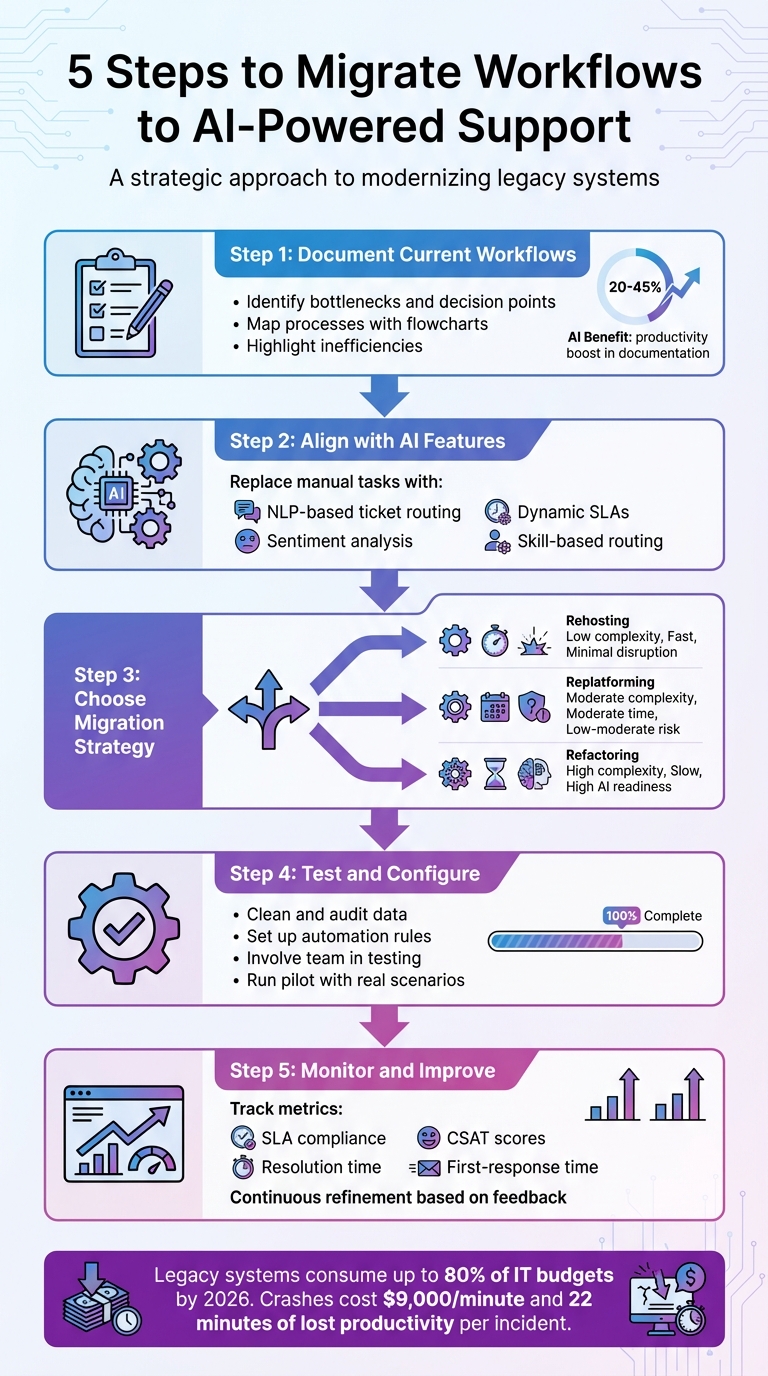
Legacy systems are draining IT budgets and slowing teams down. By 2026, these systems consume up to 80% of IT budgets, while crashes cost businesses $9,000 per minute and 22 minutes of lost productivity per incident. Transitioning to AI-powered platforms can address these inefficiencies by automating repetitive tasks, reducing errors, and improving customer support.
Here’s how to migrate your workflows to a modern AI-driven tool in five steps:
- Document Current Workflows: Identify bottlenecks, decision points, and exceptions. Use flowcharts to map processes and highlight inefficiencies.
- Align with AI Features: Replace rigid, manual tasks with intelligent automation like NLP-based ticket routing, sentiment analysis, and dynamic SLA management.
- Choose a Migration Strategy: Decide between rehosting (simple), replatforming (moderate updates), or refactoring (full overhaul) based on your goals.
- Test and Configure: Clean your data, set up automation, and involve your team in testing to ensure a smooth transition.
- Monitor and Improve: Track metrics like SLA compliance, resolution time, and CSAT scores. Use feedback and data to refine workflows.
This step-by-step approach ensures your migration is efficient, reduces risks, and sets the foundation for better support operations.
5-Step Workflow Migration Process to AI-Powered Support Tools
AI-Powered Migration plus Raw Experience with Mike Rousos
sbb-itb-e60d259
Step 1: Review and Document Your Current Workflows
Before diving into a migration, it’s crucial to document how your support operations actually work on a daily basis – not just the idealized processes. This includes all the workarounds and shortcuts your team uses to get the job done.
Find Your Core Processes and Problems
Start by identifying the workflows that matter most. Export and categorize the last 30 days of support tickets to pinpoint high-volume or confusing processes. Common examples include password resets, refund requests, account access issues, and escalations. These are often the first areas to focus on.
Each workflow should have a clear starting point (the trigger) and a defined end state. For instance, don’t stop at “agent replies.” Instead, the process should conclude when the customer feels their issue is resolved. Otherwise, you risk reopening tickets and frustrating your customers.
Pay special attention to decision points – those moments where agents repeatedly need clarification, like multiple back-and-forths asking, “Can I do this?” These are prime opportunities to introduce structured logic. Decision tables can help here, turning subjective calls into clear, machine-readable rules. For example: “If Input A exists and Value B exceeds Threshold C, then route to X.”
"Decision points are where delays and errors hide." – Helpsite [2]
To get an accurate picture, review real cases instead of relying on hypotheticals. This approach ensures you capture the actual workflows your team follows. Tools powered by AI can also speed up documentation, boosting productivity by 20% to 45% through faster drafting and standardized formats [2].
Once you’ve documented these processes, creating visual maps can uncover even more areas for improvement.
Build a Process Map of Current Workflows
Use flowcharts to visually represent your workflows. Stick to standard symbols: ovals for start/end points, rectangles for steps, diamonds for decisions, and arrows to show the flow. If a process spills over more than one page, simplify it.
Pay close attention to handoffs – the points where tasks move between teams or tools. These are common trouble spots where information can slip through the cracks. If a process includes more than six handoffs, it’s a warning sign of potential delays or errors. To dig deeper, audit a handful of delayed tickets. Trace them backward to identify where information got lost or failed to transfer between systems.
| Element to Document | Description | Why it Matters |
|---|---|---|
| Trigger | What starts the process? | Defines the entry point for the workflow |
| Inputs | Data sources, formats, and quality | Ensures the system has the info it needs to function |
| Decision Points | Where choices are made and by what rules | Reduces bottlenecks and ensures consistency |
| Exceptions | Known edge cases and workarounds | Prepares the system to handle rare scenarios |
| End State | What counts as "done"? | Prevents ticket reopenings and ensures customer satisfaction |
Don’t overlook exceptions – those rare cases or current workarounds that could cause issues later. Documenting these now helps ensure your new system can handle them effectively. Laying this groundwork sets you up for a smoother transition to AI-driven automation.
Step 2: Match Old Processes to New Tool Features
Once you’ve mapped out your workflows, it’s time to align them with the advanced features of your new platform. The goal here isn’t to replicate your old system but to improve how work gets done by using modern tools like automation and AI. This step is about upgrading, not duplicating.
Shift Workflows to AI-Driven Features
Traditional support systems often rely on rigid rules like "IF-THEN" logic or keyword matching to handle tasks such as ticket routing. While this worked to some extent, it often failed to grasp the true intent behind customer messages, leading to inefficiencies.
AI-powered platforms, such as Supportbench, take a smarter approach. Using Natural Language Processing (NLP), these tools analyze the full context and sentiment of customer requests. This allows them to identify urgent issues even if the original message was vague or poorly categorized [3].
"AI cuts through the noise to identify truly urgent issues requiring immediate attention, regardless of how poorly the initial request might have been phrased or categorized by the user." – Nooshin Alibhai, Founder and CEO, Supportbench
Here’s how you can replace manual processes with AI-driven automation:
- Intelligent Auto-Tagging: Let AI handle tagging of incoming tickets automatically, saving time.
- Context-Aware Prioritization: Use AI to assess urgency based on factors like sentiment, key phrases (e.g., "system down"), customer tier, and interaction history. This ensures critical issues are flagged, even if they were initially miscategorized.
- Skill-Based Routing: Automate ticket assignments by matching each issue to the most qualified agent, reducing delays caused by incorrect routing.
- Dynamic SLAs: Set up SLAs that adapt to the context of each ticket, ensuring high-priority incidents are addressed promptly.
For example, a recent migration to an AI-powered system significantly reduced the time spent on manual ticket routing, showcasing how AI can streamline even complex workflows.
| Legacy Approach | AI-Powered Alternative |
|---|---|
| Keyword-based routing (e.g., "refund" → billing queue) | NLP evaluates full content and intent |
| Manual priority assignment based on customer input | Sentiment, urgency, and customer tier drive prioritization |
| Static, round-robin queue assignments | Skill-based routing |
| Fixed SLAs regardless of context | Dynamic SLAs that adjust to ticket severity |
| Rules that break as products evolve | Adaptive systems that learn from patterns |
Source: [3]
When setting up AI features, define which data fields – like subject lines, body text, and metadata – the system should analyze. Regularly monitor how well auto-tagging and routing perform, and make adjustments based on team feedback.
Configure the Tool for Your Business
Pre-configured settings rarely align perfectly with your needs. Take the time to customize the platform to reflect your team’s workflows and your customers’ expectations.
Start by mapping your legacy data fields to the new system. Pay special attention to formats like dates (MM/DD/YYYY), currency (USD), and custom data to ensure a smooth transition. Also, make sure linked data – such as connections between tickets, customers, and other records – remains intact.
Set up role-based permissions to control who can access specific data. Build custom dashboards for different roles:
- Managers need insights into SLA performance, resolution times, and agent productivity.
- Agents require access to their assigned tickets and customer history.
- Customers benefit from a self-service portal to track cases and find documentation.
Integrate your CRM data so the platform can prioritize high-value customers. For instance, when a premier account submits a ticket, the system should recognize their tier and adjust routing and SLA parameters accordingly.
Plan for edge cases by setting up fallback conditions, such as default queues or escalation triggers. This ensures that tickets not meeting specific AI criteria still receive timely attention.
Involve your frontline agents during configuration and testing. Their input is invaluable for spotting usability issues and ensuring that essential elements of your previous workflows are preserved. Test the system with various scenarios, including legacy data formats, inactive users, and rare record types, to ensure it handles everything smoothly.
"Data migration is more than just copying files from one system to another – it’s a delicate, high-stakes process that can affect everything from day-to-day operations to long-term compliance." – Eric Klimuk, Founder and CTO, Supportbench
Step 3: Pick Your Migration Approach
Now that your workflows are mapped and aligned with AI-driven features (see Steps 1 and 2), it’s time to choose the right migration approach. The goal? Minimize disruption while delivering value as quickly as possible. There are three main options: rehosting, replatforming, and refactoring. Each comes with its own mix of cost, complexity, and benefits.
Compare Migration Methods
Rehosting involves moving your existing support system to a new environment without altering the code. It’s the fastest and least disruptive option, making it a go-to choice for tight deadlines or when cutting data center costs is a priority. However, it doesn’t address legacy system limitations, which can restrict AI-driven improvements.
"Rehosting is the simplest, easiest, quickest, and least risky cloud migration method because there’s no new code to be written and tested." – Bob Quillin, Chief Ecosystem Officer, vFunction [5]
Replatforming strikes a middle ground. It requires minor adjustments to leverage cloud-native features, such as managed databases or auto-scaling. This improves reliability while keeping risks and disruptions manageable, making it a solid choice for gradual modernization.
Refactoring is a complete overhaul, rebuilding your application to function as a fully cloud-native system. While this approach allows for the deepest integration of AI workflows and offers the best long-term returns, it demands significant time, expertise, and upfront investment. It also comes with a higher risk of service interruptions during the transition.
| Migration Method | Complexity | Upfront Cost | AI Readiness | Disruption Risk | Time to Value |
|---|---|---|---|---|---|
| Rehosting | Low; no code changes | Low | Low; legacy constraints | Minimal | Fast |
| Replatforming | Moderate; minimal changes | Moderate | Moderate; leverages managed services | Low to Moderate | Moderate |
| Refactoring | High; major overhaul | High | High; optimized for AI-driven workflows | High | Slow |
When to choose:
- Rehosting is ideal for quick migrations or teams with cloud software experience.
- Replatforming works well for improving reliability without a full rewrite.
- Refactoring is best when your legacy system can’t meet current demands or when full AI integration is a must.
For large-scale B2B operations, starting with rehosting or replatforming is often the safest bet. Once the system stabilizes, you can move toward refactoring for deeper modernization.
Gradual Rollout vs. All-at-Once Migration
After deciding on a migration method, the next step is choosing between a phased rollout or an all-at-once migration. Each has distinct advantages and challenges.
Phased migration involves moving data in smaller batches, allowing both old and new systems to run simultaneously. This minimizes disruption, provides time to address issues, and ensures smoother transitions. However, it does extend the overall timeline.
"Avoid an abrupt switch. Run both systems in parallel for a short period to monitor stability, identify missing workflows, and prevent service gaps." – Eric Klimuk, Founder and CTO, Supportbench [6]
All-at-once migration, also known as a "Big Bang" approach, is faster and comes with lower initial costs. However, it’s a high-risk strategy with little room for error, making it more suitable for internal systems with minimal user impact rather than customer-facing operations.
A real-world example of phased migration: In July 2025, Rossi Residencial, a Brazilian construction company, partnered with Sky.One and Google Cloud to migrate four SAP environments. Using a phased strategy with detailed architecture mirroring and thorough validation, they achieved zero downtime and cut infrastructure costs by 50% [4].
For B2B support teams managing complex workflows or customer-facing systems, a phased approach is the safer route. Plan the final cutover during quiet periods with low ticket volumes, and consider running a pilot migration with a small set of active tickets. This helps identify formatting issues or system incompatibilities early. Most importantly, have a rollback plan in place, complete with tested procedures, to handle any critical failures.
| Feature | Big Bang Migration | Phased Migration |
|---|---|---|
| Speed | Faster execution | Slower, incremental |
| Cost | Lower upfront cost | Higher (due to running parallel systems) |
| Risk Level | High (little room for error) | Low (allows for adjustments) |
| Best For | Internal systems with low user impact | Customer-facing systems and complex workflows |
| Fallback | Difficult to implement fallback | Easier to troubleshoot and adjust |
Step 4: Set Up and Test the New Tool
Now that you’ve chosen your migration strategy, it’s time to bring it to life. This step is all about translating your plan into action – setting up the new tool, testing it thoroughly, and ensuring a smooth transition to AI-powered support operations. By focusing on data preparation, AI configuration, and team validation, you’ll set the stage for a successful rollout.
Get Your Data Ready for Migration
Start with a full audit of your data. Eliminate duplicates, remove outdated records, and fix incomplete fields or inconsistent formatting. Create a detailed field-mapping document that outlines exactly where each piece of data from your current system will go in the new platform. This step ensures everything lines up correctly and nothing gets misplaced.
"There’s no benefit to moving junk. A clean dataset saves time, reduces risk, and improves results in the new system." – Eric Klimuk, Founder and CTO of Supportbench [4]
Standardize key elements like date formats (e.g., MM/DD/YYYY for U.S.), currency codes (USD), and user ID conventions before migration starts. Double-check that relationships between records – like linking support tickets to customer profiles – stay intact. To minimize risks, freeze your source data and create a secure cloud backup.
Once your data is clean and ready, run a pilot test with real-world examples, including tricky cases like inactive users or unusual record types. Involve frontline staff in this process – they’re the ones who’ll spot usability issues that technical teams might miss.
After this, you’re ready to dive into configuring AI and automation.
Set Up AI and Workflow Automation
Translate your decision-making processes into clear "if-then" rules. For instance: "If ticket priority is High and the customer renewal date is within 30 days, then assign the ticket to the Account Manager and set SLA to 4 hours." This ensures the AI mimics human reasoning in a structured way.
Take advantage of built-in AI features, such as case summaries, customer activity insights, and SLA management. Tools like Supportbench offer pre-configured options like auto-tagging for common issues, predictive CSAT scoring, and first-contact resolution tracking. These features lighten the load for agents while boosting accuracy.
Document rare or complex scenarios, noting how often they occur and any existing workarounds. This helps prevent the AI from stumbling on edge cases. For high-stakes tasks – like handling escalations or contract disputes – build in human checkpoints to maintain oversight.
Once automation is set up, test everything thoroughly to ensure it works as expected.
Test Workflows and Train Your Team
Use a sandbox environment to simulate real-world tasks without disrupting live operations. Test workflows such as ticket routing, escalations, and SLA triggers using sample data. Have agents run through these scenarios to confirm that notifications, dashboards, and other features function properly.
Provide hands-on training in this test environment, focusing on everyday tasks like ticket creation, knowledge base searches, and generating reports. Address any questions on the spot, and compile a quick-reference guide to help with recurring issues.
Before going live, perform a final validation check. Compare data from before and after migration to ensure record counts match, relationships are intact, and no critical information is missing. Finally, test your rollback plan to confirm you can quickly revert if anything goes wrong during the transition.
Step 5: Track Results After Migration
Once your new tool is live, the work isn’t over. Monitoring its performance and making adjustments ensures your support operations keep running smoothly. Tracking results right after migration helps you catch and fix any issues while they’re still manageable.
Choose the Right Metrics to Track
From day one, start keeping an eye on key support efficiency metrics. These include first-response time, ticket volume, resolution time, and SLA compliance. Early data can highlight issues like routing mistakes, duplicate tickets, or missed communications that might point to configuration problems [6].
Take advantage of built-in dashboards to automate SLA alerts and get real-time insights into compliance challenges [6]. For customer satisfaction, regularly review CSAT, CES, and NPS scores – monthly or quarterly – to identify trends and exceptions [6].
Don’t overlook technical performance. If your new tool includes a self-service portal or knowledge base, monitor Core Web Vitals like Largest Contentful Paint (LCP) and Interaction to Next Paint (INP). For example, Vodafone’s A/B testing in 2025 led to a 31% LCP improvement, boosting sales by 8% and lead-to-visit rates by 15%. Similarly, COOK reduced page load time by 0.85 seconds, resulting in a 7% increase in conversions and a 7% drop in bounce rates [7].
Combine these numbers with agent feedback. Daily pulse surveys during the first week can uncover issues like sluggish interfaces, missing features, or confusing workflows – things that metrics alone might miss. Also, watch for overlapping messages between systems, as these could signal routing problems [6].
By analyzing this data, you can fine-tune workflows and improve performance.
Keep Improving Your Workflows
"High-performing support teams require ongoing review, iteration, and user collaboration to ensure they stay fit for purpose as your business evolves." – Eric Klimuk, Founder and CTO of Supportbench [6]
Use the data you collect to refine your processes and keep them aligned with your goals. Test changes in a sandbox environment before rolling them out, and set up automated escalation workflows for when SLA thresholds are breached [6]. As you refine workflows, make sure your documentation stays updated for future scaling needs [4].
Pay close attention to patterns and outliers in your metrics rather than relying solely on averages. These can uncover inefficiencies that might not be obvious at first glance [6]. Schedule formal retrospectives with project leads and users to gather feedback and pinpoint areas for improvement [4]. Keep in mind that workflows may need adjustments within six months as your business grows or ticket complexity changes [6].
Lastly, maintain human oversight for AI-driven decisions in critical areas [1]. Use dashboards and audit logs to spot anomalies early and prevent them from escalating into bigger issues [4].
Conclusion
Shifting your workflows to a new support platform can redefine how your team operates in the long run. The five-step approach shared in this guide lays out a straightforward way to navigate this transition: start by documenting your current workflows, align them with modern features, select the best migration strategy, thoroughly test your setup, and keep tracking your results.
"Switching platforms is a strategic move – one that should be guided by data, not frustration." – Eric Klimuk, Founder and CTO of Supportbench [6]
This quote perfectly sums up the data-driven mindset emphasized throughout this guide. Migration isn’t just a one-time event – it’s an opportunity to refine and improve continuously as your business grows and your support needs change [6]. Platforms like Supportbench make this process easier with tools designed to boost efficiency and features like AI Agent Copilots, which can cut onboarding time in half [6].
The impact of these improvements is tangible. For instance, Rossi Marketing reduced infrastructure costs by 50% after modernizing their support processes with AI [4]. These platforms are built to handle the challenges of complex cases, multi-stakeholder accounts, and renewal-focused workflows – without the burden of outdated systems.
To get started, focus on identifying inefficiencies in your current setup, test changes in a controlled environment, and create feedback loops with your frontline team. By following these steps, you’ll establish a support operation that’s not only efficient and cost-effective but also prepared to scale alongside your business.
FAQs
What’s the best workflow to migrate first?
When transitioning systems, begin with high-priority automations and critical workflows that directly affect customer experience and operational efficiency. Start by documenting all existing automations to ensure nothing gets overlooked during the move. Temporarily disable these automations to prevent errors, then rebuild them in the new system.
Prioritize workflows like ticket creation, updates, triggers, and SLAs. This approach helps maintain support continuity and minimizes disruptions. Test and validate these workflows thoroughly before moving on to less critical ones. This method ensures a smoother transition and keeps operations running seamlessly.
How do I decide between rehosting, replatforming, and refactoring?
Choosing the right approach – rehosting, replatforming, or refactoring – depends on your objectives, available resources, and the complexity of your workflows.
- Rehosting (also known as lift-and-shift) is the fastest option. It involves moving your existing setup to the cloud without making significant changes. While it’s quick and straightforward, it doesn’t enhance scalability or take full advantage of cloud capabilities.
- Replatforming strikes a balance between effort and results. It involves making targeted improvements, such as introducing automation, while keeping the core architecture intact. This approach offers moderate optimization without the resource demands of a complete overhaul.
- Refactoring is the most resource-intensive but delivers the highest level of optimization. It requires redesigning workflows from the ground up to create AI-native solutions, unlocking the full potential of modern technologies.
A practical strategy might be starting with rehosting to gain immediate benefits, then transitioning to replatforming or refactoring based on your long-term objectives and budget.
How can I prove the new tool is improving support outcomes?
To showcase the effectiveness of the new tool, start by setting clear, measurable goals. Track key performance indicators (KPIs) such as response times, resolution rates, and customer satisfaction scores. Compare data from before and after the migration by conducting tests and monitoring performance in real-time.
Leverage AI-driven analytics to pinpoint improvements in areas like efficiency, cost savings, and service quality. Additionally, gather regular feedback from both agents and customers to confirm how the tool is enhancing support outcomes. This combination of metrics and firsthand insights provides a well-rounded view of the tool’s impact.
Related Blog Posts
- How do you map Freshdesk fields, groups, and statuses to a new helpdesk?
- How do you migrate Freshdesk automations (rules, triggers, SLAs) to a new platform?
- How do you recreate Kayako automations, SLAs, and routing in a modern platform?
- How do you map HappyFox categories, custom fields, and statuses to a new system?






