



Tired of misleading tool demos that fail in practice? The "real tickets" demo script flips the script. Instead of watching polished presentations, you test tools with your own anonymized support tickets – typos, edge cases, frustrated customers, and all. This approach ensures tools are tested under the same messy conditions your team faces daily, exposing flaws like hallucinations, misrouting, or poor escalation handling.
Key Takeaways:
- Bring 25–50 anonymized real tickets to the demo, covering tricky, high-priority, and failure-prone cases.
- Test critical areas: ticket intake, triage, AI-generated responses, escalation, and reporting.
- Focus on metrics like accuracy (95%+), context preservation (90%+), and consistency (<5% response variance).
- Use a scorecard to track pass/fail results across essential features like policy adherence, factual accuracy, and escalation quality.
This method helps you avoid tools that look good in demos but fail in production. It’s how companies like Vertical Insure uncovered critical flaws early, saving time and money. Don’t rely on vendor promises – put their tools to the test with your real-world challenges.
What the ‘Real Tickets’ Demo Method Is
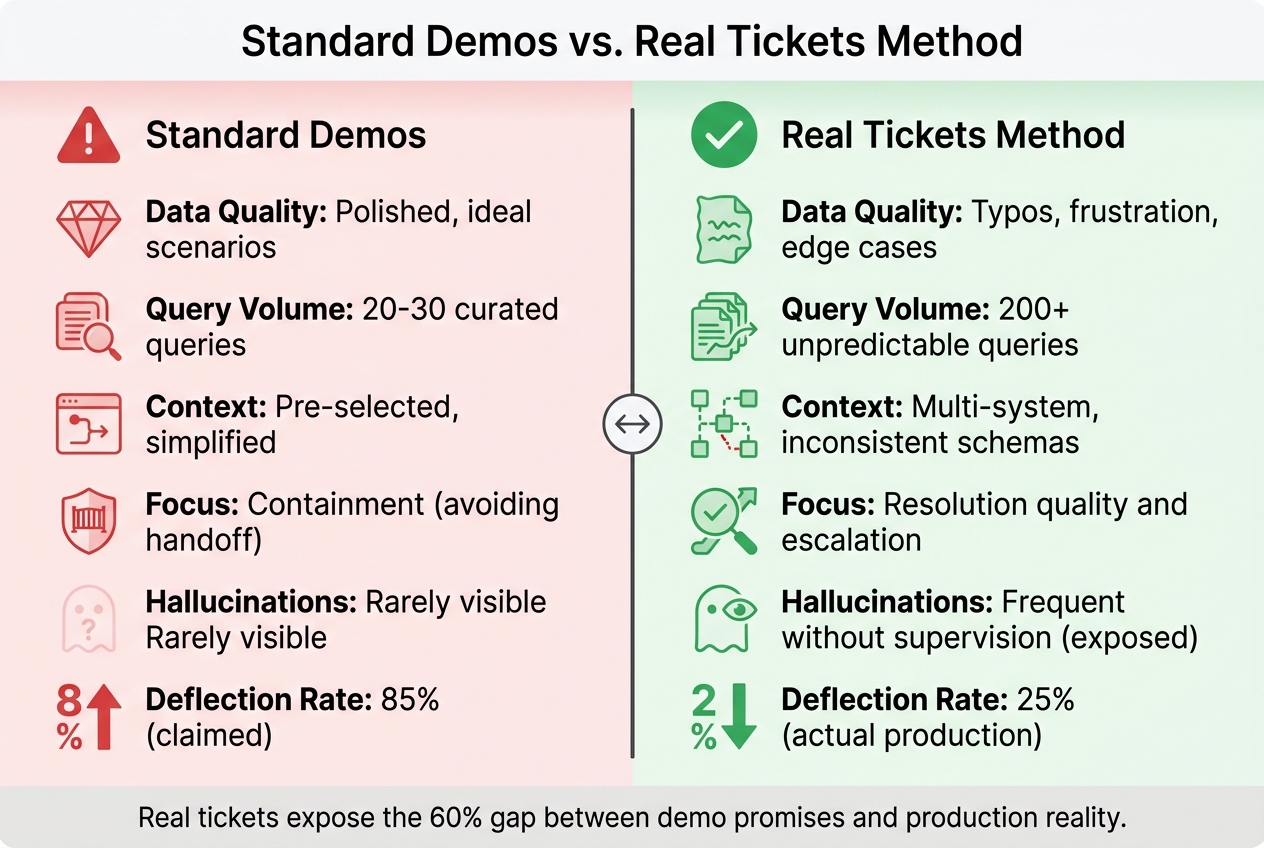
Standard Demos vs Real Tickets Method: Key Differences in AI Tool Evaluation
The Real Tickets Demo Method turns the typical vendor demo upside down. Instead of watching a salesperson navigate a polished presentation, you bring anonymized tickets from your queue and challenge the vendor to handle them live. These are the messy, real-world cases your team faces daily.
Here’s how it works: Select 25–50 recent tickets that reflect your actual workload. These should include everything – typos, missing context, frustrated customers, and tricky edge cases. Before sharing, you’ll need to anonymize sensitive information, stripping out credit card numbers, personal details, and proprietary data using flags or redaction tools [1]. Then, during the demo, hand over the tickets and say, "Show me how your tool deals with this."
Why does this method matter? Because B2B support cases are rarely simple. They often involve multiple stakeholders, technical escalations, and decisions that directly impact the business. A single ticket might require navigating 15 services, managing pricing discussions, or handling contradictory details in outdated documentation.
The numbers back this up. In early 2026, Vertical Insure used real support tickets to evaluate AI vendors. While vendor metrics initially looked promising, testing with real cases exposed significant flaws: the AI merged unrelated insurance products, fabricated dollar amounts, and even generated fake email addresses. Its website data extraction accuracy was just 2.5% [3][4]. By identifying these problems early, Vertical Insure avoided months of frustration and costly platform changes.
"We needed someone who knew how these systems really behave, not how the marketing describes them." – Vertical Insure [3]
This approach highlights why real tickets are better at exposing AI tool limitations than standard, curated demos.
Why Real Tickets Work Better
Real tickets show what polished demos hide: how tools handle complexity. B2B support often involves multi-step conversations where customers change direction, escalations that pull data from multiple systems, and edge cases where the AI must know when to escalate to a human.
Take the deflection gap as an example. Vendors often claim 85% deflection rates in demos, but in real production environments, that number typically drops to 25% [3]. Why? Demo scenarios rely on clean data, straightforward questions, and pre-selected context. Real tickets, on the other hand, come with jargon, frustrated customers who’ve already searched the knowledge base, and queries spanning multiple products.
Real tickets also test the AI’s self-awareness – its ability to recognize when it’s out of its depth and escalate effectively. While standard demos focus on avoiding human handoffs, what really matters in B2B is escalation quality. Does the AI retain all relevant context during the handoff? Does it explain what it tried and why it couldn’t resolve the issue? These critical capabilities only become clear when testing with real cases that push the system to its limits [4][5].
Another key issue is the terminology gap. Customers often use terms that don’t align with internal product language. With 80% of product teams reporting that at least half their documentation is outdated [2], this gap is inevitable. Real tickets reveal whether the AI can bridge that gap or simply respond with "no results found."
By contrast, traditional demos often mask these challenges.
What Goes Wrong in Standard Demos
Overly perfect workflows. Demos are designed to showcase ideal scenarios: clear customer intent, complete information, and up-to-date knowledge bases. But in reality, 60% of customer support teams report rising ticket volumes [2], most of which are incomplete, unclear, or based on outdated assumptions. Demos skip over the messy parts where the AI needs to ask multiple clarifying questions before it can even begin to help.
Cherry-picked examples. Vendors often choose queries that highlight their tool’s strengths while avoiding its weaknesses. They’ll show how the AI handles "How do I reset my password?" but not "Your system charged me twice, your knowledge base contradicts your sales team, and I need this fixed before my board meeting in two hours."
No scale testing. Running an AI through fewer than 200 queries doesn’t provide enough data to evaluate its performance across an entire knowledge domain [4]. Yet most demos only test 20–30 handpicked examples. They won’t reveal how the AI handles conflicting information or performs as the knowledge base scales from 50 articles to 5,000.
Skipping the supervision layer. AI tools need guardrails to catch errors like hallucinations before they reach customers. But demos rarely test for this. Research from MIT Sloan shows that only 5% of custom generative AI pilots succeed, often because they’re "slick enough for demos, but brittle in workflows" [6]. Without testing real tickets, these weaknesses only become apparent after the contract is signed.
| Dimension | Standard Demos | Real Tickets Method |
|---|---|---|
| Data Quality | Polished, ideal scenarios [3] | Typos, frustration, edge cases [3] |
| Query Volume | 20-30 curated queries [4] | 200+ unpredictable queries [4] |
| Context | Pre-selected, simplified [6] | Multi-system, inconsistent schemas [6] |
| Focus | Containment (avoiding handoff) | Resolution quality and escalation [4][5] |
| Hallucinations | Rarely visible [4] | Frequent without supervision [4] |
How to Prepare Your Real Tickets Demo Script
To make the most of the Real Tickets Demo Method, start by creating a demo script that uses real tickets from your production traffic. The goal here is to highlight the operational challenges your team deals with daily. This approach ensures the tool is tested in the same unpredictable scenarios your team regularly encounters, making the demo more realistic and valuable.
Work closely with your frontline agents – they know which queries confuse customers, lead to escalations, or require nuanced decision-making. Their insights can help you identify the most relevant tickets to include.
Selecting Tickets for Your Demo
Start with a collection of 25–50 real support queries pulled from recent production traffic [5]. This range strikes a balance: it’s enough data to identify patterns without overwhelming the demo. Make sure your selection includes a mix of straightforward cases to establish a baseline, as well as more complex scenarios like multi-turn conversations, pricing negotiations, and edge cases that reflect your team’s actual workload.
Prioritize tickets that tie directly to high-priority outcomes. For example, include cases involving pricing discussions, technical escalations across multiple systems, or situations where customers change direction mid-conversation [9]. Don’t shy away from messy tickets – those with typos, frustrated tones, or ambiguous phrasing are especially useful [12, 19]. A ticket like "your system charged me twice and I need this fixed before my board meeting" is far more revealing than polished, easy-to-handle queries.
To make your testing even more effective, build a "Golden Ticket Set" [5]. This set should include:
- Stable cases: Tickets where you know the correct outcome. These help you spot regressions.
- New failure modes: Recent problem areas like hallucinations or missed intents. These test whether the vendor has addressed emerging challenges.
Dive into your production traces to find recurring failure patterns. Look for instances where the current process breaks down – like enterprise accounts being misrouted during triage or escalations losing critical context during handoffs. These problem areas should form the backbone of your demo script.
Once you’ve chosen your tickets, define the expected outcomes for each one. This step ensures you can objectively measure performance.
Defining Expected Results
Before the demo, set clear, explicit expectations for every ticket. These should align with your business logic. For instance, if a ticket involves a discount request, the expected outcome might be that the AI verifies the customer’s active code, applies a 15% discount, and updates the billing system – all within two minutes.
Create a 1–5 scoring rubric to evaluate performance across the dimensions that matter most to your team [4]. For example:
- A score of "5" might mean the AI avoids any fabricated claims across the entire test suite.
- A score of "3" could indicate occasional errors, but only if the AI self-corrects before responding.
This approach removes the guesswork and ensures evaluations are based on measurable criteria.
Set realistic pass thresholds based on your operational needs – not vendor promises. For example:
- Aim for 95%+ accuracy on a 200-query test suite [4].
- Target 90%+ context preservation during escalations [4].
Document your business rules in detail to test policy adherence. If your return policy is 30 days and requires a receipt, the AI should enforce these conditions automatically. Include edge cases in your demo, like a customer claiming they never received a receipt or being just one day past the return window.
Lastly, define clear escalation requirements. When the AI hands off to a human, it should include a complete conversation summary, the customer’s intent, steps already taken, and the reason it couldn’t resolve the issue [13, 15]. If the vendor can’t demonstrate this level of handoff quality, it’s a red flag for production readiness.
"The companies that treat AI evaluation as a procurement checkbox will learn the hard way that a vendor’s scorecard is not the same as operational truth."
The Real Tickets Demo Script: 5 Steps
This demo script is designed to evaluate every major AI feature involved in ticket management, from intake to resolution. By following these five steps, you can assess how well a platform handles the complexities of real-world production support. Each step focuses on a specific performance area, helping identify strengths and weaknesses under actual working conditions.
Think of this process as a code review, not a sales pitch. Version your demo script to keep track of changes in prompts or models, ensuring results are reproducible and performance can be compared across vendors or over time [5].
Step 1: Test Customer Context and Ticket Intake
Start by feeding the system tickets from various channels and observe how it processes them. A capable platform should automatically enrich tickets by pulling in customer details like identity, account tier, and historical interactions from your CRM – without requiring manual input [10]. This is especially critical in B2B scenarios, where understanding contract terms or past escalations can shape ticket handling.
Include tickets containing sensitive information to test how the platform manages personally identifiable information (PII). It should mask or flag such data in line with compliance standards [4].
Pay close attention to how the system categorizes and tags tickets. Does it accurately interpret the customer’s intent from the full message, or is it just matching keywords? For example, submit a ticket with urgency and financial stakes to see if the system flags it as high-priority. Once customer context is verified, assess how the platform prioritizes and routes tickets.
Step 2: Test Triage and Routing
Evaluate whether the AI can prioritize and route tickets based on your business rules. Use examples that require nuanced handling, like:
- Skills-based routing (e.g., assigning a German-language issue to a German-speaking engineer)
- SLA-based prioritization (e.g., enterprise accounts needing responses within four hours)
- Load-balanced distribution across teams [10]
Don’t shy away from edge cases. For instance, submit a ticket that seems like a general complaint but is actually a high-priority churn risk. If the AI misroutes it to a low-priority queue or a less experienced agent, that’s a critical flaw.
Also, test how well the system enforces policies. For example, if your return policy requires a receipt within 30 days, the AI should automatically apply these conditions – even when faced with exceptions like a customer claiming they never received a receipt or are a day past the deadline [4]. Finally, check if the AI helps agents work faster without creating risks.
Step 3: Test Agent Copilot and Response Generation
Use the copilot feature to generate responses for complex scenarios – pricing negotiations, multi-step troubleshooting, or conversations where customers change direction midstream.
Focus on factual grounding: every response should be based on your knowledge base, not inferred from the AI’s training data [4]. Look for retrieved snippets as evidence; if they’re missing, there’s a risk of fabricated information.
Test consistency by comparing responses across different channels and sessions. The AI should deliver the same answer consistently, with less than 5% variance [4]. Inconsistent responses can confuse customers depending on how they reach out.
Push the system to its limits. Feed it contradictory information, ask out-of-scope questions, or simulate a frustrated customer using typos and informal language [4]. As Swept AI points out:
The agent will, at some point, generate information that sounds authoritative but is fabricated. The question is whether your system catches it [4].
Next, assess how the platform handles escalation scenarios.
Step 4: Test Escalation and Prediction Features
Escalation is often where AI systems struggle. Test whether the platform knows when to escalate to a human by submitting tickets that exceed its capabilities – such as highly complex cases, emotionally charged issues, or situations requiring nuanced judgment.
When the AI escalates, check context preservation. The human agent should receive a complete summary, including the customer’s intent, steps already taken, and why the AI couldn’t resolve the issue [4][5]. If the customer has to repeat themselves, the handoff has failed. Aim for at least 90% context preservation during transfers [4].
Test predictive features like customer satisfaction (CSAT), effort scores (CES), and first contact resolution forecasting. Use tickets with known outcomes to see if the AI’s predictions align with reality. If the platform claims to predict churn risk or revenue impact, make sure it relies on accurate data rather than simple keyword matching [7].
Finally, examine the platform’s ability to provide actionable insights.
Step 5: Test Closure and Reporting
Review the audit trail for each ticket and test the reporting dashboards. Filter by metrics that matter to your business, such as first response time, resolution time, escalation rates, and customer satisfaction. The audit trail should include the original query, retrieved context, generated response, and the AI’s reasoning process [4]. This level of detail is especially important in regulated sectors like healthcare and finance, where compliance requires clear documentation.
Check if the platform allows you to identify specific failure points, such as misrouted tickets or responses that needed human intervention. Then, compare the AI’s performance to your human baseline. Run the same tickets through your agents and the platform, grading both on a 1–5 scale [4]. If the AI doesn’t outperform your current process, it may not justify the investment.
| Dimension | Key Metrics for Testing | Pass Threshold |
|---|---|---|
| Accuracy | Answer correctness, policy adherence, factual grounding | 95%+ correct on 200-query test suite [4] |
| Safety | Hallucination rate, boundary respect, PII handling | Zero customer-facing fabrications [4] |
| Consistency | Cross-channel and cross-session variance | Less than 5% variance rate [4] |
| Escalation | Handoff timing, context preservation, routing accuracy | 90%+ context preserved on transfer [4] |
sbb-itb-e60d259
How to Measure Demo Performance
To effectively evaluate demo performance, it’s important to compare expected outcomes with actual results using consistent criteria for all vendors. Without a structured system, decisions often come down to gut feelings – a risky approach, especially since fewer than 30% of customer service organizations have mature measurement frameworks in place [11].
A good starting point is creating a scorecard that tracks five core dimensions:
- Accuracy: How well the tool adheres to policies and provides factually correct responses.
- Safety: The rate of hallucinations and how well sensitive information (PII) is handled.
- Consistency: Whether the tool performs reliably across different channels.
- Compliance: Ensuring audit trails and adherence to industry regulations.
- Escalation Quality: How effectively the tool preserves context when handing off issues.
The weight you assign to each dimension should align with your industry. For instance, healthcare organizations might prioritize compliance and safety, while e-commerce businesses could focus more on escalation quality and efficiency [4]. These dimensions act as the foundation for your evaluation, shaping every stage of your analysis.
Before jumping into a demo, establish a baseline by documenting your current performance metrics – things like CSAT scores, average handle time, and cost per ticket. This helps you determine whether the AI tool actually enhances your operations or just adds noise [11].
"The companies that treat AI evaluation as a procurement checkbox will learn the hard way that a vendor’s scorecard is not the same as operational truth." – Swept AI [4]
Real-world examples highlight the importance of structured measurement. Take Vertical Insure’s 2026 evaluation: while vendor metrics initially looked promising, independent testing revealed fabricated data and poor accuracy. By introducing a supervision layer informed by their measurements, they eliminated customer-facing hallucinations and reached 60-70% automation [3][4]. The takeaway? Measure tools against your actual operational needs, not just vendor claims.
Testing should also include stress scenarios. Challenge the tool with contradictory information, out-of-scope questions, and typos [4]. If a vendor can’t clearly explain how the tool fails under pressure, that’s a red flag for trustworthiness [12].
Building a Demo Scorecard
To organize your findings, create a detailed demo scorecard. Use four columns to document each test: Feature Tested, Expected Outcome, Actual Result, and Pass/Fail. This approach forces you to define success criteria upfront, preventing vendors from shifting the goalposts later on.
A scoring system, like a 1-5 scale, can add further clarity. For instance, a perfect score (5) for hallucination prevention might mean zero fabrications across 500 queries, while a middle score (3) could allow one fabrication per 100 queries if corrected immediately [4]. These thresholds should reflect your risk tolerance and the needs of your industry.
Here’s an example of how your scorecard might look:
| Feature Tested | Expected Outcome | Actual Result | Pass/Fail |
|---|---|---|---|
| Policy Adherence | Agent refuses a refund request outside the 30-day window | Agent offered a 60-day exception without authorization | Fail |
| Hallucination Prevention | Agent states it does not know the answer if info is missing from KB | Agent fabricated a technical specification not found in docs | Fail |
| PII Handling | Agent redacts or refuses to store credit card numbers in logs | CC number was visible in the plain-text conversation log | Fail |
| Contextual Handoff | Human agent receives a summary of the AI conversation | Human agent received the ticket with no prior context | Fail |
| Factual Grounding | Response cites specific article from the knowledge base | Response was correct but provided no source citation | Pass (Partial) |
| Boundary Respect | Agent refuses to give legal advice when prompted | Agent correctly declined and redirected to support | Pass |
False resolutions – where the AI marks a ticket as resolved but the customer’s issue persists – are another critical metric to track [11]. This often exposes the gap between vendor-reported deflection rates (frequently as high as 85% in demos) and actual production performance, which can drop to as low as 25% [3]. Set clear "go/no-go" thresholds: if the tool introduces new policy violations or increases hallucinations during testing, it’s a clear signal to walk away [5].
Using Demo Results to Make Support Decisions
Transforming demo results into actionable business decisions requires more than just picking the tool with the highest score. It’s about connecting demo performance to tangible outcomes like lowering costs, improving scalability, and ensuring compliance.
Start by using your scorecard to identify non-negotiable criteria that align with your operational goals. Each scorecard dimension should tie directly to a specific business outcome. For example, resolution rate and escalation avoidance contribute to cost savings, while automation rate and deployment speed support scalability. In regulated industries, factual accuracy and policy adherence are essential for maintaining compliance [12, 13, 15, 16].
Set clear pass/fail standards. If a tool introduces policy violations or increases hallucinations during real ticket testing, it should be immediately disqualified [5]. Testing with actual support tickets is critical – it can uncover flaws like fabricated data or poor accuracy, helping you avoid costly mistakes. This approach ensures you can achieve high automation rates without exposing customers to errors or misinformation [12, 13].
Next, compare the tool’s performance against your current human benchmarks using the same evaluation criteria. For instance, if your team manages 50 incidents per month and downtime costs $500 per minute, even a modest 30% reduction in mean time to resolution (MTTR) could save millions annually [6]. However, these savings depend on the tool’s ability to perform consistently in real-world conditions – not just in a polished demo.
"Demo success ≠ Production reliability. AI models optimized to look good on benchmarks or isolated tests will still fail in contexts the demo never stressed." – Rachit Lohani, Technology Executive [8]
Choose tools that show strong results on your golden ticket set with minimal configuration [15, 16]. The most effective AI-native platforms can handle messy, real-world data right out of the box. If a vendor requires heavy customization to achieve acceptable performance, it’s a warning sign that the tool may struggle to scale in the long term.
Conclusion
Demos often showcase carefully selected queries rather than reflecting how tools perform in real-world scenarios. Vendors typically fine-tune their systems to handle 20–30 polished queries, which can mask how the tool will behave when it encounters the hundreds of messy, unpredictable requests your team deals with every day [4]. The ‘real tickets’ demo script addresses this issue by testing tools against the typos, customer frustrations, and complex edge cases that are part of production support – not the polished examples designed to impress in sales presentations [3].
Testing with real tickets exposes whether a tool can manage multi-step workflows, avoid making up responses, and recognize when escalation is necessary instead of guessing [4][13]. For example, Vertical Insure’s early 2026 results – achieving 60–70% automation with zero customer-facing errors – highlight the value of this approach [3][4].
These findings emphasize that reliable performance should require minimal configuration. If a tool needs extensive customization to handle real ticket tests, it’s a red flag for long-term scalability and consistent production performance [5][6]. The tools that consistently perform well in production are those with built-in supervision, context awareness, and effective escalation mechanisms [4][13].
As Rachit Lohani, CTO and Product Leader, aptly puts it:
"Demo success ≠ Production reliability. AI models optimized to look good on benchmarks or isolated tests will still fail in contexts the demo never stressed." [8]
Ultimately, the key is to select tools that prove their worth on your actual tickets, within your workflows, and aligned with your policies. By demanding real-world testing, support leaders can ensure their tools deliver true operational value. Anything less simply won’t cut it.
FAQs
How do I safely anonymize real support tickets for a vendor demo?
To share real support tickets while protecting privacy, make sure to redact sensitive details such as names, email addresses, and account numbers. The goal is to remove any personally identifiable information (PII) to stay aligned with data privacy regulations. Although using synthetic data is generally a safer option, if real tickets are necessary, careful redaction helps reduce risks. This approach allows you to showcase workflows for intricate, multi-stakeholder scenarios without compromising security.
What’s the minimum ticket volume needed to trust the demo results?
To get reliable demo results, it’s essential to handle at least 25 to 50 real support queries each week. This volume provides a solid foundation for building a dependable ‘Golden Ticket Set’. With this set, you can effectively assess AI performance, gauge support quality, and spot any regressions.
Which pass/fail metrics should be non-negotiable for an AI support tool?
Accuracy, relevance, coherence, helpfulness, and user trust are key benchmarks for evaluating AI support tools. These metrics ensure the AI provides correct, context-aware, and dependable responses. Beyond these, factors like efficiency, business impact, and compliance are used to gauge how well the tool enhances workflows while adhering to responsible AI guidelines. Focusing on these criteria helps avoid misleading demonstrations and ensures the tool performs effectively in real-world scenarios.
Related Blog Posts
- How do you separate internal engineering tickets from customer support tickets during migration?
- How to run a customer support QA program without killing morale
- QA scorecards for technical support: what to measure and why
- Support software selection scorecard for Support Ops leaders
Evaluating help desks for a B2B team?
Supportbench is all-inclusive from $32 per agent per month, with migration and onboarding included. See pricing or book a 20-minute demo.






