


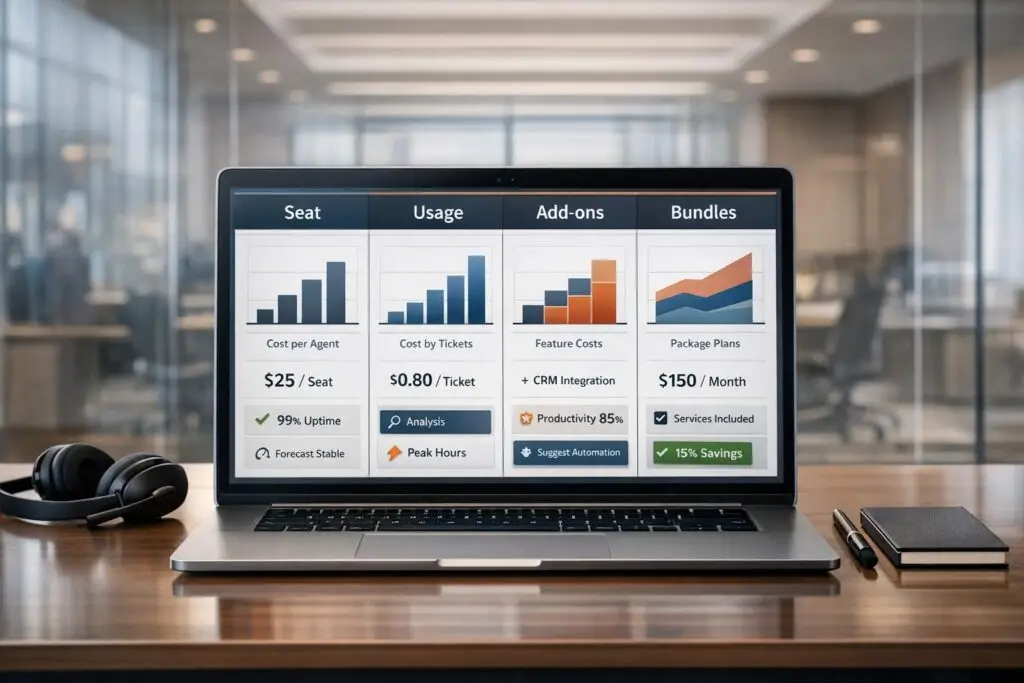
Choosing the right helpdesk pricing model can save you money and align costs with your team’s needs. Here’s a quick breakdown of the four main models:
- Seat-Based Pricing: Pay per agent, offering predictable costs but scaling expenses with headcount. Best for stable teams with steady workloads.
- Usage-Based Pricing: Costs depend on activity, like tickets or AI resolutions, making it flexible for fluctuating demand but harder to budget.
- Add-On Pricing: Start with a base plan and pay extra for features like AI or analytics. Offers flexibility but can lead to hidden costs.
- Bundled Pricing: Includes all core features for a flat fee, simplifying budgeting but potentially charging for unused features.
Quick Comparison
| Pricing Model | Predictability | Scalability | Best For |
|---|---|---|---|
| Seat-Based | High for small teams | Low; costs grow with staff | Stable teams with predictable needs |
| Usage-Based | Low; varies with usage | High; aligns with demand | Teams with fluctuating workloads |
| Add-On | Medium; hidden costs | Moderate; modular features | Teams needing specific extra features |
| Bundled | High; fixed costs | High; flat-rate options | Teams needing most features included |
Key Takeaway
To choose the best model, consider your team size, workload patterns, and feature requirements. Calculate the Total Cost of Ownership (TCO) over 12–24 months, including hidden costs like setup, add-ons, and AI fees.
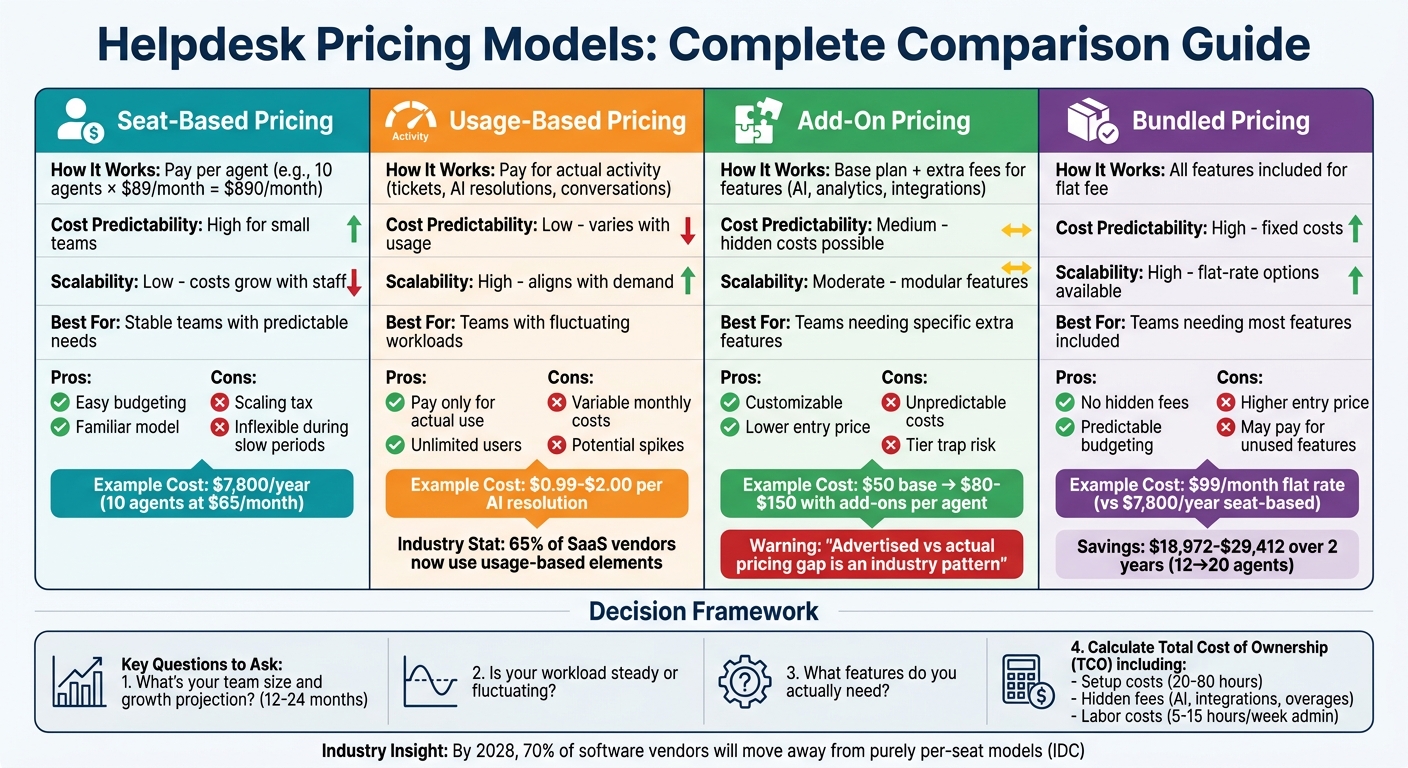
Helpdesk Pricing Models Comparison: Seat-Based vs Usage-Based vs Add-On vs Bundled
Seat-Based Pricing: Fixed Costs Per Agent
Seat-based pricing is a straightforward model where you pay a fixed monthly or annual fee per agent using your helpdesk platform. The math is simple: multiply the number of agents by the per-agent fee. For instance, if you have 10 agents and the fee is $89 per month, your total monthly cost is $890.
This pricing structure comes with a predictable cost increase, often referred to as a "scaling tax." Essentially, your costs rise as you hire more agents, regardless of whether your ticket volume increases. For example, adding three agents means paying for three additional seats, even if the number of tickets handled stays the same. And during slower periods, you’ll still pay for every licensed seat, whether it’s actively used or not.
"The pricing model also signals the vendor’s incentives. A per-seat vendor benefits financially when you add more agents – their revenue grows with your headcount." – Jonathan Bar, Founder, Corebee
Another downside is the lack of flexibility in plan tiers. Many vendors require all agents to be on the same plan, so a single feature upgrade might force your entire team to move to a higher tier – potentially increasing costs by thousands of dollars annually.
This model can also unintentionally limit collaboration. To avoid higher costs, companies might restrict helpdesk access, preventing engineers or product managers from directly engaging with customer feedback or bug reports. This can create information silos and reduce cross-functional teamwork.
Understanding these dynamics is essential to weigh the trade-offs of seat-based pricing. Let’s take a closer look at its advantages and disadvantages.
Pros and Cons of Seat-Based Pricing
| Advantages | Disadvantages |
|---|---|
| Easy to budget with predictable monthly costs | Costs rise directly with headcount, even if ticket volume stays the same |
| Cost-per-ticket decreases as agents handle more tickets | Not flexible during slower periods or seasonal lulls |
| Familiar model for finance and procurement teams | Per-agent fees for add-ons (like AI or QA tools) can significantly increase costs |
| Simple for small, stable teams to manage | High base fees may apply, even for smaller teams |
Seat-based pricing can work well in high-volume scenarios. For example, if an agent handles 1,000 tickets per month at $55 per seat, the cost per ticket is just $0.055. However, for smaller teams managing only 50–200 tickets monthly, the cost per interaction becomes much higher.
When Seat-Based Pricing Works Best
This pricing model is ideal for B2B companies with steady headcounts and predictable workloads. Industries like manufacturing, logistics, and enterprise software often benefit because their support needs align with stable customer bases rather than fluctuating consumer demand.
It’s also a good fit for larger teams (20+ agents) handling high ticket volumes. In these cases, the fixed seat cost spreads across thousands of interactions, making it more efficient. Finance teams also appreciate the consistency, as expenses remain stable as long as the team size doesn’t change.
Usage-Based Pricing: Pay for What You Use
Usage-based pricing flips the script on traditional models. Instead of charging per agent seat, costs are tied directly to actual usage – whether that’s tickets created, AI resolutions completed, conversations handled, or API calls made. Essentially, your expenses scale with your activity, not your team size.
This approach works particularly well for businesses with fluctuating support needs. When things are slow, costs automatically decrease without the hassle of canceling licenses or adjusting user counts. If ticket volumes surge, you simply pay for the additional activity – no need to forecast headcount or pay for unused capacity.
One standout benefit is the removal of the "light user tax." This means team members like engineers, product managers, or founders can contribute to support efforts without incurring expensive seat fees. It encourages collaboration across teams without financial penalties.
In AI-driven support systems, usage-based pricing often comes as per-resolution billing. For instance, Fin charges $0.99 per resolution, while Zendesk AI’s rates range from $1.50 to $2.00 depending on your commitment [2]. Importantly, you’re billed only for successful AI resolutions – not for failed or incomplete attempts – which reinforces the value of this model in AI-heavy environments.
"AI is forcing every SaaS company to ask: does my product’s value scale with the number of humans using it, or with the amount of work it produces?" – Tierly [8]
This pricing model is gaining traction across the industry. In fact, 65% of SaaS vendors now incorporate usage-based elements alongside traditional seat-based pricing, and credit-based pricing has grown by 126% year-over-year [8]. As AI takes on 30–50% of ticket resolution tasks, the traditional link between headcount and software value is rapidly fading [3]. The flexibility of this model aligns well with the demands of modern AI-first support strategies.
Pros and Cons of Usage-Based Pricing
| Advantages | Disadvantages |
|---|---|
| Pay only for actual support activity, not unused capacity | Monthly costs can vary, making budgeting tricky |
| Costs grow in line with business activity and demand | Sudden spikes in ticket volume may lead to unexpected expenses |
| Unlimited user access in most cases – no "light user tax" | Monitoring usage and spending requires diligence |
| Vendors are incentivized to deliver value (in per-resolution models) | If AI automation rates are low, costs can rise with high ticket volume |
However, unexpected spikes in ticket volume can lead to higher costs. To avoid surprises, use tools like usage estimators and set spending caps or alerts to keep expenses in check during busy periods.
Another crucial consideration is understanding what qualifies as a "resolution." Some vendors define it as any interaction without human escalation, while others require AI-verified positive outcomes. Make sure to get a clear, written definition from your vendor to avoid being charged for incomplete or failed sessions [2].
When Usage-Based Pricing Works Best
This model shines in situations where support demand varies widely. E-commerce companies with seasonal peaks, startups where support is spread across multiple roles, and businesses leveraging AI-heavy workflows all stand to gain.
For example, in early 2026, Isabel Larrow, Product Support Operations lead at Anthropic, shared that adopting Fin’s per-resolution AI agent allowed their team to automatically resolve over 50% of customer conversations, saving more than 1,700 hours in just one month [2]. Similarly, ZayZoon reported saving "millions of dollars" by switching to a per-resolution model to manage their growing customer base [2].
For companies with unpredictable growth or those exploring new markets, usage-based pricing eliminates the risk of overcommitting to costly seat licenses. You pay for the work that’s actually done, not for the capacity you think you’ll need. By tying costs to real activity, this model helps streamline operations and support long-term goals effectively.
Add-On Pricing: Core Plans Plus Extra Features
Add-on pricing starts with a basic subscription fee, but additional charges for features like AI automation, advanced reporting, workforce management, premium integrations, and quality assurance modules can quickly increase the total cost.
For example, while a platform might advertise a base rate of $50 per agent per month, adding necessary features can push that cost to anywhere between $80 and $150 per agent. As Jonathan Bar, Founder of Corebee, explains: "The gap between advertised and actual pricing is not unique to any one vendor – it is an industry pattern" [1].
One major issue is the Tier Trap. Vendors often bundle critical features into higher pricing tiers instead of offering them as standalone options. For instance, if you need advanced API access or custom integrations, you may have to upgrade your entire team’s plan from $25 to $75 per agent. This means paying extra for every team member, even if only a few need the feature [6].
Add-ons can also lead to hidden operational costs. Setting up these features might require 20–80 hours of staff time, data migration could take another 10–40 hours, and ongoing administration might consume 5–15 hours per week [1]. For a 10-agent team, these factors can push initial-year costs beyond $16,000, even on a mid-range platform [1].
Pros and Cons of Add-On Pricing
| Pros | Cons |
|---|---|
| Customization: Pay only for the tools your team needs | Unpredictable Costs: Monthly expenses can vary, complicating budgeting |
| Flexibility: Add or remove features as your needs change | Administrative Complexity: Managing multiple add-ons increases overhead |
| Lower Entry Price: Affordable base plans for small teams | Tier Trap: Some features require costly plan upgrades for all users |
While add-on pricing is attractive for startups looking to scale, the unpredictability and management challenges can make it expensive as teams grow.
Common Add-Ons in B2B Support
Here’s a breakdown of frequently offered add-ons and their typical costs:
AI and Automation:
Usually the most expensive. Some platforms charge $50 per agent per month for advanced AI and an extra $35 per agent per month for quality assurance. Others might bill per resolution, such as $0.99 per successful resolution or around $2.00 per resolution on a pay-as-you-go basis [2].
Advanced Reporting and Analytics:
These tools cost around $5–$15 per agent per month [1]. While the price seems low, they’re essential for data-driven teams, and the costs add up as teams grow.
Workforce Management (WFM):
Typically priced at $25–$50 per agent per month, these tools are crucial for managing larger teams with multiple shifts [1].
Premium Integrations:
Syncing with CRMs or billing systems can add $10–$25 per agent per month [1].
Additional Channels:
Adding phone or SMS support costs an extra $20–$50 per agent monthly [1].
Sandboxes:
These are often not available as standalone add-ons. Instead, vendors require upgrading to an Enterprise tier, which forces a full plan upgrade across the team [1].
When evaluating add-on pricing, look beyond the monthly sticker price. Calculate your total cost of ownership over 24 months, factoring in expected team growth and ticket volume increases. Carefully assess which features are essential and consider whether third-party solutions might be more cost-effective. Always request a detailed breakdown of what’s included in the base plan versus what requires extra fees before committing to a contract [3]. Understanding these dynamics is key to managing costs and ensuring scalability.
sbb-itb-e60d259
Bundled Pricing: Everything Included
Bundled pricing takes a different approach compared to seat-based or usage-based models. It offers an all-in-one package, combining core features like AI tools, workflows, dashboards, advanced reporting, and multi-channel support into a single, predictable fee. This simplicity makes it clear what’s included and helps businesses streamline their budgeting process.
The standout benefit of this model is budget predictability. For example, a bundled plan might range from $55 to $169 per agent per month, depending on the tier, and include everything from SLA management to advanced analytics [4]. This predictability allows for more accurate annual financial planning while avoiding fluctuating fees or unexpected charges.
Another advantage is how it scales with your team. Costs grow in proportion to team size without piling on extra fees for add-ons. Some vendors even offer flat-rate bundles, charging a fixed monthly fee regardless of team size. For instance, a 10-agent team on a mid-tier per-seat plan at $65 per agent would spend $7,800 annually. In contrast, a flat-rate plan at $99 per month totals only $1,188 a year [6].
As Jonathan Bar, Founder of Corebee, explains:
"The pricing model also signals the vendor’s incentives. A per-seat vendor benefits financially when you add more agents… A flat-rate vendor benefits when you need fewer agents." – Jonathan Bar [6]
Another shift in bundled pricing is the inclusion of AI features, which were often charged separately in the past. This reflects a broader industry trend: IDC predicts that by 2028, 70% of software vendors will move away from purely per-seat models [5]. For B2B support teams, this means gaining access to AI-driven tools like automated workflows, ticket summaries, and quality assurance features without additional costs.
Pros and Cons of Bundled Pricing
| Pros | Cons |
|---|---|
| Predictable Budgeting: Fixed costs simplify financial planning | Higher Entry Price: Base cost can exceed basic per-seat plans |
| No Hidden Fees: All core features included | Potential Overpayment: May pay for unused features |
| Scalability: Costs grow proportionally with team size | Less Customization: Limited ability to remove features for a lower price |
| Cross-Functional Access: No penalties for "light users" like engineers or product managers | Tier Limitations: Some advanced features (e.g., HIPAA compliance) may still require enterprise-tier upgrades [4] |
Bundled pricing works best for teams that need most of the included features. If your needs are limited to basic ticketing or email support, you might end up paying for features you don’t use. But for teams that rely on AI automation, advanced reporting, and multi-channel support, bundled pricing often provides better value than purchasing individual add-ons.
Who Benefits Most from Bundled Pricing
Bundled pricing is especially advantageous for renewal-focused B2B organizations. Industries like manufacturing, logistics, supply chain, and managed services often deal with complex, long-running cases that require robust tools – SLA management, escalation workflows, customer health scoring, and detailed reporting. Bundled pricing ensures these teams have access to everything they need without the hassle of managing multiple add-ons [7].
Growing support teams also stand to gain. For example, if a team’s size increases from 12 to 20 agents, switching from per-seat to flat-rate bundled pricing could save between $18,972 and $29,412 over two years [6]. This makes it a smart choice for startups and scaling companies that need cost certainty for investor reporting and budget planning.
Organizations that prioritize cross-functional access to tickets also benefit. Engineers reviewing bug reports or product managers analyzing feature requests often face barriers with per-seat models, which charge full rates for occasional users. Bundled pricing eliminates this issue, enabling seamless collaboration across teams without creating silos [3].
Lastly, teams focused on operational efficiency rather than customization will find bundled pricing particularly appealing. Instead of spending time deciding on add-ons, negotiating contracts, and juggling billing cycles, you get instant access to the full platform. For B2B teams, where 86% of service organizations report that help desk systems improve efficiency [7], this time savings can be redirected toward delivering better customer support.
How to Compare Pricing Models: Total Cost and Scalability
When evaluating helpdesk pricing models, focus on the Total Cost of Ownership (TCO) over a 12-month period. To calculate TCO, add up setup costs, 12 months of subscription fees, usage charges, labor, and maintenance, then subtract any potential resale value [20,21].
For instance, a $50 per agent fee can quickly rise to $120–$200 once you factor in AI features, advanced reporting, and 20–80 hours of staff time [1]. To get an accurate picture, include labor costs by using your team’s hourly rates for setup and ongoing maintenance.
Growth projections are another critical factor. Let’s say your team grows from 10 to 20 agents. On a $65 per-seat model, your annual cost jumps from $7,800 to $15,600. Meanwhile, a flat-rate plan at $99 per month stays steady at $1,188 per year, regardless of team size [6]. Some pricing models may also force you into higher tiers to unlock necessary features like API access or advanced analytics. This "tier trap" can cause per-seat costs to triple overnight [6]. Such insights are essential for making an informed comparison of pricing models.
Pricing Model Comparison Table
Here’s a quick look at how different pricing models stack up in terms of predictability, scalability, and alignment with AI features:
| Pricing Model | Cost Predictability | Scalability | AI-Native Fit |
|---|---|---|---|
| Seat-Based | Moderate; costs increase with each new hire [6]. | Low; adds a "scaling tax" as headcount grows [6]. | Variable; AI often comes as a costly add-on [1]. |
| Usage-Based | Low; costs vary based on ticket volume and AI usage [6]. | High; aligns with actual customer demand [6]. | High; typically priced per AI resolution [1]. |
| Add-On Model | Low; base prices can be misleading as additional features increase costs [1]. | Moderate; allows for modular expansion [1]. | Moderate; AI is usually an extra premium layer [1]. |
| Bundled/Flat-Rate | High; fixed monthly costs regardless of usage or team size [10,22]. | High; no extra cost for adding more agents [6]. | High; AI features are often included in the base price [10,3]. |
How to Find Hidden Costs
Hidden costs can sneak up and inflate your total expenses. Start by calculating fully loaded labor costs – the hours spent on helpdesk administration beyond just the software subscription. For mid-sized teams, this often includes 5–15 hours per week managing workflows and users, plus 5–10 hours maintaining a knowledge base [1]. At $50 per hour, this adds $6,000–$12,000 annually in operational labor.
AI resolution fees are another potential expense. Some vendors charge $0.99 per successful AI-resolved conversation, which can amount to $19,800 per month for 20,000 resolutions [3,10]. Others may charge around $50 per agent for AI add-ons, effectively doubling the base platform cost [1].
"The gap between advertised and actual pricing is not unique to any one vendor – it is an industry pattern" [1].
Don’t overlook integration, setup, and overage fees. Connecting your helpdesk to tools like CRMs or billing platforms may require 10–30 hours of technical work, and enterprise implementations can cost between $5,000 and $50,000 [1]. Additionally, consider end-of-life costs, such as data export fees or early contract termination penalties, if you plan to switch vendors [20,22]. Overage fees can also be a budget buster – some vendors charge $1.50 for committed resolutions but increase to $2.00 for pay-as-you-go overages, a 33% markup [2].
These considerations complement the earlier breakdown of seat-, usage-, add-on, and bundled pricing models, giving you a clearer view of what to expect.
Conclusion: Choosing the Right Pricing Model
When deciding on a helpdesk pricing model, think about where your team stands today and where it’s headed. For smaller, steady teams with one or two agents and predictable workloads, seat-based pricing might work well – at least for now. However, if your team is growing, incorporating cross-functional roles, or leveraging AI, flat-rate or usage-based models could help you save money and avoid the scaling costs tied to per-seat pricing.
It’s crucial to look beyond the advertised price and focus on the Total Cost of Ownership (TCO) over the next 12 months. Crunch the numbers for your expected team size and ticket volume over both 12 and 24 months. This will help you pinpoint when one pricing model becomes more cost-effective than another.
Predictability is another key factor, especially if you’re working within tight IT budgets. Flat-rate models offer consistent costs, even during busy seasons or hiring surges. On the other hand, usage-based models can align more closely with fluctuating support needs – but be cautious of unexpected charges during high-demand periods. If you’re considering a usage-based plan, make sure you fully understand any overage fees and how "resolution" is defined.
Refer back to the comparison framework outlined earlier to uncover hidden costs, evaluate labor expenses, and determine how each model supports your operational goals. This strategy ensures that your pricing model not only meets your current requirements but also sets you up for AI-driven growth in the future. Opt for a model that grows with your success – not just your headcount [5].
FAQs
How do I estimate my 12–24 month total cost of ownership (TCO) before signing?
To calculate the 12–24 month Total Cost of Ownership (TCO) for a helpdesk solution, you need to look beyond the advertised pricing. Start with the base platform fee – whether it’s per-seat or a flat-rate charge. Then, include additional costs like add-ons, usage overages, implementation fees, training expenses, and any hidden charges that may arise. Once you’ve tallied the monthly costs, multiply them by 12 or 24 months. Don’t forget to account for scalability, as your needs may grow over time, impacting the overall cost. This approach ensures you have a clear understanding of what you’ll be spending in the long run.
What usage metrics should I track to prevent bill spikes on usage-based pricing?
To keep your bills steady with usage-based pricing, it’s crucial to keep an eye on key metrics such as API calls, messages sent or received, data processed, storage consumption, and the number of contacts reached. Real-time tracking is a game-changer here – it helps you spot sudden spikes in usage before they lead to unexpected costs. Setting up thresholds, alerts, or even usage caps can give you better control, helping you maintain predictable expenses and steer clear of billing surprises.
Which pricing model is best if I want engineers and product to help in support without extra cost?
The per-resolution pricing model works well if you want engineers and product teams involved in support without paying extra. With this model, you’re charged only when AI successfully resolves an issue. This is different from per-seat or per-ticket models, where costs can climb based on the number of users or support requests. It ensures your team can collaborate freely without straining your budget.






