


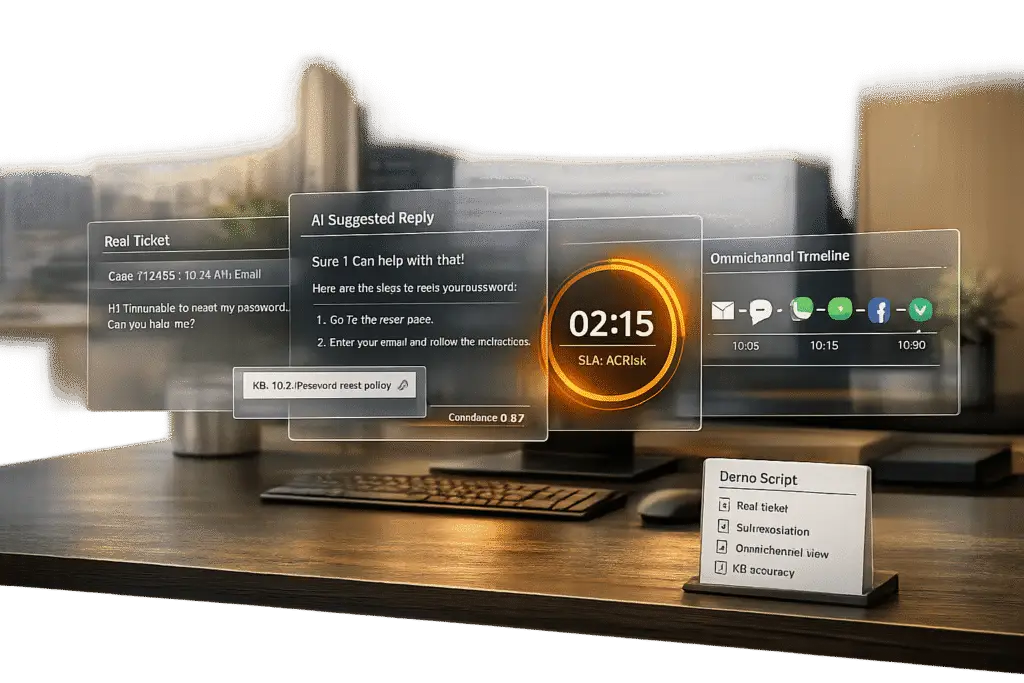
Choosing the right helpdesk software can save your business from costly mistakes. Nearly half of companies replace their helpdesk systems within three years due to poor performance in real-world conditions. Why? Many vendors rely on polished demos that fail to reflect the messy, unpredictable nature of actual support tickets.
To avoid this, you need to test vendors with structured demo scripts using your real support data. This approach ensures the platform can handle real challenges like typos, frustrated customers, complex workflows, and cross-channel consistency. Here’s what to focus on:
- Multi-Channel Integration: Ensure seamless case merging across email, chat, and social media.
- SLA Escalation Workflows: Test dynamic SLA timers and automated escalations.
- AI Accuracy: Evaluate deflection rates and error rates using your actual support tickets.
- Knowledge Base Creation: Check if the platform can draft articles from resolved cases.
- Customer Context: Look for a 360-degree view of the customer, integrating CRM and support data.
Key takeaway: Structured demo scripts and real-world scenarios are critical to making an informed decision. Test vendors thoroughly to ensure their platform meets your operational needs, avoids costly replacements, and delivers a better customer experience.
Why You Need Specific Demo Scenarios
When evaluating platforms, using real-world scenarios is critical to determine if a product is genuinely ready for production. Generic demos often rely on polished, controlled datasets that don’t reflect the unpredictable nature of actual B2B support tickets. Real tickets include typos, complex multi-turn conversations, and tricky edge cases – all of which test whether a platform can handle the messy, real-life challenges of your operations. Without these specific demo scenarios, you’re essentially judging a product that may never perform as promised in real-world use.
This is especially important in renewal-driven B2B environments, where trust and consistency far outweigh metrics like deflection volume. Shortcomings in areas like policy adherence, escalation quality, and cross-channel consistency can directly harm customer relationships. For example, ensuring policy adherence means the AI won’t mistakenly issue unauthorized discounts or incorrect return policies. Similarly, testing escalation quality ensures high-value customers don’t have to repeat themselves, while cross-session consistency prevents customers from receiving conflicting answers across different channels or on separate days [3][4].
Beyond accuracy, scalability testing is another must. Can the system handle peak loads during busy renewal periods? Can it unify conversations across email, chat, and social media? Does it send proactive alerts before SLA breaches and automate reassignments effectively? These are the kinds of challenges that standard demos often skip because they highlight weaknesses in architecture and integration [4].
The risks of skipping real-world testing are clear. Take the case of Vertical Insure [1][3], where a vendor’s AI agent performed flawlessly in a demo but failed catastrophically in real-world testing. During an independent evaluation by Swept AI, the system was found merging unrelated insurance product data, fabricating dollar amounts, and achieving only 2.5% accuracy in website data extraction. These failures underline why 90% of support teams struggle with AI-to-human handoffs [2] – vendors are too often tested on ideal scenarios rather than real operations.
Specific demo scenarios also help avoid the "selection problem" – a common issue that leads 47% of companies to replace their helpdesk within three years [4]. By requiring vendors to work with your actual tickets, including adversarial tests designed to push the AI to its limits, you can evaluate critical factors like factual accuracy, boundary enforcement, handoff quality, and total cost of ownership at varying ticket volumes [2]. This approach turns a demo from a mere sales pitch into a true test of whether the platform is ready for the demands of production.
Demo Scenarios to Request and Why They Matter
The scenarios you ask for during a demo can reveal whether you’re looking at a platform ready for real-world use or just a polished sales pitch. Below are some scenarios that can help you gauge a system’s actual B2B support capabilities.
Multi-Channel Case Creation and AI Summarization
Ask for a demo that shows how cases from email, chat, and social media are merged into a single, unified customer timeline. A true omnichannel setup ensures agents see one cohesive conversation history, reducing the need for customers to repeat themselves – a common frustration [4].
Also, evaluate how well the system summarizes long case histories and predicts key metrics like Customer Satisfaction (CSAT) and Customer Effort Score (CES). This is especially important for B2B cases that often span weeks or involve multiple teams [6]. Predictive metrics allow agents to address potential issues before customers leave negative feedback, enabling proactive intervention.
Next, check how the platform handles SLA dynamics and real-time escalations.
Dynamic SLAs and Escalation Workflows
Look for preemptive measures that prevent SLA breaches. Request a demo that shows multi-level escalation workflows – for example, notifying a team lead when 75% of the SLA time has passed and escalating to a director at 100%, with automatic reassignment to senior agents if necessary [4].
Dynamic SLAs are crucial in B2B environments driven by renewals. The platform should adjust SLA timers based on case events, such as shortening response times when a high-value customer’s renewal date is near. This ensures that customer experiences are aligned with their business importance, not just ticket volume.
Also, test role-based permissions. Can the system restrict access to cases based on factors like customer tier, product line, or region? Complex B2B account management often requires precise control over who can view or edit specific cases.
AI Agent Copilot and Automated Responses
Beyond multi-channel integration, automation can significantly boost agent productivity. AI copilots stand out from basic chatbots by seamlessly integrating with case history, customer context, and knowledge bases. Ask to see how the copilot suggests resolutions, drafts responses, and auto-tags cases.
Check if the copilot can handle multi-step tasks on its own. For instance, can it identify the right product documentation for a tender, summarize a lengthy ticket thread, or draft formal communications based on past interactions [8] [5]? These features can save agents time – 85% of users report faster first drafts when using AI copilots [7].
Also, assess how the system manages AI-to-human transitions. When the AI encounters a frustrated customer or lacks confidence, it should escalate seamlessly to a human agent while preserving the full conversation history. For example, Zoho Desk’s Zia achieved 91% accuracy in identifying frustrated customers and routing them to human agents [4]. Without this, customers may end up repeating themselves, which is a major pain point in B2B support.
Knowledge Base Integration and Article Creation
Ask vendors to show how their platform uses AI to create knowledge base articles from resolved cases. The system should extract the problem, solution, and key details to generate a draft article with a subject, summary, and keywords. Automating this process reduces the manual workload for support teams.
Also, evaluate internal and external bots designed to reduce ticket volume. Internal bots should search both public and private knowledge base articles to help agents find answers quickly. External bots should enable customer self-service through portals and widgets. Be cautious of inflated deflection rates, though. For instance, Intercom Fin achieved a 67% deflection rate during testing but also produced eight incorrect answers (hallucinations) out of 200 questions [4].
"High deflection with low accuracy is a customer experience problem waiting to happen." – Softabase Editorial Team [4]
Test these bots with real-world scenarios, including tickets with typos, frustrated language, or edge cases, to see how they perform under real conditions [1].
Customer Context and 360-Degree Overviews
B2B support often requires a complete view of the customer in one place. Request a demo showing how the platform integrates with tools like Salesforce, displays custom data tables (e.g., training records or infrastructure details), and surfaces notes from Customer Success Managers (CSMs) before agents respond.
A 360-degree overview should also include health scores based on support interactions, renewal dates, and escalation history. This helps agents prioritize high-risk accounts and tailor their responses based on the customer’s overall relationship with your company – not just the current ticket.
Test whether this view is seamless or fragmented. Can agents see order history, past cases, open escalations, and CRM data in one interface, or do they need to switch between tabs [5]? For example, Glossier uses Kustomer’s timeline view to consolidate support operations. This eliminates the need for agents to ask customers for order numbers by showing every order, return, and interaction in one place [4].
Lastly, check for customizable dashboards and reporting. Can managers create views that focus on the KPIs most relevant to their team, such as first contact resolution, SLA compliance, or AI deflection accuracy? A unified view of operational data is critical for assessing the platform’s readiness for production use.
sbb-itb-e60d259
How to Evaluate Demo Responses
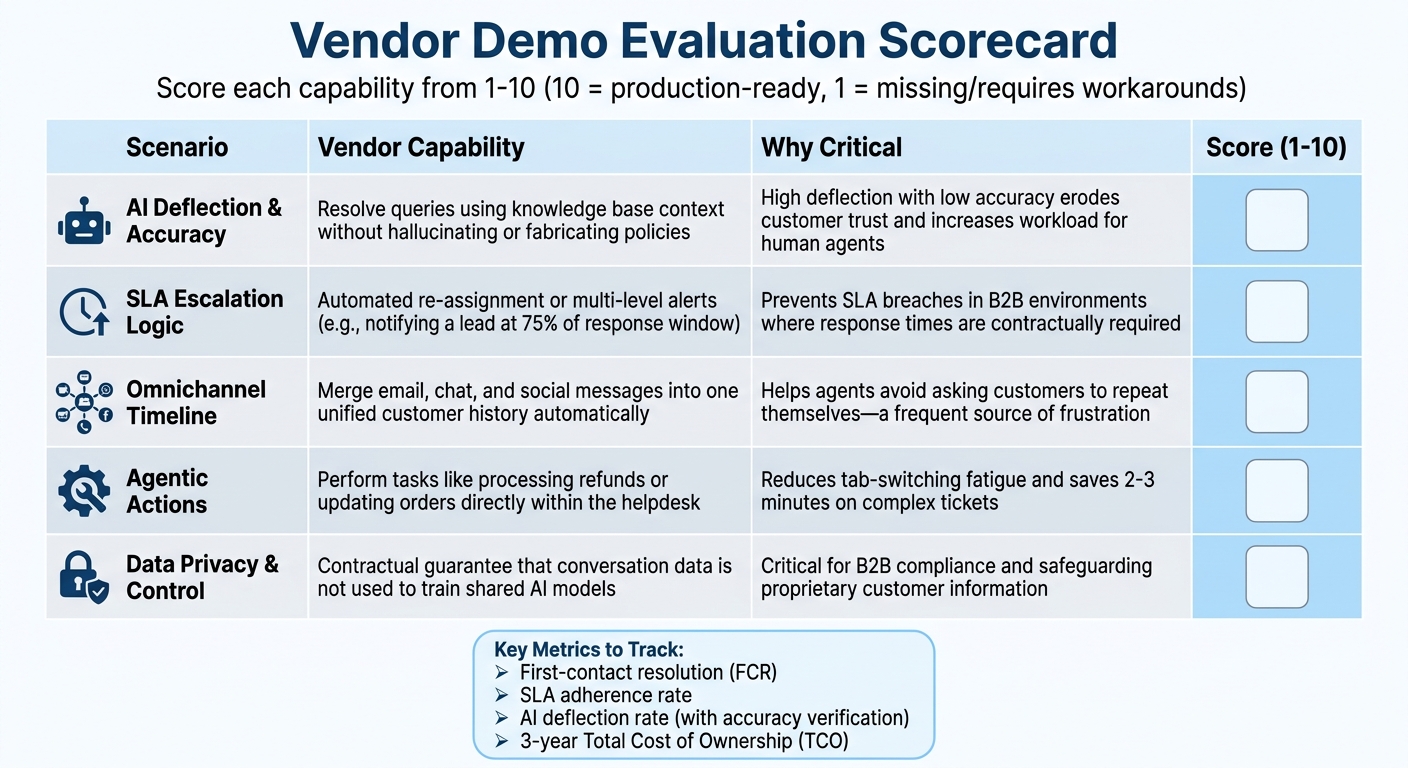
Helpdesk Demo Evaluation Scoring Framework for Vendors
Once you’ve outlined your demo scenarios, the next step is to establish a solid evaluation framework. This will help you separate flashy presentations from solutions that are genuinely ready for production use. The key is to assess how the platform performs under real-world conditions – not just during a well-rehearsed sales demo.
Scoring Framework for Vendor Demos
To keep your evaluations organized, use a scoring table to assess each vendor’s performance on the scenarios you provided. Assign scores ranging from 1 to 10 for each capability, where 10 indicates a feature that’s fully production-ready, and 1 means the feature is either missing or requires extensive workarounds. This method allows for an easy side-by-side comparison and highlights any gaps before you commit to a contract.
| Scenario | Vendor Capability | Why Critical | Score (1-10) |
|---|---|---|---|
| AI Deflection & Accuracy | Resolve queries using knowledge base context without "hallucinating" or fabricating policies. | High deflection with low accuracy erodes customer trust and increases the workload for human agents [4][9]. | |
| SLA Escalation Logic | Automated re-assignment or multi-level alerts (e.g., notifying a lead at 75% of the response window). | Prevents SLA breaches in B2B environments where response times are contractually required [4]. | |
| Omnichannel Timeline | Merge email, chat, and social messages into one unified customer history automatically. | Helps agents avoid asking customers to repeat themselves, a frequent source of frustration in customer service [4]. | |
| Agentic Actions | Perform tasks like processing refunds or updating orders directly within the helpdesk via deep integration. | Reduces "tab-switching" fatigue and saves 2–3 minutes on complex tickets [4]. | |
| Data Privacy & Control | Provide a contractual guarantee that conversation data is not used to train shared AI models. | Critical for B2B compliance and safeguarding proprietary customer information [9]. |
It’s essential to put the vendor’s AI through its paces with real tickets. Use examples that include missing fields, ambiguous priorities, or frustrated language to uncover any performance weaknesses. Additionally, confirm that the vendor offers the ability to revert to previous model versions in case an update negatively impacts performance. This rollback capability is a must-have for maintaining stability [9].
Pay close attention to how the AI handles escalation. The system should avoid "AI-to-human-to-AI" loops that waste time and SLA budgets. Ask vendors to demonstrate how their solution transitions to a human agent when the AI lacks confidence or detects customer frustration. For example, one vendor showcased a 91% accuracy rate in identifying frustrated customers and initiating escalation [4].
These evaluations will help you zero in on the metrics that matter most for your business.
Key Metrics to Prioritize During Evaluation
Once you’ve scored the demos, focus on metrics that directly impact both cost and customer satisfaction. First-contact resolution (FCR) is a key measure of how often issues are resolved during the initial interaction, especially in B2B support. Another critical metric is SLA adherence, which tracks how reliably the platform meets required response and resolution times.
The AI deflection rate – the percentage of queries resolved without human involvement – can also be revealing. However, keep in mind that vendors may define "deflection" differently. Some consider a ticket "contained" if the customer doesn’t escalate to a human agent, while others require confirmed resolution. In one test of 200 common questions, a vendor achieved a 67% deflection rate but also produced 8 inaccurate responses (hallucinations). Another vendor had a lower deflection rate of 54% but only 2 errors [4]. This highlights the trade-off between deflection rates and accuracy.
Finally, look beyond monthly seat costs and calculate the three-year Total Cost of Ownership (TCO). Factor in hidden expenses like AI resolution credits, phone support, and advanced analytics. For instance, one vendor’s professional suite costs an estimated $82,800 over three years for 20 agents, while another’s advanced package is priced at $71,280 plus additional AI resolution fees [4]. Insist on numeric SLAs for accuracy, model drift, and P1 incident response times, and be wary of vague commitments like "commercially reasonable efforts" [9].
Conclusion
Vendor demos often showcase best-case scenarios, but real-world support queues reveal the true test: dealing with frustrated customers, typos, unclear priorities, and rare edge cases. Nearly half of companies replace their help desk software within three years – not because the software itself fails, but because decisions are based on marketing hype rather than structured, practical evaluations[4].
Using well-structured demo scripts transforms subjective opinions into measurable performance data. By evaluating vendors with the same tickets, scenarios, and grading criteria, you can uncover critical weaknesses before committing to a contract. For example, understanding trade-offs in deflection accuracy underscores why thorough testing is so important. These steps ensure demos reflect your actual operational needs.
An objective scoring framework – factoring in quality, pricing, implementation, and integration – provides a solid foundation for your decision. It also helps mitigate the $75 billion in annual revenue that businesses lose each year when poor customer service drives customers away[10]. Testing features like AI-to-human handoffs, SLA escalation logic, and omnichannel timeline merging ensures the platform supports your goals rather than just impressing in a quick demo.
"The best help desk software is the one your team will actually use consistently. Pick the one that matches their workflow – not the one with the most impressive demo."
– Softabase [4]
FAQs
What real tickets should we use in a vendor demo?
When evaluating a vendor’s capabilities, it’s a smart move to use real support tickets that mirror your team’s daily operations. These should include a variety of cases, such as:
- Routine inquiries that come up frequently
- Escalations requiring higher-level attention
- Complex cases involving multiple steps or team handoffs
Avoid using overly simple or generic tickets – they won’t give you a clear picture of how the vendor’s platform performs under real-world conditions. Instead, focus on tickets that reflect your actual challenges. This approach will help you gauge how well the platform handles your specific workflows, how quickly resolutions are achieved, and how accurate the AI is in addressing your needs.
How do we measure AI accuracy vs deflection in demos?
When assessing AI performance in demos, it’s crucial to evaluate how effectively the system handles user queries and identifies situations requiring human intervention. The best way to do this? Use real support cases instead of carefully selected, ideal scenarios. This approach ensures you’re testing the AI in conditions that mirror actual operations.
Key metrics to focus on include:
- Resolution Rates: How often does the AI successfully resolve queries without needing escalation?
- Accuracy Scores: Does the AI provide correct and relevant responses consistently?
- Deflection Rates: How effectively does the AI identify and redirect cases that genuinely require human involvement?
To ensure transparency, vendors should offer measurable benchmarks demonstrating their system’s performance. These benchmarks help you validate whether the AI aligns with your operational needs and can perform reliably in everyday use. By sticking to quantifiable data, like accuracy percentages and deflection stats, you can make objective comparisons between solutions.
What should an AI-to-human handoff include?
When transitioning from AI to a human agent, the process needs to be smooth and well-structured. This means clearly identifying when the switch should happen – like when a query is too complex or remains unresolved. The context is key here. All relevant details should be passed along to the human agent to prevent customers from repeating themselves, which can be frustrating.
To keep things running efficiently, it’s also important to set measurable goals, such as response times and resolution rates. These benchmarks help ensure that issues are handled quickly without sacrificing service quality or efficiency.
Related Blog Posts
- AI Prompts for Customer Support: 25 Copy-Paste Prompts for Faster Replies
- How do you run a helpdesk RFP for Canadian organizations (scorecard + requirements)?
- How do you write a helpdesk vendor evaluation checklist for Support Ops (2026)?
- How to prevent tool demos from misleading you (the “real tickets” demo script)






