


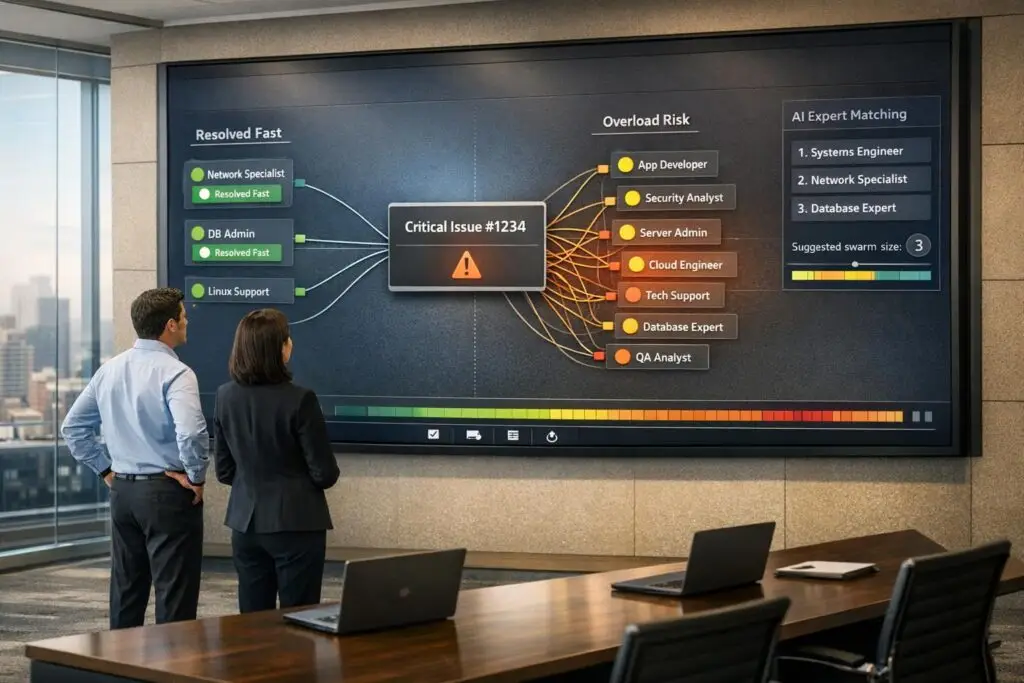
The swarming support model simplifies customer support by assigning a single agent to own a case from start to finish while collaborating with experts in real-time. This approach eliminates the delays and frustrations of traditional tiered systems, where tickets are escalated and passed around. Swarming is ideal for complex cases, major incidents, or high-value accounts, enabling faster resolutions and higher customer satisfaction. However, it requires clear triggers, proper tools, and careful management to avoid overburdening experts or misusing resources.
Key Takeaways:
- How it works: One agent owns the case, involving experts only when needed.
- Best scenarios: Complex technical issues, outages, or VIP support.
- Challenges: Overuse, expert burnout, and lack of collaboration tools.
- AI’s role: Uses AI-powered ticket routing to automate expert matching, predict escalations, and improve workflows.
- Results: Companies report faster resolutions (e.g., 37% improvement) and higher satisfaction (e.g., 98.6% scores).
Swarming works best when used selectively and supported by tools, AI, and strong documentation practices. This includes building a knowledge base that experts and agents can actually use to resolve cases faster.
Intelligent Swarming 101: Better Customer Support Through Smarter Collaboration
sbb-itb-e60d259
How the Swarming Support Model Works
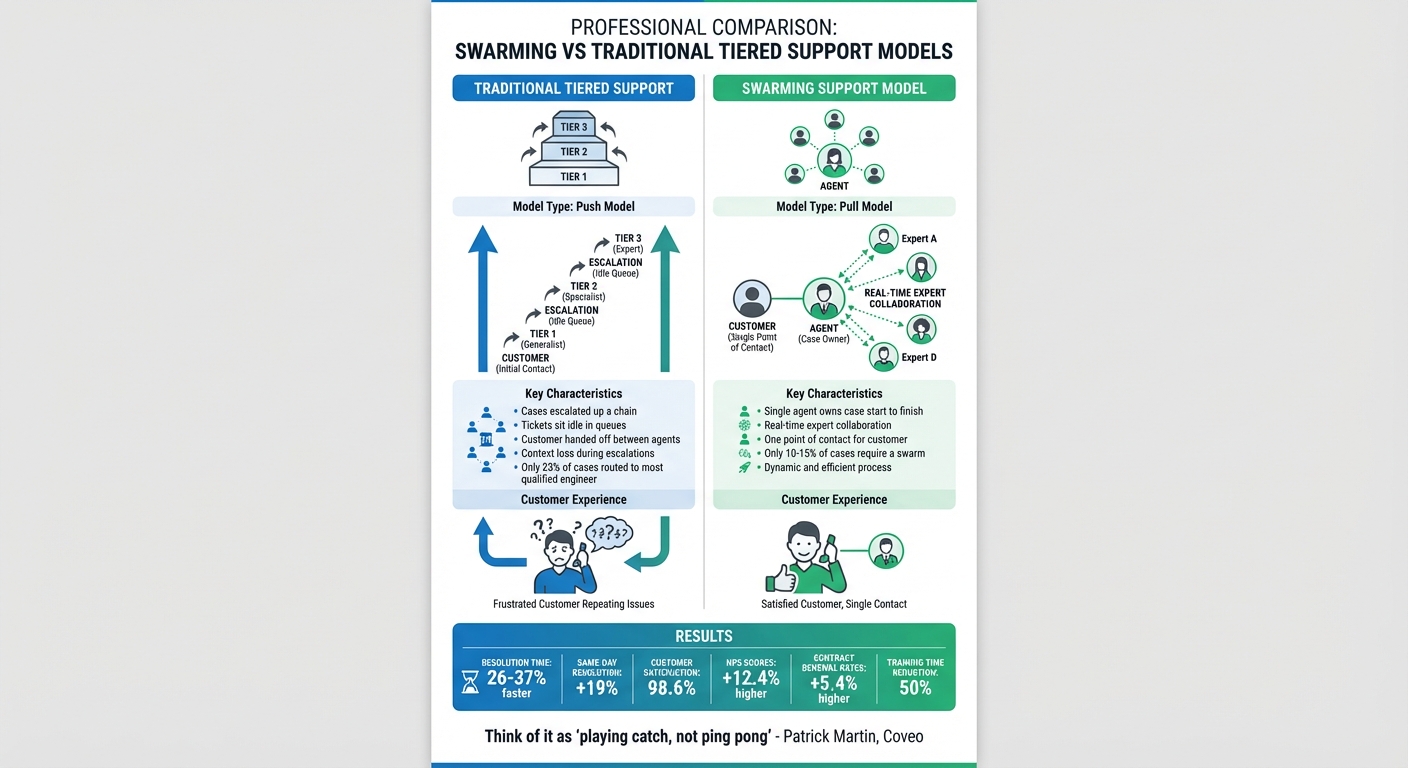
Swarming vs Traditional Tiered Support Model Comparison
Swarming shifts away from the traditional multi-tiered support structure, replacing it with a model that prioritizes immediate collaboration. In this approach, the first agent to handle a case takes full ownership, guiding it from start to finish while serving as the customer’s main point of contact. If the agent encounters a challenge, they bring in experts to collaborate in real time, ensuring the case keeps progressing smoothly[6][7].
"Intelligent Swarming… favors real-time work over queued work, collaboration over silos, and case ownership over one-way escalations." – Nancy Lee, PagerDuty[6]
Unlike the traditional "push" model – where tickets are escalated up a chain and often sit idle in queues – swarming adopts a "pull" model. Here, the agent actively involves the right experts as needed, keeping the process dynamic and efficient[6][7].
Single Ownership with Multi-Expert Input
In the swarming model, the agent who opens the case remains responsible until it’s resolved. They orchestrate the swarm, gather insights from specialists, and keep the customer informed throughout. This eliminates the common frustration of being handed off between agents and having to re-explain the issue repeatedly.
Interestingly, only 23% of companies currently route cases directly to the most qualified support engineer[7]. Swarming addresses this gap while ensuring that the process is used judiciously. Only 10% to 15% of cases typically require a swarm, as most issues can be resolved through existing knowledge bases or proper initial routing[7]. This selective approach conserves expert time and ensures their focus is reserved for genuinely complex problems. The result? Faster collaboration when it truly matters.
Real-Time Collaboration
Swarming thrives on real-time interaction. Instead of waiting for tickets to crawl through multiple queues, the agent can instantly loop in subject matter experts. Tools like Slack often play a key role here, with some teams even using macros to create dedicated channels linked directly to tickets. This setup allows seamless collaboration without the inefficiency of switching between systems[9][6].
This immediacy is especially critical in B2B scenarios, where downtime can directly impact revenue. With 76% of consumers expecting immediate support, swarming meets this demand by enabling instant teamwork[10]. For example, Salesforce implemented a swarming model using Slack and saw case resolution times improve by 26%[10]. This kind of agility not only resolves issues faster but also creates opportunities for better knowledge-sharing practices.
Knowledge Sharing and Documentation
A key element of swarming is the emphasis on documenting resolutions. Once a swarm wraps up, the solution is recorded in a knowledge base, ensuring future agents can resolve similar cases without starting a new swarm. This practice aligns with Knowledge-Centered Service (KCS) principles, which encourage agents to check the knowledge base before initiating a swarm to avoid redundant efforts[1][10].
Organizations that prioritize this documentation process see long-term benefits. For instance, BMC Software significantly reduced new hire training time by 50% after combining swarming with a strong culture of knowledge sharing[11].
"I have probably doubled my knowledge of the products in the past year because of swarming, and I have been here a long time." – Senior team member, BMC Software[11]
This model not only speeds up ticket resolution but also fosters continuous learning, enhancing the team’s expertise over time. By turning every swarm into a learning opportunity, organizations ensure that the benefits extend well beyond individual cases.
Benefits of Swarming in B2B Customer Support
Swarming, grounded in real-time collaboration and active knowledge sharing, brings measurable advantages to B2B customer support. Companies adopting this approach often report quicker resolutions, happier customers, and stronger teams – key factors that influence contract renewals and revenue stability.
Faster Resolution Times
Swarming eliminates the bottlenecks of traditional tiered escalation systems. Instead of tickets sitting idle in queues, experts are immediately brought into active cases. This keeps the process moving and avoids the context loss that often happens during escalations.
When Coveo shifted to Intelligent Swarming, they saw a 37% improvement in resolution times, with AI-based expert matching adding another 27% boost [3]. Patrick Martin, Coveo’s Chief Customer Officer, summed it up perfectly:
"Think of it as ‘playing catch, not ping pong.’ In a tiered system, cases bounce from agent to agent… The main goal is to minimize the number of cases that make it up the ladder." [3]
Improved First Contact Resolution (FCR)
Swarming’s collaborative nature allows agents to access expert input in real-time, avoiding the need for escalations or follow-ups. This single-point-of-contact approach reduces customer frustration by eliminating repetitive explanations [6].
The results speak for themselves. Companies using swarming and tier-less models report 12.4% higher NPS scores and 5.4% better contract renewal rates compared to their peers [10]. Regula Forensics, for instance, replaced their three-tiered system with swarming in mid-2023, achieving a 98.6% customer satisfaction score and a median response time of just 43 minutes. Alex Metelsky, Head of Support at Regula Forensics, highlighted the efficiency:
"The swarming model never employs predefined or automated replies, since they are generally irrelevant and only waste users’ time. By removing unnecessary steps and silos, this support model speeds up the whole process." [5]
Better Team Expertise
Unlike tiered systems, where junior agents often lose visibility on escalated cases, swarming keeps the original agent involved until the issue is resolved. This hands-on approach encourages continuous learning and accelerates skill development across the team [12] [13].
The benefits grow over time. Some organizations have cut new hire training time by as much as 50% after adopting swarming [11]. As agents handle cases end-to-end, they develop into "T-shaped" professionals – broad in general skills but with deep expertise in specific areas.
This collaborative model also strengthens the knowledge base. Documented swarm cases help future agents solve similar issues faster, reserving expert input for genuinely complex problems.
Swarming not only streamlines support operations but also builds a foundation for long-term customer satisfaction and team growth.
When the Swarming Model Works
Swarming thrives in situations where real-time teamwork is more critical than sticking to rigid, standardized processes. It’s about knowing when to bring a swarm together and when to stick with routine workflows – this balance is vital for keeping both customers happy and teams efficient.
Best Use Cases for Swarming
Swarming shines brightest in complex technical troubleshooting scenarios. Think of issues that involve multiple systems or demand expertise from different domains. For example, resolving billing errors connected to API behavior, fixing infrastructure problems, or managing feature customizations often requires collaboration across departments. These aren’t the kind of problems you can solve with a quick knowledge base article or a scripted response [14][9].
Another perfect fit for swarming is major incidents and outages. Whether it’s a SaaS platform failing, a hospital’s EMR system going offline, or a power grid disruption, time is of the essence. In these cases, swarming brings together teams from development, operations, and security to restore functionality as quickly as possible. Salesforce, for instance, reported resolving cases 26% faster after adopting a case swarming process with Slack [10].
Swarming is also invaluable for VIP and high-value account support. Enterprise clients expect immediate and expert attention. By using a swarm, you can ensure the customer works with a single point of contact who can loop in the right experts without making the client repeat their issue over and over. This approach not only shows urgency but also helps reduce churn. Companies that use swarming for high-value accounts have seen 5.4% higher contract renewal rates compared to traditional tiered support models [10].
Interestingly, if your team finds itself swarming too often, it might be a sign that your initial triage process needs fine-tuning. Swarming should be reserved for exceptional cases, not routine ones [7].
Identifying these high-stakes scenarios is just the beginning. The next step is setting clear triggers to ensure swarming is used only when absolutely necessary.
Clear Triggers for Swarming
Without clear triggers, swarming can easily spiral into chaos or be over-applied. Teams that excel at swarming establish clear criteria for when to activate it. Common triggers include situations like "Major Outage", "Security Incident", or "VIP Escalation" [14][9]. These predefined triggers ensure collaboration happens only when it’s genuinely needed, not as a knee-jerk reaction.
Severity and impact are the most frequent triggers. For instance, high-priority system-down cases (P1 cases) or issues affecting multiple customers should immediately trigger a swarm [2][7]. Similarly, cases that are at risk of breaching Service Level Agreements (SLA) or involve VIP clients demand swift, collaborative action [2].
Another key trigger is stalled progress. If a case has been stuck unresolved for over two hours or has been bounced between multiple tiers without a solution, a swarm can help break the deadlock [2]. This ensures customers aren’t left waiting indefinitely for answers.
"Intelligent Swarming… favors real-time work over queued work, collaboration over silos, and case ownership over one-way escalations." [6]
It’s also crucial to keep an eye on how often swarming is used. If more than 15% of cases require a swarm, it’s a red flag that your routing process might need adjustment to prevent simpler cases from clogging the system [7].
When Swarming Fails: Common Problems and Challenges
Swarming can be a powerful tool for tackling complex issues, but it’s not without its pitfalls. When misapplied, it can lead to inefficiencies and even create new challenges. Let’s look at some of the most common problems that arise.
Overuse on Simple Tickets
One major issue is using swarming for tasks that don’t require it. Engaging top experts for routine or straightforward tickets wastes valuable resources. Swarming is inherently more resource-intensive than traditional tiered support because it requires a team of highly skilled individuals. Applying this approach to simple, repetitive issues not only clogs communication channels but also diverts focus from the high-priority incidents that truly warrant expert attention. Over time, this misuse can lead to burnout among specialists [16].
Another problem arises when there are no clear guidelines for when to initiate a swarm. Without defined triggers, the process can become chaotic. Multiple agents might unknowingly work on the same minor ticket, wasting time and effort. To avoid this, a hybrid approach is essential: reserve swarming for critical incidents and rely on tiered support or AI-driven automation for routine, low-priority queries.
Lack of Collaboration Tools
Even the best swarming strategies will falter without the right tools to support them. For example, when ticketing systems don’t integrate seamlessly with chat platforms, troubleshooting details can get lost in unstructured conversations. This creates documentation gaps, forcing teams to repeatedly solve the same issues. Mark Sherwood, a CX Strategist and Support Operations Leader, highlights this challenge:
"Swarming conversations often happen in Slack, which is great for speed but terrible for long-term memory. If agents don’t log outcomes back into Zendesk, you lose that knowledge and the same issues keep repeating" [9].
Poor integration between tools also leads to inefficiencies, such as manual context switching and incomplete documentation. Without automated triggers like macros or response workflows, initiating a swarm becomes a cumbersome, manual process. This undermines the very speed and efficiency swarming is meant to deliver. The consequences can be severe – 33% of customers will abandon a brand after just one bad support experience [16].
To make swarming work, you need tools that streamline communication, automate customer support workflows, and ensure proper documentation. Without them, resolution times suffer, and experts face increased frustration and burnout.
Expert Overload and Burnout
Another significant challenge is the risk of overloading specialists. Constantly pulling experts into swarms can make them unavailable for other critical tasks. If too many people are involved in a swarm, it can lead to information overload, slowing progress instead of speeding it up [2]. Additionally, some high-level specialists may feel disengaged or resistant to interacting directly with customers, creating cultural friction within the team [17].
Marco Bill-Peter, VP of Global Support Services at Red Hat, addresses this issue directly:
"We have eliminated the word ‘escalation’ from our vocabulary" [17].
His team uses clear triggers and load-balancing techniques to ensure experts aren’t overwhelmed. The solution lies in setting strict activation rules for swarming, such as reserving it for major outages, security breaches, or unresolved escalations. AI-powered tools can also help by routing cases and distributing tasks evenly. Moderating swarm participation and maintaining clear communication are equally important to prevent overload and keep the process efficient.
Using AI to Improve Swarming Effectiveness
Swarming, while effective, has traditionally faced challenges like overusing resources on simple tickets, fragmented tools, and expert burnout. AI is now stepping in to address these issues, turning swarming into a more efficient and scalable process. By leveraging machine learning, organizations can automate decision-making, streamline workflows, and monitor performance in real time.
AI for Real-Time Recommendations
A major hurdle in swarming is figuring out who to involve and when. AI tackles this by analyzing case details and historical data the moment a ticket is submitted. Machine learning models classify cases based on complexity and recommend three experts with a proven track record of handling similar issues [18][15]. This ensures the right people are engaged early, avoiding overburdening a small group of specialists.
Coveo provides a great example of this in action. Within its Salesforce Service Cloud setup, the company implemented a "Case Classification" machine learning model to identify the best experts for each swarm based on past success. Jacqueline Dooley from Coveo highlighted the benefits:
"Intelligent swarming allows one CSR to own a case from beginning to end… The customer only ever interacts with one CSR, rather than being tossed around like a football between tiers" [18].
AI copilots also assist agents during active swarms by offering real-time suggestions, historical case insights, and relevant knowledge base articles. This reduces the need for agents to search manually or juggle multiple tools, complementing expert matching and simplifying workflows.
Workflow Automation and Escalation Prediction
AI doesn’t just recommend experts – it also automates routine tasks. Actions like adding responders, setting up conference calls, or opening Slack channels can be error-prone and time-intensive. With AI-powered tools like "Response Plays", these tasks are handled instantly, freeing agents to focus on solving problems.
The predictive capabilities of AI are where it truly shines. By analyzing real-time ticket data against historical resolutions, AI can forecast which cases might escalate or miss SLAs. Instead of waiting for issues to worsen, the system can recommend initiating a swarm proactively, preventing customer frustration [18][10]. This approach eliminates the "hot potato" effect often seen in traditional tiered support systems.
Salesforce, for instance, saw impressive results after integrating an intelligent swarming model with Slack: a 26% reduction in case resolution time and a 19% boost in same-day resolutions [10][15]. Additionally, AI helps balance workloads by monitoring team capacity, ensuring collaboration requests are distributed evenly. With only 23% of companies currently routing cases to the most skilled support engineers [7], AI-driven matching bridges this gap effectively.
Data-Driven Performance Monitoring
Tracking performance is crucial for refining swarming processes. AI provides real-time insights into effectiveness, such as monitoring "swarm-to-case" ratios. This ensures swarming is reserved for the 10% to 15% of cases that genuinely need it, while routine issues are handled through automation or first-line support [10][7].
ServiceNow found that cases linked to knowledge base articles – often created after swarms – were resolved 52% faster [15]. By turning swarm discussions into searchable articles, AI creates a feedback loop: each swarm not only solves the immediate problem but also reduces the chances of similar issues arising later. These insights continuously improve workflows and expert involvement.
AI also tracks participation levels, making collaboration measurable. Managers can recognize agents who actively contribute to swarms, not just those who close tickets. As Francoise Tourniaire, Founder and Principal at FT Works, pointed out:
"If I’m only rewarded at the end of the day for the cases that I close and not the cases that I help with, then my tendency is going to be taking care of myself first" [10].
With AI-driven performance monitoring, collaboration becomes visible and actionable, encouraging teamwork and better outcomes.
Best Practices for Implementing the Swarming Model
Effective swarming takes careful planning. Without clear guidelines, the right tools, and a shift in teamwork dynamics, even the best intentions can lead to disorganization or burnout. To bridge theory and practice, these best practices provide actionable steps for AI-driven B2B support teams.
Define Clear Swarming Triggers
Not every issue needs a swarm. In fact, with optimized routing in place, only a small percentage of cases require this level of collaboration[7]. Most can be resolved through self-service, automation, or first-line support. That’s why defining objective criteria for swarming is crucial.
Focus on high-impact incidents – like system outages, security breaches, critical software bugs, or Priority 1 tickets. Complexity and novelty are key factors to consider[2][6]. For example, if there’s no relevant knowledge base article or an issue remains unresolved after a set time, it might be time to trigger a swarm[2]. Historical data can help refine these triggers by identifying patterns in escalation rates for specific products or ticket types[3].
A real-world example: In August 2024, Coveo reported a 37% improvement in average resolution time after adopting an Intelligent Swarming model. They saw an additional 27% improvement by integrating machine learning to identify the right subject matter experts for each case[3].
For less urgent but complex problems, consider scheduled "case clinics" or office hours. These provide a structured, less disruptive way to collaborate[7]. AI-driven analysis can further refine swarming triggers, ensuring they align with automated workflows.
Once triggers are in place, the next step is equipping your team with the tools they need to collaborate effectively.
Invest in Collaborative Tools
Speed is critical in swarming, but it’s impossible to move quickly without the right tools. Many support agents – 56%, to be exact – report switching between multiple screens just to find the information they need, which slows everything down[8]. Consolidating systems so agents can access customer data, team communications, and best practices in one platform – ideally integrated with the CRM – can remove these roadblocks[8].
Look for platforms that support features like side conversations, macros, and unified data views to cut down on context switching[8][9]. Automation tools can also make a big difference by instantly pulling in responders and setting up conference calls when incidents occur[6].
Take Hospitable, for instance. In March 2023, they used Slack integrations and side conversations to handle live incidents. By keeping the first responder as the main point of contact and bringing in experts only when needed, they reduced resolution times for urgent issues like damage claims and KYC problems[9]. CX Strategist Mark Sherwood offers this advice:
"Swarming moves fast in Slack or Teams, but that speed comes at a cost if notes aren’t logged. Make it part of the process to summarize fixes in Zendesk as an internal note." [9]
Mobile access is another important factor. Field agents or off-duty experts need the ability to join swarms in real-time, no matter where they are[8].
Train Teams for Collaboration
Even with clear triggers and robust tools, swarming’s success hinges on a well-prepared team. Traditional support models focus on escalation, but swarming flips the script. The original case owner stays involved, bringing in experts to collaborate on a solution.
The first step? Normalize asking for help. Many agents hesitate, fearing it shows weakness, but training should emphasize that seeking help is a strength[3]. At Red Hat, this shift was so impactful that Marco Bill-Peter, VP of Global Support Services, shared:
"We have eliminated the word ‘escalation’ from our vocabulary." [12]
Swarming also helps develop "T-shaped" professionals – agents with broad general knowledge and deep expertise in specific areas. Collaborative problem-solving exposes team members to specialist knowledge, fostering growth. Dynamic profiles that list skills and development goals can further support cross-training and expertise-building[4][3].
Managers also need to adapt. Their role should evolve from monitoring individual metrics, like average handle time, to coaching teams toward broader goals like Customer Satisfaction (CSAT), First Contact Resolution (FCR), and contributions to the knowledge base[3]. As Patrick Martin, Chief Customer Officer at Coveo, puts it:
"If it’s everybody’s responsibility, then it’s nobody’s responsibility." [3]
Measuring the Success of Swarming in AI-Native Operations
Rolling out swarming is one thing, but how do you know if it’s working? Without the right metrics, support teams might waste time or miss opportunities to improve.
If you’re moving from a tiered support model, focus on metrics like resolution time and customer satisfaction. For teams formalizing informal collaboration, it’s important to measure things like active swarm sessions and the quality of peer contributions. AI-native tools can simplify this process by automating data collection, reducing errors, and providing insights – no custom dashboards needed. Let’s break down the key performance indicators (KPIs) that demonstrate swarming’s value.
Resolution Time and First Contact Resolution (FCR) Rates
Median Time to Resolve (TTR) is a core metric for evaluating how efficiently cases are handled from start to finish. For instance, in April 2022, Salesforce adopted a structured swarming model using Slack with a 1:6 staffing ratio for high-priority customers. The result? Faster TTR and fewer escalations [19].
First Contact Resolution (FCR), which measures the percentage of cases resolved during the first interaction without requiring handoffs, is just as critical. Back in 2010, BMC Software implemented a swarming model with a global team of 50. This led to an increase in customer satisfaction (CSAT) from 81% to 87%, a reduction in backlog age by 29 years, and a 50% cut in new hire training time. How? Juniors learned directly from experts during live swarms [11].
AI-powered case routing also plays a big role. By ensuring issues reach the right agent from the start, waiting times and unnecessary handoffs are minimized. ServiceNow, for example, found that cases with attached knowledge base articles were resolved 52% faster after adopting swarming [15].
Customer Satisfaction (CSAT) and Effort Scores (CES)
Speed is important, but it’s only part of the story. Customers also want to feel understood. CSAT measures overall satisfaction, while Customer Effort Score (CES) gauges how easy it was for customers to resolve their issues, typically rated on a scale from 1 (most effort) to 7 (least effort).
Swarming’s single-ownership model, where the original agent stays involved while bringing in experts as needed, reduces the frustration of customers having to repeat themselves. Operational metrics might show efficiency, but customer feedback confirms whether the model is genuinely working.
For example, in August 2024, Coveo reported an 18% drop in Median TTR after integrating intelligent swarming with Slack. Meanwhile, Salesforce’s support team closed cases 26% faster and improved same-day resolution rates by 19% [15]. Curtis, a manager at BMC Software, highlighted another benefit:
"I knew the team was on to something good when I saw the employee morale improve. It is a leading indicator of customer loyalty and productivity." [11]
AI tools now take this a step further by predicting CSAT and CES scores before surveys are sent, allowing teams to step in proactively when cases are at risk.
Team Productivity and Knowledge Growth
Swarming isn’t just about speed – it’s also about building a smarter, more capable team. Metrics like the Knowledge Sharing Rate track how often swarm sessions lead to reusable insights, such as new knowledge base articles or peer-endorsed solutions. For instance, ServiceNow saw an 87% increase in agents contributing to its knowledge base after adopting swarming [15].
It’s also important to monitor the ratio of collaborators to swarms, ensuring no single expert is overburdened. Tracking Swarm Assists – cases where agents contribute without owning the ticket – helps foster a culture of collaboration. Salesforce’s structured approach includes metrics like the "Number of Swarm Requests" and "Swarm Request Average Initial Response Time", which have helped scale their model effectively while avoiding burnout among top performers [19].
AI tools make this process even smoother by capturing insights automatically, tracking reused solutions, and identifying skill gaps within the team. This doesn’t just improve efficiency – it helps the entire support organization grow its expertise over time. These metrics don’t just measure performance; they shape the future of swarming strategies.
Conclusion: Balancing Benefits and Challenges of Swarming
Swarming has its place as a powerful tool in support operations, but it’s not a one-size-fits-all solution. It shines when applied thoughtfully, delivering faster resolutions, boosting team expertise, and improving customer satisfaction. But when used indiscriminately, it risks overburdening experts and wasting time on simpler tickets that don’t require such a collaborative effort.
The key to success lies in a hybrid approach. Swarming works best for high-stakes issues like security breaches or complex, multi-system failures. For routine requests, traditional tiered support or self-service systems remain more efficient. As Mark Sherwood, CX Strategist at SherwoodCX, aptly states:
"Swarming is for complex or urgent issues, not routine tickets" [9].
To make the most of swarming, combine it with Knowledge-Centered Service (KCS) practices. Documenting swarm resolutions in your knowledge base ensures that recurring issues are addressed proactively, reducing future workload.
Technology, especially AI, plays a pivotal role in refining swarming’s efficiency. AI can classify ticket complexity at submission, route cases to the right experts instantly, and even automate documentation of swarm outcomes. Patrick Martin, Chief Customer Officer at Coveo, explains:
"Intelligent swarming becomes a smart help desk – it uses AI to find and tap into the best resources across the organization to solve a problem" [15].
This approach minimizes the risk of uncoordinated collaboration while ensuring specialists focus on meaningful work. As AI continues to improve workflows and predict potential escalations, its integration becomes essential for maintaining an effective swarming strategy.
Finally, focus on tracking the right metrics. Pay attention to resolution times, first contact resolution rates, and customer satisfaction metrics like CES and NPS to ensure swarming is delivering a better experience. Collaboration metrics, like knowledge sharing rates and swarm assists, can also highlight whether your team’s collective intelligence is growing without burning out key contributors. The results speak for themselves – organizations using swarming alongside single-tier support models report Net Promoter Scores 12.4% higher than those relying solely on traditional tiered models [10].
FAQs
How do we decide when to start a swarm?
Deciding to initiate a swarm hinges on how complicated or time-sensitive the issue is, along with the level of cross-functional input required. Swarming works best for tackling urgent or challenging problems that standard tiered support or escalation methods struggle to address effectively. It’s especially useful when quick access to expert insights is essential for a faster solution, improving the customer experience, and making the most of specialized expertise.
How can we prevent expert burnout in swarming?
Preventing burnout in swarming requires a thoughtful approach to balancing workloads while providing autonomy and support. Give agents the freedom to manage their tasks, but ensure their workloads remain manageable. Encourage teamwork and collaboration to distribute responsibilities more effectively.
Leverage AI tools to streamline workflows and predict escalations. This can help minimize unnecessary escalations, saving time and reducing stress on your team. Additionally, fostering an environment of open communication and knowledge sharing can go a long way in building resilience.
Finally, don’t underestimate the power of recognition. Acknowledging your team’s efforts and maintaining a supportive culture can help them stay motivated and maintain high-quality service, even during high-pressure situations.
What KPIs show swarming is effective?
Swarming’s success can be measured through several key performance indicators (KPIs). These include higher customer satisfaction scores, shorter response and resolution times, a reduced backlog and backlog age, better teamwork and communication, and fewer escalations to higher support tiers. Together, these metrics paint a clear picture of how well the approach is optimizing support processes and improving the overall customer experience.
Related Blog Posts
- How do you build an escalation framework that doesn’t overload Engineering?
- How do you build a support org chart that scales (roles, ratios, and when to hire ops)?
- What are the most common HappyFox pain points for Support Ops (and how to fix them)?
- Omnichannel Routing Logic: Balancing Chat, Email, and Portal Loads
Evaluating help desks for a B2B team?
Supportbench is all-inclusive from $32 per agent per month, with migration and onboarding included. See pricing or book a 20-minute demo.






