


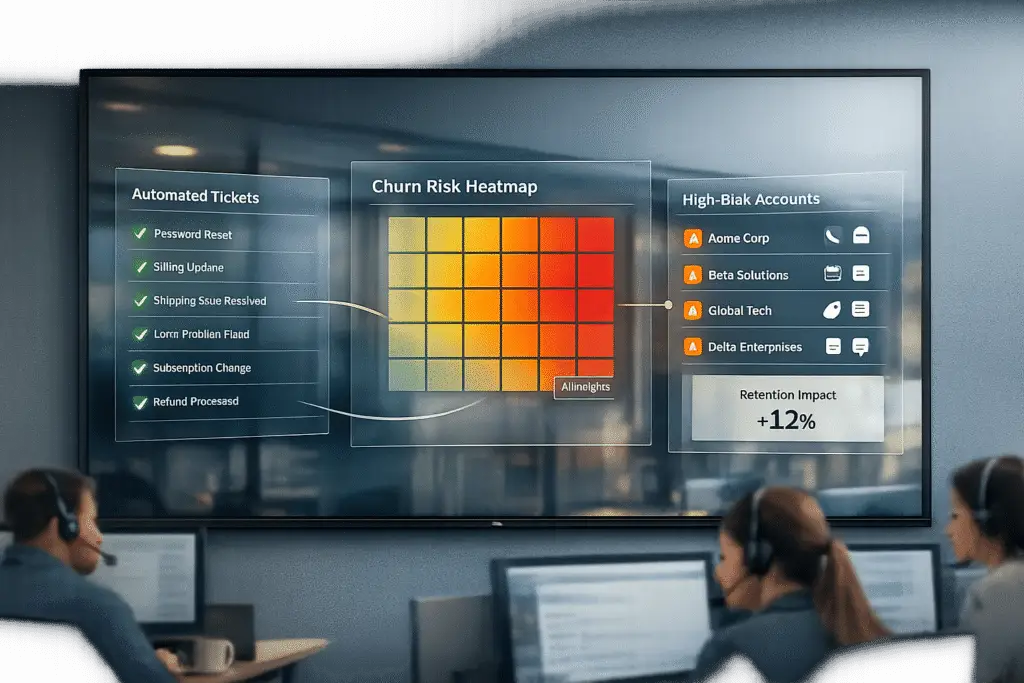
Support can drive retention without feeling like a sales pitch. The key is shifting from reactive ticket handling to proactive problem-solving and customer success. Here’s how:
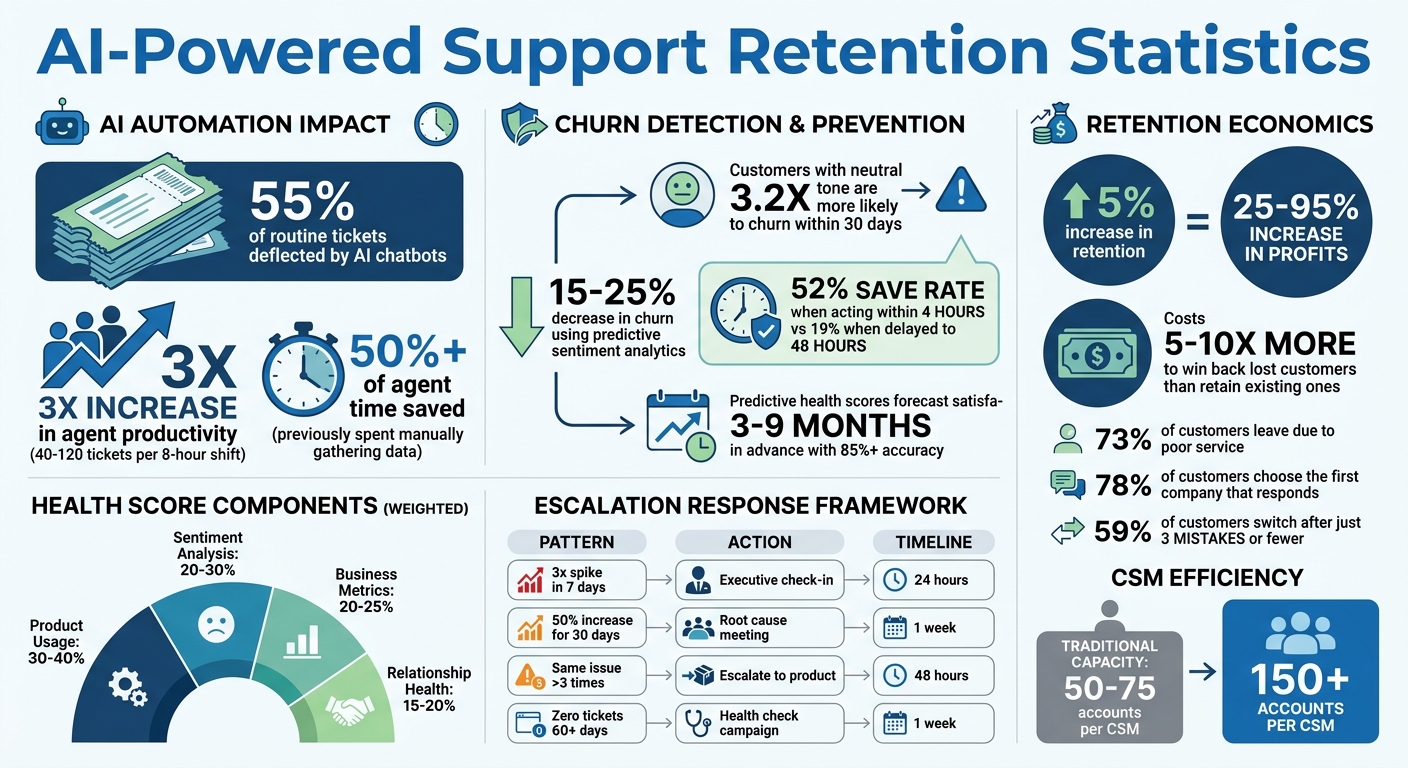
- Automate repetitive tasks: AI chatbots can deflect up to 55% of routine tickets, freeing up your team for complex issues.
- Spot churn risks early: AI sentiment analysis detects subtle disengagement signals, helping teams act before customers leave.
- Predict satisfaction: Tools like predictive CSAT and health scores identify at-risk accounts months before renewals, allowing for timely intervention.
- Speed up resolutions: AI copilots and orchestration tools streamline issue handling, tripling agent productivity.
- Prevent problems: AI-powered workflows adjust priorities based on customer health, ensuring critical accounts get immediate attention.
The result? Faster resolutions, happier customers, and lower churn. By using AI to handle routine tasks and focusing human effort where it matters most, support becomes a retention powerhouse.
AI-Powered Support Retention: Key Statistics and Impact Metrics
AI for Customer Retention: Reduce Churn and Increase Revenue
sbb-itb-e60d259
Use AI to Detect Risk and Analyze Customer Sentiment
When customers stop engaging, it often signals a higher risk of churn. As Eclincher points out, "Customers do not complain right before they churn. They go quiet" [3]. This transition – from expressing frustration to complete silence – is exactly what AI-powered sentiment analysis is built to detect. By identifying subtle behavioral changes, such as shorter messages or slower response times, AI flags accounts as high-risk. The data is telling: customers who shift to a neutral tone are 3.2 times more likely to churn within 30 days. Companies using predictive sentiment analytics have reported a 15%–25% decrease in churn. Timing is critical here – teams that act on these alerts within 4 hours achieve a 52% save rate, compared to just 19% when action is delayed to 48 hours [3]. This kind of early detection allows businesses to step in before customers fully disengage.
Monitor Customer Emotions with AI Sentiment Analysis
AI sentiment analysis dives deep into tone, context, and emotional cues across all customer interactions [10]. Unlike traditional methods that sample only a portion of conversations, AI systems review 100% of communications in real time [11]. Using Natural Language Processing, these tools can pick up on emotions like worry, disappointment, or irritation [11]. They also track patterns, such as how frequently a customer reaches out, to flag potential issues. Advanced platforms even use scenario engines to interpret sarcasm – like a customer sarcastically praising long hold times – ensuring that frustration isn’t misread as satisfaction [11]. By delivering detailed insights and pre-crafted responses, these systems help teams prioritize high-risk accounts and ensure managers intervene within that critical 4-hour window [3].
This level of analysis lays the groundwork for predicting long-term customer satisfaction.
Forecast Satisfaction with Predictive CSAT and Health Scores
Predictive health scores take sentiment analysis a step further by estimating customer satisfaction months in advance – typically 3 to 9 months before a renewal date [6][7]. Instead of relying only on survey responses, AI combines multiple data points like product usage, support interactions, billing history, and sentiment to identify accounts at risk [4][5][9]. This approach moves beyond outdated "traffic-light" systems, enabling Customer Success Managers (CSMs) to scale their workload from 50–75 accounts to over 150 accounts each [5]. These scores are calculated using weighted metrics: 30–40% product usage, 20–30% sentiment, 20–25% business metrics, and 15–20% relationship health, achieving over 85% accuracy [7].
Additionally, inferred CSAT (iCSAT) enhances this process by combining sentiment data with metrics like Customer Effort Scores and resolution quality. This method captures insights from customers who don’t complete surveys, offering a clearer picture of overall satisfaction [11]. With this comprehensive view, teams can proactively engage at-risk accounts, resolving issues before they escalate and reducing churn in the process.
Speed Up Resolutions with AI-Powered Tools
Quick resolutions are a game-changer for customer satisfaction. When customers face long wait times, they’re more likely to explore alternatives. AI-powered tools tackle this challenge by automating routine tasks, helping agents resolve issues faster. This speed not only keeps customers happy but also reduces churn. The numbers speak for themselves: agents using AI copilots now handle 40 to 120 tickets per 8-hour shift, achieving a 3x increase in productivity [15]. Importantly, this isn’t about replacing human judgment. Instead, AI takes over repetitive research tasks that previously caused delays, allowing agents to focus on solving problems. This efficiency sets the stage for even more advanced automation in response generation.
What makes modern AI tools stand out from basic chatbots? Orchestration. These tools don’t just search documents – they pull data from multiple platforms at once. For example, they can access Salesforce for account details, Jira for bug reports, and internal databases for usage patterns, creating a comprehensive view of the issue. Without AI, agents spend over 50% of their time manually piecing together data from different platforms for escalated cases [12]. By automating this time-consuming process, AI lets agents dive straight into problem-solving.
Generate Responses with AI Auto-Responses and Agent Copilots
AI copilots craft responses by pulling from case histories, knowledge bases, and account data. They use confidence scoring to decide the next steps:
- High-confidence responses are sent automatically.
- Medium-confidence drafts go to agents for review.
- Low-confidence cases are escalated to senior agents [12].
This tiered system ensures that responses are both fast and accurate, protecting the brand’s reputation while handling routine issues efficiently.
For more complex Tier 2 and Tier 3 support, AI copilots significantly cut down Average Handle Time. They combine documentation, telemetry data (from tools like Datadog), and runbooks into pre-written drafts [14]. Instead of starting from scratch, agents receive a response draft complete with troubleshooting steps and supporting links. The system also includes source attributions, so agents can verify details before sending. This approach balances speed with quality, ensuring that customers get accurate and timely solutions – key factors in building loyalty.
AI doesn’t just stop at faster responses. It also simplifies case documentation.
Summarize Cases and Create knowledge base articles with AI
In complex B2B cases, multiple team handoffs can lead to lost details. AI-driven case summarization solves this by automatically creating summaries of case histories, prior interactions, and the current status as soon as an agent opens a ticket [12]. This eliminates the need to sift through endless email threads or chat logs, saving agents valuable time.
On a broader scale, AI helps close the “ticket-to-knowledge base loop.” When it encounters questions it can’t confidently answer, it flags these gaps for knowledge base updates [2]. Additionally, AI reviews resolved cases to identify solutions missing from the knowledge base and drafts new articles automatically [14]. By turning these hard-earned solutions into reusable content, support teams can resolve future cases faster. This continuous improvement strengthens the knowledge base, boosts deflection rates, and shortens resolution times even further.
Build Workflows That Prevent Problems Before They Happen
Proactive workflows are changing the game by addressing potential issues before they even arise. With AI-driven detection and faster resolutions, support teams can now shift from simply reacting to problems to actively preventing them.
The distinction between reactive and proactive support lies in timing. Reactive support helps when customers are already dissatisfied, while proactive support steps in before disengagement occurs. By using workflows powered by AI sentiment analysis and response tools, teams can identify risk signals early and adapt their approach instantly. This shift isn’t just about customer satisfaction – it directly impacts retention. In fact, research reveals that boosting customer retention by just 5% can increase profits by 25% to 95% [16].
Effective workflows respond in real time to customer health changes. Whether it’s a drop in usage, an increase in support friction, or declining engagement, workflows should adapt quickly. This could mean prioritizing responses for at-risk accounts, escalating complex issues before they become major problems, or ensuring high-value customers always receive the attention they need.
Adjust SLAs Based on Customer Health and Renewal Status
Static SLAs often fall short for customers at risk. Dynamic SLAs, however, adapt to the situation. For example, a customer nearing renewal with declining usage demands faster and more focused support than a healthy account with a routine question. Supportbench’s dynamic SLA system uses customer health scores and renewal timelines to automatically tighten response times for accounts that need immediate attention.
This approach prioritizes behavioral signals over simple ticket categorization. For customers approaching a renewal, workflows can shift from automated educational content to direct, personalized interactions. The intensity of these touchpoints is adjusted based on the customer’s current health, ensuring issues are addressed promptly and retention is safeguarded.
Once dynamic SLAs are in place, the next step is ensuring escalations are handled seamlessly.
Automate Escalations with AI-Driven Insights
Escalations are critical moments where customer loyalty is either solidified or lost. As Ameya Deshmukh puts it, "Escalations are where your support brand is truly tested. Not in the average ticket… but in the moments where a customer is stuck, angry, blocked from doing business, or publicly losing trust" [17]. The reality is that only 14% of customer service issues are fully resolved through self-service, making escalations a crucial human-led process [17].
AI can transform how escalations are managed. By generating detailed, decision-ready briefs for Tier 2 and Tier 3 agents, AI eliminates the need for customers to repeat their story. It automatically compiles logs, summarizes case histories, flags risk levels, and outlines reproduction steps – all before the escalated agent gets involved [17]. This ensures escalations are managed efficiently by tracking ownership in real time, confirming cases are accepted, and prompting agents for updates during high-pressure situations [17].
For high-value or at-risk accounts, automation takes a backseat. These cases are routed directly to experienced managers for immediate attention.
Here’s an example framework for prioritizing escalations based on detected volume patterns:
| Volume Pattern | Recommended Action | Timeline |
|---|---|---|
| 3x spike in 7 days | Executive sponsor check-in | Within 24 hours |
| 50% increase for 30 days | Root cause deep-dive meeting | Within 1 week |
| Same issue >3 times | Escalate to product for fix | Within 48 hours |
| Zero tickets for 60+ days | Proactive health check campaign | Within 1 week |
This framework highlights how AI can identify patterns that indicate underlying issues, allowing teams to intervene before retention is negatively impacted [17].
Common Mistakes That Hurt Support-Driven Retention
One of the biggest missteps is waiting for customers to voice their frustrations. Reaching out proactively makes a huge difference – 78% of customers go with the first company that responds to their inquiry, and dissatisfaction grows quickly with delays. After 12 hours of waiting, frustration can escalate into anger [21]. Plus, trying to win back a customer who’s already decided to leave costs 5-10 times more than addressing their concerns early on [21].
Relying on manual processes for repetitive tasks is another costly mistake. Resolving tickets manually costs between $15 and $25, and teams often waste three hours coordinating for every hour spent actually solving problems [2][19]. Processes like manual triage or rigid IVR systems slow down responses and irritate customers. On the other hand, AI-powered intelligent routing can instantly understand customer intent and direct inquiries to the right team, saving time and reducing friction [20].
Another critical error is overlooking real-time customer health data. Waiting until a customer signals they’re ready to cancel often leaves too little time to act. As Cresta points out, "The difference between catching someone three weeks before they decide to leave versus three minutes before they hang up determines whether retention efforts succeed or fail" [22]. Alarmingly, 59% of customers will switch providers after just three mistakes or fewer [19].
To avoid these pitfalls, align your support strategies with predictive insights and proactive outreach. For instance, adopt a 24-hour rule to follow up on distress signals like repeated visits to help pages [1]. Replace manual processes with AI chatbots that use Retrieval-Augmented Generation (RAG) to deliver instant, context-aware answers [2]. Keep a close eye on four key signals: technical issues, usage declines, billing problems, and intent-related behaviors like visiting cancellation pages [1]. Develop a priority matrix that ties customer signals to the potential Monthly Recurring Revenue (MRR) at risk, ensuring your most valuable accounts get immediate attention [1].
For sensitive situations – like handling refunds, addressing high-value account risks, or managing regulatory concerns – make sure humans remain involved to preserve empathy and trust [18][20]. Also, set limits on how often AI reaches out and prioritize critical notifications to avoid overwhelming customers [18].
Track the Right Metrics to Measure Retention Success
To truly measure retention success, focus on metrics that highlight both short-term issues and long-term loyalty risks. Poor service drives away 73% of customers [24], and it costs five times more to acquire a new customer than to retain an existing one [23]. These metrics not only help identify problems early but also reveal whether your team is fostering trust or undermining it. By pairing these insights with AI-driven support strategies, you can turn data into actionable improvements for customer retention.
First Contact Resolution Rate (FCR)
First Contact Resolution (FCR) tracks the percentage of customer issues resolved during the first interaction without needing follow-ups, escalations, or repeat contacts [27]. A high FCR lowers customer effort, builds trust, and often leads to better Net Promoter Scores (NPS) and reduced churn [27]. Monitoring this metric allows support teams to tackle issues before they snowball, directly impacting retention.
"First Contact Resolution isn’t just a performance metric – it’s a reflection of how well your contact center understands and supports its customers." – Chris Kontes, Co-Founder, Balto [27]
To measure FCR effectively, you need a clear definition of "resolved." Avoid marking cases as resolved immediately – wait 48–72 hours. If the customer doesn’t reach out again within that timeframe, consider it a successful FCR [27]. It’s also essential to differentiate between Gross FCR (all interactions) and Net FCR (resolvable cases only). Gross FCR helps with capacity planning, while Net FCR measures how well agents are handling issues that truly matter for retention [27].
Benchmarks vary by industry. For example, Technology and SaaS companies typically achieve 70–85% FCR, while Telecommunications averages 65–75% [27]. A low FCR often indicates gaps in training, insufficient documentation, or unclear product features – all of which can lead to customer churn [27].
Predictive Retention Metrics
While FCR evaluates immediate support performance, predictive metrics help forecast long-term customer loyalty. Metrics like Customer Health Scores, Predictive CSAT, and Customer Effort Score (CES) can signal retention risks before customers even consider leaving. Using AI and machine learning, modern health scoring systems analyze factors like product usage, support interactions, and overall engagement – uncovering patterns that manual methods might miss [8][7]. These tools can predict churn 3–6 months in advance with over 85% accuracy [7], giving your team ample time to act.
A well-designed health score assigns weighted values to key behaviors. For instance, feature adoption or login frequency might account for 30–40% of the score, while sentiment analysis contributes 20–30% [25][7]. Some platforms even integrate AI-driven Predictive CSAT and CES, which estimate customer satisfaction or effort levels – even if a survey wasn’t completed.
Another important metric is Support Ticket Volume Trends, which can act as an early warning system. For example, a sudden 3x spike in tickets over seven days might indicate onboarding issues or a product failure, requiring immediate intervention within 24 hours [26]. On the flip side, zero tickets for 60+ days could point to disengagement or "silent churn", prompting a proactive outreach campaign [26]. To ensure accuracy, regularly validate your health scores by comparing them against actual renewal and churn outcomes, adjusting weightings as needed [7][26].
Conclusion
Support-driven retention thrives on systems that anticipate problems before customers even notice. The transition from reactive ticket handling to a strategy focused on retention begins with AI-powered tools. These tools can analyze sentiment, predict satisfaction levels, and automatically escalate issues based on real customer data. By automating routine inquiries, your team gains the bandwidth to focus on interactions that build loyalty and strengthen relationships.
To take this further, shift your focus from basic metrics to system health. Instead of measuring how many tickets are resolved, evaluate whether your top agents are addressing critical, strategic issues rather than repetitive questions. Today’s AI-enabled quality assurance tools can monitor over 80% of your support queue [13], turning quality checks into a rich source of insights. This data can highlight patterns, uncover training needs, and identify risks to customer retention.
"The first wave of AI support automations saved time… The second wave changes decisions." – Mark Sherwood, CX Strategist [13]
Take a close look at your workflows. Ensure your team has real-time access to support data and that high-risk accounts are escalated to human agents within 24 hours. Consider implementing a structured 30/60/90 day plan: track three key signals (like reduced usage, billing issues, or recurring problems), set up templated outreach campaigns, and measure the impact on customer cohorts. By the 90-day mark, you should aim to automate low-risk resolutions and integrate predictive metrics into your dashboards. These steps lay the foundation for a customer support management system that boosts retention.
This roadmap ties back to earlier strategies: leveraging AI to assess sentiment, forecast problems, and automate solutions. By 2026, success in retention will hinge on making smarter, faster decisions with AI – not simply expanding your team. Evaluate your tools, fine-tune your processes, and build a system designed to proactively serve your customers.
FAQs
How do I use AI in support without sounding salesy?
The key to using AI in customer support without coming across as overly sales-driven is to focus on helpfulness, personalization, and adding real value. AI tools can analyze customer interactions to uncover needs – whether that’s a feature request, a common issue, or even a knowledge gap – and provide timely, relevant outreach.
For example, AI can anticipate when a customer might need guidance and offer proactive solutions based on past interactions. This approach ensures the support feels tailored and genuinely helpful, rather than like a sales pitch.
It’s also important to base AI-driven responses on reliable, verified knowledge bases. This builds trust and ensures customers receive accurate, actionable information. When the focus remains on solving problems and enhancing satisfaction, AI can transform support into a tool for fostering loyalty and driving growth – all without feeling pushy or sales-oriented.
What churn signals should support watch for first?
Support teams should pay close attention to early warning signs of churn, such as drops in engagement, less frequent product usage, or negative tones during customer interactions. Tools powered by AI can assist by analyzing customer behavior and sentiment, giving teams the insights they need to tackle problems head-on and lower the chances of losing customers.
Which 3 metrics best prove support is improving retention?
The three key metrics that show how support contributes to retention are Net Revenue Retention (NRR), Gross Revenue Retention (GRR), and customer sentiment signals. These sentiment signals come from analyzing support interactions, such as detecting customer emotions and spotting accounts that may be at risk. Combined, these metrics reveal how support influences customer happiness and long-term loyalty.






