


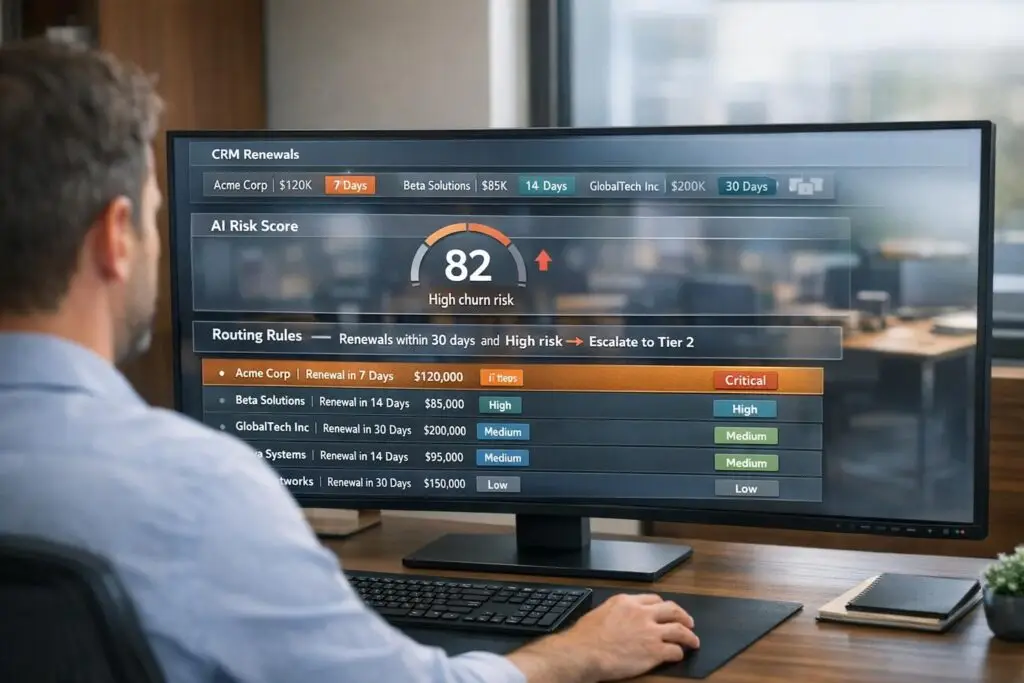
Many businesses still use outdated ticket prioritization methods, which can lead to lost revenue and customer churn. A renewal-aware system prioritizes tickets based on factors like contract renewal dates, account health, and churn risk. This approach helps support teams focus on issues that directly impact revenue retention.
Key Takeaways:
- Connect CRM Data: Integrate renewal dates, health scores, and subscription statuses into your support platform.
- Use AI for Risk Detection: Identify at-risk accounts through AI tools that analyze customer behavior and communication patterns.
- Set Priority Rules: Base ticket priority on renewal timelines, customer value, and risk levels.
- Automate Workflows: Tag, route, and escalate tickets automatically to save time and reduce errors.
- Track and Refine: Monitor metrics like SLA compliance and adjust rules quarterly to improve performance.
By aligning your support strategy with renewal timelines, you can reduce churn, improve customer satisfaction, and protect your revenue.
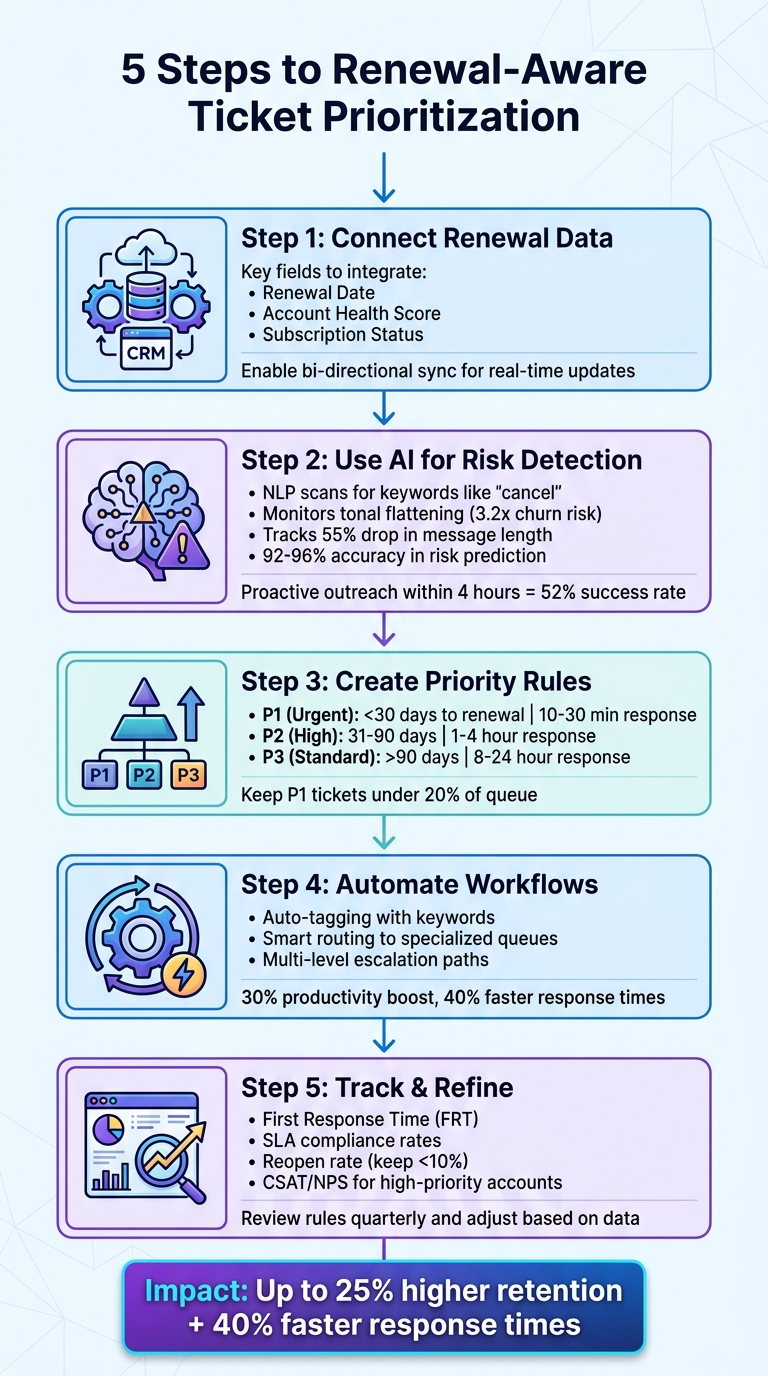
5-Step Process for Setting Up Renewal-Aware Ticket Priority System
Step 1: Connect Renewal Data to Your Support Platform
Why Renewal Data Drives Better Prioritization
When renewal data isn’t factored in, your support team might treat every account the same. That approach can cost your business – big time.
Your CRM already holds renewal data, so why not integrate it into your support platform? This way, agents can prioritize tickets more strategically. For example, if a "High Risk" account is 60 days from renewal, it can be routed directly to a senior agent for immediate attention.
"Without the structured data of a CRM, AI is prone to ‘hallucinations’… You need that historical ‘source of truth.’" – Dotsquares [5]
To make this work, focus on integrating three key fields:
- Renewal Date: Helps establish urgency.
- Account Health Score: Flags at-risk customers proactively.
- Subscription Status: Confirms if an account is active and worth prioritizing.
These fields can turn a messy ticket queue into a system that protects revenue by ensuring critical accounts get the attention they need.
Setting Up CRM Integration
Now that you understand the importance of renewal data, the next step is making sure your CRM and support platform work together seamlessly. This requires setting up a bi-directional sync. Here’s why it matters: renewal dates and contract values should flow from your CRM to your support platform, while ticket updates need to go back to the CRM to keep customer health scores accurate. Avoid one-way integrations – they only create data silos.
Tools like Zapier, Skyvia, or MuleSoft can simplify this process, offering integration solutions without needing custom code [4].
Before syncing, take time to clean up your CRM. Outdated leads and incomplete records can mess with your prioritization system, so ensure your CRM data is accurate [5]. Also, make it a standard practice to require a Renewal Date for every closed deal. This ensures all customer accounts have this critical detail [6].
For the best results, enable real-time synchronization. This ensures that if a renewal date is approaching or a health score drops, ticket priorities adjust instantly. Platforms like Supportbench, which offer native Salesforce synchronization, can make this process even smoother. By skipping extra middleware and reducing custom API maintenance, you’ll save time and effort while keeping high-value accounts at the top of your team’s priority list.
sbb-itb-e60d259
Step 2: Use AI to Identify At-Risk Renewals
How AI Detects Renewal Risk
AI systems are excellent at picking up on subtle cues that might slip past human observation. Using Natural Language Processing (NLP), these tools scan support conversations for emotional indicators. For instance, when a customer mentions words like "cancel" or "switching vendors", the system flags it immediately [7].
Interestingly, silence can be a bigger red flag than outright complaints. AI tools monitor for "tonal flattening", which happens when a customer’s tone shifts from frustration to neutrality or indifference. This isn’t a sign of resolution – it often signals disengagement. Research shows that customers who transition from a frustrated tone to a neutral one are 3.2 times more likely to churn within 30 days compared to those who continue to voice their frustrations [9].
"Customers do not complain right before they churn. They go quiet." – Eclincher [9]
Beyond language, AI tracks behavioral metadata. A 55% drop in message length compared to a 90-day baseline or an increase in how long it takes a customer to respond can trigger high-risk alerts [9]. Tools like Supportbench’s AI Customer Activity Summaries compile data from ticket history, login frequency, and feature usage to calculate a health score that predicts churn risk well ahead of renewal dates. These predictive models can identify at-risk accounts with 92% to 96% accuracy [8].
Applying AI Insights to Ticket Priority
When AI flags an at-risk account, swift action is crucial. Systems can automatically adjust ticket urgency based on risk scores. By syncing with CRM renewal data, AI identifies specific risk signals and enables timely interventions. For example, if tonal flattening appears in a customer’s recent tickets, the platform can escalate the issue to a senior agent and notify the account owner via a real-time Slack alert.
Timing makes all the difference. Proactive outreach within 4 hours of an AI-generated alert has a 52% success rate at intercepting potential churn [9]. To ensure these alerts don’t get lost in dashboards, workflows should direct them to the right person immediately. Tools like Supportbench’s AI Automation streamline this process by auto-assigning issue types, dynamically adjusting SLAs, and tagging cases. This eliminates manual triage, allowing agents to focus on solving problems. Companies using predictive intelligence in this way have seen churn rates drop by 15% to 25% [9].
These AI-powered insights set the stage for establishing precise priority rules in the following step.
Step 3: Create Simple Priority Rules Based on Renewal Timeline
Setting Up Priority Rules
Once AI identifies at-risk accounts, the next step is to tie renewal timelines into priority rules. This ensures that accounts nearing renewal deadlines get the attention they need, especially if they’re flagged as at-risk. By integrating these insights, your team can respond faster and more effectively.
Here’s how you can structure these rules:
- Use renewal proximity and health scores to define priority levels. For instance:
- P1 (Urgent): Accounts within 30 days of renewal, particularly those flagged as at-risk or facing critical issues.
- P2 (High): Accounts 31–90 days from renewal with medium-risk health scores or significant concerns.
- P3 (Standard): Healthy accounts with non-critical issues.
- Keep high-priority tickets manageable – limit them to about 20% of the total queue. This avoids overwhelming your team with constant emergencies.
- Set stricter SLA targets for renewal-driven tickets:
- P1: First response in 10–30 minutes, resolution within one business day.
- P2: Response within 1–4 hours.
- P3: Standard response times of 1–3 business days [1].
Priority Rule Examples
Let’s break this down with some examples:
- A customer with a renewal date of May 15, 2026, submits a ticket on April 28, 2026 – just 17 days before renewal. The system automatically assigns P1 priority and routes it to a senior agent. If the customer’s health score shows a decline (e.g., reduced logins), it also triggers an alert to their Customer Success Manager.
- For accounts 60–90 days from renewal, use a method called Service-to-Renewal Signal Mapping [10]. Even a seemingly minor ticket – like a question about an underused feature – can be flagged as P2 if the health score is low. The ticket is tagged as "Renewal Risk", and the system notifies the appropriate team to take action early.
- If an active customer suddenly becomes unresponsive near the 90-day mark, any ticket they submit should be escalated immediately.
To streamline decisions, use a weighted scoring system (0–10) that factors in urgency, impact, customer tier, and SLA risk [11]. For example, a high-value enterprise customer within 14 days of renewal, facing a blocker affecting multiple users, might score a 10. This would trigger immediate escalation, skipping the standard queue entirely.
| Renewal Timeframe | Priority Level | Target Response Time | Workflow Action |
|---|---|---|---|
| < 30 Days | P1 (Urgent) | 10–30 Minutes | Auto-escalate to Account Manager; bypass standard queue |
| 31–90 Days | P2 (High) | 1–4 Hours | Tag as "Renewal Risk" if health score is low; notify Customer Success Manager |
| > 90 Days | P3 (Standard) | 8–24 Hours | Route based on standard impact and urgency criteria |
With these rules in place, you’re ready to move on to automating ticket tagging, routing, and escalation. This ensures no critical account slips through the cracks as renewal dates approach.
Step 4: Automate Ticket Tagging, Routing, and Escalation
Configuring Automated Workflows
Once you’ve established priority rules, automation ensures tickets are categorized and addressed consistently. Manual sorting often leads to inefficiencies and errors, so it’s crucial to integrate your CRM data – like plan tiers, lifetime value, and renewal dates – directly into your support platform. This way, every ticket automatically includes essential customer details [2][3].
Set up keyword triggers for phrases such as "cancel", "renewal", "billing error", "outage", and "security." When these keywords appear, the system should immediately apply a renewal-critical tag and route the ticket to a specialized queue [1][3]. To make this even smarter, incorporate sentiment analysis. For example, if a message reflects frustration or mentions a potential negative review, the system can escalate it automatically [3].
Create time-sensitive triggers to flag tickets from customers nearing renewal dates (e.g., within 90 days) or those who recently placed orders (e.g., within the last two hours). This helps you catch issues early – avoiding fulfillment errors and reducing shipping or return costs [3][14]. For high-stakes accounts, route these flagged tickets to senior agents or Customer Success Managers for immediate attention [1][3].
Real-world examples highlight the impact of automation. In 2023, Love Your Melon automated responses to handle 25% of tickets instantly, while Comme Avant managed 7,500 tickets monthly with efficient tagging and prioritization. These cases show how automation can boost both productivity and response times [3].
Once tagging and routing are automated, focus on building robust escalation processes to ensure critical issues are resolved quickly.
Managing Escalations for At-Risk Accounts
Tagging and routing alone aren’t enough – multi-level escalation paths are essential for addressing urgent tickets promptly. Tie your priority levels to Service Level Agreements (SLAs) that trigger alerts as deadlines approach. For example, P1 tickets (critical issues within 30 days of renewal) might require a first response within 15–30 minutes and resolution within 1–2 hours [2][13]. If these timelines are at risk, the system should notify administrators via email, send Slack alerts, or contact the assigned Customer Success Manager [2][3].
Use a weighted time left strategy to dynamically reorder your queue based on how close tickets are to breaching SLA deadlines. This ensures urgent tickets get immediate attention while lower-priority ones aren’t forgotten [12]. For high-priority issues that are delayed, establish clear escalation paths involving on-call engineers or product teams. Use internal notes within your ticketing platform to provide critical context about at-risk accounts without exposing sensitive details to customers [1].
Teams that leverage automation for ticket management report a 30% productivity boost and 40% faster first response times for critical issues [1]. Companies that address high-priority concerns quickly also see customer retention rates increase by up to 25% [1]. While automation handles routine tasks, make sure complex, renewal-critical issues reach experienced agents who can deliver personalized, high-touch support [14][3].
Step 5: Track Performance and Adjust Your Rules
Metrics to Track
To ensure your system is performing effectively, keep an eye on key metrics. Start by tracking First Response Time (FRT) and Time to Resolution (TTR) by priority tier, especially for high-risk tickets, to guarantee quick responses where they matter most [1]. Include SLA compliance rates in your analysis, particularly for customers nearing renewal, to ensure you’re meeting service commitments.
Pay attention to your reopen rate – a rate above 10% might signal issues with ticket routing or prioritization [1]. Assess routing accuracy to measure how well your AI assigns priority levels, and monitor the reassignment rate to identify tickets bouncing between queues unnecessarily [11]. If more than 20% of your tickets are consistently marked as high-priority, it could be a sign that your criteria are too broad, leading to a reactive approach [1]. Lastly, track CSAT (Customer Satisfaction) and NPS (Net Promoter Score) for high-priority accounts to gauge satisfaction levels among your most at-risk customers [1].
These metrics are essential for refining your prioritization rules and improving system performance.
Refining Rules Based on Results
Make it a habit to review and adjust your prioritization rules quarterly. Use agent feedback and data trends to ensure the rules are consistently interpreted and delivering optimal results [1][2]. Leverage your support dashboard to identify patterns and insights [1][15]. To improve accuracy, allow agents to override AI-assigned priorities with a single click, and use that feedback as training data for your system [11]. This feedback loop will help your system evolve and perform better over time.
If you notice certain keywords, like "outage" or "billing error", are triggering too many false positives, refine your automation triggers monthly [1]. Also, keep an eye on handoff delays – the time between a ticket’s escalation and when work begins. Aim to keep these delays under 30 minutes for high-priority issues [17].
"Time is the scarcest resource, and unless it is managed, nothing else can be managed." – Peter Drucker [16]
For example, if you detect a threefold increase in tickets from a specific account segment within a week, consider scheduling an executive sponsor check-in within 24 hours [1]. Quick adjustments like these, driven by data, can significantly improve retention outcomes.
AI in Ticket Management Explained | Automate Support Tickets with AI
Common Mistakes to Avoid
When refining a system for renewal-aware prioritization, it’s crucial to steer clear of common missteps that can derail your efforts. These pitfalls often arise from mismanaging how renewal data ties into ticket prioritization.
One major issue is priority inflation. This happens when more than 20% of tickets are marked as "High Priority", creating a chaotic environment where everything feels urgent. Emily Carter explains it well:
"When everything is urgent, nothing is. Agents end up in constant firefighting mode with no real differentiation in the queue" [1].
Another frequent problem is confusing severity with priority. While severity reflects the technical impact (e.g., a broken button), priority considers factors like business consequences, customer tier, and renewal deadlines [2]. For instance, a minor bug affecting a client with a $500,000 renewal in 30 days should take precedence over a major outage for a lower-value account. To avoid confusion, keep severity and priority as separate fields in your system.
Static labels can also hinder effective prioritization. A ticket marked "Low Priority" on Monday might become critical by Thursday if more users report the issue or a renewal date looms closer [1]. Without a system that dynamically updates priorities, these evolving needs can slip through the cracks.
The table below outlines these mistakes and how to address them:
Mistake vs. Fix Table
| Mistake | Impact on Retention | Recommended Solution (Fix) |
|---|---|---|
| Priority Inflation | High-value renewal risks get lost in a flood of high-priority tickets. | Keep high-priority tickets under 20% of the total; reserve for revenue-critical issues [1]. |
| Static Prioritization | Evolving issues aren’t addressed until they become major problems. | Continuously reassess priorities based on new reports or approaching renewal dates [1]. |
| Neglecting Low Priority | Small frustrations lead to silent churn over time. | Use "Weighted Time Left" to highlight aging tickets before SLA breaches [12]. |
| Confusing Severity & Priority | Low-value technical issues take precedence over critical business needs. | Separate severity (technical impact) from priority (business impact + customer value) [2]. |
| Customer-Set Priority | The queue becomes skewed by the loudest customers, not the most valuable ones. | Allow customers to suggest urgency, but rely on agents or automation to confirm priority using internal data [1][2]. |
| No Feedback Loop | Automated systems misroute or misprioritize tickets without correction. | Enable agents to adjust AI-assigned priorities with one-click corrections to refine the system [11]. |
Lastly, avoid over-relying on AI without human oversight. Only 17% of U.S. adults trust workplace AI to function reliably on its own [19]. This skepticism is warranted – about 40% of AI productivity gains are lost to rework and fixing errors [19]. To counter this, introduce "friction roles" where agents review and validate AI-driven suggestions. This not only reduces automation bias but also keeps agents engaged in the process [18].
Conclusion
Creating a renewal-aware ticket prioritization system doesn’t require a complete overhaul of your current operations. By linking renewal data, leveraging AI for identifying risks, establishing straightforward priority rules, automating customer support workflows, and monitoring performance, you can build a practical system that helps protect your revenue.
Resolving high-priority issues quickly can lead to up to 25% higher customer retention and 40% faster first response times [1]. Considering repeat customers can generate 300% more revenue compared to first-time buyers [3], prioritizing the right tickets at the right moments becomes a direct investment in your bottom line.
This isn’t about neglecting smaller accounts – it’s about ensuring your most valuable customers get the attention they need, even when your team is managing a flood of lower-impact requests.
Start by integrating essential CRM data and clearly defining priority tiers. This step lays the groundwork for a system that protects revenue. Use AI to handle the initial sorting, while your team refines and improves the process. The goal isn’t immediate perfection but continuous improvement, reducing silent churn and making sure your top customers feel valued – not just like another ticket in the queue. Take this approach to keep your key customers happy and your revenue secure.
FAQs
What data do I need from my CRM to make ticket priority renewal-aware?
To prioritize tickets with renewal awareness, start by leveraging CRM data that sheds light on renewal likelihood and overall customer health. Focus on key insights such as behavioral trends, usage metrics, engagement levels, contract details, and support interactions.
By analyzing this data, your team can identify high-value accounts that may be at risk of churn. This approach ensures proactive support efforts are directed where they matter most, ultimately boosting customer retention.
How can AI spot churn risk before a customer complains?
AI can identify churn risk early by examining behavioral signals such as decreased usage, trends in support tickets, payment challenges, delays in adopting features, and lower engagement levels. These patterns often hint at dissatisfaction or a lack of interest. For instance, a noticeable drop in product usage or fewer interactions with support teams may point to underlying issues. By catching these signs early, teams can address problems proactively, reducing the likelihood of churn before customers even raise concerns. This approach transforms support efforts from reactive to proactive, helping to improve customer retention.
How do I prevent “everything is P1” once I add renewal-based rules?
To prevent the chaos of labeling every issue as a top priority (P1), establish clear rules that separate urgent renewal-related tickets from those that are less critical. A tiered priority system – like P1, P2, and P3 – can help rank tickets based on their urgency and overall impact.
Consider using AI tools to analyze the context of each ticket and evaluate the customer’s value to your business. This approach ensures a more objective assessment of priority levels. Additionally, make it a habit to review and refine your rules regularly, so only the most pressing issues are flagged as P1.






