


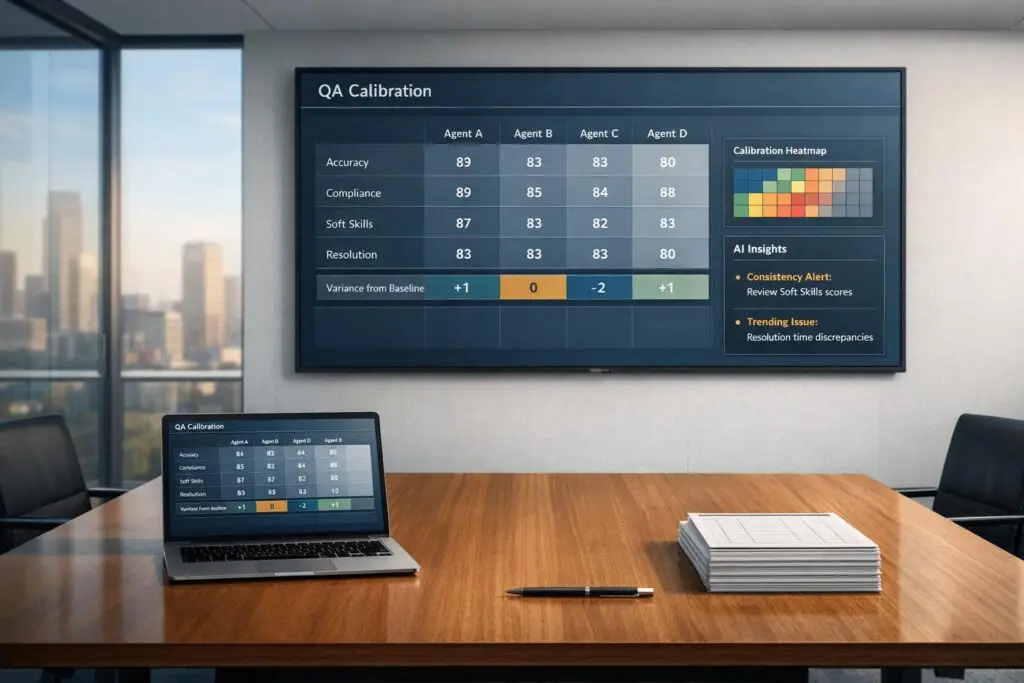
Inconsistent QA scoring can confuse agents, skew performance metrics, and harm customer experience. To ensure fairness and alignment across managers, follow these steps:
- Standardize the QA Scorecard: Use clear, measurable criteria to evaluate key areas like resolution quality, compliance, and empathy. Avoid vague language and test the scorecard for consistency.
- Select Representative Cases: Pick cases that reflect real challenges from various channels (email, chat, phone) and focus on scenarios prone to scoring disagreements.
- Run Calibration Sessions: Use blind scoring to minimize bias, then discuss discrepancies as a group to align on scoring standards. Document consensus decisions for future reference.
- Set a Variance Baseline: Aim for less than 5% scoring variance among reviewers. Track alignment over time to identify outliers and address inconsistencies.
- Leverage AI in customer support: Automate scoring checks, detect bias, and analyze all interactions – not just a small sample. AI can boost accuracy and streamline the process.
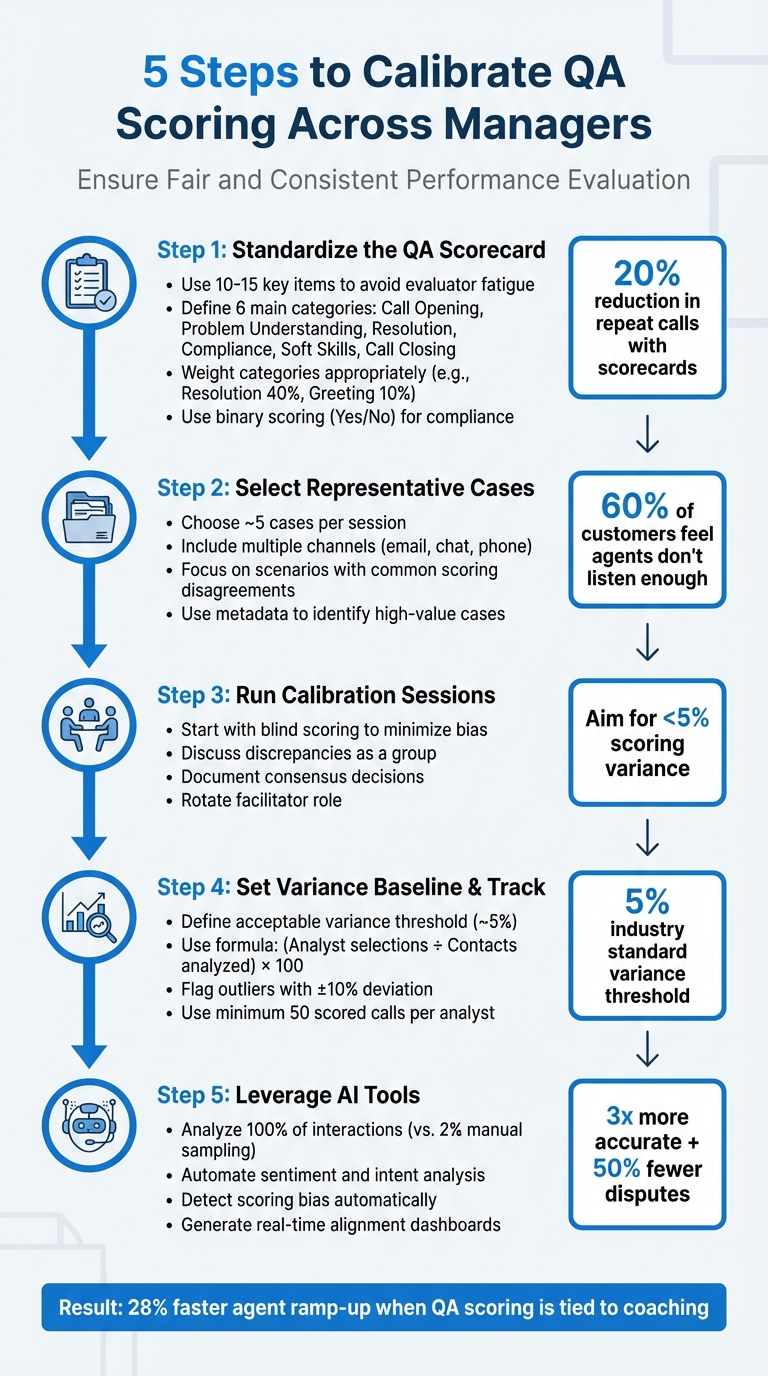
5-Step QA Calibration Process for Fair and Consistent Scoring
Customer Service QA Calibration Sessions – Part 1: Three approaches [Online Course]
sbb-itb-e60d259
Step 1: Create a Standardized QA Scorecard with Clear Criteria
Fair calibration starts with a standardized scorecard. This tool turns subjective opinions into measurable, objective criteria. Without it, managers might evaluate agents inconsistently, which undermines the entire process.
Keep your scorecard concise – 10 to 15 key items is ideal. This helps avoid evaluator fatigue and ensures thoughtful scoring. Focus on what drives performance in your B2B support team. For example, resolution quality, compliance, and process adherence often outweigh greeting protocols. In fact, contact centers using scorecards have reduced repeat calls by 20%. A well-designed scorecard not only ensures consistency but also sets the stage for tracking metrics that matter.
Define Key Metrics and Behaviors to Evaluate
Your scorecard should address six main categories: Call Opening (first impressions and expectation-setting), Problem Understanding (listening and asking the right questions), Resolution (accuracy and thoroughness), Compliance (adherence to regulations like GDPR or SOC2), Soft Skills (tone and empathy), and Call Closing. Each category should align with your operational goals.
Weighting is critical, especially in B2B environments. For example, Resolution or Accuracy might make up 40% of the score, while Greeting Protocols might only account for 10%. This reflects the priority of solving technical issues over minor formalities. Interestingly, studies show that 60% of customers feel agents don’t listen enough, which makes "Problem Understanding" a high-priority category worth extra weight.
Compliance is non-negotiable. In regulated industries like pharma, a single error can lead to fines of up to $50,000 per call. For these high-stakes requirements, use binary scoring (Yes/No) – either the agent met the standard, or they didn’t. This method keeps things clear and avoids gray areas.
Once your metrics are outlined, refine them further by eliminating any vague or unclear language.
Remove Subjective Bias from Your Criteria
Subjective language can lead to inconsistent scoring. Replace it with specific, observable actions. For instance, instead of asking, "Was the agent professional?" use criteria like "Agent introduced themselves with name and company" or "Agent confirmed issue was resolved before ending the call". This approach eliminates guesswork and ensures consistency across reviewers.
Soft skills should also be clearly defined. For example, instead of a vague "hold etiquette" metric, specify: "Apologizes for wait on hold if it exceeds 30 seconds". Similarly, for empathy, define it as "Acknowledges customer frustration using specific language." By focusing on observable behaviors, you remove room for interpretation and favoritism.
"A rubric ensures that everyone – whether you’re a QA manager, supervisor, or peer reviewer – evaluates calls using the same yardstick." – Call Compass
Before implementing your scorecard, test it. Have multiple reviewers evaluate the same set of calls. If their scores differ significantly, refine the wording. Once finalized, share the criteria with your agents. This shifts QA from feeling like a "gotcha" exercise to a collaborative effort. When agents understand exactly how they’re being evaluated, they’re more likely to self-assess and improve on their own.
Step 2: Choose Representative Support Cases for Calibration
After setting up your scorecard, the next step is to select cases that truly represent the daily challenges your B2B support team faces. Avoid picking tickets at random. Instead, focus on cases that reflect the variety of scenarios your team encounters. This ensures that calibration sessions are aligned with actual performance expectations.
Aim to include around five cases per session. Keep the number manageable to allow for thorough discussion. It’s also important to include cases from multiple support channels and with varying levels of complexity. For instance, a session focused only on simple password resets won’t prepare your managers to fairly assess more intricate technical escalations. Similarly, reviewing only email cases means missing out on the unique challenges of chat interactions, where tone and responsiveness take center stage compared to grammar. By stratifying your sample across channels and scenarios, you’ll ensure a well-rounded calibration process.
Include Cases from Different Channels and Scenarios
B2B support often spans various channels – email, chat, phone, and even social media. Each one comes with its own nuances. For example, "tone of voice" on a phone call might translate to "word choice and emoji use" in chat or "grammar and clarity" in email. Select cases that reflect the full range of B2B support scenarios, such as technical troubleshooting, renewals, escalations, compliance-related interactions, and even churn risks.
Take Replo, a SaaS company specializing in Shopify landing pages, as an example. In 2025, they implemented a weighted QA scorecard for chat and email. Their calibration process focused on five key themes: Voice (technical concepts), Accuracy (product knowledge), Empathy, Writing Style (including formatting and images), and Procedures (like tagging and troubleshooting).
Use metadata from your help desk system to pinpoint high-value cases. Tags, source types, and CSAT, CES, and NPS scores can help you identify interactions requiring complex product knowledge or those tied to high-stakes compliance issues. Alternate the types of cases you use to cover a wide range of situations and avoid creating confusion.
Find Cases That Show Common Scoring Disagreements
Focus on cases where scoring tends to vary significantly. These "gray areas" often highlight gaps in your scorecard and spark meaningful conversations about what "good" performance truly looks like. For example, consider cases where an agent followed all internal procedures but still left the customer dissatisfied. These scenarios can reveal mismatches in how reviewers balance process adherence with customer satisfaction.
Pay attention to areas in your scorecard that are prone to subjective interpretation. Common sources of disagreement include soft skills like empathy or tone, deciding between "failed" and "non-applicable" outcomes, or handling conditional behaviors (e.g., whether to apologize for a delay if the customer doesn’t seem upset). Use customer service reporting tools to identify scorecard questions with low "Alignment Scores", as these highlight categories where your team struggles to agree. Select cases that bring these discrepancies to light.
"Sometimes the person who looks like they’re the outlier is actually the one who’s being more accurate than the rest of the team. But it allows us to have the conversation with them and dig into why there is a difference."
– Tom Vander Well, Call Centre Consultant
Have reviewers independently score a batch of cases using blind scoring. Prioritize cases with the widest score variations for group discussions. This method helps pinpoint where interpretations diverge, making your calibration sessions much more effective. To avoid bias, anonymize the agent’s name (except for the calibration owner) during the process.
Step 3: Run Collaborative QA Calibration Sessions
Once you’ve chosen the cases, gather your managers for a structured calibration session. The aim here is to identify scoring inconsistencies and establish a shared understanding of what "good" quality looks like. For the first meeting, avoid scoring cases as a group to steer clear of groupthink. Instead, take a two-step approach: start with blind scoring, then move into a facilitated discussion. Begin with blind scoring before diving into group conversations.
Use Blind Scoring to Minimize Bias
Have each reviewer independently score the same interactions without seeing others’ evaluations or comments. Avoid any form of shared or visible scoring to ensure unbiased reviews. Most QA platforms offer a blind scoring feature – make use of it.
Once blind scoring is complete, compare the results. Aim to keep scoring variances within 5%. Focus your meeting on areas where the team disagreed during the blind scoring phase. This targeted approach helps pinpoint where interpretations differ, making your sessions more efficient and effective.
Lead Group Discussions to Align Scoring
After identifying discrepancies, move into a structured discussion phase. Designate a facilitator to guide the conversation, ensuring it remains focused on the quality criteria. The facilitator’s role is to encourage input from all reviewers and keep the discussion productive. When disagreements arise, ask clarifying questions like, "What principle can we agree on to standardize our scoring?" – Tom Vander Well, Contact Center Expert.
Once you’ve discussed each case, settle on a final consensus score. Mark one review as the "baseline" or gold standard for that interaction. Document this consensus in a Calibration Monitor or your meeting notes to guide future reviews. If discussions hit a deadlock, ensure there’s a clear decision-maker who can finalize the score – otherwise, the session risks turning into an endless debate. To keep things fresh and collaborative, rotate the facilitator role among different managers in future sessions. This helps promote shared ownership and engagement.
Step 4: Set a QA Calibration Baseline and Track Variance
Once you’ve completed your calibration sessions, it’s crucial to ensure your managers remain aligned over time. A calibration baseline serves as a guide, setting the maximum acceptable scoring variance between reviewers. According to Riley Young, this variance typically sits around 5%.
This benchmark is key to providing agents with consistent feedback, no matter who’s reviewing their work. It also helps identify managers who may lean too lenient or too strict. Without such a baseline, you’re left guessing, and decisions like promotions or rewards might be influenced by bias instead of actual performance.
Define Acceptable Scoring Variance Thresholds
To keep things consistent, start by establishing a clear threshold for what qualifies as "aligned" versus "out of sync." The industry standard for acceptable variance is about 5%. If two reviewers’ scores differ by less than this, their evaluations are aligned. Anything above this threshold signals the need for further discussion.
To pinpoint outliers, use this formula:
(Number of times an analyst selected a specific score ÷ Number of contacts analyzed) x 100.
Compare each manager’s percentage against the team average. If someone deviates by plus or minus 10%, it’s worth investigating further. For accurate results, use a sample size of at least 50 scored calls per analyst.
Once your thresholds are set, the next step is to actively monitor these metrics to ensure ongoing alignment.
Use Reporting Dashboards to Monitor Consistency
Tracking variance manually becomes impractical when managing multiple managers and hundreds of tickets. AI-powered reporting dashboards simplify this process by automatically calculating alignment scores, flagging potential biases, and highlighting trends over time. These dashboards generate an Alignment Score to show how closely reviewers adhere to the baseline. If scores dip too low, alerts can prompt coaching before issues escalate.
Modern dashboards also normalize scores to reduce bias and ensure fair assessments. By February 2026, AI tools will even be able to detect "best-behavior bias" – when managers score differently during calibration sessions than during their regular reviews. This level of automation ensures your QA program remains fair, scalable, and free of unnecessary manual effort.
Step 5: Use AI Tools to Automate and Improve QA Calibration
Handling QA calibration manually can quickly become unmanageable. Trying to track scoring differences across multiple managers and thousands of customer interactions is overwhelming. AI tools step in to solve this problem by spotting patterns and inconsistencies instantly. Unlike traditional methods that rely on a small 2% sample of interactions, modern AI platforms can analyze every single interaction, giving you a complete and statistically sound view of performance.
AI-Powered Sentiment and Intent Analysis
Scoring "soft skills" like tone, empathy, and professionalism has always been tricky. These aspects are naturally subjective, leading to varying scores from different managers. AI-powered sentiment and intent analysis tackles this issue by offering neutral, objective scoring – free from personal preferences, fatigue, or unconscious bias.
Using Natural Language Processing (NLP), AI evaluates customer moods and agent tones based on actual language patterns, not gut feelings. For instance, instead of debating whether an agent was "empathetic enough", you can look at sentiment data that shows a customer’s emotional state improving during the conversation. This approach removes the influence of individual biases.
"The human element introduces chances for errors, bias, and subjectivity that can get in the way of a fair and neutral score. AI for contact center QA can eliminate these issues." – Scorebuddy
Platforms like Supportbench use AI-driven sentiment analysis to streamline operations. These tools analyze tone, intent, and emotion automatically, giving managers a consistent baseline to work with during calibration. This is just the beginning – automated consistency checks take it a step further.
Automated Scoring Consistency Checks
AI not only evaluates interactions but also monitors reviewers by comparing their scores to those of their peers. If a manager consistently gives lenient or harsher ratings compared to others, the system flags this discrepancy. For example, a manager who regularly scores higher than their peers can be identified before their ratings skew overall performance reviews.
AI tools also catch instances where managers might score more generously during formal calibration sessions than in routine reviews. This ensures that calibration improvements stick.
By automating these checks, AI-powered tools have been shown to cut QA disputes in half and boost evaluation accuracy by three times compared to manual processes. These systems eliminate the need for time-consuming spreadsheet audits, allowing teams to focus on coaching and refining strategies. The insights from these checks feed directly into detailed reports for better decision-making.
AI-Driven Reporting and Insights
AI takes calibration further by offering advanced reporting tools. Dashboards consolidate data to highlight trends and guide improvements. They show which managers are aligned, which scoring categories need attention, and where calibration efforts should focus.
Some platforms track reviewer performance using metrics like an Internal Quality Score (IQS). If a manager’s IQS drops below a certain level, the system sends an alert, prompting immediate coaching. Features like "Grade the Grader" scorecards even evaluate reviewers themselves to maintain consistent scoring practices.
Supportbench includes these AI-powered insights as standard. Its dashboards highlight scoring variances, normalize scores to reduce bias, and identify the root causes of disagreements. On top of that, AI can auto-fill comments to ensure consistent style and tone, removing yet another layer of subjectivity. This means your team can spend less time debating scores and more time improving agent performance.
| Feature | Manual Calibration | AI-Native Calibration |
|---|---|---|
| Sample Size | ~2% of interactions | 100% of interactions |
| Evaluation Time | ~5 minutes | <5 seconds |
| Bias Detection | Subjective/Manual | AI-powered variance detection |
| Dispute Handling | Manual tracking/Spreadsheets | Automated disputes |
| Consistency | High variance between managers | Normalized scoring engines |
Common Pitfalls in QA Calibration and How to Avoid Them
Even with the best intentions, QA calibration can go off track. The most frequent problems stem from subjective bias influencing scores and a lack of follow-through on calibration updates. These issues can distort your metrics and frustrate agents who receive mixed messages in their feedback.
Reduce Subjective Bias in Scoring
Subjective bias often sneaks into scoring. For example, managers might grade their direct reports more generously or interpret criteria like "empathy" differently. One manager may prioritize resolving the customer’s issue, while another focuses on strictly following procedures. On the flip side, repeated mistakes might lead to overly harsh scoring.
One way to tackle this is through blind scoring to uncover inconsistencies. A neutral facilitator can guide discussions, encourage balanced input, and act as a tie-breaker when needed. Replace vague criteria with a detailed rubric that uses clear descriptions and checkboxes for measurable behaviors.
"If you do have some level of ambiguity in your questions, using the description to lay out… what constitutes ‘meets expectations’ [and] ‘below expectations’… can help." – David Gunn, Customer Success Manager, MaestroQA
Strive for a scoring variance of 5% or less between reviewers. If discrepancies exceed this, refine your definitions and hold more frequent alignment sessions. Keep calibration groups small and minimize distractions – like banning multitasking during sessions – to ensure focus and consistency. These steps will reinforce alignment and help maintain the integrity of your QA process.
Ensure Consistent Follow-Through on Calibration Changes
Reducing bias is just one piece of the puzzle. The real challenge lies in ensuring that calibration insights lead to meaningful action. Without proper implementation, even the best calibration sessions lose their value. When reviewers fail to adopt updated standards, metrics become unreliable, and agents receive conflicting feedback. This inconsistency can harm morale and widen the gap between "strict" and "lenient" graders.
If a session identifies a poorly defined category, update the scorecard immediately and communicate the changes to the team. This ensures everyone is working from the same playbook.
Track the impact of these updates using alignment scores, which show how closely reviewers match a consensus over time. If someone’s alignment remains low, it’s a sign they need additional coaching. Use reporting dashboards to monitor performance regularly, and schedule calibration sessions consistently – monthly or even weekly if your standards are evolving quickly.
"We’ve normalized the expectation that we’re driving toward commitment, not consensus." – Jenni Bacich, Stitch Fix
Rotating the facilitator role among reviewers can also encourage shared responsibility and keep everyone engaged. Calibration isn’t just about consistency – it’s about building trust in your QA process. By addressing these common pitfalls, you can create a more reliable framework where evaluations reflect best practices rather than individual preferences.
How to Maintain Consistent QA Calibration Over Time
Once you’ve established standardized calibration practices, the challenge becomes keeping them consistent. Without regular effort, standards can drift, and interpretations may vary. Calibration isn’t just a one-time or quarterly task – it’s an ongoing governance process that requires continuous attention.
Schedule Regular Calibration Sessions
Regular calibration sessions are essential for maintaining alignment. For most support teams, monthly sessions strike a good balance between staying on track and avoiding burnout from too many meetings. However, when scaling reviewer groups or during major process changes, increasing the frequency to bi-weekly or even weekly might be necessary.
Each session should focus on a specific goal, such as addressing scoring spikes, reviewing edge cases, or aligning on new criteria. A practical starting point is to review about five conversations per session, adjusting the number based on ticket complexity and team size. Beginning sessions with blind scoring can help reveal discrepancies among reviewers.
Rotating the facilitator role among team members is another way to boost engagement and shared responsibility. As Tom Vander Well, a Quality Process Expert, explains:
"What’s the principle we can glean from this discussion that will help us be more consistent in scoring all of our calls?"
These sessions also provide a solid foundation for integrating broader feedback and leveraging technology.
Incorporate Feedback from Agents and Customers
Internal alignment is important, but external feedback from agents and customers is just as critical for refining your QA process. For example, linking your QA scorecard to customer satisfaction metrics like CSAT and NPS can uncover discrepancies. If an agent scores well on QA but consistently receives low CSAT ratings, it might indicate that the scorecard is overly focused on procedural compliance while neglecting soft skills like empathy.
"Agent Sessions" are another way to involve frontline representatives. These sessions allow agents to discuss their interactions and provide context. Including top-performing agents in the design or revision of scorecards ensures the criteria are practical, reflect real-world challenges, and gain team buy-in. Encouraging agents to perform self-audits using the QA scorecard and comparing their evaluations with official reviews can also highlight gaps and promote self-awareness. Many successful contact centers evaluate three to five interactions per agent each month to maintain a steady flow of actionable data.
This feedback loop supports continuous improvement and helps refine QA processes over time.
Use AI for Continuous QA Optimization
AI tools are transforming QA by analyzing every customer interaction across all channels. This is a major improvement over manual sampling, which typically covers only about 2% of tickets. With full coverage, calibration sessions can focus on high-impact or complex cases, rather than extrapolating insights from a small sample.
AI-powered normalization engines adjust scores to reduce human bias, delivering QA evaluations that are three times more accurate and cutting QA disputes by half. Alignment dashboards provide real-time insights into how closely reviewers’ scores align with a baseline. A formal variance threshold – usually around 5% – can trigger a calibration session when discrepancies exceed this limit. Metrics like the "Likelihood of Analyst Ticking Box" can also flag reviewers whose scores deviate significantly (e.g., by more than 10%) from the team average, signaling a need for additional coaching.
Modern platforms like Supportbench take this a step further with AI-driven features like predictive CSAT and CES scoring, automated case prioritization, and first-contact resolution detection. These tools provide dynamic insights that refine calibration standards based on real customer outcomes rather than internal assumptions.
Conclusion
Aligning QA scoring across managers lays the groundwork for a fair and effective support team. When everyone agrees on what "good" looks like, agents get consistent feedback, coaching becomes more impactful, and your quality metrics reflect reality instead of personal biases. In fact, organizations that tie QA scoring to coaching report 28% faster agent ramp-up, and using structured scorecards can cut repeat calls by 20%.
To achieve these outcomes, the QA calibration process must follow a clear plan: start by creating a standardized scorecard with clear, objective criteria, conduct regular blind scoring sessions to uncover biases, set a variance threshold (commonly about 5%) to measure alignment, and share calibration results with your team to close the loop. Without these steps, you risk unreliable data, demotivated agents, and a QA program that complicates more than it helps.
AI tools have revolutionized QA calibration. Instead of relying on manual reviews of just 1–2% of interactions, platforms like Supportbench analyze customer conversations across all channels. AI-powered normalization engines provide 3x more accurate evaluations and reduce QA disputes by 50%. These tools strengthen calibration by automating consistency checks and delivering real-time insights, ensuring your standards are based on real customer outcomes rather than internal guesswork. However, manual oversight remains essential to keep the process grounded.
The key to sustaining calibration lies in continuous governance. Teams must schedule regular sessions, incorporate feedback from both agents and customers, and refine their strategies using AI-driven insights. As Robyn Coppell aptly puts it:
"Calibration isn’t just a box-ticking exercise, it’s a crucial step in building a fair, consistent, and high-performing contact centre".
When QA calibration is done right, everyone wins. Agents trust the feedback they receive, managers rely on accurate data to make smarter decisions, and customers enjoy consistently great service. In the world of B2B support, fair and consistent QA scoring isn’t just helpful – it’s essential.
FAQs
How can AI help ensure QA scoring is fair and consistent?
AI brings a new level of precision to QA scoring by automating evaluations, spotting inconsistencies, and providing real-time insights. This not only minimizes human bias but also ensures that all managers adhere to uniform standards.
Some standout AI tools include sentiment analysis, consistency checks for scoring, and comprehensive reporting dashboards. These features simplify the calibration process, making QA reviews more precise and efficient while encouraging fairness across the board.
How can we ensure QA scoring is fair and consistent across managers?
Ensuring fairness and consistency in QA scoring across managers means tackling challenges like subjective evaluations, inconsistent criteria, and misaligned expectations head-on. Subjectivity often creeps in when reviewers interpret standards differently, leading to uneven scores. The solution? Develop scorecards that are clear, measurable, and leave little room for personal interpretation. Pair this with thorough training to ensure everyone understands how to apply these standards.
Regular calibration sessions are another must. These sessions allow managers to review how they’ve scored the same interactions, identify discrepancies, and work together to align their approaches. Open discussions during these meetings help ensure that everyone interprets the scoring criteria in the same way.
On top of that, incorporating AI tools can streamline the process. These tools can spot inconsistencies in scoring, analyze sentiment, and even provide real-time feedback. By automating some parts of the process, you not only save time but also improve accuracy and fairness, helping to build a more dependable QA system for your team.
How often should we hold QA calibration sessions to ensure fair and consistent scoring?
To keep QA scoring consistent and impartial, it’s important to hold calibration sessions on a regular basis, whether that’s monthly or quarterly. These sessions help teams stay aligned on evaluation standards, resolve discrepancies, and maintain uniform scoring across all managers.
By meeting regularly, you can minimize subjective biases and adjust processes as your team grows or changes. The key is to establish a schedule that works for your team’s size and workflow, while allowing enough time for thorough reviews and necessary adjustments.
Related Blog Posts
- Top 7 AI Tools for Tracking Support Agent Performance and Competency
- How do you build a QA scorecard for support (with examples and scoring templates)?
- How do you coach agents using QA data without killing morale?
- How do you build a customer health scoring model using support signals (not just CSM notes)?






