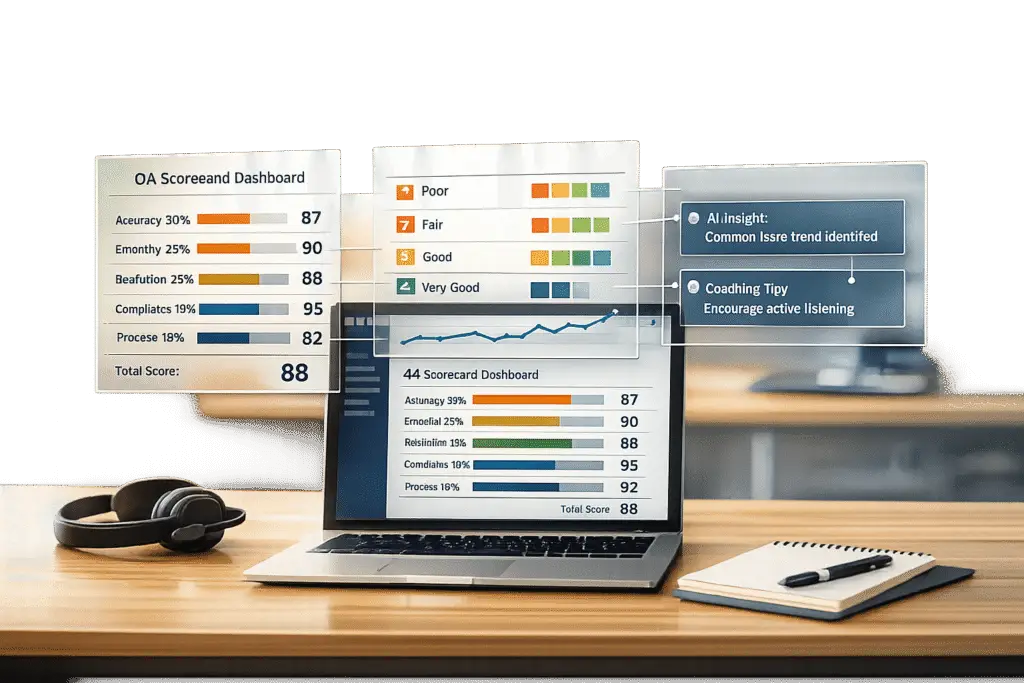
QA scorecards are essential for improving customer support quality. They standardize evaluations, ensure fairness, and help identify areas for agent improvement. Here’s a quick breakdown of how to create one:
- Define Objectives: Decide what "quality" means for your business. Focus on key areas like communication, compliance, and issue resolution.
- Set Metrics: Use measurable criteria like empathy, resolution accuracy, and adherence to processes.
- Weight Categories: Assign importance to each metric (e.g., 50% for resolution, 30% for empathy).
- Design the Scorecard: Use clear rating scales (e.g., 1–5) and a simple layout. Include space for comments and critical fail criteria for compliance.
- Leverage AI: Automate scoring for 100% interaction coverage and faster feedback.
- Train Reviewers: Align on scoring standards through calibration sessions and provide actionable feedback.
- Track Results: Monitor scores, adjust criteria every 3–6 months, and use dashboards to analyze trends.
QA scorecards help teams improve performance, ensure compliance, and enhance customer satisfaction. By combining structured rubrics with AI tools, businesses can evaluate every interaction effectively while focusing on agent growth.
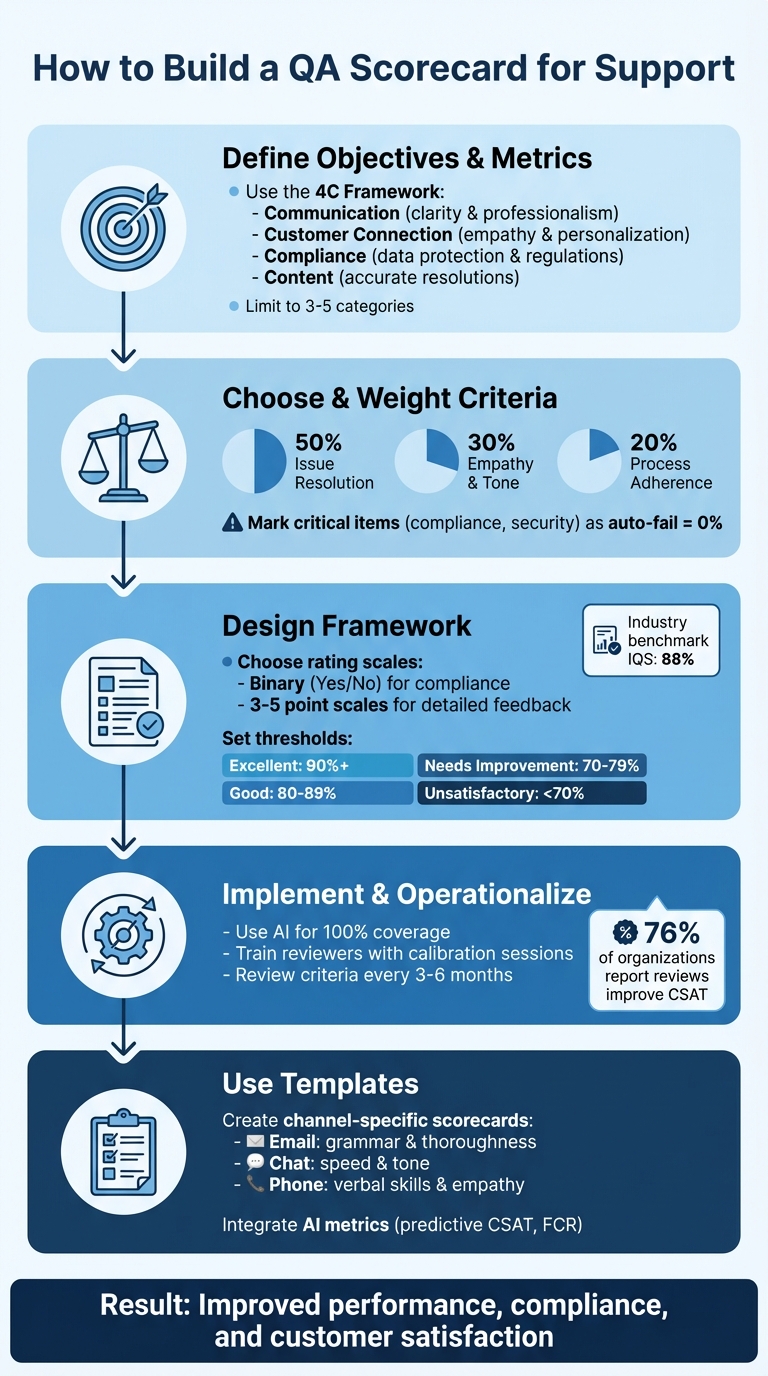
5-Step Process to Build an Effective QA Scorecard for Customer Support
Step 1: Define Your Objectives and Key Metrics
Identify Your Core Objectives
Start by figuring out what "quality" means for your business. This definition can vary widely depending on your industry. For example, a SaaS company might focus on delivering personalized and consultative interactions to encourage upselling, while a fast-paced e-commerce platform may prioritize quick and efficient problem-solving.
The 4C Framework can help you organize your objectives into four main areas: Communication (ensuring clarity and professionalism), Customer Connection (focusing on empathy and personalization), Compliance (adhering to data protection and regulations), and Content (delivering accurate and effective resolutions). Your goals should also align with your brand’s identity. For instance, MeUndies built their QA rubric to maintain their playful and approachable brand voice. They even included guidelines for using emojis to ensure interactions reflected their unique tone.
Once you’ve outlined your objectives, the next step is translating them into measurable metrics.
Select the Right Metrics
Turn your objectives into metrics that can be tracked and measured. Separate performance outcomes (like Average Handle Time or First Contact Resolution) from agent-specific behaviors (like tone or empathy). Agent scorecards typically measure productivity metrics, while QA scorecards focus on interaction quality, covering aspects like compliance, accuracy, and emotional connection.
Take Replo, a Shopify landing page platform, as an example. They use a weighted QA scorecard with five key themes: Voice, Accuracy, Empathy, Writing Style, and Procedures. Each theme is rated on a 1–3 scale, allowing them to fine-tune how each factor impacts overall performance. Similarly, Rentman revamped their QA process to replace vague standards with structured reviews, which helped them achieve impressive CSAT rates of up to 96%.
To keep things manageable, stick to three to five categories on your scorecard – this prevents reviewers from becoming overwhelmed. Label items like HIPAA compliance or identity verification as "Critical" – failure in these areas should result in a 0% score for the entire interaction. For the remaining categories, assign weights based on their importance. For example, you might allocate 50% to issue resolution, 30% to empathy, and 20% to script adherence. This ensures your scorecard reflects the factors that truly influence customer satisfaction and business success.
Step 2: Choose and Weight Your Scoring Criteria
Key Scoring Categories
After defining your objectives and metrics, the next step is to group them into clear categories. These categories should directly connect to the goals and metrics you’ve already established. A popular approach for B2B scorecards is the 4C Framework, which focuses on Communication (clarity and tone), Customer Connection (empathy and personalization), Compliance and Security (data protection), and Correct and Complete Content (accuracy and resolution quality). Alternatively, the Pillar Framework organizes metrics into Soft Skills (tone and empathy), Issue Resolution, and Procedure (adhering to internal protocols).
To keep things efficient, limit your scorecard to three to seven categories. This strikes a balance between capturing valuable insights and avoiding reviewer fatigue. Going beyond this range can overwhelm reviewers and dilute the focus of your evaluations. For B2B support, it’s often wise to place extra emphasis on Resolution Accuracy and Data Protection, given the higher technical and legal requirements in this space.
Certain criteria, like data security, identity verification, or regulatory compliance, should be treated as critical. If these aren’t met, assign a 0% score to the entire interaction, regardless of performance in other areas. This approach underscores the importance of non-negotiable standards while keeping the evaluation process aligned with your business priorities.
Assign Weights Based on Business Priorities
Once your categories are set, it’s time to assign weights to reflect their importance. Focus on the behaviors that have the greatest impact on customer retention and your key performance indicators (KPIs). A good starting point is the 50/30/20 rule: allocate 50% to Issue Resolution, 30% to Empathy and Tone, and 20% to Process Adherence. For example, if improving First Call Resolution (FCR) is your main goal, Resolution Accuracy should carry the highest weight.
"Not every behavior has the same impact. Some directly affect customer trust or business outcomes, while others are nice to have. Weighting helps you focus attention where it counts." – Ritu John, Content Marketer, Hiver
Consider channel-specific priorities as well. For phone support, you might prioritize tone and active listening, while email and chat evaluations should focus more on grammar, writing style, and proactive follow-ups. Keep in mind that weighting isn’t a one-time task – review and adjust your allocations every three to six months to align with changing business goals and customer feedback trends.
Before rolling out your scorecard, test it with a small group – around 10–20% of your agents – for three to four weeks. This pilot phase will help ensure that your chosen weights accurately highlight the best and worst interactions.
With your scoring criteria and weights in place, you’re ready to design the QA scorecard framework.
Step 3: Design Your QA Scorecard Framework
Use Clear Rating Scales
The rating scale you choose plays a big role in how efficiently reviewers can work and how useful their feedback will be. Binary scales (Yes/No) are the quickest to use and work well for compliance checks where something either occurred or didn’t. For example, a question like "Did the agent verify the customer’s identity?" only requires a simple yes or no answer. On the other hand, 5-point scales provide more detailed insights, making them better for coaching purposes, though they take longer to complete and can feel more subjective. If you’re looking for a balance, 3-point or 4-point scales can offer a middle ground by ensuring clarity while still allowing some nuance.
When deciding on a scale, consider your review volume and coaching needs. For instance, if you’re only manually reviewing 2% of conversations (a common industry practice), you’ll want a scale that’s both efficient and actionable. Always include a "Not Applicable" (N/A) option so agents aren’t unfairly scored on criteria that don’t apply, such as an "Outbound verification" item during an inbound chat. Be sure to define each point on the scale with a clear scoring guide to maintain consistency.
Once your scale is set, focus on structuring your scorecard for straightforward and efficient assessments.
Create a Simple Layout
A well-designed layout can make the review process faster and more effective. Your scorecard should be easy to navigate and take no more than five minutes to complete. A table format works best, listing each category alongside a brief description, the rating scale, and space for comments. To avoid overwhelming reviewers, limit the scorecard to three to seven categories. For example, a simple B2B scorecard might include:
- Issue Resolution (50% weight)
- Communication (20% weight)
- Compliance (20% weight)
- Soft Skills (10% weight)
Here’s how this could look in a table:
| Category | Weight | Rating (1-5) | Comments |
|---|---|---|---|
| Issue Resolution | 50% | ☐ 1 ☐ 2 ☐ 3 ☐ 4 ☐ 5 | Verify root cause and FCR |
| Communication | 20% | ☐ 1 ☐ 2 ☐ 3 ☐ 4 ☐ 5 | Tone, grammar, clear language |
| Compliance | 20% | ☐ 1 ☐ 2 ☐ 3 ☐ 4 ☐ 5 | Identity verification, data safety |
| Soft Skills | 10% | ☐ 1 ☐ 2 ☐ 3 ☐ 4 ☐ 5 | Empathy, personalization, listening |
To make feedback even more actionable, consider adding a "Root Cause" dropdown for negative ratings. This allows reviewers to tag specific issues like "Missed security protocol" or "Incorrect troubleshooting step", providing clear direction for coaching.
Set Scoring Thresholds
Once your scorecard layout and scales are in place, establish clear performance thresholds to ensure consistent quality. Define a passing score – usually between 70% and 80% – so agents understand the baseline for acceptable performance. Instead of a simple pass/fail system, use tiered performance levels, such as:
- Excellent: 90%+
- Good: 80–89%
- Needs Improvement: 70–79%
- Unsatisfactory: Below 70%
For critical areas like data security or regulatory compliance, enforce an auto-fail rule. If an agent fails one of these must-meet criteria, the entire interaction should receive a 0% score. This approach emphasizes the importance of non-negotiable standards.
To maintain consistency, schedule regular calibration sessions where multiple reviewers score the same interaction. This helps ensure everyone interprets the scales and thresholds the same way. Adjust thresholds as needed to reflect changing business goals or priorities, keeping in mind that the industry benchmark for Internal Quality Score (IQS) is around 88%.
Step 4: Implement and Operationalize Your QA Process
Use AI to Streamline QA Reviews
Traditional quality assurance (QA) processes often rely on random sampling, leaving many interactions unchecked. But AI changes the game by analyzing every single conversation – whether it’s through email, chat, phone, or social media. These tools don’t just skim the surface; they assess tone, resolution quality, compliance, and sentiment, automatically flagging cases that need a closer look from a human.
For instance, AI can identify negative sentiment, signals of churn risk, or even standout service moments that deserve recognition or coaching. It can also handle straightforward tasks like scoring tickets for solution accuracy, grammar, and empathy. Some tools even analyze up to 27 distinct emotions to evaluate tone and customer experience.
The results speak for themselves. In 2024, companies like Salesforce and Coveo used AI-powered QA to achieve measurable results. Salesforce cut escalation rates by 56% and saw a 13% productivity boost for managers. Meanwhile, Coveo reduced Mean Time to Resolution by 53% and increased same-day resolutions by 31%.
"AI transforms QA from a bottleneck into an accelerator." – Eugenio Scafati, CEO, Autonoma
If you’re considering AI for QA, start small. Run a pilot program focused on a specific goal, like reducing churn or improving first-contact resolution. Once you see results, expand the program. But don’t forget to maintain human oversight – this ensures AI-generated scores align with real-world risks and customer behavior.
With AI managing routine scoring, your team can focus on delivering precise, actionable feedback.
Train Reviewers and Create Feedback Loops
Even with AI in the mix, human reviewers remain crucial for coaching and applying nuanced judgment. According to research, 76% of organizations report that reviewing conversations directly improves customer satisfaction. But this only works if reviewers are well-trained and aligned on what "great" looks like.
Calibration sessions are key. During these sessions, reviewers score interactions together and discuss any discrepancies. This helps eliminate bias and ensures consistent evaluations. Use these sessions to clarify how to apply rating scales, decide when criteria are "not applicable", and craft constructive feedback.
When giving feedback, be specific. Instead of saying, "Work on communication", point to exact moments in the conversation and explain what could have been done better. Balance constructive criticism with positive reinforcement to keep agents motivated. Regular one-on-one coaching sessions (weekly or bi-weekly) are also essential. Use these meetings to review QA results, set actionable goals, and track progress. Notably, 44% of support teams already use QA feedback as a foundation for coaching.
"Effective QA feedback is the cornerstone of continuous improvement in any organization." – Bella Williams, Insight7
Accountability is also important. If an agent struggles with empathy, for example, provide targeted training and review their subsequent interactions to ensure improvement. This approach reinforces the idea that QA is about growth, not punishment.
Finally, use the data from reviews to refine processes and address knowledge gaps.
Track and Analyze QA Results
Dashboards are your best friend when it comes to tracking QA performance. Start by calculating your Internal Quality Score (IQS) – divide the total score by the maximum possible score and express it as a percentage. The industry benchmark is 88%, so aim to meet or exceed that standard.
Pair your IQS with external metrics like CSAT (Customer Satisfaction), NPS (Net Promoter Score), or CES (Customer Effort Score) for a fuller picture. For example, a high IQS but a low CSAT might point to broader issues like product flaws or policy challenges rather than agent performance. Keep in mind, though, that CSAT response rates are often low – averaging 19% for chat and just 5% for email and phone. This makes internal QA scores a more reliable indicator.
To identify training needs, use root cause analysis. When reviewers assign low scores, require them to select a predefined reason, such as "missed security protocol" or "incorrect troubleshooting step." This data can reveal patterns that point to knowledge gaps or process issues.
The impact of these efforts is clear. In 2024, Databricks used AI-powered QA to analyze interactions and send alerts, leading to a 20% boost in CSAT, a 9% rise in partner CSAT, and a 40% drop in SLA misses. Similarly, Rentman leveraged Zendesk QA to provide targeted feedback, achieving CSAT rates as high as 96%.
Don’t forget to revisit your QA criteria regularly. Update your scorecards and category weights every 3–6 months to ensure they align with changing business goals and customer needs. As your team grows and priorities evolve, your QA process should keep pace to reflect what matters most to your customers – and your business.
sbb-itb-e60d259
Step 5: QA Scorecard Examples and Templates
Channel-Specific Templates
Tailored templates can make QA evaluations more effective by focusing on the unique needs of each support channel. For example:
- Email scorecards should emphasize thoroughness and grammar. Written communication must anticipate customer needs and minimize back-and-forth exchanges.
- Live chat scorecards should prioritize speed and tone. Key metrics include resolution time (to avoid frustrating delays) and the agent’s ability to match the customer’s tone while managing multiple conversations simultaneously.
- Phone scorecards should focus on verbal soft skills such as pacing, volume, active listening, and empathy – especially important for emotionally charged interactions.
When it comes to technical support, the focus shifts to accuracy in troubleshooting and diagnostic thinking. A well-designed technical scorecard should assess how effectively agents probe for information, follow troubleshooting protocols, explain technical issues, adhere to security guidelines, and document resolutions accurately. These elements ensure problems are resolved correctly while maintaining compliance and clear documentation.
AI-Integrated QA Scorecard Examples
Modern QA scorecards increasingly incorporate AI-driven metrics for more automated and detailed evaluations. For instance:
- Predictive CSAT (also known as "Conversational Quality" or CQ) uses AI to analyze customer sentiment and the ease of interactions. This method provides a satisfaction score even when customers skip surveys, addressing low response rates in traditional feedback systems.
- AI can also measure First Contact Resolution (FCR) by analyzing case histories to determine if customer issues were resolved in a single interaction – something that has historically been challenging to track accurately without automation.
A practical example is Replo’s weighted scoring system for chat and email interactions. This system evaluates five AI-supported themes: Voice, Accuracy, Empathy, Writing Style, and Procedures, using a 1–3 scale. These AI-driven insights integrate seamlessly into broader QA processes, offering a deeper layer of analysis.
Customizable Templates You Can Use Today
Start with a simple framework that includes three to seven rating categories, covering areas such as communication, connection, compliance, and complete resolution. Use different scales for different metrics: binary scales for speed, 3-point scales for balance, and 5-point scales for more detailed feedback.
A comprehensive template should include fields for agent details, interaction date, channel type, individual criterion scores, weighted totals, reviewer comments, and action items. Advanced templates can also incorporate predictive CSAT, sentiment analysis, churn risk flags, and FCR detection. For AI-native environments, these templates align with real-time data to improve operational efficiency.
Critical categories, like compliance or security, should be marked as "auto-fail." If an agent fails these checks, it should result in a 0% score for the entire interaction, regardless of other performance metrics. This ensures that essential standards are always upheld.
What Categories to Use For Customer Service QA? – Part 1: Category options [Online Course]
Conclusion: Build Better Support with QA Scorecards
Creating an effective QA scorecard involves five key steps: defining objectives, choosing weighted criteria, designing a straightforward framework, implementing AI-powered tools, and using channel-specific templates tailored to your support workflows. These steps tie directly to the earlier discussion on how AI is reshaping QA processes. When executed well, QA scorecards shift quality assurance from a tedious, manual task to a streamlined, data-driven process focused on continuous improvement.
AI-native platforms go beyond the limitations of manual reviews by covering all interactions and automatically identifying churn risks, sentiment patterns, and coaching opportunities. Research shows that 76% of organizations find that conversation reviews help boost customer satisfaction. This highlights the power of leveraging AI tools for comprehensive insights that manual methods often overlook.
Consider the IQS (Interaction Quality Score), with an industry benchmark of 88%. Despite its importance, only about one-third of support teams currently track this metric. Combining IQS with external measures like CSAT (Customer Satisfaction Score) offers a more complete picture. For example, a high IQS but low CSAT might point to underlying product or policy issues that need escalation or coaching.
The most effective QA programs are flexible and adaptive. Regularly updating your scorecard – typically every 3 to 6 months – ensures it remains aligned with changing business goals. Calibration sessions help reduce reviewer bias, while marking critical categories like compliance as "auto-fail" ensures key priorities are met. Pair this with regular coaching sessions to close the feedback loop. With AI automating routine scoring and flagging critical interactions, managers can focus on targeted agent development, aligning with the strategic methods outlined earlier. Adopting these data-driven QA practices is crucial for maintaining a competitive edge in AI-powered B2B support operations.
FAQs
What are the key metrics to include in a QA scorecard for support teams?
To build an effective QA scorecard, start by identifying key performance indicators (KPIs) that align with your customer service objectives. Common metrics to consider include clarity in communication, accuracy in resolving issues, compliance with internal procedures, and customer satisfaction levels. The exact metrics you choose should reflect the unique requirements of your support channels, whether that’s email, chat, or phone.
It’s also important to factor in your team’s specific workflows and priorities. For instance, if cutting down resolution times is a major goal, focus on metrics that track efficiency – but make sure quality remains a priority. By designing your scorecard around measurable and relevant goals, you can drive improvements that enhance both your team’s performance and the overall customer experience.
How does AI improve the QA process in customer support?
AI is reshaping the quality assurance (QA) process in customer support by automating how interactions are evaluated. Instead of analyzing just a small sample manually, teams can now review 100% of customer interactions. This shift not only ensures consistent and objective scoring but also removes the biases that often come with manual reviews. Plus, it saves time and boosts efficiency, freeing up support teams to focus on improving customer experiences.
On top of that, AI-powered QA tools go a step further by offering actionable insights. They can pinpoint skill gaps, flag compliance issues, and uncover areas where improvement is needed. Some systems even provide personalized training recommendations to help agents grow and perform better. By weaving AI into QA workflows, businesses can enjoy quicker resolution times, happier customers, and smoother operations.
How often should I update my QA scorecard to keep it relevant?
To keep your QA scorecard relevant and impactful, it’s essential to revisit and revise its criteria every 3 to 6 months. This allows you to adjust for shifts in your support processes, updates to product features, or changing customer needs.
By making these updates regularly, you ensure your team is assessed on the most current goals, which helps boost customer satisfaction and streamline operations.