



When your support team grows, managing tickets efficiently becomes a challenge. The right SaaS helpdesk can help you create consistent workflows, provide real-time insights, and control costs as your ticket volume increases. In 2026, helpdesks also integrate AI to handle repetitive tasks, streamline operations, and improve customer satisfaction.
Key Takeaways:
- Challenges for Growing Teams:
- Increased ticket volume and new communication channels overwhelm current systems.
- Lack of visibility makes tracking performance and SLAs difficult.
- Manual workflows lead to inefficiencies and missed deadlines.
- What to Look For:
- Omnichannel support: Centralize email, chat, and social media inquiries.
- AI tools: Automate ticket tagging, responses, and summaries.
- Integrations: Sync with CRMs like Salesforce and collaboration tools like Slack.
- Cost control: Avoid hidden fees for AI features, reporting, or data storage.
- Top Platforms by Team Type:
- High-volume teams: Pylon, Forethought, Crescendo.ai.
- Product-led SaaS: Intercom, Ferndesk.
- B2B account-based support: Supportbench, Plain, TeamSupport.
Supportbench stands out for B2B teams with its $32/month all-in pricing, offering AI, integrations, and reporting without hidden costs. For growing support teams, selecting the right helpdesk ensures smoother workflows, better visibility, and scalable operations.
What Defines a Growing Support Team
Growth in a support team isn’t just about hiring more people. It becomes evident when ticket volumes double year after year, agents juggle multiple tools to resolve a single issue, and leadership struggles to access real-time insights about team performance. A growing support team often finds itself outpacing its existing systems and workflows. Below, we’ll explore the clear signs of growth – like rising ticket volumes and the demand for centralized data – so you can identify where scalable solutions are essential.
Headcount and Ticket Volume Growth
When ticket volumes jump from 500 to 1,000 requests a month, simply working faster won’t cut it. You’ll need more agents, and those agents will require standardized workflows to keep things running smoothly. Consider this: 86% of service professionals say customer expectations are on the rise, while 77% of customers now expect instant responses. This means your team isn’t just dealing with more tickets – they’re also handling more urgent and complex inquiries, leaving little room for mistakes.
The problem is that capacity bottlenecks tend to appear quickly. Top-performing agents often bear the brunt of the workload because newer agents may lack the necessary context or permissions to handle issues independently. Without clear structures for delegation, experienced agents can become overwhelmed, while less-experienced team members remain underutilized. This imbalance leads to inefficiencies, especially as demand continues to grow. Adding new support channels only amplifies these challenges, making it harder to maintain effective workflows.
New Channels Add Operational Complexity
Expanding into new channels – like chat, in-app messaging, or social media – might enhance the customer experience, but it can also create logistical headaches if your team lacks a unified platform. Agents often find themselves switching between multiple tools, such as email, Slack, CRMs, and ticketing systems. This constant toggling drains productivity and increases the likelihood of missed inquiries. For SaaS companies, as user bases grow, so do the number of requests across various channels, which can stretch both budgets and operational resources.
Take the example of Emma, a fintech app. Their monthly inquiries skyrocketed by 127%, jumping from 3,500 to 7,200 conversations, while their support team remained just five people strong.
"We wanted to serve users 24/7… but we were only five people"
To tackle this, Emma’s team deployed an AI chatbot to manage weekend and overnight inquiries. This move provided 24/7 coverage and tripled their average resolution speed – all without hiring additional staff. The takeaway? Expanding channels without automating or streamlining processes can lead to burnout and missed service-level agreements (SLAs). These challenges underscore the importance of giving leadership the tools they need to monitor and manage team performance effectively.
Leadership Needs Better Visibility
As support teams grow, leadership can’t rely on anecdotal feedback or occasional ticket reviews to gauge performance. They need real-time dashboards to track key metrics like first-response times, resolution rates, and backlog trends. Without this visibility, small issues can snowball into larger problems. For example, unclear routing and ownership can lead to SLA breaches, and unnoticed patterns in customer dissatisfaction can quietly drive up churn rates.
Studies show that 60% of business leaders believe high-quality support directly impacts customer retention.
"When you’re handling thousands upon thousands of tickets, AI gives you a better way to understand and keep a pulse on what is happening with your customers"
Having clear, real-time insights allows leadership to implement repeatable processes, improve efficiency, and better manage costs as the team scales. It’s not just about solving today’s challenges but also preparing for tomorrow’s growth.
Common Pain Points During Growth
As support teams grow, the flaws in existing workflows become glaringly obvious. Ticket volume can increase at a rate 3–4 times faster than customer growth. This surge leads to longer response times, mounting backlogs, and a noticeable drop in service quality. What works for a small team handling 500 tickets a month often crumbles under the pressure of managing 2,000 tickets with eight agents.
These growing pains create a ripple effect. Agents lose valuable time switching between tools, managers struggle to maintain visibility into operations, and outdated knowledge bases add to the confusion. The result? Disorganized workflows, unclear ownership of tickets, and resources that fail to deliver. Let’s take a closer look at the three biggest challenges teams face during this phase.
Inconsistent Workflows and Missed SLAs
When processes aren’t standardized, agents develop their own ways of handling tickets. One agent might rely on macros for common issues, another crafts custom responses each time, and yet another forgets to update ticket statuses altogether. This patchwork approach leads to uneven resolution quality and makes it nearly impossible to meet SLAs consistently, which directly impacts costs and operational efficiency.
Manual triage only adds to the chaos. Urgent issues can get buried in the shuffle, leaving customers waiting. Without clear ownership, tickets often go unassigned. And with 77% of customers expecting instant replies, delays caused by manual workflows quickly lead to dissatisfaction. Teams find themselves scrambling to manage the workload, and satisfaction scores take a hit.
Routing and Ownership Confusion
Unclear ticket ownership is a recipe for frustration – for both customers and agents. When no one knows who’s responsible, resolution times stretch out, forcing customers to repeat themselves and eroding trust in the process.
The problem worsens as teams grow, especially when specialists or new product areas are added. A billing issue might need input from finance, while a technical problem could require engineering support. Without intelligent routing or clear escalation paths, valuable time is wasted figuring out who should handle the ticket instead of solving the issue. This lack of clarity disrupts SLA adherence and leaves leadership struggling to monitor team performance effectively.
Outdated Knowledge Base and Tool Overload
Knowledge bases can quickly fall behind as products evolve and new features roll out. When documentation doesn’t keep pace, it creates more problems than it solves. As the Pylon Team points out:
"An outdated article can be worse than no article, because it erodes customer trust".
This gap in resources drives up ticket volumes unnecessarily.
To make matters worse, tool sprawl compounds the issue. Teams often juggle multiple platforms: Slack for internal communication, spreadsheets for tracking, email for customer conversations, and separate CRMs for account data. This fragmented setup wastes time and energy. In 2025, HeliosX tackled this problem by consolidating their tools into a unified platform, cutting staffing costs by over 50% while boosting efficiency and customer satisfaction scores. Disconnected systems, on the other hand, can quietly drain 10% to 30% of annual revenue through hidden inefficiencies.
Tackling these challenges head-on is essential when choosing a scalable SaaS helpdesk solution.
Requirements for a Scalable SaaS Helpdesk
After pinpointing the challenges your team faces, the next step is figuring out what your helpdesk needs to handle growth smoothly. A well-designed platform doesn’t just manage tickets – it creates repeatable workflows and helps keep costs predictable as your team expands.
The essential features for scalability can be grouped into three main areas: omnichannel intake with smart automation, AI tools that reduce manual effort without complicating processes, and integrations that link your support team with the rest of the business. These elements form the backbone of a helpdesk built to grow.
Omnichannel Intake and Workflow Automation
Customers interact with businesses through their preferred channels – email, Slack, live chat, Microsoft Teams, or social media. A scalable helpdesk brings all these messages into one place and uses intelligent routing to ensure each issue lands with the right specialist.
The real game-changer here is intelligent routing and automation. For example, a billing inquiry should automatically go to your finance expert. If a high-value customer submits a ticket just days before their renewal, the system should flag it as urgent and adjust the SLA to reflect its priority. This kind of logic ensures no ticket sits unattended and the right person addresses the issue promptly.
Automation also has a measurable financial impact. Automated systems can handle about 22% of tickets at no cost, compared to the $22 average cost of resolving a ticket manually. And with 92% of customers willing to spend more with companies that don’t make them repeat themselves across channels, omnichannel automation isn’t just convenient – it’s essential for customer satisfaction.
AI Features That Reduce Agent Load
The best AI features are those that genuinely lighten the workload for your team. Key tools include reply assist, auto-tagging, case summaries, and knowledge base generation. Reply assist can suggest or even draft responses based on your knowledge base and past ticket resolutions, cutting down on repetitive tasks. Auto-tagging uses machine learning to categorize and prioritize tickets, saving time on manual sorting.
Case summaries are especially helpful when agents need to jump into ongoing conversations. Instead of sifting through a long thread of messages, AI can instantly summarize the history, allowing agents to get up to speed in seconds. Additionally, when your knowledge base starts lagging behind product updates, AI can pinpoint gaps and create new articles based on resolved tickets.
AI-powered helpdesks can deflect up to 90% of inquiries before they ever reach a human agent. For instance, Front’s 9,000 business customers reported increasing CSAT to 87% while cutting response times by 25% after adopting AI-driven features. The key is to choose a platform where AI is integrated from the start, not added later as an expensive extra.
Integration and Reporting Capabilities
Beyond automation and AI, seamless integrations are critical for connecting your helpdesk to the rest of your business systems. A helpdesk that doesn’t sync with your CRM, product tools, or identity management systems can create more headaches than it solves. Native integrations with tools like Salesforce, HubSpot, Jira, and SSO providers allow agents to access key customer details – like deal stages, renewal dates, purchase history, and open bugs – all in one place. This makes it easier to personalize responses and escalate issues effectively.
Integrations also enable real-time collaboration across teams. For example, connecting with Slack or Microsoft Teams allows support, engineering, and product teams to tackle issues together without disrupting their workflows. If an engineering team needs to address a bug, a two-way sync with Jira ensures tickets update automatically as the issue progresses.
On the reporting side, customizable dashboards are a must for tracking metrics like CSAT, SLA adherence, response times, and workload distribution. These insights help leadership spot trends, address bottlenecks, and plan for future growth. Be wary of platforms that charge extra for advanced reporting or essential integrations, as these hidden fees can add up quickly as your team scales.
Top SaaS Helpdesk Options by Team Type
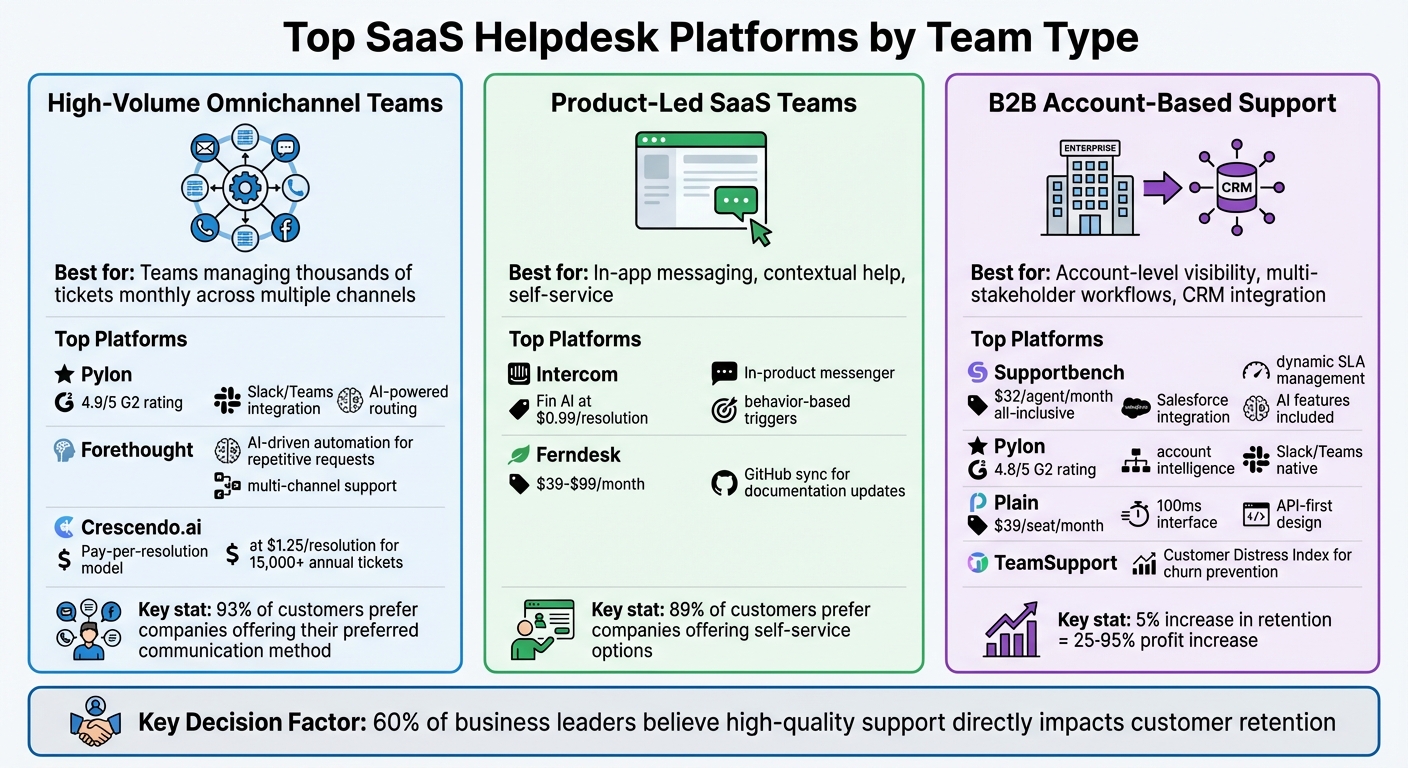
Best SaaS Helpdesk Platforms by Team Type: Features and Pricing Comparison 2026
Different team structures have unique helpdesk needs. Here’s a closer look at the best platforms for high-volume omnichannel teams, product-led support, and account-based support in B2B environments.
High-Volume Omnichannel Platforms
For teams managing thousands of tickets every month across email, chat, phone, and social channels, speed and automation are key. These platforms excel at routing tickets, ensuring SLA compliance, and using AI to handle repetitive queries before they even reach an agent.
Pylon is a standout choice for B2B SaaS teams using Slack or Microsoft Teams for customer support. It centralizes these channels alongside email into one inbox, leveraging AI to draft responses and categorize issues automatically. With a 4.9/5 rating on G2, it’s ideal for teams focused on collaborative workflows. Forethought specializes in automating responses to repetitive requests, offering AI-driven resolutions and surfacing relevant knowledge articles across chat, email, and voice. For teams handling over 15,000 tickets annually, Crescendo.ai provides a pay-per-resolution model starting at $1.25 per resolution, which can be more cost-efficient than traditional per-agent pricing.
Why does this matter? A seamless experience across channels is critical – 93% of customers are more likely to spend with companies that let them use their preferred communication method. Fragmented systems that lose context can cost you both time and customer trust.
Helpdesks for Product-Led SaaS Teams
Product-led teams often need solutions that integrate directly into the product experience. The best platforms here focus on in-app messaging, contextual help, and tools that deflect issues before they escalate into tickets.
Intercom leads the way for product-led teams, embedding support directly into the product through a messenger widget, product tours, and behavior-based triggers. Its Fin AI feature, costing $0.99 per resolution, handles routine Tier-1 queries, freeing up your team for more complex tasks like onboarding. Ferndesk solves a major issue for fast-moving teams: outdated documentation. It syncs with your GitHub codebase to flag help articles that need updates when features change, with pricing ranging from $39 to $99 per month.
"For PLG companies, documentation is part of the product experience. Embedded help, contextual tooltips, and in-app guidance matter as much as standalone articles." – Wilson Wilson, Author
Self-service is also a big deal – 89% of customers are more likely to spend with companies that offer it. If your product updates frequently, choose a helpdesk that keeps your knowledge base aligned with your codebase. Static tools won’t cut it for the ever-changing needs of SaaS.
Account-Based Support Platforms for B2B
Unlike product-led models, B2B support often involves managing entire accounts rather than individual users. This requires tools that provide account-level visibility, manage multi-stakeholder workflows, and integrate with CRM systems for a holistic view.
Supportbench is a top choice for this scenario, offering dynamic SLA management that adjusts response times based on account details – like tightening SLAs when a renewal is near or when a high-value customer submits a ticket. It syncs natively with Salesforce, giving agents access to licensing details, renewal dates, and customer health scores without leaving the platform. Starting at $32 per agent per month, it includes AI features like predictive CSAT, case summaries, auto-tagging, and knowledge base article generation – without add-on fees.
Pylon is another strong option for B2B teams, thanks to its account intelligence tools and Slack/Teams integration, earning a 4.8/5 rating on G2. For technical teams using Slack or Discord, Plain offers a fast 100ms interface and API-first design, starting at $39 per seat per month. If churn risk is a concern, TeamSupport provides a Customer Distress Index that flags accounts at risk by analyzing support patterns across account hierarchies.
Why invest in these tools? Boosting customer retention by just 5% can increase profits by 25% to 95%. Your helpdesk should offer instant account insights, support multi-threaded conversations, and connect seamlessly with your CRM to tie support efforts to revenue outcomes. Platforms like Supportbench deliver this level of visibility while keeping costs manageable.
sbb-itb-e60d259
How to Choose the Right Helpdesk
For growing teams, the best helpdesk is one that provides consistency, transparency, and cost efficiency. It’s not about picking the platform with the most features – it’s about finding one that matches your team’s current needs while being scalable for future growth. The smartest way to approach this is by using a structured checklist, a weighted scoring system, and a short pilot to see how it handles real-world scenarios.
Requirements Checklist by Growth Stage
Your helpdesk needs will evolve as your team grows. What works for a small startup won’t cut it for a larger, more complex team. Start by identifying where your team stands today and use these guidelines to set your priorities.
- For teams with 1-5 agents: Focus on affordability and simplicity. You’ll need basic ticketing features, a simple knowledge base, and a platform that’s easy to set up without IT support. Look for free plans or entry-level pricing under $20 per agent per month. Don’t worry about advanced features until your ticket volume increases.
- For teams with 5-20 agents: Integration becomes key. Your helpdesk should connect seamlessly with your CRM to provide full customer context. Automation tools for ticket tagging, routing, and suggested replies can help you manage more tickets without adding staff. Look for platforms priced around $30-50 per agent per month, with AI features included at no extra cost. Collaboration tools like internal notes and shared ticket ownership will also be crucial for cross-team coordination.
- For teams with 20+ agents: At this stage, you’ll need a platform that offers advanced customization, ITIL compliance (for technical support teams), and strong security features like multi-factor authentication and audit logs. Scalability is critical to ensure the system can handle a growing ticket volume. Advanced reporting and forecasting tools are also essential for giving leadership a clear view of team performance. If you manage enterprise accounts, look for systems that support account-based workflows where multiple stakeholders from the same client organization can submit tickets that are tracked collectively.
Scoring System for Platform Evaluation
To evaluate helpdesk platforms, use a weighted scoring system that focuses on the factors that matter most: consistency, visibility, cost, and AI capabilities.
Assign a score from 1 to 10 for each category, then multiply by the suggested weight:
- Consistency (30% weight): Measures how well the platform standardizes workflows using automation, routing rules, and templates.
- Visibility (25% weight): Evaluates reporting tools, SLA tracking, and whether leadership can easily assess team performance.
- Cost (25% weight): Looks at pricing transparency, included features, and how costs scale as your team grows.
- AI capabilities (20% weight): Assesses whether AI features like ticket deflection, auto-tagging, and suggested replies actually reduce workload.
For example, a platform might score 8/10 for consistency, 6/10 for visibility, 9/10 for cost, and 7/10 for AI. The weighted score would be calculated as follows: (8×0.30) + (6×0.25) + (9×0.25) + (7×0.20) = 7.6. Adjust the weights based on your specific needs. If budget is tight, you might increase the weight for cost to 35% and reduce AI to 15%. If ticket volume is your biggest challenge, prioritize AI features instead.
This scoring system helps you make deliberate trade-offs rather than expecting one platform to excel in every area.
2-4 Week Pilot Plan
Before committing to a full rollout, run a 2-4 week pilot to test how well the platform fits your workflows.
- Week 1: Set the Foundation
Define clear objectives and success criteria. For example, are you aiming to reduce manual triage time by 30% with AI features? Or eliminate CRM lookups by integrating customer data? Choose 3-5 key metrics, such as ticket resolution time, user satisfaction scores, or system adoption rates. Assemble a pilot group of 5-10 agents from different specialties, not just managers. Train them and set up necessary integrations to mirror real-world conditions. - Weeks 2-3: Test the System
Start handling live tickets with the new platform while keeping your old system as a backup. Test common scenarios like password resets, billing issues, and technical troubleshooting. Evaluate whether AI features like keyword detection and sentiment analysis actually reduce manual tasks. Hold weekly check-ins to review usage data, address technical issues, and gather agent feedback. This is also the time to see if the platform’s omnichannel support truly integrates customer interactions across email and chat. - Week 4: Evaluate Results
Collect final user feedback and compare your pilot metrics to baseline data. For instance, if your goal was a 40% faster ticket resolution time and you achieved 35-45%, that’s a good sign. If the improvement is minimal, dig into the reasons before moving forward. Research shows that integrating support into collaboration tools like Microsoft Teams can improve ticket resolution time by up to 40% and boost employee satisfaction by 25%. If the pilot doesn’t meet your goals, revise your approach and consider running a second test.
The pilot will reveal whether the platform’s automation aligns with your ticketing needs, whether agents find it intuitive, and whether it provides the reporting tools leadership requires. A minimum of 30 days is recommended to fully assess both technical and user readiness. By following these steps, you’ll ensure that your chosen helpdesk supports your team’s goals for consistency, visibility, and cost management.
Implementation Playbook
Getting your helpdesk up and running is the next big step after choosing the right one. The goal? A smooth launch that doesn’t disrupt customer support. This guide builds on scalable workflows and outlines how to go live quickly while keeping things secure. A well-executed plan minimizes downtime, avoids losing critical data, and helps your team adapt faster. By breaking the process into three main phases – setup and configuration, data migration and training, and a phased rollout – you can ensure consistent workflows, clear performance insights, and controlled costs.
Setup and Configuration Steps
Start by creating a straightforward ticket taxonomy with simple tags to track trends like bugs, feature requests, or usability issues. This setup not only highlights where customers need the most help but also gives leadership a clear view of recurring problems. Keep it simple at first; you can refine the system as patterns emerge.
Next, centralize all communication channels – email, Slack, in-app chat, website widgets – into a single inbox. A unified inbox prevents agents from juggling multiple tools and losing track of conversations. Configure email routing so that messages from different aliases (e.g., support@, billing@, help@) flow into the same system, tagged appropriately for easy management.
Automation is your friend here. Set up rules for repetitive tasks like tagging, routing, and sending initial responses. For instance, route billing-related inquiries directly to the finance team or flag tickets marked as "urgent" for priority handling. Start with automation for the top three ticket types and expand as needed. These configurations ensure consistent data patterns, making it easier for leadership to monitor and report.
Once your system is configured and basic automation is in place, it’s time to tackle data migration and train your team.
Data Migration and Agent Training
Data migration is often where things go off track. In fact, research shows that nearly 80% of migration projects fail due to poor planning. Start with a thorough data audit and test a small sample migration to ensure everything maps correctly. Clean up your existing data by removing duplicates, outdated tickets, and inactive accounts. This step not only speeds up the transfer but also saves on storage costs in your new system.
Ensure that all links between tickets, contacts, attachments, and custom fields are preserved during mapping. A pilot migration of 20 carefully selected records can help you verify accuracy before transferring everything. During the process, encrypt data both in transit and at rest, and restrict access to trained personnel only. Schedule the migration during off-peak hours to minimize disruptions.
For training, focus on hands-on, scenario-based sessions where agents can practice resolving real tickets in the new system. Assign mentors to support new agents and offer video tutorials or handbooks to help your team get comfortable with the interface. Effective training ensures everyone knows what’s expected from day one.
With your data in place and your team ready, you’re set to begin the rollout.
Rollout Strategy and Success Metrics
Rather than switching everyone over at once, roll out the system in phases. Start with a small group of 5–10 agents who handle a variety of ticket types. Let them use the new system for two weeks while keeping the old one as a backup. This phased approach helps identify and resolve any issues before scaling up to the full team.
Monitor key metrics like ticket resolution time, SLA compliance, and agent satisfaction. If your helpdesk includes AI, track how many tickets are resolved through self-service – some systems can handle up to 90% of inquiries automatically. After the rollout, audit the system to confirm data integrity and check for any security gaps. Gather agent feedback through surveys and address concerns promptly.
Depending on your team size and data volume, the entire implementation process may take anywhere from a few weeks to a few months. By sticking to this playbook, you’ll minimize downtime, protect your ticket history, and make the transition seamless for your team – all while setting up a system that grows alongside your business.
Cost and Pricing Reality
Managing costs is a top priority for scalable support teams. But the advertised price of software often tells only part of the story. Hidden costs can increase your total investment by 30% to 50% annually beyond what’s initially quoted. For teams that are expanding – whether by hiring more agents or adding new communication channels – these unexpected expenses tend to surface at the worst times. Understanding the true cost structure is essential for accurate budgeting and avoiding platforms that penalize growth. Let’s break down these hidden costs and how they impact your long-term investment.
Hidden Costs to Watch For
Many helpdesk solutions promote a low per-user price, but critical features often come at an extra cost. For example:
- AI tools like automated tagging and reply suggestions are often locked behind premium upgrades.
- Premium support can tack on an additional 15% to 25% of your subscription cost.
- Integration access may come with usage caps or fees for exceeding limits.
On top of that, companies waste an estimated $21 million annually on unused or underutilized SaaS licenses. This often happens due to "zombie" accounts – licenses tied to employees who have left the company. Additionally, some vendors increase per-seat pricing as your team grows.
Other hidden costs include data retrieval fees, which can arise when you exceed storage limits or need access to archived tickets. These charges often catch finance teams off guard during audits or compliance checks.
Implementation is another major expense. Onboarding, data migration, and training for enterprise platforms can cost up to $1,500 per employee. Then there are contractual pitfalls like auto-renewal clauses and early termination fees, which can lock you into a system that no longer meets your needs.
Calculating Total Cost of Ownership
To get a clear picture of your total investment, use this formula:
Total Cost = (Base Seat Cost × Headcount) + (Add-on Fees) + (Implementation/Training Costs) + (Usage Overages)
Evaluate this over a 5 to 10-year period to account for growth and inflation. Don’t forget to include the following:
- Labor costs for internal setup and training, which include salaries, benefits, taxes, and overhead.
- Recurring subscription fees, which often rise as your headcount grows.
- Indirect costs, like lost productivity during downtime or the time agents spend learning a new system instead of resolving tickets.
To manage costs effectively, conduct quarterly audits to identify and deactivate unused licenses before your next billing cycle. When negotiating contracts, push for terms that allow you to scale seat counts down if necessary, and avoid long-term agreements unless they provide meaningful discounts and flexibility. Before committing, ask vendors for a detailed breakdown of costs, including onboarding, data migration, and premium support.
Supportbench‘s All-In Pricing Model
Supportbench takes a straightforward approach to pricing. At $32 per agent per month, the platform includes all features and AI capabilities right from the start. This means you get enterprise-level tools like case management, knowledge base, workflows, dashboards, reporting, and live support – all wrapped into one transparent price.
With Supportbench, there are no hidden fees for AI features, integrations, API access, or data storage. As your team grows, your per-seat cost remains predictable, making it easier to budget and plan as you expand from 5 agents to 50. This pricing model is designed to support growing teams, offering robust functionality without the surprise costs that typically accompany scaling.
For B2B SaaS teams looking for account context, visibility across support and success, and reliable cost management as they grow, Supportbench delivers enterprise-grade tools without the hefty enterprise price tag.
Conclusion: Choosing the Best SaaS Helpdesk for Your Growing Team
When it comes to selecting a SaaS helpdesk, look for a system that offers repeatable processes, clear metrics, and predictable costs. The right helpdesk ensures smooth workflows, avoids ticket overload, and uses AI to ease your team’s workload – all without surprise expenses.
Your team’s structure and needs will guide your choice:
- High-volume omnichannel teams benefit from advanced routing and automation tools.
- Product-led SaaS companies thrive with self-service features and quick implementation.
- High-touch B2B support teams require CRM integration, detailed context, and visibility across support and success functions.
For high-touch B2B support, one platform stands out: Supportbench. At $32 per agent per month, it offers case management, AI-powered insights, knowledge base tools, dynamic SLAs, and comprehensive reporting – all without hidden fees for AI features, integrations, or data storage. Nooshin Alibhai, Founder and CEO of Supportbench, highlights its value:
"Supportbench blends AI-driven automation, cross-department integration, and scalability into one platform"
This combination of simplicity and functionality makes Supportbench a strong choice for growing teams. It eliminates the complexity and high costs that often come with older systems.
If your team has outgrown shared inboxes or outdated helpdesk tools, and your B2B customers demand consistent, contextual support, Supportbench provides the transparency, predictable pricing, and AI-driven efficiency you need. It’s a platform designed to streamline workflows, reduce friction, and grow with your team – without unnecessary complications.
For high-touch B2B teams, Supportbench offers the balance of power and simplicity to help your team excel.
FAQs
What are the most important features to look for in a SaaS helpdesk for a growing support team?
For support teams that are expanding, it’s essential to focus on tools that enhance scalability, efficiency, and visibility. Start by choosing platforms with omnichannel intake, allowing you to handle customer inquiries across email, chat, and other channels without missing a beat. Features like automated workflows – including queues, SLAs, escalations, and role-based permissions – help keep processes consistent and ensure accountability as ticket volumes and team sizes increase.
Collaboration features, such as internal notes and shared tickets, are key for smooth handoffs and unified responses. A well-organized knowledge base with self-service options can lighten the load for agents while giving customers the tools to solve issues independently. On top of that, reporting and forecasting tools are critical for monitoring performance, tracking SLA compliance, and identifying trends in the backlog.
Don’t overlook AI-powered features like ticket summaries, reply suggestions, and auto-tagging. These tools streamline workflows and improve efficiency without adding unnecessary complexity, helping your team grow while delivering excellent customer experiences.
How can AI tools help growing support teams handle high ticket volumes more efficiently?
AI tools are changing the game for growing support teams, especially when it comes to handling high ticket volumes. By automating repetitive tasks, they help reduce manual effort and improve accuracy. For instance, AI-powered systems can automatically sort, prioritize, and direct tickets based on their urgency and content. This not only saves time but also minimizes mistakes in assigning or routing tickets.
On top of that, AI-driven chatbots can tackle routine customer questions, delivering instant responses across various channels. This frees up agents to concentrate on more challenging issues. Features like auto-tagging, reply suggestions, and even generating knowledge base articles make workflows smoother, ensuring responses are both consistent and precise. These tools address common hurdles like SLA breaches, growing backlogs, and outdated information, while also giving managers clearer insights into team performance.
By leveraging AI, support teams can scale efficiently, resolve tickets faster, and keep quality intact – even as ticket volumes and complexities rise.
What hidden costs should I consider when selecting a SaaS helpdesk?
When picking a SaaS helpdesk, it’s important to watch out for hidden costs that can sneak up on you and inflate your budget. These might include fees for extra user licenses, exceeding storage limits, accessing premium features, or using the API. Some platforms may also charge for upgraded support, integrating with other tools, or binding you to long-term contracts.
Another challenge to consider is tool sprawl – when teams rely on a mix of disconnected tools like email, Slack, and spreadsheets. This often leads to inefficiencies and unnecessary expenses. To steer clear of unexpected costs, take the time to thoroughly review the pricing details, read the fine print, and calculate the total cost of ownership as your team scales.
Related Blog Posts
- The best new ticketing systems
- Helpdesk software comparison matrix 2026
- What Is a Help Desk? Definition, Benefits, and Real Examples
- 10 best ticketing systems for startups and how to choose one
Evaluating help desks for a B2B team?
- Zendesk vs Supportbench
- Jira Service Management vs Supportbench
- Salesforce Service Cloud vs Supportbench
Supportbench is all-inclusive from $32 per agent per month, with migration and onboarding included. See pricing or book a 20-minute demo.






