



81% of customers try solving issues on their own before contacting support, but poor search systems often leave them frustrated. If your knowledge base search relies only on exact keyword matches, customers may not find what they need, leading to more support tickets and higher costs. For example, searching "I can’t log in" might not connect to an article titled "Authentication Troubleshooting."
To fix this, focus on:
- Structuring content with clear keywords and metadata to match customer language.
- Organizing articles into simple categories and using tags for cross-referencing.
- Implementing AI-driven tools like semantic search to understand intent and improve results.
- Tracking metrics like zero-result queries and click-through rates to identify content gaps.
Better search systems lower costs, boost customer satisfaction, and make self-service faster.
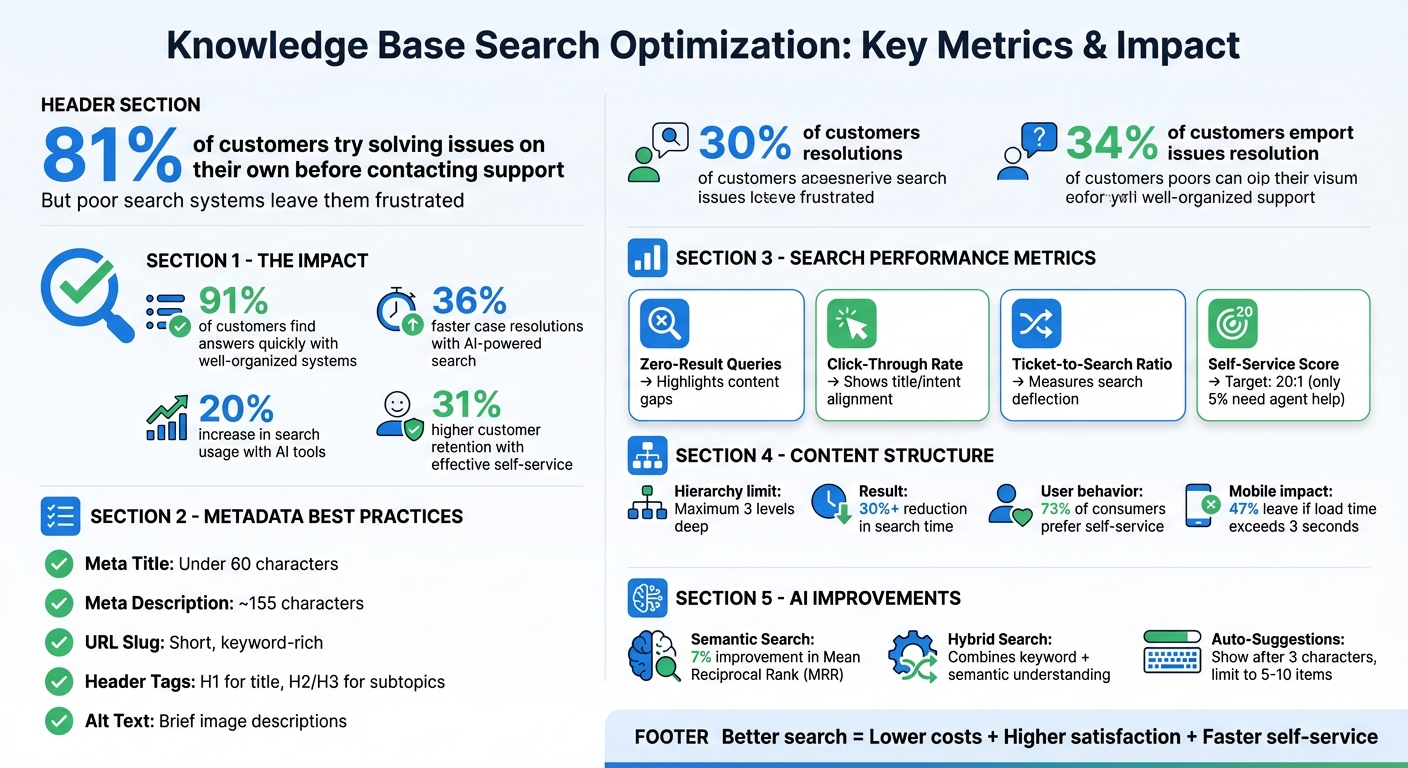
Knowledge Base Search Optimization: Key Metrics and Best Practices
Improving AI Search in Your Knowledge Base
How to Structure Knowledge Base Content for Better Search Results
The way your knowledge base is structured can make or break the user experience. A well-organized system allows 91% of customers to find answers quickly. The way you organize articles, apply metadata, and structure categories plays a huge role in helping both human users and AI-powered search tools locate the right information.
How to Use Keywords and Metadata
The language your customers use often differs from your internal jargon. For example, if someone searches for "forgot password" but your article is titled "Credential Recovery Procedures", they might not find what they need. The solution? Use the exact language your customers use. Reviewing search terms can help identify the phrases people are actually typing in.
Strategic keyword placement is key. Focus on including your primary keyword in critical spots like the article title, H1 tag, first paragraph, and at least one H2 subheading. This signals relevance to search engines without overloading the content. Metadata also plays a big role in whether users click on your article. Keep meta titles under 60 characters and meta descriptions around 155 characters to avoid truncation in search results.
Get to the point fast. Place the answer or solution within the first one or two sentences. This increases your chances of being featured in snippets or AI-generated responses. Don’t forget to add descriptive alt text to every image or diagram. This improves accessibility and helps your content show up in image search results.
| Metadata Element | Best Practice | Impact on Search |
|---|---|---|
| Meta Title | Under 60 characters; front-load keywords | Boosts visibility and click-through rate (CTR) |
| Meta Description | ~155 characters; include a call-to-action | Helps users confirm they’ve found the right info |
| URL Slug | Short, descriptive, keyword-rich | Clarifies topic for users and search engines |
| Alt Text | Brief descriptions for images/screenshots | Enhances image search indexing and accessibility |
| Header Tags | Use H1 for title, H2/H3 for subtopics | Improves scannability and hierarchy |
By following these best practices, your content becomes easier to navigate and more relevant to search engines.
How to Organize Content with Categories and Tags
A clear, hierarchical structure helps users navigate from general topics to specific answers. Use a top-down approach – Categories > Sections > Articles – and limit the hierarchy to three levels deep. Content buried deeper than three clicks often leads to user frustration and abandonment.
"The structure of a knowledge base is typically hierarchical, with categories and subcategories that help users navigate through information seamlessly." – Bloomfire
Each article should fit neatly into one category, but you can use tags to connect related articles across categories. For instance, you might tag content by product version, user role, or whether it’s for administrators or end-users. This hybrid method keeps navigation clean while allowing for flexible cross-referencing.
Intuitive structures can cut search time by over 30%. Breadcrumb navigation (e.g., Home > Account > Password Reset) helps both users and search engines understand where content lives. Use plain, customer-friendly language – like "Troubleshooting" instead of "Product Diagnostics" – to make navigation intuitive.
Faceted search adds another layer of usability. Categories and tags can serve as filters, and showing the number of results next to each filter (e.g., "Installation ") guides users toward relevant paths. This feature is especially useful for B2B knowledge bases, where users often need to filter by product line, user role, or deployment type.
A well-organized structure not only improves user experience but also enhances how AI tools interpret and serve your content.
Common Content Structuring Mistakes to Avoid
Avoiding common pitfalls can make a huge difference in how well your knowledge base performs.
Don’t cram multiple topics into one article. Covering too many subjects in a single piece can confuse users and make it harder for AI tools to understand the content. For example, if you’re discussing both password resets and two-factor authentication, split them into separate articles.
FAQs should provide context. Simple "yes" or "no" answers don’t help search algorithms or users. Instead, write full-sentence responses that stand alone. For instance, instead of "Q: Can I reset my password? A: Yes", try, "You can reset your password by clicking the ‘Forgot Password’ link on the login page and following the email instructions."
Ditch the jargon. Around 73% of consumers prefer to resolve issues on their own, but technical terms can create a barrier. Rewrite articles with the customer’s perspective in mind, using plain language instead of internal terminology.
Consistency is key. Mixing different navigation styles or filter types can confuse users. Stick to a uniform system, and avoid dead-end "No results found" pages. Instead, suggest related articles, offer alternative searches, or provide a contact option.
Finally, don’t overlook mobile users. Nearly half of visitors will leave if a mobile site takes longer than 3 seconds to load. Speed up your pages by minifying CSS and JavaScript, using WebP images, and making sure the search bar is prominent and easy to use. A hidden or hard-to-spot search bar can make your entire search function feel nonexistent.
Using AI to Improve Knowledge Base Search
Organizing your knowledge base with clear metadata is the first step toward unlocking AI-driven search capabilities. Traditional keyword searches often fall short when customers phrase queries differently. For example, if someone types "can’t log in", they might be dealing with anything from password resets to account lockouts or browser issues. A basic search engine might not connect these dots, but AI can. By analyzing intent, AI goes beyond the exact words typed, offering results that truly address user needs.
Semantic Search and Intent Detection
Semantic search uses Natural Language Processing (NLP) to grasp the context and meaning behind queries. Instead of matching exact words, it transforms both queries and content into vectors, measuring their relevance based on proximity in vector space. This means it can interpret a question like "How do I make text bigger?" and link it to "font size settings", saving users from guessing the right technical terms.
Intent detection takes this a step further by analyzing the context of a query. For instance, a user searching for "password" might need a setup guide rather than recovery instructions. AI evaluates the surrounding details to provide the most relevant response. In one case, implementing semantic search led to a 7% improvement in Mean Reciprocal Rank (MRR), while other studies show AI-powered search can speed up case resolutions by up to 36%.
The best results often come from a hybrid search approach, which combines semantic understanding with traditional keyword matching. This ensures precision for specific terms like error codes while maintaining flexibility for conversational queries.
"The optimal solution is a hybrid search approach that combines both semantic and keyword techniques. Think of it as having two friends help you find information: one is very literal… and the other understands context and intent." – Knowledge-Base.Software
Building on this contextual understanding, predictive features like auto-suggestions can further enhance the user experience.
Auto-Suggestions and Predictive Search
Auto-suggestions work hand-in-hand with semantic search to guide users toward helpful content before they even finish typing. This speeds up the process, helps users refine their queries, and often brings attention to content they might not have discovered otherwise. For the best user experience, show suggestions after the user types at least three characters and limit the list to 5–10 items to avoid overwhelming them.
To make suggestions more user-friendly, include visual cues like icons or tags to distinguish content types (e.g., "Articles" vs. "Community posts") and bold the query terms within titles for better readability. On the technical side, techniques like debouncing minimize unnecessary API calls during typing, while fuzzy matching accounts for typos and spelling errors.
Other useful strategies include offering pre-filled suggestions (like popular searches or top FAQs) when the search box is first clicked and showing related articles or contact options when no results are found. AI-powered search tools have been shown to increase search usage by 20% and dramatically improve both speed and relevancy. These tools excel at anticipating user needs, often bridging the gap between a frustrating and a seamless search experience.
AI Agent Copilots for Internal Use
AI innovations aren’t just for customers – they also empower support agents. AI copilots act as assistants, streamlining the support process by analyzing tickets in real time and recommending relevant knowledge base articles. This helps agents resolve issues faster and ensures consistent responses.
These tools can summarize long ticket threads, extract key details, and suggest solutions based on both ongoing conversations and similar past cases. This approach not only speeds up resolution times but also improves first-contact resolution rates. A staggering 47% of employees report avoiding their company’s knowledge base due to disorganized content or poor search functionality. AI copilots address this by delivering accurate information directly to agents without disrupting their workflow.
For example, Supportbench’s AI Agent-Copilot reviews past cases and searches across internal and external knowledge bases to provide actionable suggestions. This allows agents to stay focused and efficient, eliminating the need to juggle multiple tools. By integrating these AI enhancements, companies can simplify processes and improve overall support performance.
sbb-itb-e60d259
How to Monitor and Improve Search Performance with Analytics
Analytics play a crucial role in understanding whether your search functionality is effectively helping users or unintentionally driving more support requests. By tracking key metrics, you can pinpoint where users encounter obstacles, identify missing content, and determine which articles need immediate updates. Analytics complete the AI-driven approach by ensuring search enhancements lead to measurable improvements in support efficiency. The metrics outlined below can guide targeted actions.
Key Search Metrics to Track
Start by monitoring zero-result queries, which highlight gaps in your content. Another essential metric is the Click-Through Rate (CTR) – the percentage of clicked results compared to total searches. A low CTR for popular terms might indicate that while the content exists, it’s not easily discoverable or aligned with user expectations.
Next, evaluate the ticket-to-search ratio, which measures how many support tickets are submitted after a search. A high ratio suggests that search results aren’t adequately resolving user issues. Additionally, tracking your self-service score – the ratio of total knowledge base sessions to users submitting tickets – offers a big-picture view of your self-service system. According to experts, companies with effective self-service platforms can achieve 31% higher customer retention rates, with an ideal target of 20:1 for page views to support tickets (meaning only 5% of visitors need agent assistance).
| Metric | What It Reveals | Insight |
|---|---|---|
| Zero-Result Queries | Searches that yield no articles | Highlights areas where content is missing |
| Click-Through Rate | Clicks divided by total searches | Shows if titles and snippets align with user intent |
| Ticket-to-Search Ratio | Tickets created after searches | Measures how well search deflects support queries |
| Self-Service Score | Knowledge base sessions per submitted ticket | Gauges overall self-service effectiveness |
In addition, keep an eye on bounce rates and reading times for search-referred articles. High bounce rates or very short reading times might indicate that the content is irrelevant or unclear. Article ratings, like thumbs up or down, can also provide direct feedback on outdated or inaccurate information.
Using Analytics to Find Content Gaps
Zero-result reports should be your starting point for addressing content gaps. As Arush Balyan from DevRev puts it:
"Plugging these search gaps is likely the lowest-hanging fruit in terms of improving consumer self-serve!"
Content gaps can also result from language mismatches. Adding user-friendly terms as labels or keywords can improve discoverability, especially when customers use different phrasing than your documentation.
If popular search terms have a low CTR, it might mean that the content exists but the titles don’t align with how users phrase their queries. Revising titles to reflect customer language can make a big difference. Similarly, if users spend too much time on a page covering a complex topic, consider breaking it into smaller, easier-to-digest sections to help them find answers faster.
Analyzing search-to-ticket patterns can also reveal issues. If users frequently submit tickets after searching for a specific term, it’s a sign that the related article isn’t effectively addressing their needs and requires immediate updates.
Once you’ve identified content gaps, implement a structured review process to ensure continuous improvements.
Building a Continuous Improvement Process
Analytics are only valuable if they lead to action. Establish a review cycle to flag significant metric changes, investigate correlations between engagement and satisfaction, and address problem areas. Implement targeted updates and reassess after one to two months. As Volodymyr Zhukov, Founder of IngestAI, explains:
"Data-backed tweaks compound improvements over time."
During the early stages, schedule monthly reviews to track trends and refine your knowledge base. As your system stabilizes and satisfaction scores increase, you can shift to quarterly reviews. Use reports like “top 10 searches with no results” to guide your content creation pipeline. Additionally, set articles to expire after 6–12 months to ensure they remain accurate and relevant.
Collaboration is key – support, product, and marketing teams should work together to refine this process. When aligned, these teams not only resolve customer issues but also boost organic search traffic, keeping your knowledge base both effective and up-to-date.
Conclusion
Improving knowledge base search isn’t just about making life easier for your customers – it’s also a smart way to cut support costs and boost satisfaction. In a world where customers expect instant answers, a well-optimized search function becomes the backbone of your support system. It helps deflect tickets, speeds up agent response times, and ensures users get the solutions they need when they need them.
The strategies discussed here – like organizing content with clear metadata, adopting hybrid search models, and keeping an eye on zero-result queries – lay the groundwork for an efficient, scalable self-service system. Even small tweaks to search relevance can lead to noticeable improvements in support efficiency.
Analytics are your secret weapon for ongoing progress. By monitoring key metrics like click-through rates and identifying content gaps, support teams can make informed decisions that drive consistent improvement over time. The goal isn’t to achieve perfection right away – it’s about creating a system that learns and evolves with every query. These insights don’t just improve search; they open doors to broader strategic benefits.
For complex B2B setups, AI-driven tools like semantic search, agent copilots, and predictive analytics take things to the next level. When your knowledge base integrates seamlessly with case management and customer success workflows, you’re not just resolving issues faster – you’re also safeguarding customer retention and revenue while maximizing efficiency.
FAQs
How does AI make knowledge base searches faster and more accurate?
AI transforms knowledge base searches into smarter, faster, and more user-friendly experiences. Unlike traditional keyword-based searches, it leverages semantic search and natural language processing (NLP) to grasp the intent behind user queries – even when the wording doesn’t match the content exactly. This means users receive more accurate and relevant results.
AI also introduces features like auto-suggestions, intent detection, and conversational search interfaces, making it easier for users to find what they need with minimal effort. On top of that, it analyzes search behaviors to pinpoint content gaps, allowing teams to refine and expand their knowledge base. By turning static collections of information into dynamic, intelligent systems, AI enhances self-service options and improves customer satisfaction.
What are the best practices for organizing knowledge base content effectively?
To make your knowledge base content easy to use, start by structuring it into clear and logical categories. Stick to descriptive, keyword-focused titles that allow users to quickly spot the articles they need. You can also link related articles together or group them into clusters around specific topics. This not only improves navigation but also helps users discover additional resources they might find useful.
Improving the search experience is just as crucial. Features like autocomplete, filters, and facets can help users refine their searches and locate answers more efficiently. Make sure your content is mobile-friendly and presented in a consistent, easy-to-read format. By prioritizing clarity, relevance, and accessibility, you can build a knowledge base that empowers users while streamlining operations.
How can analytics help improve a knowledge base by identifying content gaps?
Analytics can play a powerful role in improving a knowledge base by pinpointing gaps in content through data-driven insights. By tracking metrics like search queries, user engagement, and support ticket trends, you can identify areas where customers frequently look for information but struggle to find clear or helpful answers. For example, if certain search terms consistently result in low engagement or drive up support ticket volumes, it’s a clear sign that the knowledge base could use more targeted or detailed content in those areas.
AI tools like semantic search and intent detection take this a step further by uncovering patterns in user behavior that might be missed through manual analysis. These tools can help you decide which updates to prioritize, whether it’s creating entirely new articles or refining existing ones. The result? A knowledge base that stays relevant, thorough, and effective at meeting customer needs.






