


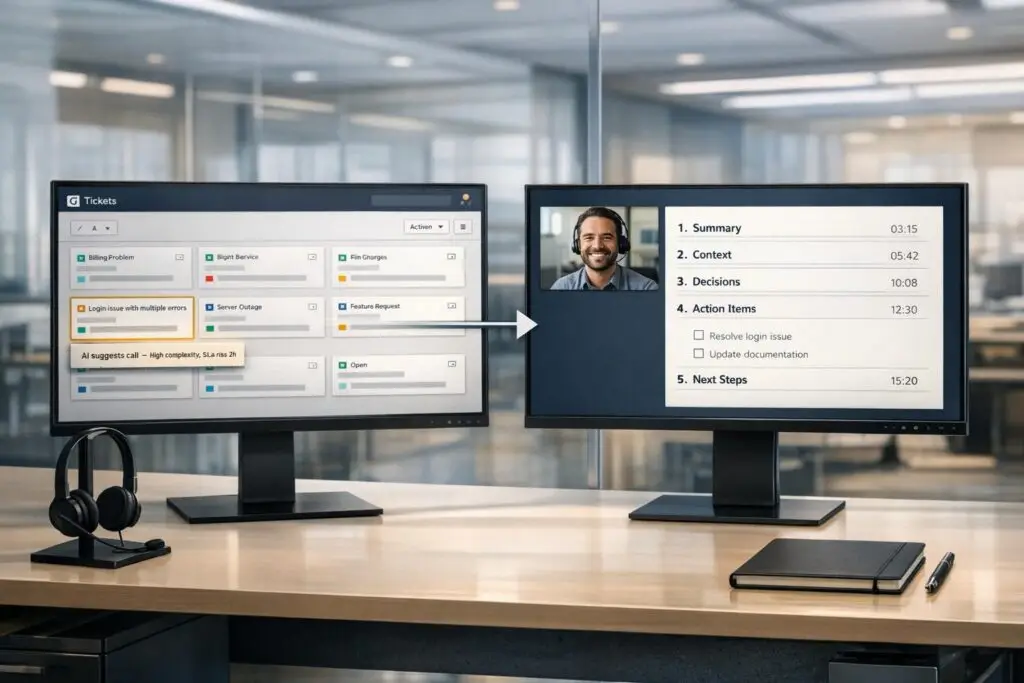
In customer support, knowing when to escalate a ticket to a call can save time, reduce frustration, and improve resolution rates. Escalate too late, and you risk SLA breaches and unhappy customers. Escalate too early, and you waste resources. Here’s when and how to handle it effectively:
- Escalation Triggers: Move to a call for complex technical issues, multi-stakeholder coordination, high-emotion situations, SLA risks, or when automation fails.
- Preparation: Use AI to identify escalation triggers, gather context, and ensure the agent is fully prepared before the call.
- Structured Notes: Use templates for pre-call details, take live notes during the call, and summarize outcomes with clear action items afterward.
- AI Tools: Automate triage, routing, and documentation to reduce errors and maintain customer trust.
Key takeaway: Timing and context are critical. Proper escalation and structured notes streamline workflows, reduce operational costs, and improve customer satisfaction.
06 | Best Practices for IT Ticket Escalation in Help Desk | Learning IT Help Desk
sbb-itb-e60d259
When to Escalate a Ticket to a Call
When to Escalate Customer Support Tickets to Calls: 5 Key Triggers
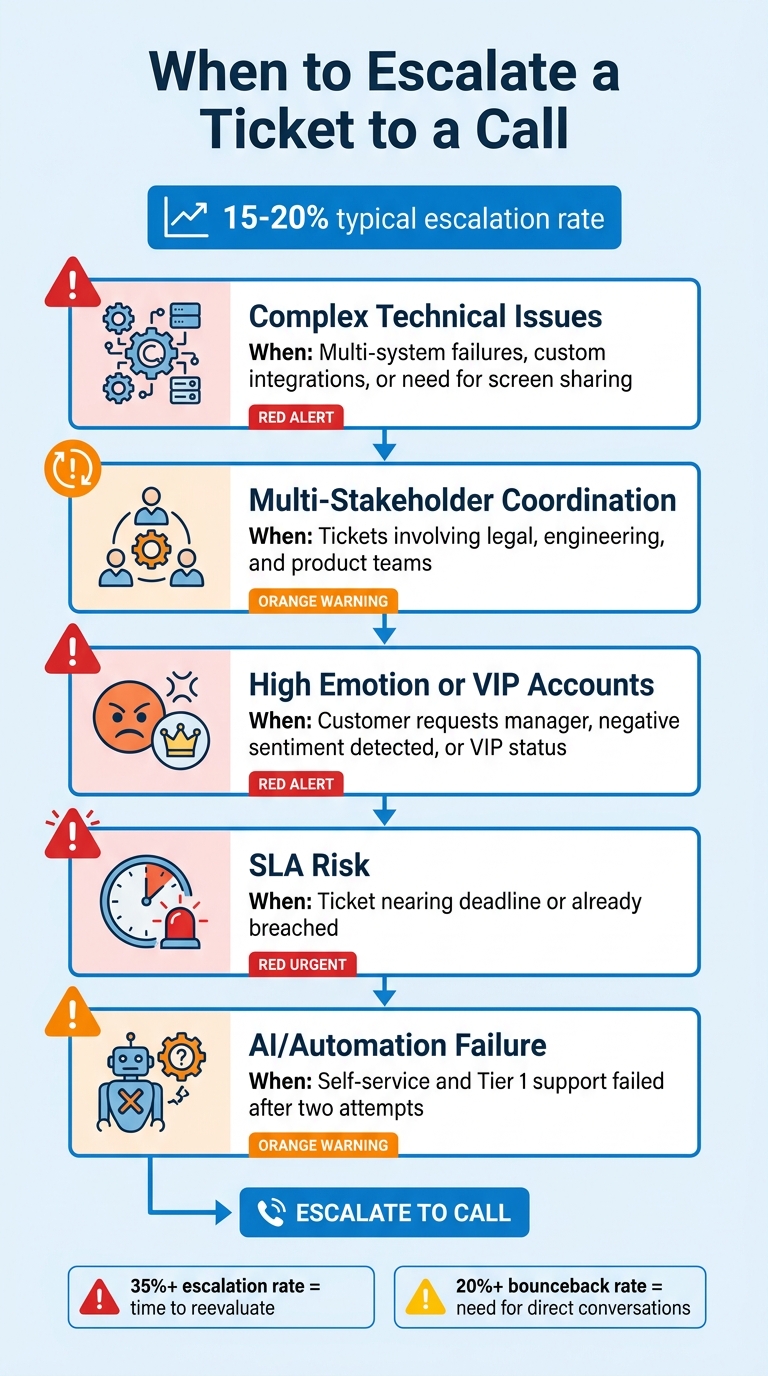
Escalating a ticket to a call should be reserved for situations where delays, loss of context, or growing customer frustration could worsen the issue. A well-functioning service desk typically escalates about 15% to 20% of tickets. If your escalation rate is hitting 35% or more, it might be time to reevaluate your criteria [6]. Establishing clear guidelines ensures smoother escalations while avoiding unnecessary delays or confusion.
Complex Technical Issues Across Multiple Systems
When a ticket involves failures across multiple systems or custom integrations, written troubleshooting can quickly become inefficient. For example, if an API integration generates timeout errors during a custom authentication process – such as an Okta setup with custom attributes – key diagnostic details often get overlooked in written exchanges [5]. In these situations, a live call with screen sharing allows for faster issue resolution. If frontline efforts have failed and the problem spans multiple platforms, escalating to a real-time conversation is the next logical step.
Multiple Stakeholders Need to Align
When tickets require input from multiple teams – like legal, engineering, and product – live calls can eliminate the inefficiency of lengthy email threads. Real-time discussions ensure everyone is on the same page and can make decisions quickly [5]. This approach is especially useful for tasks requiring immediate collaboration.
Customer Frustration or High-Emotion Situations
If a customer’s frustration is evident or flagged by automated sentiment analysis, escalating to a call can help preserve trust. For instance, if a customer requests to speak with a manager or if negative language patterns are detected, a phone call signals urgency and attentiveness. Emily Carter, a Customer Service Software Expert at EasyDesk, notes:
A customer whose complex issue was escalated smoothly and resolved thoroughly often becomes more loyal than one who never had a problem at all [8].
Additionally, if a customer has sent three or more follow-up messages without resolution, that’s a clear indication that a live conversation is necessary.
SLA Deadlines and VIP Customer Accounts
For VIP customers or tickets nearing a service-level agreement (SLA) deadline, relying on written responses can be risky. Automated systems should flag these tickets before any breach occurs. High-value transactions, enterprise contracts, or disruptions to critical departments demand immediate attention. Escalating to a call in these cases helps maintain trust and avoids potential contractual penalties [7].
AI or Automation Couldn’t Resolve the Issue
If Tier 0 (self-service) and Tier 1 support fail to resolve an issue after two attempts, it’s time to escalate to a call [1]. This prevents customers from having to repeat themselves and reduces the risk of losing their trust [1]. Furthermore, if more than 20% of escalated tickets are returned for clarification, it’s a sign that written communication may not be sufficient, and direct conversations are needed [6]. Relying on human expertise when automation falls short ensures that the support process remains effective.
| Escalation Trigger | When to Move to a Call |
|---|---|
| Complex Technical Issues | Multi-system failures, custom integrations, or need for screen sharing |
| Multi-Stakeholder Coordination | Tickets involving legal, engineering, and product teams |
| High Emotion or VIP Accounts | Customer requests manager, negative sentiment detected, or VIP status |
| SLA Risk | Ticket nearing deadline or already breached |
| AI/Automation Failure | Self-service and Tier 1 support failed after two attempts |
How to Move a Ticket to a Call
When a ticket requires escalation to a call, the process should be swift, organized, and packed with relevant details. A seamless handoff spares customers from repeating themselves and equips agents with the necessary context to resolve the issue effectively. Many modern support platforms rely on AI and automation to handle this transition, minimizing manual errors and ensuring smoother workflows.
Use AI to Identify Which Tickets Need Calls
AI-powered triage systems are excellent at pinpointing tickets that demand live conversations. These systems look for specific triggers, such as:
- Negative sentiments (e.g., anger or frustration)
- Complex technical problems (like outages or data loss)
- Policy-related issues (e.g., refund requests surpassing a certain limit)
- Direct customer requests like "call me" [10][11]
For example, in September 2025, the Duolingo English Test (DET) team adopted Decagon‘s AI platform to manage urgent student support. This system used hourly FAQ updates and automated knowledge syncing, achieving an impressive 80% chat deflection rate on its first day [10].
"Great customer service automation is knowing exactly when and how to get a human involved" [10].
Ryan Smith from Decagon highlights this critical balance. AI can also track the number of back-and-forth interactions in a ticket and escalate it automatically when a set threshold is reached [11].
Prepare Before the Call
Preparation is key before escalating a ticket to a call. AI systems should generate a brief that includes essential details such as the customer’s desired outcome, troubleshooting history, account information, and relevant artifacts. Ameya Deshmukh, Director of Customer Support at EverWorker, explains:
"Escalation should not be a ‘dump into Tier 2.’ It should be a handoff with intent – reducing handle time and increasing first-contact resolution for escalated cases" [11].
This kind of preparation can shave 3–5 minutes off the average handle time for escalated calls [2]. Additionally, some platforms require AI to gather specific fields, such as reproduction steps or account identifiers, before the ticket is escalated [11]. Once all the context is in place, scheduling and notifications ensure the call happens promptly.
Schedule Calls and Send Notifications
Automated workflows can send instant notifications via SMS, Slack, or Teams when a ticket is escalated to a call [9]. For VIP accounts or critical issues, these alerts should go out immediately to avoid delays. Notifications should include dynamic ticket details so agents have immediate context [9]. For less urgent cases, scheduling callbacks with automated calendar invites can help reduce no-show rates.
Route Calls to the Right Agent
Routing the call to the most qualified agent is crucial for resolving issues efficiently. Skills-based routing systems match tickets to agents based on their expertise – technical problems go to specialists, billing disputes to finance teams, and enterprise escalations to senior account managers [9][10]. For high-priority issues, top-performing teams aim to keep handoff delays under 30 minutes [[6]](https://unito.io/blog/ticket escalation metrics).
To avoid bottlenecks, define clear paths for routine, controlled, and high-risk escalations so tickets don’t get stuck in generic queues [11]. AI can even recommend collaborators who have successfully handled similar issues in the past, boosting first-contact resolution rates [7]. This targeted approach ensures a more consistent and effective support experience, aligning with the proactive standards of B2B operations.
How to Keep Call Notes Structured
Keeping call notes organized is key to maintaining smooth operations in B2B support. Properly structured notes ensure seamless handoffs during escalations and preserve important context throughout the entire process – from pre-call preparation to post-call follow-up. Without this structure, essential details can easily slip through the cracks.
Use Note Templates Before Calls
Start by using standardized note templates to gather critical information before the call even begins. A good template should include fields for:
- Account context
- Ticket history
- Reproduction steps
- Environment details
- Error logs
- escalate a customer service issue [6][13]
Templates should also distinguish between internal technical details and summaries meant for customers [13]. Adding metadata like intent (e.g., billing or technical issue), sentiment (positive, neutral, or negative), and escalation reason can help direct the call to the right team immediately [13]. To avoid miscommunication or delays, consider making certain fields mandatory – such as attaching error logs or screenshots. This can significantly reduce the likelihood of tickets being returned for clarification, especially if the bounceback rate is above 20% [6].
Once the template is ready, use it as a guide to document key points during the call.
Take Notes During Calls
Live note-taking during calls ensures that no detail is missed. Agents can follow a structured approach like Issue Confirmation → Diagnosis Steps → Discussed Resolutions [14]. Paraphrasing the customer’s concerns during the call is a great way to confirm understanding and build trust [14].
Include a standardized header with key details like the date, time, caller’s name, and purpose of the call for easy reference later [15]. Organize the notes into categories such as customer concerns, proposed solutions, and follow-up actions to make them easier to navigate [14]. While ticketing systems track statuses and SLAs, detailed notes provide the deeper context – capturing things like internal discussions and technical nuances that might not make it into the ticket itself [12].
Once the call wraps up, shift focus to summarizing the outcomes and next steps.
Create Summaries and Action Items After Calls
Wrap up the process by summarizing the main takeaways and action items immediately after the call [12]. AI tools can help by converting real-time transcripts into structured summaries, highlighting the key points and decisions made during the discussion [15]. For more complex issues, create an Escalation Brief that outlines the full history: what the customer reported, what was investigated, what steps were taken, and the current status [12].
Every resolved issue should include a concise, one-sentence explanation of the root cause and the resolution method [12]. Tagging outcomes and follow-up tasks ensures clear ownership and accountability for next steps [15]. Over time, these detailed notes contribute to a growing knowledge base, turning every resolved call into a searchable resource for future cases.
Common Mistakes and How to Avoid Them
Even with the best intentions, support teams often run into trouble when deciding whether to escalate tickets to calls or when documenting those interactions. These missteps can waste time, frustrate customers, and overwhelm specialists. However, using AI tools can help avoid many of these pitfalls by enabling timely escalations and structured documentation. Let’s break down the most common mistakes and how to address them.
Don’t Escalate Too Early or Too Late
Timing is everything with escalations. Escalate too early, and subject matter experts (SMEs) get bogged down with issues that frontline agents could have resolved with proper documentation. Escalate too late, and you risk missing SLA deadlines or losing important accounts. Poor timing creates a domino effect – SMEs become overburdened, and frontline agents may grow overly dependent on escalation[5].
A better approach is to use outcome-based criteria instead of relying solely on ticket attributes like account size or dollar value. Agents should evaluate whether they have the tools, documentation, and context to solve the issue rather than assuming complexity demands escalation. AI-driven triage systems can analyze ticket details and customer history to predict complexity, flagging tickets that genuinely need specialist attention while keeping simpler issues with frontline teams. For example, Cynet implemented AI tools and centralized knowledge, which allowed them to resolve or deflect 47% of tickets at Tier 1, boosting their CSAT scores from 79 to 93 points[5].
"The difference between escalation management and escalation reduction is architectural." – Mosaic AI[5]
Another key metric to monitor is the repeat escalation rate. If more than 20% of escalations involve the same issues, it’s a sign that known problems aren’t being documented effectively using knowledge-centric support solutions[3]. AI-powered SLA monitoring can also flag tickets at risk of breaching deadlines, ensuring they’re escalated in time.
Lastly, maintaining structured notes is critical for smooth escalations and seamless handoffs.
Keep Note Structures Consistent
Inconsistent note-taking disrupts workflows and leads to lost context. When notes lack a standard format, essential details can get overlooked, causing context loss rates to exceed 10%. This forces engineers to repeatedly ask customers for the same information, doubling resolution times and leaving customers feeling ignored.
A standardized template can solve this issue. Every escalation should include key details like account context, ticket history, reproduction steps, environment specifics, error logs, and the reason for escalation. Requiring mandatory fields, such as attaching error logs or screenshots, helps minimize bouncebacks. A healthy bounceback rate is between 5% and 10%; anything above 20% signals that the documentation process needs fixing[6].
"Customer support isn’t a tracking problem – it’s a context problem." – Mem[12]
Integrating platforms with bidirectional synchronization ensures that notes added in one system (e.g., Jira) automatically sync with another (e.g., ServiceNow), maintaining a single source of truth. This integration can save agents 3–6 hours per week otherwise spent copying and pasting notes across systems[6]. AI tools can also assist by packaging conversation transcripts, sentiment analysis, and key details into a "context package" that follows the ticket through every stage[2].
Clear and consistent notes lay the groundwork for effective team handoffs.
Document Handoffs Clearly
Handoffs are critical moments where escalations can easily go wrong. When multiple teams are involved but no one is clearly responsible, workflows can become chaotic, leaving customers feeling like their issue is being passed around unnecessarily[1].
The solution? Assign roles explicitly. Document who is responsible for resolving the issue, who will update the customer, and who will oversee progress. Creating an escalation brief that outlines what was reported, what has been investigated, and what actions have been taken ensures crucial information stays with the ticket[12].
It’s also essential to track handoff delays – the time between when a ticket is escalated and when a specialist begins working on it. For high-priority tickets, this delay should be under 30 minutes. If it exceeds 2 hours, the ticket may be stuck in limbo[6].
Another potential issue is priority mistranslation – the percentage of tickets that lose their correct priority level during system transfers. This rate should stay at 5% or below[3]. When urgent tickets are mistakenly downgraded, they can sit unattended, leading to SLA breaches and unhappy customers.
Using AI Tools for Escalation and Documentation
Modern AI tools have transformed customer service by automating processes like escalation, preparing call context, and generating detailed notes. These tools enhance interaction quality and are projected to cut operational costs by 30% by 2029, when agentic AI is expected to resolve 80% of common customer service issues on its own[11][16]. Let’s explore how AI streamlines escalation and documentation to improve efficiency.
AI for Ticket Triage and Routing
AI systems analyze customer interactions by assessing factors like complexity, sentiment, and priority to determine when escalation is necessary[2]. Tickets are categorized into three groups:
- Autonomous: AI resolves the issue independently.
- Guardrailed: AI resolves with human approval for sensitive actions.
- Human-first: Immediate escalation for high-risk or complex issues[11].
These systems often use knowledge graphs to map relationships, such as Customer → Product → Known Bug, enabling the AI to trace root causes before escalating[16]. They also identify "loops", where customers repeatedly ask the same question or the AI struggles with resolution. In such cases, the system triggers a handoff to a human agent before frustration builds[11].
The results speak for themselves: by 2026, 91% of customer service leaders report pressure to adopt AI, and 15–25% of tickets that once required manual triage are now handled more efficiently through AI-driven routing[16]. Once routed, AI ensures that all critical details are documented for seamless follow-up.
AI-Generated Notes and Summaries
AI tools can save agents 3 to 5 minutes per call by automating post-interaction documentation[18]. These tools generate transcripts with over 90% accuracy, blending extractive and abstractive summarization techniques to produce notes that feel as though they were written by a skilled agent[17][18][22].
Real-time transcription goes beyond note-taking. It can trigger immediate actions like booking appointments or flagging urgent issues, while also providing supervisors with detailed context[19][20]. Additionally, AI captures sentiment and tone, feeding this data into quality monitoring systems and coaching workflows[17][18][21].
Agents, however, should review and refine AI-generated summaries to ensure accuracy, especially when dealing with industry-specific language or complex technical matters[17][20]. By syncing these summaries directly into CRM platforms like Salesforce or HubSpot, teams eliminate manual data entry and maintain a unified view of customer interactions[17][18][21]. This integration ensures that notes are consistent with structured templates, creating a seamless documentation process.
Automated Workflows for End-to-End Continuity
AI-powered workflows prevent "context failures", where customers are forced to repeat information. These systems compile complete conversation transcripts, sentiment data, customer history, and troubleshooting steps into structured handoffs, cutting handle time by up to 5 minutes per escalated call[2][11].
Clear triggers make these workflows effective. For instance, escalation might be triggered if a sentiment score drops below 3/10 or after two failed resolution attempts, rather than relying on vague criteria like "complex issues"[2]. Each escalation includes a suggested resolution path and specifies the appropriate team (e.g., Tier 2, Billing, or Engineering), avoiding the inefficiency of generic queues[11].
Resolved cases are automatically added to a living knowledge base, allowing teams to reference past solutions for similar problems in the future[12]. Tools like Supportbench simplify this process by offering built-in AI automation that prioritizes cases, assigns issue types, and tags tickets without requiring IT support. This ensures continuity from the initial interaction to the final resolution.
Conclusion
Knowing when to escalate a ticket to a call and how to document it effectively plays a key role in maintaining customer trust and streamlining operations. For 39% of U.S. customers, interacting with a knowledgeable representative is the cornerstone of a great service experience [4]. To ensure representatives have the context they need, structured handoffs are essential.
Structured note-taking connects the dots between tracking workflows and preserving critical details. Without it, support teams can spend 3 to 6 hours each week manually transferring information between systems [6]. Moreover, when escalation bounceback rates exceed 20% [6], it signals a breakdown in the process. AI-powered tools can tackle these challenges by generating call summaries, maintaining customer context, and routing tickets to the right experts. These advancements help unify escalation and documentation processes.
Supportbench takes this a step further with AI-driven automation that prioritizes cases, assigns issue types, and tags tickets automatically. Its robust workflow engine ensures that when a ticket escalates to a call, agents have a complete view of all prior interactions. This eliminates context gaps and reduces repetitive questioning. Companies adopting such advanced tools have seen up to a 30% boost in ticket-handling efficiency within three years [6].
FAQs
What should my escalation rate to calls be?
A good escalation rate for calls typically falls between 10-20%, though this can vary depending on your industry and the complexity of the support you provide. For instance, e-commerce teams often aim to keep their escalation rates below 10%, while general support teams usually target under 20%. This balance helps maintain both efficiency and customer satisfaction. It’s important to tailor your benchmark to fit your team’s unique requirements and the nature of the issues you manage.
What fields should be required before scheduling a call?
To get ready for a call, make sure you’ve filled out these key fields: customer contact details (name, email, phone number), issue summary or reason for escalation, priority level or urgency, relevant ticket or case number, preferred date and time, and additional notes or context. Having this information upfront helps keep the process smooth and ensures the support team can address the issue effectively.
How do I measure whether call notes are ‘good’?
Good call notes should be concise, thorough, and practical. They need to clearly document the customer’s issue, the steps taken to address it, the customer’s sentiment, and any next steps. Structuring these notes in a way that makes them easy to search and reference later is essential.
To assess their quality, ask yourself: Do these notes allow your team to quickly grasp the issue without needing additional context? Can they help identify trends or recurring problems? Well-written call notes ensure continuity and lead to improved support outcomes.
Related Blog Posts
- How do you run an executive escalation program without training customers to escalate?
- How to design escalation paths that customers can understand
- How to build an escalation matrix that aligns Support, CS, and Engineering
- How to handle “we need a call now” requests without losing async control
Evaluating help desks for a B2B team?
Supportbench is all-inclusive from $32 per agent per month, with migration and onboarding included. See pricing or book a 20-minute demo.






