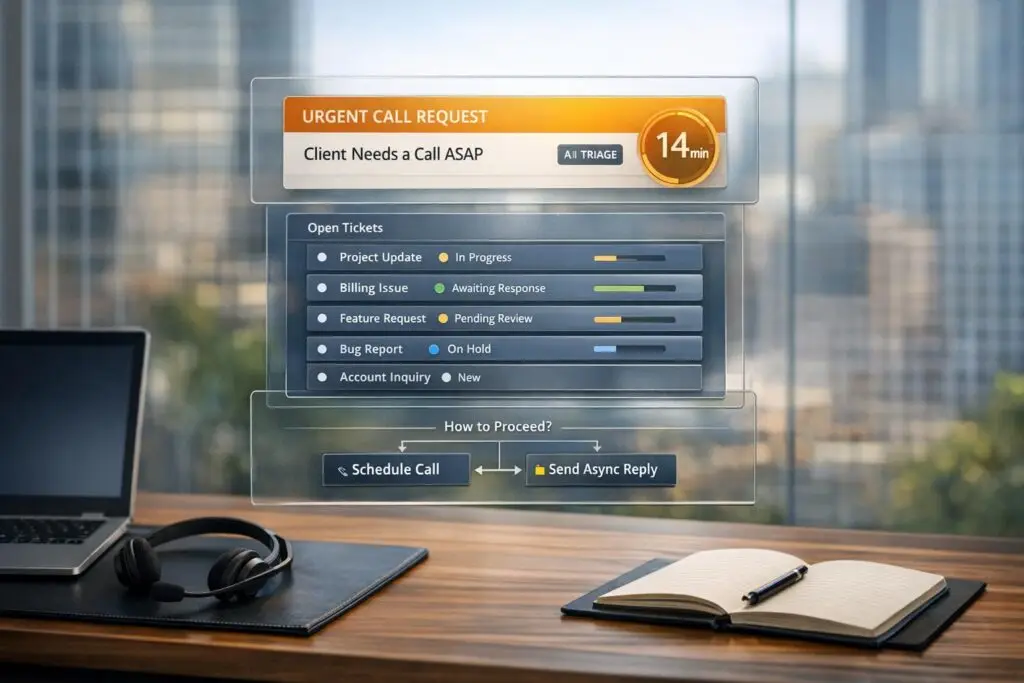
When a customer demands an immediate call, it can disrupt your carefully planned workflows. These interruptions often lead to inefficiencies, scattered communication, and stressed teams. But here’s the reality: not all urgent requests truly require a call. Many can be handled effectively through asynchronous methods if urgency is validated upfront.
Here’s how to manage urgent call requests without sacrificing productivity:
- Validate urgency: Use AI-driven tools to assess the request’s importance by analyzing sentiment, account value, and issue type.
- Leverage AI triage: Automate responses for routine issues and route critical ones to the right team.
- Set dynamic SLAs: Tailor response times based on urgency, customer value, and workload.
- Preserve context: Use AI to summarize past interactions, so agents are prepared when calls are unavoidable.
- Optimize workflows: Track escalation trends and refine processes to prevent unnecessary calls.
How Immediate Call Requests Disrupt Async Workflows
Immediate call requests can throw a wrench into the smooth operation of async workflows. They interrupt focus, break the structured flow, and scatter context, making it harder for agents to stay on track. Without clear criteria for escalation, agents face a dilemma – some may jump into routine calls, while others stick to async tasks. This inconsistency not only creates unpredictable customer experiences but also wastes valuable specialist time. Over time, these real-time interruptions further fragment communication and disrupt the entire system.
Why Real-Time Calls Break Async-First Models
Real-time calls can choke the efficiency of an async-first support model. When an agent takes an unplanned call, they’re pulled away from other tasks. This leads to ticket backlogs, slower response times, and an overwhelmed team – especially during busy periods. Agents are left juggling queues and trying to decide which requests truly need immediate attention.
On top of that, there’s the issue of fragmented context. Call transfers rarely preserve all the details, forcing customers to repeat themselves and costing specialists an extra 3–5 minutes per call [1]. Multiply that by dozens – or hundreds – of calls, and you’re looking at a significant loss of time. For B2B organizations, where accounts are high-value and technical needs are complex, this inefficiency can quickly become a competitive disadvantage.
Manual escalation processes add another layer of trouble. Without real-time insights into account value or opportunity size, high-priority customers often find themselves waiting alongside routine inquiries. This delay can frustrate key accounts and hurt long-term relationships.
The Real Costs of Unplanned Escalations
Unplanned escalations don’t just waste time – they also take a toll on your team. Agents often spend the first few minutes of these calls calming down frustrated customers, which adds stress and increases the risk of burnout. Over time, excessive escalations can undermine the effectiveness of your AI and async tools, reducing the return on investment.
A well-functioning system typically keeps escalation rates between 20% and 35%, with top-performing teams maintaining an "Appropriate Escalation" rate above 90%. This means nearly all human handoffs are reserved for genuinely complex issues [2]. But when unplanned calls push your escalation rate beyond these limits, efficiency plummets, and scaling becomes a challenge no matter how large your team grows.
Another issue? Without data on what types of queries lead to escalations, managers can’t optimize workflows or justify hiring more specialists. Instead, teams are stuck reacting to individual problems rather than fixing the root causes. These inefficiencies highlight the importance of structured, AI-driven ticket routing and escalation strategies to keep support operations running smoothly.
sbb-itb-e60d259
How to Handle Urgent Requests While Maintaining Async Control
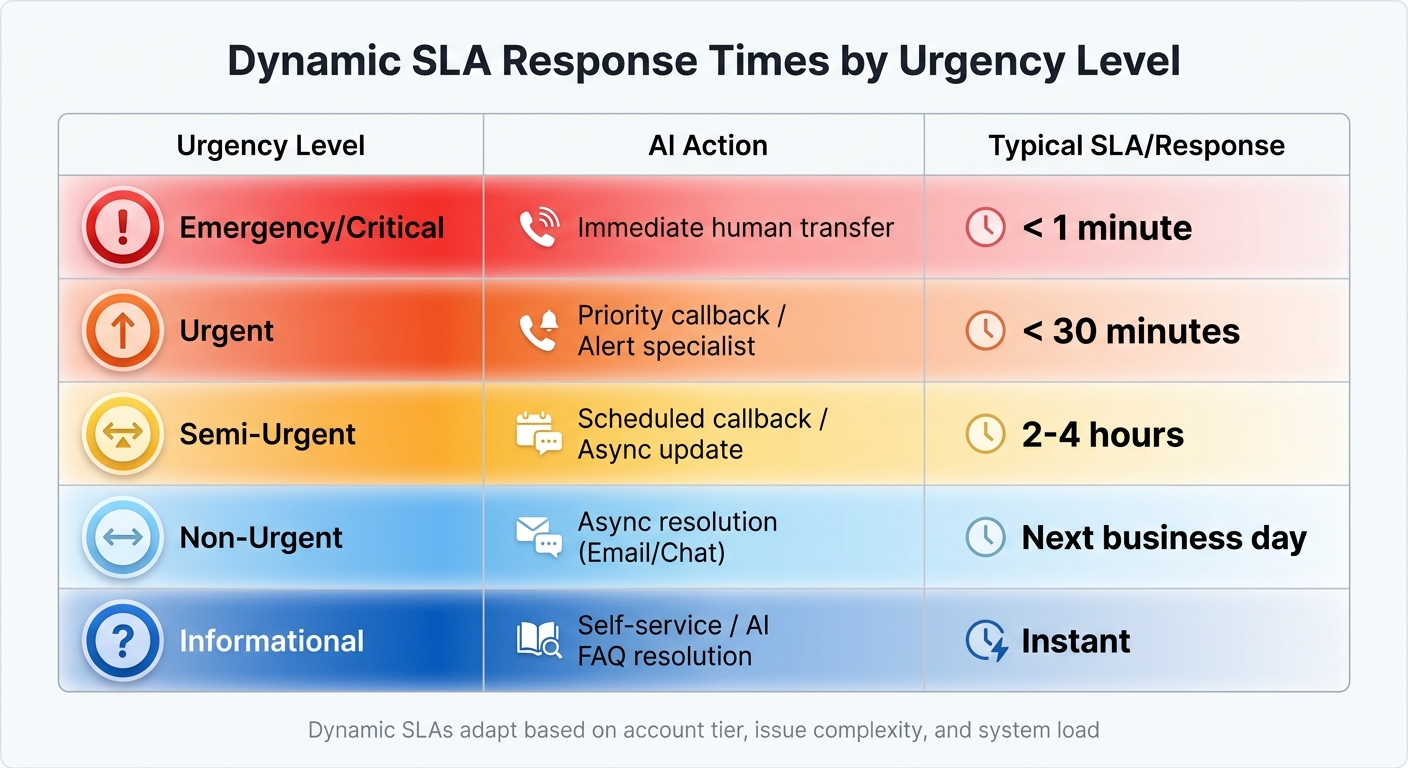
Dynamic SLA Response Times by Urgency Level for Customer Support
Managing "we need a call now" scenarios can be tricky, especially when juggling efficiency with genuine emergencies. The key lies in validating the urgency of requests and routing them intelligently. Many B2B support teams default to calls because they lack tools to assess whether real-time intervention is necessary. However, with AI-driven workflows, you can maintain async control while addressing urgent needs effectively.
Validate Urgency Without Defaulting to Calls
Before jumping on a call, it’s important to qualify the urgency of the request. AI-powered triage systems can analyze incoming messages for urgency indicators – like "system down", "access issues", or "revenue loss" – using natural language processing (NLP). These systems assign urgency scores based on factors such as sentiment, account value, and historical data [1]. This approach ensures routine issues don’t masquerade as emergencies.
Stefan Behrens, Co-founder and CEO of GYANT, emphasizes, "Asynchronous care has been stress tested as a high-capacity and timely venue of care… Patients are looking for more ways to engage with care on their schedule and providers need to efficiently handle low acuity cases" [6].
This principle applies to B2B support as well. Low-priority requests – like FAQs or status updates – can be redirected to async options such as email responses or portal updates, preserving resources for higher-priority cases.
To ensure consistency, define clear escalation triggers instead of vague labels like "complex issue." For instance, set criteria such as escalating only if sentiment analysis detects frustration scores above 7/10 in two consecutive responses or if the account value exceeds $100,000 annually. This removes guesswork and keeps processes uniform.
Once urgency is validated, AI can route the request to the appropriate channel for resolution.
Use AI Triage and Auto-Responses
AI triage systems go beyond categorizing requests – they actively reduce call volumes by resolving up to 80% of routine inquiries without human involvement [5]. When a customer submits an urgent request, the AI evaluates the message in real time, identifying key phrases and complexity triggers to decide the best response. For routine issues, the system can auto-respond with relevant knowledge base articles or schedule a prioritized callback instead of defaulting to an immediate call.
Preserving context is crucial. When a call is necessary, AI compiles interaction history, sentiment data, and key issues into a concise summary for the human agent. This eliminates the frustration of customers repeating themselves and reduces handling time.
Smith.ai highlights that "Context preservation eliminates repetitive information gathering, reduces average handle time by 3-5 minutes per escalated call, and improves satisfaction scores" [1].
Modern AI triage systems achieve over 95% accuracy in routing and assessment when built on well-defined protocols [8]. They also support multilingual capabilities, ensuring accurate urgency detection across diverse customer bases [3][7]. Additionally, if an urgent AI-flagged request isn’t acknowledged within a set timeframe – say, 10 minutes – it automatically escalates to a backup or administrator [4].
Set Dynamic SLAs for Call Escalation Limits
Dynamic service-level agreements (SLAs) refine the escalation process by adapting to real-time factors like account tier, issue complexity, and system load. These SLAs can significantly reduce SLA violations and improve response times compared to traditional methods [11].
| Urgency Level | AI Action | Typical SLA/Response |
|---|---|---|
| Emergency/Critical | Immediate human transfer | < 1 minute |
| Urgent | Priority callback / Alert specialist | < 30 minutes |
| Semi-Urgent | Scheduled callback / Async update | 2 – 4 hours |
| Non-Urgent | Async resolution (Email/Chat) | Next business day |
| Informational | Self-service / AI FAQ resolution | Instant |
To keep queues manageable, set "heartbeat" timers. For example, configure reminders after 10 minutes of inactivity and close idle tickets after 15 minutes to free up resources for actual emergencies [9].
Jessica Li, Product Manager at Microsoft, notes, "Timeout rules now support automatically moving active conversations to a waiting state on asynchronous and persistent chat channels. This helps manage idle chats efficiently" [9].
Policy-based routing gates can further streamline the process. For example, if a request shows negative sentiment and high urgency, it triggers an escalation. If key information is missing, the system defaults to an async mode to ask clarifying questions [10]. This hybrid approach balances compliance-driven logic with AI’s ability to detect sentiment, creating a reliable workflow without overwhelming your team.
Tools and Processes for Async Workflow Optimization
Choosing the right tools can make or break an async-first strategy – especially when urgent requests start rolling in. Modern AI-powered platforms go beyond simple ticket categorization. They equip agents with the tools to prepare for calls, predict potential escalations, and seamlessly manage handoffs to engineering teams. These technologies ensure that only the most critical issues escalate to calls, safeguarding the efficiency of asynchronous operations. Let’s dive into how AI copilots and predictive metrics are helping teams streamline their processes.
AI Copilots for Call Preparation and Case Summaries
When a call becomes unavoidable, AI copilots remove the hassle of digging through ticket histories. For example, Forethought Assist generates detailed case summaries, including troubleshooting history, sentiment analysis, and first-response suggestions, before an agent even steps in [12]. This means customers don’t have to repeat themselves, and agents can jump into calls without delays.
Pluno Escalation Copilot takes this a step further by creating detailed escalation briefs. These include reproduction steps, troubleshooting history, and an analysis of customer impact – ensuring smooth collaboration between support teams and engineers [13]. On top of that, the Pluno Hybrid Agent autonomously keeps customers updated on engineering progress and relays any follow-up questions back to the team, maintaining the async workflow [13].
Sarala Conlan, Sr. Customer Support Manager at Kojo, summed it up perfectly: "My team is, like, a huge fan. They feel like they can’t live without Pluno now. We’d be drowning without it" [13].
The results speak for themselves: AI-generated context improves engineering response times by 3x and reduces back-and-forth communication by 80% [13]. For B2B support teams managing complex accounts, this means fewer unnecessary calls and faster resolutions when calls are necessary. But the benefits don’t stop there – AI metrics take escalation management to the next level by predicting and reducing future call volume.
AI Metrics to Predict and Reduce Call Volume
AI doesn’t just prepare teams for calls; it helps prevent them altogether. Predictive metrics allow support teams to identify and address issues before they escalate. For instance, Forethought Discover analyzes historical support data to uncover knowledge gaps and pinpoint the main drivers behind customer inquiries. With this insight, teams can create self-service resources or automated workflows that resolve these issues asynchronously [12].
One key metric to track is First Contact Resolution (FCR). While manual methods often struggle to measure FCR accurately, AI can analyze case histories to determine whether an issue was truly resolved on the first contact. Forethought users, for example, have achieved a 93% FCR rate by combining AI-driven triage with intelligent routing [12]. Additionally, AI tools like Predictive CSAT and CES scores help identify cases that might have left customers dissatisfied – even if they didn’t fill out a survey – allowing teams to refine their processes and avoid future escalations [12].
Emily Pearce, Senior Director of Global Customer Care, shared her perspective: "It’s great that we’ve created something our agents love. They’re not worried about their jobs going away; they see Forethought as their teammate so they can focus on enhancing the experience for our members" [12].
How Supportbench Handles Async-First Escalation Control
Supportbench is built to support B2B teams in managing escalation while staying aligned with async-first strategies. Even during urgent situations, its AI-driven triage system categorizes tickets based on factors like topic, customer value, and emotional sentiment. Instead of relying on obvious keywords like "urgent" or "outage", the platform digs deeper, analyzing subtle signals such as customer frustration or health scores – often before a survey is even completed. This predictive approach to escalation is something that sets Supportbench apart.
Its dynamic SLA management takes things a step further by adjusting response times to match the customer’s journey. For instance, if a customer is nearing a contract renewal or has been flagged as "at-risk", the system shortens SLA windows to prioritize resolution. By doing so, it often eliminates the need for a call entirely. Escalation triggers can also be customized to route critical issues to the right team without delay [15]. These features work in tandem with Supportbench’s proactive call management tools to ensure smooth operations.
When a call becomes unavoidable, Supportbench’s AI Co-Pilot equips agents with all the context they need – instantly. Agents gain access to a complete 360° view of the customer, including performance metrics, product usage, contract details, and a streamlined ticket history. It also pulls relevant knowledge base queries and auto-summarizes past resolutions, making it easier to maintain the async principles established earlier.
"Supportbench is amazing in how it gets things done compared to other success and case executives arrangements I’ve used and IMO incomparably superior when it comes to resolving end-user difficulties", said Caitlyn Langston, Chief Technology Officer [14].
To ensure async communication remains effective and empathetic, Supportbench employs built-in AI Quality Assurance. This tool reviews each ticket for tone and quality, reinforcing the async-first strategy while helping to de-escalate tension and keep interactions personal.
Conclusion
Managing "we need a call now" situations requires creating smarter systems for handling escalations. The most effective teams ensure that urgency is verified before resorting to live calls. By leveraging AI-powered ticket triage, they can identify true emergencies while keeping routine matters in asynchronous channels. Predefined escalation triggers help strike the right balance, safeguarding both customer satisfaction and team productivity [2].
The data speaks for itself. Companies aiming for an escalation rate of 20–35%, with over 90% of those escalations deemed appropriate, consistently achieve post-escalation CSAT scores above 4.2 [2]. This success stems from structured processes, such as passing complete context during handoffs, using sentiment-based routing, and offering callbacks as an option. As Entrepreneur AI Tools aptly put it, "Escalation is not only a routing event. It is an expectation-setting event" [16].
Cutting down on coordination time is another game-changer. On average, B2B teams spend three hours coordinating for every hour spent solving problems [17]. AI-powered tools that summarize tickets, predict customer satisfaction, and provide agents with a 360° view of the customer can dramatically reduce this inefficiency. For example, when Numbr centralized their escalation context within a single platform, they resolved issues 75% faster [17].
FAQs
What should count as a real emergency?
A "real emergency" refers to situations that pose immediate threats to health, safety, or cause major property damage. Think of events like fires, public health crises, or failures of essential utilities.
In customer support, emergencies are just as serious – examples include security breaches or system outages that disrupt core operations. Recognizing these scenarios is crucial. It allows support teams to focus on urgent, high-priority issues without derailing their regular workflow.
How do we say “no call” without upsetting customers?
The best way to say “no call” without upsetting customers is to approach the situation with clarity and empathy. Let them know that asynchronous support is designed to handle their issues in a way that’s both efficient and thorough. Emphasize the advantages, such as quicker response times and the ability to track progress more effectively. For instance, you could say something like: “We’ve found that handling support asynchronously allows us to give your issue the attention it deserves, helping us prioritize and resolve requests more effectively.”
Which escalation metrics should we track first?
Tracking response times and resolution times for escalated issues is a smart first step. These metrics highlight how swiftly urgent requests are being handled and whether your escalation process is working as intended. By keeping an eye on these numbers, you can assess how well your triage and prioritization strategies are performing. This ensures urgent calls are managed promptly without losing grip on your asynchronous support workflows.