


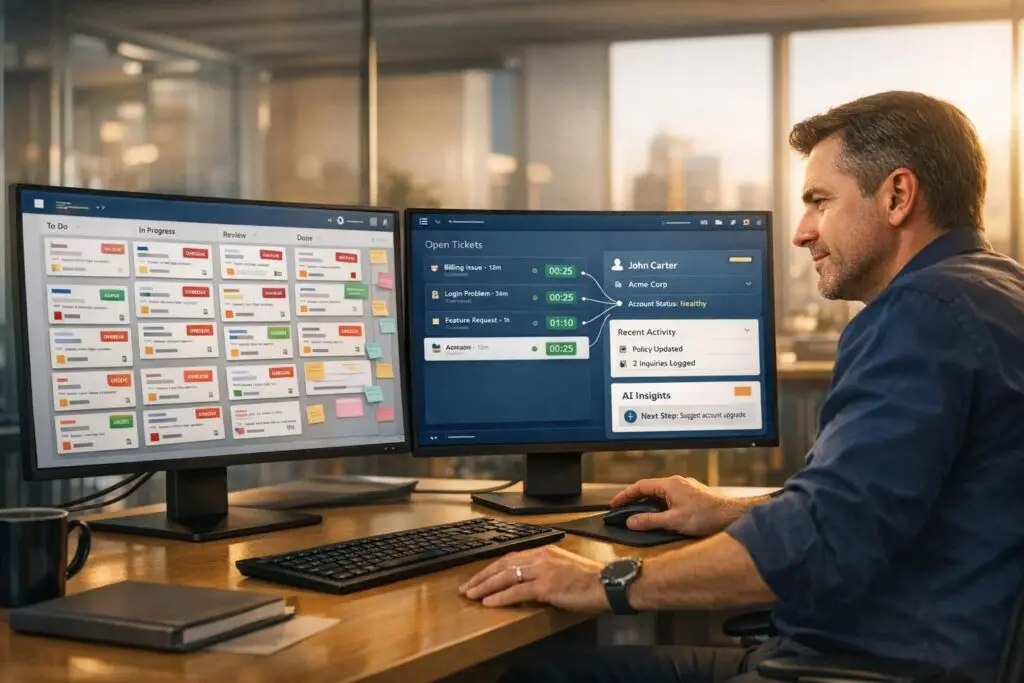
When it comes to customer support, using the wrong software can hinder operations. Many businesses mistakenly use project management (PM) tools for support tasks, leading to inefficiencies and poor customer experiences. Here’s the bottom line:
- Support tools are designed for tracking customer relationships, managing tickets, and integrating with modern support CRM systems to provide a complete view of customer interactions.
- PM tools focus on organizing internal workflows, tasks, and timelines but lack features like SLA tracking, ticket prioritization, or customer communication history.
Why this matters:
- Misaligned tools can cause unresolved tickets, higher churn rates, and fragmented workflows.
- Support tools improve efficiency with features like AI automation, centralized communication, and customer-focused metrics.
- PM tools, while great for internal collaboration, fall short in handling external customer relationships.
Quick takeaway:
To deliver better service and lower churn, choose tools built for customer support, not internal task management.
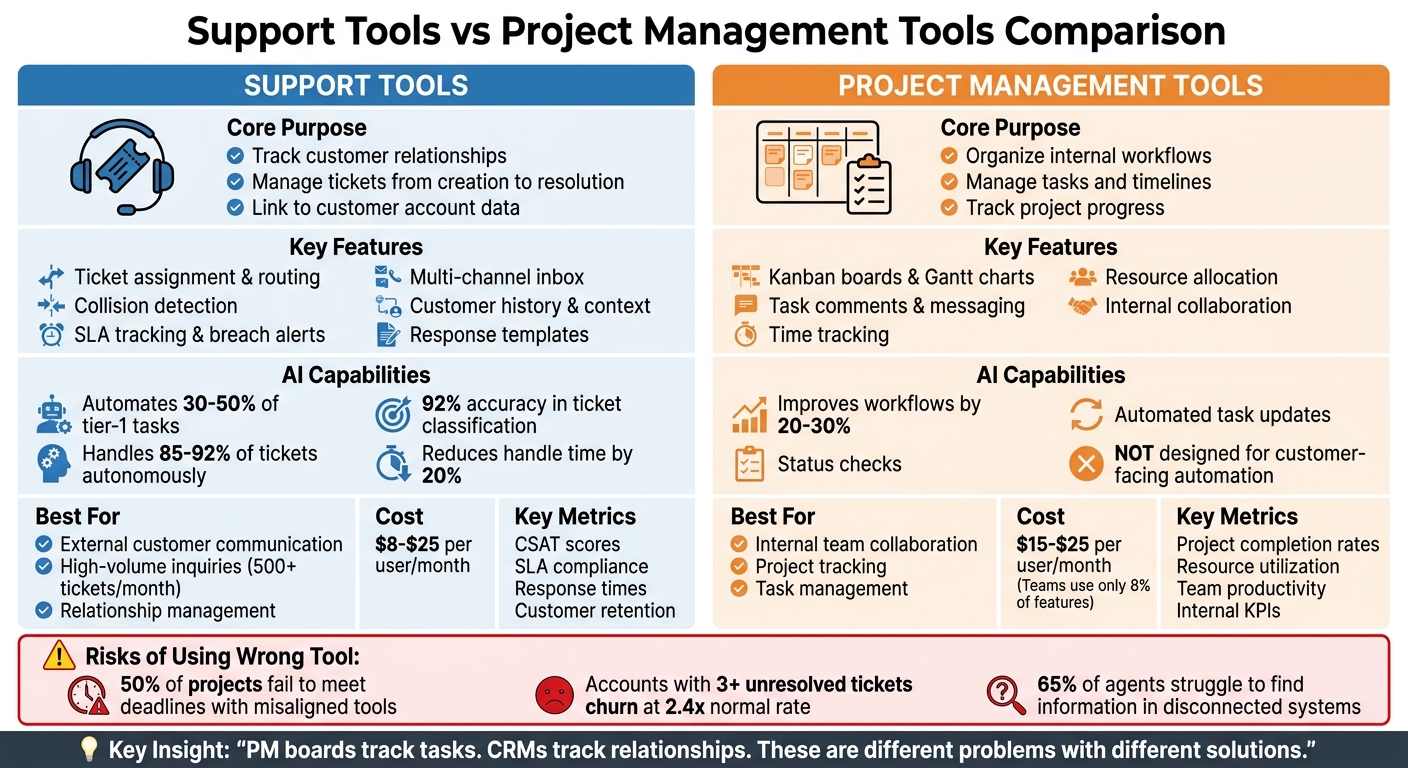
Support Tools vs Project Management Tools: Key Differences and Features Comparison
1. Support Tools
Core Functionality
Support tools are designed to centralize inquiries across various channels, managing each ticket from its creation to resolution while linking it to customer account data. What sets these tools apart is their data-focused approach. They treat each inquiry as a distinct task, moving it through a structured workflow. When integrated with CRM systems, they shift to a customer-focused model by connecting tickets to key account details like contract status, renewal dates, and account value [3]. This is especially important in B2B settings, where a ticket from a high-value client may require a different level of attention compared to one from a smaller account.
Key features include ticket assignment, internal notes for seamless team collaboration, collision detection to avoid duplicate responses, and pre-made response templates. For teams of 5–15 agents, setting up these tools when transitioning from email to a helpdesk typically takes about 4–6 weeks [5].
Communication Capabilities
Support platforms go beyond ticket management by consolidating all communication channels into one inbox. However, effective use requires tailoring Service Level Agreements (SLAs) to each channel. For instance, live chat might need a response within 2 minutes, while email inquiries could allow for a 4–8 hour window [5].
Providing agents with a unified view of customer data can significantly improve efficiency, cutting average handle time by up to 20% [3]. Despite this, 65% of service agents report struggling to find the information they need because it’s often stored in disconnected systems [3].
AI and Automation Features
AI in support tools is primarily aimed at improving internal efficiency. It automates tasks like triage, categorization, and routing, enabling agents to work faster without sacrificing the quality of customer interactions [5].
By automating 30–50% of tier-1 tasks – such as password resets or order status updates – AI can dramatically reduce operational costs compared to fully human teams [5]. Gabe Campbell of AI Genesis highlights this balance:
"Help desk software makes humans more efficient at resolving tickets, but a human still needs to read each ticket… An AI agent handles the tasks traditionally managed by human agents." [4]
For example, RTR Vehicles employs a hybrid model where AI resolves 92% of tickets automatically, leaving only 8% of complex cases for a part-time human agent. This setup costs between $4,600 and $5,500 per month, a huge savings compared to the $12,000–$18,000 monthly expense of an entirely human team [4].
Implementation Risks
One major risk is tool misalignment. Using a CRM-focused tool for a high-volume support team can lead to inefficient queue management, while relying on a basic help desk for a customer success team might lack the context needed for relationship management [3].
Over-automation is another common issue. Forcing customers to navigate knowledge bases or prematurely closing tickets before issues are fully resolved can harm satisfaction. A focus on metrics like "tickets closed" often leads to incomplete resolutions and higher reopen rates [5].
Data loss during migration is also a significant concern. Switching platforms can result in losing critical information, such as internal notes, tags, and custom fields. To avoid this, running the old and new systems concurrently for at least two weeks allows teams to finish ongoing tickets while directing new ones to the updated platform [5].
These risks highlight how mismatched tools or overly aggressive automation can disrupt support operations and damage customer relationships. Addressing these challenges sets the stage for understanding the unique hurdles faced with project management tools.
sbb-itb-e60d259
2. Project Management Tools
Core Functionality
Project management tools organize work into projects, tasks, and subtasks, using structures like Kanban boards, Gantt charts, and features for time tracking and resource allocation. The key distinction lies in how they handle data: PM tools treat each support request as a task-focused entry on a board, while support platforms use a relationship-focused model that ties together contacts, companies, and complete activity timelines [1].
This design creates challenges for support-specific needs. PM tools lack a built-in connection between contacts and tasks, making it difficult to access customer history – like email threads, call logs, or previous tickets – when viewing a single project item [1]. This disconnect can lead to complications in both communication and automation.
Communication Capabilities
PM tools excel at fostering internal collaboration. They offer features like real-time messaging, task comments, and message boards [3, 14]. However, they fall short when it comes to external communication, particularly email support for customer service [1].
When teams rely on separate PM and support tools, feedback often gets fragmented. Support agents must manually transfer information between platforms, creating inefficiencies and increasing the risk of losing critical context.
AI and Automation Features
AI in project management tools aims to improve internal workflows by 20–30%, offering features like automated task updates and status checks [6, 13]. While these tools enhance team productivity, they don’t address external customer interactions effectively. Gabe Campbell from AI Genesis highlights this difference:
"The distinction is like the difference between a project management tool (organizes work) and an employee (does the work)" [4].
On the other hand, AI in dedicated support platforms can autonomously handle 85–92% of incoming tickets, leaving only the more complex cases for human intervention. PM tools simply aren’t designed for customer-facing automation [4].
Implementation Risks
Using project management tools for support roles often leads to operational breakdowns. Around 50% of projects fail to meet deadlines and quality standards due to misaligned tools [6]. Their complexity often results in the creation of unofficial "shadow systems" [2]. As Lucas from Breeze explains:
"Project management tools fail not because people reject technology, but because they reject complexity and control" [2].
Data mismatches also create friction. PM tools require manual formulas to calculate metrics like conversion rates or response times – tasks that support platforms handle automatically [1]. These manual processes increase the likelihood of errors and can lead to tool abandonment. Without built-in relationship tracking, new agents struggle to quickly grasp a customer’s history, slowing down resolutions and negatively affecting service quality [1].
Pros and Cons
When considering the challenges of using support and project management (PM) tools, their strengths and weaknesses reveal why certain implementations succeed or fail. Support tools are built to handle high volumes of customer inquiries, while PM tools focus on managing internal workflows and tasks [7].
Support Tools
Support tools are ideal for managing large-scale customer interactions. For example, while a shared inbox might suffice for handling fewer than 500 tickets per month, higher volumes demand a more structured help desk solution [8]. These tools often include features like collision detection [8] and use AI to classify customer intent with impressive speed and accuracy – 92% accuracy in under 200 milliseconds. This enables automated ticket routing and dramatically reduces manual workload. Without AI, triaging 200 tickets daily could take 2–3 hours of manual effort [8]. These efficiencies highlight why support tools outperform PM tools in customer-facing operations.
PM Tools
On the other hand, PM tools are designed for internal collaboration and often fall short when used for customer support. They typically lack features critical for customer service, such as SLA tracking, breach alerts, and escalation rules [8]. This forces teams to rely on inefficient workarounds like spreadsheets or chat threads to fill the gaps [2]. Additionally, misaligned tools can lead to poor outcomes – about 50% of projects fail to meet deadlines or quality benchmarks when the chosen tool doesn’t fit the team’s needs [6].
Cost Considerations
Cost is another key differentiator. AI-powered support tools typically offer automation features across all pricing tiers, with costs ranging from $8 to $25 per user per month [8][9]. In contrast, enterprise PM platforms often reserve advanced features for their higher-priced tiers, costing around $15 to $25 per user per month. Despite this, teams often use only about 8% of an enterprise PM tool’s capabilities, leading to wasted resources [8]. Time savings also vary: AI in support tools can cut status reporting time by 80–90% and reduce meeting summarization time by 70–80% [9].
Key Metrics
Ultimately, choosing the right tool depends on aligning its features with operational needs. Support tools prioritize customer-centric metrics like CSAT scores, SLAs, and audit trails, while PM tools focus on internal metrics such as KPIs and resource allocation [8]. Misalignment between a tool’s design and the demands of the team often leads to implementation failures.
Conclusion
Project management tools often fall short in customer support because they’re designed for entirely different purposes. As PipeCrush aptly put it:
"PM boards track tasks. CRMs track relationships. These are different problems with different solutions" [1].
When you try to use a tool built for managing internal tasks to handle external customer relationships, you inevitably end up patching gaps with workarounds. This might mean using spreadsheets to track context, third-party tools for email, or manual calculations for basic metrics. Meanwhile, platforms specifically designed for customer support handle these needs seamlessly.
The bigger issue lies in the operational risks and hidden costs. Beyond the initial hassle of switching tools, the real damage shows up in missed escalations and fragmented customer histories. For instance, accounts with three or more unresolved tickets churn at 2.4 times the normal rate [3]. This highlights how incomplete histories and unresolved issues can directly impact revenue and customer retention – problems that don’t arise when using tools built specifically for support.
When evaluating support platforms, focus on the data model. Look for systems that link tickets to a global customer profile, preserving the full historical context rather than isolating interactions as individual tasks. Platforms with built-in communication tools – like email and activity logging – are also essential to avoid data silos. Additionally, check for AI capabilities that adapt to customer behavior in real time instead of relying on rigid, rule-based automations.
If your team is manually transferring data between tools, it’s a clear sign of misalignment. These inefficiencies not only frustrate employees but also erode customer trust and inflate costs over time. As Pranshu Sharma pointed out, the right tool does more than just resolve tickets quickly – it safeguards the revenue tied to those customer relationships [3].
Don’t rely on third-party integrations to patch over design flaws. Choose a platform with native support features and AI-driven automation to ensure both efficiency and customer satisfaction.
FAQs
When is a PM tool ‘good enough’ for support?
When operations are straightforward, a project management tool can handle support tasks well enough. It can manage basic ticket tracking, simple workflows, and minimal escalation requirements. Plus, if your team is already comfortable using it and adoption rates are high, it might work as a short-term solution.
However, when things get more complex – like dealing with multi-level escalations, managing dynamic SLAs, or implementing AI-driven triage – a specialized support platform becomes crucial. These tools are designed to handle advanced needs, ensuring smoother operations and better customer experiences.
What are the earliest signs our support tool is misaligned?
Workflow hiccups and unhappy customers are often the first clues that your current system isn’t cutting it. For instance, if your tool can’t handle complex case management, dynamic workflows, or AI-powered routing, you’re likely dealing with delays and rising costs.
On top of that, limitations like restricted SLA flexibility or weak customer data visibility can create bottlenecks, making it harder to deliver personalized support. These challenges often point to the need for a more tailored, AI-driven solution.
How do we migrate without losing ticket history and context?
To keep ticket history and context intact during migration, it’s crucial to follow a well-organized approach. Start by validating the data after migration to ensure everything transferred correctly. Test workflows thoroughly to confirm they function as expected. Use migration tools specifically designed for helpdesk systems, as these tools are built to maintain data relationships.
To reduce downtime, take advantage of features like Delta Migration, which allows you to migrate changes incrementally. Running a pilot migration beforehand can help you spot and address any potential issues early on. The key to a seamless transition lies in careful preparation – this includes cleaning up data, configuring systems properly, and planning every step in advance to avoid losing essential information.






