



Help Scout is great for small support teams, but as your business scales, it may not meet the demands of complex B2B operations. Struggling with SLA management, tiered support, escalation tracking, or reporting? These are clear signs it’s time to consider a more advanced platform. Key limitations include:
- No built-in SLA management: Manual workflows for SLAs can’t handle dynamic client needs or compliance tracking.
- Basic permissions and routing: Limited roles and single-queue design hinder multi-tier teams.
- Weak escalation tracking: Lacks tools to maintain context or prioritize high-stakes tickets.
- Outdated reporting: No predictive metrics or customizable dashboards for deeper insights.
If your team spends hours on manual tasks, misses SLA targets, or struggles with reporting and escalations, it may be time to switch to a platform with AI-driven tools and scalable features.
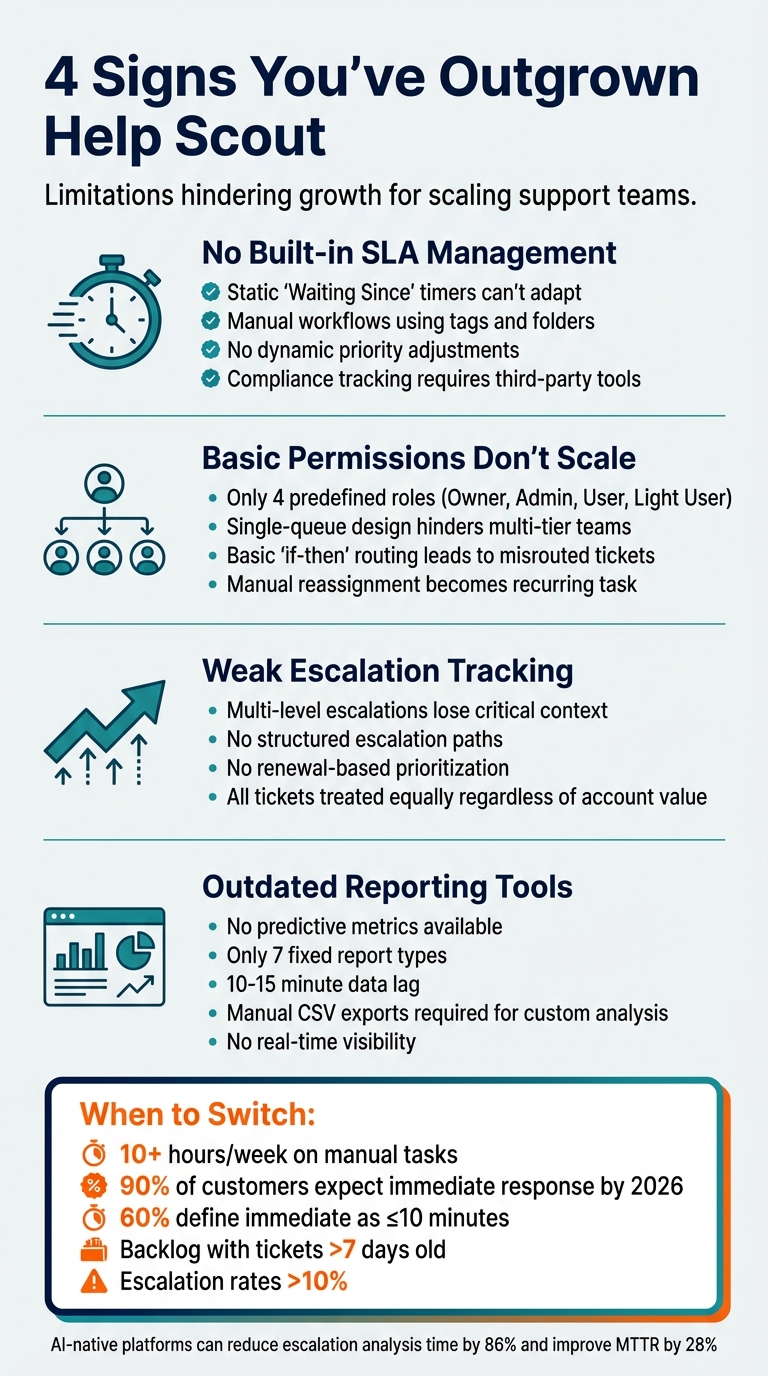
4 Signs You’ve Outgrown Help Scout: Key Limitations for B2B Support Teams
Sign 1: SLA Management Doesn’t Support Complex B2B Requirements
SLA Settings Lack Flexibility for Complex Needs
Help Scout doesn’t come with built-in SLA (Service Level Agreement) capabilities. Instead, it relies on makeshift solutions like time-based workflows, tags, and folder views to mimic SLAs. The main issue? These static "Waiting Since" timers can’t adapt to different ticket scenarios.
In B2B environments, you often need stricter response times for high-value clients or quicker resolutions as renewal dates approach. Trying to handle these dynamic requirements with manual conditions quickly becomes overwhelming as customer demands grow more varied.
Another challenge is the inability to adjust priorities based on real-time factors like customer sentiment or past urgency. For instance, if a high-value customer submits a ticket while clearly frustrated, the system’s static timers won’t adjust to reflect the ticket’s business importance.
Compliance Tracking Is a Headache
The lack of native SLA features also makes tracking compliance unnecessarily complicated.
To monitor SLA performance, you’re forced to manually set up report views using tags like "overdue" or "near-due". This approach only provides reactive insights, leaving you scrambling to address issues after deadlines have already passed.
Creating separate workflows for "overdue" and "near-due" warnings adds even more complexity, often pushing teams to rely on third-party tools to track critical metrics. This patchwork system increases the risk of missed deadlines and unhappy customers.
For enterprise-level support, these limitations make it clear that basic helpdesk solutions like Help Scout simply can’t keep up with the demands of sophisticated B2B operations.
sbb-itb-e60d259
Sign 2: Tiered Support and Permissions Don’t Scale
Role-Based Permissions Are Too Basic
Help Scout’s permission system offers just four predefined roles – Account Owner, Administrator, User, and Light User – which limits the level of access control that B2B teams often need. This setup can create issues in tiered support models, where Tier 1 agents might inadvertently gain access to sensitive enterprise data they shouldn’t handle.
Even with the Plus plan ($75/month per user), which unlocks advanced permissions, the platform still operates on a flat, collaborative model. This "support-swarming" approach relies on a single-queue hierarchy where everyone works together, making it poorly suited for the structured workflows required in tiered support.
"Tiers and strict allowance areas reduce the feeling of accountability and ownership for support agents and may cultivate an attitude of getting rid of issues by just re-assigning them."
– Amanda Langford, Groove Writer
The restrictive role structure becomes even more problematic as teams scale and require more nuanced access controls.
Queue Management Can’t Handle Multi-Tier Teams
When support teams expand and specialize – handling areas like billing, technical issues, or escalations – Help Scout’s single-queue design becomes a roadblock. The platform’s "all-in-one" view of discussions works well for smaller teams but struggles to manage the complexity of routing cases across specialized queues.
The system relies on basic "if-then" rules, triggered by keywords or subject lines, to route tickets. However, this often leads to misrouted or misprioritized cases, especially in complex B2B scenarios. As a result, manual reassignment becomes a recurring task.
"More complex conversations were sometimes getting stuck, languishing in the bottom of the queues waiting for ‘the right person’ to pick them up."
– Mathew Patterson, Help Scout
To compensate, teams often resort to manual triage or implement dedicated rotations to ensure cases land in the right hands. This workaround underscores the platform’s limitations in effectively supporting multi-tier operations.
Sign 3: Escalation Tracking Fails for Long-Running Cases
Multi-Level Escalations Lose Critical Context
B2B issues often require input from multiple teams, but Help Scout’s straightforward assignment system struggles to maintain context during these transitions. For example, a technical issue might start with frontline support, move to a product specialist, then to engineering, and finally back to the customer success team. Instead of following a structured escalation path, the platform relies on basic assignments, making it tough to track the complete journey of an issue.
This lack of structure often results in engineering teams receiving escalations without the necessary background information. They’re left chasing details, which delays resolution times.
"When our engineers investigated tricky cases, the information they were able to uncover didn’t always make it back to the Customers team, so it wasn’t able to be reused."
– Help Scout Internal Triage Report
The absence of a system to retain and share insights forces frontline agents to escalate the same issues repeatedly. Instead of resolving problems at Tier 1, teams find themselves retracing steps, wasting time and resources.
No Mechanism for Renewal-Based Prioritization
Beyond tracking issues, Help Scout also falls short when it comes to prioritizing tickets by their business impact.
The platform treats every ticket as an individual request, ignoring the broader customer relationship. It doesn’t automatically prioritize tickets based on factors like account value, renewal timelines, or contract importance. For instance, a support ticket from a customer with a $500,000 annual contract due for renewal in 30 days is handled no differently than one from a $5,000 account with no immediate business risk.
This lack of account-level visibility makes it challenging for support leaders to identify escalations that carry the most significant business implications. The system doesn’t flag high-stakes cases, such as those nearing renewal deadlines or at risk of SLA violations. As a result, managers are forced to manually comb through queues to spot critical tickets.
These limitations highlight why scaling B2B teams require platforms with automated ticket routing and deeper business-context awareness – topics we’ll dive into in the next sections on AI-driven solutions and performance metrics.
Sign 4: Reporting Lacks AI-Driven Metrics
Predictive Metrics Aren’t Available
Reporting limitations can hold teams back just as much as issues with SLA management or escalation processes. Help Scout’s reporting tools focus heavily on what has already happened. Metrics like response times, handle times, and resolution rates dominate the data landscape. But for modern B2B support teams, the ability to predict trends and act before problems escalate is crucial. Unfortunately, predictive metrics like forecasted customer satisfaction, customer effort scores, or automated detection of first-contact resolution aren’t part of the package.
For example, there’s no built-in feature to flag open tickets likely to result in poor customer feedback or predict which cases might require multiple touches or escalations based on patterns in the conversation. Help Scout’s AI tools, such as its chatbot AI Answers, are geared more toward resolution and escalation rates rather than delivering forward-looking insights. While it’s reported that teams using these AI tools resolve 36% more emails, the tools function as "copilots" – they still require manual oversight for each ticket.
"We need to bring more than just vibes to our leadership team if we want to effect change for our customers. We need to bring data."
– Kristi Thompson, Customers Team, Help Scout
Without predictive analytics, teams are left manually reviewing "Contact Not Helped" sessions to identify knowledge gaps. This process is not only tedious but also something that could easily be automated. The limitations don’t stop there – rigid reporting dashboards make proactive decision-making even harder.
Dashboards Can’t Be Customized for KPI Tracking
Another significant drawback lies in the lack of flexibility with Help Scout’s dashboards. The system offers seven fixed report types, which means custom KPI tracking based on unique data sets is off the table.
"While we offer lots of filters, there isn’t a way to customize how calculations are performed nor is there an option to build custom reports based on custom data sets [within the app]."
– Help Scout Support
For businesses that need to track performance across different customer tiers or monitor renewal-risk accounts separately, the only option is to export raw data to CSV files or use the Inbox API to create custom reports with external tools. This workaround not only adds complexity but also delays decision-making.
Real-time visibility is another weak spot. Help Scout’s reporting has a 10–15 minute lag, and data exports leave out calculated metrics like averages, totals, or percentages.
For B2B teams managing intricate account setups with varying SLA requirements, contract values, or escalation paths, these limitations make it nearly impossible to get the detailed insights needed for effective decision-making. On top of that, standard plans don’t include access to reporting endpoints via the Inbox API, further restricting options for tailored analysis.
How to Decide If You Need a More Advanced Platform
Performance Benchmarks That Signal It’s Time to Switch
If your team spends over 10 hours a week on manual tasks like analyzing ticket patterns, identifying escalation risks, or building custom reports in spreadsheets, it’s a clear sign your platform might be holding you back. That’s valuable time that could be used to address customer issues or reduce churn instead.
Customer expectations have also changed dramatically. By 2026, 90% of customers will consider an "immediate" response essential, with 60% defining "immediate" as 10 minutes or less. If your current platform can’t support response times like 10 minutes for strategic accounts, 20–40 minutes for enterprise clients, and under an hour for commercial accounts, you’re likely falling short of key SLAs.
Operational warning signs are another red flag. High reopen rates and constant "urgent" pings suggest that your tiered support system isn’t working effectively. A backlog with tickets older than seven days is another critical indicator. Beyond these, modern B2B teams are increasingly tracking "customer effort" signals – phrases like "I already tried this" or "I had to repeat myself" – which can highlight quality issues that customer satisfaction metrics might miss. If your platform can’t automatically detect these patterns, you risk overlooking significant problems.
These challenges call for a proactive solution – something AI-native platforms are specifically designed to address.
AI Features That Solve These Problems
When manual and reactive processes fall short, AI-native features offer a faster, smarter alternative. Tasks like escalation analysis, which might take 9–13 hours manually, can be reduced to just 1–2 hours using AI, cutting analysis time by 86%. This is achieved through real-time monitoring of sentiment changes, response delays, and account context, with the system automatically scoring tickets for escalation risk.
Predictive escalation management is a game-changer. AI models trained on historical B2B data can predict escalation risks with about 88% accuracy. Companies adopting this technology often report a 32% to 45% drop in overall escalation rates and a 28% improvement in Mean Time to Resolution. Proactively managed high-risk tickets can even lead to an 18% boost in CSAT.
AI also excels in context-aware prioritization, which goes beyond basic keyword detection. By analyzing factors like sentiment, urgency phrases (e.g., "system down"), and customer value, the platform identifies truly critical issues. It then routes tickets based on agent skills, language proficiency, and workload, reducing unnecessary internal transfers.
For reporting, AI provides insights that traditional platforms can’t match. Predictive metrics like forecasted customer satisfaction, automated first-contact resolution detection, and real-time sentiment tracking are all built into the system. These tools offer the forward-looking data needed to address issues before they escalate.
AI-native platforms shift support operations from reactive to proactive, automating escalation prevention and improving customer retention across the board.
Conclusion
Outdated manual processes and rigid system limitations can significantly hinder the efficiency of growing support teams. If your team spends too much time on tasks like analyzing ticket trends, creating SLA reports, or managing escalations manually, it may be a sign that you’ve outgrown Help Scout’s capabilities. Its basic SLA settings struggle to meet the demands of complex B2B scenarios, such as prioritizing renewals or ensuring compliance across multiple regions. Additionally, its role-based permissions can become a roadblock as your team scales beyond 25 agents.
When escalation rates climb above 10% due to manual workflows or when reporting tools fail to provide predictive insights – like churn risk forecasting – it’s clear that a basic helpdesk solution won’t cut it anymore.
AI-native platforms, like Supportbench, offer a way to shift from reactive to proactive support. With features like dynamic SLAs that adjust based on renewal schedules and customer risk indicators, multi-level escalation management, and predictive dashboards, Supportbench tackles these challenges head-on. Unlike Help Scout’s limited automation, Supportbench automates intricate B2B workflows seamlessly, eliminating the need for constant oversight or costly third-party integrations. These tools not only simplify operations but also deliver tangible, measurable improvements.
For example, AI-driven escalation prediction can reduce escalation rates by 32% to 45% and improve Mean Time to Resolution by 28%.
Supportbench also boasts a 4.9/5 rating on G2 and Capterra, thanks to its integrated Customer 360 views, skill-based tiered routing, and customizable KPI scorecards – all offered without hidden fees or feature restrictions. Implementing the platform is quick, often taking just weeks, and it’s designed to be managed by support teams with minimal IT involvement.
If your team handles over 1,000 tickets per month, struggles to maintain SLA compliance above 90%, or has grown beyond 25 agents, it might be time to evaluate whether your current solution is holding you back from delivering proactive, data-driven support.
FAQs
How do I know if my SLA process is too manual?
If tracking response times, setting alerts, or generating reports feels like a labor-intensive process, your SLA workflow might be overly manual. You might notice recurring issues like missed deadlines, inconsistent performance, or an overworked team. Another red flag? If your team spends too much time manually analyzing ticket trends or handling escalations. These are strong indicators that adopting automated, AI-powered tools could streamline your operations and make your support processes more efficient and scalable.
What’s the simplest way to run true tiered support at scale?
To effectively implement tiered support at scale, structure your support system into levels that correspond to the complexity of issues. For example, Tier 1 handles straightforward, routine inquiries, Tier 2 addresses more technical problems, and Tier 3 focuses on highly complex cases.
Use AI-powered tools to streamline ticket routing, ensuring each issue is directed to the appropriate tier. Automate escalations to save time and reduce manual intervention. Additionally, customize SLAs (Service Level Agreements) for each tier to align with the urgency and complexity of the issues they handle.
Maintaining a well-organized knowledge base for each tier is crucial. This ensures your team has consistent resources to resolve issues efficiently. To keep operations scalable and effective, regularly monitor key metrics like resolution times, customer satisfaction, and escalation rates.
Which AI metrics matter most for B2B support leaders?
Key metrics powered by AI are transforming how B2B support leaders manage their teams and customer interactions. For instance, escalation risk scores help flag high-risk tickets early, giving teams a chance to intervene before issues escalate. Similarly, real-time SLA breach predictions allow teams to adjust response times dynamically, ensuring service agreements are met.
Other valuable tools include predictive customer sentiment analysis, which helps gauge potential frustration levels, and First Contact Resolution (FCR) forecasts, enabling teams to resolve issues more efficiently. Together, these insights empower support teams to take a proactive, data-driven approach, minimizing escalations and boosting customer satisfaction.






