


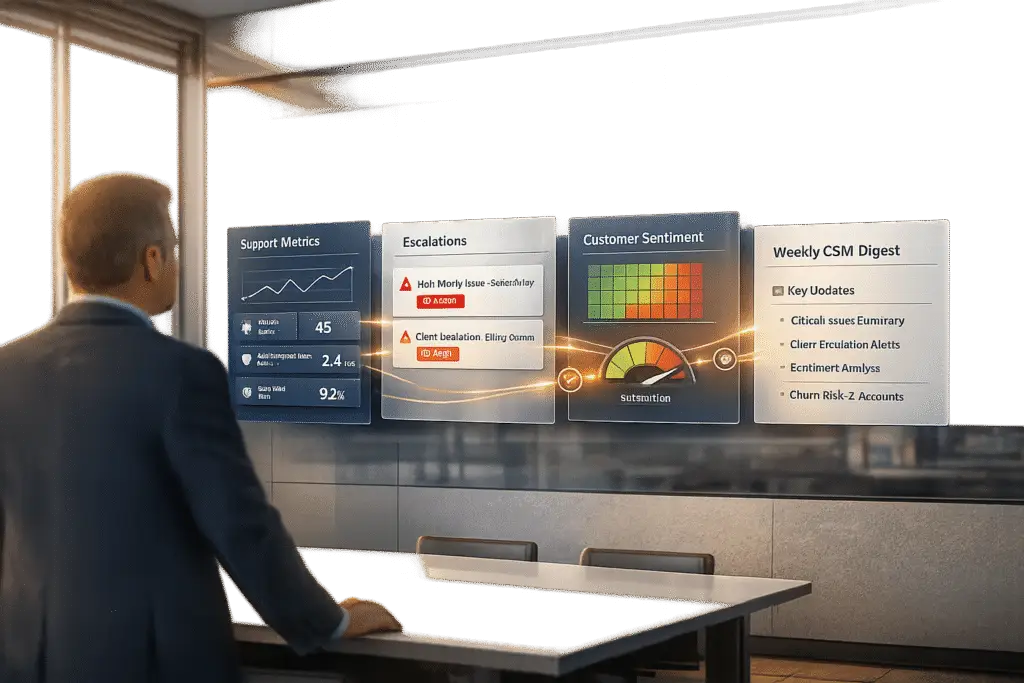
Support and CSMs often miss crucial opportunities to collaborate, leaving CSMs unprepared for renewal discussions or customer frustrations. Weekly updates from support teams can bridge this gap by sharing actionable insights, but manual reporting takes too much time. Automating these updates ensures timely, accurate information without draining resources.
Here’s what weekly updates should include:
- Performance Metrics: Ticket volumes, resolution times, SLA performance, and trends.
- Escalation Data: Key issues with context, reproducibility steps, and severity levels.
- Customer Sentiment: Trends in feedback, flagged issues, and links to conversations.
To save time, start with a manual reporting template using a "Fact → Plan → Blockers" framework. Then, automate with AI tools like Supportbench to:
- Summarize Data: Extract key details from tickets and conversations.
- Analyze Sentiment: Flag risks using tone and urgency analysis.
- Automate Reports: Deliver scheduled updates directly to CSMs.
- Set Up Dashboards: Monitor account health in real time.
Automation frees CSMs to focus on problem-solving and customer care, improving collaboration and reducing churn risks. Start by automating one report and expand as needed.
AI Customer Success Clone: Automate CSM Busywork & Focus on Growth
sbb-itb-e60d259
What to Include in Weekly Updates
The best weekly updates go beyond just dumping numbers – they deliver insights that help Customer Success Managers (CSMs) make informed decisions. Instead of overwhelming teams with raw data, support teams should focus on three key areas that directly affect customer health. Let’s break them down.
Performance metrics are the backbone of any update. CSMs need visibility into ticket volume trends, resolution times, open case counts, and SLA performance. But numbers alone aren’t enough – context is crucial. As Ryan O’Donnell, Director of Marketing at MESA, points out:
"Manual reporting takes hours every week and often misses the insights that matter most to your team’s performance" [2].
For example, don’t just report that 47 tickets were logged. Highlight that it’s a 50% increase compared to the last 30 days, which might warrant a follow-up meeting. Week-over-week percentage changes help CSMs identify patterns early, allowing them to act before minor issues escalate into major problems [2].
Beyond metrics, escalation data is critical for addressing potential problems before they spiral. Mark Sherwood, CX Strategist, emphasizes:
"Escalations are where support systems usually fall apart. Not because agents are doing something wrong, but because everything that should be structured isn’t" [1].
Escalation summaries should include reproducibility steps, expected versus actual outcomes, account-specific context, and a suggested severity level [1]. AI tools can also help by spotting clusters of similar issues across accounts, enabling teams to identify potential incidents early and avoid a backlog [1].
Finally, customer sentiment and feedback add a crucial layer of understanding. Weekly updates should summarize 2–3 noticeable trends in plain language. For instance, instead of saying "workflow questions", describe the issue as "confusion about adding delay steps." Include volume estimates and links to relevant conversations so CSMs can quickly review the context without digging through multiple systems [2]. If an issue pops up more than three times, it should be escalated to the product team for resolution within 48 hours [2].
Building a Manual Weekly Report Template
Before diving into automation, it’s essential to establish a manual reporting template that captures the right details in a format that Customer Success Managers (CSMs) can easily use. A solid structure to follow is the "Fact → Plan → Blockers" framework. This method isn’t just about compiling data – it’s about connecting major issues to specific actions or decisions that CSMs need to address. By doing so, the report becomes a tool for problem-solving rather than just a collection of stats [3].
Start with a Metrics Summary
Kick things off with a metrics summary. This section should highlight:
- New versus resolved cases
- Week-over-week volume changes
- Average response times compared to SLA targets
- CSAT, CES, and NPS scores
Always include percentage changes to provide context. For instance, instead of simply noting, "47 tickets this week", add context like, "47 tickets (up 50% from last week)." This makes trends easier to spot and understand if fluctuations are short-term or part of a larger pattern [3][2].
Add an Escalations Section
Next, include an escalations section that organizes issues by urgency and customer tier. Victoria Taylor, Head of Content at Visme, offers a key tip:
"Think about the friendliness of the reader… Use simple language as much as possible in your weekly report, rather than technical terms and jargon" [4].
Quantify the impact of escalations wherever possible. For example, replace vague descriptions like "system issues" with something more specific: "Payment gateway timeout impacting ~200 transactions/hour and $20,000 in revenue" [3]. To keep this section manageable, limit metrics to 5-7 key points and focus on 2-3 critical issues. This ensures the report is concise and actionable for readers [3].
Summarize Customer Feedback and Sentiment
Include a customer feedback and sentiment summary that highlights 2-3 key trends. Use plain language to describe these trends, and provide volume estimates along with links to relevant conversations. This way, CSMs can quickly dive into the context without sifting through multiple platforms. To make this section even more user-friendly, incorporate color coding:
- Green: On track
- Red: At risk
- Black: Pending
This visual system allows for a quick assessment of the overall situation [4]. Aim to keep the entire report to one page so it remains scannable and actionable.
Prioritize High-Value Accounts
For high-priority accounts, add a VIP section at the top of the template. This ensures that critical issues affecting major contracts are immediately visible. By segmenting these updates, CSMs can allocate resources more effectively and prevent high-stakes problems from getting lost in broader updates [2].
This manual reporting template doesn’t just organize data – it sets the stage for more efficient, AI-driven updates in the future.
How to Automate Weekly Updates with AI
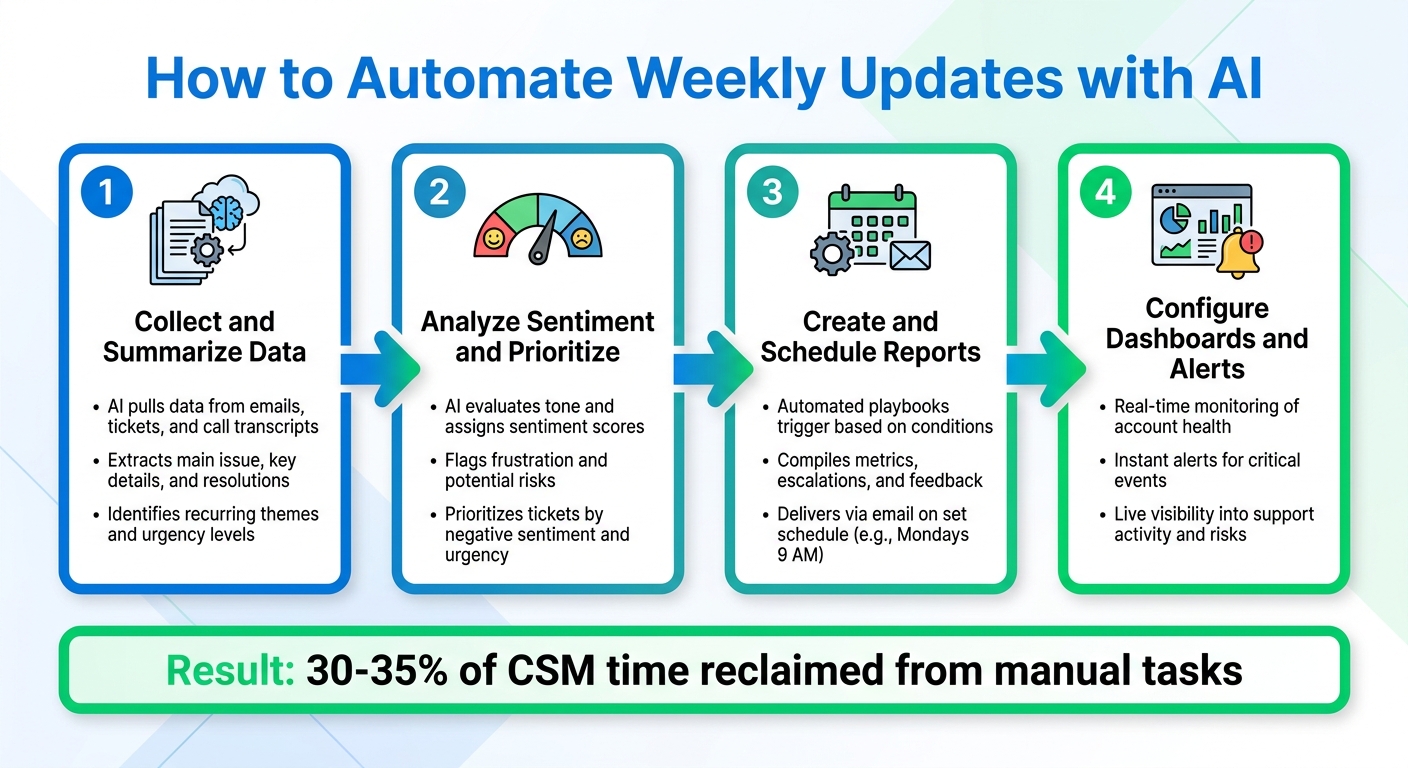
4-Step Process to Automate Weekly Support Updates for CSMs
Transforming your manual report template into an automated system can save time and ensure consistent, accurate updates for Customer Success Managers (CSMs). By automating repetitive tasks, support agents no longer need to remember what to include each week. Studies show that 30% to 35% of a CSM’s workload is often tied up in manual tasks like meeting preparation or managing follow-ups – automation helps reclaim that time [7]. The steps below outline how to build an AI-powered reporting system that delivers actionable insights to CSMs every week.
The process involves four key steps: gathering and summarizing data, analyzing sentiment to prioritize updates, scheduling automated reports, and setting up real-time dashboards for live account monitoring.
Step 1: Collect and Summarize Data with Supportbench AI
Start by using AI to pull together and summarize data from emails, support tickets, and call transcripts into concise overviews. Supportbench’s AI summarization tool reviews the entire conversation history of a ticket to extract the main issue, key details, and any resolutions or pending steps [8]. This eliminates the need for CSMs to sift through lengthy message threads to understand the status of a customer account.
Additionally, AI can pinpoint recurring themes and assess urgency levels, helping teams focus on the most pressing issues [8].
Step 2: Analyze Sentiment and Prioritize Updates
AI tools can evaluate the tone of customer interactions and survey responses, assigning sentiment scores that flag frustration or potential risks that might not show up in traditional metrics [5]. Supportbench’s AI, for instance, detects sentiment and urgency in communications, enabling reports to highlight tickets with negative sentiment or high urgency at the top of the list [8].
This prioritization ensures that teams can address critical issues promptly, reducing the chances of minor problems escalating into major churn risks.
Step 3: Create and Schedule Automated Reports
Supportbench’s workflow automation lets you schedule weekly reports for CSMs. You can create playbooks that trigger when specific conditions are met – like a health score dropping below a threshold or a spike in support ticket volume. These workflows compile key metrics, escalations, and feedback from your manual template and deliver the report via email on a set schedule, such as every Monday at 9:00 AM [5].
Step 4: Configure Real-Time Dashboards and Alerts
Go beyond scheduled reports by setting up AI-powered dashboards and alerts that provide live updates on account health, support activity, and potential risks. Alerts can notify CSMs immediately about critical events, such as a VIP customer submitting a high-priority ticket or a sentiment score falling below a certain level.
For example, in February 2026, Triptease implemented AI tools to manage customer accounts, reclaiming 30% of CSM time by automating data tracking and churn monitoring. Before this, the team, led by Larry Hogan, Global VP of Customer Success & Support, struggled to track churn rates until the end of each quarter. With AI, they gained real-time visibility, allowing them to focus on more strategic tasks [6]. Hogan explained:
"The concept of being a truly strategic CSM was impossible before. With the AI features… now they actually have the time and visibility to do the work they were hired to do." [6]
Supportbench AI Features for Support-to-CSM Updates
Supportbench’s AI tools simplify the process of keeping Customer Success Managers (CSMs) informed, offering precise updates without the need for complicated IT setups or lengthy report generation. These tools integrate effortlessly into existing weekly reporting routines, building on previously mentioned automation strategies.
AI Case and Activity Summaries
With Supportbench AI, detailed case histories are condensed into concise, actionable summaries. These summaries highlight the core issue, key troubleshooting steps, and any pending actions, giving CSMs a clear snapshot of account status at a glance. The system also evaluates the tone and emotion in customer interactions, helping CSMs identify accounts that may require urgent attention. Resolved cases can even be converted into knowledge base articles, ensuring that the latest solutions and documentation are always part of the weekly updates.
AI Predictive CSAT and Escalation Detection
Supportbench leverages predictive analytics to offer early insights into customer satisfaction and churn risks – even before surveys are completed. Using sentiment analysis from support interactions, the platform generates predictive CSAT and Customer Effort Score (CES) ratings. This allows CSMs to spot potential issues early. Tickets are automatically prioritized based on factors like customer value and emotional intensity, ensuring that critical accounts are addressed first. This proactive approach minimizes manual oversight and helps tackle churn risks head-on.
Custom Dashboards and Email Automation
Supportbench provides customizable KPI dashboards that bring together data on escalation trends, customer health, and issue types in one place. These dashboards integrate real-time data with automated email updates, giving CSMs a complete view of customer status. A no-code automation builder ensures updates are sent directly to CSM inboxes, offering a seamless way to stay informed. By presenting a 360° view of the customer journey, these tools ensure that updates reflect the full scope of customer interactions rather than isolated events. Export-ready insights and visual CSAT dashboards make it easy to share data with leadership while keeping an eye on sentiment shifts and churn risks in real time.
Conclusion
When Customer Success Managers (CSMs) spend hours sifting through dashboards, they miss out on time they could spend addressing critical customer needs. Automation solves this by breaking down information silos, ensuring consistent communication, and turning ticket data into actionable insights that CSMs can use right away.
Efficiency takes center stage with proactive management. Instead of reacting to problems as they arise, teams can share a unified source of truth that updates automatically on a set schedule. This eliminates the need for constant manual updates or status meetings. Early warning systems add another layer of effectiveness by identifying potential issues before they escalate into churn risks, allowing teams to resolve customer challenges with precision.
Supportbench’s AI tools make this shift possible. Features like predictive CSAT scores, automated case summaries, and customizable dashboards take over the time-consuming tasks of data analysis and reporting. This frees up CSMs to focus on strategic guidance and building stronger customer relationships.
Automation doesn’t replace human connection – it enhances it. By delivering detailed weekly updates that explain the why behind ticket trends, not just the numbers, CSMs can address customer concerns more effectively. The outcome? Better collaboration, improved customer satisfaction, and scalable support operations that don’t come with skyrocketing costs.
To get started, consider automating just one weekly report. Choose the one that takes the most time to prepare manually, set up automated delivery, and track how much time you save. Once you see the benefits, you can expand to include sentiment alerts, predictive insights, and real-time dashboards. The tools are already available – start small and build from there.
FAQs
What’s the best weekly update format for CSMs?
A great weekly update for Customer Success Managers should be brief yet comprehensive, covering the essentials like key metrics, customer escalations, feedback, and next steps. Using a standardized template is crucial – it keeps things consistent and ensures clarity across the board.
Consider automating parts of the process with AI tools. These can handle tasks like summarizing data, analyzing sentiment, and generating reports, saving you time while boosting accuracy. The goal is to create updates that are actionable, easy to digest, and always delivered on schedule.
Which metrics actually predict churn risk?
The repeat contact rate is a strong indicator of churn risk. Data shows that customers who submit 3 or more support tickets within 30 days are 2 to 3 times more likely to churn than those with fewer interactions. Keeping an eye on this metric allows you to spot customers who may be dissatisfied and take action to enhance their experience before they decide to leave.
How do I automate weekly reports without extra admin work?
Automating weekly support reports can save time and ensure consistent updates. By leveraging AI-powered tools, you can simplify data collection and delivery. Connect your support platform to automation tools to pull essential metrics, analyze sentiment, and compile summaries of escalations. Set up workflows to run on a weekly schedule, delivering reports directly to email or Slack. This approach minimizes manual work while keeping Customer Success Managers (CSMs) informed and communication steady.






