- The Problem: Frequent escalations interrupt engineers, causing context switching and lost productivity. Even a 20-minute interruption can cost hours of focused work.
- Root Cause: Most escalations stem from access issues (e.g., permissions for databases or internal tools), not technical roadblocks.
- The Impact: Escalations cost companies time, money, and morale. For example, a SaaS company with a 20% escalation rate loses $97,500 annually in engineering time.
- The Solution: Prevent unnecessary escalations by:
- Setting clear escalation triggers and Service Level Agreements (SLAs).
- Creating structured escalation tiers to filter issues effectively.
- Using AI to predict, triage, and route cases before they disrupt workflows.
- Verifying cases thoroughly before escalating to engineers.
- Empowering support teams with tools and training to resolve more issues independently.
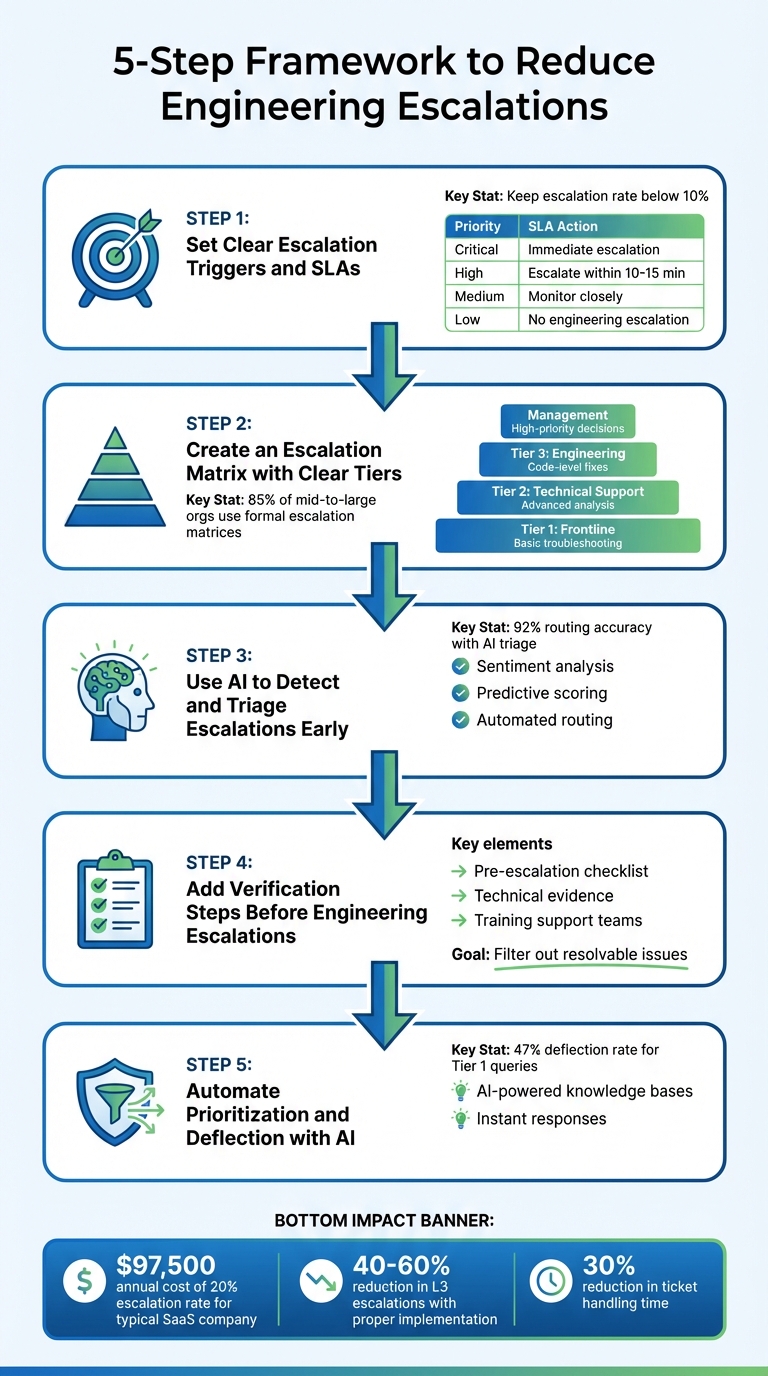
5-Step Framework to Reduce Engineering Escalations and Interruptions
Customer Escalation Reduction Made Easy: Your Prescription to Efficiency
sbb-itb-e60d259
Step 1: Set Clear Escalation Triggers and SLAs
To protect engineering teams from constant interruptions, it’s essential to establish clear escalation criteria and dynamic SLA management. Defining when and how to escalate is the backbone of reducing unnecessary disruptions and sets the stage for the AI-powered triage strategies discussed later. Without these guidelines, support teams often err on the side of caution, escalating cases unnecessarily and delaying resolutions.
A well-thought-out escalation framework separates routine service requests (like password resets) from critical incidents (like server failures) [3]. This distinction helps ensure engineering teams stay focused on tasks that truly require their expertise. For example, major incidents like emergency-level service outages can cost businesses up to $300,000 per hour [3], making it vital to prioritize these cases effectively.
Common Escalation Triggers to Define
When defining escalation triggers, focus on factors like severity, business impact, and technical complexity. For instance, a system-wide outage affecting payment processing should be escalated immediately, while minor UI glitches with workarounds can remain with frontline teams [3][4].
Technical complexity is another key consideration. If resolving an issue requires advanced troubleshooting – such as remote access, database queries, or system resets – it should be escalated [4]. Recurring issues also need attention. Instead of treating repeated problems as isolated support tickets, escalate them for a root-cause analysis [4].
| Priority Level | Impact/Criteria | Action |
|---|---|---|
| Critical | System-wide outage, payment failure, VIP account | Immediate escalation to engineering/on-call |
| High | Large number of users affected, major disruption | Escalate within 10–15 minutes if no progress |
| Medium | Moderate interruption, some employees affected | Continued troubleshooting; monitor closely |
| Low | Minor interruption, workaround available | Standard handling; no engineering escalation |
Fallback rules are just as important. If the primary escalation contact is unavailable, ensure there’s a backup plan to keep cases moving [4]. Aim for an escalation rate below 10% – rates above 15% often indicate that frontline teams need better training or improved resources [9].
Creating Dynamic SLAs That Adapt to Context
Once triggers are in place, dynamic SLAs (Service Level Agreements) ensure that these criteria translate into timely, context-sensitive responses.
Dynamic SLAs adjust response times based on customer tier, issue type, and business needs. For example, a VIP customer facing a billing issue during their renewal period should receive faster attention than a standard user requesting a feature enhancement [5][7].
SLAs should include clear conditions tied to case attributes. For instance:
- A Critical ticket might require acknowledgment within 15 minutes and resolution within 2 hours.
- A Standard ticket might allow 4 hours for a first response and 24 hours for resolution [9].
Proactive alerts can prevent SLA breaches by notifying agents and supervisors before deadlines are missed, giving teams time to act without unnecessary stress [10].
To improve visibility during handoffs between support and engineering, track these as measurable states rather than instantaneous events. Use timestamps like:
- Escalated time: When the handoff begins.
- Claimed time: When engineering acknowledges the case.
- Started time: When active work begins [6].
This approach helps pinpoint bottlenecks where tickets might get stuck. Chinmay Kulkarni, Staff Software Engineer at ConductorOne, explains:
An SLA escalation policy lets you define a time limit… If that SLA isn’t met, C1 can automatically escalate the request. That escalation could mean changing who approves the request, switching to a different policy, or even closing it out altogether [8].
To maintain accuracy, implement pause and resume logic in your SLAs. For example, pause the SLA clock when waiting for customer input, so teams aren’t penalized for delays outside their control [5]. Use precise language in SLAs – replace vague terms like "as soon as possible" with specific timelines like "within 12 hours" [10]. This clarity helps set realistic expectations for both customers and internal teams.
Step 2: Create an Escalation Matrix with Clear Tiers
Once you’ve established triggers and dynamic SLAs, the next step is to create a structured escalation matrix. This tool acts as a roadmap, guiding issues through the appropriate support levels. By doing so, it ensures that only the most complex problems reach engineering teams, keeping their focus on tasks that genuinely require their expertise. Essentially, an escalation matrix outlines the hierarchy of support and the criteria for moving an issue between levels, clarifying responsibilities through support level management at each stage [11].
By 2023, 85% of mid-to-large organizations had implemented formal escalation matrices to streamline incident management [12]. Without such a system, support teams often waste time shuffling tickets back and forth, or worse, escalate issues prematurely – dragging engineers into problems that could have been resolved earlier in the process.
How to Structure Escalation Tiers
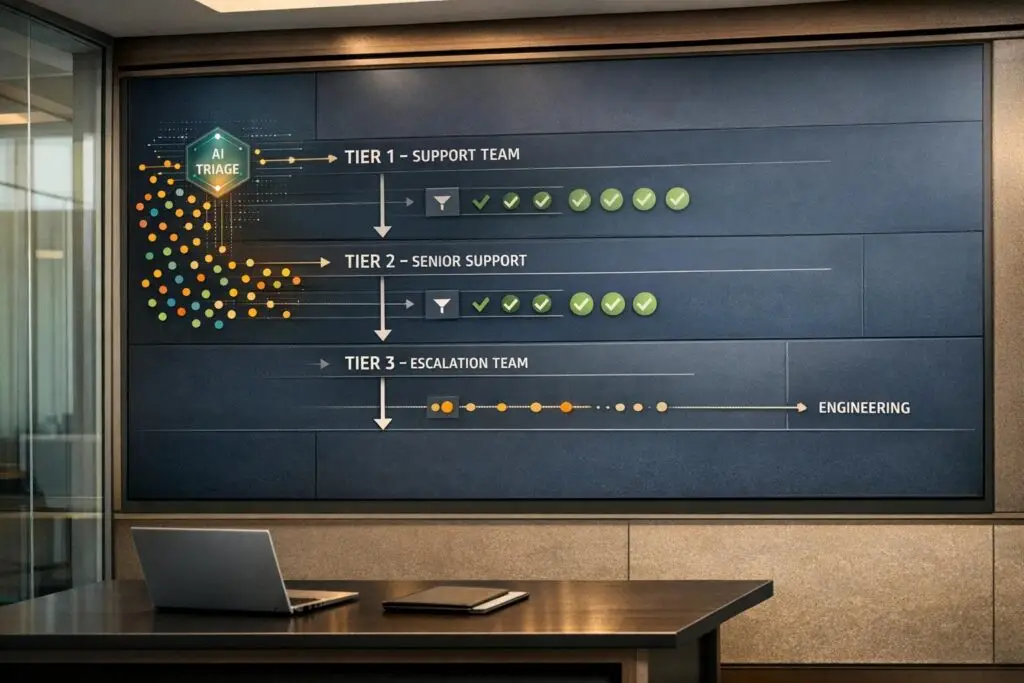
A well-designed escalation matrix typically breaks support into three or four tiers, each with its own focus and responsibilities:
- Tier 1: This is the frontline team, responsible for addressing common queries, basic troubleshooting, and known issues. These agents are the first point of contact for customers, handling tasks like password resets or account setup.
- Tier 2: Here, technical support engineers or senior specialists take over. They handle more complex issues that require advanced tools, deeper technical knowledge, or root cause analysis. For instance, diagnosing intermittent API failures or analyzing logs falls under this tier.
- Tier 3: This tier is for developers and engineers. They handle confirmed software bugs, code-level changes, and system-level failures. By the time an issue reaches Tier 3, Tiers 1 and 2 should have verified it as a problem requiring code intervention.
- Management Tier (optional): Some organizations add a layer for handling high-priority situations, such as SLA breaches, major outages, or account risks. This tier often involves strategic decision-making and resource allocation.
Interestingly, while 40% of small companies opt for simpler structures where frontline teams escalate directly to department heads, larger organizations often use multi-tiered systems that span support, engineering, and DevOps teams.
There are two main escalation paths to consider:
- Functional escalation: Directs tickets to specialized teams with the technical expertise needed to resolve them.
- Hierarchical escalation: Moves issues to higher management levels when they involve major business impact or require additional resources.
| Escalation Tier | Primary Responsibility | Ownership | Key Triggers |
|---|---|---|---|
| Tier 1 | Frontline response and basic troubleshooting | Support Generalists | Initial customer contact; known issues |
| Tier 2 | Advanced technical analysis and specialized support | Technical Support Engineers | Issues requiring advanced tools or specialized knowledge |
| Tier 3 | Bug fixes, code changes, and backend resolution | Engineering / Product Teams | Confirmed software defects; issues requiring code-level intervention |
| Management | Resource allocation and high-level communication | Support/Product Managers | High-priority account risk; SLA breaches; major service outages |
Defining Roles and Responsibilities for Each Tier
To ensure smooth handoffs between tiers, it’s essential to define roles and responsibilities clearly. Each tier should have specific tasks, escalation triggers, and response time expectations tied to SLAs.
For Tier 1, success means knowing when to escalate. Common triggers include unresolved issues after a set time (e.g., 2 hours), problems requiring database access, or suspected bugs. Tier 1 agents should document all troubleshooting steps, include screenshots, and log customer interactions to save time for the next tier.
Tier 2 teams need the authority to dive deeper into diagnostics and use specialized tools. Their escalation criteria should be clear-cut, such as confirmed software defects, issues needing code changes, or system failures affecting multiple users. Severity levels (e.g., P1 to P4) help prioritize tasks, where a P1 might be a total system outage, and a P4 could be something minor like a cosmetic UI glitch [12].
Tier 3 engineers should only receive tickets with complete documentation and context. To avoid misrouting, establish specific communication channels, such as a dedicated Slack channel or ticketing system. Including backup contacts for all tiers ensures continuity if someone is unavailable.
To keep the escalation matrix effective, store it in a centralized, easily accessible location. Update it quarterly or whenever roles change to keep contact details accurate. Post-escalation reviews are also valuable for identifying bottlenecks and improving processes over time.
Step 3: Use AI to Detect and Triage Escalations Early
Once your escalation matrix is in place, the next step is spotting potential issues before they spiral out of control. This is where AI steps in to transform the process. Instead of waiting for a customer to escalate or for an issue to breach its SLA, AI can analyze case histories, customer sentiment, and technical patterns to flag high-risk situations early. By automating triage, support teams can quickly route cases to the right tier, keeping engineering focused on resolving actual code-level challenges. This proactive approach integrates seamlessly with your escalation framework, ensuring that critical cases are flagged and addressed before they escalate further.
How AI Predicts Escalation Risks
Modern AI tools use sentiment analysis to evaluate the tone of customer interactions. Whether it’s emails, chat messages, or support tickets, AI can gauge emotional cues – positive, negative, or neutral – helping teams detect frustration early and prevent formal escalations or public complaints [14].
AI-powered chatbots take this a step further by identifying urgent matters within conversations and immediately escalating them to the right team [14]. Through aspect-based sentiment analysis, AI can link negative emotions to specific product features (e.g., "API timeout" or "dashboard loading"), enabling engineering teams to pinpoint technical root causes faster [14].
Predictive sentiment scores, often measured on a scale from 0 to 100, provide another layer of insight. Cases with scores below a certain threshold can bypass general support queues and go straight to senior tiers. Unlike older keyword-based systems, modern AI models excel at understanding context and nuance, delivering more precise risk assessments [13][14].
"Matters with urgency are spotted by artificial intelligence (AI)–based chatbots with sentiment analysis capability and escalated to the support personnel." – AWS [14]
For cases with particularly low sentiment scores, AI can trigger immediate alerts for senior review. Less critical cases, on the other hand, remain in lower tiers, ensuring that high-priority issues get the attention they need without clogging escalation channels.
Automating Escalation Triage with AI
After identifying risks, AI-driven triage steps in to sort and prioritize cases based on urgency and customer impact. By combining sentiment scores with technical data – like error screenshots, log files, and stack traces – AI achieves an impressive routing accuracy of about 92% [16]. This approach allows teams to identify root causes early, determining whether an issue requires engineering intervention or can be resolved with existing resources.
AI triage becomes even more effective when it evaluates trends over time rather than reacting to single incidents. For example, tracking deviations from a customer’s typical behavior – like a sudden spike in support requests or repeated mentions of the same issue – can reveal patterns that warrant escalation [15]. If a normally low-maintenance customer suddenly submits multiple tickets in a short period, AI can flag this as a potential risk, prompting proactive outreach.
To avoid overwhelming teams with unnecessary alerts, AI systems should incorporate confidence scoring. When AI identifies a potential escalation but isn’t certain, it can route the case to a human for review instead of auto-escalating [16]. This ensures that only critical issues interrupt engineering while still addressing significant concerns promptly.
"By learning what’s normal for an individual patient, AI better ensures alerts are only triggered for meaningful deviations, making each notification more actionable and restoring the urgency – and one could argue purpose – of the alert system." – Dan Tashnek, Founder and CEO, Prevounce Health [15]
Platforms like Supportbench leverage AI-driven automation to handle tasks like auto-assigning issue types, prioritizing cases, and tagging tickets. This eliminates the need for agents to manually categorize every request, saving time and ensuring cases are routed to the right teams faster. When paired with dynamic SLAs that adapt to account-specific contexts – like an upcoming renewal or a recent outage – AI triage helps support teams stay ahead of potential escalations instead of merely reacting to them.
Step 4: Add Verification Steps Before Engineering Escalations
Human verification plays a key role in ensuring only well-documented, legitimate cases reach engineering. While AI-driven triage helps organize and prioritize issues, it’s the human layer that ensures no ticket bypasses essential troubleshooting steps. Without this, incomplete or poorly investigated cases can disrupt engineering workflows, wasting valuable time. A structured verification process helps filter out cases that support teams can resolve, keeping engineering focused on tasks that truly require their expertise.
Pre-Escalation Verification Checklists
Before escalating any issue, support agents should follow a mandatory checklist to confirm all troubleshooting steps have been completed. This process begins with AI-powered triage and classification, ensuring tickets are routed to the correct queue. Agents should then check the platform status page for any ongoing outages and consult the knowledge base for documented bugs or potential workarounds.
The checklist should also include verifying that all standard operating procedures (SOPs) and help center resources have been exhausted. Only when all these options have been ruled out should a ticket be escalated. Additionally, agents must gather technical evidence – like error messages, screenshots, logs, and clear reproduction steps – before forwarding the case. This kind of preparation not only saves engineering time but also speeds up the resolution process. With detailed evidence in hand, engineers can address the issue more efficiently, reducing disruptions to their workflow.
By completing these checks, support teams can also identify areas where they can improve their own problem-solving skills, reducing the need for future escalations.
Training Support Teams to Solve More Issues
While checklists ensure thorough verification, ongoing training empowers support teams to resolve more issues independently.
Providing agents with unified dashboards that offer complete customer context – such as history, product usage, and past resolutions – helps eliminate information gaps that often lead to unnecessary escalations [17]. When agents have all the details in one place, they’re better equipped to handle even complex challenges without turning to engineering for help.
AI insights can further enhance training by offering agents proven troubleshooting steps based on how similar issues were resolved in the past. Automated systems can also capture solutions from resolved escalations and update the knowledge base, ensuring recurring problems don’t require expert intervention [17]. Over time, this creates a feedback loop where every resolved case strengthens the team’s ability to handle future issues independently.
Step 5: Automate Prioritization and Deflection with AI
Building on defined triggers, structured tiers, and verification checklists, AI takes escalation management to the next level by ranking and filtering cases automatically. This approach combines intelligent prioritization with proactive deflection, ensuring engineers only deal with the most pressing issues while routine queries are resolved instantly through self-service.
How AI Handles Escalations Automatically
AI-powered ticketing systems rely on Natural Language Processing (NLP) to evaluate a ticket’s issue, urgency, and technical details [18]. Machine learning models then match this information with historical data to predict the fastest resolution and route the ticket to the right team [18].
Take Rapid7 as an example. In 2024, this cybersecurity company managed over 7,000 complex support tickets monthly, cutting ticket handling time by 30%, increasing agent capacity by 35%, and maintaining a 95% customer satisfaction (CSAT) score [18]. Similarly, Cynet, a B2B security platform, used generative AI to provide quick, verified answers. The results? A 14-point jump in CSAT (from 79 to 93), a 47% deflection rate for Tier 1 queries, and resolution times cut in half [18].
To make AI prioritization work seamlessly, connect your AI platform to all relevant tools – Slack, Confluence, Notion, and your ticketing system – creating a unified data hub [18]. Set up automation rules for common escalation types (e.g., tickets mentioning "API integration error" and "Python" can be routed directly to the appropriate engineering team) [18]. For high-stakes issues like billing disputes or compliance concerns, define confidence thresholds and ensure human oversight with mandatory escalation triggers [19].
In addition to prioritization, AI reduces interruptions by deflecting routine queries through smarter knowledge management.
Reducing Escalations with AI-Powered Knowledge Bases
AI-powered knowledge bases use advanced techniques like Retrieval-Augmented Generation (RAG) to provide answers grounded in verified company information [18]. This method avoids inaccuracies and ensures responses align with company policies and rules [19]. Whether customers or support agents ask questions, the AI pulls relevant articles or generates answers based on approved sources like help centers, internal documents, and past resolutions [18][19].
The shift in the industry is clear: companies are moving from reactive handoff models to proactive systems that resolve issues at the first point of contact, avoiding unnecessary escalations [18]. Before launching an AI-powered knowledge base, it’s crucial to consolidate duplicate articles, clarify policies, and include decision tables for edge cases to improve accuracy [19]. Focus on outcome-driven metrics like resolution rate, containment rate, and cost per resolution, rather than just activity metrics [19].
"The ultimate goal isn’t just to manage escalations better. It’s to create a support ecosystem so intelligent that most escalations never need to happen in the first place." – Team Mosaic [18]
When AI can handle the questions of 77% of customers who expect instant responses and increase issue resolution per hour by about 15% [19], engineering teams are freed to focus on innovation instead of repetitive support tasks. These AI-driven strategies enhance the overall escalation framework, ensuring engineers dedicate their time to critical challenges.
Common Mistakes That Undermine Escalation Management
Even with well-designed AI triage systems and structured escalation processes, operational missteps can still cause significant issues. Two major pitfalls stand out: treating escalations as isolated events instead of symptoms of broader problems and letting non-critical cases reach engineering teams. Both mistakes waste precious engineering time and strain the relationship between support and product teams.
Failing to Address Root Causes of Repeat Escalations
One of the biggest missteps is ignoring the root causes behind recurring escalations. When cases are treated as one-off issues, teams often miss the larger patterns that could point to systemic problems. A common scenario occurs when support teams lack access to essential technical data, such as billing tables or bug statuses. Without this access, they’re forced to escalate repeatedly for information they could have handled themselves [1]. This creates an "escalation loop", where engineers spend hours responding to routine inquiries instead of focusing on new developments [1].
The financial impact of such inefficiencies can be staggering. For instance, a SaaS company with five support agents managing 50 tickets daily and a 20% escalation rate would generate 10 daily interruptions. If each interruption takes 30 minutes, that adds up to 25 engineering hours lost every week – costing the company roughly $97,500 annually [1]. The solution isn’t just better training; it’s about removing technical barriers. Giving support teams access to tools like databases, ticket systems (e.g., Linear), and documentation platforms (e.g., Notion or Confluence) through user-friendly, self-serve interfaces can dramatically cut response times – from hours to mere seconds for complex queries [1].
"Your support team isn’t escalating because they’re lazy or untrained. They’re escalating because the systems that contain the answers are accessible only through advanced technical skills." – Recon [1]
To break this cycle, adopt a "knowledge loop" approach. After resolving an escalation, document the solution in a searchable knowledge base and set up detection rules to help support teams handle similar issues independently in the future [20]. Conducting blameless postmortems on major incidents can also help identify and address systemic failures, preventing future disruptions [22].
Sending Non-Critical Cases to Engineering
Another common mistake is inefficient ticket triaging, which allows non-critical issues – like configuration errors, known bugs with workarounds, or feature requests – to reach engineering teams. These interruptions disrupt planned work and force engineers into constant context switching, which can be costly. A single 20-minute interruption may result in up to 2 hours of lost productivity [2].
For a company with 20 engineers spending 30% of their time on escalations, this inefficiency can translate to about $1.2 million in lost engineering capacity annually. Leading teams aim to keep their engineering escalation rate below 20% [20].
"Treating the engineering team as your personal tech support is a surefire way to create animosity and hinder communication." – Caleb Gammon, Tech Meets Human [21]
To minimize non-critical escalations, standardize intake processes. Route urgent requests through a centralized system with clear priority criteria [22]. Implementing a dedicated on-call rotation – where a single engineer handles operational support requests – can shield the rest of the team from unnecessary interruptions [22]. Additionally, providing detailed diagnostics, such as session replays and logs, empowers support teams to resolve issues independently [20]. Finally, don’t just measure deflection rates; track resolution quality to ensure customer problems are genuinely addressed, not just rerouted [20].
Measuring Success: Metrics for Fewer Engineering Interruptions
To fix a problem, you first need to see it clearly. Traditional engineering metrics like sprint velocity and DORA scores often overlook the hidden burden of support escalations. Teams frequently allocate 20% to 30% of their sprint capacity to handle unexpected escalation work, effectively losing a significant chunk of productivity [24].
"Traditional metrics hide structural failures. You see that 500 tickets escalated last month. You don’t see that 200 sat for four hours between ‘escalated’ and ‘engineering started work.’" – Richie Aharonian, Head of Customer Experience & Revenue Operations, Unito [25]
The key is tracking metrics that reveal how escalations truly impact engineering teams. For example, instead of just counting tickets, measure how much sprint time (in hours) escalations consume. If senior engineers spend over 15% to 20% of their time on unplanned work, it can derail feature delivery schedules. Automated triage systems can reduce this number to under 10% [24].
Tracking Escalation Volume and Resolution Speed
Metrics help uncover how escalations drain engineering capacity and where inefficiencies might be hiding.
- Time-to-escalate: This measures how long it takes from ticket creation to escalation. If this number is high, it might indicate that support teams are struggling to identify when they need help [23].
- Handoff delay: This tracks how long a ticket sits before engineering starts working on it. For high-priority issues, delays over 30 minutes may point to routing or notification problems [25].
- Bounceback rate: This shows how often engineering returns tickets to support for more information. A healthy rate is 5% to 10%. Anything above 20% suggests escalation management system criteria or missing technical details in escalation forms [25].
- Repeat issue rate: This measures how often incoming tickets are variations of previously solved problems. A high rate signals that debugging insights are not being documented in a way that others can easily access later [24].
Industry benchmarks can provide useful context. For example, a well-managed service desk typically has an escalation rate of 15% to 20% [25]. Customer re-contact rates for escalated tickets should stay below 15% [25]. By the third year of using integrated service management tools, organizations often see a 30% improvement in ticket-handling efficiency [25].
Another critical metric is decision latency, which measures the time between when an escalation is raised and when a final decision (like a rollback or risk acceptance) is made. Delays here can reveal bottlenecks in the approval process. Weekly escalation reviews can help identify and address recurring issues [23].
Measuring Engineering Team Productivity Impact
Escalations don’t just affect individual tickets – they can have a ripple effect on overall engineering productivity.
One of the most telling metrics is the L2/L3 deflection rate, which tracks how often support resolves complex issues without involving engineers. This is particularly important because it directly preserves senior engineers’ time. Systems that provide support teams with deeper context – like code-level insights – can significantly improve this rate [24].
Another valuable metric is average investigation time by tier. Breaking this down into L1 (support-only), L2 (engineering context required), and L3 (senior engineer-level investigations) can pinpoint where resources are being consumed. A rise in L3 investigations could indicate underlying product quality issues or a lack of knowledge transfer to support teams [24].
It’s also worth remembering that only 1% to 5% of users report software issues, meaning the visible ticket queue is just a fraction of the actual problems. For a mid-size company, senior engineers spending 30% of their time on triage could translate into a $1.05 million annual capacity cost [24].
"Reducing debugging time is a metric. Returning that time to planned work – and tracking what gets built with it – is the actual goal." – PlayerZero Team [24]
To ensure accurate data collection, automate timestamps. For instance, add an "Escalated At" field when a ticket changes to escalated status to track time-to-escalate accurately [23]. Use custom fields like "Escalation Reason" and "Escalated To" to standardize data across teams. Comparing timestamps between tools like your CRM and engineering task manager (e.g., Jira) can also uncover hidden delays in the handoff process [25].
Conclusion: Building Better Escalation Management Systems
Escalations don’t have to disrupt engineering productivity. By implementing strategies like setting clear triggers and SLAs, using tiered escalation matrices, leveraging AI-driven triage, verifying issues before escalation, and automating prioritization, you can create a system where engineers remain focused on their core tasks rather than constantly addressing support tickets.
The benefits of these approaches are tangible. For example, empowering support teams with technical context can significantly reduce L3 escalations – by as much as 40%–60%. Companies like Zuora and Cyrano have demonstrated the impact: Zuora achieved a 60% reduction in escalations, while Cyrano cut engineering hours spent on bug fixes by 80% [20].
"You shouldn’t escalate tickets to the engineering team in the same way you receive them. Treating the engineering team as your personal tech support is a surefire way to create animosity." – Caleb Gammon, Tech Meets Human [21]
AI-native platforms, such as Supportbench’s support CRM, make these improvements achievable by equipping support teams with the technical insights they need. Features like session replays, code path tracking, and access to historical resolutions allow L1 and L2 agents to handle cases that would otherwise require engineering intervention. Automated triage ensures only the most critical, non-duplicate issues reach engineers, while real-time sentiment analysis helps prioritize based on customer urgency and technical complexity. Additionally, every resolved escalation enriches the knowledge base, preventing recurring issues from reaching engineering teams.
The goal isn’t to eliminate escalations entirely but to ensure that when they do occur, they are meaningful and justified. A well-designed system preserves engineers’ ability to focus, minimizes the cost of context-switching (which takes about 23 minutes to recover from [20]), and keeps customers satisfied. With the right tools and processes, escalations become an opportunity for continuous improvement rather than a productivity drain.
FAQs
How do we choose escalation triggers without over-escalating?
To keep escalation processes under control, set clear and specific triggers that justify involving higher-level intervention. These triggers might include situations like issues that fall outside the team’s scope, urgent matters requiring immediate attention, or problems causing major disruptions. Establish well-defined thresholds, such as unresolved critical issues or significant operational interruptions, to guide decision-making.
Make it a habit to review these criteria regularly to ensure they align with current priorities and organizational needs. This method not only avoids unnecessary escalations but also helps maintain workflow efficiency and builds trust among teams.
What data should support include before escalating to engineering?
To ensure escalations are handled efficiently, support teams should include the following essential information:
- Customer issue details: Provide a clear description of the problem, including any symptoms, error messages, or unusual behavior observed.
- Troubleshooting steps: Outline the actions already taken to resolve the issue, helping to prevent duplicated efforts.
- Impact and urgency: Explain how the issue is affecting the customer or business to prioritize appropriately.
- Reproduction steps: Share details about the environment, versions, or conditions needed to replicate the issue for further investigation.
- Previous communication: Include any relevant interactions or history to maintain continuity and avoid missteps.
By covering these points, support teams can ensure a smoother and more effective escalation process.
How can AI triage reduce escalations without creating false alarms?
AI triage helps reduce escalations by examining alert context, severity, and patterns to separate actual threats from irrelevant noise. These systems improve over time by learning from feedback, which fine-tunes detection models and cuts down on false positives. Automated workflows handle low-priority alerts, bringing only high-confidence incidents to the forefront. This approach allows support teams to concentrate on real problems, boosting efficiency and avoiding unnecessary disruptions.