



Product launches often fail when support teams are unprepared. A support-driven release readiness checklist ensures your support team is ready before customers encounter new features. This process focuses on training, documentation, and tools to minimize downtime and improve customer experience.
Key takeaways:
- Why it matters: 98% of engineering leaders face issues due to unprepared launches; downtime costs $5,600 per minute.
- Steps to success:
- Form a cross-functional team with clear roles.
- Update documentation and knowledge bases early.
- Train support teams and simulate scenarios.
- Set dynamic SLAs, escalation paths, and monitoring systems.
- Run final validation and confirm readiness before going live.
- AI tools: Automate documentation updates, create training simulations, and monitor launch performance to reduce errors and costs.
This checklist ensures smooth launches by aligning support teams with product goals, reducing risks, and improving response times.
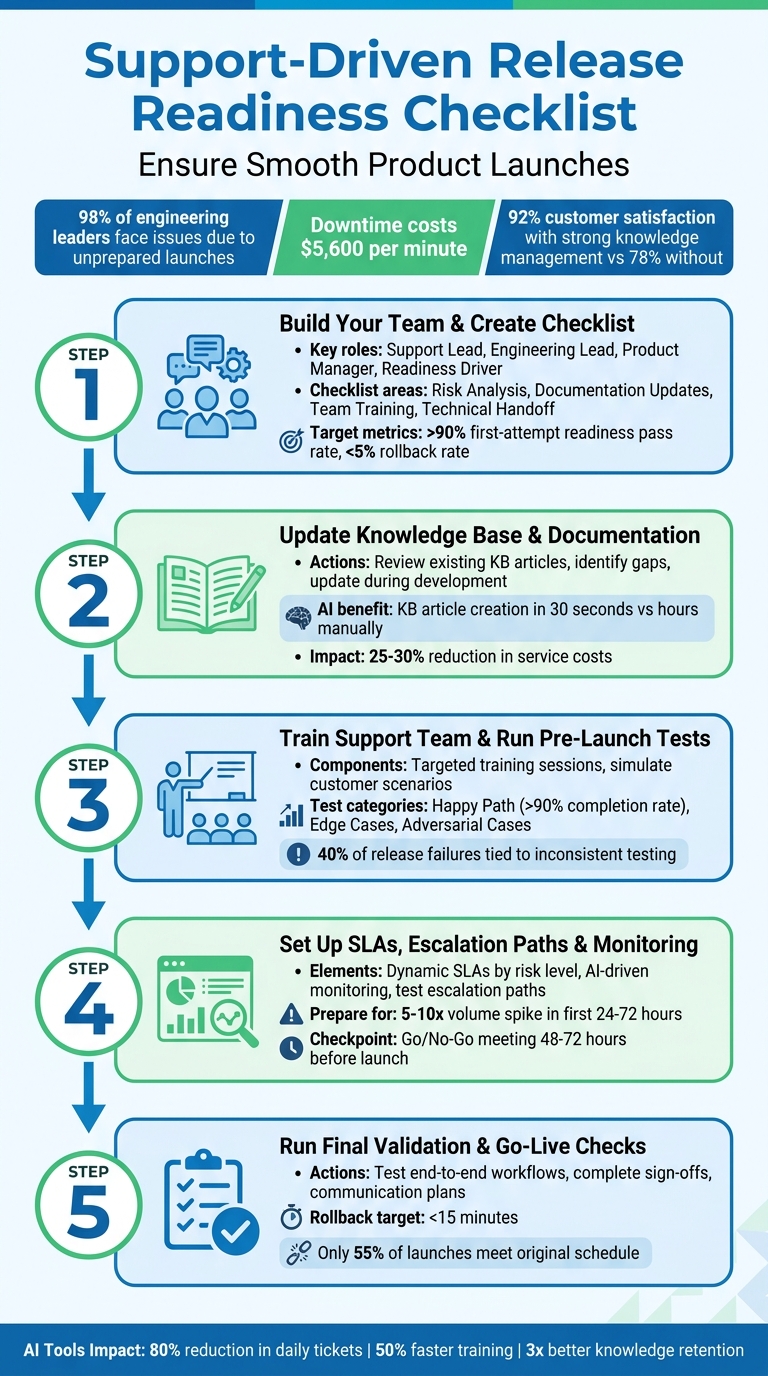
5-Step Support-Driven Release Readiness Checklist
Step 1: Build Your Team and Create a Standard Checklist
Start by putting together a cross-functional team that includes support leaders, frontline agents, product managers, engineering leads, and SRE or platform engineers. Why? Because combining technical, business, and support insights helps close any gaps. In fact, 66% of leaders say inconsistent standards across teams are the biggest obstacle to scaling readiness effectively [4]. Getting everyone on the same page from the start is key. Clear roles and responsibilities also set the stage for smooth execution.
Assign Roles and Responsibilities
Each area of readiness needs a clear owner. Here’s how you can break it down:
- Support Lead: Handles documentation updates, agent training, and setting up escalation paths.
- Engineering Lead: Oversees monitoring alerts, rollback procedures, and performance testing.
- Product Manager: Provides predicted FAQs, summaries of customer impacts, and acceptance criteria [8][3].
Additionally, appoint a Readiness Driver from support operations. This person will coordinate efforts across the team, manage capacity planning, and lead weekly triage meetings. Without someone in charge of keeping things organized, there’s a risk of missing critical steps – especially for releases with a high customer impact or technical complexity.
What to Include in Your Checklist
Your checklist should cover four main areas: risk analysis, documentation updates, team training, and technical handoff. This ensures no critical aspect of release readiness is overlooked. Here’s how to approach it:
- Risk Analysis: Classify each release as low, medium, or high risk. For example, high-risk changes like database migrations or major UI updates require a full cross-functional review. On the other hand, low-risk bug fixes can follow a simpler process [2][4].
- Documentation Updates: Include rollback procedures (aim for under 15 minutes), updated knowledge base (KB) articles, and internal FAQs.
- Team Training: Provide agent briefings and ensure they have clear escalation contacts.
- Technical Handoff: Set up monitoring dashboards and ensure everything is ready for a smooth transition [3][7].
A well-run release process should aim for a first-attempt readiness pass rate of over 90% and a rollback rate of less than 5% [3]. Use these benchmarks to guide your checklist, and adjust its rigor based on the complexity and customer impact of each release.
sbb-itb-e60d259
Step 2: Update Your Knowledge Base and Documentation
Now that your team and checklist are in place, it’s time to focus on your knowledge base (KB) and documentation. Keeping these resources up-to-date is crucial for a smooth launch. A well-maintained KB reduces repetitive questions and minimizes the need for incident "firefighting." If your documentation isn’t ready before customer tickets start pouring in, your team will waste valuable time answering the same questions instead of tackling more complex, high-priority issues.
The importance of this step is clear. Companies with strong knowledge management systems report a 92% customer satisfaction rate, compared to just 78% for those without them [11]. Beyond customer satisfaction, a robust KB can help identify and address potential risks before they escalate into production issues, cutting down on post-launch emergencies [9][2]. As Team DX aptly states:
"Readiness isn’t just about the code. It’s about ensuring that everyone who supports the code is also ready" [2].
Review Existing KB Articles
Start by auditing your current KB to spot any gaps or outdated information before new features go live [2]. Pay particular attention to features with the largest "blast radius" – those that impact the most users or carry significant technical risks [2]. This targeted approach ensures you focus on the most critical updates rather than spending time on minor changes.
A practical strategy is to have team members who weren’t involved in the development process review your documentation. Their "fresh eyes" can quickly identify unclear instructions or missing details [9]. Additionally, aim to update technical and API documentation during the development phase, not after the release is finalized [1]. This parallel workflow avoids last-minute scrambles and ensures your documentation is ready when it’s needed.
Once the essential updates are complete, refine the KB based on user feedback and conduct a final QA check in the staging environment to confirm accuracy [2][9].
Use AI to Speed Up Updates
While careful auditing ensures accuracy, AI tools can dramatically speed up the process. Updating a KB manually can take hours – time you likely don’t have during a busy release cycle. This is where AI tools can make a real difference. For example, generative AI can turn bullet points, notes, or ticket resolutions into KB drafts in just 30 seconds [12]. As Sirjad Parakkat, an Engineering and Product Executive at Ivanti, explains:
"Generative AI can significantly accelerate the creation of knowledge articles, reducing the time from hours to minutes while allowing for personalization and translation for diverse audiences" [10].
Supportbench offers an AI KB Article Creation from Case History feature that takes this concept even further. If you identify a case that provides a good example of a problem and its solution, the AI can automatically create a KB article from it. This includes generating the subject, summary, and keywords based on the case details. This process not only saves time but also ensures your KB reflects real-world customer issues and effective solutions.
AI also supports the three Rs of knowledge management: serving Relevant articles based on usage, pinpointing underperforming content for Revision, and flagging outdated information for Retirement [10]. Incorporating AI into your customer service operations can reduce overall service costs by 25–30% [11]. To further streamline incident response, link your internal runbooks and KB articles directly to monitoring dashboards and alerts, so support teams can access them instantly during an issue [2]. AI doesn’t just speed up the process – it strengthens your overall readiness for launch.
Step 3: Train Your Support Team and Run Pre-Launch Tests
Once your documentation is up to date, the next step is preparing your support team to tackle potential release issues. This involves targeted training and realistic simulations. Even the best knowledge base (KB) won’t be effective if your team isn’t well-trained to use it. By aligning your training efforts with the updated KB, you can ensure your team is ready to provide effective support during the launch.
The pressure to get things right is undeniable. Industry data reveals that 40% of release failures are tied to inconsistent testing, while 10% result from poor monitoring practices [3]. And when teams fail to catch issues early, they often learn about bugs from frustrated customers instead of identifying them beforehand [3]. As Fayaz Mohammed, an expert in Release Confidence & Quality Ownership, explains:
"Release readiness is about evidence-based confidence, not task completion. The goal is to ship safely and predictably, not to ship on time at all costs" [3].
Run Targeted Training Sessions
Begin by hosting readiness workshops before the launch. These sessions should cover the release’s purpose, goals, architectural updates, and a detailed walkthrough of changes [5]. Tailor the training to each role – while not everyone needs deep technical expertise, everyone should understand how the changes impact their responsibilities.
One effective strategy is to hold internal release briefings that outline all features, changes, and known risks before the release window begins [1]. For complex releases, consider pairing junior support staff with SREs or engineers during readiness reviews. This creates "teaching moments", helping agents grasp not just what changed but why those changes matter [2].
Additionally, test escalation paths and rollback procedures during training. Develop runbooks for common issues and link them directly to support dashboards so agents can access them quickly during incidents [1][2]. For fast-paced teams, focus on "blast radius" management – ensuring agents can quickly detect and address issues rather than attempting to prevent every possible bug [2].
Simulate Customer Support Scenarios
Once role-specific training is complete, simulated scenarios can validate your team’s readiness. Start by identifying at least 20 representative inputs your support system might encounter. These should fall into three categories: "Happy Path" (expected queries), "Edge Cases" (unusual but plausible situations), and "Adversarial Cases" (inputs designed to stress the system) [13].
Aim for a task completion rate of over 90% on "Happy Path" cases before moving into production. If the rate drops below 80%, it signals that the core functionality is too unstable for further testing [13]. Repeating key queries 5–10 times can also help spot inconsistencies, which may highlight reliability issues [13].
Tools like Supportbench’s AI Agent-Copilot can streamline this process by allowing agents to practice responses using historical case data and both internal and external knowledge base articles. The system suggests relevant answers based on similar past cases, enabling agents to rehearse in a realistic environment before going live. Additionally, simulate tool failures – like API timeouts or errors – during practice sessions to test how agents respond under pressure and prevent them from getting stuck in endless loops [13]. As The Agent Labs points out:
"How a system fails is as important as how it succeeds. Good failure handling is what separates a production-ready agent from a demo" [13].
Finally, save validated test cases in a regression suite for automatic pre-update testing [13]. With a well-trained and thoroughly tested support team, you’re ready to move forward by configuring SLAs and establishing strong monitoring systems.
Step 4: Set Up SLAs, Escalation Paths, and Monitoring
Once your team is trained and prepared, the next step is to establish the systems that will handle the inevitable surge in support requests during a launch. Even the best-prepared team can struggle if the infrastructure isn’t ready to manage a sudden increase in volume – often 5 to 10 times higher within the first 24 to 72 hours [14].
The stakes are high: 98% of engineering leaders report facing major fallout from launching services that weren’t adequately prepared [4]. And downtime? That can cost as much as $5,600 per minute [1]. As TQ Systems puts it:
"Release readiness is not about completing tasks. It’s about confidence: Can you ship this release to production without causing critical issues, downtime, or customer impact?" [3]
To avoid these pitfalls, you need to set up dynamic SLAs, leverage AI-driven monitoring, and ensure escalation paths are clear and functional.
Set Up Dynamic SLAs
Traditional SLAs often fall short during a product launch. Instead, you need SLAs that adjust based on the risk level of the release. Start by categorizing changes into Low, Medium, or High risk. High-risk changes, for instance, should involve double the monitoring, testing, and rollback preparation compared to standard updates [3].
Prepare your team for spikes in volume by using forecast-driven staffing models. These models link expected support demand to specific staffing actions, like adding overtime shifts or rerouting tickets to specialized queues. If forecasts show demand exceeding capacity by a set percentage, you can activate these measures in advance [8]. Prioritize tickets from high-value accounts or customers in active buying cycles since a delay in response can degrade purchase intent by about 5% for every hour they wait [14].
Tools like Supportbench’s Dynamic SLAs can automatically adjust response times based on factors such as upcoming renewals or high-value account flags. This ensures that critical cases are handled quickly without requiring manual oversight. Additionally, setting up automated SLO validation with scorecards allows you to track error budgets and flag early signs of trouble during the rollout [4].
Enable AI-Driven Monitoring
When support volumes spike, manual monitoring simply won’t cut it. AI-powered tools can step in to prioritize cases, identify potential customer satisfaction issues (CSAT), and tag cases automatically for quicker resolution. For example, Supportbench’s AI Automation can streamline workflows by assigning issue types and tagging cases, freeing up agents to tackle more complex problems.
AI Predictive CSAT and CES tools can even identify dissatisfied customers before they submit feedback, giving you a chance to intervene early. AI-driven anomaly detection can highlight unusual patterns in product usage or behavior – potentially signaling emerging bugs or friction points – before they escalate into major issues.
For faster resolution, link automated alerts directly to runbooks. This provides responders with immediate context and clear steps for remediation, reducing Mean Time to Recovery (MTTR) [2] [4]. Keep ownership information updated by syncing with identity providers, ensuring that contact details remain accurate as team roles change [4].
Schedule a "Go/No-Go" checkpoint 48 to 72 hours before launch. Use this time to confirm that monitoring systems, on-call assignments, and documentation are all in place [8].
Test Escalation Paths
Before the launch, test your communication and escalation channels to ensure they work as intended. Emergency channels must be fully functional, and the team should know exactly how to use them [1]. Assign an on-call escalation contact ahead of time, and clearly define the criteria for escalation. Everyone should know who to contact and what diagnostic data to gather when escalating an issue [8].
Step 5: Run Final Validation and Go-Live Readiness Checks
You’ve got your checklist, your team is trained, and your monitoring systems are in place. Now comes the big moment: making sure everything is truly ready before you go live. This step isn’t about just checking off tasks – it’s about ensuring your operation is prepared to handle the real challenges ahead.
Here’s a reality check: only 55% of product launches stick to their original schedule, while 45% face delays of at least a month [6]. What happens in the last 48 to 72 hours before launch can make or break your rollout. This is when you bridge all your preparation with the actual live launch.
Plan a formal "Go/No-Go" checkpoint 48 to 72 hours before launch. At this meeting, confirm that four key deliverables are ready: a customer-facing explanation of the updates, an internal decision log for handling edge cases, proof that your team has completed all training, and a capacity plan to manage the expected surge in activity [8].
Test End-to-End Workflows
Before you go live, run a complete test of your support workflows. Use the training and AI tools you’ve set up to validate every support scenario. Simulate the entire process, from a customer submitting a ticket to resolution. This includes ticket routing, agent responses, applying macros or knowledge base articles, and meeting your SLA targets. If any part of this process fails, it’s a clear sign you’re not ready yet.
Ensure that Supportbench’s AI correctly identifies cases to achieve first-contact resolution (FCR) – a metric that has historically been tough to track manually. Run sample tickets through the system to confirm its accuracy before real customer interactions begin.
Don’t skip the rollback test. Document your rollback plan and test it in a staging environment. Best practices suggest you should be able to undo a release in under 15 minutes [3]. If it takes longer or hasn’t been tested, you could risk losing customer trust when things go wrong.
Leverage AI tools to find gaps you might have overlooked. Simulate edge-case queries through your knowledge base to see how the system responds to unclear or missing information. Define clear "don’t know" behaviors for your system – should it provide an estimated answer or stick to cited information? This step helps avoid what one expert describes as "trust-killers" [15]. Many support bots fail because no one defines what "good" looks like before launch [15].
Complete Sign-Offs and Communication Plans
Once your workflows pass testing, finalize your sign-offs and communication strategy. Get written approvals from key teams – support, product, engineering, and customer success. Document these approvals in a centralized system like Jira, a shared spreadsheet, or a detailed launch brief [8][7].
Internal communication is just as important as external messaging. Make sure your entire team knows the launch date, the on-call schedule is set, and escalation paths are clear. For external communication, follow a sequence: start with an internal announcement, then release support documentation, followed by in-app notifications, customer emails, and finally blog posts or social media updates [7].
In the first week after launch, conduct daily reviews of new tickets to address any issues quickly. Sample 5 to 10 tickets within the first 48 hours to ensure agents are using the new guidance correctly [8]. This immediate feedback loop helps prevent small problems from turning into bigger ones.
The goal here isn’t perfection – it’s confidence. As Fayaz Mohammed from TQ Systems explains:
"Release readiness is not about completing tasks. It’s about confidence: Can you ship this release to production without causing critical issues, downtime, or customer impact?" [3]
If you can confidently say "yes" and back it up with evidence, you’re ready to go live.
Common Pitfalls and How AI Helps Avoid Them
Even with a well-organized checklist, two major challenges can disrupt your release: gaps in your knowledge base and unprepared support teams. Both can slow down issue resolution and damage customer trust during critical launch periods. Here’s how AI can step in to address these issues.
Incomplete Knowledge Base Coverage
When your knowledge base (KB) is outdated or missing key information, it can lead to delays in support responses and longer resolution times. If documentation doesn’t reflect the latest product updates, support agents are left scrambling for answers, leaving customers frustrated. Static tools like spreadsheets quickly become obsolete, as TestCollab aptly points out:
"A release readiness checklist is only as useful as it is current. Static checklists go stale the moment someone commits a fix or closes a bug." [16]
AI tools can automate the process of keeping your documentation up to date. Instead of manually auditing every KB article, AI systems can analyze unstructured data – such as team chats, product specs, and recorded demos – and convert it into searchable, ready-to-use articles [17][18]. For example, one company reduced its daily ticket volume by 80% by implementing an AI-driven knowledge base and interactive guides. Customers preferred this instant, interactive help over sifting through long, static documents [17].
Platforms like Supportbench take this a step further by flagging outdated content and generating new articles from resolved cases. When an agent handles a complex issue, the system reviews the case history and creates a detailed KB article, complete with a summary, subject, and relevant keywords. This ensures your documentation stays accurate and current without adding extra tasks to your team’s workload. Keeping your KB dynamic is a critical piece of preparing for a successful launch.
Unprepared Support Teams
Another common pitfall is launching without fully trained support agents. If your team isn’t familiar with new features, escalation paths, or potential failure points, they’ll often discover critical issues only after customers do – resulting in a poor customer experience.
AI-powered training tools help bridge this gap by creating realistic simulation scenarios. These tools allow agents to practice handling complex inquiries in a controlled environment, providing immediate feedback and directing them to the latest documentation. This approach can cut training time by 50% and improve knowledge retention by up to 3x, thanks to adaptive learning methods [19][20].
Supportbench’s AI agent copilot further enhances live support by analyzing past cases and searching internal and external KBs to suggest relevant responses in real time. Even if an agent misses a detail during training, they can still deliver accurate and efficient support, especially during the critical first week of a launch. Combining AI-driven documentation updates with these training tools ensures your team is ready to handle whatever comes their way.
Conclusion
This guide has outlined how a support-driven, AI-focused checklist can shift your release process from being reactive to taking a more prepared and forward-thinking approach. Running a release readiness checklist isn’t just about marking off tasks – it’s about ensuring your launch goes smoothly, avoiding downtime and major issues along the way [3]. Teams that consistently launch with confidence rely on a well-tested, repeatable process [2].
Collaboration across teams is key. When engineering, product, operations, and support teams work together instead of operating in silos, they can catch potential risks early – before they affect customers [21]. Proactive training ensures your support team is ready to handle new features, while strategies like canary deployments help limit the impact if issues arise [3]. High-performing teams aim for benchmarks like achieving over 90% readiness on the first attempt and having rollback systems in place to quickly restore stability when needed [3]. These practices lay the groundwork for using automation to make the launch process even more efficient.
FAQs
Who should own the release readiness checklist?
The release readiness checklist needs a clear owner – someone or a team tasked with making sure the product or feature is completely ready for launch. This role often requires close collaboration between engineering, product, and support teams. Usually, a release manager, product owner, or support leader takes charge. They coordinate the process, gather necessary inputs, and confirm that all readiness criteria are checked off before the release goes live.
What should be done 48–72 hours before launch?
To ensure your support team is fully prepared in the critical days leading up to a launch, focus on these essential steps:
- Develop a detailed readiness brief: Use the release information to create a concise yet comprehensive guide that outlines key details.
- Centralize resources: Provide a dependable hub for policies, FAQs, and potential edge cases, so your team has quick access to crucial information.
- Train and refine: Conduct training sessions to ensure your team understands the material. Use their feedback to address any knowledge gaps.
- Plan for demand: Analyze expected customer needs and adjust staffing levels to manage the anticipated increase in inquiries.
By following these steps, your support team will be better equipped to provide accurate and timely help during this critical pre-launch window.
How can AI reduce support tickets after a release?
AI plays a key role in cutting down support tickets by enhancing release documentation, automating ticket summaries, and enabling proactive customer support. For instance, AI can craft concise and clear release notes by summarizing bug fixes, which helps minimize confusion and reduces the number of inquiries. It also supports chatbots and agent assistants by providing structured documentation, allowing them to address routine questions more effectively. On top of that, AI can validate release readiness, identifying and resolving potential issues before they escalate into post-release problems.
Related Blog Posts
- Best SaaS helpdesk for growing support teams
- How do you implement KCS step-by-step with a small team?
- How do you build a change management plan for switching helpdesks (adoption + resistance)?
- HappyFox cutover checklist: parallel run, training, and customer comms
Evaluating help desks for a B2B team?
Supportbench is all-inclusive from $32 per agent per month, with migration and onboarding included. See pricing or book a 20-minute demo.






