
Knowledge-Centered Service (KCS) is a way to make customer support more efficient by turning every ticket into reusable knowledge. For small teams, it helps reduce repetitive work and speeds up ticket resolution by integrating knowledge creation into daily workflows. Here’s how to implement KCS step-by-step:
- Assess Readiness: Identify pain points, like scattered documentation or repetitive tickets. Focus on high-impact areas (e.g., password resets) and set measurable goals (e.g., reduce repeat questions by 40% in 6 months).
- Form a Pilot Team: Choose 3–5 motivated team members to lead the process. Involve IT early to set up tools and ensure smooth workflows.
- Define Objectives & Metrics: Align goals with business needs, such as improving self-service success and reducing ticket resolution times. Track metrics like article reuse rates and first-contact resolution.
- Integrate the Solve Loop: Train agents to search the knowledge base before solving tickets. Use templates for consistency and encourage real-time updates to articles.
- Choose Tools & Train: Select AI-driven platforms that integrate with ticketing systems. Use tools to simplify article creation and maintenance, and provide hands-on training for agents.
- Run a Pilot Program: Start small, focusing on one area (e.g., top 20 FAQs). Gather feedback, track metrics, and refine processes.
- Scale Gradually: Expand KCS to the entire team in phases. Use peer coaching and embed KCS training into onboarding.
- Sustain with AI: Automate tasks like content audits, article updates, and ticket trend analysis to maintain efficiency over time.
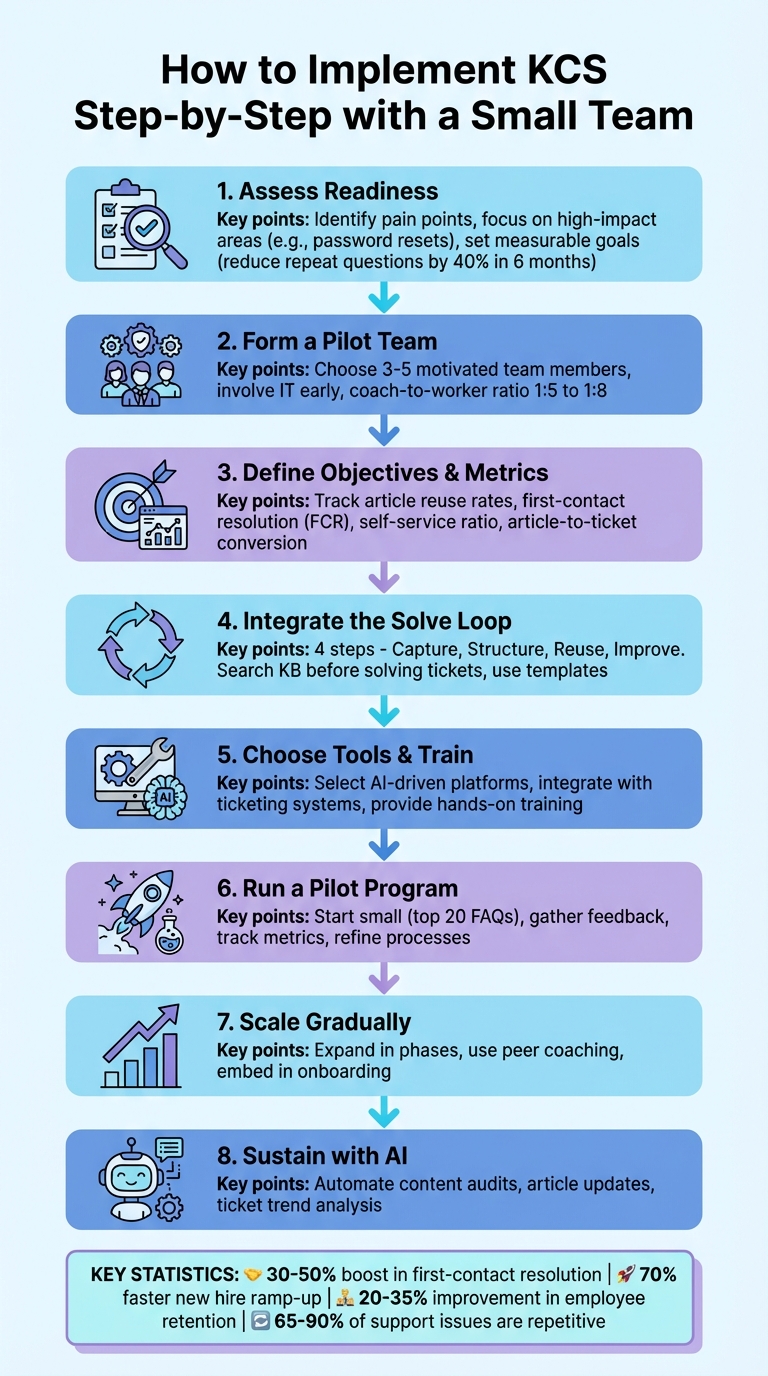
8-Step KCS Implementation Process for Small Teams
The Beginner’s Guide to Knowledge Centered Service (KCS)
Step 1: Assess Readiness and Build Your Core Team
Before diving into Knowledge-Centered Service (KCS), take a moment to evaluate how prepared your team is for this shift. The goal isn’t perfection – it’s about identifying the areas where change will have the biggest impact and setting your team up for a collaborative, knowledge-sharing mindset.
Run a Readiness Assessment
Start by measuring where your team stands today. Look for operational pain points, like scattered documentation stored in emails, chat logs, or personal drives, that waste time and energy. Pay special attention to the content that’s most frequently used – typically, 20% of articles answer 80% of common questions. For example, if password resets dominate your support tickets, focus on improving this area. Set clear, measurable goals, like reducing repeat questions by 40% within six months.
Getting leadership on board is a must. Executives need to commit resources and time for this transition. As the Consortium for Service Innovation explains:
"Knowledge-Centered Service (KCS) is a simple idea that creates profound benefits… To successfully adopt and sustain KCS requires a new way to think about work, people, measures, and process".
This readiness assessment is more than just a starting point – it’s the foundation for building a pilot team that can lead the way.
Form a KCS Pilot Team
Once you’ve pinpointed key areas for improvement, it’s time to assemble a pilot team. Select 3–5 team members who are natural advocates for knowledge sharing and motivated to solve existing challenges. These individuals should also have an eye for detail, as they’ll be responsible for creating content standards and templates.
Take inspiration from the University of South Dakota. In 2022, they used KCS to address knowledge silos and saw an 18% drop in time spent on service tickets within just six months. As Wymar noted:
"We lacked that one platform, that one mindset that allowed us to share knowledge".
Involve your IT team early to handle technical aspects like platform setup and security (e.g., SSO implementation). This allows your pilot team to focus on what matters most – streamlining workflows and creating content – without being bogged down by troubleshooting. In smaller teams, aim for a coach-to-knowledge-worker ratio of 1:5 to 1:8. Pilot team members will need to juggle dual roles as both support agents and mentors, guiding their peers through the process.
Step 2: Define Objectives, Metrics, and Workflows
Once your pilot team is ready, it’s time to outline what success looks like. Focus on metrics that drive efficiency, consistency, and scalability. The goal is to make capturing knowledge a natural part of problem-solving – not an added chore that slows the team down.
Set KCS Objectives and KPIs
Your KCS objectives should align with actual business priorities. For smaller teams, this typically means focusing on self-service success (helping customers solve issues on their own to cut support costs), faster onboarding (reducing new hire training time), and consistent service (ensuring every agent provides the same verified solution for the same problem). These objectives help lower costs while building trust with your customers.
To measure progress, track metrics that matter:
- Article reuse rate: This shows how often existing knowledge articles are linked to tickets, reflecting efficiency and consistency.
- First contact resolution (FCR): Tracks the percentage of issues resolved in the first interaction, which is crucial for customer satisfaction.
- Self-service ratio: Measures how well your content deflects tickets by dividing knowledge base views by new tickets. For example, TechSmith achieved a self-service score 3.6 times higher than the industry average with KCS.
- Article-to-ticket conversion: Uses the formula
(# of tickets created after visiting an article / total article views) * 100to identify articles that need improvement.
Avoid focusing on individual performance metrics, like ranking agents by ticket volume. The Consortium for Service Innovation emphasizes:
"KCS success requires the organization to shift the value proposition… to: you are valued for your ability to learn, and your ability to help others learn".
Once your goals and metrics are clear, embed these principles into your team’s workflows.
Integrate the Solve Loop into Daily Work
The Solve Loop is central to KCS. It’s not an extra task – it’s how your team should approach every problem. The process includes four steps: Capture, Structure, Reuse, Improve.
Start by requiring agents to search the knowledge base using the customer’s exact language before troubleshooting. If a solution already exists, they reuse it. If not, those search terms become the starting point for a new article. This prevents redundant work and ensures knowledge creation is seamless – especially important since 65% to 90% of support issues are repetitive.
To maintain speed and consistency, use concise templates. Small teams don’t have time for overly detailed documentation, so focus on capturing "complete thoughts" rather than full sentences. As Swifteq puts it:
"Providing a solution to one customer creates a little bit of value. Documenting that solution so it can be easily provided to thousands of future customers creates way more value".
Step 3: Select Tools and Train the Team
Once you’ve refined your workflows and gathered insights from your pilot, it’s time to equip your team with the right tools and provide hands-on training to make Knowledge-Centered Service (KCS) part of their daily routine.
Choose AI-Driven Knowledge Tools
Your platform should work seamlessly with your ticketing system, allowing agents to search, create, and update knowledge articles without juggling multiple screens. Look for AI-powered features that simplify article creation and upkeep. For example, tools with generative AI can turn bullet points into polished articles. Other helpful features include agent co-pilots that suggest relevant knowledge during live interactions and automated systems that flag outdated content.
Take Supportbench as an example. It offers built-in AI tools like knowledge capture, auto-tagging, and agent co-pilots. These features let agents create knowledge base articles directly from case histories. The AI organizes the problem and solution, while automatically filling in details like subjects, summaries, and keywords.
When reviewing tools, check if they are KCS Verified or KCS Aligned, as designated by the Consortium for Service Innovation. This ensures the platform supports KCS principles, such as the Solve Loop and real-time updates. Also, look for structured templates – like "Solution", "How To", or "What Is" – to keep your team’s documentation consistent and clear.
Once you’ve chosen the right tool, the next step is training your team to use it effectively.
Implement Practical, On-the-Job KCS Training
Training should be hands-on and integrated into your team’s daily workflow. The goal is to make knowledge capture a natural part of solving problems, not an extra task. Start by teaching agents to search the knowledge base for every ticket using the customer’s exact wording. If an article already exists, they should reuse it.
Encourage real-time updates to the knowledge base. For instance, agents can jot down quick notes during a case, and AI can expand those notes into full articles. This ensures documentation stays up-to-date without adding extra work. The Consortium for Service Innovation explains it best:
"KCS is not something we do in addition to solving problems. It becomes the way we solve problems."
Train your team to make small, immediate fixes rather than waiting to do a full rewrite later. If they spot an error or a missing step while helping a customer, they should update the article on the spot. This approach keeps the knowledge base accurate without requiring extra maintenance time.
For smaller teams, AI can play a key role in speeding up documentation. Agents can use AI to turn simple bullet points into complete articles instantly, ensuring that documentation doesn’t delay ticket resolution. Considering that 80% of support requests are repetitive, every new article added to the knowledge base can save significant time for the entire team.
sbb-itb-e60d259
Step 4: Launch a Pilot and Iterate Based on Results
Run a KCS Pilot Program
Start your pilot program with a small, focused group instead of rolling it out to your entire support team. Pick agents who handle a high volume of cases and are passionate about improving workflows – these individuals can encourage adoption more effectively than those who might resist change. Keep the scope tight; for instance, concentrate on one product line or the top 20 frequently asked questions. This approach helps you achieve quick, measurable successes.
Think of your pilot users as beta testers. Soft-launch the knowledge base to a select group of customers to gather practical feedback and iron out any issues before a wider release. Set up dedicated channels, like a Slack workspace or feedback forms, for participants to share problems or suggestions in real time. From day one, track essential metrics such as search success rates, first-contact resolution, and content gaps revealed by user queries. These insights will help you refine your process and prepare for scaling with AI-driven tools.
Address Challenges with AI Automation
One common concern during a KCS pilot is that documenting solutions might slow agents down. Modern AI tools can help by turning brief case summaries or bullet points into fully structured articles in seconds. For example, Supportbench’s AI-driven features can analyze case histories, automatically generate complete articles, and even identify high-impact topics by reviewing ticket trends. This significantly reduces the manual workload.
Interestingly, only about 20% of documented information ends up being widely used, and KCS focuses on that crucial portion. By automating much of the documentation process, agents can stay fully engaged in the Solve Loop without extending their work hours. The insights and efficiencies gained during this phase will guide your broader KCS rollout and scaling efforts.
Step 5: Scale and Sustain KCS with AI
Expand Beyond the Pilot Team
After your pilot team demonstrates success, expand gradually – one group at a time. Rolling out to the entire team all at once can overwhelm agents and make it difficult to adjust based on real feedback. By adding one or two groups at a time, you give each wave the chance to build confidence, share their experiences, and refine the process for the next group.
Customize your messaging about KCS benefits for different roles. Liz Bunger, KCS Program Manager at Motive, highlights this point:
"It’s all about the ‘what’s in it for me,’ and the ‘what’s in it for me’ is very different for your agents than it is for the managers, than it is for the directors and the CIO".
For agents, the focus is on saving time – about 2 minutes per call – and cutting down repetitive tasks. Managers, on the other hand, are more interested in metrics like achieving 40% faster first-call resolutions. Share these successes widely. For instance, a well-implemented knowledge base can deliver search success rates of around 85%.
Instead of relying on strict oversight, encourage peer-to-peer coaching. Experienced agents from your pilot team can mentor new contributors, creating a more collaborative knowledge-sharing culture while easing the leadership workload. Include KCS training in your onboarding process from the start, teaching new hires to "check the KB first" as part of their daily problem-solving routine.
Once you’ve established this foundation, AI can help you sustain and scale these gains.
Use AI for Long-Term Efficiency
To maintain momentum, integrate automation into your workflow. AI can handle routine governance tasks, freeing up your team for more complex challenges. For example, Supportbench’s AI features track "Article to Ticket Conversion" rates – calculated as (number of tickets created after visiting an article / total article views) × 100. This data helps identify which articles aren’t effectively deflecting tickets. AI can also automate content audits, flag outdated articles, and manage bulk updates across your knowledge base. For instance, if your product’s UI changes, AI can update terminology across hundreds of articles without manual effort.
AI tools can also analyze ticket trends to identify recurring issues and suggest new articles for high-demand topics. These insights provide real-time feedback on customer needs, helping your team stay ahead.
Real-world results show the impact of these strategies. For example, similar AI implementations have reduced service ticket times by 18%. Paula Cottrell, Knowledge Manager at the University of South Dakota, posed a thought-provoking question:
"What would you do if you had an additional day a week?".
Embedding AI directly into the agent workspace – through features like auto-generated drafts or intelligent copilots – makes knowledge sharing part of the daily workflow. This approach allows even a small team to maintain quality and expand coverage as your organization grows.
Conclusion: Key Takeaways for KCS Implementation
Implementing KCS can turn even small teams into agile, high-performing support operations, especially when paired with modern AI tools.
Next Steps for Small Teams
KCS works best when introduced gradually. Start with a pilot team, weave the Solve Loop into daily routines, and ensure every agent is trained to search the knowledge base using straightforward templates. Building these habits early is key to maintaining long-term consistency.
The results speak for themselves: organizations using KCS report a 30–50% boost in first-contact resolution, a 70% faster ramp-up time for new hires, and a 20–35% improvement in employee retention. As the Consortium for Service Innovation explains:
"KCS is not something we do in addition to solving problems. It becomes the way we solve problems".
These initial improvements lay the groundwork for further advancements through AI integration.
How AI Enables Modern Support Operations
AI tools amplify the benefits of KCS by automating repetitive tasks like content audits, drafting articles, and identifying knowledge gaps. These tools can pinpoint bottlenecks, suggest articles based on ticket trends, and transform brief agent notes into fully developed help center content. AI has already slashed service ticket times by 18%, and with 73% of consumers preferring self-service options and 90% expecting access to a self-service portal, the demand for streamlined solutions is clear.
For small teams facing increasing workloads, AI-driven automation ensures quality is maintained without needing to expand the team. By embedding AI into your workflow, knowledge sharing becomes seamless, and your team can achieve more with fewer resources.
FAQs
How can small teams use AI to improve the KCS process?
AI can play a big role in streamlining the Knowledge-Centered Service (KCS) process, especially for small teams. It simplifies how knowledge is created, organized, and accessed. For example, AI tools can automatically capture support interactions, pull out key insights, and even suggest relevant knowledge articles in real-time. This helps agents document solutions faster and more consistently. Plus, by analyzing support trends, AI can spot gaps in the knowledge base and recommend new topics to keep it up-to-date.
AI-powered search tools also make it much easier for both agents and customers to quickly find accurate information. This speeds up resolution times and improves first-contact resolution rates. For small teams with limited resources, AI can handle repetitive tasks like tagging and categorizing content. That way, team members can focus on more complex issues and fine-tuning the knowledge base. Integrating AI into KCS allows small teams to work more effectively, provide excellent support, and get the most out of their resources.
What metrics should we track when implementing KCS with a small team?
When rolling out Knowledge-Centered Service (KCS) with a small team, it’s important to keep an eye on key performance metrics that reflect your team’s efficiency, consistency, and the overall customer experience. Here are a few metrics worth focusing on:
- Search success rate: This measures how often team members or customers successfully locate helpful knowledge articles. It’s a great indicator of how well your knowledge base is serving its purpose.
- First-call resolution (FCR): This tracks the percentage of issues resolved during the initial contact. A higher FCR often translates to a smoother and more satisfying customer experience.
- Customer satisfaction (CSAT): This metric captures direct feedback from customers about their support experience, offering valuable insight into how well your team is meeting their needs.
By keeping tabs on these metrics, you can gauge your progress, spot areas that need attention, and ensure that adopting KCS delivers meaningful benefits for both your team and your customers.
How can we keep our knowledge base accurate and up-to-date?
Keeping your knowledge base accurate and current takes teamwork and a structured approach. Start by assigning a dedicated owner who can manage routine reviews, spot outdated information, and prioritize necessary updates. This ensures there’s always someone focused on maintaining the quality of your content.
Encourage your team to contribute by flagging errors or content gaps as part of their everyday tasks. This creates a proactive system where potential issues are identified and addressed quickly.
Consider using the Knowledge-Centered Service (KCS) methodology, which makes content updates a team effort. Support agents can document solutions as they resolve issues, allowing the knowledge base to grow and adapt to customer needs naturally. Regularly revisiting and refining content based on actual customer interactions helps keep it relevant, streamlines workflows, and ultimately boosts customer satisfaction.