


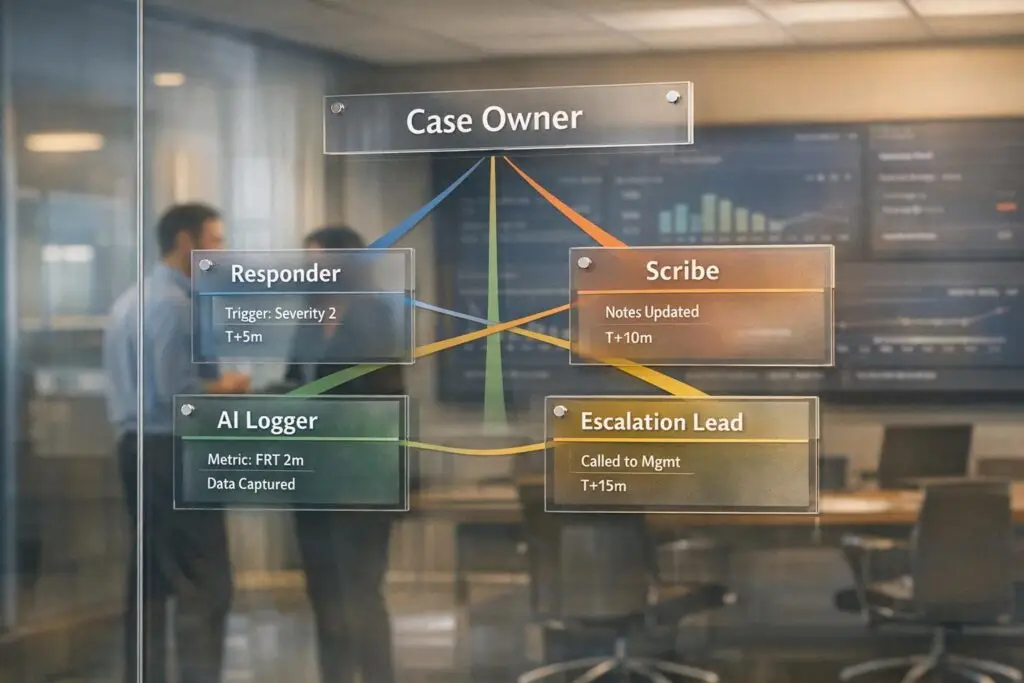
Accountability in swarming scenarios can be challenging but manageable with clear processes. Swarming, a collaborative approach in customer support, ensures the first agent remains responsible while involving subject matter experts (SMEs) as needed. However, when multiple contributors join, accountability often becomes unclear, leading to delays and inefficiencies.
Here’s how to maintain accountability:
- Assign clear ownership: Every ticket needs a single Case Owner responsible for communication, follow-ups, and resolution.
- Define roles and triggers: Use structured roles (e.g., Case Owner, SME, Supervisor) and specific criteria to decide when to initiate a swarm.
- Document everything: Standardize case records and enforce policies for consistent tracking.
- Leverage AI: Automate task assignments, log decisions, and generate summaries to ensure traceability.
- Measure performance: Use metrics like response time, swarm assists, and escalation depth to identify gaps and improve processes.
Building Clear Accountability Structures
Define Ownership Roles and Responsibilities
Assigning clear ownership is critical in managing cases efficiently. Each case should have one designated Case Owner who oversees the ticket from start to finish. This person is responsible for all customer communication, internal follow-ups, and ensuring the issue is resolved. While subject matter experts (SMEs) contribute their expertise, they don’t take on overall responsibility for the case.
"Every ticket needs a single agent responsible for updates to the customer. Without this, communication breaks down and customers get conflicting messages. The owner can ask for help, but they never give up responsibility." – Mark Sherwood, CX Strategist [1]
To streamline collaboration, supervisors and account owners can be automatically added to a swarm based on their connection to the case. This automation ensures that the right people stay informed without disrupting workflows. Platforms like Supportbench support role-based workflows, keeping roles distinct and ensuring ownership remains clear, even as more participants join the swarm. This clarity is essential for maintaining accountability throughout the case lifecycle.
| Role | Primary Responsibility | Accountability Level |
|---|---|---|
| Case Owner | Customer communication, follow-ups, and final resolution | Primary (End-to-End) |
| Swarm Lead/SME | Technical fixes, log sharing, and specialized troubleshooting | Secondary (Task-Specific) |
| Supervisor/Admin | Monitoring swarm progress and managing high-level escalations | Oversight |
| Account Owner | Providing customer context and managing relationship expectations | Consultative |
Build a Framework for Deciding When to Swarm
Once ownership roles are defined, it’s equally important to determine when to initiate a swarm. Swarming should be a deliberate choice, not the default for every ticket. Overusing swarms can overwhelm SMEs and dilute responsibility. The key is to activate swarms only when specific, documented criteria are met.
Triggers for swarming might include:
- Risk of missing an SLA deadline
- High-value or VIP accounts
- Repeated incidents with no identified root cause
- Technical issues requiring skills beyond the Case Owner’s expertise
Routine issues like password resets, billing queries, or basic how-to questions should stay within standard workflows. Tools like Supportbench can automatically evaluate case details and account attributes to flag when a swarm is necessary, eliminating guesswork. By swarming selectively, accountability stays intact, and resources are used effectively.
Write and Enforce Swarming Policies and Permissions
To ensure consistency, swarming processes must be guided by clear, written policies. These policies should outline every aspect of swarming, from initiation to resolution. Without formal guidelines, swarming can become chaotic and undermine accountability.
A strong swarming policy includes:
- Swarm initiation requirements: Define what triggers a swarm and who can start one.
- Required information: Agents should complete a swarm form with fields like case title, customer priority, product, and a detailed issue description. This ensures SMEs have the context they need before joining.
- Ownership transfer conditions: Clearly state when and how responsibility shifts between team members.
- Case closure steps: Outline the final actions required to close the case.
Restricting swarm creation and modifications to authorized team members ensures the process stays controlled. Embedding these policies directly into the platform, like Supportbench, helps enforce compliance automatically, removing reliance on individual memory. By tying together roles, triggers, and policies, you create a unified structure that promotes accountability, transparency, and traceability in every swarming scenario.
sbb-itb-e60d259
Using AI to Improve Transparency and Traceability
Standardize Case Records for Accurate Tracking
Once you’ve established clear roles and policies, the next hurdle is maintaining consistent case records as your team – or "swarm" – grows. Without a shared structure, agents may record information in different ways, making it challenging to piece together past cases.
To avoid this, every swarming case should include a predefined set of fields right from the start: primary owner, swarm lead, active participants, escalation level, prior resolution attempts, and customer priority. These are your critical data fields – the essential details that allow anyone, whether human or AI, to pick up a case and understand its history without starting from zero. Platforms like Supportbench make this easier by supporting role-based workflows and ensuring these fields remain consistent during every handoff, so no information gets lost.
When these data fields are standardized, AI can track the entire lifecycle of a case seamlessly. It logs key metrics like escalation counts, resolution attempts, and ownership changes in real time. This creates accurate, auditable records – a must-have for meeting strict regulatory documentation requirements. Plus, this structured tracking sets the stage for AI to log decisions effectively, ensuring accountability at every step.
Use AI to Log Decisions and Generate Case Summaries
Standardized records and AI-generated summaries go hand in hand to create a clear accountability system. While standardized fields capture consistent data, AI transforms that data into actionable insights. Relying on manual note-taking wastes time and introduces errors. Studies show that manual data transfer between systems has an error rate of about 15%, with a team of 30 agents spending approximately 240 hours per week just on transcription tasks [6]. That’s valuable time spent copying notes instead of solving problems.
AI eliminates this inefficiency by automatically logging every action taken – what was read, decided, sent, and updated – into a secure, tamper-proof record.
"The full interaction – what the agent read, what it decided, what it sent, and what it updated – is written to the audit trail. Not a summary. The full trace." – Orchestrik.ai [5]
When a case escalates, AI can generate a context package: a detailed summary of prior interactions, attempted solutions, customer sentiment, and recommended next steps. This allows the next agent to receive a clear, concise handoff in seconds, without needing to sift through an entire conversation history. Tools like Supportbench use this approach to create summaries both at the start and end of a case, ensuring everyone involved has a complete understanding.
The contrast between manual logging and AI-assisted logging is striking:
| Feature | Manual Logging | AI-Assisted Logging |
|---|---|---|
| Speed | Time-consuming; notes added after the fact. | Instant; logged in real time. |
| Accuracy | ~15% error rate in data transfer. | Captures exact outputs and reasoning. |
| Traceability | Scattered across tools and threads. | Centralized, unchangeable audit trail. |
| Context Transfer | Agents manually re-read threads. | Automated context summaries for seamless handoffs. |
For example, an AI queue manager can share every ticket assignment in a public channel, including details like ticket ID, assigned agent, and the engineer’s current workload. This transparency ensures everyone knows how tasks are distributed and why.
"Fairness stopped being a matter of perception and became part of the system’s design." – Rahul Bhatiya, Senior Technical Support Engineer, Atlan [4]
These transparent, automated processes are essential for managing responsibility and keeping everyone informed during a swarm. This kind of clear, visible decision-making is what turns a well-organized swarm into a truly traceable system, avoiding the chaos of unclear accountability.
Designing Swarming Workflows That Work
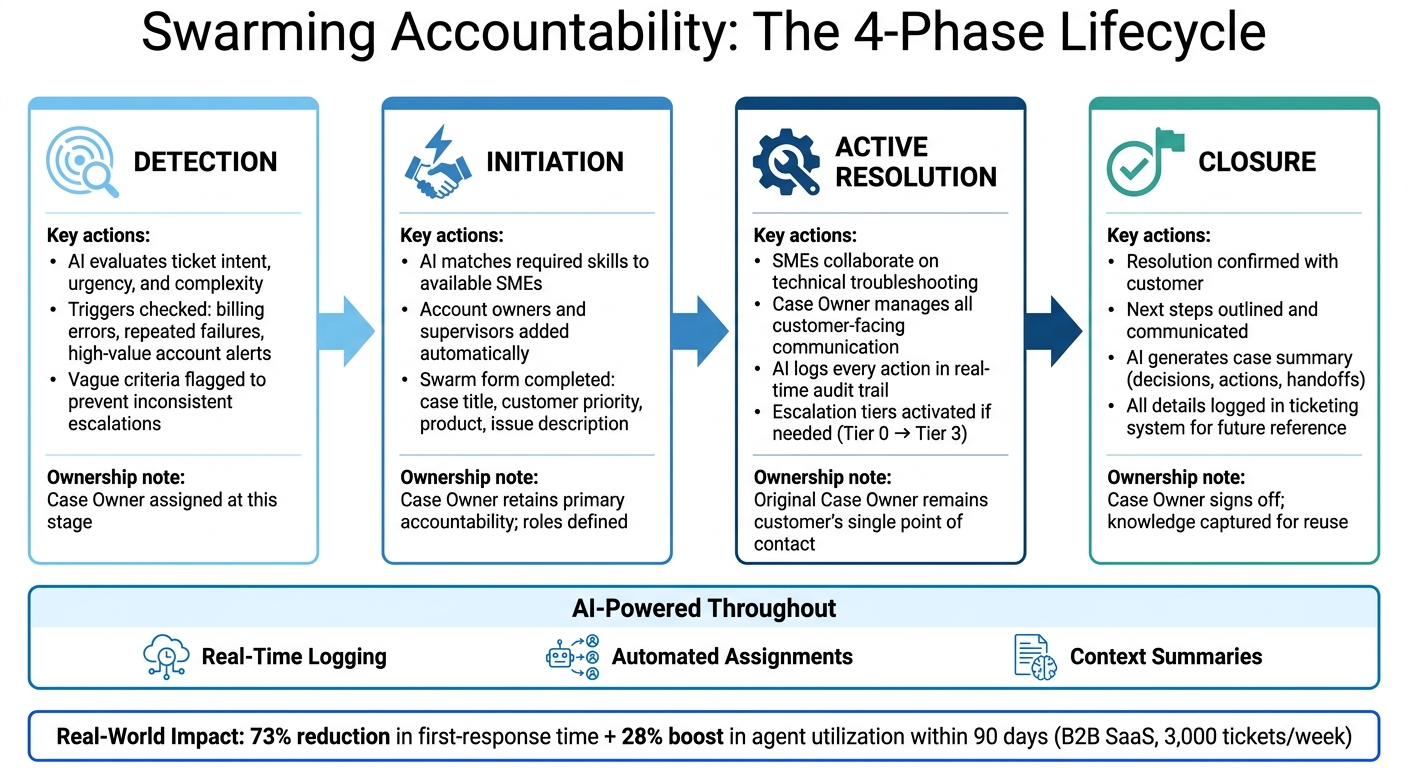
Swarming Accountability Framework: 4-Phase Lifecycle
Map Out the Swarming Lifecycle
Creating an effective swarming workflow requires a clear structure. Break the process into four main phases: detection, initiation, active resolution, and closure. Each phase ensures everyone involved knows their role and responsibilities.
In the detection phase, AI evaluates incoming tickets based on factors like intent, urgency, and complexity. To maintain consistency, use precise triggers – such as specific billing errors, repeated failures, or alerts for high-value accounts. Vague criteria can lead to inconsistent escalations and reduced accountability. During initiation, AI assigns tasks by matching the required skills to available experts. It also includes key stakeholders, like account owners or supervisors, right from the start to ensure proper oversight [3]. The active resolution phase is where the real troubleshooting begins. Experts collaborate to resolve the issue while the original owner manages all customer-facing communication. Finally, in the closure phase, the team confirms the resolution with the customer, outlines any next steps, and logs all details in the ticketing system for future reference.
The impact of a well-defined lifecycle can be huge. For example, in March 2026, a B2B SaaS company managing 3,000 tickets per week introduced an AI system to classify tickets by intent and complexity. This system resolved 35% of tickets at the self-service level. For more complicated cases, it combined cross-channel context and escalated proactively when customer sentiment declined. Within 90 days, the company saw a 73% reduction in first-response time and a 28% boost in agent utilization [8].
This structured approach allows AI to effectively assign tasks and balance workloads, making the entire process smoother.
Automate Task Assignment and Balance Workloads with AI
Manual triage often leads to inconsistent ticket assignments and accountability gaps. AI eliminates this guesswork entirely.
With AI, task assignment begins by categorizing the issue using language models (LLMs). Then, it checks real-time availability through integrated shift schedules to distribute workloads evenly. Finally, it prioritizes agents based on their active queue – the number of tickets they’ve handled in the past 12 hours. This ensures agents with more capacity are assigned tasks, reducing the risk of burnout for high-performing team members [4].
A great example of this in action comes from Atlan. In February 2026, they implemented "Olof", an AI-powered queue manager built on n8n and Snowflake. Olof automated ticket assignments by analyzing real-time availability and workload. Using a deterministic algorithm, it matched tickets to agents based on category fit and recent ticket counts. This system completely removed manual triage and ensured consistent 24/7 routing across time zones. It also eliminated "ghost assignments" – tickets left unowned because no one knew who was responsible [4].
"AI-native systems eliminate manual queue management overhead; Olof assigns tickets in real-time based on availability, category fit, and workload, not gut feelings." – Rahul Bhatiya and Taksh Preet Singh, Technical Support Engineers, Atlan [4]
Platforms like Supportbench offer similar AI-driven capabilities, allowing for role-specific assignments, prioritization, and tagging of tickets without manual input. Once task assignment is streamlined, the next step is ensuring accountability through a structured escalation process.
Set Up Multi-Level Escalation with Clear Ownership
Escalation processes often fail when ownership becomes unclear during handoffs. The solution? Ensure that every escalation tier has a named owner and a defined trigger rather than relying on vague policies.
A practical tiered escalation model might look like this:
- Tier 0: Self-service and AI-guided solutions for routine issues.
- Tier 1: AI-assisted frontline support for common queries.
- Tier 2: Human specialists handling edge cases that require judgment.
- Tier 3: Leadership or operational teams managing high-risk or VIP accounts [7].
Throughout all tiers, the original agent remains the customer’s main point of contact, maintaining trust and continuity.
"Most support escalations do not fail because the issue is too complex. They fail because the customer loses trust during the handoff." – Entrepreneur AI Tools [7]
To avoid this breakdown, every escalation should include a structured handoff brief. This brief should detail what actions have been taken, the customer’s current sentiment, and the next steps, including the next contact window. Tools like Supportbench simplify this process by tracking escalations, allowing agents to add notes at each stage, and automatically identifying the next escalation path. SLA thresholds can also trigger re-routing when a ticket is nearing a breach, ensuring no case is left without an active owner [8].
Tracking Performance and Improving Over Time
Once you’ve set up escalation tiers and workflows, the next step is figuring out how to measure their success.
Define Metrics That Measure Accountability
Traditional support metrics don’t always align with swarming. Metrics like ticket volume or average handle time might not tell you if the right people were involved at the right time. Instead, you need metrics that highlight both the speed and quality of collaboration.
Here are some key metrics to consider:
| Metric Category | Key Performance Indicator | What It Tells You |
|---|---|---|
| Responsiveness | Average Initial Response Time for Swarm Requests | How quickly your team reacts to a request for help |
| Participation | Number of Swarm Assists | How often team members contribute to cases they don’t directly own |
| Efficiency | Median Time to Resolve | How long it takes from the initial request to resolution |
| Quality | Helpful Answers / Knowledge Capture | Whether the collaboration generates reusable knowledge |
| Volume | Percentage of Case Inflow Swarmed | How often the swarming model is applied |
| Sentiment | CSAT / Employee Satisfaction (ESAT) | How the process impacts both customers and team morale [2][9] |
These metrics help you identify trends and refine your review process.
Two metrics stand out. Swarm Assists – the number of contributions made to cases an agent doesn’t own – provide a clear picture of team collaboration. Francoise Tourniaire of FT Works explains:
"In collaborative swarming, ‘going solo’ has a negative effect on the individual’s own contribution numbers as well as the team’s." [2]
Another critical metric is escalation depth. If a single case cycles through multiple agents before resolution, it’s often a sign that your triggers or role definitions need adjusting – not that the team is putting in extra effort.
Tools like Supportbench’s AI Predictive CSAT and CES features can help by flagging accountability gaps in real time, giving you insights into case outcomes even before customers submit surveys.
Run Post-Swarm Reviews to Capture Lessons
Metrics don’t just track performance – they also uncover ways to make swarming more effective. Reviewing resolved cases is essential for spotting patterns and improving future practices. Even a quick 15-minute review can yield valuable insights.
Key questions to ask during reviews include: Was the right owner assigned? Was collaboration initiated quickly? Did the resolution result in reusable knowledge?
Supportbench simplifies this process by automatically generating AI-powered case summaries at closure. These summaries provide a clear record of decisions, actions, and handoffs without adding extra work for your team.
One helpful approach is mapping resolution times and customer satisfaction scores to the timing of initial collaboration. For example, if cases where swarming started early consistently close faster and with higher satisfaction, that’s solid evidence to encourage early collaboration. Use these findings to adjust your swarming policies and triggers, ensuring the process continues to improve with each cycle.
Conclusion: Steps to Keep Accountability Intact in Swarming
Maintaining accountability in swarming requires a foundation of clear roles, well-defined participation rules, and thorough documentation of actions. By establishing structured roles, leveraging AI-powered tracking tools, and conducting regular reviews, teams can manage even the most complex cases without losing sight of accountability.
At its heart, the process is straightforward: the first agent involved stays responsible for the case from start to finish. A system that combines defined roles, automated templates, and AI-driven task assignments ensures nothing falls through the cracks. This cohesive approach keeps ownership clear and consistent at every stage.
Developing disciplined processes turns accountability from a concept into a daily practice. Tools like Supportbench’s AI-driven features – such as AI-driven case summaries and real-time workload balancing – equip teams with the insights they need to identify and address potential accountability gaps before they impact customers. The ultimate aim is a system that adapts, learns, and sustains a culture of ownership, ensuring support operations run smoothly and effectively in all swarming scenarios.
FAQs
How do we keep one clear owner when many people contribute?
To keep ownership clear when multiple people are involved, assign one person to take accountability – this could be a "coordinator" for each issue or handoff. Use your CRM’s role-specific fields to track who’s responsible. Establish clear "if/then" decision rules based on the type of issue or its stage, and make sure to review these rules regularly. Tools like shared threads and automated tracking systems can also help maintain accountability as team members or responsibilities shift.
What rules should trigger a swarm versus normal handling?
Swarming is best initiated for situations that are complex and demand immediate attention. This includes outages, unresolved escalations, or security breaches. These types of challenges typically require input and collaboration from multiple departments to address them effectively and ensure a swift resolution.
How can AI prove who did what in a swarm?
AI bolsters accountability in swarming through the use of cryptographic audit trails, signed event chains, and delegation certificates. These mechanisms meticulously document every action with cryptographic signatures and hash chains, ensuring that each step is both tamper-proof and traceable to a specific agent or individual. By assigning unique cryptographic identities and signing each action, AI establishes a verifiable chain of custody. This approach ties actions directly to their source, making it easy to determine responsibility and maintain transparency.






