
Migrating Intercom help center articles to a KCS-ready knowledge base involves transforming static documentation into a dynamic system that evolves with customer interactions. This shift ensures your knowledge base supports AI tools effectively, improves resolution rates, and reduces repetitive queries.
Here’s the process in a nutshell:
- Audit your content: Identify outdated, duplicate, or underperforming articles. Refresh content older than six months and prioritize high-traffic or low-resolution-rate articles.
- Restructure for KCS: Rewrite articles with clear language, headers, bullet points, and metadata. Include problem, resolution, and environment tags for better AI readability.
- Leverage AI tools: Use AI for triaging, tagging, and identifying content gaps. Focus on the top 20% of articles for maximum impact.
- Plan migration in phases: Start with a pilot test to minimize risks. Back up all content and map old articles to new structures.
- Post-migration validation: Test the migrated knowledge base for errors, broken links, and search accuracy. Engage support agents to continuously update and improve content.
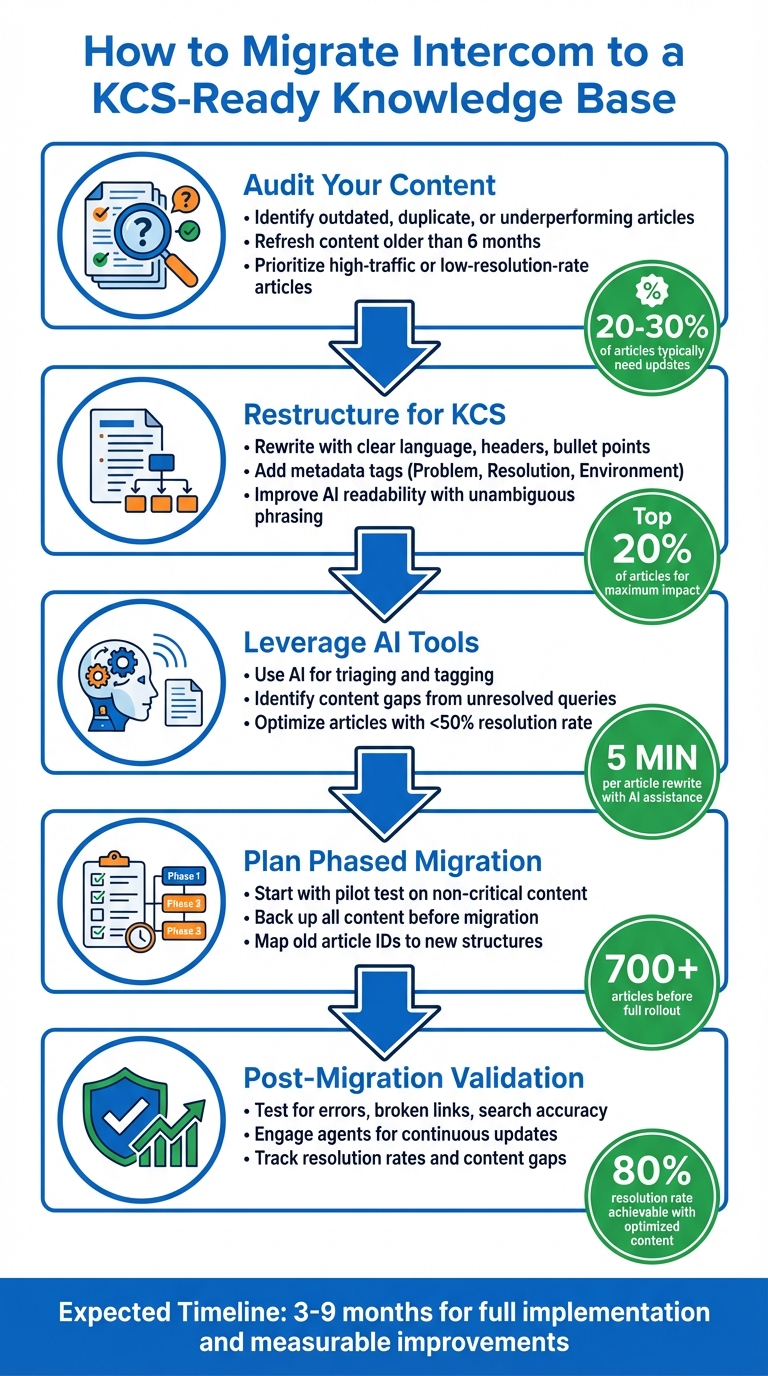
5-Step Process for Migrating Intercom to KCS-Ready Knowledge Base
Understanding KCS and Preparing for Migration
What is KCS and How Does it Differ from Standard Help Centers?
Think of traditional help centers as static libraries – content gets written, published, and often forgotten until someone remembers to update it. Knowledge-Centered Service (KCS) takes a completely different approach. It treats knowledge as a living system that evolves constantly, shaped by real customer interactions and performance data.
The key difference lies in how content is created and maintained. In a standard help center, technical writers document features after product launches, sometimes weeks or months later. KCS flips this script. Support agents actively update and refine content in real time while resolving customer issues. This on-demand evolution ensures the knowledge base always reflects what customers actually need, rather than what product teams assume they need.
"Great AI support starts with great documentation. To train Fin effectively, you need more than just a Help Center; you need a living, evolving knowledge management system." – Beth-Ann Sher, Intercom
Another critical aspect of KCS is its focus on machine readability. Unlike human readers, AI agents require clear, unambiguous instructions to interpret content accurately. As Declan Ivory, VP of Customer Support at Intercom, explains:
"If you’ve got an FAQ document today that a human can interpret and you’ve got simple yes or no answers in there, the machine won’t interpret those answers in the same way that a human does. You’ve got to expand on what you mean when you say ‘yes,’ what you mean when you say ‘no.’"
This structured clarity is crucial for improving AI accuracy during a migration. Intercom’s Fin AI agent achieved an 80% resolution rate by adopting this dynamic knowledge management approach. For organizations implementing KCS, improvements are often noticeable within 3 to 9 months. Interestingly, focusing on the top 20% of content – the articles customers interact with the most – can dramatically enhance AI resolution rates.
Before diving into migration, though, a thorough content audit is essential.
Readiness Checklist for Migrating Intercom Content
Start by auditing your current content. In 2024, Intercom reviewed over 700 live articles before integrating them with their AI agent. They divided the articles by product area and gave teams across product and engineering one week to verify, update, or retire outdated content. This collaborative effort revealed that a large portion of their knowledge base needed updates.
Here’s what to focus on during your audit:
- Content Freshness: Review all live articles for outdated information and duplicates. On average, 20% to 30% of articles require updates. Any content older than six months is likely stale and should be refreshed.
- AI Performance: If you’re already using AI tools, identify articles with a resolution rate below 50%. These underperforming pieces are prime candidates for restructuring using KCS principles.
- Product Updates: For new product releases, Intercom typically creates or updates 3–6 articles and macros within hours using AI-assisted drafting. Keeping up with this pace ensures your knowledge base stays aligned with product changes.
| Area | Readiness Criteria | Recommended Frequency |
|---|---|---|
| Stale Content | Refresh articles older than 6 months | Monthly |
| AI Performance | Optimize content with < 50% resolution rate | Monthly |
| Product Alignment | Update UI screenshots and instructions | Weekly (per release) |
| Knowledge Gaps | Review "unresolved questions" and Fin suggestions | Weekly |
Once you’ve tackled content freshness and performance, turn your attention to metadata. Review and document your existing metadata and tagging structure. Intercom categories, folders, and tags should be mapped to KCS-friendly metadata like "Problem", "Resolution", and "Environment". Also, flag articles with unsupported formats, such as video embeds or complex tables, which may need manual adjustments during migration.
Finally, before starting the migration, create a full backup of your content. Export all Intercom data into a structured format – like CSV, JSON, or HTML – to safeguard against any data loss during the transition. This backup acts as your safety net, ensuring nothing critical is lost along the way.
sbb-itb-e60d259
Auditing and Mapping Your Intercom Help Center Content
How to Export and Inventory Intercom Articles
Intercom doesn’t offer a straightforward export option for articles, but you can use the Intercom REST API to get the job done. Specifically, the GET /articles endpoint allows you to retrieve a full list of articles along with their metadata.
"Use our REST API to list all articles and extract required information." – Ivan, Intercom Help
If working with APIs feels too complex, third-party tools like Help Desk Migration can simplify the process by exporting your articles into formats like CSV or JSON. When building your inventory spreadsheet, include key columns such as Title, Category, Folder, Description, Status (Draft/Published), and Tags. To make your inventory even more useful, pull performance data from the Articles report. This data provides insights into engagement metrics, customer reactions, and the number of conversations each article has generated.
Take this a step further by cross-referencing your inventory with the Optimize dashboard and the "Searches with no results" report. This helps pinpoint priority gaps and articles that might be causing AI tools to stumble. Also, check the "Written by" field for each article – this can help you avoid republishing issues if an author is no longer part of your workspace.
Once your inventory is ready, you can move on to categorizing your content for better alignment with KCS (Knowledge-Centered Service) principles.
Categorizing Content for KCS Alignment
With your inventory complete, the next step is to organize your content to fit KCS guidelines. Start by splitting your articles into two main categories: public articles (self-service resources for customers) and internal articles (reference material for support teams). KCS frameworks typically divide content into "Solve" (internal use) and "Evolve" (customer-facing) categories.
To ensure your content meets KCS standards, use search data to identify high-priority articles. Pay particular attention to "searches with no results", as addressing these gaps is a key KCS objective. Organize content by granularity, breaking it into "Snippets" for quick, reusable answers and "Articles" for more detailed guides. This approach supports KCS’s emphasis on concise, actionable information.
Assign ownership by grouping articles into folders based on product features or the teams responsible for maintaining their accuracy. Flag any articles with unsupported formatting – like videos from non-supported providers – for manual review. Additionally, use metadata tags to segment content by user groups, such as "VIP customers" or "EMEA-only", to ensure the right information reaches the right audience.
Effective categorization not only makes it easier for support agents and AI tools to find and update content but also strengthens the dynamic nature of the KCS framework. While Intercom’s native articles are quickly ingested by AI agents, external content synced via public URLs updates only on a weekly basis.
Restructuring Articles for KCS-Ready Content
Best Practices for Rewriting Articles
Creating KCS-ready articles means crafting content that’s easy to read and understand for both humans and AI systems. Using clear headers, bullet points, numbered lists, and tables helps make the information more digestible for everyone involved. If an article is hard for a person to follow, it will also confuse AI systems.
To make things even clearer, restate the customer’s question within the article. This approach provides context and ensures responses are straightforward. For instance, instead of starting with a vague "Yes, you can", rewrite it as, "You can use your own packaging when returning an item to our warehouse." This style eliminates ambiguity for both readers and AI systems.
Define all acronyms and specialized terms the first time they appear. Unlike humans, AI systems can’t infer meaning from context. For example, spell out "SLA" as "Service Level Agreement" or "CSAT" as "Customer Satisfaction Score." Additionally, since AI can’t interpret images or videos, always include step-by-step text instructions alongside any visuals, using clear headers to guide readers.
Start with high-impact content when optimizing your knowledge base. Intercom’s support team achieved an 80% resolution rate by refining their articles for their AI agent, Fin. They focused on the top 20% of articles that had the most AI involvement, especially those with resolution rates under 50%. With the help of AI rewriting tools, they managed to revamp underperforming articles in about 5 minutes each.
Once the articles are rewritten, the next step is to improve their discoverability through structured metadata and tagging.
Adding Structured Metadata and Tags
After restructuring content, enhancing discoverability with accurate metadata and tags becomes essential. Since Intercom doesn’t offer a dedicated "keywords" field, use the article description to summarize the content. Include search terms that customers are likely to use, as this description serves as both a search preview and an indexing tool for AI.
Tags play a crucial role in organizing content. They help filter articles by category, exclude irrelevant content from AI responses, and route specific information to the right audience segments. For example, you could use tags like "VIP-customers" or "EMEA-only" to ensure that the appropriate users see the relevant content.
Additionally, group articles into Collections with a hierarchical structure (up to three levels deep). This setup aids both human navigation and AI processing. Clearly identifying the target audience within each article is also important, especially if your product serves multiple user types. This helps AI provide tailored responses to specific customer groups.
Regularly auditing your knowledge base is another key step. Use the "last updated" metadata to filter articles that haven’t been refreshed in over six months. Prioritize high-traffic articles and those frequently used by AI systems for updates.
Before and After: Examples of KCS-Optimized Articles
Intercom’s approach to rewriting and organizing articles offers a clear example of how these practices can transform a knowledge base. Before launching their AI agent, Fin, they audited over 700 articles. They identified areas for improvement and restructured the content to include tables, numbered lists, and other scannable elements.
One effective strategy involved documenting expected product behavior. When a support agent resolved a confusing issue, they tagged the conversation, and the knowledge team spent about 10 minutes updating the related article with specific details. This process helped reduce future escalations by equipping the AI agent with nuanced product information.
Another key improvement was breaking long paragraphs into smaller, scannable sections with clear headers. They also created reusable Snippets for common information that appeared across multiple articles. These Snippets, managed centrally, ensured consistency for both human agents and AI systems.
| KCS Optimization Task | Implementation | Expected Benefit |
|---|---|---|
| Answering Questions | Restate the question in the response | Provides context for AI and improves search accuracy |
| Formatting | Use bullet points and numbered lists | Makes content easier to read and process |
| Language | Use full sentences instead of "Yes/No" | Reduces confusion for automated support |
| Reusability | Create Snippets for common fragments | Maintains consistency across the knowledge base |
| Visuals | Add detailed text instructions to visuals | Ensures content is accessible to AI systems |
Executing the Migration with AI Tools
Using AI for Triage and Tagging
AI tools can simplify and improve the migration process by building on KCS practices and leveraging structured metadata. These tools extract source metadata, such as labels and categories, and convert them into usable tags. For instance, if you’re moving content from another platform like Zendesk, a label like "EMEA-only" can automatically be transformed into a tag, ensuring that your AI agent delivers this content exclusively to European customers.
AI also helps pinpoint content gaps by analyzing unresolved customer queries. For example, Intercom’s AI agent, Fin, highlights "content suggestions" by flagging conversations that required escalation, signaling missing snippets or outdated articles that need attention. Additionally, external AI tools can restructure articles to align better with customer intent and common phrasing, making it easier for AI agents to interpret and provide accurate responses. Once the content is imported, bulk tools can update tags, refine audience settings, and organize articles into KCS-aligned folders.
Beth-Ann Sher, Knowledge Manager at Intercom, explains:
"Unlike human readers, AI relies heavily on clear structure, unambiguous phrasing, and strong alignment with customer intent".
This underscores the importance of prioritizing clarity and consistency during an AI-assisted migration. To maintain quality, schedule weekly reviews of AI-generated content suggestions to evaluate whether to accept, revise, or reject proposed updates.
By streamlining tagging and identifying content gaps, AI tools play a crucial role in laying the groundwork for a smooth migration process.
Phased Migration Strategy for Reduced Risk
Once AI-assisted tagging is complete, a phased migration strategy ensures a smoother transition while minimizing risks. Running a pilot migration before a full rollout is a smart way to catch formatting issues or permission errors without disrupting daily operations. Start small – migrate a subset of non-critical content or a single category to test how articles, formatting, and metadata function in the new system.
Intercom’s internal migration is a great example of this approach. Their team audited 700+ articles, dividing the knowledge base by product area. Under the leadership of Knowledge Manager Beth-Ann Sher and VP of Customer Support Declan Ivory, teams were assigned to validate the accuracy of AI-tagged content.
"As part of that first deployment, test it to ensure it mirrors the customer experience." – Declan Ivory, VP of Customer Support, Intercom
Before the final cutover, implement a content freeze to prevent data discrepancies between the old and new systems. Use a master spreadsheet to map old article IDs and URLs to their new counterparts – this ensures internal links are updated, and SEO redirects are correctly established. Track resolution rates after each migration phase, flagging content with resolution rates below 50% for further improvement.
A phased approach, combined with AI-driven tools, reduces risks and ensures a smoother migration process.
Post-Migration Validation and Optimization
Testing the Migrated Knowledge Base
After completing the migration, thorough validation ensures the knowledge base functions as intended. Start by reviewing articles marked "Review" to catch any formatting errors or broken imports. Verify that 301 redirects are correctly set up in the Domains settings and enable search engine indexing under General > Privacy to avoid broken links and delayed indexing.
Test the system by running searches using common customer queries to confirm that relevant results appear. Declan Ivory, VP of Customer Support at Intercom, emphasizes the importance of this:
"As part of that first deployment, test it yourself, and make sure that you actually experience the experience that your customer is going to have."
Leverage AI-powered gap analysis to identify "unresolved questions", which highlight areas where content is either missing or inadequate. Intercom, for instance, refined their knowledge base and achieved an 80% resolution rate, showcasing the value of ongoing validation.
Once the system performs as expected, shift your focus to continuous content improvement by involving your front-line agents.
Engaging Agents for Continuous Improvement
Create a submission process – such as an inbox macro or ticket form – so agents can easily report content gaps or errors they encounter. This aligns with the KCS model, integrating real-time feedback to improve the knowledge base. For example, if customers frequently misunderstand a specific design choice, agents can document their explanations and update the relevant article to address the confusion.
Establish a "Special-T" team, a group of support specialists and engineers who dedicate 5–10 hours weekly to maintaining the knowledge base and addressing the backlog. Provide these agents with "speed-templates" for quick content uploads, ensuring all new material adheres to a consistent style guide.
Set the old knowledge base to read-only after migration. Agents should prioritize searching the new KCS-ready base first. If no article exists, they can pull content from the old repository and reformat it into a new KCS-structured article. This demand-driven method is effective, as research shows that 90%–95% of content in legacy systems is rarely, if ever, accessed.
With agents actively contributing to updates, you can track key metrics to measure the migration’s success and make data-driven improvements.
Key Metrics to Track Migration Success
To evaluate the effectiveness of your migration, monitor metrics such as ticket deflection rates and Average Handle Time (AHT), which indicate how efficiently your support system is operating. Page views and helpfulness ratings can help you identify which articles are performing well and which need improvement.
Analyze search queries to uncover content gaps – topics customers are searching for but not finding – and prioritize creating articles to address these needs. Additionally, review outdated or high-traffic articles monthly to refresh UI screenshots and update content as necessary. Many knowledge bases reveal that 50–60 articles may go untouched for over six months when filtered by "last updated".
| Metric Category | Key Performance Indicators | Purpose |
|---|---|---|
| Customer Impact | CSAT, Ticket Deflection Rate, Adoption Rate | Tracks user satisfaction and self-service success |
| Content Quality | Helpfulness Ratings, Search Queries (Zero Results), Page Views | Identifies content gaps and high-value articles |
| Operational | Average Handle Time (AHT), IT Staff Productivity | Measures financial ROI and team efficiency gains |
Allow for a 3–6 month stabilization period before fully evaluating the migration’s success, as early metrics may reflect initial challenges rather than long-term outcomes. Dedicate one hour a week to review AI-generated content suggestions based on escalated conversations to maintain the knowledge base’s quality.
KCS 6.5 Migrating Legacy Data and Knowledge Into your Knowledge Base – Knowledge Centered Support
Conclusion
Migrating to a KCS-ready knowledge base involves more than just moving content – it requires a careful audit, cleanup, and restructuring to make it effective for both agents and AI. Studies show that 20–30% of content in existing systems tends to be duplicate or irrelevant, making a thorough cleanup essential. Once you’ve refined your content, adopting a phased migration strategy helps reduce risks and ensures that every improvement is tested and validated.
This step-by-step approach allows you to experiment with formatting, metadata, and AI performance on a smaller scale before committing to a full migration. Begin with high-traffic content, leverage AI tools to spot gaps using "unresolved questions" reports, and engage your front-line agents in the ongoing improvement process. As Anthony, Knowledge Manager at Intercom, wisely points out:
"Every upfront investment you make in your knowledge base has long-term benefits. And whether you hire someone to do this work full time or give your agents time away from the queues each week, the ROI speaks for itself."
Beyond mitigating immediate risks, this approach sets the stage for long-term efficiency. A well-organized, AI-ready knowledge base doesn’t just handle repetitive queries – it frees up agents to tackle complex issues. Even a small investment, like 30 minutes spent improving documentation, can save hours of manual effort while delivering fast, accurate responses to customers. This strategy aligns perfectly with modern support practices, ensuring your knowledge base remains a valuable and adaptable resource.
FAQs
How long will a KCS migration take?
The time it takes to complete a KCS migration depends on the size and complexity of the data involved. For straightforward migrations where accounts are already connected, the process might wrap up in under a day. However, more intricate projects generally span anywhere from 4 to 12 weeks. Careful planning and allocating the right resources can make the process smoother and more efficient.
What should we migrate first for the biggest impact?
Migrating your existing help center articles is the first and most impactful step. By doing this, you preserve your current knowledge base, maintain continuity for your users, and establish a solid foundation for your new platform. Prioritize transferring the most important content efficiently to uphold user trust and avoid unnecessary disruptions.
How do we keep articles accurate after the cutover?
Regularly reviewing and updating your articles is key to keeping them accurate and reflective of current product features and policies. Incorporating AI tools into your workflow can make a big difference – use them for tasks like content triage, tagging, and running quality checks. This helps spot outdated or inconsistent information quickly. Also, make sure your content stays in sync with source systems by scheduling automatic resyncs. This ensures everything remains aligned and up to date.