


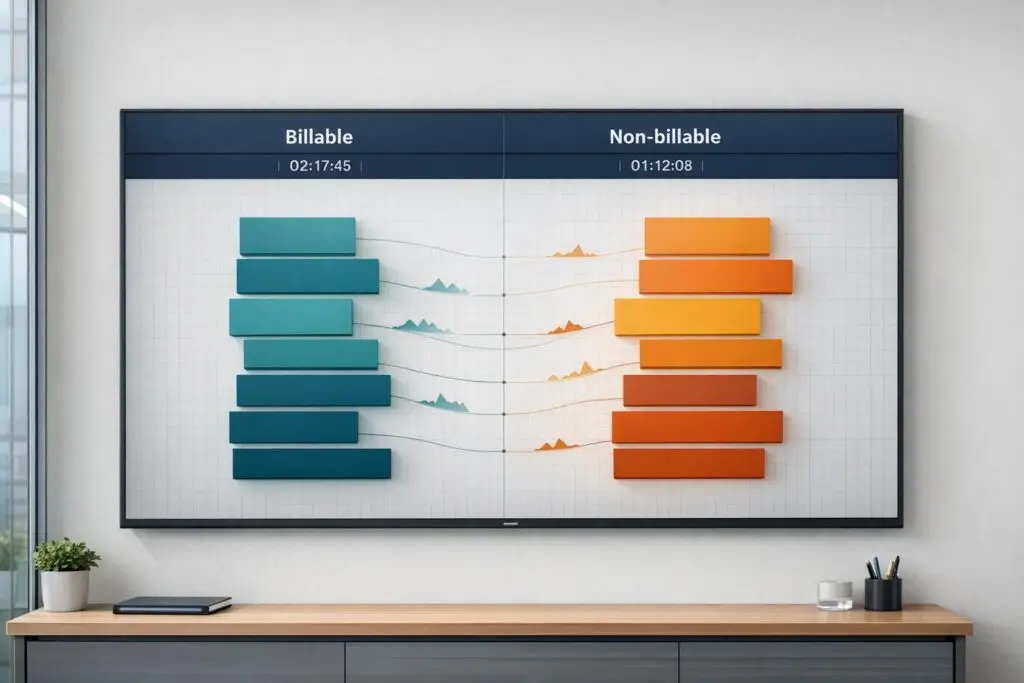
In B2B support, the way you classify and track time directly impacts profitability. Misclassifying even 2–3 hours weekly per consultant can cost a 10-person team over $200,000 annually. On the flip side, improving billable utilization by 10% for a consultant charging $100/hour can add $20,800 per year per person.
Here’s the breakdown:
- Billable work: Tasks tied to client contracts, like SLA-driven support or project delivery, that generate revenue.
- Non-billable work: Internal activities like training, admin duties, or meetings that don’t directly earn income.
- Gray areas: Tasks like client outreach or research that require clear rules to avoid disputes.
Tracking time accurately is critical. Manual systems often underreport up to 25% of billable hours, while AI tools can recover lost revenue by automating task classification and improving reporting. Firms that implement clear policies, real-time tracking, and AI solutions typically see 15–25% higher profitability.
The key? Set clear rules, track time consistently, and use AI to reduce admin tasks. This ensures every billable hour is logged while protecting client relationships and boosting revenue.
What Billable and Non-Billable Work Means in Support Operations
At its core, billable work is revenue-generating – it’s the time your team spends directly on client-contracted tasks like resolving SLA-driven cases, handling technical escalations, or delivering project-specific support. These tasks are invoiced and typically pre-approved through contracts or service level agreements (SLAs). On the other hand, non-billable work refers to the behind-the-scenes activities that keep operations running smoothly, such as agent training, internal meetings, or administrative duties. While essential, these tasks don’t directly bring in revenue.
Understanding this distinction is crucial because misclassifying tasks can hurt your bottom line. Even small errors in categorization can skew profitability, while firms with clear classifications often see profitability gains of 15–25% [1]. Misclassification can also distort productivity metrics. For example, utilization rates – the ratio of billable hours to total available hours – are key indicators of operational efficiency. Without clear guidelines, a senior support engineer spending 40% of their time in internal meetings might be unfairly labeled as underutilized, potentially resulting in inaccurate performance evaluations or misguided hiring decisions.
Poor categorization can also harm client relationships. Overbilling for minor administrative tasks, like quick status emails, can leave clients feeling overcharged and erode trust. On the flip side, underbilling may set unrealistic expectations where clients come to expect "free" work, making it harder to justify charges for legitimate scope changes later. Transparency is key – clients should clearly understand what they’re being billed for.
Some tasks don’t fit neatly into either category. Activities like proactive client outreach, detailed email responses, or research for future projects often fall into a gray area. Without clear rules, agents may make inconsistent decisions, leading to billing disputes and unreliable historical data. The following sections will explore how to categorize these ambiguous tasks while safeguarding both your profitability and client trust.
What Counts as Billable Work
Billable work includes any task directly tied to a client contract that delivers measurable value. In B2B support, this often involves SLA-driven case resolutions, technical escalations requiring specialized expertise, or project delivery tasks like implementation support or customization. The key factor? These tasks are outlined in your Statement of Work (SOW) or service agreement and could reasonably appear as a line item on an invoice.
A helpful way to determine if a task is billable is the "invoice test": ask yourself, "Would this task be a valid item on an invoice under our current agreement?" For example, if your team spends three hours troubleshooting a priority support ticket for a production outage, that work is billable. Similarly, a 45-minute strategic consultation call qualifies if advisory services are included in the contract.
Accurate tracking is essential. Billable work should be logged in small increments – such as 6-minute (0.1 hour) or 15-minute (0.25 hour) blocks – so even brief but meaningful client interactions (e.g., a 12-minute call logged as 0.2 hours) are captured.
However, not all client-facing interactions qualify as billable. For instance, time spent fixing avoidable internal errors – like misconfiguring a client setting – should be non-billable. Charging for your team’s mistakes can damage client trust.
What Counts as Non-Billable Work
Non-billable work includes activities that are necessary for operations but don’t generate direct revenue from a specific client. Common examples include agent onboarding and training, internal team meetings, and administrative tasks like timesheet entry or expense reporting. These activities are essential for maintaining quality and efficiency but represent overhead costs rather than income.
Even tasks that ultimately improve client outcomes, like internal skill development, are non-billable. Similarly, business development activities – such as discovery calls with potential clients, proposal preparation, or attending industry events – support growth but shouldn’t be charged to existing clients. Strategy discussions around resource allocation or pricing also fall into this category.
Top-performing professional services firms typically achieve 75–85% billable utilization, compared to an average of 60–70% [1]. The goal isn’t to eliminate non-billable tasks but to track them accurately. This allows you to price services appropriately, identify areas for automation, and set realistic utilization targets.
How to Handle Tasks That Fall in Between
Some tasks sit in a gray area between billable and non-billable, and how you handle them can significantly impact both your profitability and client relationships. Examples include proactive client outreach, detailed email responses, quick updates, or research for future projects. Clear categorization rules are critical to avoid inconsistent decisions that could lead to billing disputes or unreliable data.
Start with a simple decision tree: Is the task outlined in the contract? Is it performed for a specific client? Would it reasonably appear as a line item on an invoice? If the answer to all three is yes, classify it as billable. If not, take a closer look. For example, a 20-minute email explaining a complex technical workaround is billable if email support is part of the agreement. However, a 2-minute scheduling message is typically non-billable relationship maintenance [1].
To avoid confusion, document your policies for gray-area tasks and share them with your team. A reference guide with clear examples ensures consistent categorization across the board.
"Just because you CAN bill for something doesn’t mean you SHOULD. Build trust by being selective and fair with billable hours. Clients notice when you charge for every 5-minute email – and it damages relationships."
– TimeRewards [1]
Regular reviews can help refine your approach. Compare estimated hours for support cases with actual tracked time on a weekly basis. If you notice consistent discrepancies – like a case scoped for 4 hours routinely taking 6 hours – adjust your policies accordingly [5]. This ongoing process ensures your rules are based on real-world data rather than guesswork.
With clear categorization rules in place, the next step is implementing effective tracking methods, whether manual or AI-powered, to ensure these distinctions are consistently monitored.
sbb-itb-e60d259
How to Track and Manage Billable vs Non-Billable Work
Once you’ve clearly defined billable and non-billable tasks, the next step is to track them accurately. Poor tracking can lead to underreporting billable hours by as much as 25%, potentially costing a 10-person team over $200,000 annually [1]. Relying on manual time reconstruction at the end of the day often results in 15–25% of billable hours being overlooked [1].
The key isn’t just better discipline – it’s creating workflows that make accurate tracking second nature. This means using real-time timers, standardizing task categories, providing clear guidance, and regularly reviewing data to catch errors early. Below, we’ll dive into practical steps to streamline your tracking system.
Setting Up Time Tracking and Task Categories
Real-time start/stop timers can increase reported billable hours by 8–15% [1]. Manual logs often lead to missed short tasks, over-rounded entries, and forgotten billable work.
To improve clarity, create 5–8 specific categories for non-billable work. Common examples include:
- Admin
- Internal Meetings
- Training
- Sales/Proposals
- Rework (fixing internal mistakes)
Avoid vague categories like "Miscellaneous" or "Other", as these make it harder to understand where time is going.
Standardize your billing increments. Use 6-minute (0.1 hour) or 15-minute (0.25 hour) intervals. For example, log a 12-minute client call as 0.2 hours (two 6-minute blocks) rather than rounding up to 0.5 hours. This prevents overestimations that can distort profitability data.
Break down tasks into smaller entries instead of lumping them together. For instance, instead of logging "4 hours on Client X", specify tasks like "Client Call – 0.5 hours", "Technical Research – 1.5 hours", and "Email Follow-Up – 0.25 hours." This level of detail helps you spot recurring issues like scope creep.
Encourage honesty when logging non-billable time. If employees feel penalized for reporting higher non-billable hours, they may leave out important data. This can skew capacity planning and pricing decisions.
"Non-billable time is data, not a crime. The goal is visibility. Make it safe to log everything."
– Gregory Shein, CEO & Founder of Corcava [5]
Creating Clear Documentation for Task Categories
To ensure consistency, provide a detailed reference guide for classifying tasks. This document should include 30–50 real-world examples of billable and non-billable work [1]. Address common scenarios, edge cases, and gray areas your team encounters.
For example:
- Billable: A 45-minute troubleshooting call for a production outage (covered under SLA)
- Non-Billable: A 10-minute internal team standup meeting
- Non-Billable: 30 minutes fixing an internal configuration error
For ambiguous situations, train your team to use the "invoice test." Ask, "Could this task reasonably appear on an invoice under our agreement?" If not, it’s non-billable.
Keep the guide updated as your business evolves. This ensures it remains relevant and supports your team in maintaining accurate records.
Daily Review and Quality Checks
Accurate tracking doesn’t stop at setup – it requires regular oversight. Weekly reviews can catch misclassifications and improve efficiency [1]. A 15-minute audit each week is far more effective than a large-scale monthly review.
During these reviews, look for patterns. Are certain non-billable categories growing? Are some team members logging excessive administrative time? Watch for "hidden support" tasks, like long email threads, that may be misclassified. These insights can highlight inefficiencies and training needs.
Monitor utilization rates closely. Top-performing firms typically achieve 75–85% billable utilization, while average firms hit 60–70% [1]. If a team member’s utilization rate drops suddenly – say, from 75% to 60% – investigate for potential misclassifications or shifts in workload.
Introduce a "rework" tag for time spent fixing internal mistakes [1]. This ensures clients aren’t billed for errors and helps track internal quality issues.
Additionally, group non-billable tasks into fixed time slots to minimize context switching and improve focus. This small adjustment can lead to noticeable productivity gains.
Using AI to Automate Task Classification and Reporting
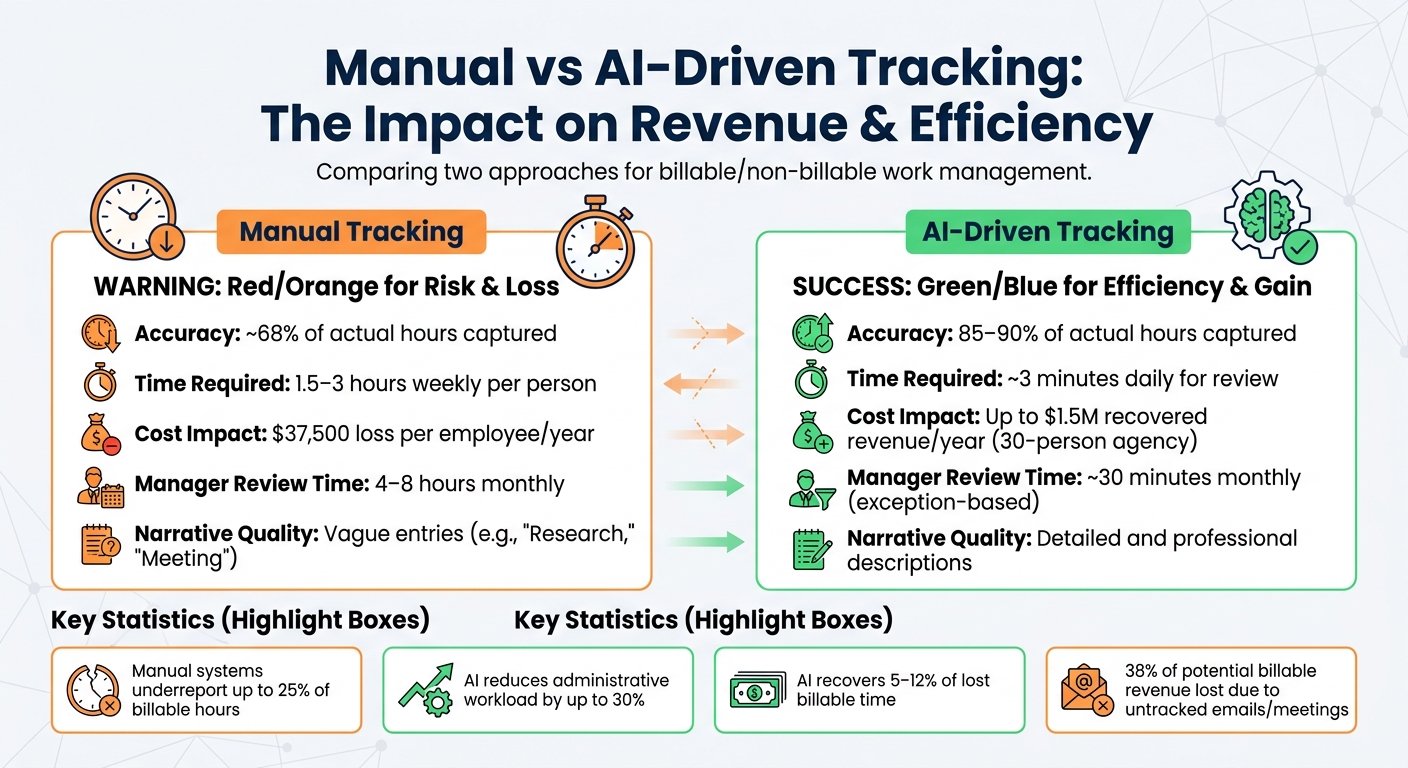
Manual vs AI-Driven Time Tracking: Cost Impact and Efficiency Comparison
Did you know that manual tracking systems only capture about 68% of actual work hours? For a 10-person team, this can result in losses exceeding $375,000 annually [6]. AI-driven tracking flips this scenario by automatically piecing together work hours from digital signals – like calendars, project management tools, emails, and communication platforms – completely removing the need for manual timers.
By utilizing AI, businesses can capture nearly all billable time, improving revenue management and reducing lost income. Professional services firms typically lose 11–29% of billable hours due to inefficient tracking workflows [7]. AI not only recovers 5–12% of that lost time but also reduces administrative workloads by up to 30% [7][8].
AI-Powered Task Categorization
AI tools analyze patterns in your digital workspace to classify tasks without any manual effort. These tools connect to platforms like email, calendars, project management software, and communication apps to identify "billable signals." For instance, a meeting with external participants or work tagged to a specific client project is automatically categorized as billable [6][7].
Natural Language Processing (NLP) takes informal notes – like "spent the morning troubleshooting Acme’s deployment issue" – and converts them into structured entries [6]. Machine learning models then match keywords to client accounts and billing statuses, ensuring precise billing narratives. For example, a 35-minute email exchange with a client can be turned into a detailed entry for invoicing [7].
AI also flags anomalies, such as excessively long workdays or projects exceeding budgets, reducing the time managers spend on reviews. Instead of spending 4–8 hours monthly on these tasks, managers can cut this down to just 30 minutes [6][7].
"The specificity of the narrative directly correlates with whether you get paid."
– OpenClaw [7]
Most AI tracking tools incorporate a "human-in-the-loop" system. Instead of submitting entries automatically, they send a daily summary – via Slack or email – for employees to review or edit. This process takes about 3 minutes a day, a huge improvement over the 1.5–3 hours per week spent on manual logging [6][7]. During the initial 30-day calibration period, these tools typically improve their accuracy from 50–60% to 75–85% as they learn your team’s workflows [6].
With accurate task categorization in place, AI can also transform raw data into actionable insights.
AI-Generated Reports for Better Decision-Making
Once tasks are classified, AI systems take it a step further by providing real-time insights. Dashboards display metrics like billable ratios, productivity, and project profitability instantly [8][2].
These tools also uncover "hidden billables", which are often overlooked. For example, professionals can lose up to $50,000 annually per person on untracked activities like answering emails [9]. In fact, around 38% of potential billable revenue is lost due to untracked emails, meetings, and delays in filling out timesheets [9]. AI ensures these activities are either billed properly or accounted for as non-billable overhead, improving capacity planning.
Take FalkMedia as an example. In March 2023, this consultancy firm adopted AI-powered time tracking and saw a 22% increase in billable hours within just four months [2].
"Timely isn’t just a time tracking tool; it’s a time management tool. We’ve seen a clear increase in billable hours and overall efficiency since we started using it."
– CEO Kristian L. Thomassen [2]
AI-generated narratives also reduce client write-offs. Detailed descriptions created from activity data have been shown to lower write-offs by 18% compared to vague entries like "Research" or "Meeting" [7]. This level of detail helps justify invoices and speeds up payment cycles.
Manual vs. AI-Driven Tracking: A Comparison
The contrast between manual and AI-driven tracking is striking. Traditional systems depend on employees remembering and logging their work, which often results in underreporting and wasted time. AI, on the other hand, reconstructs the workday from digital footprints, capturing nearly every task automatically.
| Factor | Manual Tracking | AI-Driven Tracking |
|---|---|---|
| Accuracy (Capture Rate) | ~68% of actual hours [6] | 85–90% of actual hours [6][7] |
| Time Requirement | 1.5–3 hours weekly per person [6] | ~3 minutes daily for review [7] |
| Cost Impact | $37,500 loss per employee/year [6] | Up to $1.5M recovered revenue/year (30-person agency) [6] |
| Manager Review Time | 4–8 hours monthly [7] | ~30 minutes monthly (exception-based) [6] |
| Narrative Quality | Vague (e.g., "Research", "Meeting") [7] | Detailed and professional [7] |
For teams managing complex B2B accounts, AI tracking offers the visibility needed to allocate resources effectively, justify pricing, and capture every billable hour. The key is integrating AI into your existing tools – like project management software, communication platforms, and time-tracking systems – using APIs. By setting up clear rules upfront (such as billing policies, client lists, and non-billable exceptions for internal activities), you can let the AI handle repetitive tasks while your team focuses on strategy, relationships, and decision-making.
How to Reduce Non-Billable Work and Increase Billable Output
Profitability in support operations hinges on maximizing the time spent on revenue-generating work. High-performing firms often achieve 75–85% billable utilization, while less efficient teams lag below 55% [1]. The difference isn’t about working harder – it’s about cutting unnecessary steps, automating routine tasks, and making smarter decisions about staffing. Even minor missteps, like misclassifying 2–3 hours per week per consultant, can cost a 10-person firm more than $200,000 annually in lost revenue [1]. With accurate tracking and AI-driven insights, you can implement these strategies to boost billable output and cut wasted hours.
Automating Repetitive Tasks with AI
Tasks like tickets, case summaries, and data entry can eat up 4–6 hours a week per team member [1]. That’s time better spent solving client problems than organizing and categorizing them. By leveraging AI, you can automate these repetitive processes and free up your team for higher-value work.
AI tools can handle tasks like reading incoming tickets, assigning issue types, tagging cases by priority, and even drafting initial responses based on your knowledge base. This eliminates the need for manual triage, allowing agents to focus on resolving complex client issues. Automation also ensures that every client interaction is logged in real time. To put it into perspective, increasing billable utilization by just 5% for a consultant charging $100/hour generates $10,400 in additional annual revenue per person [1].
Cross-Training Agents for Better Resource Use
When agents are confined to specific tasks, they often sit idle during slow periods, while others are overwhelmed. Cross-training your team allows them to switch seamlessly between billable client work and internal tasks as needed.
Cross-training not only increases flexibility but also reduces non-billable rework by improving skills across the board [1]. For example, junior agents often underreport billable hours because they’re unsure what qualifies. Training them on what counts as billable work can help capture an additional 10–20% of billable time [1].
Instead of applying a one-size-fits-all approach, set role-based utilization targets. Senior team members, who often spend time on leadership and training, might have billable targets of 50–65%, while individual contributors should aim for 75–85% [1]. This approach ensures accurate staffing and prioritizes new work for those with the highest billable capacity.
Common Mistakes in Task Management and How to Avoid Them
Even with the right tools, poor task management can drain billable hours. Here’s how to address some common pitfalls:
| Common Mistake | Impact | Solution |
|---|---|---|
| Rounding up too aggressively | Damages client trust and weakens relationships. | Track and bill in 6-minute (0.1 hr) or 15-minute (0.25 hr) increments [1]. |
| Billing for internal errors | Charging clients for fixing your mistakes or rework. | Mark rework as non-billable "internal quality" to identify skill gaps [1]. |
| Excessive internal syncs | Meetings can consume over 25% of capacity. | Audit calendars and replace status meetings with async updates or shorter huddles [1][3]. |
| Invisible Support | Unpaid help via Slack or email adds up. | Set communication boundaries in contracts and offer support retainers for ongoing assistance [4]. |
| "Other" time overuse | Excessive "Other" logs obscure where time is spent. | Refine categories into 5–8 clear buckets like Admin, Sales, or Training [5]. |
"Non-billable time is data, not a crime. The goal is visibility."
– Gregory Shein, CEO & Founder, Corcava [5]
To address these challenges, create a classification library with 30–50 examples of billable versus non-billable tasks. Train your team to use it consistently, reducing confusion during time entry. Grouping non-billable tasks into dedicated blocks – like at the start or end of the day – can also protect deep work time for billable tasks [1][4]. Context switching can waste 2–3 hours of productive time each day [1], so batching admin tasks minimizes interruptions and keeps the focus on client work.
Conclusion
Balancing billable and non-billable work isn’t about obsessively tracking every second – it’s about understanding how your team spends its time and using that insight to make smarter business decisions. By implementing clear task categorization, real-time tracking, and automation tools, time management becomes a tool for driving profitability. In fact, firms that classify billable and non-billable work effectively can see 15–25% higher profitability compared to those that don’t [1].
The financial impact is undeniable. For example, increasing billable utilization from 65% to 75% for a consultant charging $100/hour generates an extra $20,800 in annual revenue per person [1]. Multiply that by a 10-person team, and you’re looking at more than $200,000 in additional revenue – all without hiring more staff. Achieving this requires tools like automated tracking systems that record work in real time, clearly documented policies with 30–50 examples of billable tasks, and AI solutions that can save 4–6 hours of manual admin work each week [1].
Gregory Shein, CEO & Founder of Corcava, emphasizes this point:
"Your utilization rate (billable ÷ total hours) is the single most important operational metric for an agency. Get it wrong and everything downstream is wrong" [5].
The goal isn’t to penalize non-billable time but to treat it as valuable data. This approach fosters honest time tracking and highlights areas where improving processes can create more capacity.
With these strategies in place, AI tools can further streamline operations by automating task categorization, generating reports, and reducing administrative burdens. This allows your team to focus on what truly matters – delivering results for clients. By accurately tracking time, automating repetitive tasks, and regularly reviewing data to catch issues early, firms can boost profitability while maintaining the high-quality service their clients expect. The result? A business that doesn’t just survive but scales efficiently and sustainably.
FAQs
How do we decide what’s billable in gray areas?
Deciding what’s billable in those tricky gray areas comes down to figuring out if the task directly benefits the client or contributes to their deliverables. Obvious examples, like client meetings or specific project work, are usually billable. But when it comes to less clear-cut tasks, ask yourself: Does this impact client satisfaction or generate revenue? To avoid confusion, create clear internal guidelines to consistently categorize tasks. And always consider whether the client expects to be charged for the time spent.
What billable utilization target should we set by role?
Billable utilization targets often fall between 70% and 85%, depending on the role and its responsibilities. For support operations, the typical range is 75% to 80%, as these roles juggle revenue-generating tasks alongside non-billable activities like training or team meetings.
Client-facing roles, such as consultants or account managers, usually aim for higher utilization rates, around 80% to 85%, reflecting their direct impact on revenue. On the other hand, internal roles may have slightly lower targets to account for responsibilities like strategy planning or administrative work.
It’s important to adjust these targets based on the specific demands of each role to strike the right balance between productivity and efficiency.
How can AI track time without agents running timers?
AI keeps track of time without relying on traditional timers by monitoring contextual cues and background activities. This includes analyzing app usage, calendar entries, emails, and tasks. By identifying workflows and activity patterns, it generates precise time entries automatically. This hands-off method removes the need for manual input, streamlining time tracking for smoother operations and more accurate billing, all while lightening the workload for users.
Related Blog Posts
- How do you run a weekly support ops review that drives real improvements?
- How do you build a support org chart that scales (roles, ratios, and when to hire ops)?
- The “Always On” Expectation: Setting Boundaries in Slack-First Support
- Justifying the Switch: How to Prove Tool Inefficiency to Leadership
Evaluating help desks for a B2B team?
Supportbench is all-inclusive from $32 per agent per month, with migration and onboarding included. See pricing or book a 20-minute demo.






