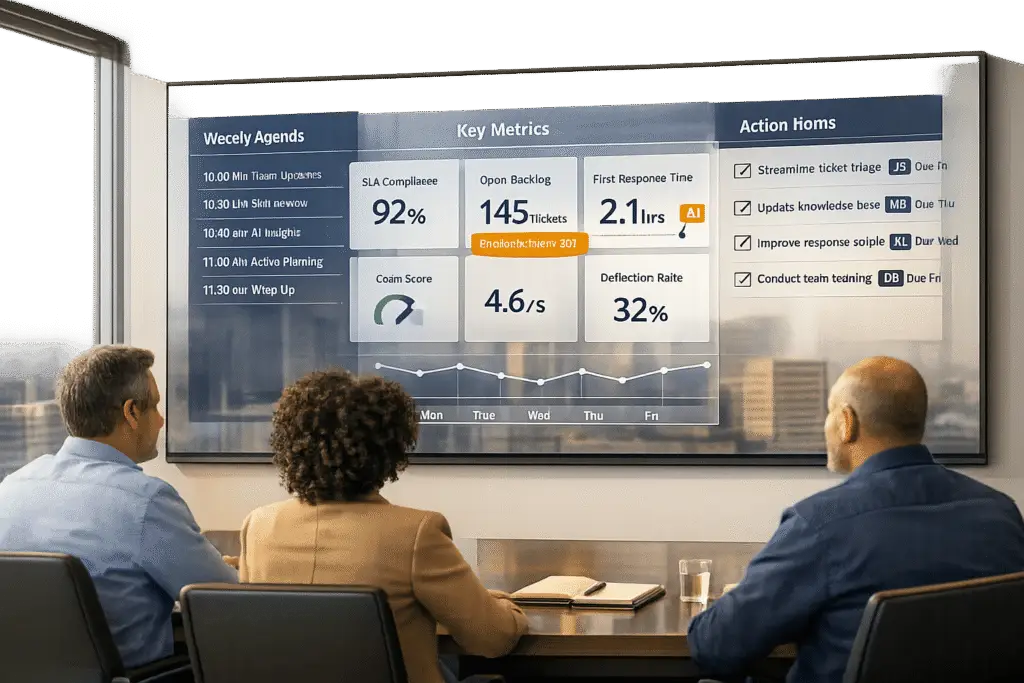
Running a weekly support operations review can feel like a chore – but it doesn’t have to be. Done right, these meetings can help you spot risks early, fix issues quickly, and improve both team efficiency and customer satisfaction. Here’s how to make them work:
- Focus on the right metrics: Track key indicators like First Response Time (FRT), Customer Satisfaction (CSAT), and Escalation Rates. Break data down by urgency or customer tier to uncover trends.
- Leverage AI tools: Automate data collection, analyze 100% of customer interactions, and generate actionable insights to save time and improve accuracy.
- Prepare effectively: Share reports and an agenda ahead of time so everyone arrives ready to tackle challenges.
- Keep meetings action-oriented: Highlight wins, review live metrics, identify bottlenecks, and assign clear next steps with deadlines.
The goal is simple: turn data into decisions that improve customer support outcomes. By using real-time dashboards, automating insights, and focusing on actionable tasks, you can make these reviews a powerful tool for driving meaningful change.
How to Prepare for Your Weekly Support Ops Review
Key Support Operations Metrics and Industry Benchmarks
The difference between a productive review and a meeting that feels like a waste of time often comes down to preparation. If your team is scrambling to gather data at the last minute, you’re already setting yourself up for failure. Proper preparation means having the right metrics at your fingertips, automating insights, and sharing pre-work in advance so everyone arrives ready to tackle challenges – not just stare at graphs. This groundwork sets the stage for a meeting that drives actionable outcomes.
Choose Your Key Metrics and KPIs
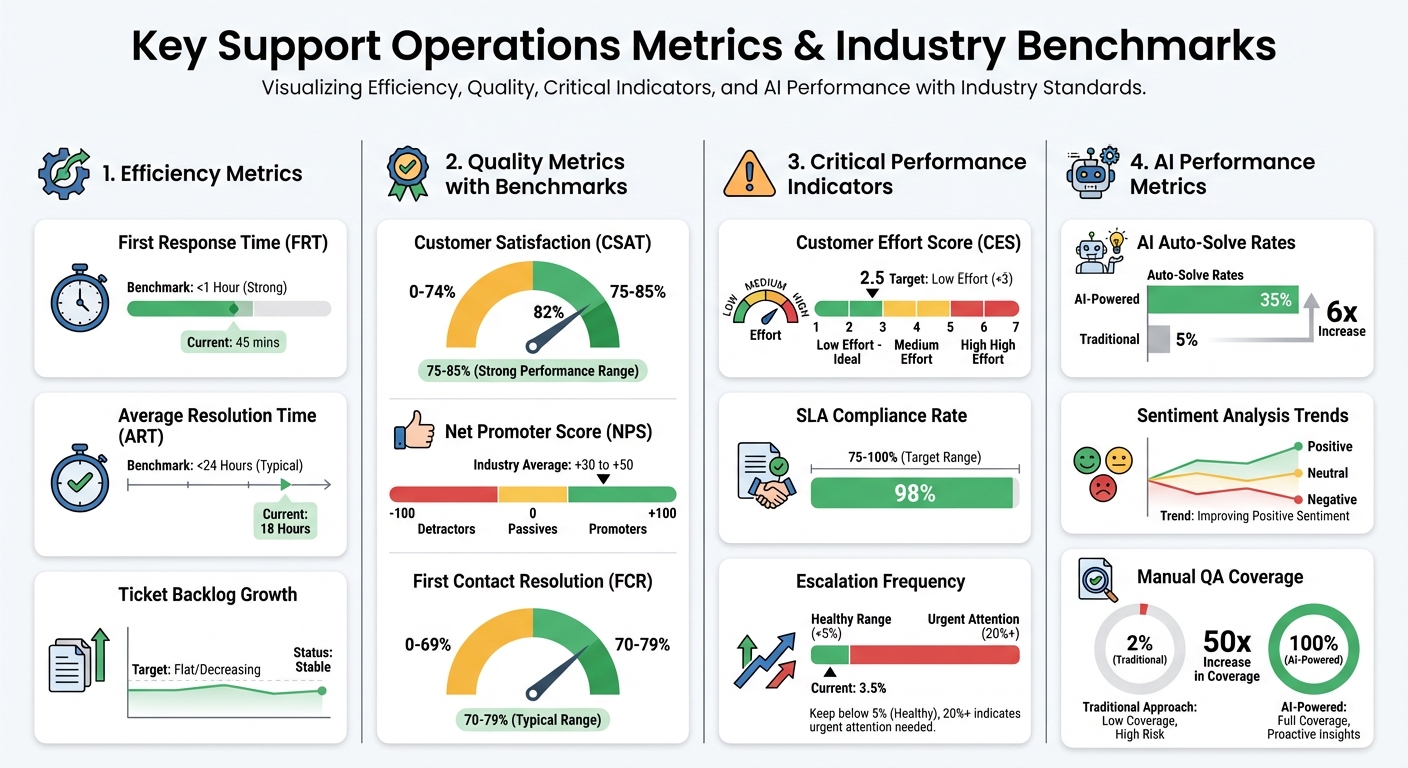
Focus on the metrics that inform decisions. For efficiency, look at metrics like First Response Time (FRT), Average Resolution Time (ART), and Ticket Backlog Growth to identify staffing challenges. For quality, track Customer Satisfaction (CSAT), Net Promoter Score (NPS), and First Contact Resolution (FCR) to assess how well problems are being solved. Industry benchmarks suggest strong CSAT scores range between 75% and 85%, while FCR typically sits at 70–79%.
Don’t stop there. Add Customer Effort Score (CES), SLA Compliance Rate, and Escalation Frequency to your reports. Aim for SLA compliance rates between 75–100% and keep escalations below 5%. If your escalation rate exceeds 20%, it’s a sign that your triage process or knowledge base might need immediate attention.
For teams leveraging AI, include metrics like AI auto-solve rates and sentiment analysis trends to measure whether automation is genuinely reducing manual workloads or just creating extra noise. Break down reports by urgency level and customer tier (e.g., VIP vs. general support) to ensure resources are allocated effectively. These metrics don’t just track performance – they help you make informed decisions to improve your support operations.
Use AI Tools to Automate Insights
Skip the manual data collection. AI-powered platforms can pull data from multiple systems and provide real-time insights – no SQL queries or spreadsheet wrangling required. For example, from February to April 2025, Otter.ai’s Head of Customer Experience implemented an AI system that auto-solved over 1,000 “thank you” tickets and prioritized more than 10,000 others. This doubled the team’s capacity without a proportional increase in manual work.
AI tools can also identify gaps in your knowledge base by analyzing customer query trends and flagging outdated or missing help center articles. Instead of reviewing a small sample of conversations (usually just 2%), AI can analyze 100% of interactions to uncover recurring issues and agent performance gaps. This shift from reactive reporting to proactive problem-solving keeps you ahead of potential challenges.
Additionally, AI can generate plain-English summaries of weekly trends, allowing your team to focus on strategy instead of interpreting charts. Automating ticket triage is another game-changer – AI can label and route tickets before the review meeting, eliminating delays caused by manual processes. Once these insights are automated, you can focus on setting a clear agenda for meaningful discussions.
Create an Agenda and Distribute Pre-Work
A well-structured agenda ensures meetings stay on track and don’t devolve into endless data reviews. Define who is responsible for leading the meeting, who needs to attend, and what decisions need to be made. Tie the agenda directly to your organization’s Objectives and Key Results (OKRs), whether it’s reducing customer churn, improving agent retention, or lowering the cost per ticket. Aligning the agenda with business goals ensures every meeting contributes to measurable progress.
Automate reports to land in stakeholders’ inboxes ahead of time – Sunday night for a Monday morning review works well. Highlight week-over-week percentage changes to make trends easy to spot. Use AI to generate 2–3 actionable recommendations based on ticket data, such as identifying confusion around a new checkout process, rather than relying on vague categories like “workflow issues”.
Finally, use real-time KPI dashboards during the meeting to display live data. This transparency eliminates time wasted debating numbers and ensures the focus remains on solving problems.
How to Run Your Weekly Support Ops Review Meeting
When it’s time for your weekly review meeting, keep it focused on actionable steps and immediate priorities. This isn’t the place for long-term strategy discussions – that’s what your quarterly sessions are for. Instead, zero in on current performance, pressing challenges, and quick adjustments that can be made over the next week. The goal? Turn preparation into decisions that drive results.
Review Wins and Key Metrics First
Kick things off with a 10-minute spotlight on wins. Maybe your First Contact Resolution (FCR) rate improved, escalations dropped, or you received glowing customer feedback. Recognizing these achievements sets a positive tone and reinforces the progress you’re making.
After that, dive into your live key metrics. Use real-time dashboards – not static reports – to track metrics like FRT (First Response Time), ART (Average Resolution Time), CSAT (Customer Satisfaction), SLA compliance, and escalations. Week-over-week percentage changes are especially helpful for spotting trends versus one-off spikes. For example, if escalations fell from 8% to 4%, celebrate it. But if SLA compliance took a nosedive, it’s time to dig deeper.
Focus on metrics that show movement, like backlog growth over time, rather than just static numbers. A shift in backlog trends across several weeks tells you more about your team’s performance than a one-time snapshot of ticket volume.
Identify and Analyze Bottlenecks and Escalations
Use AI tools to uncover the root causes behind issues instead of just describing symptoms. For instance, if escalations jump from 5% to 12% in one week, figure out why. Is it a knowledge gap among agents? A tricky product feature causing confusion? Or maybe VIP customers are waiting too long for resolutions?
Segment your data by urgency, customer tier, and channel. This helps you allocate resources more effectively. For example, if VIP customers are facing 30% longer resolution times than others, that’s a clear sign you need to adjust your resource allocation.
AI can also analyze every customer interaction – not just the small percentage typically reviewed manually. This can uncover recurring problems, like confusion around a new checkout process, so you can implement precise fixes.
Check AI Workflow Performance
AI is a powerful tool, but it’s only as good as its implementation. Use this time to evaluate whether your AI systems are hitting their targets. Metrics like one-touch ticket percentages and handover-to-human rates can help you gauge whether automation is reducing manual work or creating new problems.
For example, successful AI rollouts in early 2025 showed how automation could handle routine tickets and triage interactions by urgency and topic, allowing teams to scale without adding more manual effort. But if you notice issues like misrouted tickets or missed context, flag them for follow-up. This might mean refining AI workflows or updating training data.
Assign Clear Next Steps
Once you’ve tackled the operational challenges, wrap up with clear, actionable next steps. Assign tasks with specific owners, deadlines, and SLAs. Avoid vague promises like "we’ll look into it." Instead, create concrete assignments, such as "Revise the billing errors knowledge base article by Friday, 2/5/2026", or "Schedule a coaching session with Agent X on empathy scoring by Wednesday, 2/3/2026."
"Decisions only matter if they translate into action." – Moxo Team
Keep your action items manageable – just 2–3 high-impact tasks for the product or operations team. Overloading the team can stall progress. Focus on changes that will either reduce future support volume or enhance the customer experience in a measurable way. Automation tools can help by triggering task creation when metrics like average response time spike by over 30%.
Finally, ensure transparency by scheduling automated reports to go out to stakeholders right after the meeting. This keeps everyone in the loop without requiring extra manual effort.
sbb-itb-e60d259
Tools and Templates for Tracking Progress
To get the most out of your weekly reviews, you need a structured system to track progress. Without the right tools, it’s easy for discussions to fall flat, leaving no measurable improvements behind. The right dashboards, logs, and evaluation frameworks turn meeting insights into actionable steps that drive continuous improvement.
Use KPI Dashboards and Scorecards
Live dashboards act as a real-time overview of your support operations. Unlike static reports that only reflect past performance, live dashboards provide up-to-the-minute data, helping you respond to issues before they escalate. Focus on metrics that show trends – like week-over-week changes in SLA compliance, First Contact Resolution (FCR), and Customer Satisfaction (CSAT) – instead of just static snapshots.
Your dashboard should automatically sort data by urgency and customer priority. For example, if VIP customers are waiting significantly longer for resolutions compared to others, that’s a clear signal to shift resources immediately. This kind of segmentation ensures your weekly action items address the areas that need attention most.
Scorecards, on the other hand, measure the quality of your support interactions. While dashboards track speed and efficiency, scorecards dive deeper into aspects like tone, empathy, personalization, and adherence to internal processes. Adjust the weight of these categories based on your current goals. For instance, if reducing churn is a priority, give more weight to empathy and solution accuracy. Regular calibration sessions ensure reviewers are consistent in their evaluations, reducing bias and maintaining fairness.
Keep an Action Item Log
All the insights from your weekly reviews won’t matter if action items aren’t tracked. A central log helps you monitor tasks, assign owners, set deadlines, and track completion. Using a RACI matrix (Responsible, Accountable, Consulted, Informed) can clarify roles and prevent confusion about who’s handling what.
Organize your log to separate quick fixes from long-term strategies. For example, you might need to address a confusing knowledge base article right away while planning quarterly empathy training sessions. Automating task creation through project management tools can also save time. For instance, if average response times spike by 30%, your system could automatically create a task and assign it to the relevant team member.
A real-world example: New Hope Fertility Center boosted staff efficiency by 50% after implementing tracking tools like internal notes and collision alerts. Operations Associate Jennifer Nguyen shared that the center avoided nearly 400 duplicate email responses per month, saving around 33 hours of staff time monthly. This transparent tracking process not only improved performance but also motivated the team to handle patient concerns more effectively.
"Data alone doesn’t drive improvement; reflection does." – Hiver
Share the action item log with your team every week. Transparency builds accountability without feeling overbearing, and seeing completed tasks can boost morale. Tie each action item to larger business goals – like cutting churn or improving agent retention – so your weekly reviews lead to meaningful results.
Run Quarterly Evaluations
While weekly reviews keep things on track, quarterly evaluations allow you to step back and assess the bigger picture. These sessions help you analyze long-term trends and evaluate whether your weekly review process is delivering results. Look at key metrics like responder burn rate (labor hours spent on major incidents) and business services at risk to identify areas for improvement.
Check if weekly action items are being completed and whether the metrics you’re tracking still align with your goals. Have AI workflows reduced manual tasks, or have they introduced new challenges? Use this time to refine your review process, retire outdated metrics, and introduce new ones that better reflect your objectives.
Quarterly evaluations also give you a chance to celebrate progress. For instance, if your FCR rate improved from 70% to 79% or your Cost per Ticket dropped from $35 to $28 over the quarter, recognizing these achievements reinforces the value of your review process. Celebrating successes keeps your team motivated and focused on continuous improvement for the next quarter.
Conclusion
Running an effective weekly support operations review requires more than just a checklist – it demands real-time data, meaningful agendas, AI-powered insights, and actionable follow-ups.
Imagine spotting SLA breaches before they occur or noticing that a VIP customer has been waiting too long for a resolution. With the right tools, you can take immediate action instead of simply reviewing problems after the fact. AI tools make this possible by analyzing 100% of your support conversations, compared to the small fraction manual QA typically reviews. This comprehensive analysis helps uncover issues like unclear documentation or confusing product features that lead to repeated customer inquiries.
But data alone isn’t the solution. The real impact comes when every insight leads to action. As Eric Klimuk, Founder and CTO of Supportbench, explains:
"You don’t need more spreadsheets. You need tighter loops between data, decisions, and behavior".
Accountability is key. Assigning clear owners and deadlines ensures that insights turn into tangible changes – whether it’s updating a knowledge base article, optimizing agent schedules, or escalating product issues to the engineering team.
Supportbench simplifies this entire process. With real-time SLA tracking, AI-driven analytics, and unified dashboards that connect metrics directly to customer interactions, your team can shift its focus from manual tasks to strategic improvements. This approach underscores the value of AI-powered, cost-effective support operations.
FAQs
How can AI improve the effectiveness of weekly support operations reviews?
AI has the potential to completely change how weekly support operations reviews are handled by taking over repetitive tasks like gathering, analyzing, and reporting data. Instead of spending hours wrestling with spreadsheets, teams can access detailed insights on key performance indicators like resolution speed, escalation trends, customer satisfaction (CSAT), and cost efficiency. This shift allows teams to focus their energy on making improvements rather than slogging through manual data work.
Beyond just crunching numbers, AI tools can spot recurring patterns in customer interactions, flagging common issues that might otherwise go unnoticed. These tools can also uncover areas where training could make a big difference. By automating workflows, AI can prioritize tickets, suggest process tweaks, and deliver actionable insights that help managers make smarter, data-backed decisions.
The result? Weekly reviews become faster, more forward-thinking, and better aligned with operational goals, giving teams the clarity they need to drive meaningful improvements.
What metrics should you focus on in a weekly support operations review?
During your weekly support operations review, it’s essential to concentrate on metrics that reveal how well you’re balancing customer satisfaction and operational efficiency. Key areas to monitor include:
- Customer Satisfaction (CSAT): A direct indicator of how happy your customers are with the service.
- First Contact Resolution (FCR): Measures the percentage of tickets resolved during the first interaction.
- Resolution speed, escalation rates, ticket volume, agent performance, and cost efficiency.
Keeping an eye on these metrics helps you spot patterns, tackle bottlenecks, and enhance both the customer experience and your team’s performance. Focus on extracting actionable insights from the data and let it drive process improvements and smarter decision-making that deliver clear, measurable outcomes.
How can I assign and track action items effectively after a support review?
To keep momentum after a support review, it’s crucial to assign actionable tasks with clear ownership and firm deadlines. Make sure each task is documented, detailing who is responsible – whether it’s an individual or a team – and use tools like dashboards or task trackers to keep everything organized. This approach ensures accountability and reduces the risk of tasks slipping through the cracks.
Automation tools can make tracking easier by updating task statuses in real time as progress is made. Bringing these tasks back into future review meetings keeps everyone aligned, helps tackle any roadblocks, and allows for necessary adjustments. This structured follow-up process transforms review insights into meaningful changes, improving both team efficiency and customer satisfaction.
Related Blog Posts
- How to Manage Customer Support Across Multiple Products with Different Complexity Levels
- How AI Improves Time Management in Support
- How to Create Your First Support Ops Role (What to Hire For, When, and a 90-Day Plan)
- How do you build an SLA policy that actually improves response times (without burning out agents)?