


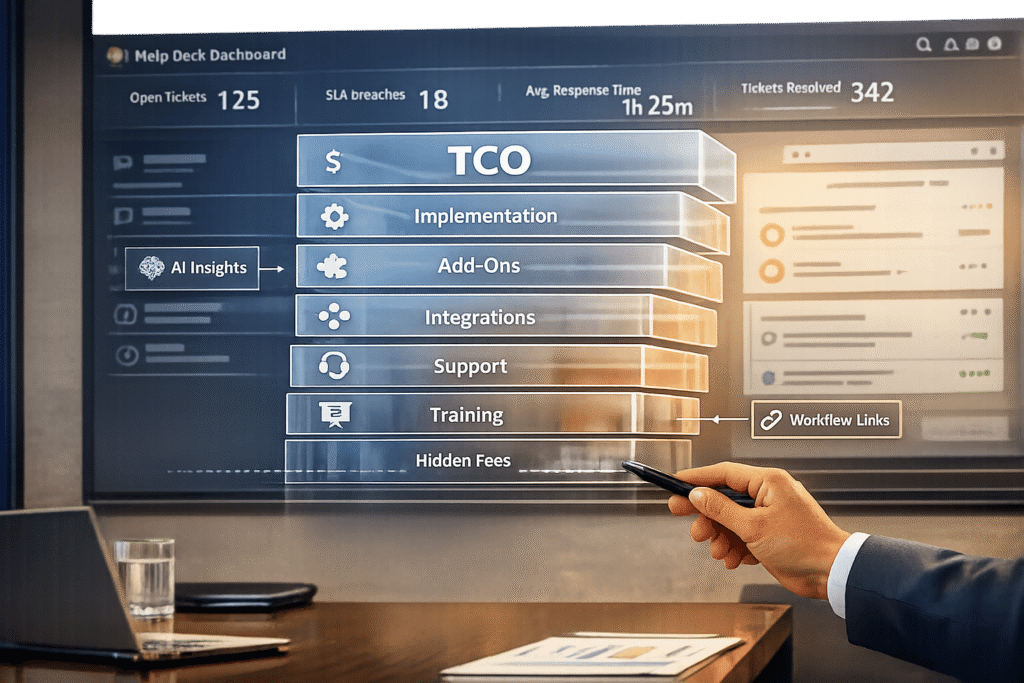
When evaluating help desk software, the subscription fee is only a fraction of the total cost. Over five years, 70% of expenses come from hidden costs like implementation, training, maintenance, and add-ons. These costs can make the actual price 5–8 times higher than expected, leading to budget overruns and regrets for 58% of businesses.
Key points to consider:
- Pricing models: Per-agent, per-ticket, usage-based, or custom enterprise contracts. Each has pros and cons based on team size and ticket volume.
- Hidden costs: Setup fees, premium features (e.g., AI tools), integrations, and ongoing maintenance.
- TCO calculation: Factor in acquisition, operating, and personnel costs, including potential growth and usage spikes.
To reduce costs:
- Pick a pricing model that matches your team’s needs.
- Consolidate tools with built-in features to avoid extra fees.
- Negotiate transparent, long-term pricing and audit licenses regularly.
Understanding these factors is essential to avoid surprises and ensure your software investment delivers long-term value.
Common Help Desk Pricing Models
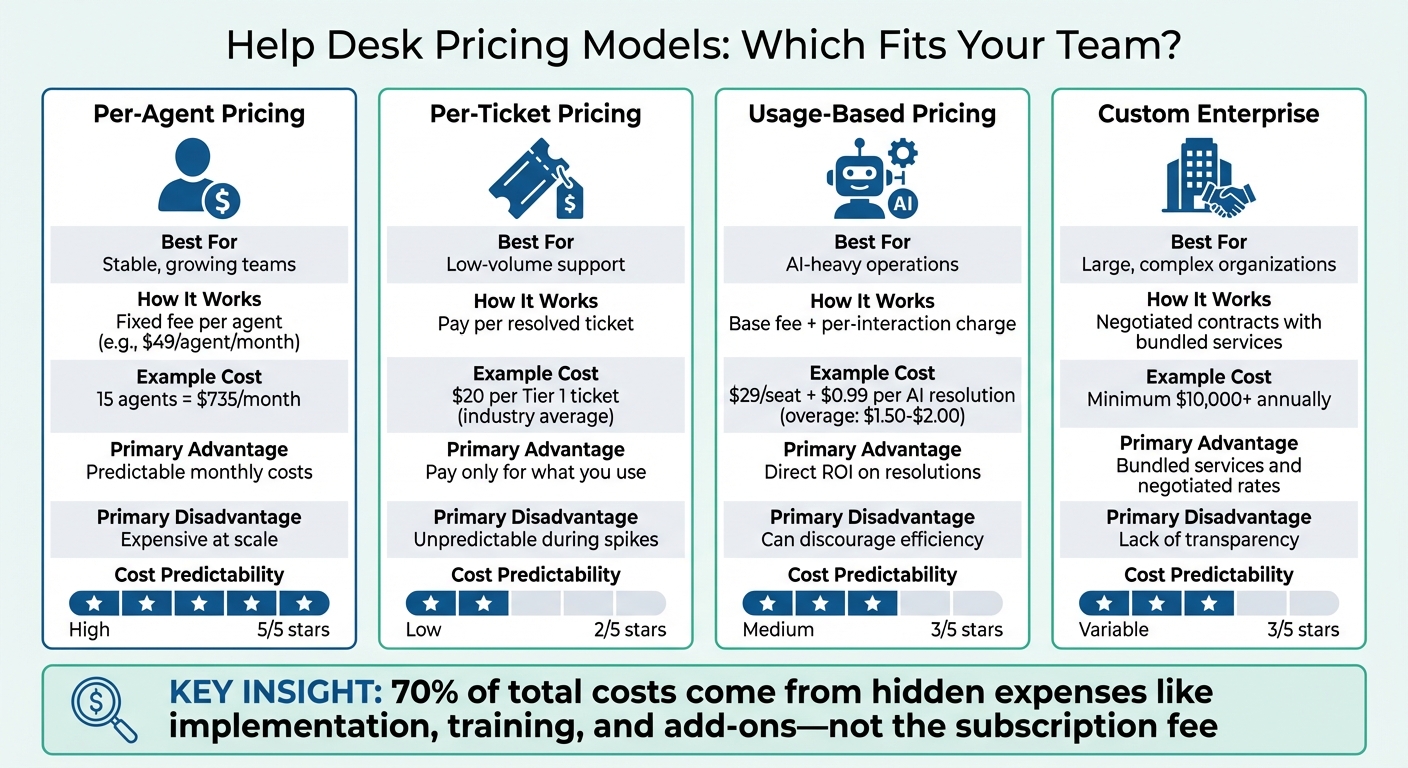
Help Desk Software Pricing Models Comparison: Per-Agent vs Per-Ticket vs Usage-Based vs Enterprise
How much you spend on help desk software often depends on the pricing model the vendor uses. These models determine how costs scale as your business grows.
Per-agent pricing is one of the most widely used structures. Here, you pay a set fee – monthly or yearly – for each support agent, no matter how many tickets they handle. For instance, if you have 15 agents at $49 each, your monthly cost is $735. Adding five more agents would increase your bill by $245. However, vendors often bundle advanced features into higher-priced plans, meaning you might need to upgrade just to access certain essential tools.
Per-ticket and usage-based pricing charges based on activity, like the number of resolved tickets or AI interactions. This model works well for teams handling fewer support requests, but it can lead to unpredictable costs if ticket volumes suddenly spike. For example, the average industry cost for a Tier 1 support ticket is $20. Some vendors combine this with a base fee, such as $29 per seat, and an additional charge per interaction – like $0.99 for each AI resolution. Once you exceed the included AI credits, overage fees can jump to $1.50–$2.00 per resolution, making it tough to predict monthly expenses for high-volume teams.
Custom enterprise contracts cater to large organizations with complex requirements. These agreements often start at a minimum annual spend of $10,000 and include features like advanced security, dedicated account management, and custom integrations. One big advantage is flexibility – you might negotiate licensing that only charges for agents actively logged in or secure fixed rates for high volumes. However, enterprise pricing is rarely transparent, and it can be hard to figure out which specific features contribute most to the cost. For companies with strict compliance needs or intricate workflows, the tailored options can make the upfront investment worthwhile.
Here’s a quick comparison of these pricing models:
| Pricing Model | Best For | Primary Advantage | Primary Disadvantage |
|---|---|---|---|
| Per-Agent | Stable, growing teams | Predictable monthly costs | Can become expensive at scale |
| Per-Ticket | Low-volume support | Pay only for what you use | Unpredictable costs during spikes |
| Usage-Based | AI-heavy operations | Direct ROI on resolutions | Can discourage agent efficiency |
| Custom Enterprise | Large, complex organizations | Bundled services and negotiated rates | Lack of cost transparency |
Next, we’ll dive into the hidden costs that can significantly impact your total cost of ownership (TCO).
Hidden Costs in Help Desk Software
The price tag on a help desk platform often only scratches the surface. While the monthly subscription fee might seem straightforward, the real expenses – such as implementation, add-ons, integrations, and ongoing maintenance – can quickly add up. Let’s break down some of the hidden costs tied to implementation, additional features, and system integrations.
Implementation, Onboarding, and Training Fees
Getting a new help desk system up and running involves more than just signing up. You’ll need to migrate data from your old system, customize workflows to fit your needs, and train your team to use the new platform effectively. Often, companies bring in external consultants to handle this process, which can be costly. For larger platforms, these upfront expenses can be significant. For example, Aisera’s entry-level annual plans range from $100,000 to $200,000, while ServiceNow typically requires an initial spend of $10,000 to $50,000 just to get started.
Even after implementation, ongoing support is necessary. Many organizations need dedicated system administrators, IT support teams, and sometimes even process consultants to ensure the platform runs smoothly.
Add-Ons and Premium Features
Many help desk platforms lure users with appealing base prices but then charge extra for essential features. For instance, AI Copilot add-ons might cost $50 per agent per month. Tools for quality assurance can add another $35 per agent monthly, and workforce management features might tack on an additional $25.
AI-powered tools often come with usage-based pricing, which can be unpredictable. While platforms may include a limited number of automated resolutions per agent, high-volume teams could face overage fees of $1.50 to $2.00 per resolution. Enterprise-level needs, like HIPAA compliance, Single Sign-On (SSO), or advanced security measures, are frequently excluded from standard plans. These features are often sold as separate add-ons, costing $50 or more per agent each month.
Beyond these add-ons, integration and ongoing maintenance can further increase costs.
Integration and Maintenance Costs
Connecting your help desk platform to other tools – such as CRM systems, Slack, or Shopify – often involves extra fees or custom development. While basic integrations may be included, linking with enterprise systems like Salesforce, Jira, or SAP typically requires paid connectors or custom API work.
For cloud-based platforms, hosting and updates are usually included. However, on-premise deployments bring additional costs, such as server hardware, database licenses, operating system upgrades, and dedicated IT staff. Communication channels like SMS, WhatsApp, and telephony are often billed separately based on usage, with costs rising during peak support times. As your data grows, you might also need to budget for increased storage, additional user licenses, or more advanced reporting capabilities – all of which may not be covered in your original plan.
How to Calculate Total Cost of Ownership (TCO)
When evaluating software costs, it’s important to look beyond the upfront price. Studies show that a software’s lifetime cost can be 5–8 times its initial purchase price. To get an accurate picture of Total Cost of Ownership (TCO), you need to factor in all expenses incurred throughout the software’s lifecycle.
To calculate TCO, add up costs from three main categories: Acquisition (licenses, implementation, data migration), Operating (maintenance, support, training, integrations), and Personnel. These costs tend to grow over time, especially as your team expands or as support needs increase. Breaking down both recurring and one-time costs is essential to fully understand the financial commitment.
Projecting Subscription and Usage Costs
Start by estimating subscription costs over a four-year period. Ask vendors to provide a four-year TCO estimate, which forces them to reveal their assumptions about ongoing expenses. To see how costs might scale, model scenarios with team growth rates of 10%, 25%, and 50%.
For usage-based pricing models, historical data is your best friend. Analyze past ticket volumes and data growth trends. If your platform charges for things like automated resolutions, API calls, or storage overages, these costs can add up quickly. Exceeding base storage limits, for example, might lead to forced tier upgrades or unexpected fees that weren’t in your original budget.
Including Operational and Hidden Expenses
Operational costs often include overlooked items like implementation and onboarding. These might cover data migration, custom integrations, workflow adjustments, and initial training. As your team grows, ongoing training costs will also add to the total.
Don’t forget personnel expenses. A dedicated system administrator, whose salary might even exceed the cost of the software subscription, is a common example. Additionally, consider the time your IT team spends maintaining integrations, creating reports, and managing updates. For on-premise setups, factor in hardware, database licenses, and even utility costs like electricity and cooling.
Identifying Cost Escalation Risks
Once you’ve outlined base and operational costs, take a closer look at what might drive those costs higher. Team growth, for instance, often increases seat licenses, but it can also push you toward higher-tier plans if you hit storage or contact record limits. Similarly, needing just one or two advanced features might force you into premium pricing tiers.
Regular license audits can help you avoid paying for "shelfware" – licenses that aren’t being used. Be cautious of vendor estimates for implementation timelines, as they may be overly optimistic to close the deal. Also, watch out for "bill of material stuffing", where vendors bundle high-tier packages with features you don’t immediately need.
| TCO Category | Potential Escalation Risks | Projection Strategy |
|---|---|---|
| Subscription | Tier upgrades due to feature needs; seat growth | Model costs with 10%, 25%, and 50% team growth |
| Usage/Storage | Rising data retention or AI resolution volume | Audit historical ticket/data growth; check pay-as-you-go rates |
| Add-ons | Paying for unused tools or features | Identify which tiers include only essential features |
| Personnel | Hiring specialized staff or consultants | Estimate hours needed for maintenance and reporting |
sbb-itb-e60d259
How to Reduce Help Desk Software Costs
Building on the total cost of ownership (TCO) breakdown, there are practical ways to cut software expenses even further. Tackling these often-overlooked costs is key to running efficient, AI-driven support operations in the long term.
Choosing the Right Pricing Model
The pricing model you select should fit your team’s structure and the volume of support requests you handle. For teams managing a large number of devices with a steady support staff, a pay-per-technician model can keep expenses predictable. For example, Atera charges $129–$179 per technician per month, allowing unlimited devices, which avoids the escalating costs of per-device pricing.
On the other hand, high-volume support teams might benefit from a resolution-based pricing model. This approach ties costs to successful ticket resolutions rather than team size. Intercom‘s Fin AI agent, for instance, charges $0.99 per resolved ticket, making it easier to scale support without adding full-time staff. It’s also helpful during slower periods when ticket volumes drop, ensuring you’re not overpaying for unused capacity.
Another way to save is by opting for annual billing. For example, Zendesk‘s Support Team plan drops from $25 per month to $19 per month when billed annually. That 24% discount can save a 20-agent team around $1,440 annually on base subscription fees.
Consolidating Tools and Using Built-In AI
Using separate systems for ticketing, knowledge management, and AI assistance often adds hidden labor costs that can surpass the software’s subscription price. Research shows that acquisition costs make up only about 30% of a five-year TCO, with the remaining 70% going toward customization, maintenance, and manual processes.
Switching to an all-in-one platform with built-in AI features can eliminate integration fees and reduce the need for manual system management. For instance, Intercom’s Fin AI agent resolved over 6,000 conversations autonomously within six months for Synthesia, while Linktree saw 42% of its conversations resolved in just six days. Platforms with integrated AI can handle up to ten times the ticket volume without adding staff, bundling AI capabilities into their base price instead of charging an additional $50 per agent per month for premium features.
Negotiating Transparent, Scaled Pricing
When evaluating vendors, request a TCO estimate that spans four to five years, covering maintenance, upgrades, and anticipated growth in usage. This approach helps uncover hidden costs and allows for better comparisons between providers. Clearly documenting your requirements upfront can also prevent unnecessary features from inflating your bill.
Ask about specific charges, such as fees for API access, data storage limits, and whether onboarding and training are included or come at an extra cost. For larger contracts, negotiate terms that lock in favorable pricing for future user additions and data expansions. Vendors are often more flexible during the deal-closing phase.
Conducting regular license audits can also reduce unnecessary spending. Identify and eliminate idle licenses or reassign them to active team members. Some vendors offer free or low-cost "Lite" seats for limited access, which can be a cost-effective alternative to paying full agent prices.
Conclusion
As we’ve explored, getting a clear picture of pricing models and hidden costs is critical for accurate Total Cost of Ownership (TCO) planning. When it comes to help desk software, the price tag often goes beyond the subscription fee, with hidden costs adding up significantly over a five-year period.
Avoiding unexpected expenses starts with identifying these hidden costs early. Things like implementation fees, integration expenses, training, and ongoing maintenance can quickly inflate the total cost. Asking vendors for a comprehensive four-year TCO estimate – including all acquisition and lifetime costs – can help you make informed comparisons and steer clear of surprises.
To manage costs effectively, focus on strategic decisions. Choose a pricing model that fits your team’s structure, consolidate tools to avoid integration fees, and negotiate transparent contracts that secure favorable terms for future growth. Regularly auditing licenses, using built-in AI features instead of paying extra for premium add-ons, and involving legal and finance teams during contract discussions can also help keep spending in check.
By applying these strategies, you can ensure your help desk software supports growth without unplanned budget overruns. The goal isn’t to simply find the cheapest solution – it’s to invest in software that delivers real value while aligning with your operational needs and long-term goals.
"TCO isn’t just a cost metric; it’s a leadership tool that keeps growth and governance moving in the same direction." – WalkMe
FAQs
What hidden costs should I watch out for when budgeting for help desk software?
Hidden expenses in help desk software can sneak up on you, often tied to ongoing costs that aren’t immediately apparent. These might include customization and setup fees, system upgrades, or training and support services. For example, some platforms may require hefty investments for major upgrades every few years, even if you’re already paying annual maintenance fees.
You might also encounter extra charges for add-on features such as AI tools, advanced analytics, or workforce management modules, which are typically sold separately. Costs can escalate further as your business grows, with vendors charging based on factors like the number of users or increased data storage requirements. To steer clear of unexpected expenses, it’s crucial to factor in these elements when budgeting and assessing the total cost of ownership (TCO).
What’s the best way to calculate the Total Cost of Ownership (TCO) for help desk software?
When evaluating help desk software, it’s essential to look beyond the upfront price tag. The Total Cost of Ownership (TCO) includes all expenses tied to the software, not just the initial purchase. Here are the key cost areas to consider:
- Acquisition Costs: These are the software licenses or subscription fees. They often depend on the number of users and the features included in your plan.
- Operating Costs: These cover ongoing expenses like maintenance, updates, customizations, and integrations with other tools.
- Personnel Costs: Think of the time and resources needed for tasks like implementation, employee training, and day-to-day system management.
To avoid unexpected expenses, ask vendors about potential hidden or recurring fees. These might include costs for extra user licenses, additional data storage, or premium support services. Tools like TCO calculators or comparison platforms can also help you assess long-term costs over several years. This ensures your choice fits both your budget and operational needs, giving you a solution that provides consistent value without surprises.
How can I avoid hidden costs when investing in help desk software?
To steer clear of unexpected expenses with help desk software, it’s crucial to grasp the total cost of ownership (TCO). This goes beyond the initial subscription or licensing fees to include ongoing costs like customization, maintenance, upgrades, and training. When discussing options with vendors, dig into the details. Ask about potential extra charges for integrations, advanced tools, or premium support – these can sometimes catch you off guard.
Another smart move is to compare the TCO across different vendors. Look into aspects like scalability, licensing models, and the requirements for future upgrades to ensure your investment aligns with long-term needs. Opting for modern, AI-native solutions can also streamline operations by reducing manual tasks, which may help cut down on personnel costs. Taking a proactive and detailed approach to analyzing costs ensures fewer surprises and a more informed decision.






