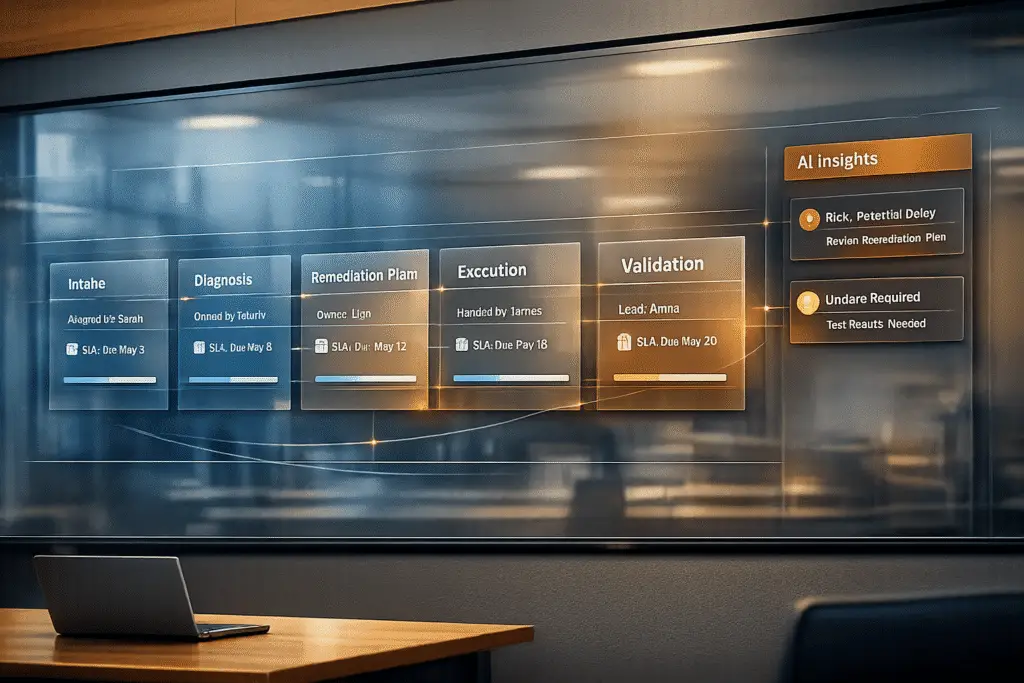
Managing long B2B cases can be challenging, but using “case milestones” simplifies the process. Milestones are checkpoints that help teams track progress, meet deadlines, and improve communication across departments. They ensure accountability, reduce delays, and keep customers informed during complex, multi-week resolutions.
Key Takeaways:
- What milestones do: Break down long cases into manageable steps, like "Initial Ticket Triage and Prioritization" or "Root Cause Analysis."
- Why they matter: They help avoid SLA breaches, improve customer satisfaction, and prevent bottlenecks through escalation management.
- How to implement:
- Map your case lifecycle (e.g., New, InProgress, Closed).
- Define clear milestones (one-time, recurring, or conditional).
- Assign ownership for accountability.
- Use tools like AI for tracking, updates, and predicting delays.
By following these steps, you can streamline your support process, improve resolution times, and enhance customer retention. Let’s dive into the details.
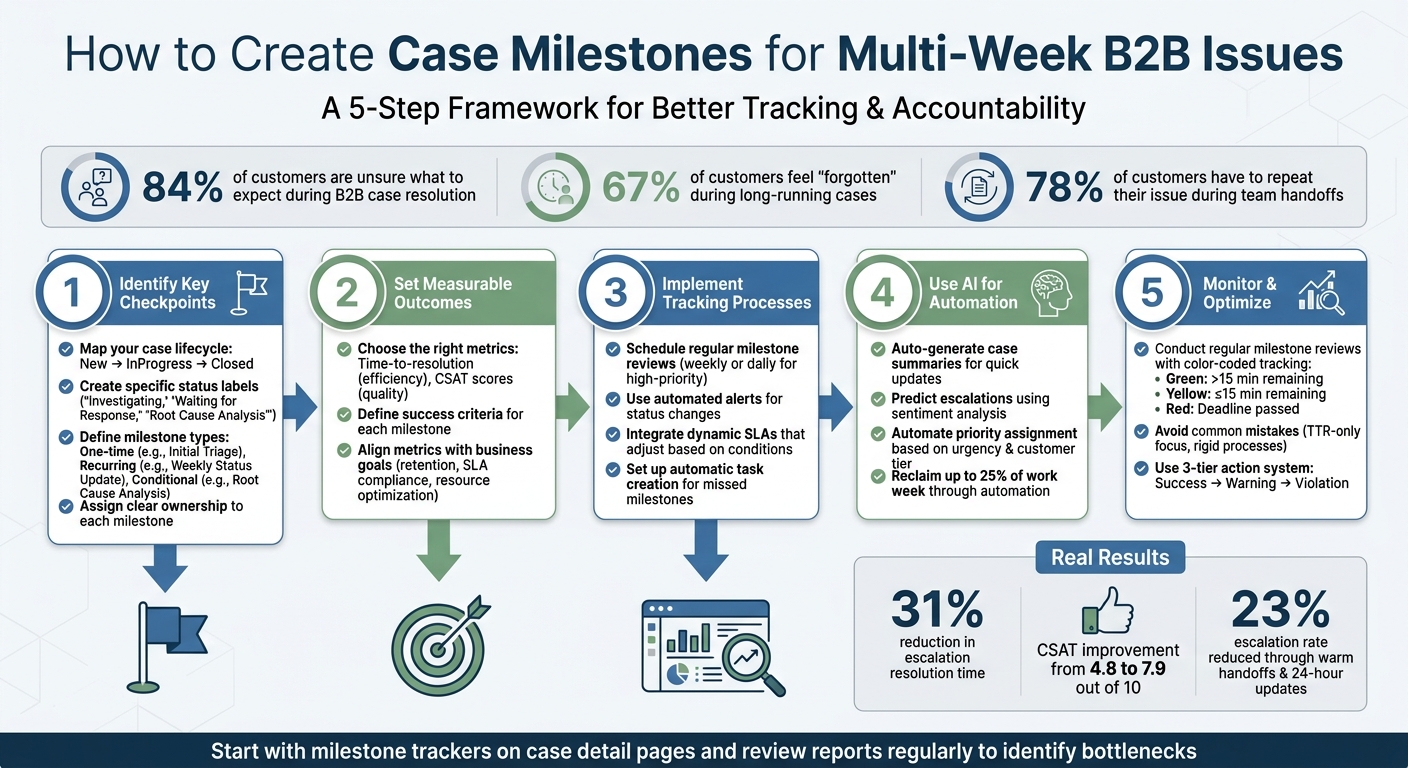
5-Step Framework for Creating B2B Case Milestones
Step 1: Identify Key Checkpoints for Multi-Week Cases
Map Your Case Lifecycle
Start by organizing your B2B case lifecycle into three main stages: New (initial triage), InProgress (active investigation), and Closed (resolution and completion) [3]. This structure provides a clear foundation, with the majority of multi-week cases typically falling within the InProgress stage.
Within the InProgress stage, create specific status labels to reflect the exact activity happening at any given time. Labels like "Investigating", "Waiting for Response", and "Root Cause Analysis" make it easier for stakeholders to understand the case’s current status [3]. This level of detail is crucial – 84% of customers navigating complex B2B cases admit they’re unsure of what to expect during the resolution process [4].
Look for complexity triggers such as multi-system integrations, custom configurations, or high-stakes issues that could impact revenue [4]. These triggers indicate the need for additional checkpoints and tighter communication protocols compared to standard B2B cases.
Define Milestones for Each Phase
Using your lifecycle map, set actionable milestones for every phase. Keep in mind, milestones serve different purposes – some happen once, some recur, and others are conditional.
For example:
- "Initial Triage" is a one-time milestone that occurs when the case is first created.
- "Weekly Status Update" is a recurring milestone that happens every seven days until the case is resolved.
- "Root Cause Analysis" is a conditional milestone triggered when the case status shifts to "Investigating" [1].
"Milestones define major steps in a support process and they can help define company SLAs." – Salesforce Ben [1]
This variety ensures you’re tracking both single events and ongoing progress effectively. The next step is assigning clear ownership to ensure accountability.
Assign Ownership for Each Milestone
Each milestone must have a designated owner – whether it’s a frontline support agent, an escalation specialist, or a support manager. Clear ownership ensures accountability and smooth transitions throughout the lifecycle. Without it, cases often stall, especially during handoffs between teams or departments. In fact, 78% of customers report having to repeat their issue during such transitions [4].
Implement a "Warm Handoff" process to improve these transitions. The current owner should personally introduce the next owner to the customer, providing all relevant context [4]. One B2B software company that faced a 23% escalation rate adopted this approach, alongside a 24-hour update requirement. Over eight months, they reduced escalation resolution time by 31% and boosted customer satisfaction scores from 4.8 to 7.9 out of 10 [4].
Finally, set up communication protocols for milestone owners. For multi-week cases, require proactive updates every 24 hours or every three business days [4]. Regular updates help address a common customer frustration – 67% of customers feel "forgotten" when updates are missing during long-running cases [4].
sbb-itb-e60d259
Step 2: Set Measurable Outcomes and Success Criteria
Choose the Right Metrics
Once you’ve outlined your milestones, it’s time to define how you’ll measure success. Use metrics that are both specific and relevant. For example, time-based metrics like time-to-resolution can track efficiency, while quality-focused metrics such as CSAT scores reflect service quality. Balancing these ensures that your team delivers timely support without cutting corners, reducing the chances of repeat issues and dissatisfied customers.
"Organizations can measure and analyze case resolution times, agent performance, and customer satisfaction by tracking milestones." – NandBlogs [2]
Visual tools can also help by providing instant updates on milestone progress, keeping everyone informed and aligned.
Example: Success Criteria for Diagnostics
Let’s break this down with an example. Imagine you’re setting success criteria for a milestone like "Root Cause Analysis." A concrete measurable outcome could be: diagnostic testing and root cause identification completed within five business days of entering the "Investigating" phase. Success would also mean documenting findings in case notes, providing the customer with a clear explanation, and moving the case to the next phase with an actionable plan.
This clarity helps everyone involved understand what "done" truly means. It also gives stakeholders a way to verify progress against specific benchmarks. Without such criteria, milestones risk becoming vague tasks that fail to drive meaningful results.
Align Metrics with Business Goals
Your metrics should connect directly to your company’s larger goals, such as improving customer retention, meeting SLA commitments, or optimizing resources. For instance:
- If customer retention is a priority, track CSAT scores at key milestones to ensure quality remains high.
- If SLA compliance is critical, measure how often milestones are completed within their designated timeframes.
Step 3: Implement Milestone Tracking Processes
Now that milestones and measurable outcomes are identified, the next step is setting up efficient ways to track progress. This involves using scheduled reviews, automated alerts, and flexible SLAs to keep everything on course.
Schedule Regular Milestone Reviews
Establish a routine for milestone check-ins to evaluate progress, especially for multi-week cases. These reviews should happen consistently – weekly for most B2B support teams, or even daily for high-priority accounts. During these sessions, focus on whether milestones are being met, flag cases that might miss deadlines, and reassign resources if needed. The idea isn’t just to observe progress but to adapt timelines proactively when changes arise, like delays from customers or unexpected internal issues.
These regular reviews also encourage accountability. When team members know their progress will be discussed in recurring meetings, it motivates them to stay on track. To make this process even smoother, innovative help desk automation can reduce the need for constant manual oversight while keeping milestone statuses updated in real time.
Use Automated Alerts and Notifications
Automated alerts are a game-changer for keeping everyone informed without constant manual effort. Configure your system to send notifications whenever a case status changes, triggering the corresponding milestone countdown [1].
For missed critical milestones, set up automatic task creation within your management system. For example, if a "Root Cause Analysis" milestone isn’t completed on time, the system could create a task like "Investigate missed milestone" and assign it to the appropriate team lead [5].
To maintain consistent communication during extended cases, schedule recurring "Customer Update" milestones. This ensures customers feel informed and engaged, even during longer resolution periods [1].
Integrate Milestones with Dynamic SLAs
Dynamic SLAs add flexibility to your tracking process by adjusting deadlines based on milestone progress and case-specific conditions. Instead of applying a fixed timeline to every case, these SLAs can adapt to unique scenarios. For instance, if a customer’s contract renewal is near, you might shorten the SLA to prioritize resolution. On the flip side, if a customer requests a pause, the SLA can be extended to reflect that.
You can also use relative milestones that automatically recalculate their deadlines based on the completion of earlier milestones [5]. This approach ensures your timeline stays realistic as the case evolves through different phases. By combining regular reviews, automation, and adaptable SLAs, you can create a system that keeps everything on track while staying responsive to changes.
Step 4: Use AI for Automated Milestone Management
AI is transforming how multi-week cases are managed by taking over repetitive, time-consuming tasks. Instead of agents sifting through extensive case histories or managers manually tracking at-risk milestones, AI steps in to handle these processes efficiently.
AI-Driven Milestone Updates and Summaries
Handling cases that stretch over weeks can be a challenge, especially when it comes to staying updated on progress. AI simplifies this by automatically generating concise summaries of long case threads. These summaries provide a clear snapshot of milestone statuses, saving agents from scrolling through endless interactions [7][9]. This feature is particularly useful during shift changes or escalations, as it equips the next agent with an instant understanding of the case’s current state and the next steps.
"AI Case Summaries condense long, complex case threads into concise, easy-to-read overviews." – Supportbench [9]
AI doesn’t stop at summaries. It can also pinpoint specific issues that are holding up progress. For instance, if a "Root Cause Analysis" milestone is delayed because a customer hasn’t submitted necessary log files, AI identifies and flags that exact problem. This eliminates the need for manual searches, allowing teams to focus on resolving the issue.
Beyond just summarizing, AI can also predict potential delays, giving teams a chance to act before milestones are missed.
Predict Escalations with AI
AI goes beyond providing updates – it offers foresight. By monitoring customer sentiment and urgency, AI predicts when a milestone might fail. For example, if a customer’s tone becomes frustrated or their language signals urgency, the system flags the case for immediate attention [6][7]. This proactive approach ensures teams can address issues before they escalate.
Sentiment analysis acts as an early warning system. Even when a case seems on track based on standard updates, AI can detect hidden risks by analyzing emotional cues and underlying concerns in support conversations [6]. This allows teams to step in early, avoiding the chaos of reacting to missed deadlines.
AI also uses historical data to predict SLA breaches [6]. If the system detects deviations from expected patterns, it sends alerts, enabling managers to adjust resources or timelines before problems arise.
Reduce Manual Work with Automation
AI takes the burden off teams by automating tasks like prioritizing high-stakes milestones. It factors in customer sentiment, urgency, and past trends to ensure critical milestones – especially for key B2B clients – get the attention they need without manual intervention [6][9]. By analyzing customer health scores and historical data, AI ensures no crucial milestone slips through the cracks.
"AI-powered priority assignment uses advanced algorithms to analyze incoming cases based on several factors, including sentiment, urgency, and customer tier." – Supportbench [6]
Teams leveraging AI for milestone management can reclaim up to 25% of their work week by automating processes like work breakdowns, status updates, and bottleneck detection [8]. AI also preserves contextual memory across extended periods, addressing a common issue with manual handovers [6][9].
These AI-powered tools provide a comprehensive solution for managing and optimizing multi-week cases, ensuring smoother operations and better outcomes for both teams and customers.
Step 5: Monitor, Optimize, and Avoid Common Mistakes
Keeping tabs on your processes and fine-tuning them as you go is crucial to staying on track and addressing problems before they escalate. Let’s dive into how you can stay ahead and avoid common missteps.
Conduct Regular Milestone Reviews
Staying on top of milestones means having a clear, real-time view of case progress. Workflow automation and alerts are a great start, but pairing them with visual tracking tools makes things even clearer. For instance, custom reports can use color-coded flags – green, yellow, and red – to show the status of milestones at a glance. A case might display green if there’s more than 15 minutes left, yellow when time is running low (15 minutes or less), and red if the deadline has already passed [10].
To keep everything current, set these milestone reports to refresh automatically – say, every 55 seconds. This ensures decisions are based on the most up-to-date data available [10]. Also, make sure that missed milestones automatically trigger corrective actions as part of your tracking system [5].
Avoid Common Mistakes
One major trap to avoid is focusing only on Time to Resolution (TTR). While TTR is important, prioritizing it too much can push agents to close cases too quickly, sometimes without fully resolving the customer’s issue [1]. Instead, balance speed with quality by also keeping an eye on customer satisfaction and how accurately issues are resolved.
Another common mistake is sticking to a rigid, step-by-step process. In B2B support, cases often involve a lot of back-and-forth communication, unexpected delays, and shifting requirements. To handle these complexities, consider using relative milestones. This means the target date for the next step adjusts automatically based on when the previous milestone is completed [5]. It’s a more flexible way to manage unpredictable workflows.
Recognizing these potential pitfalls helps you refine your approach and improve how you handle future cases.
Refine Processes Based on Results
Use the metrics and AI-driven insights from earlier steps to continuously tweak your milestone system. For instance, set up risk-based triggers that escalate cases automatically when milestones are nearing their deadlines but haven’t been completed yet [5]. A three-tier action system works well here:
- Success: Milestones completed on time
- Warning: Deadlines approaching soon
- Violation: Deadlines missed
This structure not only streamlines how you respond to issues but also boosts accountability at every stage [1]. Regular adjustments like these ensure your process stays effective and adaptable.
Conclusion: Key Takeaways for Case Milestone Management
A Look Back at the Case Milestone Framework
This five-step framework offers a practical way to simplify operations and boost accountability for multi-week B2B support cases. Let’s quickly revisit the steps:
- Step 1: Outline your case lifecycle and identify key checkpoints for tracking progress.
- Step 2: Define measurable outcomes with clear success criteria that align with your business objectives.
- Step 3: Establish tracking methods, including regular reviews and automated alerts.
- Step 4: Use AI tools to automate milestone updates, cutting down on manual tasks.
- Step 5: Continuously refine your approach by analyzing milestone reports and making necessary adjustments.
Why Case Milestones Matter for B2B Support
Case milestones are a game-changer for managing complex, long-term issues. They bring clarity and accountability to the resolution process, making it easier to measure performance. By tracking agent performance metrics like resolution times, you can better manage extended cases while improving customer satisfaction. [2]
Take the First Step Toward Smarter Milestone Management
Ready to see the difference case milestones can make? Start by integrating milestone trackers into your case detail pages. This gives agents a clear, visual reminder of their progress. Ensure milestone status fields are easy to access by configuring field-level security and page layouts. Regularly review milestone reports to identify any bottlenecks and adjust your workflows as needed. Tools like Supportbench offer built-in automation and AI insights to simplify milestone management and improve overall efficiency.
FAQs
How many case milestones should a multi-week case have?
A multi-week case benefits from having three to five key milestones to monitor progress and keep things on track. The number of milestones you set will depend on how complex the case is and what your specific operational goals are. These checkpoints play a crucial role in keeping stakeholders aligned and ensuring accountability as the case moves forward.
What’s the best cadence for customer updates in long-running cases?
The right timing for updates really depends on how serious the issue is and how much progress is being made. For critical issues, aim to send updates every 30–60 minutes. For less urgent situations, you can adjust the frequency as things develop.
One key step: send an initial acknowledgment within 10–15 minutes. This sets expectations early and reassures everyone that the issue is being addressed. Keeping communication consistent and clear not only prevents frustration but also helps build trust during longer investigations.
How can AI predict milestone delays before an SLA breach?
AI can anticipate milestone delays by examining a mix of factors, such as customer sentiment, response times, and case history. By leveraging predictive analytics and real-time data, it pinpoints high-risk cases early in the process. These models analyze more than 40 data points to forecast potential delays, giving teams the chance to take action before issues escalate. With continuous learning, workflows can be adjusted and priorities refined, helping to minimize missed milestones and avoid SLA violations.