


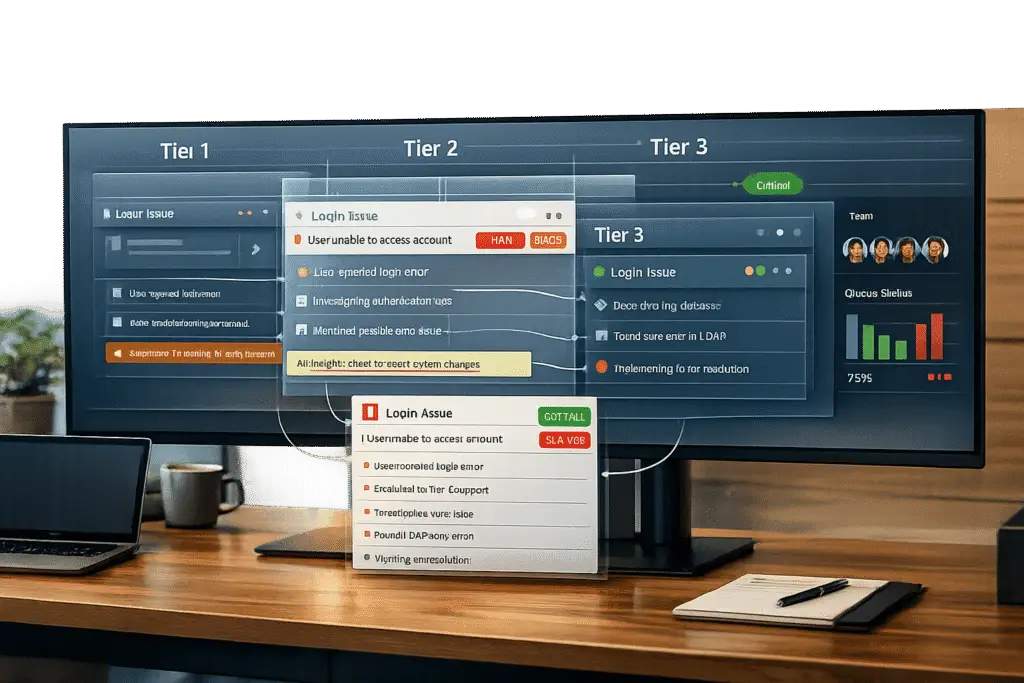
When choosing a helpdesk for multi-tier support, focus on platforms that handle ticket routing, escalation, and context preservation effectively. Multi-tier support organizes agents by expertise – Tier 1 handles simple tasks, Tier 2 tackles more complex issues, and Tier 3 addresses advanced technical problems. The right helpdesk ensures smooth transitions between tiers, prevents bottlenecks, and keeps customers from repeating themselves.
Key features to look for:
- Smart routing: Assign tickets based on skills, workload, or urgency.
- SLA management: Set response and resolution deadlines for each tier.
- Context preservation: Transfer ticket history, notes, and troubleshooting steps seamlessly.
- Collaboration tools: Enable internal messaging, private notes, and team involvement.
- Knowledge base integration: Help agents resolve issues faster and reduce escalations.
- Reporting: Track metrics like escalation rates and time spent at each tier.
Quick Tip: Test these features during demos by simulating ticket escalations and checking how well the platform preserves context and enforces workflows.
A strong option like Supportbench combines intelligent routing, dynamic SLAs, and AI-powered tools to streamline multi-tier support for teams managing complex cases. Compare platforms by how well they address your team’s specific needs.
What Multi-Tier Support Means
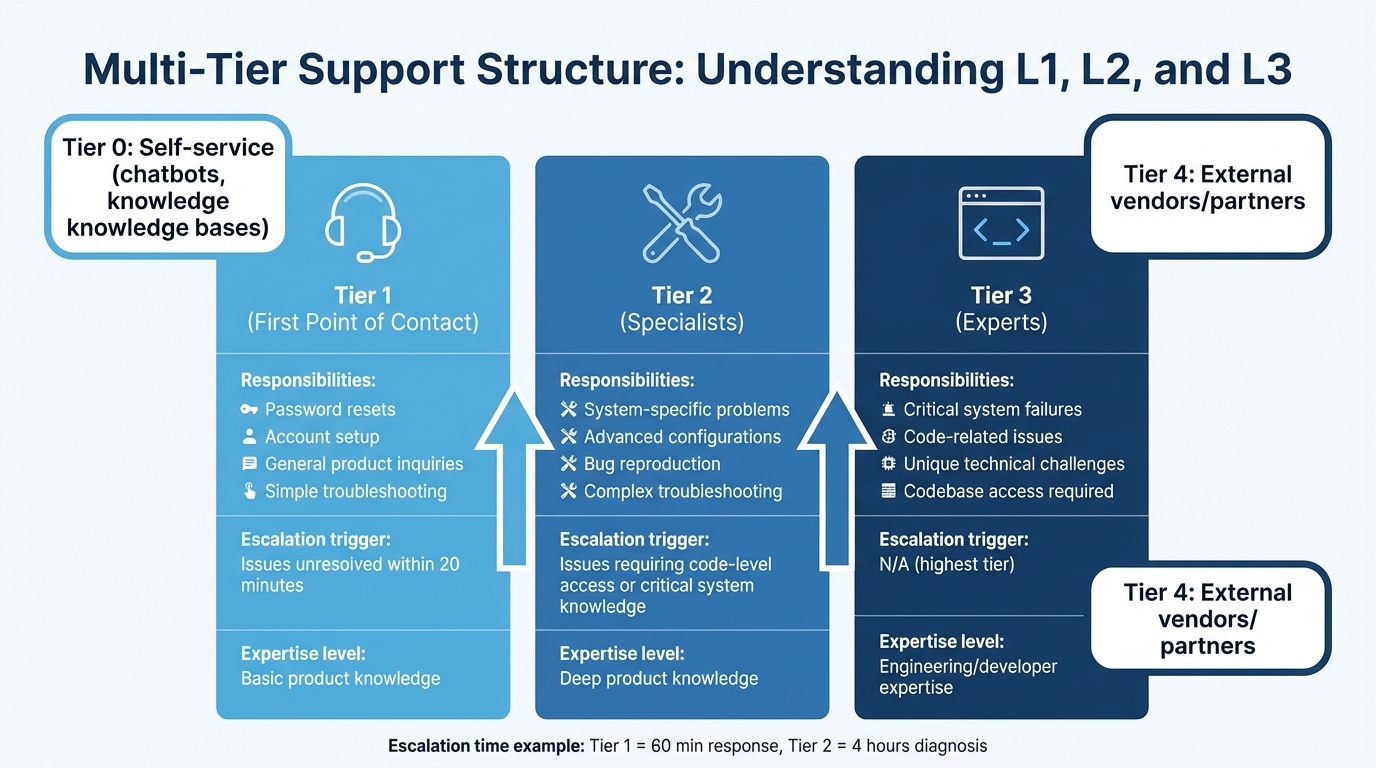
Multi-Tier Support Structure: L1, L2, and L3 Responsibilities Comparison
Multi-tier support is a structured system that organizes support agents into levels based on their technical skills and the complexity of issues they handle. Instead of routing tickets randomly, this system creates distinct layers of expertise. For example, Tier 1 addresses high-volume, straightforward issues like password resets, Tier 2 handles more advanced troubleshooting, and Tier 3 involves specialists or engineers for complex, code-level problems. Some organizations extend this model with Tier 0 (self-service options like chatbots and knowledge bases) and Tier 4 (external vendors or partners).
This setup ensures that each issue is resolved by someone with the right level of expertise, which improves efficiency. Without such a system, developers might waste time on simple account issues, while front-line agents could struggle with technical problems beyond their skill set. The result? Delays, dissatisfied customers, and inefficient use of resources. Multi-tier support helps prevent these bottlenecks by aligning tasks with the right personnel.
That said, tiering isn’t always the best solution for every team. For smaller groups with fewer tickets and simpler issues, a flat model where all agents handle a shared queue may be more practical.
L1/L2/L3 Support Structure
The traditional three-tier model divides support tasks by their technical complexity:
- Tier 1 agents are the first point of contact. They handle basic tasks like account setup, general product inquiries, and simple troubleshooting. If they can’t resolve an issue within a set timeframe (e.g., 20 minutes), it escalates to the next level.
- Tier 2 specialists have deeper knowledge of the product. They manage more complex issues, such as system-specific problems, advanced configurations, or reproducing bugs.
- Tier 3 experts – often engineers or developers – deal with critical system failures, code-related issues, and unique technical challenges that require access to the codebase.
Swarming and Specialist Models
Not every organization sticks to rigid tier structures. Some use functional escalation, where tickets are sent directly to specialists based on the nature of the issue, bypassing traditional tiers. For instance, a billing question might go straight to a payments expert, while a technical bug might be routed directly to an engineer.
This creates a swarming model, where specialists collaborate on a case based on its specific needs. Instead of moving from Tier 1 to Tier 2 to Tier 3, the right experts are brought in immediately. This reduces delays from handoffs and helps maintain context. However, this model requires advanced routing systems and strong collaboration tools to avoid confusion. Organizations can also tailor their support approach based on other factors, such as product lines, geography, or partnerships.
Product, Regional, and Partner-Based Tiers
In some cases, tiering isn’t just about technical complexity. Support teams may also organize by:
- Product lines: Teams specialize in specific modules or features, ensuring they have deep expertise in those areas.
- Regions: Regional tiers enable "follow-the-sun" support, ensuring customers receive help during their local business hours across time zones.
- External partners: Some organizations include third-party vendors or partners in their support structure. For example, a Tier 4 might involve a vendor stepping in to resolve issues that require their specialized knowledge.
Required Helpdesk Capabilities for Multi-Tier Support
To effectively manage multi-tier support, a helpdesk must handle case routing intelligently, maintain context during handoffs, and provide clear visibility into ticket progress. This prevents issues like lost cases, repetitive explanations, and Tier 2 overload, creating a smoother support experience.
Routing and Escalation Controls
Skills-based routing ensures tickets are assigned to the right agent from the start by matching cases to specific attributes like language skills, product knowledge, or technical expertise. To handle unresolved cases or those approaching critical deadlines, time- and event-based triggers can automate escalations. Adding custom fields for escalation reasons also promotes accountability.
For high-volume environments, features like "Play Mode" can streamline workflows by automatically assigning the next prioritized ticket to agents, ensuring that urgent cases are handled promptly.
SLA Management and Case Ownership
Tier-specific Service Level Agreements (SLAs) set clear expectations for response and resolution times at each level. For example, Tier 1 might have a 60-minute response target, while Tier 2 could have up to four hours for diagnosis. SLA timers can pause during customer delays or off-hours, and SLA-based prioritization ensures that tickets nearing breach are addressed first.
Ownership models play a crucial role in maintaining context and avoiding miscommunication. Some teams assign a single "case owner" who remains responsible throughout the ticket’s lifecycle, while others use a "queue ownership" approach, transferring responsibility as cases move between tiers. Collision detection features can prevent duplicate efforts and wasted time.
"In Tier 1, we had 60 minutes to respond to the customer and acknowledge the issue. From there, it had to be escalated immediately to Tier 2, and they had four hours to diagnose and resolve the issue."
- Paul Lalonde, Product Marketing Manager, Zendesk
Collaboration Tools, Reporting, and Knowledge Base
Internal collaboration tools are essential for maintaining resolution context. Private notes let agents document troubleshooting steps without sharing technical details with customers, while @mentions make it easy to involve specialists. Side conversations allow agents to loop in other departments, like Finance or Engineering, without cluttering the main ticket thread.
Performance reporting helps identify bottlenecks by tracking metrics like time spent at each tier, escalation rates, and first-contact resolution at Tier 1. For instance, frequent escalations from Tier 1 to Tier 2 might point to training gaps or routing issues. Monitoring "time to escalation" can also reveal whether tickets are being held too long before being passed along.
A shared knowledge base can significantly reduce escalations. When Tier 2 or Tier 3 agents resolve complex issues, documenting these solutions empowers Tier 1 agents to handle similar cases in the future. AI-powered tools can further assist by suggesting relevant articles to agents in real time, enabling them to resolve issues without needing to escalate.
How to Evaluate Helpdesks for Multi-Tier Workflows
When selecting a helpdesk for multi-tier support, it’s crucial to go beyond just ticking off features on a checklist. A thorough evaluation during vendor demos will reveal how well the platform handles escalations, preserves ticket context during handoffs, and generates detailed performance reports for each tier – all without relying on manual fixes or workarounds.
Questions to Ask in Platform Demos
During demos, request a live walkthrough showcasing key capabilities like time-in-tier reporting, approval workflows, and automated SLA-triggered escalations. For example, see how the system manages SLA breaches at Tier 1, including automated notifications and priority adjustments for scenarios like high-value refunds or policy exceptions.
Check if the platform can automatically route Tier 1 tickets to Tier 2 when queues are overloaded. Ensure it enforces state capture requirements, such as validating facts or documenting diagnostic results, before escalation. These workflows are critical for smooth routing, escalation, and approval processes.
Testing Context Preservation and Team Collaboration
Once you’ve evaluated routing and escalation, focus on how well the platform maintains ticket context and supports team collaboration. Test the transfer of a ticket from Tier 1 to Tier 2, ensuring that SLA timers, internal notes, and all relevant information carry over seamlessly . Look for features like automated summaries of lengthy Tier 1 conversations, which can help Tier 2 agents ramp up faster. Also, confirm that internal messaging allows teams to consult with each other without needing to transfer ticket ownership.
"Zendesk helps reduce friction in our ticket escalation process by empowering teams to collaborate and share information smoothly, which creates a better experience for agents, brokers, and customers."
- Howard Muhlstein, Vice President of Infrastructure Services, PURE Insurance
Checking SLA and Reporting Features
Finally, robust SLA tracking and reporting are essential for managing multi-tier workflows effectively. Ask for a demonstration of dashboards that monitor tier-specific SLA compliance, CSAT scores, escalation rates, and average escalation times. Verify that SLAs pause appropriately in scenarios like waiting for vendor or developer input and that the platform supports different SLA targets for each tier – such as a 20-minute resolution for Tier 1 versus longer timelines for Tier 3 . These tools provide a clear, data-driven view of the helpdesk’s performance across all tiers, ensuring operational efficiency.
Common Multi-Tier Support Problems and How to Fix Them
Multi-tier support systems often stumble when handoffs, workflows, or accountability structures are poorly designed. These missteps can lead to lost context during escalations, overwhelmed middle tiers, and frustrated customers who are forced to repeat their issues. The result? Slower resolution times, unhappy agents, and dissatisfied customers.
To tackle these challenges, let’s examine some common issues in multi-tier support and practical ways to address them.
Problem: Escalation Handoff Failures
When Tier 1 agents escalate tickets without including enough context, the receiving team is left to piece things together from scratch. This lack of information can derail progress. Richie Aharonian, Head of Customer Experience & Revenue Operations at Unito, highlights the critical nature of this issue:
"Escalation is a boundary where context dies unless you actively preserve it".
To fix this, implement mandatory escalation templates. These templates should require Tier 1 agents to include key details like validated facts, diagnostic results, steps already taken, and a working hypothesis before escalating the ticket. Using structured fields and internal notes ensures the receiving team doesn’t waste time retracing steps. As Aharonian puts it:
"The extra two and a half minutes [spent on structured handoff] feels like overhead when you’re the person doing it. It saves twenty minutes for the receiving team".
Problem: Tier 2 Becomes a Backlog
Tier 2 can quickly become a bottleneck when unresolved Tier 1 tickets pile up without clear ownership or proper workflows. If tickets are manually "pulled" from a queue, agents may cherry-pick easier tasks, creating uneven workloads and longer delays.
To prevent this, use capacity-based routing to automatically assign tickets based on agent availability and expertise. Introduce SLA triggers, such as escalating a Tier 1 ticket if it remains unresolved for 20 minutes, to ensure timely action. Limit the number of active tickets per agent to help avoid burnout and improve focus. Additionally, make backlog metrics visible to leadership so capacity issues can be addressed before they spiral out of control.
Problem: Customers Repeat Themselves Across Tiers
Few things frustrate customers more than having to re-explain their issue every time a ticket is escalated. This happens when agents don’t have access to the full case history or fail to document prior troubleshooting efforts. It not only wastes time but also erodes trust.
The solution? Ensure single-thread communication by using a unified workspace where all customer interactions – whether via email, chat, or phone – are consolidated into one view. Agents should document troubleshooting steps using internal notes and private comments, so the next tier knows exactly what’s been tried. Automated summaries can also help by condensing lengthy ticket histories into clear overviews for higher-tier agents. Most importantly, make sure your helpdesk automatically transfers all internal notes and context with each ticket. This way, customers don’t have to repeat themselves, and agents can seamlessly pick up where the last team left off.
sbb-itb-e60d259
How to Set Up Multi-Tier Support in Your Helpdesk
To tackle the challenges of managing customer support effectively, you need a helpdesk system that clearly defines tiers and escalation rules. The goal? Ensure tickets land with the right team, escalate smoothly, and retain all relevant context along the way.
Define Tier Scope and Escalation Rules
Start by evaluating your team’s expertise to assign agents to the appropriate tiers. For example:
- Tier 1: Handles high-volume, straightforward tasks like basic troubleshooting or FAQs.
- Tier 2: Focuses on more technical issues requiring deeper investigation.
- Tier 3: Reserved for highly complex problems needing expert-level knowledge.
Once tier assignments are clear, decide how tickets will be routed. You can choose between a push model, where tickets are automatically assigned based on skills and workload, or a pull model, where agents select tickets themselves.
Next, set up escalation triggers. These can be based on events (like keywords or issue types) or time. For instance, you might escalate a ticket if a Tier 1 agent hasn’t resolved it within 20 minutes. Clear escalation criteria are essential so agents know exactly when to pass a ticket up. Triggers could include:
- Lack of authority to resolve the issue (e.g., refund approvals).
- Need for specialized knowledge.
- Reaching a predefined time limit.
Dedicated ticket forms and support email addresses can help streamline issue categorization right from the start.
With these foundations in place, you can move on to setting service level agreements (SLAs) and ownership rules.
Configure SLAs, Ownership, and Knowledge Workflows
Build on your tier structure by implementing SLAs and workflows that ensure accountability and keep everything running smoothly.
Tier-Specific SLAs
Define response and resolution times for each tier. For instance, Tier 1 might have a 60-minute response deadline, after which unresolved tickets are automatically escalated to Tier 2. Automated triggers can enforce these SLAs, preventing delays and keeping your team on track.
Ownership Models
Choose between push or pull models for assigning tickets. Push models distribute tickets based on agent capacity and skills, balancing workloads effectively. Pull models, where agents select tickets themselves, offer flexibility but may lead to cherry-picking. Push models are ideal for maintaining consistent workloads.
Knowledge Base Integration
A well-integrated knowledge base can make a huge difference. Use Tier 0 (self-service) tools like AI chatbots and help articles to address common issues such as password resets. For higher tiers, adopt a “document and share” approach. For example, Tier 3 experts can draft knowledge base articles for unique issues they solve, empowering Tier 1 agents to handle similar cases in the future. As Paul Lalonde from Zendesk puts it:
"A successful resolution of a problem that sits buried inside of one ticket is far less valuable than something that’s been documented for other team members to find."
To ensure smooth transitions, make sure the full ticket history, including tags and internal notes, moves with the ticket. Tag-based routing (e.g., adding a tag like Auto_Route_Tier2) helps the system recognize updated priorities.
Example Workflows for Common Scenarios
Here’s how tickets might flow through the tiers in real-life situations:
Password Reset Request
A customer requests a password reset. At Tier 0, an AI chatbot or knowledge base provides a self-service link. If the link doesn’t work, the ticket moves to Tier 1. If the issue involves enterprise SSO configuration, Tier 1 escalates it to Tier 2. For complex cases like SAML metadata problems requiring code changes, Tier 3 steps in.
Bug Report
A customer reports a bug. Tier 1 gathers details like reproduction steps and browser info, then escalates the ticket to Tier 2. Tier 2 agents try to replicate the issue in a test environment. If confirmed, the ticket moves to Tier 3, along with logs and an impact assessment. Tier 3 collaborates with developers to resolve the issue.
Billing Dispute
For billing disputes, Tier 1 verifies if the charge aligns with the service agreement. If the customer requests a refund exception, the ticket escalates to a manager, as Tier 1 may not have the authority to approve refunds. Once the manager makes a decision, the ticket returns to Tier 1 for customer communication.
System Outage
For critical outages affecting multiple customers, tickets bypass the usual tier structure and go straight to Tier 3 or the on-call engineering team. These tickets are marked high-priority, and related inquiries are grouped into a master ticket to avoid duplication.
To keep everything running efficiently, set strict time limits – like 20 minutes for Tier 1 agents to resolve a ticket before automatic escalation. Use omnichannel routing to ensure tickets are assigned only to available agents, keeping workflows smooth and consistent.
Comparing Helpdesks for Multi-Tier Support
Platform Strengths and Limitations
When it comes to multi-tier support, not all helpdesk platforms are created equal. While many claim to offer robust features, the real test lies in how effectively they handle routing, escalation, and preserving context – key elements that directly impact operational efficiency.
Take Supportbench, for example. This platform is tailored for B2B teams managing complex, multi-tier cases. It uses AI to automate case prioritization, auto-tagging, and triage, ensuring that tickets are routed intelligently. One standout feature is its dynamic SLA system, which adapts timelines based on customer context. This means Tier 1 agents aren’t held to the same standards as those managing high-value accounts. Additionally, its AI Agent-Copilot taps into past cases and knowledge bases (both internal and external) to speed up resolutions and cut down on unnecessary escalations.
Implementation considerations: Supportbench is designed with simplicity in mind, so IT teams aren’t bogged down with routine configurations or maintenance. Role-based security ensures agents only see content relevant to their role, while its flexible workflow engine allows businesses to customize escalation paths without relying on developers. The platform also provides a 360-degree customer view and integrates seamlessly with Salesforce, giving Tier 2 and Tier 3 agents all the context they need before diving into a ticket.
To help you evaluate its capabilities, here’s a quick comparison of the key features Supportbench offers:
Multi-Tier Capability Comparison Table
| Capability | Supportbench | What to Expect |
|---|---|---|
| Routing Model | Push (omnichannel, skills-based) and pull options; AI-driven intelligent triage | Automatically assigns tickets based on agent capacity, skills, and case complexity, avoiding cherry-picking |
| Escalation Controls | Multi-level escalation tracking with mandatory notes, categories, and de-escalation workflows | Ensures accountability with structured handoffs |
| SLA Management | Dynamic SLAs that adapt to customer context | Tier-specific response and resolution times with automated breach alerts |
| Context Preservation | Full case history, internal notes, AI summaries, and linked customer data | Ensures agents have complete histories without requiring customers to repeat themselves |
| Collaboration Tools | Internal notes, AI Agent-Copilot, customer activity summaries, and workflow-driven handoffs | Allows agents to consult specialists or managers without losing ticket context |
| Knowledge Base Integration | AI-driven creation of KB articles from case history; supports internal and external use | Helps Tier 1 agents deflect cases through self-service and provides documentation for future use |
| Reporting & Visibility | Tracks time in tier, escalation rates, predictive CSAT/CES, and FCR detection | Identifies bottlenecks, training needs, and tier performance in real time |
| AI Capabilities | Includes AI for triage, auto-responses, case summaries, predictive CSAT/CES, and FCR detection | Reduces manual tasks across all tiers without extra costs |
| Pricing | From $32 per agent/month with all features included | Offers transparent and scalable pricing |
One of Supportbench’s biggest strengths is its built-in multi-tier functionality. Features like escalation management, dynamic SLAs, and AI-driven triage are integrated directly into the platform, so you won’t have to pay extra for essential tools. This makes it a strong contender for teams seeking a comprehensive solution without hidden fees.
Conclusion
Aligning your helpdesk with your specific support structure is crucial for delivering effective service. The key is to choose a platform that fits your tier complexity, SLA requirements, and collaboration demands. For businesses operating with strict L1/L2/L3 models and regulated SLAs, look for systems that offer strong escalation controls, smooth context handoffs, and detailed tier reporting. On the other hand, if your team uses a hybrid swarming model, prioritize platforms with flexible routing and tools that enhance internal collaboration.
To find the right fit, use the provided framework and checklist during platform demos. Ask for live demonstrations of features like time-in-tier reporting, mandatory escalation workflows, and seamless context transfers. These operational elements help distinguish platforms designed for multi-tier support from those that merely advertise it.
It’s worth noting that 90% of CX leaders anticipate AI will soon resolve 8 out of 10 issues without human involvement. This makes it essential to invest in Tier 0 capabilities, such as AI-powered self-service tools and comprehensive knowledge bases. By doing so, your human agents can focus on handling complex, high-value cases.
Make the most of the comparison table, workflow examples, and failure mode insights to refine your escalation triggers, evaluate team strengths, and establish clear definitions of success at each tier. With the right helpdesk, tier transitions become invisible to customers while offering your team the structure, visibility, and accountability they need. Use these strategies to build a scalable, efficient support system.
FAQs
What are the main advantages of using a multi-tier support system?
A multi-tier support system brings a range of benefits that can boost both efficiency and customer satisfaction. One of its key strengths lies in smart routing and escalation. By directing tickets to the appropriate level of expertise based on their complexity, it cuts down on resolution times and avoids bottlenecks, ensuring workloads are evenly distributed among teams.
It also encourages clear accountability and ownership. With well-defined roles and escalation paths, issues are handled more consistently, maintaining high service quality. Additionally, this model makes resource allocation more efficient by assigning straightforward tasks to lower tiers or self-service tools, while reserving skilled agents for more challenging problems – a move that can help control costs.
Another advantage is the improved visibility and tracking it offers. Teams can monitor handoffs, track SLA compliance, and analyze performance metrics more effectively. This not only aids in better decision-making and continuous improvement but also ensures escalations are seamless and updates are communicated clearly. When executed properly, a multi-tier support system becomes a valuable asset for delivering quicker, more precise resolutions.
How can a helpdesk streamline transitions between support tiers?
A helpdesk can simplify transitions between support tiers by using clear escalation workflows and smart routing rules. Start by mapping out escalation paths with specific guardrails, such as mandatory fields, clear reasons for escalation, and approval steps. These measures prevent delays or errors and ensure cases are handled efficiently. Assigning clear ownership – whether by individual case or queue – keeps accountability in check and ensures smooth management across all tiers.
To improve collaboration during handoffs, leverage tools like internal notes, @mentions, linked tickets, and task assignments. These features help teams share knowledge and maintain context, reducing confusion. Automation can take this a step further, using triggers and SLA policies to guide cases through the escalation process. Metrics like time spent in each tier and the number of handoffs can provide valuable insights into performance and highlight areas for improvement.
A well-structured knowledge base is another key component. It can empower customers to resolve simpler issues through self-service at lower tiers, while also serving as a resource for agents handling more complex cases. Quick access to accurate information ensures agents can work efficiently and confidently.
By combining these strategies, you can create a support system that runs smoothly, benefits your team, and delivers a better experience for your customers.
What should I look for in a helpdesk to support multi-tier workflows?
When selecting a helpdesk for multi-tier support, it’s important to prioritize features that promote smooth ticket management, clear accountability, and efficient escalations. Key functionalities to consider include tier-aware routing (based on skills or roles), escalation guardrails (such as approvals and mandatory fields), and robust ownership models to keep workflows organized and eliminate confusion.
Choose a platform that supports seamless handoffs with internal collaboration tools like notes, @mentions, and linked tickets. Automation features – such as triggers, macros, and routing rules – are invaluable for moving tickets between tiers without losing context. Effective SLA management tailored to each support tier ensures timely responses and resolutions, while visibility tools like audit trails and performance reports help you track efficiency and identify bottlenecks.
The ideal helpdesk system enhances operational efficiency and improves the customer experience by ensuring consistent updates, clear communication, and well-managed escalations across all support tiers.






