



Escalations in B2B support are predictable and preventable. AI can spot early warning signs – like frustrated language, delayed responses, or unresolved tickets – before customers formally escalate. This approach helps reduce escalations by up to 50%, saving time, protecting revenue, and boosting customer trust.
Here’s how AI detects and manages escalation risks:
- Sentiment Analysis: Tracks language, tone, and engagement changes to flag dissatisfaction.
- Case Patterns: Identifies risks in ticket reopen rates, delays, or frequent handoffs.
- Account Context: Considers renewal timelines, SLA breaches, and account value for prioritization.
- Automated Workflows: Adjusts SLAs and routes high-risk cases to senior agents for faster action.
Power of AI in escalations | Can AI predict customer escalations?
AI can also help teams identify at-risk customers by analyzing sentiment and behavior patterns before they lead to a formal complaint.
sbb-itb-e60d259
Escalation Risk Signals AI Can Detect
Customers at risk of escalation often don’t openly express their dissatisfaction. Instead, they leave behind clues – some obvious, others more subtle – that AI can pick up on before the situation escalates formally.
Sentiment and Emotion Signals
AI can evaluate the sentiment of every customer interaction by focusing on word choice, tone, and phrasing. It identifies direct expressions of frustration like "this is unacceptable" or "I’m extremely disappointed." At the same time, it picks up on less obvious signs, such as sarcasm or passive-aggressive comments, which may hint at mounting frustration. Changes in behavior, like shifting from detailed responses to curt replies, can also indicate emotional disengagement.
Another critical signal is a sudden drop in communication. When customers stop engaging altogether, it can be a sign they’ve mentally checked out, often before the issue is flagged internally.
| Signal Type | What AI Detects | Why It Matters |
|---|---|---|
| Direct sentiment | Words like "unacceptable", "frustrated" | Highlights immediate emotional friction |
| Tone shifts | Sarcasm, passive-aggressive comments, short replies | Suggests growing tension or loss of trust |
| Intent language | Phrases like "cancel", "manager", "legal action" | Warns of likely formal escalation |
| Engagement drop | Silence or missed follow-ups | Indicates potential silent churn risk |
Case and Conversation Patterns
AI doesn’t just analyze individual messages – it looks at the bigger picture of how cases evolve over time. For instance, a ticket that gets reopened multiple times, is passed between several agents, or remains unresolved for an extended period can signal trouble, even if the customer hasn’t explicitly complained.
By tracking operational patterns like handoff frequency, response delays, and case age, AI can uncover hidden risks. It also flags unusual behaviors, such as a customer suddenly CC’ing a senior executive on an email thread – often a sign they’re preparing to escalate beyond the support team. Predictive models trained on historical ticket data can detect likely escalations with about 88% accuracy [4], allowing teams to intervene before the situation worsens.
These patterns, combined with individual interactions, provide a clearer picture of potential escalation scenarios.
Account and Contract Context Signals
"At SupportLogic, we view escalations as the primary leading indicator of revenue risk." – Monika Voorhis, Senior Solutions Architect, SupportLogic [2]
Escalation risks become even more pronounced when viewed alongside account and contract details. Accounts nearing their renewal window – typically within 90 days – are particularly vulnerable to unresolved issues. A billing dispute or lingering problem that might be overlooked mid-contract can become a deal-breaker when renewal talks are on the horizon.
AI also considers factors like annual recurring revenue (ARR) tier, SLA breach proximity, and whether the problem affects just one user or the entire organization (account density). For example, a $500,000/year account nearing an SLA breach two months before renewal poses a much higher risk than a smaller account facing a similar issue.
Platforms like Supportbench integrate these account-level signals directly into case views, providing agents with renewal timelines, SLA statuses, and customer health scores. This comprehensive context ensures agents are better equipped to manage risks. By combining sentiment signals, case dynamics, and account insights, AI creates a unified risk scoring system – a crucial foundation for the proactive workflows discussed in the next section.
Building a Data Foundation for AI Escalation Detection
AI escalation detection depends on having well-organized and centralized data. By ensuring your data is both accessible and standardized, you can create AI models capable of accurately identifying escalation risks.
Centralize Support and Customer Data
Support teams often store key escalation signals across various systems – ticket transcripts, email exchanges, chat logs, product usage stats, and account details in CRMs. To give AI the full picture, these scattered sources need to be integrated. This allows the AI to differentiate between everyday complaints and real escalation risks.
Key data to centralize includes:
- Support interaction records: Ticket transcripts, emails, and chat logs.
- Operational details: SLA statuses, ticket aging, reopen counts, and agent handoffs.
- Customer information: ARR, customer tier, and contract renewal timelines.
- Product usage insights: Feature adoption rates, error spikes, and engagement drops.
Tools like Supportbench bring all of this together – case histories, SLA tracking, customer health scores, and account details – into a single, unified view. This ensures both agents and AI models work with the same comprehensive data.
Standardize and Label Historical Data
Centralizing data is only the first step. To make it usable for AI, you need to standardize and label it. Start by defining escalation criteria – such as manager involvement, SLA violations, or executive-level attention – so the AI has a clear framework to learn from.
"Escalations are predictable. Treat them as engineered workflows, not exceptions." – Ameya Deshmukh, EverWorker [1]
Audit your ticket sources and map out escalation criteria immediately. Label historical cases that show patterns involving multiple signals, such as repeated contact on the same issue within 72 hours or a low CSAT score followed by immediate re-engagement. Avoid relying on single-signal labeling, as it often results in unreliable models. Adjust thresholds based on account segments to enhance prediction accuracy.
Accurate and clean labeled data is essential – without it, AI predictions lose the precision needed to support meaningful action.
Set Up AI Insights and Predictive Metrics
Once your data is clean and labeled, you can configure AI tools to generate real-time escalation signals. The most effective setups combine structured signals (like SLA statuses, reopen counts, and account tiers) with unstructured signals (such as AI-driven sentiment trends or escalation-related language) into a single risk score.
Focus first on high-impact indicators like usage anomalies, increasing error trends, and unresolved ticket aging. AI models fine-tuned by customer tier and SLA parameters can reduce escalations by up to 45% while cutting the time needed for manual predictions – typically 10–22 hours – down to just 1–3 hours [4].
Set confidence thresholds to avoid overwhelming agents with excessive alerts. Each alert should include clear reasoning, such as "sentiment drift over three interactions" or "SLA breach combined with a renewal window", so agents can respond confidently and quickly.
This strong data foundation sets the stage for the proactive AI workflows discussed in the next section.
How to Build AI Workflows That Detect and Prevent Escalation
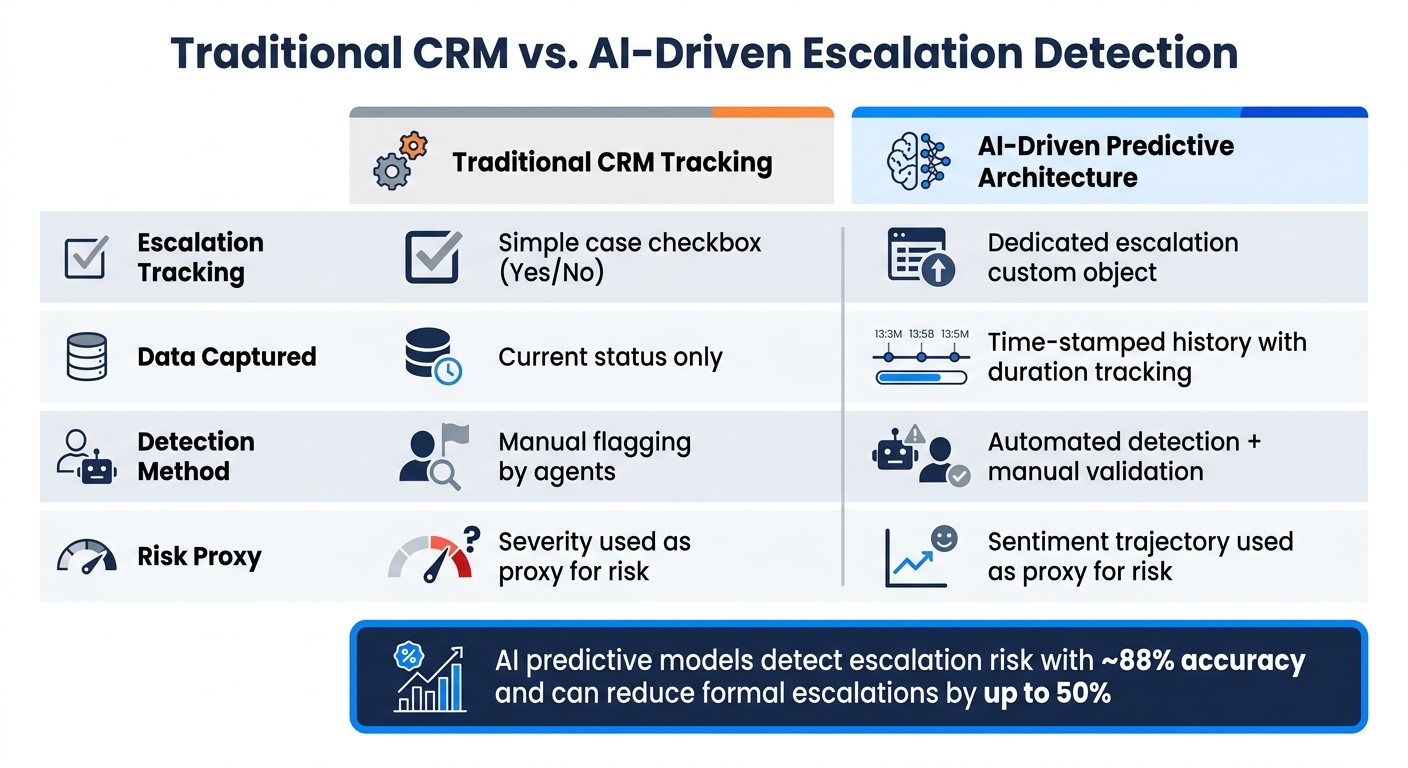
Traditional CRM vs. AI-Driven Escalation Detection: Key Differences
Once you’ve organized and centralized your data, the next step is turning those insights into automated workflows that can identify and prevent escalations before they spiral out of control.
Build an Escalation Risk Scoring Model
An effective escalation risk score combines both structured data (like reopen counts, SLA status, account tier, and response delays) and unstructured data (such as sentiment trends, emotional intensity, and phrases signaling escalation intent). For example, assigning a numerical sentiment score (from 0 to 100) to each interaction allows you to tag cases as "At-Risk" when scores dip below 30. How you handle these flagged cases should depend on the context – a Tier 1 account with a $500,000 contract needs faster attention than a smaller account.
It’s also important not to confuse technical severity (P1, P2, P3) with risk level. For instance, a P3 case with worsening sentiment can be more urgent than a P1 case where the customer remains calm.
Natural Language Processing (NLP) plays a key role here. It can identify escalation intent by recognizing phrases like "I need to speak to your manager" – going beyond just spotting negative keywords. This early detection gives your team a chance to address issues before they escalate formally. Companies using predictive models like this have cut formal escalations by up to 50% [2].
| Traditional CRM Tracking | AI-Driven Predictive Architecture |
|---|---|
| Simple case checkbox (Yes/No) | Dedicated escalation custom object |
| Current status only | Time-stamped history with duration tracking |
| Manual flagging by agents | Automated detection + manual validation |
| Severity used as proxy for risk | Sentiment trajectory used as proxy for risk |
Once you’ve scored cases accurately, you can dynamically adjust routing and SLAs to ensure swift intervention.
Automate Risk-Based Routing and SLAs
Static response times don’t account for the varying levels of risk – dynamic SLAs do.
"A hostile-sentiment ticket from an enterprise account sitting unescalated for four hours is a churn event, not a support delay." – Jesus Vargas, Founder, LowCode Agency [7]
When a case crosses a certain risk threshold, its SLA should automatically tighten. For example, a high-risk ticket might shift from a 24-hour response window to just 4 hours, with no manual input required. Routing decisions should also consider account tier, sentiment, and issue type together – not just the category. For instance, a billing issue from a $1M enterprise account should bypass the general queue altogether, regardless of its classification.
Supportbench enables this by adjusting SLAs dynamically based on factors like upcoming renewal dates or patterns of repeated contact. This ensures agents are always working with the appropriate level of urgency.
However, it’s crucial to maintain a human override. If agents are manually re-routing AI-assigned cases more than 15% of the time, it’s a sign your classification system needs fine-tuning [7].
Use AI Insights to Intervene Early
Even with dynamic routing, timely human intervention is key to resolving issues before they escalate.
"Preventing a support escalation with AI means detecting and resolving friction before the customer decides to escalate – not automating the escalation workflow faster." – Ami Heitner, Worknet [6]
When a case is flagged, AI should create a context package summarizing the issue’s history, previous resolutions, and the customer’s current sentiment. This eliminates the need for customers to repeat themselves and equips agents with immediate suggestions for how to respond. For example, Supportbench’s AI Agent-Copilot pulls from case histories and knowledge bases to provide agents with all the relevant context and response ideas before they even begin typing.
Here’s how specific AI-triggered signals can lead to proactive actions:
| AI Insight Trigger | Proactive Action |
|---|---|
| Sentiment score < 30 or escalation intent detected | Route to senior agent or manager immediately |
| High frustration in a Tier 1 account | Reduce SLA response target from 24h to 2h |
| Repeated negative sentiment + 3+ replies | AI Copilot generates context package and response suggestions |
| Predicted CSAT < 50% or "Red Account" status | Alert CSM or executive sponsor for outreach |
| 5+ agent replies without resolution | Auto-add internal note with troubleshooting resources |
Measuring and Improving AI Escalation Detection Over Time
To ensure AI-driven risk scoring and proactive interventions remain effective, continuous monitoring and refinement are essential. As customer behaviors and product complexities shift, AI workflows must evolve to maintain high detection accuracy.
Track Escalation KPIs
To measure success, focus on key metrics like escalation prediction accuracy, early warning precision, and false positive rates for accuracy. For speed, track time-to-escalate and time to initiate Tier 2 responses. Finally, evaluate business impact through escalation rate reduction and CSAT, CES, and NPS changes.
Organizations using AI for escalation detection have reported a 45% drop in overall escalation rates [4]. Additionally, proactive AI systems have achieved a 29% prevention rate for escalations, along with a 22% boost in CSAT protection compared to baseline levels [5]. To truly assess the effectiveness of interventions, it’s essential to track CSAT specifically for customers impacted by escalations – not just the overall score. This approach provides a clearer picture of whether trust is being rebuilt. For high-value accounts, connect these metrics to renewal outcomes, as preventing escalations directly influences net revenue retention [4]. These insights not only validate your current strategies but also guide necessary refinements.
Adjust AI Models and Thresholds
AI models require regular updates to stay effective. Changes in customer language, product features, or escalation trends mean that weekly model retraining and quarterly reviews of risk signals are practical steps to keep up with evolving patterns [5].
Before deploying any threshold adjustments, back-test them on historical data to evaluate their impact without risking customer trust [5]. This method provides a safe way to explore new sensitivity settings. However, be mindful of alert fatigue – too many low-confidence alerts can overwhelm agents, leading them to ignore important signals. To prevent this, use strategies like setting confidence thresholds, limiting alerts per account, and suppressing duplicate alerts within a specific cooling period [5].
"You cannot predict what you do not structurally capture." – SupportLogic [2]
Incorporate structured feedback from frontline agents to further refine your AI systems.
Use Feedback to Improve AI Workflows
Early detection is only effective if paired with actionable improvements, and frontline feedback plays a critical role in this process. Insights from agents can help fine-tune predictions and workflows. Establishing a formal RACI (Responsible, Accountable, Consulted, Informed) process ensures clear ownership of each escalation stage, helping to identify bottlenecks that raw data might overlook [3].
Szymon Gołyski of BOLD highlights the value of this feedback loop:
"We determine what actions (or lack of them) are the most common in the users that churned and we react each time the pattern starts. It gives us a great edge and we can win back more customers." [3]
For low-confidence predictions, route them to senior agents with the AI’s rationale and recommended actions. This human-in-the-loop approach not only protects the customer experience but also generates labeled data to improve future model accuracy [4][5]. Tools like Supportbench streamline this process by logging AI suggestions and their reasoning, allowing managers to review and refine decisions without needing engineering support. This creates an efficient feedback loop that strengthens both AI performance and team workflows.
Conclusion: Managing Escalation Risk with AI
Escalations often follow patterns that can be spotted – AI has the ability to detect early warning signs even before customers raise concerns. By leveraging the data and AI workflows discussed earlier, the advantages are clear: predictive AI can slash formal escalations by up to 50% [2] and cut management time from 10–22 hours to just 1–3 hours [4]. This not only safeguards renewal revenue but also reduces the need for resource-heavy interventions.
AI’s impact goes beyond just improving efficiency. It drives a fundamental change in how support operations function. Proactively forecasting issues helps restore trust and prevents frustrated customers from spreading negative feedback, which could jeopardize expansion opportunities.
"A proactive AI system that prevents 20% of escalations from forming isn’t just a support efficiency win. It is a retention intervention at scale." – Ami Heitner, Worknet [6]
The best-performing teams don’t stop at quick fixes – they use AI to identify underlying causes and recurring process issues, stopping escalations before they even begin. By adopting AI for early detection, B2B support teams can shift from reactive problem-solving to proactive customer retention, creating smoother workflows and stronger, more lasting customer relationships.
FAQs
What data do I need to start predicting escalations with AI?
To anticipate escalations effectively, it’s crucial to bring together data from across your support tools, giving AI a complete picture of the customer. Pay attention to these three key areas:
- Case Factors: Look at ticket history, how resolutions typically unfold, response times, and the total number of interactions.
- Customer Factors: Dive into CRM details such as account tier, annual recurring revenue (ARR), renewal dates, and customer health scores.
- Operational Signals: Monitor sentiment trends, signs of escalation in language, error codes, and agent metrics like the size of their backlog.
How do I set risk thresholds without creating alert fatigue?
To tackle alert fatigue, set thresholds that trigger alerts only for the most critical cases. Instead of depending on a single metric, combine multiple signals for a more accurate assessment. For example, use conservative cutoffs like an Attention Score of 80 or higher, a sentiment score of 50 or lower, or more than two instances of negative sentiment. Focus on the top 1%–5% of cases for immediate follow-up. Regularly review and adjust these thresholds – ideally on a weekly basis – to balance alert volume with effectiveness.
How can we prove AI escalation alerts improve renewals and CSAT?
To show how AI escalation alerts can enhance renewals and customer satisfaction (CSAT), it’s crucial to tie these alerts to measurable results. Early detection plays a key role, reducing escalations by 40%–56% and significantly cutting resolution times – by as much as 86%. This faster response directly contributes to higher satisfaction levels.
When it comes to renewals, linking escalation trends to churn predictions is essential. Acting on these alerts can drive gross retention up by 15% and net retention by 25%, while also identifying potential churn risks up to 30 days earlier. These metrics highlight the tangible benefits of using AI-driven alerts in customer success strategies.
Related Blog Posts
- How AI Predicts Ticket Escalations
- Call Center Management Best Practices (That Reduce Escalations)
- What are the signs you’ve outgrown Help Scout (SLAs, tiers, escalations, reporting)?
- How to handle “executive escalations” without derailing the team
Evaluating help desks for a B2B team?
Supportbench is all-inclusive from $32 per agent per month, with migration and onboarding included. See pricing or book a 20-minute demo.






