


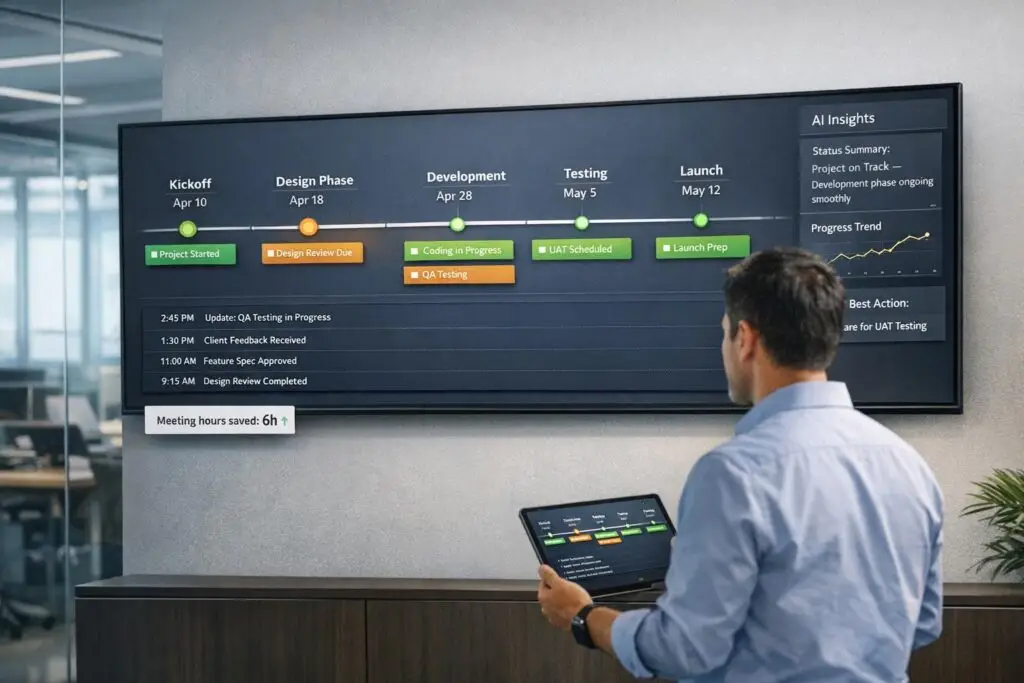
Tired of endless status meetings in B2B support? A customer-facing timeline can save time, improve communication, and keep everyone informed without constant interruptions. Here’s how:
- What it does: A timeline gives customers direct access to updates on their cases – progress, milestones, and next steps – without needing to schedule calls.
- Why it works: By centralizing case details and automating updates, support teams reduce repetitive tasks and improve transparency. Customers can check updates anytime.
- Impact: Companies report cutting meeting time by 40%, boosting productivity by 71%, and improving customer satisfaction with clear accountability.
- How to build it:
- Define key components (ticket management metadata, milestones, communication history).
- Integrate real-time data from tools like CRMs and ticketing platforms.
- Design a clear, user-friendly layout with filters and summaries.
- Use AI for automation, real-time updates, and sentiment tracking.
- Set role-based permissions for secure, tailored access.
Why Customer-Facing Timelines Work for B2B Support
Customer-facing timelines tackle a common challenge: they transform status updates into self-service tools. Instead of constant back-and-forth emails or scheduled calls to answer "Where are we on this?", timelines let customers find the information they need on their own. This shift from reactive updates to proactive visibility can reshape how support teams operate.
By giving customers access to every update, assignment change, and milestone, timelines create a clear picture of what’s happening with their case. They eliminate the confusion caused by scattered emails or inconsistent communication [4]. Plus, when multiple agents or stakeholders are involved, everyone benefits from a centralized interaction history. This reduces duplicate work and ensures everyone is on the same page. Let’s break down how timelines save time, improve transparency, and streamline case management.
Cut Meeting Time by 40%
Relay, a Series A startup with a 15-person product and engineering team, slashed their meeting time by 40% in just six weeks. They replaced their 45-minute Monday status meetings with structured updates in their project tool. This change allowed engineers to focus on uninterrupted work in the mornings, boosting productivity and giving the team more control over their schedules [3].
The same concept applies to customer support. A real-time timeline displaying open conversations, ticket statuses, and current assignments means customers can find answers without scheduling a call. For agents, this means updating the timeline once instead of repeating the same information to different stakeholders. The rule here is simple: use meetings for decisions, not updates [3].
Improve Transparency and Accountability
Fewer meetings also foster greater accountability. When customers can see who’s assigned to their case, what’s been done, and what’s next, accountability becomes a natural part of the process.
"That’s where accountability lives." – Daniela Nistor, Leadership Coach [1]
A well-structured timeline assigns clear responsibilities and deadlines to each task, ensuring nothing gets overlooked [1][2]. Customers always know who’s handling the next step and when to expect progress. At the same time, your team operates with full visibility, which encourages consistent follow-through.
Shifting from generic updates to timelines tailored to customer concerns makes clients feel valued and understood [5]. As Jeff Kushmerek, CEO of Kushmerek Consulting, explains:
"The companies that listen win… because they make the customer feel heard, respected, and understood." – Jeff Kushmerek, CEO, Kushmerek Consulting [5]
Manage Long-Running and Complex Cases
Timelines aren’t just about cutting meetings and assigning accountability – they’re also critical for managing long-term cases. B2B support often involves weeks or months of interactions, spanning multiple team members and communication channels. Without a timeline, finding specific details can mean sifting through endless emails or chat logs.
A timeline provides a complete view of the customer’s history [4]. Features like date and status filters make it easy to locate key milestones or the latest updates, even in complex, long-running cases. This is especially helpful for managing support escalations – managers can quickly review the full case history, grasp the context, and make informed decisions without lengthy briefings.
For recurring issues, timelines allow agents to access past conversations and resolutions effortlessly. If a customer reopens a case months later, your team can quickly review what worked before, leading to faster and more accurate problem-solving.
sbb-itb-e60d259
How to Build a Customer-Facing Timeline
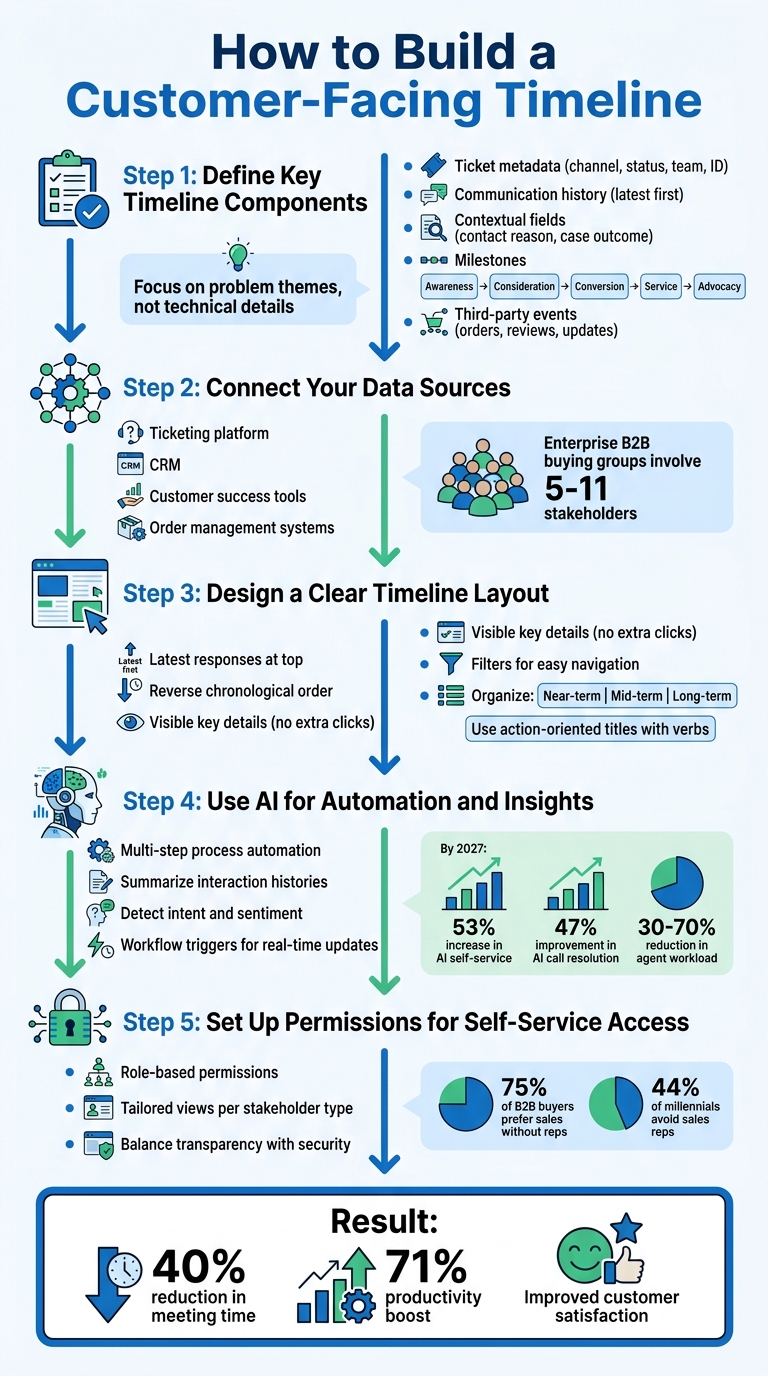
5-Step Process to Build a Customer-Facing Timeline for B2B Support
A well-designed customer-facing timeline brings all your support data into one place, cutting down on meetings and streamlining communication. To make it effective, you need to consolidate data, present it clearly, and keep it updated without constant manual effort. Here’s how to create one that works.
Step 1: Define Key Timeline Components
First, decide what information your timeline should include to minimize the need for status calls. Essential elements are ticket metadata (like channel, status, team assignment, and ticket ID), communication history (with the latest responses at the top), and contextual fields such as contact reason and case outcome [4].
For B2B setups, go a step further by highlighting significant case milestones, like Awareness, Consideration, Conversion, Service, and Advocacy [10, 11]. If you’re dealing with complex cases, include third-party events, such as new orders, product reviews, or security updates, to give customers a complete view [7, 13].
"The most common reason to open the Timeline is to understand the most recent interaction." – Jordan Miller, Product Marketing Manager, Gorgias [4]
Focus on summarizing problem themes and expected outcomes rather than drowning the timeline in technical details. For example, in 2021, vFairs switched from basic spreadsheets to customer-facing roadmaps that emphasized problem-solving themes over feature lists. This shift boosted sales win rates by 7–10% and improved retention for multi-year enterprise deals by 8–10% [8]. Customers care more about how you solve their problems than the features you offer.
Once you’ve outlined your timeline’s core components, integrate data from all relevant sources.
Step 2: Connect Your Data Sources
To keep your timeline current and reduce status updates, ensure it pulls real-time data from multiple systems. Integrate your ticketing platform, CRM, customer success tools, and order management systems to eliminate silos [10, 13]. This way, whenever an agent updates a ticket or a customer places an order, the timeline reflects it immediately.
With enterprise B2B buying groups typically involving five to 11 stakeholders [7], fragmented information can create confusion. A unified timeline ensures that everyone – whether in sales, support, or leadership – has access to the same accurate data.
Step 3: Design a Clear Timeline Layout
A clean layout helps reduce follow-up calls. Display the latest responses at the top since customers check those first [4]. Make sure key details like channel, status, team assignment, and ticket ID are visible without requiring extra clicks [4]. Use reverse chronological order and filters to make information easy to find [4].
Organize items by near-term, mid-term, and long-term priorities [8]. For near-term updates, include mockups or wireframes to help customers visualize upcoming changes [8].
Avoid overloading the timeline with internal metrics like story points or technical debt – these don’t add value for customers [11]. Instead, use action-oriented titles starting with verbs to clearly outline outcomes [8].
Step 4: Use AI for Automation and Insights
AI can keep your timeline accurate without requiring constant manual updates, reducing the need for status meetings. Tools like Agentic AI can handle multi-step processes – such as processing returns or verifying order details – and automatically post updates to the timeline [14, 15]. Generative AI can summarize long interaction histories, making it easier for both customers and agents to understand complex cases [7, 14].
AI can also analyze customer language to detect intent and sentiment, helping categorize tickets and flag urgent issues [14, 15]. By 2027, customer service executives expect a 53% increase in AI-powered self-service tools, with AI-driven call resolution improving by 47% [9].
Set up workflow triggers to update your CRM or initiate follow-ups based on customer actions [14, 15]. This ensures the timeline reflects real-time updates – like shipping status or payment confirmations – and can reduce agent workloads by 30–70% [10].
Once automation is in place, the next step is to control access securely.
Step 5: Set Up Permissions for Self-Service Access
Enable secure self-service by configuring role-based permissions so customers only see data relevant to them. Different stakeholders need different views: technical users might want detailed specs, while business users often prefer ROI-focused insights [11].
With 75% of B2B buyers favoring a sales experience without a representative [7], and 44% of millennial decision-makers preferring to avoid sales reps during purchases [6], self-service is more important than ever. By balancing transparency with security, you empower customers to find answers on their own while protecting sensitive information. This approach also helps reduce status meetings and improves overall efficiency.
Common Mistakes to Avoid When Creating Timelines
When creating a timeline, it’s easy to fall into traps that can reduce its effectiveness. Avoiding these missteps ensures your timeline remains a tool for cutting down on meetings and improving clarity.
Adding Too Much Data to the Timeline
Stuffing your timeline with excessive details can dilute its purpose. If you use a timeline to bridge coordination gaps, it can quickly turn into a cluttered "status update" board. These updates are better suited for shared documents, as they often distract from key tasks and decisions [3]. Focus only on fields that truly matter. A simple rule: if losing a piece of data wouldn’t disrupt anything, it probably doesn’t belong on the timeline [3].
"Sync for decisions, async for updates." – Sneha Kanojia, Author, Plane Blog [3]
Instead of overwhelming stakeholders with raw data, use AI tools to create concise summaries or "highlight reels" for more complex cases. This keeps attention on actionable insights rather than irrelevant details. Also, make sure your timeline stays up-to-date and accurate.
Providing Outdated or Inaccurate Updates
Timelines lose their value when they display stale or incorrect information. If stakeholders can’t rely on your timeline for real-time updates, they may resort to scheduling more meetings just to get clarity [3]. Missing or outdated updates can feel like broken promises – when milestones are missed or miscommunicated, trust erodes [1]. This often leads to wasted meeting time spent clarifying the current status instead of solving problems [3].
To avoid this, automate updates with AI-powered tools that track data in real time, generate meeting summaries, and log action items without requiring manual input [2]. Keep comments linked directly to work items to ensure context and accuracy [3].
Overlooking Integration and Scalability
Failing to plan for integration can cause long-term headaches. If customer data is scattered across emails, chats, and social media, it becomes nearly impossible to maintain a unified timeline [14]. A recent survey found that 53% of executives struggled to meet goals due to challenges in integrating AI with legacy systems, and 67% believe their organizations need better integration across hybrid cloud, AI, and security platforms [13].
"Data integration is the circulatory system of your business. If it’s slow, fragmented or fragile, every business initiative suffers, from AI to analytics to customer experience." – Chandni Sinha, Product Marketing Manager, IBM [13]
To tackle these issues, choose a platform that works across cloud, on-premises, and edge systems [13]. Implement event-driven architectures and Change Data Capture (CDC) for real-time synchronization [13]. Automated monitoring can also alert your team to integration problems immediately [12]. With global spending on data and analytics expected to hit $134.6 billion by 2025 and $219.4 billion by 2029 [13], investing in scalable integration now will prevent costly problems later.
Supportbench: Building Customer-Facing Timelines with Built-In AI
Supportbench takes the concept of streamlined, AI-powered timelines to the next level by consolidating tickets, interactions, service levels, and account histories into a single profile. This eliminates the need for switching between tools and provides a 360-degree view of customer data. The result? Both internal teams and customers gain complete visibility into case progress – no need for endless status update meetings. Trusted by 9,000 businesses worldwide [16], Supportbench offers a cost-effective alternative to pricier enterprise solutions, delivering AI-powered features without requiring additional purchases [16]. This approach seamlessly integrates AI and unified data, creating a strong foundation for customer-facing timelines.
AI-Driven Automation for Real-Time Updates
Supportbench leverages built-in AI to keep timelines accurate and up-to-date without manual intervention. For example, the platform automatically summarizes lengthy case histories, ensuring that timelines remain concise and easy to understand. It also tracks customer sentiment in real time, allowing teams to detect and respond to shifts in sentiment directly within the case management view. Additionally, predictive CSAT algorithms estimate customer satisfaction scores before surveys are sent, offering an early glimpse into case health. These AI-driven insights are updated dynamically as new data flows in, ensuring accuracy across both the "Command Center" and executive dashboards.
"Our agents can now effortlessly manage thousands of emails daily, thanks to the platform’s ease of use and accuracy." – Eilis Byrnes, Customer Service Manager, Wolseley [17]
Customizable Timeline Views for Complex B2B Cases
Supportbench allows teams to tailor their timeline views with drag-and-drop widgets, enabling real-time tracking of ticket volumes, agent workloads, and SLA compliance [17]. Organizations can also create custom-branded portals where customers can view ticket updates and access self-service tools. This feature goes beyond standard timelines, offering branded, customer-specific experiences [17]. Teams can define multiple service levels based on factors like customer tiers, contract types, or issue priorities, with automated escalation alerts built in [17]. Custom KPI scorecards further enhance flexibility, tracking metrics such as first-response resolution and escalation rates, all filterable by agent, team, or issue type [16][18]. This is especially important considering that only 17% of a B2B customer journey involves direct interaction with a vendor, making automated visibility tools essential [15]. These customizable views reduce the need for repetitive status calls, saving time for both teams and customers.
Cost-Effective and Scalable Solution
Supportbench combines advanced features with affordability, helping businesses cut down on unnecessary meetings while scaling effectively. Starting at just $32 per agent per month, the platform includes a full suite of tools such as case management, a knowledge base, workflows, dashboards, and live human support – all with built-in AI capabilities [16][18]. Features like ticket prioritization, auto-summarization, and sentiment analysis come natively integrated, eliminating the need for costly add-ons or premium pricing [16][18]. With no-code automation, teams can quickly implement complex workflows, such as intelligent ticket routing and dynamic SLA adjustments, without relying on IT support [18]. Additionally, the platform’s AI-driven QA reviews every ticket for tone and effectiveness, reducing the time spent on manual QA processes as case volumes grow [18].
"Using Supportbench has provided our department with a complete client management system. Since everything is one platform, we have a clear overview of all client and team interaction." – Jonathan Pasquel, Personnel Manager [16]
Conclusion
Customer-facing timelines tackle a major pain point in B2B support: the endless cycle of unnecessary status meetings. By offering real-time updates on case progress, these timelines eliminate the need for constant "just checking in" calls, giving customers the transparency they expect while freeing up valuable time for support teams. Companies adopting these strategies report measurable boosts in productivity and employee satisfaction [2][20].
The financial benefits are hard to ignore. For every 100 employees, unnecessary meetings can cost a staggering $2.5 million each year [19]. Shopify made headlines in January 2023 when COO Kaz Nejatian canceled recurring meetings involving three or more people. This bold move wiped out 12,000 calendar events, saved 36 years’ worth of meeting time, and cut costs by at least $8.4 million [19]. Nejatian summed it up perfectly:
"No one at Shopify would expense a $500 dinner. Yet many spend far more on meetings without reaching decisions. The goal of this thing is to show you that time is money." – Kaz Nejatian, COO, Shopify [19]
These numbers highlight the value of adopting a well-designed timeline system. To make it work, you need the right tools: AI-driven automation to ensure updates stay accurate, customizable views for handling complex B2B cases, and scalable infrastructure that grows with your business. Supportbench offers all of this for just $32 per agent per month, complete with built-in AI to keep costs low.
The shift toward asynchronous communication is already happening – 83% of employees say they prefer it over traditional meetings because it saves time [20]. Customer-facing timelines fit seamlessly into this trend, offering the transparency clients need without clogging up calendars. This AI-powered approach not only slashes costs but also allows support teams to focus on solving problems instead of scheduling updates. Meanwhile, customers enjoy the self-service visibility they increasingly expect, making this a win-win for everyone involved.
FAQs
What should customers see vs. what should stay internal on the timeline?
Customers benefit from seeing updates that matter to them, such as service status, open tickets, ticket ID, team assignments, and key interaction details. These updates ensure clarity and build trust, but it’s important to strike a balance – keeping them informed without overloading them with unnecessary details.
On the other hand, some information is best kept internal. This includes agent notes, escalation protocols, and backend data. By sharing clear and timely updates with customers while keeping operational specifics behind the scenes, you can avoid confusion or raising concerns unnecessarily.
How do we keep the timeline accurate without adding more work for agents?
To keep timelines accurate without a lot of manual effort, turn to AI-powered automation. This can handle updates, track sentiment, and even predict customer satisfaction, ensuring your information stays current. By setting clear triggers and intervals for updates, you can make sure customers get timely information without constant human intervention.
Features like improved visibility tools – such as showing ticket counts and key details – help agents quickly access what they need. This not only saves time but also reduces the need for extra updates or repetitive tasks.
How can we prove the timeline is reducing meetings and improving CSAT?
To demonstrate how the timeline reduces meetings and boosts CSAT, start by tracking a few key metrics. Measure the frequency and duration of meetings both before and after the timeline is implemented. Compare CSAT (Customer Satisfaction) and CES (Customer Effort Score) over time to see if there’s a noticeable shift. Collect qualitative feedback from customers about how clear and effective communication feels to them.
It’s also worth keeping an eye on support interactions and escalations. Ideally, fewer updates and improved transparency should naturally result in higher CSAT. To back this up, consider using AI tools for sentiment analysis. These can help confirm whether customers are responding more positively to the changes.






