


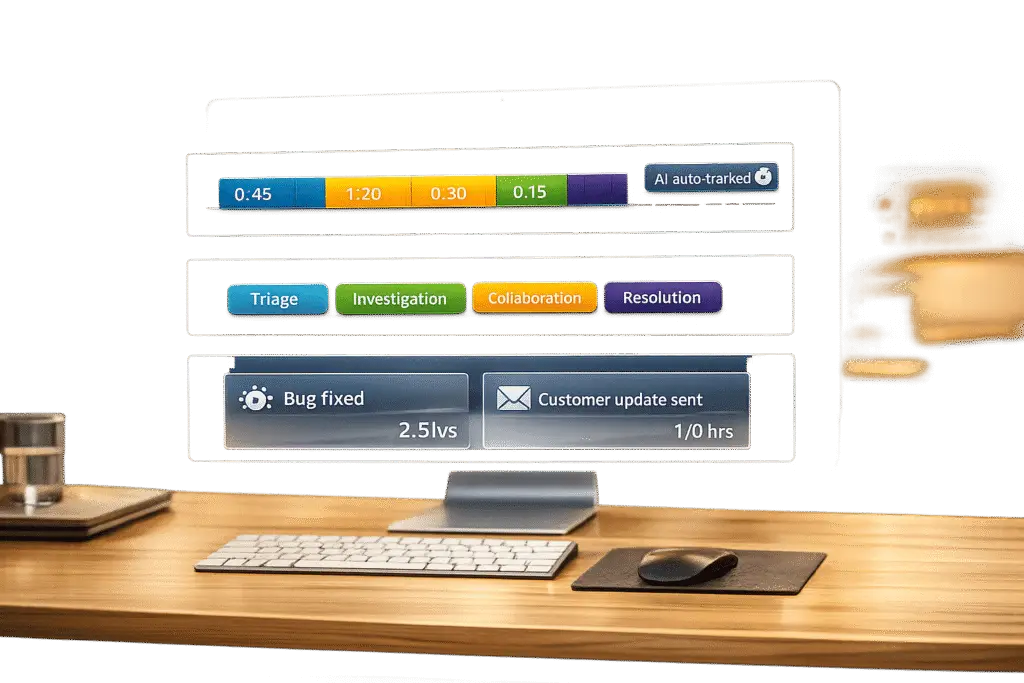
Tracking time on complex support tickets is essential for understanding effort, improving workflows, and ensuring accurate billing. However, it shouldn’t feel like micromanagement. Here’s how to do it effectively:
- Use AI-driven tools: Automate time tracking by integrating with emails, calendars, and support platforms. These tools create draft logs for agents to quickly review, saving hours of manual entry.
- Focus on team trends, not individuals: Time tracking should prevent burnout, improve resource allocation, and identify workflow issues – not scrutinize every agent’s activity.
- Simplify the process: Avoid overly complex systems. Limit task categories and use automation to reduce manual steps.
- Tie time tracking to outcomes: Metrics like customer satisfaction (CSAT), CES, and NPS, first-contact resolution (FCR), and agent workload give a clearer picture of performance than hours logged alone.
Automated systems not only save time and reduce errors but also empower agents to focus on solving tickets instead of administrative tasks. When implemented with transparency and simplicity, time tracking becomes a tool for better decision-making and team balance.
Time Tracking as a Support Tool, Not a Control Mechanism
Time tracking serves as a tool for understanding workload distribution and preventing burnout, rather than micromanaging every moment of an agent’s day [5]. By analyzing utilization, managers can identify bottlenecks, justify staffing needs using the essential toolset for modern support teams, and ensure no one is overwhelmed with complex tickets while others have idle capacity. The focus is on creating balance, not surveillance.
The cost of poor time tracking is staggering. Agencies lose an average of $37,500 per employee annually due to unbilled time [4]. For example, a 45-person agency that improved its tracking accuracy – capturing previously unlogged hours – recovered approximately $180,000 per year [4]. These numbers highlight how precise tracking can separate efficient operations from constant firefighting.
Modern time tracking prioritizes agent autonomy while delivering accurate insights. AI-powered systems simplify the process by generating draft time entries based on calendar events, support activity, and communication patterns. Agents simply review and approve these entries via tools like Slack or email [4]. As Shopclawmart/OpenClaw aptly put it:
"Nobody went to design school or got an MBA to fill out timesheets" [4].
The weekly grind of manually reconstructing work is not only tedious but also demoralizing. Automation eliminates this friction entirely, letting agents focus on meaningful tasks.
Common Myths About Time Tracking
Myth #1: Time tracking is about catching lazy agents.
The truth is, time tracking highlights the nature of complex tasks rather than inefficiencies. For instance, a longer initial investigation on a complex ticket often reflects the challenges of B2B support. This data helps allocate resources, set realistic expectations, and pinpoint areas for coaching or training.
Myth #2: Detailed tracking kills creativity and autonomy.
When implemented thoughtfully, time tracking can actually support creativity. As Shopclawmart/OpenClaw noted:
"Creative professionals resist detailed tracking when it feels like surveillance" [4].
Features like screenshot blurring, private time settings, and the ability to delete captures ensure agents feel supported rather than monitored.
Myth #3: Only manual tracking is accurate.
Manual tracking can consume 1.5 to 3 hours per week per person, yet employees typically log only 68% of their actual worked hours [4]. Automated systems, on the other hand, integrate seamlessly into workflows, detect idle time, and use AI to categorize activities. These systems have proven to reclaim revenue through more accurate billable hours in 83.4% of cases [6].
By addressing these misconceptions, time tracking shifts from being a source of tension to a tool for empowerment.
How Agent Autonomy Improves Complex Ticket Handling
When agents have autonomy, they can move from reactive tasks to strategic problem-solving. Non-intrusive, automated time tracking reduces administrative burdens, allowing agents to focus on impactful work. Research shows productive employees are 242% more likely to adopt AI tools [9], largely because these tools reduce friction instead of adding oversight.
The key lies in giving agents control over their data. Tools that allow agents to review and edit automated tracking entries before sharing with supervisors build trust while ensuring accuracy [7][8]. This is especially critical for complex tickets, which often involve non-linear workflows like researching legacy integrations, collaborating with engineering, and documenting solutions. Automated systems capture these activities seamlessly, eliminating the need for manual logging.
Detailed workforce insights can boost productive hours by 15.82% [6]. As TimeCamp explains:
"TimeCamp’s time tracking promotes transparency and productivity, not micromanagement. It provides insights to enhance efficiency without intrusive oversight, respecting employee autonomy and trust" – TimeCamp [6].
When agents see time tracking as a way for leadership to make informed decisions – like hiring or capacity planning – it shifts their perspective. Instead of resisting, they become advocates for a system that prevents burnout and fosters improvement [4]. The data becomes a collaborative tool for growth, not a means for criticism.
sbb-itb-e60d259
How to Implement Time Tracking Without Adding Friction
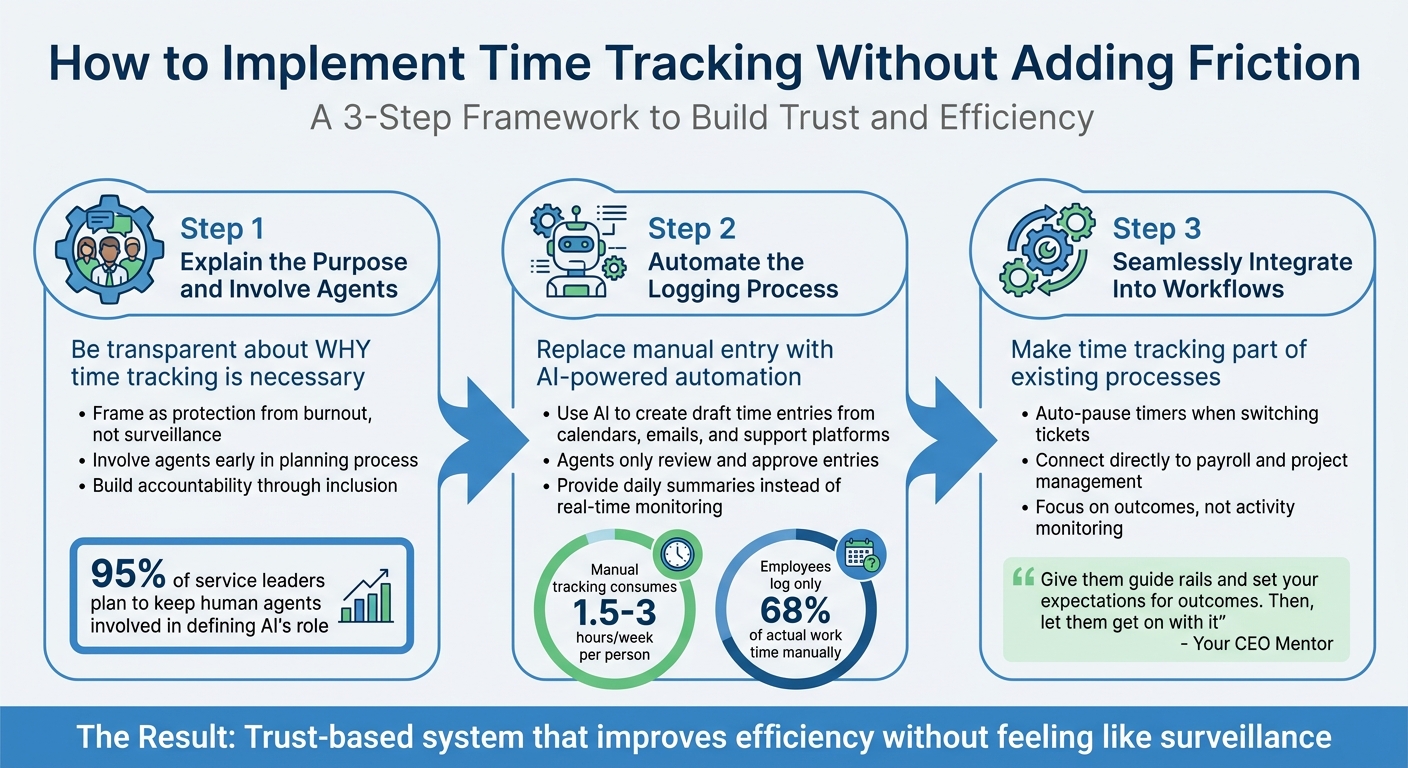
3-Step Framework for Implementing Time Tracking Without Micromanagement
Introducing time tracking can either improve efficiency or create frustration – it all depends on how it’s rolled out. A poorly implemented system can easily feel like micromanagement, which, according to research, negatively impacts morale for 85% of employees. Even more telling, nearly 70% of workers have considered leaving their jobs to escape micromanagers [11]. The solution? Build trust from the very beginning. Here’s a straightforward, three-step plan to implement time tracking without disrupting workflows or morale.
Step 1: Explain the Purpose and Involve Agents
Start by being transparent about why time tracking is necessary. If employees feel it’s just a surveillance tool, resentment is almost guaranteed [11]. Instead, frame time tracking as a way to protect employees from burnout, justify staffing levels, and identify pain points in workflows. As MIT Sloan Management Review puts it:
"Autonomy is essential to harness people’s innovation and creativity. People need degrees of freedom, not just to enable their unconstrained thinking, but to get their buy-in to the process" [12].
This means involving agents early on. By including them in the planning process, you build accountability and trust. Plus, their unique insights into ticket workflows can shape a system that works for everyone [2][10]. With 95% of service leaders planning to keep human agents involved in defining AI’s role [3], their input is invaluable. Once agents are on board, move to the next step: automating ticket workflows.
Step 2: Automate the Logging Process
Manual time tracking is a time sink, eating up 1.5 to 3 hours per week per person – and employees often underreport their hours, logging only about 68% of their actual work time [4]. Automated systems can solve this problem by using AI to translate data from calendars, communication tools, and support platforms into draft time entries. All agents need to do is review and approve these entries [4].
Present automated logs as a safeguard for employees, creating a clear record of their work and eliminating ambiguity around productivity [14]. Rather than monitoring in real time, provide agents with a daily summary of suggested logs at the end of their shift. This approach maintains accuracy while respecting autonomy. With automation in place, the final step is to integrate it into everyday workflows.
Step 3: Seamlessly Integrate Time Tracking Into Workflows
The key to frictionless time tracking is making it part of agents’ existing processes. For example, some systems automatically pause a timer on one ticket when work begins on another [13]. This eliminates the hassle of manually starting and stopping timers throughout the day.
To further simplify things, ensure time data is directly connected to payroll and project management tools. This eliminates redundant tasks like manual data entry and shows employees that their time logs serve real purposes, such as accurate payroll or capacity planning [14]. Focus on outcomes rather than micromanaging activity. As Your CEO Mentor emphasizes:
"The primary purpose of leadership is to maximize value… provide the environment to enable people’s creativity to be liberated. Give them guide rails and set your expectations for outcomes. Then, let them get on with it" [12].
Outcome-focused dashboards can reduce the need for constant updates, letting managers check progress without hovering. When discussing progress, prioritize results and challenges over day-to-day details to avoid giving off a micromanagement vibe [11][12].
Using AI to Automate Time Tracking and Analysis
Time tracking has evolved beyond simple hour recording, thanks to AI. Modern tools not only log hours but also integrate seamlessly with support systems, extract critical details from resolution notes, and even analyze sentiment. This ensures 100% ticket coverage [15], delivering insights that surpass the capabilities of manual timekeeping. The result? A shift from tedious manual entries to smarter, more supportive systems working in the background.
Automated Time Logging and Sentiment Analysis
AI systems have revolutionized time tracking by automatically logging time as tickets progress. Through API integrations and webhooks, these tools trigger time logs the moment a ticket’s status changes [15]. Natural Language Processing (NLP) further enhances this process by categorizing tickets – whether they’re bugs, onboarding requests, or escalations – and prioritizing them based on SLA thresholds [16]. This eliminates the need for agents to manually start timers, streamlining their workflow.
Sentiment analysis adds another layer of intelligence by detecting emotional and tonal shifts during interactions [17]. For instance, AI can distinguish between routine queries and high-stress escalations, offering a clearer picture of the effort involved. A compelling example comes from an online trading platform handling over 300,000 tickets annually. By implementing an AI-driven analysis tool, the platform automated 83% of its tickets with 93% accuracy within just 15 days. Over six months, this led to a 25% reduction in support costs [17]. Similarly, ecommerce businesses using AI for sentiment tracking achieved an 85% chat automation rate and saw resolution times improve by 93% [17].
The efficiency of AI in sentiment detection is striking, with accuracy rates exceeding 90% and data extraction being 30% faster than manual efforts [15]. As CEO Dinesh Goel aptly states:
"Support teams do not struggle because they lack data. They struggle because they cannot interpret it at scale" [17].
By analyzing every interaction – across email, chat, voice, and social channels – AI provides a complete view of agent workload and ticket complexity, far beyond what manual sampling can achieve. These insights pave the way for smarter, dashboard-driven decision-making.
AI-Powered Dashboards for Pattern Recognition
AI doesn’t stop at logging and sentiment analysis – it transforms raw data into actionable insights via advanced dashboards. These tools identify trends, such as spikes in particular ticket types, alert managers when resolution times exceed limits, and uncover root causes that traditional metrics might overlook [16]. With AI clustering patterns, root cause analysis becomes 45% faster, enabling teams to address underlying issues and reduce repeat tickets by 30% [15].
Predictive analytics takes this further by forecasting timelines and pinpointing bottlenecks early [19]. AI also tracks behavioral patterns, such as focus quality and distractions, calculating "Focus Quality Scores" to identify burnout risks [18]. For example, remote consulting teams using these insights have improved project delivery timelines and client satisfaction by 30% [19].
As TimeSentry highlights:
"AI that can’t explain itself isn’t trustworthy enough for billing. The goal isn’t to remove humans from the loop – it’s to move them from data entry to quality control" [1].
Common Mistakes to Avoid When Tracking Time
Even with the best intentions, time tracking can go sideways when teams fall into predictable traps. To achieve accurate tracking without undermining agent autonomy, it’s essential to avoid overly complicated systems and excessive scrutiny of individuals.
Making the Process Too Complicated
One of the fastest ways to derail time tracking is by making it overly complex. Imagine being handed a list of 40+ task categories to choose from every time you log your work. It’s no surprise that agents often resort to guessing or picking the quickest option, which leads to inaccurate data [21][4]. Shashikant Tiwari, Digital Marketing Strategist at Mera Monitor, explains:
"Every time I helped an organization reduce its 40–50 category timesheet down to 10–12 meaningful buckets, accuracy instantly jumped. People finally knew where to place their time." [21]
The numbers back this up. Manual time tracking methods are notoriously error-prone, with 80% of spreadsheets containing mistakes [21]. Even worse, 49% of employees admit to inflating their logged hours [21]. OpenClaw highlights the financial impact:
"Agencies lose an average of $37,500 per employee per year in unbilled time. Not because they’re lazy – because the process is genuinely awful, and humans are genuinely bad at remembering what they did six hours ago." [4]
The solution? Simplify. Limit categories to 10–12 intuitive options and use automation to handle repetitive tasks, like starting and stopping timers when tickets open or close. Instead of managers combing through every entry, let AI flag anomalies like over-budget projects or missing data [21][4].
But complexity isn’t the only issue. Over-monitoring individual performance can also backfire.
Overemphasizing Individual Performance Metrics
While complicated systems lead to bad data, focusing too much on individual metrics creates its own set of problems. Over-monitoring can breed anxiety and shift agents’ priorities from accuracy to simply inflating their numbers [21]. This "quantity over quality" mindset encourages presenteeism – where employees appear busy without actually being productive.
The effects of micromanagement are hard to ignore. 85% of employees say heavy oversight hurts morale, and nearly 70% have considered leaving their jobs because of it [11]. As the MIT Sloan Management Review puts it:
"Nose in, fingers out!" [12]
Instead of nitpicking individual entries, focus on team-wide trends and processes. Metrics like project completion rates, ticket resolution times, and progress toward shared goals paint a far clearer picture of overall performance [11]. For example, if you notice consistent outliers, consider whether there are systemic issues affecting the team rather than blaming individuals.
Shashikant Tiwari sums it up perfectly:
"Time tracking is not about monitoring people – it’s about empowering teams and leaders with truth." [21]
When agents see time tracking as a tool to prevent burnout and improve workflows, they’re more likely to engage with the process and help refine it [20][21].
How Supportbench Handles Time Tracking for Complex Tickets

Supportbench takes the hassle out of time tracking with a built-in system designed specifically for complex B2B support cases. Instead of relying on agents to log every minute manually, the platform automatically tracks every action – logging what happened, when, and who was involved. This seamless integration ensures accountability without adding extra steps for agents. By embedding time tracking into its workflow, Supportbench delivers two key benefits: smoother processes and better case management.
Features That Simplify Time Tracking
Supportbench’s AI Co-Pilot is a game-changer for agents working on challenging tickets. It provides clear, context-aware answers directly within the ticket interface. Agents can quickly access company data or review past case histories without leaving the ticket view, saving time spent hunting through emails or switching between tools. Eilis Byrnes, Customer Service Manager at Wolseley, highlights the difference:
"Our agents can now effortlessly manage thousands of emails daily, thanks to the platform’s ease of use and accuracy." [23]
Dynamic SLA timers further streamline operations. These timers automatically monitor response and resolution deadlines based on pre-set service level rules. Tickets are prioritized and routed without manual input, and managers receive alerts if deadlines are at risk. Marjia T., an IT Specialist, shares her experience:
"Dynamic SLA timers and agent coaching scorecards helped bring consistency across the board. We finally have visibility into who’s doing what, and cases aren’t falling through the cracks." [22]
Another standout feature is the AI-driven KB article creation. After resolving a complex ticket, agents can instantly convert the case history into a knowledge base article. The AI drafts the subject, summary, and keywords based on the issue and its solution, removing the need for manual documentation while ensuring crucial insights are preserved.
These features – AI Co-Pilot, SLA automation, and knowledge base publishing – are standard in every Supportbench subscription [22].
Streamlined Case Management for Complex Issues
Supportbench doesn’t stop at time tracking; it also enhances overall case management. With the Customer 360 unified view and AI-powered ticket summarization, agents can see the complete context of a case on a single screen. No more switching between tools or digging through old emails to piece together the story.
KPI Scorecards provide leadership with insights into escalation trends, first-response resolution rates, and agent productivity – all in one dashboard. This allows managers to monitor efficiency and identify patterns without micromanaging. Additionally, predictive CSAT and CES scoring offer a forward-looking view of case complexity and customer satisfaction, helping managers focus on outcomes that matter most rather than just tracking hours worked.
What to Measure Beyond Hours Logged
Tracking hours worked is just one piece of the puzzle – it shows effort but doesn’t necessarily reflect results. To truly understand performance in an AI-driven support operation, it’s essential to connect time spent with meaningful outcomes. As Eric Klimuk, Founder and CTO of Supportbench, explains:
"If you’re reporting on volume without context or measuring time without linking it to customer satisfaction, you’re just busy, not improving" [24].
By tying time tracking to customer satisfaction and team sustainability, you can ensure your metrics promote balanced and effective operations. Let’s dive into the key performance indicators (KPIs) that can uncover the real impact behind the time logged.
CSAT and First-Contact Resolution (FCR)
Customer Satisfaction (CSAT) and First-Contact Resolution (FCR) are crucial for measuring how well time translates into results. If agents are spending long hours but FCR rates are low, it might indicate issues like knowledge gaps, approval delays, or unnecessary back-and-forth communication [25].
To put things into perspective, FCR rates typically range between 70% and 79%. However, in complex B2B environments, it’s common to see slightly lower numbers. For CSAT, a strong score generally falls between 75% and 85% [24]. By analyzing logged hours alongside these metrics, you can ensure operational efficiency doesn’t come at the cost of customer experience.
But resolution quality is only part of the story. Understanding how agents handle their workload helps fine-tune efficiency even further.
Agent Workload and Productivity Patterns
Agent productivity is healthiest when utilization rates stay between 60% and 70% – this balance keeps productivity high without risking burnout [24]. Monitoring patterns over time can reveal bottlenecks, highlight areas for additional training, and help you adjust capacity as needed.
Escalation rates are another valuable measure. Rates below 5% indicate excellent performance, while rates between 5% and 20% are considered average [24]. If escalation rates exceed 20%, it could point to process issues like ticket routing issues or ineffective triage [24]. Similarly, tracking backlog growth can signal when complex cases are overwhelming the team, potentially leading to missed SLAs and overworked agents [24].
To get a full picture of performance, normalize these metrics across all channels – email, chat, and voice. This ensures you’re evaluating your team’s effectiveness comprehensively [24].
Conclusion
Time tracking doesn’t have to feel like micromanagement. When done right, it becomes a tool that balances operational efficiency with agent autonomy. The secret lies in moving away from manual data entry and adopting automated systems that passively capture work signals. This way, agents only need to review and confirm entries, saving time and reducing frustration.
The numbers back this up: automated time tracking can generate a 31% ROI in just six months, increase daily productive work time by 34%, and speed up project delivery by 25% [26]. These benefits come when systems are built on trust. As TimeSentry aptly puts it:
"The goal isn’t to remove humans from the loop – it’s to move them from data entry to quality control" [1].
Daniel Kroytor, CEO of TimeSentry, highlights the purpose behind this approach:
"I tell my team that the end goal is to establish how long something takes so we can bill more accurately and protect our time" [27].
This reframes time tracking as a tool for better resource management, not a surveillance mechanism. The key is to implement systems that fit seamlessly into existing workflows, whether through AI-powered auto-logging, passive capture tools, or simple end-of-day reviews.
To enhance trust, it’s crucial to separate time data from individual performance evaluations. When agents know their logged hours won’t be used against them, they’re more likely to report accurately. Instead of focusing solely on hours worked, consider broader metrics like customer satisfaction, first-contact resolution, and agent utilization. This ensures that tracked time translates into meaningful outcomes, aligning with modern support practices that value both efficiency and autonomy.
The right time tracking approach doesn’t create extra hurdles – it removes them. It provides managers with real-time insights for smarter resource allocation while allowing agents the freedom to excel without constant oversight. This balance not only improves operational results but also empowers agents, proving that time tracking can be a strategic advantage for everyone involved.
FAQs
How do we start time tracking without agents feeling watched?
Tracking time effectively without making agents feel like they’re under a microscope requires a thoughtful approach. Use tools with automatic time logging to minimize manual effort while avoiding any sense of being watched. Shift the focus to outcomes rather than oversight by setting clear goals and using metrics tied to results. This way, agents can view time tracking as a tool to improve efficiency and service quality, rather than as a form of micromanagement.
What’s the minimum set of time categories we should use?
When tracking time, the two basic categories you should use are Billable Time and Non-Billable Time. These categories clearly separate work that can be charged to clients from internal tasks or activities that don’t directly generate revenue.
If you want more detailed insights, you could also monitor Handling Time for each ticket or update. Still, sticking to Billable and Non-Billable Time keeps things straightforward while providing the clarity and operational focus you need.
How can we use time data to predict burnout and staffing needs?
Time data offers a powerful way to anticipate burnout and address staffing needs by uncovering patterns in how agents handle their workload and the time they spend resolving tickets. With automated tracking tools and AI-based models, managers can analyze this data to spot trends, such as periods of heavy workloads or unusually long resolution times. These insights allow for smarter, real-time staffing adjustments, ensuring enough team members are available during busy periods. At the same time, this approach helps prevent overworking agents, keeping both service quality and employee well-being intact.






