When managing a high volume of support tickets, creating an efficient queue strategy is critical. It ensures tickets are handled quickly, by the right agents, and without bottlenecks. Here’s a concise breakdown:
- Triage: Use automated rules to prioritize tickets based on urgency, customer tier, and issue complexity. Leverage AI to analyze intent, sentiment, and urgency for accurate categorization and to filter out spam or duplicates.
- Routing: Assign tickets based on agent skills, workload, and availability. AI can optimize this by learning from past performance and real-time conditions.
- Ownership: Clearly define who owns each ticket to prevent delays. Use dynamic SLA policies to prioritize high-value or time-sensitive cases.
- AI Optimization: Continuously improve processes with AI tools that predict outcomes, automate repetitive tasks, and refine workflows based on feedback.
For example, Wolseley Canada improved resolution times and agent efficiency by automating ticket routing, handling 7,000–8,000 emails monthly. Their approach reduced manual sorting and improved visibility into workloads.
The key takeaway? A well-structured strategy supported by AI reduces delays, enhances customer satisfaction, and prevents agent burnout.
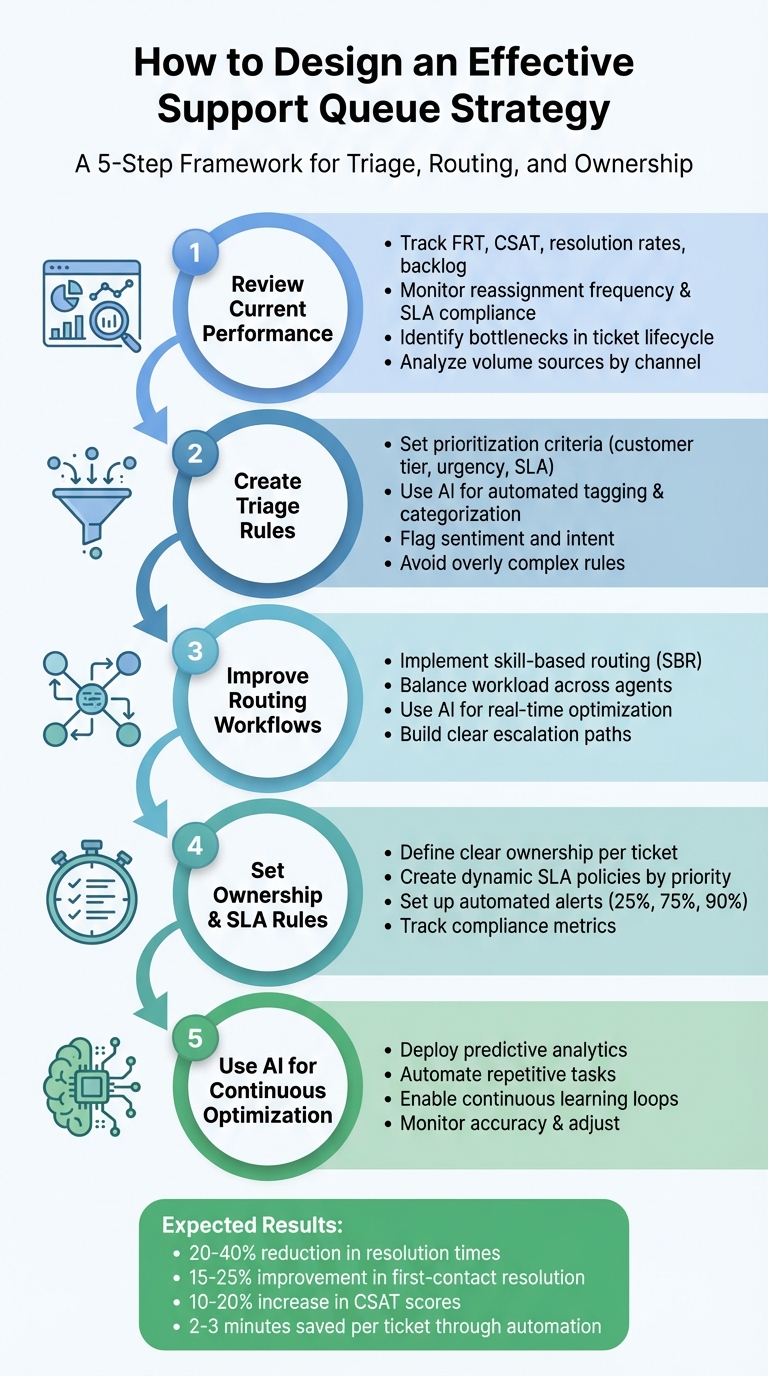
5-Step Support Queue Strategy Framework: Triage, Routing, and Ownership
Step 1: Review Your Current Support Queue Performance
Before making any changes to your support queue strategy, it’s important to get a clear picture of your current performance. Start by collecting baseline metrics like First Response Time (FRT), resolution rates, ticket backlog, and Customer Satisfaction (CSAT) scores. These metrics will help you identify areas that need improvement. Additionally, keep an eye on operational indicators such as reassignment frequency and SLA compliance. If tickets are being passed between agents multiple times, it’s a sign that your triage or routing processes might need an overhaul.
Review Key Metrics
Focus on metrics that shed light on both the speed and quality of your support operations. For instance, track how long tickets remain in each queue and how many are waiting for agent availability. Look at metrics like tickets handled per agent per hour and how resolution times vary by channel or shift. For example, if your email support is consistently missing SLA targets while your chat support is performing well, you’ll know where to reallocate resources. Also, prioritize high-value customers by segmenting them into tiers to ensure accounts with strict SLA requirements get faster attention.
| Metric Category | Key KPIs to Track | Purpose |
|---|---|---|
| Speed | First Response Time (FRT), Resolution Time | Tracks how quickly customers receive assistance. |
| Quality | CSAT, Sentiment Analysis, Churn Risk | Evaluates the effectiveness and tone of interactions. |
| Process | Reassignment Rate, SLA Compliance | Highlights bottlenecks and routing inefficiencies. |
| Volume | Backlog Size, Tickets per Agent/Hour | Measures workload distribution and team capacity. |
Once you’ve collected this data, map your workflow to identify delays or inefficiencies.
Find Bottlenecks and Escalation Patterns
Document the entire lifecycle of a ticket – from submission to resolution – to pinpoint recurring delays. Team leads can provide valuable insights into which agents excel at specific types of issues and which may require additional training or support. High reassignment rates often indicate that agents lack the expertise or context to resolve issues on the first try. Additionally, large and visible queues can create unnecessary stress, potentially slowing down performance. Dividing these into smaller, more specialized queues might help streamline operations.
Review Ticket Volume Sources
To complement workflow mapping, analyze where your tickets are coming from. Examine traffic across all entry points – email, chat, web forms, API, and phone – to see which channels generate the most volume and how quickly those tickets are resolved. Use tools like custom fields in support forms or issue-specific email addresses (e.g., billing@company.com vs. tech@company.com) to group tickets by type. For teams managing thousands of tickets each month, this level of visibility is critical. Don’t forget to factor in customer time zones to prioritize responses effectively. These insights can guide resource allocation and improve response strategies.
Step 2: Create Effective Triage Rules
Once you’ve assessed your support queue performance, the next step is setting up triage rules that automatically organize and prioritize incoming tickets. These rules help ensure high-priority issues – like those from Enterprise customers, critical outages, or time-sensitive requests – are addressed quickly, while routine inquiries follow standard workflows. The aim is to minimize manual sorting, avoid bottlenecks, and streamline ticket handling using your existing performance data.
Set Prioritization Criteria
The first step is establishing clear criteria to decide which tickets need urgent attention. A good triage strategy balances urgency and impact. For instance, a system outage affecting an Enterprise client should take precedence over a general feature request from an SMB account. Use data from your CRM to flag important customer tiers, such as VIP or high-revenue accounts, for immediate attention. Additionally, align triage rules with SLA requirements to ensure response times meet contractual obligations without manual oversight.
Categorizing tickets by issue type and complexity is also essential. Different issues – like billing questions, technical bugs, or product-related inquiries – require varying levels of expertise and response times. AI tools can further refine this process by analyzing sentiment, flagging messages that show frustration or anger, and routing them to agents skilled in de-escalation. Language and region-based rules can assign tickets to agents fluent in the customer’s language, improving communication.
| Prioritization Criterion | Description | Data Source for Automation |
|---|---|---|
| Customer Tier | Enterprise, SMB, or VIP status | CRM data / Organization tags |
| Urgency | Critical system down vs. general inquiry | AI Sentiment / Keywords |
| Intent | Billing, Technical, Feature Request | AI Intent detection |
| SLA Level | Contractual response time (e.g., 1 hour) | Customer contract metadata |
| Language | Requester’s native language | AI Language detection |
With these criteria in place, you can use AI tools to further refine how tickets are categorized and routed.
Use AI for Automated Tagging and Categorization
AI-powered tools take triage to the next level by analyzing ticket content, metadata, and patterns – not just keywords. Using natural language processing (NLP) and machine learning, AI can detect intent and sentiment even when specific terms aren’t mentioned. For example, if a customer writes, "I want to stop paying for this", AI can interpret the intent as "cancellation" and route the ticket appropriately.
AI also helps eliminate spam and irrelevant tickets from your queue. By setting confidence thresholds, you can ensure automated actions are only taken when the AI is highly certain. For instance, if the AI confidently identifies a "Refund Policy" query, it can send an automatic response with self-service information. If the confidence level is lower, the ticket can be flagged for human review.
"With customer support AI… you can intentionally automate all these processes through best-in-class machine learning that identifies the need and intent better than anything else, including a human agent." – Deon Nicholas, President, Forethought
AI can also combine intent and sentiment to trigger escalations. For example, a ticket marked with "Subscription Cancellation" intent and "Very Negative" sentiment can be routed directly to a senior agent or account manager. Additionally, AI can automate information gathering by identifying missing details – like a purchase order number – and sending follow-up requests before an agent steps in.
Avoid Common Triage Mistakes
Even the best triage systems can fail if they’re overly complicated or poorly maintained. A common mistake is creating too many specialized rules too early, leading to confusion and misrouted tickets. Start with a few high-priority use cases, such as VIP escalations or technical issues, and refine your rules over time based on performance data.
Another issue is relying on static conditions that don’t adapt as your team or ticket volume grows. For example, routing all "Technical Support" tickets to one queue might work initially but can create bottlenecks as demand increases. To prevent this, set up fallback paths – such as default queues or overflow groups – to catch tickets that don’t meet specific criteria.
"Unnecessarily complicated routing logic can lead to confusion and a host of errors." – G2 Learn
Lastly, avoid overloading your most skilled agents. Automatically assigning all high-priority tickets to the same individuals can lead to burnout and delays. Use workload caps and availability filters to distribute tickets more evenly. Regularly review and adjust triage rules based on reassignment rates, SLA trends, and agent feedback to keep your system efficient and effective.
Step 3: Improve Routing Workflows
Once you’ve established triage rules, the next step is to create routing workflows that ensure tickets land with the right agents quickly and efficiently – without overwhelming your team. Poorly designed routing systems can overload your top performers while leaving other agents underused. The key is finding a balance between expertise, availability, and workload so that tickets flow smoothly through your system with minimal manual effort.
Use Skill-Based and Workload-Balanced Routing
Skill-based routing (SBR) ensures tickets are assigned to agents with the right expertise, cutting down on unnecessary transfers and boosting first-contact resolution rates. For example, billing questions should go to agents who know invoicing systems, while technical issues are better suited for engineers or IT specialists.
But SBR alone isn’t enough. Without factoring in workload, your most skilled agents can end up buried in high-stakes cases while others have little to do. To avoid this, consider a workload-balancing approach. Instead of assigning tickets based solely on volume, take into account ticket complexity, priority, and current workload. For instance, if an agent is already managing several critical escalations, they shouldn’t receive another urgent case just because others have fewer tickets.
You can set workload caps and introduce cooldown periods after an agent closes a ticket to allow them time to regroup. Another option is implementing skills timeouts – if a specialist isn’t available within a set timeframe (like 30 seconds for live chat or an hour for email), the ticket can automatically route to a generalist who can address the issue until the specialist is free.
Use AI for Routing Optimization
AI tools can take your routing workflows to the next level by analyzing factors like intent, sentiment, and historical agent performance in real time. Unlike manual tagging, AI can learn from resolution data to infer agent skills, making it easier to match tickets with the best-suited person without constant rule adjustments. AI can also assess an agent’s workload by considering ticket complexity and urgency, ensuring that agents managing challenging cases aren’t assigned additional high-stakes tickets.
Sentiment analysis is another game-changer. Tickets flagged as "Very Negative" can be routed to senior agents with specialized training in de-escalation. Ryan Radcliff, Director of Product Marketing at SupportLogic, highlights the importance of this approach:
"Put the wrong person on the wrong case and you get slower resolution, more transfers, and frustrated customers. Put too much work on a few ‘heroes’ and you burn them out while others sit underutilized."
– Ryan Radcliff, Director of Product Marketing, SupportLogic
Start by using AI to recommend routing decisions, and as the system’s accuracy improves, move toward full automation. Skills timeouts can help prevent tickets from lingering if a specialist isn’t available, while monitoring reassignment rates can reveal gaps in the AI’s skill matching or intent detection. Once tickets are routed accurately, having clear escalation paths in place ensures no issue falls through the cracks.
Build Clear Escalation Paths
Even with a strong routing system, you’ll need escalation workflows for unresolved or high-priority tickets. Without these, complex cases can get stuck in limbo or bounce between agents, frustrating customers and delaying resolutions. Create fallback rules that automatically route tickets to secondary teams or overflow groups when the primary team is unavailable or at capacity.
For example, if a ticket goes unassigned for 30 minutes or if a team hits its workload limit, it should move to a backup queue. AI can also trigger escalations based on sentiment or intent. A ticket flagged as "Churn risk" with a "Very Negative" sentiment might be routed directly to a senior agent or account manager for immediate attention.
To prevent escalation loops, use specific tags like triage_trigger_fired to ensure rules only execute once per ticket. During peak times, round-robin windows and time zone alignment can ensure escalated tickets are handled by agents available during the customer’s working hours. Regularly review escalation trends to refine your fallback logic and keep your system running smoothly.
sbb-itb-e60d259
Step 4: Set Ownership and SLA Rules
Routing tickets to the right agents is just the beginning. To ensure accountability and deliver consistent customer support, you need clear ownership rules and adaptable SLA (Service Level Agreement) policies. These frameworks help eliminate confusion, speed up ticket resolution, and keep your support team running efficiently.
Define Ownership Responsibilities
Every ticket needs a clear owner from the moment it’s created. Automated routing systems prevent agents from cherry-picking easier tickets by distributing them based on workload and expertise. This approach not only improves accountability but also shortens resolution times.
It’s equally important to have protocols for handovers. For example, if an agent becomes unavailable, they should reassign their tickets so customers don’t experience unnecessary delays. Ticket statuses like "waiting on customer" or "on-hold" clarify who’s responsible for the next step, making SLA tracking more precise. To maintain smooth operations, set up fallback paths to redistribute tickets when agents are at capacity or unavailable.
Here’s a real-world example: In June 2025, Wolseley Canada adopted Supportbench to manage ticket routing for 7,000–8,000 monthly emails. By categorizing tickets based on case type and client profiles, they gained better visibility into agent performance and resolved long-standing issues within a year.
"The ticketing system assisted us in resolving instances that were long overdue and in providing the staff with a smooth platform experience."
– Eilis Byrnes, Customer Service and Process Improvement Manager, Wolseley Canada
While clear ownership is essential, it works best when paired with dynamic SLA policies to maintain high performance.
Set Dynamic SLA Policies
Not all tickets are created equal, so your SLA policies shouldn’t treat them that way. Dynamic SLAs allow you to prioritize based on factors like customer tier, urgency, or the critical nature of the issue.
To create effective SLA policies, order them from most restrictive to least restrictive. Your system will apply the first policy that matches the ticket’s conditions. Use your team’s current performance data to set realistic benchmarks. For instance, if your team averages a 6-hour response time, don’t set a 1-hour SLA – it will lead to missed targets and burnout. Use 24/7 calendar hours for critical issues, while standard business hours may suffice for general inquiries.
Pause SLA timers during delays caused by customers or third parties. To stay ahead of potential breaches, set up alerts at key milestones – 25%, 75%, and 90% of SLA time used. Escalate unresolved tickets to team leads at 90%. Additionally, Operational Level Agreements (OLAs) can help define internal targets for tickets that move between departments, like from Support to Finance.
| SLA Metric | Description |
|---|---|
| First Reply Time | Time from ticket creation to the first human reply |
| Periodic Update | Time between consecutive agent responses |
| Requester Wait Time | Time a ticket spends in New, Open, or On-hold status |
| Group Ownership Time | Time a ticket is assigned to a specific team (OLA) |
Track Ownership and SLA Compliance
Once you’ve established ownership and SLA rules, automation can help you track compliance and identify potential issues in real time. Automating SLA tracking ensures you know which tickets are on track, which are at risk, and which agents may need support. For example, configure your routing engine to prioritize tickets nearing their SLA deadlines rather than sorting by creation date.
Set reassignment timeouts to prevent tickets from sitting idle. For real-time channels, strict timeouts (30–60 seconds) ensure unresolved tickets are reassigned quickly. You can also use "skills timeout" rules to relax skill requirements after a set time, ensuring tickets don’t linger while waiting for a specific agent.
Track metrics like SLA compliance rate (percentage of tickets resolved within SLA), breach rate (percentage missed), and tickets nearing breach. Regularly review these metrics – monthly is a good cadence – and adjust your SLA pause rules or OLAs if you notice recurring delays. By optimizing these processes, you could reduce ticket resolution times by 20–40% and improve customer satisfaction (CSAT) by 10–20%.
Combining clear ownership, dynamic SLAs, and automated tracking creates a streamlined support operation that keeps customers happy and your team productive.
Step 5: Use AI for Continuous Queue Optimization
Once you’ve set up triage, routing, and ownership rules, AI tools can help fine-tune these processes over time. Unlike static rules, AI adapts by learning from your support data, predicting outcomes, automating repetitive tasks, and improving queue performance – all without constant manual adjustments.
Use AI-Powered Predictive Analytics
AI’s predictive analytics can anticipate outcomes before an agent even steps in. By analyzing historical data – such as language, tone, and sentiment – AI can forecast metrics like customer satisfaction (CSAT), customer effort score (CES), and the likelihood of resolving a ticket on the first try. These insights help identify high-priority or frustrated customers, ensuring that urgent cases are handled promptly before they escalate.
For instance, if AI flags a ticket as likely to result in low CSAT due to the customer’s tone, it can automatically route the case to a senior agent or mark it for immediate attention. Additionally, AI can detect missing details, such as order numbers or addresses, and prompt customers for this information, increasing the odds of resolving the issue on the first contact. This proactive approach helps prevent bottlenecks and keeps your support queue running smoothly.
Beyond predictions, AI also shines in automating repetitive tasks, freeing up agents to focus on more complex problems.
Automate Repetitive Tasks
AI is particularly effective at managing routine tasks that often slow down agents. Automated triage can determine the intent and urgency of incoming tickets more precisely than manual processes, allowing critical issues to be prioritized right away. It can also filter out spam tickets and handle automated tagging and categorization, enabling agents to dedicate their time to solving more demanding issues.
For example, AI can distinguish between tickets with similar language – like "can’t access dashboard" versus "portal won’t load" – and route them appropriately. By setting confidence thresholds (e.g., 90%), you can ensure that AI auto-tags or auto-routes tickets only when it’s highly certain, leaving lower-confidence cases for human review to maintain accuracy. These automated workflows not only save time but also lay the groundwork for continuous improvement.
Enable Continuous Learning and Improvement
AI systems get smarter with every interaction, thanks to feedback loops and machine learning. By analyzing historical agent performance and success rates, AI can predict the best-fit agent for specific issues, helping you make better use of your resources. When agents correct errors – like misclassifications or routing mistakes – the AI learns from these adjustments and applies that knowledge to future tickets.
With time, AI models can achieve up to 90% accuracy in classifying new tickets. To sustain this level of performance, it’s important to regularly audit your AI’s effectiveness and update it with fresh data. Keep an eye on metrics like prediction accuracy, reassignment rates, and SLA adherence to ensure your AI-driven processes are delivering results. Optimized routing alone can reduce average ticket resolution times by 20-40% and boost first-contact resolution rates by 15-25%.
Conclusion
Building an efficient support queue strategy hinges on smart triage, accurate routing, and clear ownership. When these elements align, you can eliminate bottlenecks, evenly distribute workloads, and deliver faster, more reliable responses.
AI plays a key role by automating triage and classification, saving 2–3 minutes per ticket, cutting resolution times by 20–40%, and boosting first-contact resolution rates by 15–25%. Features like real-time sentiment detection ensure that frustrated or high-value customers get immediate attention, while dynamic workload balancing helps prevent agent burnout during busy periods. These AI-driven advancements work hand-in-hand with the structured processes outlined earlier.
"Automated ticket routing isn’t just about saving time – it’s about getting every customer the right help, at the right moment." – Nooshin Alibhai, Founder and CEO, Supportbench
Focus on prioritizing VIP escalations and setting fallback paths to keep tickets moving smoothly. Continuously track metrics like reassignment rates, resolution times, and SLA compliance to spot areas for improvement. Over time, as your AI learns from agent feedback and historical data, its efficiency will only grow stronger.
FAQs
How does AI enhance ticket triage and routing accuracy?
AI streamlines ticket triage and routing by evaluating details like intent, language, and sentiment. This enables precise categorization and ensures tickets reach the appropriate teams swiftly and effectively.
By automating these steps, AI minimizes human mistakes, accelerates response times, and allows support teams to concentrate on solving issues rather than managing and assigning tickets. The result? Quicker resolutions and happier customers, even in demanding support scenarios.
What are the key metrics to measure support queue performance?
When evaluating your support queue performance, it’s essential to focus on metrics that reflect efficiency, responsiveness, and the quality of service provided. Some of the most important metrics include:
- Average resolution time: This tracks how quickly tickets are resolved, giving you a clear sense of your team’s efficiency.
- First response time: Measures how fast agents respond to a ticket initially, which plays a significant role in customer satisfaction.
- Ticket backlog: Keeps an eye on the number of unresolved tickets, helping you identify areas where your team might be falling behind.
Beyond these, it’s also worth monitoring:
- Ticket routing accuracy: Ensures tickets are being assigned to the right agents or teams, reducing delays caused by misrouting.
- Escalation rates: Highlights issues that require additional intervention, pointing to potential bottlenecks in your workflow.
Lastly, metrics like customer satisfaction (CSAT) and SLA compliance rates are critical for assessing how well your team meets service expectations and commitments. Keeping a close watch on these metrics allows you to fine-tune processes, eliminate inefficiencies, and elevate the overall performance of your support operations, especially in today’s AI-driven landscape.
What are dynamic SLA policies, and how do they improve customer support efficiency?
Dynamic SLA policies adjust response and resolution times automatically, factoring in elements like ticket urgency, customer priority, and real-time conditions. By aligning service levels with the unique needs of each situation, they help ensure that critical issues are handled promptly without sacrificing efficiency.
This method reduces SLA breaches, optimizes agent workflows, and ensures resources are used effectively to meet customer expectations. Dynamic SLAs are especially useful in fast-paced support environments where priorities can change in an instant.