


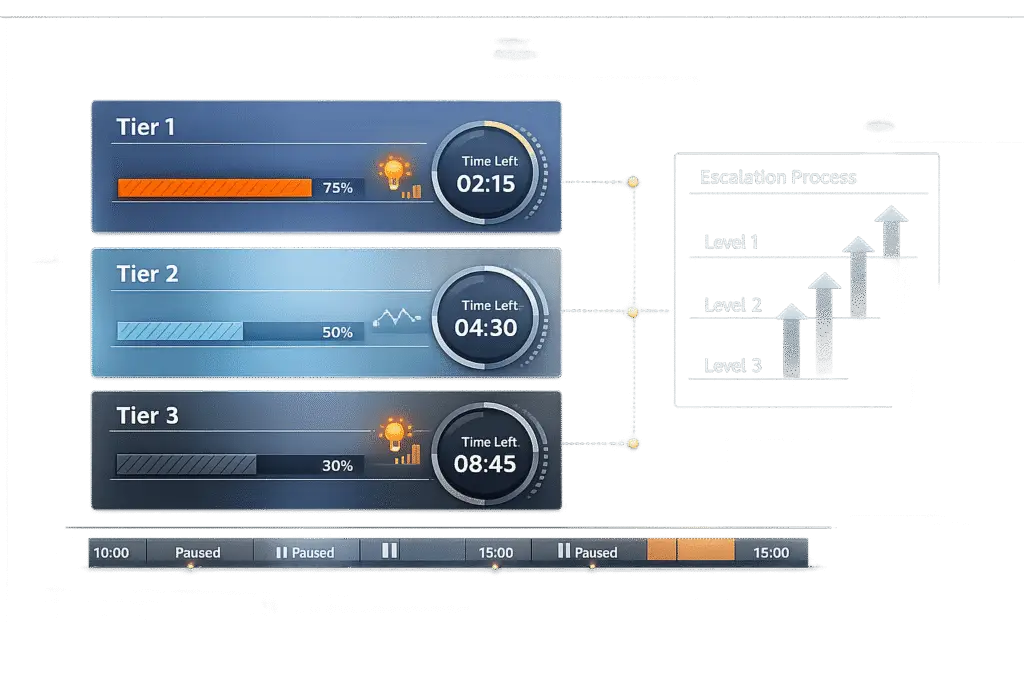
Implementation requests differ from standard support tickets. They involve guiding customers through onboarding, setups, or integrations, not just resolving issues. To manage these effectively, you need clear Service Level Agreements (SLAs) to set expectations, ensure accountability, and avoid delays.
Key Steps for Setting Up Implementation SLAs:
- Define the Workflow: Tailor statuses like "Pending Approval" or "Provisioning" for implementation requests.
- Set SLA Tiers by Priority: Use levels like P1 (Critical) for urgent blockers and P4 (Low) for minor tasks, with specific response and resolution times.
- Avoid Common Mistakes: Configure SLA pause conditions for delays caused by customers, and prevent duplicate field mapping errors.
- Use Automation: AI tools can route requests, track SLA compliance, and predict potential breaches.
- Track Metrics: Focus on SLA compliance rate, breach rate, and first response time to measure success.
Pro Tip: Set alerts at 75% of SLA duration to prevent breaches, and use business hours for accurate tracking.
Quick Comparison of SLA Priority Levels:
| Priority | Description | Response Time | Resolution Time | Updates |
|---|---|---|---|---|
| P1 | Critical blocker | 15-60 mins | < 4 hours | Every 30 mins |
| P2 | Major delays or failures | 1-2 hours | 8-24 hours | Every 2-4 hours |
| P3 | Standard onboarding | 4-8 hours | 2-3 business days | Daily |
| P4 | Minor adjustments | 12-24 hours | 5+ business days | Weekly |
Outcome: Clear SLAs ensure smoother workflows, better customer trust, and improved team performance.
How to Define Your Implementation Request Type
What Makes Implementation Requests Different
Implementation requests follow a distinct workflow compared to standard support tickets. While support incidents typically follow a "receive → diagnose → fix → verify" process, implementation requests use a "receive → approve → provision → complete" path instead [4]. This unique flow means they require custom status options like "Pending Approval" or "Provisioning", which wouldn’t apply to regular support tickets. As a result, tailoring the configuration is key to keeping the process efficient and organized.
How to Configure Request Attributes and Triggers
AI tools can automatically identify keywords like "I need" or "setup", making it easier to direct implementation requests to the right place [4]. When setting up triggers, stick to the "One Trigger, One Job" rule. Start with categorization triggers, then move on to assignment rules, and finally, configure notification triggers in that order [5]. AI-driven routing can also assign requests based on criteria such as request type, urgency, or the specialized skills of your team members [6]. This level of automation ensures requests are assigned quickly and accurately.
Once automation is in place, the next step is to define clear SLA pause conditions. This minimizes errors and keeps the workflow running smoothly.
Common Setup Mistakes to Avoid
One frequent mistake is neglecting to set pause conditions for SLAs. For example, if states like "Waiting on Customer" aren’t marked as pause states, the SLA clock will keep running even when the customer is responsible for the next action. This can lead to false SLA breaches and unnecessary stress for your team. To address this, use percentage-based alerts – like triggering reminders at 75% of the SLA duration – rather than static reminders. This approach works better across varying SLA lengths.
Another pitfall is duplicate field mapping. If a field appears in both the request form and a linked form, it can cause system errors that block updates. Similarly, creating duplicate links between requests can lead to serious tracking issues. Oracle highlights this risk:
"A service request can be a duplicate of only one original… Service requests that are the cause of or caused by others will cause logical errors in the status propagation" – Oracle [7]
For instance, if Request A is marked as a duplicate of Request B, and Request B is already a duplicate of Request C, the entire status tracking system can fail. To avoid these issues, make sure each field and link is unique and properly configured. With careful attention to these details, your implementation request process will run smoothly and keep SLAs enforceable.
sbb-itb-e60d259
How to Set SLA Timelines and Track Success
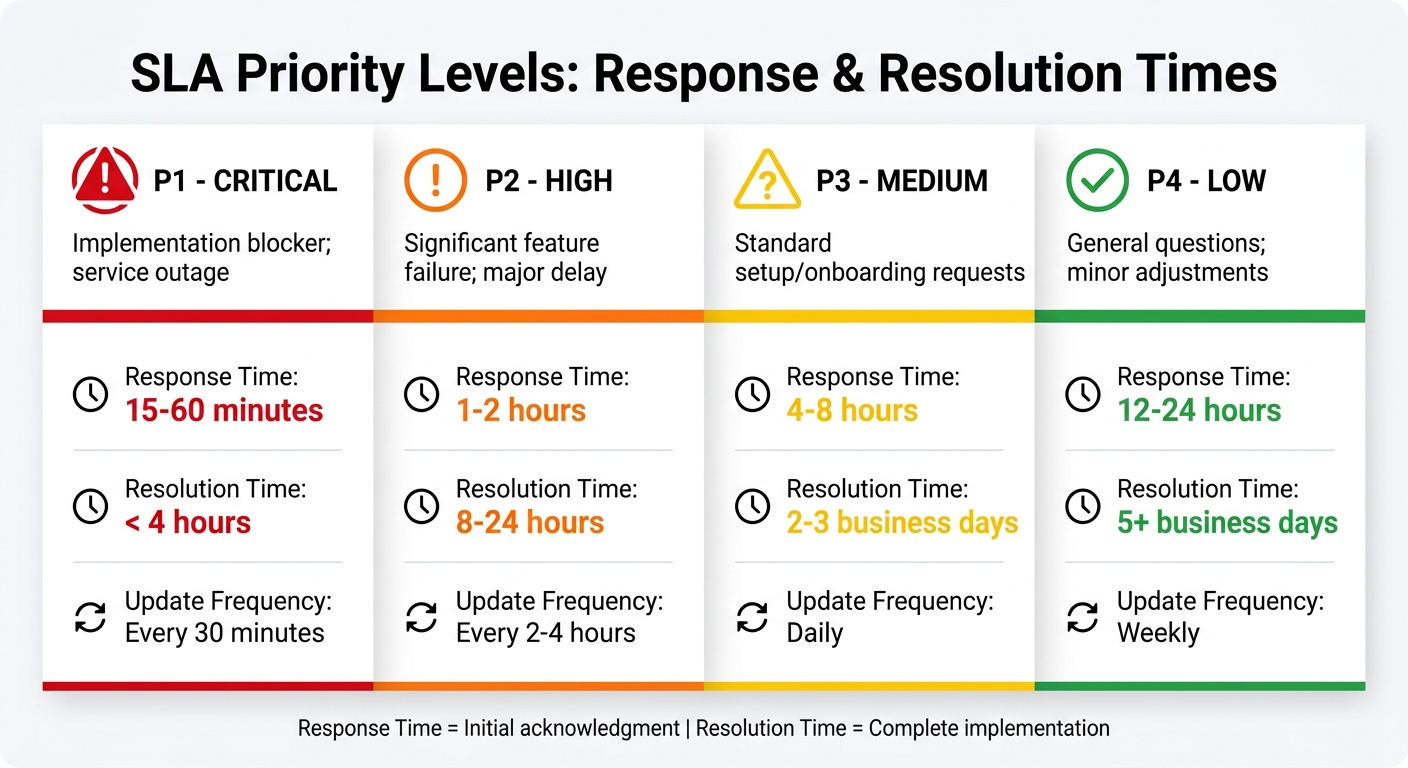
SLA Priority Levels for Implementation Requests: Response and Resolution Times
Creating SLA Tiers by Priority Level
When setting SLA timelines, it’s essential to account for the priority of each implementation request. A practical approach is to create four distinct tiers, each based on the urgency and impact of the issue. For example, a P1 (Critical) request – like a complete service outage or a blocker for implementation – requires immediate attention, with a response time of 15–60 minutes, resolution within 4 hours, and updates every 30 minutes. On the other hand, a P4 (Low) request, such as a minor adjustment, can have a more relaxed timeline, like a 12–24 hour response time and resolution within 5 or more business days.
The key is to align these tiers with the actual business impact. For instance:
- P2 (High) issues, which involve major feature failures delaying critical milestones, should have a response within 1–2 hours and resolution within 8–24 hours.
- P3 (Medium) requests, such as standard setups or onboarding, typically require a 4–8 hour response time and resolution within 2–3 business days.
As one expert puts it:
"The contract protects the business. The SLA protects the customer experience" [8].
Here’s a quick breakdown of the priority levels:
| Priority Level | Description | Response Target | Resolution Target | Update Frequency |
|---|---|---|---|---|
| P1 – Critical | Implementation blocker; service outage | < 15–60 mins | < 4 hours | Every 30 mins |
| P2 – High | Significant feature failure; major delay | < 1–2 hours | < 8–24 hours | Every 2–4 hours |
| P3 – Medium | Standard setup/onboarding requests | < 4–8 hours | 2–3 business days | Daily |
| P4 – Low | General questions; minor adjustments | < 12–24 hours | 5+ business days | Weekly |
It’s also important to differentiate between response time (how quickly the issue is acknowledged) and resolution time (how long it takes to fully resolve the issue). Response times are typically measured in minutes or hours, while resolution may take hours to days. To prevent SLA breaches, consider setting up alerts – like triggers at 50% or 75% of the SLA limit – so managers can step in before deadlines are missed [1].
Once these tiers are in place, the next step is to define success metrics to evaluate performance.
Choosing the Right Success Metrics
Establishing SLA tiers is just the beginning of effective SLA management. To ensure your team consistently delivers, you’ll need clear metrics to measure performance. These metrics help distinguish proactive, high-performing teams from those that are merely reactive. Focus on the following three key metrics:
- SLA compliance rate: The percentage of tickets resolved within their SLA targets.
- Breach rate: The percentage of tickets that miss their SLA targets, broken down by team or issue type.
- First response time: A measure of how quickly your team acknowledges requests, reflecting intake efficiency [8].
Modern platforms simplify tracking by automatically logging "SLA KPI Instances" for each request. These instances record whether a ticket is In Progress, Succeeded, Canceled, or Breached, along with the exact time of any failure [1]. This detailed tracking can reveal trends, such as recurring issues with P2 tickets on specific days or patterns in breached requests.
To ensure accuracy, configure pause conditions for your metrics. For example, pause the timer when waiting for customer input or during third-party escalations. This prevents your team from being penalized for delays outside their control [2][3]. Additionally, use business minutes (which count only active working hours) instead of real minutes (which run continuously). This avoids “phantom breaches” caused by requests sitting idle during off-hours [3]. Advanced tools can even dynamically adjust deadlines, restarting paused resolution clocks when customers respond [3].
Building Workflows and Escalation Rules
The Standard Implementation Workflow
An effective implementation workflow breaks the process into clear stages, each with specific triggers and responsibilities. It starts with defining the kickoff point – usually the "Issue Created" event – to ensure immediate tracking. From there, the workflow typically progresses through:
- Intake: Initial acknowledgment and assignment.
- Milestone Updates: Regular progress check-ins aligned with SLA tiers.
- Testing: Verifying that the implementation meets requirements.
- Final Handover: Securing customer sign-off and closure.
It’s important to distinguish between acknowledgment (response time) and full resolution (completion time) at each step. To keep your metrics accurate, establish "pause" conditions for situations like waiting on customer feedback or approvals. This ensures that only active work time is tracked. As Jim Brandt from Request Tracker emphasizes:
"A missed deadline can incur financial penalties, leaving no room for sloppy tracking" [3].
To avoid "phantom breaches", align workflows with a business calendar that reflects working hours and holidays. This ensures SLA timers only run during active periods. Such workflows also enhance earlier SLA setups by providing a structured framework for tracking performance.
Once this structure is in place, escalation rules act as a critical safeguard to address potential SLA risks.
Setting Up Escalation Rules for Missed SLAs
Escalation rules act as a safety mechanism for requests that risk missing deadlines. A popular approach is a two-stage trigger: a "Warn After" alert before the breach and a "Failure After" deadline [1]. For instance, a high-priority request might send a warning at 1 day and escalate at 2 days, giving the team time to act.
When warnings are triggered, automate the response to ensure swift action. This could include:
- Moving the ticket to a "High Attention" queue.
- Notifying the support lead or account manager.
- Adding senior engineers as participants [2].
For tickets with less than 30 minutes left before a breach, escalate them immediately. If an SLA breach occurs, your procedure should outline who to contact and what steps to take – whether it’s reassigning the case, raising its priority, or involving higher-level stakeholders [1].
Modern tools can support up to 90 SLA goals, allowing customization based on factors like customer segments or contract tiers [2]. While manual escalation is vital, dynamic SLAs can further streamline the process by adapting timelines automatically.
Using Dynamic SLAs to Adjust Timelines Automatically
Static SLAs fall short when conditions change. Dynamic SLAs solve this by recalculating deadlines in real time. For example, if a request’s priority is downgraded from high to medium, the system cancels the current SLA and recalculates the timeline based on the new priority [1].
Platforms like Dynamics 365 offer this flexibility. Adjusting a work order’s priority automatically updates its failure deadline to match the new urgency level. You can also configure dynamic due dates that reset based on customer interactions, such as restarting the clock after a customer responds during a paused period [3]. This approach prevents teams from being penalized for delays outside their control while ensuring accountability for active tasks.
As Justyna Gdowik from Deviniti notes:
"SLAs are living documents, not static contracts. Regularly review, adapt, and improve them to keep pace with evolving needs" [2].
How AI Improves SLA Management
Managing SLAs manually can quickly become overwhelming, especially when juggling numerous active requests across different customer tiers. AI steps in to simplify this process by continuously monitoring performance data and predicting potential SLA breaches. Instead of waiting for agents to sift through dashboards or respond to alerts after problems arise, AI analyzes ticket patterns in real time, flagging cases that are at risk. This proactive approach not only streamlines monitoring but also lays the groundwork for automation in escalation and reporting.
AI for Real-Time SLA Tracking and Breach Prediction
Modern AI platforms leverage Change Data Capture (CDC) technology to keep a close watch on ticketing systems, ensuring updates are synchronized in under 60 seconds [9]. This means that as soon as a request’s status or priority changes, the system recalculates SLA timelines and assesses potential risks. By using machine learning, these platforms can identify anomalies – like unexpected workflow delays or spikes in unassigned tickets – that may signal an impending SLA failure [9].
AI systems also use multi-level thresholds to provide timely alerts. For instance, a high-priority case with a 5-day SLA might trigger a warning at 80% of the allotted time and escalate to a critical alert at 95% [9]. This ensures that issues are addressed before they breach SLA limits.
"AI enhances ETL for real-time analytics through automatic schema mapping, anomaly detection, and predictive quality monitoring" – Integrate.io [9]
AI adapts seamlessly to changes in source systems. If your CRM adds new fields or modifies data structures, AI-powered schema mapping prevents disruptions that could lead to SLA breaches [9].
Automated Escalations and Case Prioritization
AI doesn’t just monitor – it takes action. When a case nears a critical threshold, the system can automatically move it to a high-priority queue, alert the on-call lead, and create an incident record [9]. This ensures that no case is overlooked, even when SLA deadlines are tight.
Predictive risk modeling further enhances SLA management by analyzing historical data to uncover patterns that might signal future breaches. For example, if certain types of cases frequently experience delays, AI can flag them early and adjust their priority. Organizations leveraging AI for customer onboarding have reported a 25% reduction in onboarding time [12], largely because AI automates triage and routing, removing the need for manual coordination.
By 2027, AI agents are projected to automate around 70% of customer support interactions [11]. Many companies have already seen first-response times drop by up to 74% [11], while employees spend 25% to 40% less time on low-value tasks [11]. These efficiencies directly improve SLA compliance, particularly for time-sensitive requests.
In addition to real-time tracking and escalations, AI also drives improvements through advanced reporting.
AI-Powered Reporting and Process Improvement
AI-generated reports go beyond surface-level metrics, offering deeper insights into performance trends [12]. Instead of just highlighting SLA breaches, these reports pinpoint specific workflow stages where delays occur and recommend actionable improvements. For example, if cases consistently stall at a particular step, the system might suggest automated reminders or workflow adjustments to keep things moving.
Conversation intelligence tools add another layer of efficiency by extracting data from customer calls and meetings. These tools automatically capture action items and decisions, eliminating the need for manual note-taking [12][13]. Aiden Technologies, a cybersecurity firm, implemented automated conversation capture in 2024. By transcribing Zoom calls and syncing notes directly to their CRM, they improved team efficiency by 33% [13]. This ensures that critical context is preserved and SLA tracking reflects real progress.
AI can also save organizations between 12,500 and 20,000 hours of analysis time through automated obligation tracking [10], which is particularly beneficial for managing complex, multi-tiered SLAs.
"The quality of your AI outputs is only as good as the data feeding them" – Richard Tasker, Otter.ai [13]
Platforms that integrate directly with CRMs and project management tools deliver the most accurate insights, helping organizations achieve better SLA performance while reducing manual effort.
Conclusion: Getting Implementation SLAs Right
Creating effective implementation SLAs starts with thoughtful setup. Make sure SLA timers are aligned with business hours, holidays, and agent time zones to avoid inaccurate breach calculations during non-working hours [2][1]. Break down projects into smaller, manageable parts for easier reporting and maintenance [2]. To build trust and set clear expectations, display SLA timers on customer portals [2].
Streamlined workflows are essential for keeping implementation requests on track. Set up escalation chains with triggers, such as 75% warnings and 100% manager alerts [14]. Use tiered priority levels to focus resources on tasks that have the most impact. Additionally, configure SLA pausing for delays caused by external factors to ensure metrics stay accurate [15]. As Jonathan Bar, Founder of Corebee, explains:
"Your customers do not need the fastest support in the world – they need support that is reliably as fast as you promised" [14].
Once workflows and configurations are in place, monitoring becomes the next key step. AI-powered tools can shift SLA management from reactive to proactive. Real-time, color-coded tracking helps managers quickly identify bottlenecks [15], while predictive breach alerts and ticket prioritization enable teams to reassign tickets before deadlines are missed [14].
Well-defined SLAs eliminate ambiguity, boost customer confidence, and offer insights for ongoing improvement. Aim for 90% SLA compliance, and if it drops below 85%, consider adjusting targets or increasing resources [14]. Regular quarterly reviews ensure that SLAs stay in sync with both team capacity and customer expectations [14].
FAQs
When should I create an “implementation” request type instead of a support ticket type?
When dealing with complex customer onboarding, setup, or implementation tasks, it’s crucial to have a dedicated request type called "Implementation." These tasks often require specific workflows, involve multiple steps, and demand close coordination, making them more intricate than standard support requests.
By creating this request type, you can:
- Ensure proper prioritization: Complex tasks won’t get lost in the shuffle of routine support tickets.
- Enable tailored workflows: Custom workflows can be designed to handle the unique requirements of these tasks.
- Track SLAs effectively: Clear SLA tracking helps prevent delays and ensures commitments are met.
This approach keeps everything organized, minimizes errors, and ensures that critical customer needs are addressed efficiently. The result? Smoother processes and happier customers, even when handling the most demanding implementation tasks.
How do I set SLA pause rules for ‘waiting on customer’ without gaming the metrics?
To establish SLA pause rules for situations like ‘Waiting on Customer’ without skewing the metrics, focus on creating conditions that reflect actual delays. Set the rules to pause only when the ticket status is clearly marked as ‘Waiting on Customer’ or a comparable status. Avoid mechanisms that can be easily manipulated, like manual toggles, which could compromise the accuracy of your metrics. Incorporating tools such as AI monitoring can help identify inconsistencies, ensuring SLA metrics remain reliable and performance stays on track.
What’s the simplest way to start using AI to prevent SLA breaches in implementation work?
The easiest way to prevent SLA breaches with AI is by using AI-driven tools that keep an eye on progress, predict potential risks, and allow for timely escalation. These tools can analyze ticket patterns, anticipate problems, and automate responses to reduce delays. With features like intelligent escalation and resolution time predictions, they help prioritize tasks effectively and ensure SLA compliance, all while providing a budget-friendly solution to streamline workflows.






