


A shared inbox works for small B2B teams with simple workflows but falls short as complexity grows. For teams handling under 500 tickets per month and straightforward email-based inquiries, shared inboxes provide a cost-effective, collaborative solution. They’re easy to set up, affordable ($14–$25 per user/month), and keep communication personal.
However, as ticket volumes rise or teams expand beyond 5 agents, shared inboxes struggle with accountability, SLA tracking, and managing high-stakes B2B issues. Advanced platforms with automation, AI, and structured workflows become necessary to handle complex operations, improve response times, and maintain client trust.
Key takeaways:
- When shared inboxes work: Small teams (1–5 agents), fewer than 500 tickets/month, simple email queries.
- When they don’t: Teams with 10+ agents, high-ticket volumes, multi-channel support, or strict SLA requirements.
Choose a solution based on your current needs, not future possibilities. If manual triage eats up hours daily or accountability gaps arise, it’s time to upgrade.
When Shared Inboxes Work for B2B Operations
Small Teams with Simple Workflows
For smaller teams, shared inboxes can be a practical and budget-friendly option. Teams with 1–5 agents handling fewer than 500 monthly interactions often find shared inboxes to be an efficient solution [1][2]. At this scale, managing the queue doesn’t require complex workflows or routing rules. Plus, the setup process is quick – taking less than an hour – and requires minimal onboarding [1][3].
In March 2026, a SaaS company with four employees managing 180 monthly tickets switched from an enterprise platform to a shared inbox. This move slashed their costs from $460 to $100 per month, a 78% reduction [1].
This streamlined approach works particularly well for straightforward customer support tasks.
Simple Customer Questions and Requests
The type of customer inquiries your team handles also plays a big role in determining whether a shared inbox is a good fit. These tools shine when most support requests are simple and email-based. Common examples include password resets, billing questions, product usage guidance, and basic troubleshooting. These tasks typically don’t require multi-step approvals or strict service level agreements (SLAs) [3].
If more than 90% of your customer support happens via email, a shared inbox keeps the process personal and conversational. Unlike formal ticketing systems, shared inboxes avoid impersonal touches like ticket numbers or automated responses [3].
To help teams work efficiently, shared inboxes include features like collision detection, which prevents multiple agents from responding to the same email. Internal notes and @mentions also allow team members to collaborate privately on complex issues before replying to customers [1][3]. This balance of teamwork and personalization is especially important for maintaining strong B2B relationships, where a human touch matters [2].
Lower Costs for Basic Needs
For teams with straightforward needs, shared inboxes are a clear winner when it comes to cost. Most shared inbox tools cost between $14 and $30 per user per month, while professional help desk platforms with advanced features like SLA tracking and detailed reporting can range from $55 to $115 per agent [1][3]. If your team handles fewer than 200 tickets daily and relies heavily on email, you might be paying for features you don’t actually need [4][3].
The savings don’t stop at subscription fees. Shared inboxes are easy to use, with interfaces that resemble standard email platforms. This eliminates the need for extensive training and reduces setup time, which requires little administrative effort [4][3]. Teams already using Microsoft 365 or Google Workspace can also benefit from basic shared mailboxes under 50 GB, which are often included at no extra cost [4][2].
While shared inboxes are a cost-effective choice for simpler operations, they may not meet the demands of more complex support environments.
sbb-itb-e60d259
Where Shared Inboxes Fall Short for Growing B2B Teams
Lack of Visibility Across Multiple Stakeholders
B2B accounts often involve several decision-makers, making shared inboxes a coordination headache. Without structured tools for assigning tickets, teams resort to unreliable methods like color-coded categories or subfolders. These workarounds fail to provide visibility for other stakeholders, leaving agents unable to view a customer’s complete support history or prior interactions within the inbox. This leads to constant context-switching between email and CRM systems, wasting time and increasing the risk of errors [7][4].
High-volume, multi-user environments expose even more flaws. For instance, replies sent from a shared email address might only show up in the shared "Sent Items" folder, or worse, display an agent’s personal email address if permissions aren’t set correctly. This creates confusion about who communicated what, a major issue in complex B2B relationships [7].
"Standard email inboxes fall short because they lack transparency for teams addressing emails collaboratively. They often leave team members in the dark about an email’s resolution." – Gmelius [5]
Shared inboxes also miss critical features like automated routing and prioritization, forcing teams to spend hours manually triaging tickets – especially when daily volumes exceed 500 [1]. Security is another weak point, as shared mailboxes lack unique credentials and email encryption. They also can’t prevent users from deleting messages, which compromises audit trails essential for compliance [6]. These limitations make it difficult to coordinate effectively or track issues over the long term.
Challenges in Tracking Long-Running Issues
Tracking ongoing issues is another major shortfall. Shared inboxes treat emails as unstructured threads rather than organized, trackable tickets. This makes it nearly impossible to prioritize or follow up on critical problems. For instance, a severe technical bug might get buried under routine requests like password resets, creating chaos for teams managing high-stakes B2B accounts [1][2].
Without proper assignment tools, messages often fall through the cracks. Agents may assume someone else is handling an issue, leaving it unresolved – or worse, multiple agents might respond with conflicting information, a situation known as agent collision. This sends a poor message to high-value clients and undermines trust [2][8]. If customers frequently follow up with "just checking in" emails, it’s a clear sign that important issues are being overlooked [2].
As shared inboxes grow in size, performance takes a hit. Storage limits slow down folder loading and search functions. Teams typically outgrow shared inboxes when they reach 10 agents or handle more than 200 tickets per day [4][2].
Lack of Accountability and Performance Tracking
Another major drawback is the absence of tools for tracking agent performance and accountability. Without clear ownership of tasks, workloads become uneven, and balancing capacity becomes a guessing game. At volumes of 200 tickets per day, manual triage alone can eat up 2 to 3 hours of team time daily [1].
"Outlook shared mailboxes become a liability – not because Outlook is a bad product, but because it was never designed to be a support ticketing system." – Dinesh Goel, CEO, Robylon [7]
Shared inboxes don’t provide data on email age or response deadlines, forcing managers to manually export and analyze data in Excel – a process many abandon due to its complexity [7]. Without detailed activity logs, it’s nearly impossible to track who made specific changes or sent replies. If your team spends more time in Slack or meetings figuring out "who’s handling what" than actually responding to customers, it’s a strong sign that a structured platform is overdue [4][2].
B2B Requirements That Need More Than a Shared Inbox
SLAs and Escalation Management
B2B contracts often come with strict SLAs and the expectation of timely responses – areas where shared inboxes struggle to keep up. Without built-in SLA tracking, teams are left juggling manual tools like spreadsheets or calendar reminders to meet deadlines.
Escalation workflows highlight more limitations. When critical issues need to be escalated to specialized teams, shared inboxes rely on forwarding emails or tagging colleagues with @mentions. This approach fragments communication and blurs accountability. For enterprise-level B2B relationships, what’s needed are automated escalation rules. These rules can route high-priority issues to the right team based on factors like severity, customer tier, or how much time has passed – something standard email folders simply can’t handle. This level of precision is also essential for managing task distribution and prioritization effectively [1][3].
Queues, Prioritization, and Access Controls
In complex B2B setups, skills-based routing ensures technical inquiries land with the right experts, while senior agents can focus on more strategic, high-value tasks. Advanced platforms also provide role-specific permissions to control who can see certain messages, adding an extra layer of security and efficiency [4].
Without proper queues, urgent issues – such as production outages – can easily get buried under routine requests. Modern AI tools, capable of identifying customer intent with 92% accuracy in less than 200 milliseconds, can automatically categorize and route messages. This ensures that time-sensitive matters are addressed promptly and don’t slip through the cracks [1]. Beyond routing, these tools enhance support resolution by automating repetitive tasks.
AI Automation and Knowledge Base Management
AI-driven support platforms can autonomously resolve up to 81% of inquiries by connecting directly to AI knowledge-centric solutions and business systems [2]. In contrast, shared inboxes rely on agents to manually draft responses for routine questions – like password resets, status updates, or policy clarifications – that AI could handle in seconds. On average, agents spend 3 to 5 minutes per email searching external wikis or SharePoint sites when the necessary information isn’t embedded in their workspace [7].
"Power Automate cannot read an email, understand the customer’s intent, retrieve the relevant knowledge base answer, and generate a personalized response – which is what actual email automation requires."
- Dinesh Goel, CEO, Robylon [7]
Without a centralized, AI-accessible knowledge base, agents risk providing inconsistent information – either rephrasing answers differently or relying on outdated materials. Advanced platforms address this by generating AI-powered drafts that align with the case context and company tone. This allows teams to resolve issues up to 44% faster while still delivering the personalized touch that B2B clients expect [4][7].
9 reasons why you should upgrade from a shared inbox to a helpdesk. (Part I)
Shared Inbox vs. AI-Native Platform: Feature Comparison
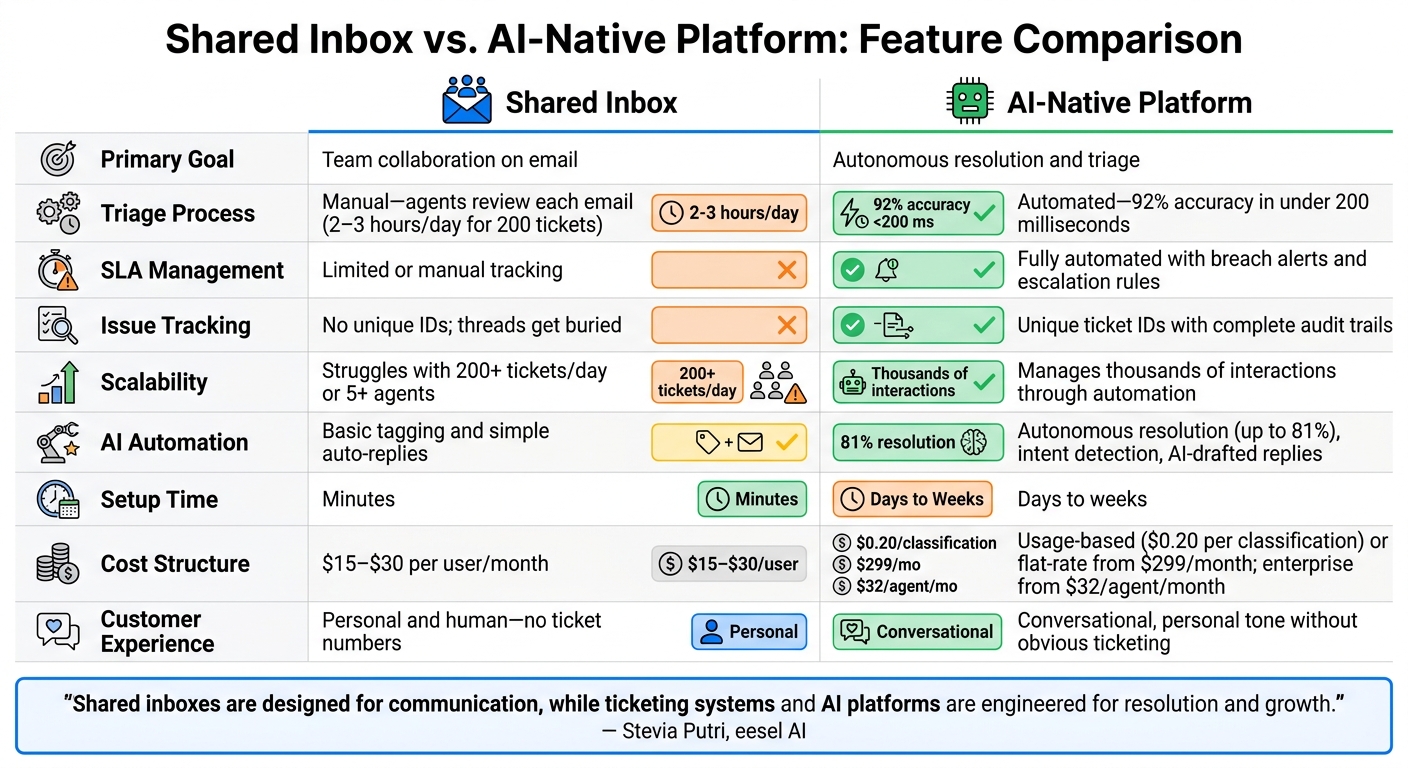
Shared Inbox vs AI-Native Platform: Feature Comparison for B2B Support Teams
Feature Comparison Table
Here’s a side-by-side look at how shared inboxes and AI-native platforms stack up. Shared inboxes focus on team collaboration, enabling multiple team members to manage a single email address (like support@company.com). On the other hand, AI-native platforms leverage machine learning to streamline triage and resolution, offering scalability without the need for proportional staffing increases.
| Feature | Shared Inbox | AI-Native Platform |
|---|---|---|
| Primary Goal | Team collaboration on email | Autonomous resolution and triage |
| Triage Process | Manual – agents must review each email (2–3 hours/day for 200 tickets) [1] | Automated – AI identifies customer intent with 92% accuracy in under 200 milliseconds [1] |
| SLA Management | Limited or manual tracking [1][4] | Fully automated with breach alerts and escalation rules [3][4] |
| Issue Tracking | No unique IDs; threads can get buried in long conversations [2] | Unique ticket IDs with complete lifecycle audit trails [3][2] |
| Scalability | Struggles with more than 200 tickets/day or 5+ agents [1][2] | Easily manages thousands of interactions through automation [2] |
| AI Automation | Basic tagging and simple auto-replies [3] | Advanced features like autonomous resolution (up to 81%), intent detection, and AI-drafted replies [2] |
| Reporting & Analytics | Basic metrics like volume and response times | Detailed analytics, including SLA tracking, CSAT, and performance dashboards |
| Setup Time | Minutes | Days to weeks |
| Learning Curve | Similar to standard email tools | Low to medium – adapts using existing company data |
| Cost Structure | $15–$30 per user/month [1] | Usage-based (e.g., $0.20 per classification [1]) or flat-rate starting at $299/month [2]; enterprise plans from $32/agent/month |
| Customer Experience | Personal and human – no ticket numbers | Maintains a conversational, personal tone without obvious ticketing [2] |
The manual workload and costs tied to shared inboxes can quickly escalate as support demands grow. For example, handling 200 tickets daily requires agents to spend hours on triage, making the labor savings from automation a compelling case for AI-native platforms. For teams managing over 500 tickets monthly, the higher upfront software costs are often offset within the first quarter.
"Shared inboxes are designed for communication, while ticketing systems [and AI platforms] are engineered for resolution and growth."
This breakdown highlights the key tradeoffs, helping you determine which solution aligns better with your team’s evolving support needs.
How to Decide What Your B2B Support Needs
Questions to Ask About Your Support Operations
Setting up the right support system now can save you from headaches as your business grows. Whether you stick with a shared inbox or upgrade to a more advanced platform depends on your current needs.
Start by evaluating your ticket volume. Are you handling more than 500 tickets a month? If so, manual workflows may start to fall apart under the pressure [1]. Another key factor is whether you have formal service level agreements (SLAs). If your contracts require strict SLA tracking, a basic shared inbox might leave you vulnerable.
Next, think about your team. Do you have 10 or more support agents, especially spread across multiple time zones? If so, the lack of clear ownership in a shared inbox can cause delays and confusion [2]. Are your agents spending more time assigning tickets than resolving them?
Finally, take stock of your reporting needs. If you need more than basic metrics like ticket volume or response times – such as detailed insights into agent performance, customer health, or SLA compliance – a shared inbox might fall short. Similarly, if you’re managing support across three or more channels (email, chat, phone, or social media), you’ll need a system designed for multi-channel routing.
Once you’ve answered these questions, you can start planning a phased migration to a more advanced support platform.
Steps to Move from a Shared Inbox to an Advanced Platform
After assessing your needs, a step-by-step migration plan will help you scale your support operations smoothly. Transitioning from a shared inbox doesn’t have to be overwhelming. Instead, take a gradual approach based on your ticket volume.
- 0–200 tickets per month: A standard email inbox with labels may be enough.
- 200–500 tickets per month: Upgrade to a robust shared inbox with basic features like assignment and collision detection.
- 500+ tickets per month: Introduce AI-driven triage to manage the workload and delay the need for a full platform migration [1].
When planning your move, align with stakeholders on the features you truly need – such as automated SLA tracking, multi-channel support, or advanced reporting. This ensures you’re not overpaying for tools you won’t use. Also, start your data migration early. Importing historical emails and setting up a knowledge base takes time and coordination [2].
Consider using AI as a helper before diving into full automation. For example, start with AI drafting responses for agents to review. This builds trust and improves accuracy over time. If your team handles more than 500 tickets a month, the upfront investment in advanced software often pays off quickly – saving 2–3 hours of manual triage daily for teams managing 200 tickets per day [1]. To minimize risk, pilot the new system with a small group before rolling it out company-wide.
Conclusion: Choosing the Right B2B Support Tool
Key Takeaways
If your team handles fewer than 500 tickets per month, a shared inbox can be a budget-friendly option, typically costing between $14–$25 per user. It provides a straightforward, conversational approach to customer support and works well when email is your primary channel. Plus, it’s quick to set up and easy to use, which is perfect for smaller teams [1].
That said, shared inboxes have their limits. They struggle with formal SLA tracking, multi-channel support strategies, and detailed performance reporting. Once ticket volumes hit around 200 per day, manual triage can become a major time sink, eating up 2–3 hours daily that could be better spent addressing customer needs [1].
For teams that need structured workflows, escalation management, or advanced access controls, more sophisticated platforms are essential. AI-driven tools provide an interesting middle ground, blending the personal feel of email with automation and scalability. These tools can speed up issue resolution by as much as 44% [4] and achieve autonomous resolution rates of up to 81% [2].
These considerations can guide you toward selecting a tool that matches your operational needs.
Final Thoughts
Choose a support tool that fits your current workload, team size, and SLA requirements – not just what you might need in the future. For example, if you’re managing 180 tickets per month with a four-person team, investing in enterprise-level software may be overkill. But if your team is spending more time sorting through emails than solving problems, it’s probably time to consider an upgrade.
FAQs
What are the clearest signs we’ve outgrown a shared inbox?
When your team starts encountering problems like duplicate replies from agents, missed urgent issues due to poor prioritization, or SLA breaches caused by manual tracking, it’s a sign that your shared inbox might be falling short. Add to that the lack of automation, difficulty measuring performance, and collaboration struggles from fragmented communication, and it becomes clear that the current setup isn’t keeping up with your team’s need for efficient and scalable support.
How can we track SLAs and escalations without a ticketing system?
Tracking SLAs and managing escalations without a ticketing system can be tough, but it’s not impossible with the right manual or semi-automated strategies. You can use email tags to indicate priority levels, ensuring important issues get flagged appropriately. Keeping a shared escalation log allows the team to track ongoing issues and their progress. To avoid missing deadlines, set calendar reminders for key milestones or due dates. Additionally, regular team reviews can help spot potential problems before they escalate.
These methods work well for smaller teams with limited complexity. However, as operations grow, managing SLAs manually becomes harder. At that point, transitioning to an automated system can provide better tools for tracking, managing, and ensuring accountability.
What’s the safest first step to add AI without disrupting support?
The best way to bring AI into your support operations is by starting small – automating routine tasks like ticket routing or offering response suggestions within your existing platform. Focus on repetitive, rule-based activities, such as assigning tickets based on keywords or categories. This method helps streamline efficiency without disrupting your current workflows, giving your team the advantages of AI while keeping things running smoothly.






