


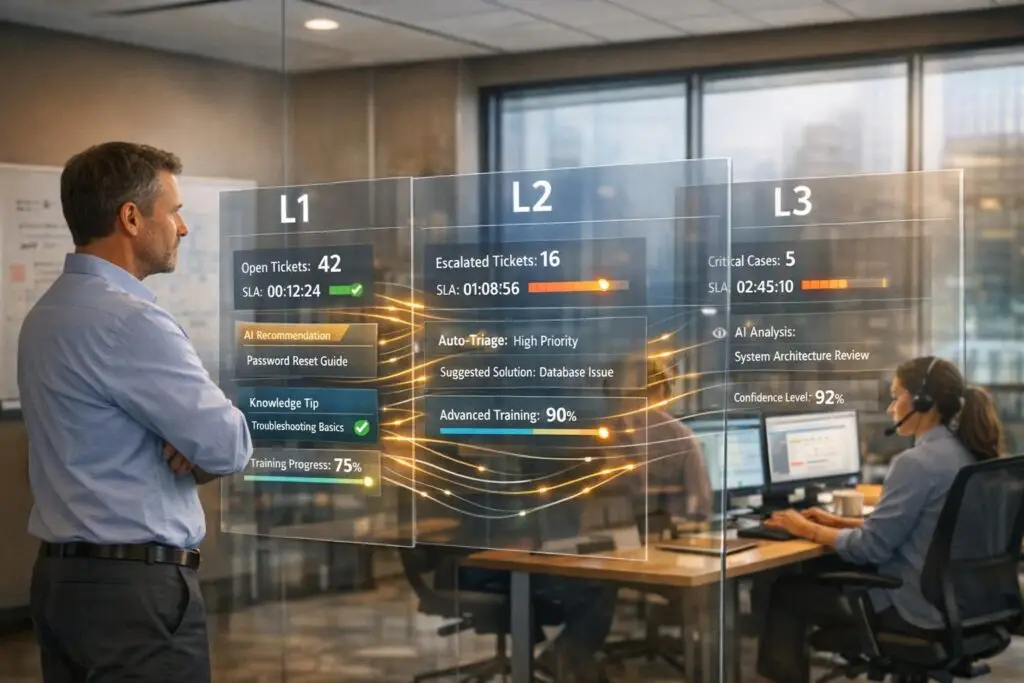
When handling complex products like APIs or enterprise systems, a tiered support model (L1, L2, L3) helps allocate the right expertise to the right problem. Here’s the essence:
- L1 (Basic Support): Handles simple tasks like password resets or basic troubleshooting. Focus is on speed and first-call resolution.
- L2 (Technical Diagnostics): Tackles advanced issues like log analysis, configuration validation, and system dependencies.
- L3 (Engineering-Level Support): Manages the most complex problems, including code fixes, platform patches, and long-term solutions.
Key Takeaways:
- 80% of issues are resolved at L1, 18% at L2, and 2% at L3.
- Proper staffing ratios: L1 (60–70%), L2 (25–30%), L3 (<10%).
- Clear escalation rules, training, and AI tools reduce delays and improve efficiency.
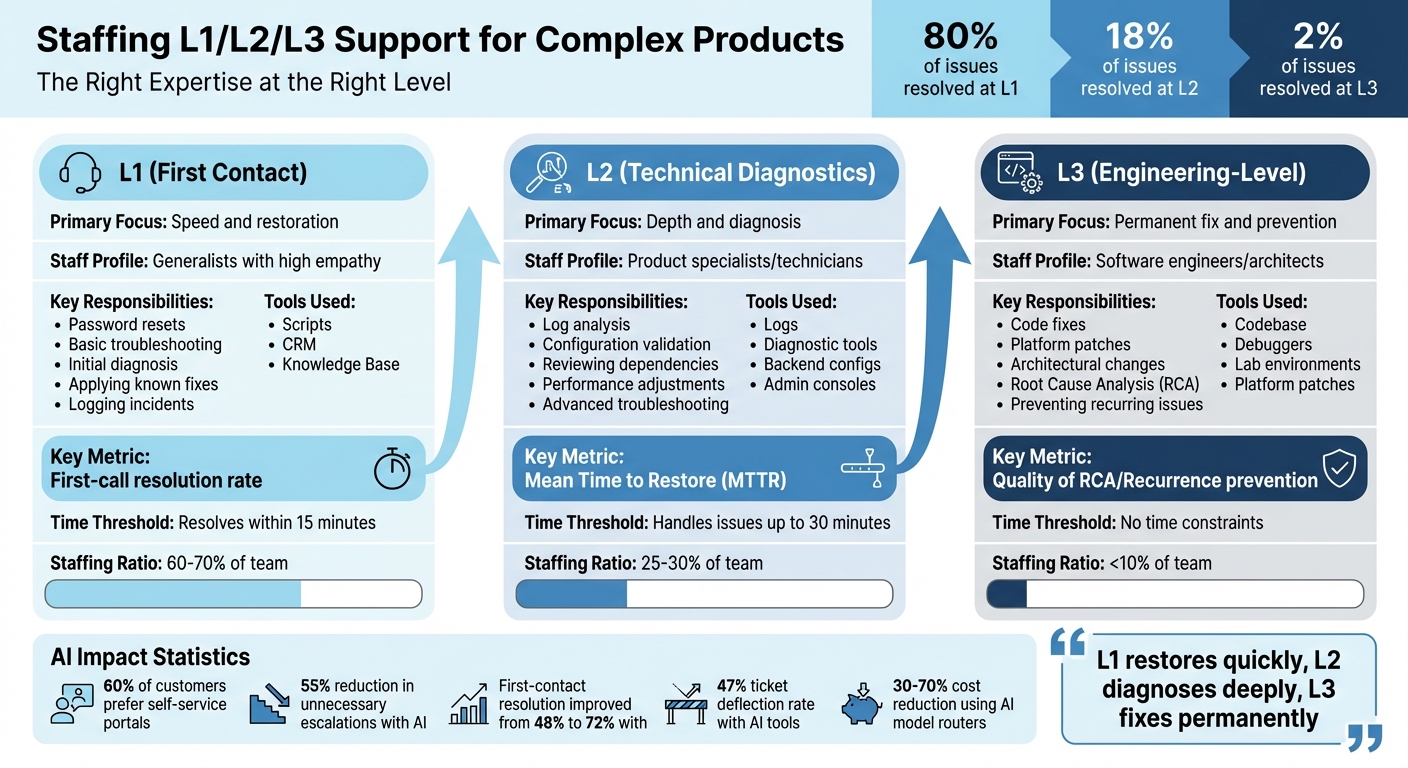
L1 L2 L3 Support Tier Comparison: Roles, Skills, and Staffing Ratios
What Does IT Support Do? Level 1, Level 2, Level 3 Escalations [Overview]
sbb-itb-e60d259
What L1, L2, and L3 Roles Mean for Complex Products
Each tier in a support structure serves a specific purpose, ensuring the right expertise is applied to the right level of complexity. As Hemant Panda, Senior IT Delivery Leader, explains: "Escalation is about capability, not hierarchy" [3].
Defining clear boundaries between tiers is crucial. It prevents high-level resources, like engineers, from being bogged down with routine tasks (e.g., password resets), allowing them to focus on more challenging issues. This structure ensures incidents are routed efficiently, avoiding unnecessary delays or mismanagement through escalation processes [3]. Let’s break down the roles of each tier:
L1: First Contact and Basic Issue Resolution
L1 agents are the first line of defense. Their main job? Restore service quickly or transfer the issue to the right team [3]. They handle tasks like:
- Initial diagnosis
- Applying known fixes from the knowledge base
- Logging and categorizing incidents accurately
Their work typically involves straightforward tasks such as password resets, basic connectivity troubleshooting, and providing configuration guidance.
L1 staff follow scripts and standard procedures, so they don’t need deep technical knowledge of the product’s design. Instead, strong communication skills and empathy are essential [1][4]. A key performance metric for L1 agents is the first-call resolution rate – how often they resolve issues without escalation [3].
When an issue requires backend access or code-level fixes, it gets escalated to L2.
L2: Technical Diagnostics and Advanced Troubleshooting
L2 specialists step in when the issue goes beyond the scope of L1. Their focus is on diagnosing the technical root cause and finding a fix or workaround [3]. Responsibilities include:
- Analyzing logs
- Validating configurations
- Reviewing dependencies
- Adjusting performance settings
These specialists are product experts who understand how various components interact. Their role demands domain-specific knowledge, such as expertise in API architectures, database structures, or integration patterns. They also have access to advanced tools like admin consoles and backend systems, which L1 does not [1][3][5].
However, L2 doesn’t handle tasks like bug fixes, vendor-level changes, or major architectural redesigns. Those responsibilities fall to L3. Success at this level is measured by how many issues are resolved without needing engineering involvement [3].
L3: Root-Cause Analysis and Engineering Collaboration
L3 is where the most complex problems land. This tier consists of software engineers, architects, or senior developers [5]. Their primary role is to deliver permanent solutions and prevent recurring issues [3]. They handle:
- Code fixes
- Platform patches
- Architectural changes
- Leading Root Cause Analysis (RCA) sessions
L3 specialists rely on tools like source code, debuggers, and lab environments [5]. They often collaborate with product teams or external vendors to resolve issues that go beyond configurations. As Hemant Panda puts it: "L1 restores quickly, L2 diagnoses deeply, L3 fixes permanently" [3].
This tier is reserved for tasks requiring deep technical expertise and focuses on long-term solutions.
Summary of Tiered Roles
Here’s a quick comparison of the three tiers:
| Tier | Primary Focus | Staff Profile | Key Metric | Tools Used |
|---|---|---|---|---|
| L1 | Speed and restoration [3] | Generalists with high empathy [4] | First-call resolution rate [3] | Scripts, CRM, Knowledge Base [1] |
| L2 | Depth and diagnosis [3] | Product specialists/technicians [4] | Mean Time to Restore (MTTR) [3] | Logs, diagnostic tools, configs [3] |
| L3 | Permanent fix and prevention [3] | Software engineers/architects [4] | Quality of RCA/Recurrence prevention [3] | Codebase, platform patches [3] |
How to Assess Skills and Structure Your Teams
Aligning skills with the complexity of tasks is key to building an effective support team. Missteps in this area can lead to bottlenecks, employee burnout, or wasted resources.
Required Skills for Each Tier
L1 agents are your frontline team members. They need strong empathy, clear communication, and the ability to stick to established procedures. Their responsibilities include ticket logging, basic troubleshooting, and escalating issues when necessary. These agents focus on quick resolutions and act as generalists in handling customer concerns [1].
L2 specialists bring a deeper technical skill set. They should excel in advanced diagnostics, operating system troubleshooting, network analysis, and SQL. With access to backend systems, they analyze logs, validate configurations, and understand how various product components interact. Their role is centered on solving more complex technical problems [1].
L3 engineers are your top-tier experts. They handle the most challenging tasks, such as root-cause analysis, code-level debugging, infrastructure design, and managing security incidents. Collaborating directly with engineering teams, they address application bugs and work to prevent recurring issues.
"To be truly customer-driven, we need to structure our support team around specific skills and levels of experience." – Andrew Gori, Zendesk [7]
Once skills are defined, structuring the team size to match the workload ensures better efficiency.
Recommended Staffing Ratios for L1/L2/L3
The workload distribution typically follows these ratios: L1 handles 60–70% of total tickets, L2 takes on 25–30%, and L3 manages less than 10% [8]. These numbers reflect the nature of issues and the effectiveness of each tier.
Zendesk’s Global Customer Advocacy Team, with over 250 members, uses this three-tier model. At their organization, Tier 3 addresses only 5–10% of tickets – reserved for the most complex cases that require engineering-level expertise or infrastructure changes [7]. If your L1 team escalates more than 50% of tickets, this could indicate gaps in training or insufficient authority, rather than a need for more high-tier staff [8].
Time-based thresholds can also guide tier assignments. For example:
- L1: Resolves issues within 15 minutes.
- L2: Handles problems requiring up to 30 minutes.
- L3: Tackles complex cases without time constraints [7].
This time-based approach ensures simpler issues don’t consume the resources of higher-tier teams.
Using AI to Forecast Workload and Adjust Team Size
With skills and ratios in place, AI tools can further refine team efficiency by forecasting workloads.
AI-driven forecasting tools analyze patterns to predict ticket volume spikes – whether caused by product launches, seasonal trends, or emerging technical problems. Instead of relying on historical averages, predictive analytics allow for proactive adjustments to team size [1].
AI can also act as a "Tier 0" by handling high-volume, low-complexity interactions. 60% of customers prefer using self-service portals for troubleshooting before reaching out to support [5]. This reduces the burden on L1 agents, allowing them to focus on cases that require human judgment.
Organizations that integrate AI into their tiered support models have seen impressive results, such as a 55% reduction in unnecessary escalations and an improvement in first-contact resolution rates from 48% to 72% [8]. By redefining resource allocation, AI transforms how teams operate across all tiers.
Setting Up Escalation and Triage Processes
Managing complex support issues effectively requires clear escalation paths to avoid delays and bottlenecks. Without well-defined criteria, tickets can bounce between teams, slowing resolution times significantly.
When to Escalate: Setting Clear Criteria
Deciding when to escalate should be based on whether the agent has the tools and information needed to resolve the issue – not just on the ticket category [9]. Before escalating, consider: Does the agent have a full understanding of the customer’s situation? Have all recommended troubleshooting steps been tried? Is there relevant documentation available?
Most issues are resolved at the L1 (Level 1) stage, with only a small percentage requiring escalation to L3 (Level 3) [2][1]. However, if more than 20% of tickets are being escalated from L1, it could point to a training gap or unclear boundaries of responsibility.
Some common reasons for escalation include:
- Issues that exceed the agent’s expertise
- Risk of missing SLA commitments
- High-priority incidents, such as security breaches or system outages [9]
It’s also important to differentiate between two types of escalation:
- Hierarchical escalation: Moving an issue up the chain of command for approvals.
- Functional escalation: Redirecting the issue to a specialized team for technical expertise [9].
For time-sensitive problems, automatic escalation and ticket routing should trigger if L1 agents cannot resolve the issue within a specified timeframe [1][6].
"When escalation paths are clear and responsibilities are defined, resolution time drops naturally and consistently." – FlairsTech [2]
Once the need for escalation is identified, a smooth handoff process becomes essential.
How to Hand Off Cases Between Tiers
Even with clear escalation criteria, an effective handoff process is critical to maintaining momentum. Poor handoffs can lead to wasted time and increased frustration for both staff and customers. If context is missing, L2 and L3 teams often waste time retracing steps instead of resolving the issue [9].
To ensure seamless handoffs, include:
- Detailed logs and diagnostic data
- Notes on prior troubleshooting steps
- Standardized frameworks like SBAR (Situation, Background, Assessment, Recommendation) for consistent and thorough communication [11]
Requiring L1 agents to document key details before escalating ensures that the next team has all the necessary context, reducing ticket bouncing and delays [6][9].
For critical situations, consider warm handoffs with acknowledgment tracking. For example, if a high-priority escalation isn’t acknowledged within 30 minutes, an automated system alert can notify a manager [11]. A real-world example comes from October 2024, when a midsized urban safety net health system implemented a "red flag" policy and standardized handoff messages. This reduced response times from 48 business hours to 10, with 85% to 86% patient follow-through rates and no reported safety incidents [10].
Integrating your ticketing system with CRM tools, product databases, and internal chat platforms ensures agents have access to all the information they need before escalating [9]. This unified approach minimizes unnecessary escalations caused by incomplete data.
"Escalations have a much more significant impact than they realize. It’s a bottleneck that can be removed rather easily." – Tina Grubisa, Value Consultant, Mosaic AI [9]
Using AI to Improve Tiered Support Staffing
AI is reshaping the support landscape by streamlining how tickets are triaged, routed, and escalated. Instead of relying on basic keyword matching or an agent’s instincts, AI dives into ticket details, customer history, and technical nuances to assign issues to the right tier – or even decide if human involvement is necessary at all. Building on the advantages of workload forecasting, let’s explore how AI enhances tiered support processes.
AI for Auto-Triage and Escalation Management
Traditional triage methods often fall short, especially in complex support environments. These approaches rely heavily on subjective judgments and the expertise of a small group of seasoned staff [12]. AI steps in by analyzing ticket content to determine the type of issue, its urgency, and the correct routing path [12]. A confidence-based system works well here: AI can automatically assign high-confidence tickets, suggest routes for medium-confidence cases, and flag low-confidence tickets for manual review [12].
Before enabling full automation, it’s essential to standardize team roles and test AI routing in a suggestion-only mode [12]. This allows teams to quickly correct any misrouted tickets and continuously refine the AI model [12]. This iterative process aligns with the broader goal of matching the right expertise to the appropriate level of complexity.
"The winning model is not ‘replace IT teams.’ It’s ‘remove repetitive triage friction so teams can focus on higher-value work.’" – Layer 8 Labs [12]
Unlike workload forecasting, AI here directly aids in ticket routing and helps agents make more informed decisions.
AI Tools That Help Agents Work Faster
AI doesn’t just streamline routing – it also equips agents with tools to resolve issues faster by providing instant access to expert knowledge. AI-powered agent-assist tools pull insights from past Tier 3 resolutions and make them available to frontline agents [9]. These tools give L1 and L2 agents immediate access to troubleshooting steps, documentation, and case histories through an integrated system [9].
For example, Supportbench uses AI to deliver features like case summaries, predictive CSAT scoring, and knowledge base bots. When an agent opens a ticket, AI provides a summary of the customer’s history and flags relevant articles or past resolutions. If a similar issue was recently resolved at Tier 3, the solution is surfaced immediately, saving time.
At Cynet, integrating AI cut resolution times nearly in half. By delivering instant answers, agents avoided unnecessary searches or escalations. This resulted in a 47% ticket deflection rate and a 14-point CSAT improvement (from 79 to 93), with nearly half of all tickets resolved at Tier 1 without escalation [9]. The focus shifts from speeding up escalations to preventing them entirely – measuring success by tracking first-contact resolutions and reducing repeat escalations for known issues [9].
Reducing L1/L2 Workload Through Automation
AI-assisted triage and agent tools are complemented by automation, which further reduces routine tasks for lower-tier teams. Automated knowledge capture, for instance, creates documentation when Tier 3 experts resolve new issues [9]. This ensures that once a novel problem is solved, it doesn’t repeatedly escalate.
AI also handles repetitive tasks like categorizing tickets, tagging issues, and prioritizing cases based on factors like account health and SLA risk [9]. By automating these processes, agents avoid unnecessary context switching, which often leads to premature escalations. This frees up L1 and L2 teams to focus on more meaningful interactions.
The result? Fewer unnecessary escalations, faster resolutions, and more time for Tier 3 engineers to address root causes instead of repeatedly answering the same questions. Automation not only improves efficiency but also supports the broader goal of cost-effective, specialized support.
Training Programs and Mistakes to Avoid
How to Design Training for Each Tier
Tailor training programs to align with the specific responsibilities of each support tier. For L1 agents, the focus should be on mastering customer service basics, learning standard troubleshooting techniques, and effectively using scripts. The goal here is speed and precision, ensuring routine issues are resolved quickly by following established processes.
L2 agents require a more advanced skill set. Their training should cover in-depth diagnostics, extensive product knowledge, backend system analysis, log reviews, and root-cause investigations. Regular training sessions and certifications are crucial to keep them updated on tools and technologies that evolve over time.
For L3 agents, training becomes highly specialized. This level demands a deep technical understanding, including code-level analysis, architectural changes, and close collaboration with engineering teams. L3 agents should also be equipped to implement permanent solutions to recurring problems.
While technical expertise is critical at all levels, don’t overlook the importance of soft skills like empathy and perseverance. Building a knowledge base can be a game-changer, enabling agents to document fixes, streamline processes, and avoid redundant troubleshooting. Additionally, clearly defined career advancement opportunities can boost job satisfaction and help retain skilled team members.
Even with well-designed training, common staffing mistakes can undermine the system. Let’s look at how to avoid them.
Avoiding Common Staffing Mistakes
Clear role definitions are critical to maintaining an efficient support structure. Without them, teams risk falling into common pitfalls that disrupt workflows and lower morale.
One major mistake is uniform staffing across tiers. Teams should be organized based on skill sets and experience levels. When this isn’t done, agents may find themselves handling issues beyond their expertise, leading to inefficiencies and frustration. Similarly, unclear role boundaries can cause tickets to bounce between tiers unnecessarily, leaving critical issues unresolved for longer than necessary.
Another frequent issue is premature escalation. When L1 agents lack proper diagnostic training, they may escalate simple problems to L2 too quickly, overburdening the higher tier. Implementing standardized diagnostic scripts and clear escalation criteria can ensure that tickets are resolved at the appropriate level.
Bottlenecks at L3 are another concern, especially when engineers focused on development are pulled into support tasks. Using L3 as a vetting layer before involving the development team can help balance workloads and ensure resources are used wisely.
Finally, a lack of documentation for new fixes can lead to repeated efforts, especially at the L1 and L2 levels. To prevent this, establish closure rules that require detailed documentation before resolving tickets. Set triggers – like escalating a ticket after 15 minutes of unresolved work – to avoid bottlenecks and ensure efficient issue resolution. This approach keeps things running smoothly and minimizes repeated mistakes.
Conclusion
Staffing L1, L2, and L3 teams for complex products requires more than just adding headcount – it’s about creating the right structure. As Drake Q., Co-founder & CPO at Chatty, explains: "Overwhelmed teams usually have a structure problem, not a people problem." [4] The goal is to align the complexity of issues with the right level of expertise, so your top engineers aren’t stuck fixing password resets while critical bugs pile up.
Defining roles clearly is the starting point. When tier boundaries are well-established and supported by tools like the Minimum Diagnostic Packet (MDP), ticket bouncing is minimized, and higher-tier teams can focus on what truly requires their attention. In fact, implementing proper tiered routing can cut engineering ticket loads by nearly 40% in just three months [4], while a robust Tier 0 self-service system can deflect 20–40% of tickets before they even reach a human agent [4].
Training plays a pivotal role in the success of your support structure. "Tier 1 training quality sets the ceiling for your whole system," says Drake Q. "When frontline agents lack confidence, escalation rates spike – creating artificial complexity at Tier 2 and 3." [4] This underscores the importance of investing in targeted training programs that enhance both technical abilities and diagnostic confidence at every tier.
AI tools further enhance efficiency by managing triage, routing, and workload forecasting on a large scale. With AI interaction costs ranging from $0.10 to $1.50 compared to $3.00 to $6.00 for human interactions [14], automation not only boosts consistency but also enables cost-effective scaling. Using cost-aware model routers can reduce costs by 30% to 70% [13] while maintaining high-quality support.
The most effective strategy blends structure, training, automation, and ongoing refinement. By setting clear escalation criteria, ensuring smooth handoffs, and using data to adjust staffing ratios, you can build a support operation that scales efficiently without compromising on quality.
FAQs
How do I know if L1 is escalating too much?
You can spot if L1 is escalating too often by keeping an eye on the escalation rate – this is the percentage of tickets passed on to higher support tiers. A good benchmark is keeping this rate below 20%, especially when customer satisfaction and first contact resolution rates are solid. If the rate goes over 20% on a regular basis, it could point to issues like inadequate training, vague workflows, or an overcomplicated product that’s overwhelming L1 support.
What should be included in an escalation handoff to L2 or L3?
When escalating a case to L2 or L3 support, it’s crucial to include clear and comprehensive context. This means detailing the problem description, outlining the troubleshooting steps already taken, and providing relevant customer information. Be sure to include:
- A thorough problem description that explains the issue in detail.
- A summary of diagnostics performed to avoid repeating steps.
- The current status of the case, so the next tier can pick up where you left off.
Providing this information ensures that the higher-tier team can quickly grasp the situation, minimize redundant work, and focus on resolving complex issues efficiently.
Which support tasks should AI handle first?
AI is well-suited for handling tasks such as triage, categorization, and prioritization of incoming tickets or alerts. By analyzing and routing requests to the appropriate teams, it significantly cuts down on manual effort. It can also automate escalations to ensure SLAs are met, which helps improve response times and minimizes alert fatigue. This frees up human agents to dedicate their time and energy to resolving more complex issues more effectively.
Related Blog Posts
- What’s the best way to set up tier 1 / tier 2 / tier 3 support workflows in a help desk?
- How do you design a tiered support model without slowing down resolution?
- How do you run an executive escalation program without training customers to escalate?
- How to design escalation paths that customers can understand






