


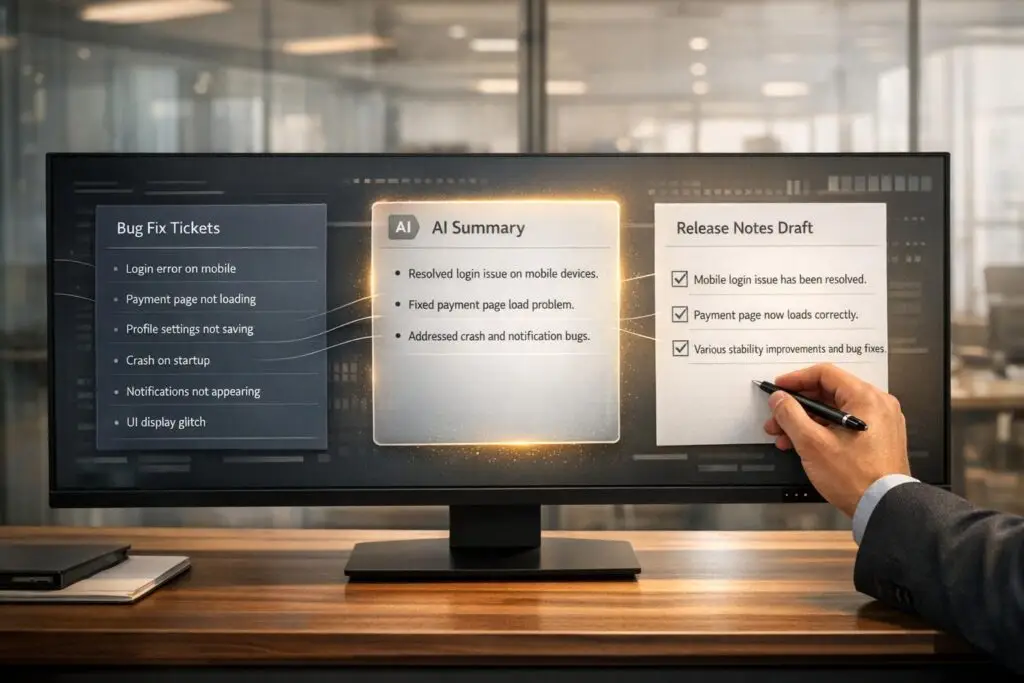
Writing release notes manually is time-consuming, error-prone, and tedious. Teams often spend hours sifting through complex ticket histories, technical jargon, and scattered details to create user-friendly summaries. AI tools can cut this process by 90%, reducing it to just 15 minutes of review. Here’s how AI simplifies release note creation:
- Summarizes tickets: Converts technical details into user-friendly language.
- Saves time: Automates repetitive tasks, reducing manual effort.
- Improves accuracy: Dynamically updates summaries to reflect the latest ticket changes.
- Streamlines collaboration: Ensures consistency across repositories and teams.
This guide explains how to integrate AI into your workflow, from organizing tickets to crafting effective prompts and reviewing output. By combining automation with human oversight, you can produce clear, concise, and accurate release notes quickly and efficiently.
Why AI Matters for Bug Fix Ticket Summaries
Problems with Manual Summarization
Manually summarizing bug fix tickets can be a huge drain on resources. Agents often spend 10–20 minutes per ticket just sifting through extensive ticket histories before even beginning to solve the issue [6]. This "context tax" piles up quickly, especially for teams juggling dozens of tickets across multiple product lines.
Another major headache is information decay. Manual summaries become outdated the moment a new update or comment is added to the ticket. The Inkeep team describes it perfectly:
Manual summaries decay the moment a customer replies. The CAN report you wrote three messages ago no longer reflects reality [7].
This constant cycle of outdated information is expensive. Engineers can spend 2–4 hours per escalated ticket trying to reconstruct the context from old summaries, racking up costs of $200–$500 per ticket [7]. Across a typical 18-hour resolution cycle, more than 6 hours are wasted as tickets bounce between teams due to incomplete or inaccurate context [7].
Then there’s the issue of technical language. Commit messages like "fix null pointer exception" don’t explain how the fix impacts users. Turning these into user-friendly, benefit-driven release notes requires deep domain expertise [4]. In multi-repository setups, coordinating updates across teams can feel like herding cats, often leading to missed or duplicated information [4].
These pain points highlight why AI is so crucial for improving bug fix ticket workflows and release notes.
How AI Improves Release Notes
AI tackles problems like outdated summaries and technical jargon head-on. By automatically updating structured summaries – covering sections like "Issue", "Steps Taken", "Blockers", and "Outcome" – AI ensures that information stays relevant and easy to follow after every ticket update [7][8]. This structured approach simplifies scanning and comprehension.
For teams adopting AI-powered pipelines, the results are transformative. Drafting release notes, which used to take 2–3 hours, now requires just 15 minutes of review – a 90% reduction in effort [4]. Alex Conroy, Manager of Product Support Engineers at Telnyx, explains:
It’s particularly useful for agents and managers handling complex, multi-region tickets, offering AI-driven summaries that save time and provide clarity [9].
Modern AI tools also include inline citations, linking directly to source messages. This makes it easy for technical teams to verify details with a single click, ensuring accuracy without slowing down workflows [7]. The aim isn’t to fully automate the process but to cut out 80% of the manual work, especially when teams are managing high ticket volumes with a modern support CRM [7].
AI doesn’t just make life easier – it reshapes how teams handle bug fixes and release notes, saving time, money, and effort.
sbb-itb-e60d259
How to Build an AI Agent to Automate Release Notes (Azure DevOps → Confluence, Google ADK + MCP)
How to Create AI-Powered Release Notes: Step-by-Step

5-Step Process for Creating AI-Powered Release Notes
Step 1: Filter and Organize Bug Fix Tickets
Start by gathering all relevant bug fix tickets from your support platform. Use the reporting tools available to display tickets marked as "Resolved" or "Shipped" within your desired timeframe – whether that’s weekly, monthly, or tied to a specific release cycle.
Apply filters to refine your list. Focus on tickets tagged as Bug or Improvement to avoid cluttering your release notes with unrelated items. Claire George, VP of Marketing at Aha!, suggests:
Use a custom field with a predefined choice list to capture whether release notes are required or not [1].
This could be as simple as a checkbox or dropdown that flags which tickets need documentation for customers. Once you’ve filtered your tickets, organize them into categories like Bug Fixes, Improvements, and New Features. With everything sorted, you’re ready to craft clear prompts for AI to generate summaries.
Step 2: Craft Clear AI Prompts
To get accurate AI-generated summaries, your prompts need to be specific. Clearly outline the details you want, such as the issue description, solution implemented, affected product areas, and customer impact. Also, specify the preferred format – whether that’s bullet points, tables, or paragraphs.
Tailor the tone and style of your prompts to your audience. For example, if the release notes are for non-technical users, instruct the AI to avoid technical jargon and use straightforward language. You can also include style guidelines, like using a second-person perspective to address readers directly and focusing on clear, precise summaries.
Standardizing your prompts helps streamline the process. For instance, you might request headers like Request, Resolution, Root Cause, and Recommendations. For specific ticket types, such as security updates or major features, adjust the prompts to ensure the level of detail is appropriate without overwhelming the reader.
Step 3: Generate Draft Summaries with AI
Once your prompts are ready, use your AI tool to create draft summaries. Platforms like Supportbench offer built-in AI tools that analyze ticket histories and generate structured summaries automatically.
To maintain accuracy, set the AI model to a low "temperature" (around 0.1). This keeps the output factual and consistent, avoiding unnecessary creative liberties. For example, Claire George highlighted how Aha! Roadmaps introduced AI-powered release notes in October 2023. This tool groups updates by type and summarizes benefits, allowing users to publish these notes directly as webpages or custom pages [1]. Such automation can transform a time-intensive manual task into a much faster process.
Step 4: Review and Edit AI Output
Human review remains critical to ensure quality. As Eric Klimuk, Founder and CTO at Supportbench, points out:
Accuracy is generally very high… However, like any AI, they aren’t infallible and might occasionally miss subtle nuances or misinterpret highly ambiguous language [6].
Carefully compare the AI-generated summaries against the original ticket data. Keep raw data – like commit histories or original comments – on hand to quickly identify and correct inaccuracies. Translate technical language into terms that customers can easily understand. For example, instead of "fix null pointer exception", you might write, "Resolved an issue where the application would crash when processing certain data inputs."
Also, remove any internal-only details, such as pull request numbers, branch names, or technical IDs that aren’t relevant to end users. Organize the edited summaries into clear sections – like Features, Improvements, and Bug Fixes – so they’re easy to navigate.
Step 5: Finalize and Publish Release Notes
Bring all your reviewed summaries together into a cohesive release notes document. Match the tone and style to your audience – whether it’s a technical team or a broader customer base. Maintain links to the original tickets so your team can access additional context if needed.
For example, in 2025, Ascend.io automated its release notes process using Python and OpenAI‘s GPT-4o. Led by Shifra Isaacs, this initiative reduced the time required to produce release notes from 3 hours to just 15 minutes per cycle, while ensuring complete coverage across multiple repositories [4]. As Isaacs explained:
The goal isn’t to eliminate human oversight – it’s to make it more efficient and focused [4].
With this streamlined process, your team can publish release notes through your chosen channels quickly and efficiently. By combining automation with thoughtful human review, you’ll save time and ensure your updates are clear and useful.
AI Prompts for Bug Fix Summaries
When it comes to generating high-quality AI-driven release notes, the clarity of your prompts makes all the difference. Vague prompts lead to unclear output, while detailed instructions result in clear, actionable summaries. Below are strategies to improve productivity in AI-powered B2B support by producing concise and accurate release notes.
Prompts for Complete Ticket Summaries
To capture the full lifecycle of a support ticket, request a structured summary that includes sections like ## Request, ## Resolution, and ## Root Cause. This method ensures no critical details are missed and directly addresses the inefficiencies of manual summarization [11].
Start your prompt by defining the AI’s role: "You are an AI assistant tasked with summarizing support tickets." This ensures consistency across summaries. Additionally, set the AI model’s temperature to 0.1 to keep the output strictly factual – an essential feature for technical documentation [4].
Prompts for Organizing Fixes by Category
Grouping bug fixes into categories makes release notes easier to navigate. Instruct the AI to organize fixes under headings like 🚀 Features or 🛠️ Bug Fixes. For more complex products, you can further classify them by components such as Dashboard, Billing, or API [4][13].
For large sets of tickets, use a step-by-step approach. Start by asking the AI to: "Analyze the tickets to identify major themes. Generate a list." Then, follow up with: "For theme 1, provide detailed notes… now do the same for theme 2" [12]. This approach prevents the AI from truncating summaries due to token limitations. Once the fixes are categorized, adjust the language to match your audience’s expectations.
Prompts for Customer-Friendly Language
Technical language doesn’t always resonate with non-technical users. To bridge this gap, instruct the AI to: "Translate technical commits into clear, customer-friendly language and exclude internal identifiers" [4].
For instance, Ascend.io utilized an AI pipeline to transform technical commits into user-friendly release notes, cutting creation time by 90% [4]. Shifra Isaacs explained:
Technical commits don’t translate to user benefits… The translation from technical change to user value requires domain knowledge and communication skills that not every developer possesses [4].
Tailor your prompt to the audience by including phrases like "Write this for a non-technical customer" or "Focus on user benefits and avoid technical jargon" [10]. To refine the tone, use descriptors like "friendly yet professional" or "approachable" to guide the AI’s voice [14]. If the initial draft feels too technical, follow up with: "The tone feels too technical. Make it more lifestyle-focused and highlight the benefits for everyday users" [14].
Common Mistakes to Avoid with AI Summarization
When using AI tools to streamline workflows, it’s essential to steer clear of common pitfalls that can undermine the clarity and usefulness of your release notes. Even with advanced AI, mistakes can lead to confusion and wasted effort. Here’s how to avoid some of the most frequent errors.
Vague or Generic Summaries
Phrases like "fixed various bugs" or "notable enhancements" are unhelpful and often ignored by users [16]. These generic descriptions fail to convey meaningful information. A common issue is AI defaulting to technical jargon – such as "refactor billing service" – instead of framing updates in terms of user benefits, like "clearer line items on invoices" [17].
Ascend.io addressed this in 2026 by using an AI pipeline to transform raw commit messages into user-friendly descriptions. For instance, instead of cryptic notes like "fix css overflow", their system produced actionable summaries like "CSS overflow issue has been fixed." Shifra Isaacs from Ascend.io highlighted the importance of this approach:
Raw commit messages like ‘fix null pointer exception in data validation’ don’t help users understand that their data processing is now more reliable [4].
To avoid vague language, set the AI’s temperature to a low value (around 0.1) to ensure factual output, and instruct it to prioritize user-focused explanations before diving into technical details [4].
Missing Ticket Context
AI-generated summaries can quickly become inaccurate when new updates are added to a ticket thread [7]. Failing to account for these updates often forces engineers to spend hours reconstructing the full context, costing teams significant time and money – estimates range from $200 to $500 per escalated ticket [7].
The Inkeep team has cautioned:
AI that confidently hallucinates causes worse handoff failures than no summary at all [7].
To mitigate this, implement continuous summarization that updates dynamically with new ticket activity. Use inline citations linking directly to source messages, enabling instant verification. Clean up input data by removing unnecessary details, such as alternative approaches or future plans, which can confuse the AI [15].
Skipping Human Review
No matter how polished the AI output appears, skipping human review can lead to subtle but costly errors. A common mistake is assuming AI-generated content is accurate without proper verification [15]. API technical writer Tom Johnson observed:
A lot of people will LGTM a fix without really understanding it or having knowledge to know whether it’s right or wrong. They just want to get the pull request or changelist out of their queue [15].
The goal isn’t complete automation – it’s about reducing manual effort by 80%, leaving humans to refine the final 20% for precision. Ascend.io, for example, cut release note creation time by 90%, reducing hours of manual work to just 15 minutes of human review by integrating a pull request workflow for AI-generated notes [4]. Set confidence thresholds to flag ambiguous summaries for manual checks, especially for new product areas or unclear technical issues [7]. Always inform reviewers when content is AI-generated so they remain vigilant [15].
Adding AI to B2B Support Workflows
AI summarization proves its worth when it becomes part of everyday workflows rather than existing as a standalone tool. Modern support platforms can integrate AI to automatically generate summaries at critical points, cutting down on repetitive tasks and ensuring clear, consistent communication. Here’s how AI can seamlessly fit into your support operations.
Auto-Generate Summaries When Tickets Close
One of the most effective uses of AI in support workflows is automating case summaries when tickets close. Instead of requiring agents to manually document the resolution, the system generates a detailed summary that captures the problem, diagnosis, and solution [6]. Eric Klimuk, Founder and CTO of Supportbench, highlights its impact:
AI Case Summarization… is rapidly becoming an essential tool for operational efficiency and improved customer outcomes [6].
For B2B teams managing complex, long-running cases with multiple email threads and chat logs, this automation ensures that every detail is documented. Platforms like Supportbench can initiate this process automatically when a ticket is marked as "closed", creating a structured, dynamic record that updates as new information is added [6].
Turn Summaries into Knowledge Base Articles
AI-generated summaries can also be repurposed into draft knowledge base (KB) articles [6][10]. This process not only saves time but also ensures that valuable insights from resolved cases are shared across the organization. By converting case summaries into KB articles, teams can preserve context while it’s still fresh, transforming internal records into helpful, customer-facing resources. Klimuk notes:
Full case closure summaries provide a valuable record for future reference, knowledge base creation, and quality analysis [6].
To make these articles more effective, tailor the AI output to the intended audience. For example, ask it to write for "non-technical users" or "executive-level readers", depending on the audience [10]. Consistent instructions help maintain a unified brand voice across all content [18]. Using bullet points or tables in summaries can also make information easier to scan for both agents and customers [6][10].
Scale AI Workflows for Complex B2B Accounts
B2B support often deals with long-term relationships and cases that span weeks or months, involving multiple teams and escalation levels [6]. AI workflows can simplify this complexity by generating tailored summaries for different stages of a case. For instance:
- Initial inquiry summaries improve triage accuracy.
- Current state summaries help agents quickly get up to speed when joining mid-case.
- Closure summaries provide comprehensive documentation at the end [6].
This layered approach reduces the "context tax" during handovers, ensuring every agent has the information they need without wasting time on redundant updates. Meanwhile, routine workflows continue in the background, minimizing manual effort and keeping the process efficient [6].
Conclusion
AI has transformed the way release notes are created, reducing what used to take significant manual effort into a task completed in seconds. Instead of combing through endless bug fix tickets, B2B support teams can now produce clear, concise summaries almost instantly. For instance, in March 2024, OctoTools – a small DevOps toolkit team of 14 – slashed its monthly release note prep time from 45 minutes to just 82 seconds. By adopting an automated GitHub Actions workflow powered by the Phi-3-mini LLM, they achieved zero post-publication edits and delivered improved clarity for their v3.2.0 release [5].
This streamlined process ensures release notes are consistent, accurate, and aligned with a brand’s voice. It also removes guesswork and reduces the likelihood of missing important details – a common risk when agents are under pressure to skim through lengthy ticket threads [2][3][20]. The result? Customers benefit from clear, reliable communication that fosters trust and eliminates the frustration of having to repeat themselves.
AI’s impact doesn’t stop at release notes. These tools also help build knowledge bases and simplify handoffs, and speed up ticket triage, all while lightening the workload for support teams [6][10]. With 77% of businesses already using or exploring AI to enhance customer interactions, and the AI customer service market expected to hit $47.82 billion by 2030, automation is quickly becoming a necessity rather than an option [19].
FAQs
What ticket fields should we standardize before using AI for release notes?
Before leveraging AI to draft release notes, it’s essential to standardize ticket fields for consistency and completeness. Pay attention to key fields such as customer information, issue details, actions taken, resolution status, and any custom fields that add context – like links to documentation or specific product areas. This standardization ensures that AI can effectively extract and summarize important details, leading to release notes that are clearer and more practical.
How do we keep AI summaries accurate as tickets change over time?
To keep AI-generated summaries accurate as tickets change, rely on auto-updating AI tools that refresh context with every ticket update. This approach ensures summaries reflect the most current information, preventing outdated or irrelevant details. By automatically regenerating summaries, you minimize manual work while maintaining precision, even when customers add new replies or updates.
How can we prevent sensitive internal details from appearing in AI-written release notes?
To keep sensitive details out of AI-generated release notes, it’s crucial to adopt solid data handling practices. Start by configuring AI prompts to steer clear of internal or confidential information. Afterward, manually review all summaries before publishing them. This approach helps align with privacy policies and security standards, reducing the risk of accidental disclosures. Additionally, consistently refining your workflows can help lower risks even further and uphold the quality and integrity of your release notes.
Related Blog Posts
- How do you create a “Known Issues” program that reduces tickets and escalations?
- How do you reduce “where is my ticket?” follow-ups with proactive updates?
- Generative AI for Ticket Summaries: Killing the “Read-In” Delay
- AI-Driven Knowledge Creation: Turning Solved Tickets into Articles
Evaluating help desks for a B2B team?
Supportbench is all-inclusive from $32 per agent per month, with migration and onboarding included. See pricing or book a 20-minute demo.






