


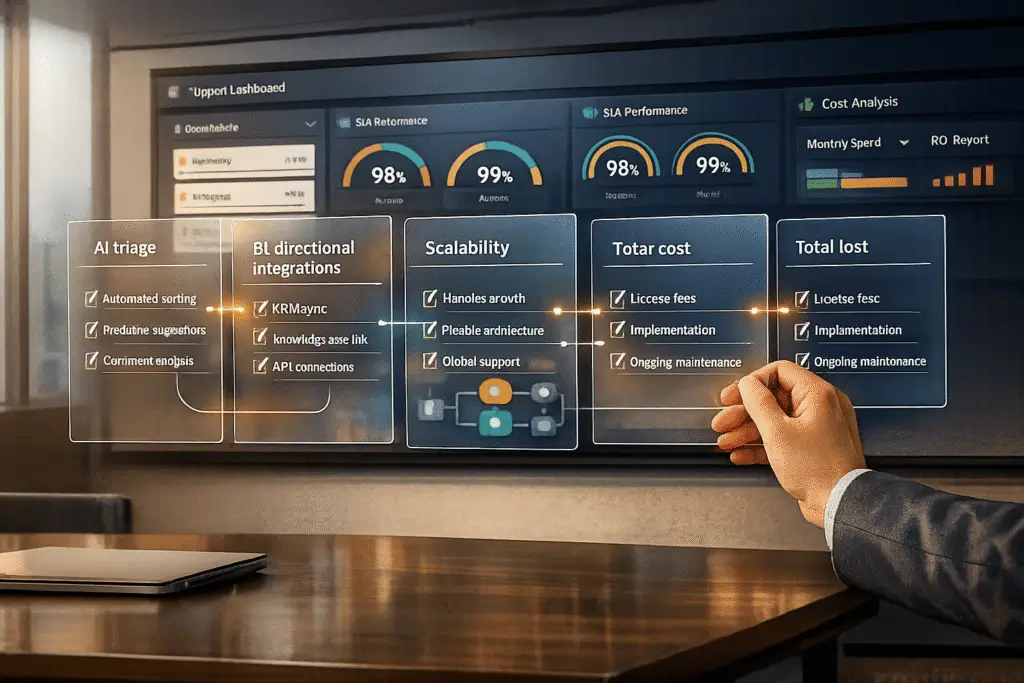
When selecting support software, relying on generic RFP questions can lead to costly mistakes. Many tools look promising during demos but fail under daily demands like managing high ticket volumes, handling AI-to-human transitions, or preserving customer context. To avoid this, focus on these key areas:
- AI Performance: Does the AI handle tasks like triage, tagging, and escalation effectively? Can it transfer full context to agents during handoffs?
- Integration Depth: Does the software offer real-time, bi-directional CRM integrations that respect your workflows and SLA policies?
- Scalability and Costs: Is the pricing model flexible and transparent? Are hidden costs, like ongoing AI management, accounted for and measured?
Instead of using generic checklists, craft targeted RFP questions that dig into workflow specifics and test vendors with real-world scenarios. This ensures the platform aligns with your needs, avoids surprises, and supports your team effectively.
Why Standard RFP Processes Fail to Reveal Workflow Fit
Most RFP templates rely on generic questions that lead to generic answers. When you send out a massive 100+ question RFP copied from a template, the responses you get often fail to show how the software will truly work in your environment. As Andrew Erlichman from Guidant Global explains:
A copy and paste of a 100+ question RFP doesn’t get the best out of the market if you ask for responses to a list of stock questions. Surprise! You’ll receive stock answers [6].
The problem is that standard RFPs focus on what a system can do, rather than how it will function in real-world scenarios [6]. This distinction is critical. For example, a vendor might say their platform "integrates with your AI helpdesk", but that vague claim doesn’t tell you if it’s a basic one-way data push or a robust, bi-directional sync that respects your routing rules and SLA policies [2]. Let’s break down two major flaws in these processes: feature checklists and generic questions.
Feature Checklists Miss Critical Details
Evaluating software based on feature checklists creates a false sense of completeness. A vendor might check "Yes" for AI-driven triage, but that simple answer doesn’t reveal whether the AI can actually support your team’s needs. Does it retain full conversation history, relevant knowledge base articles, and escalation details when handing off to a human agent? A checklist might confirm that a handoff feature exists but won’t address whether the context transfer is seamless or useful [2].
Even worse, controlled demos often mask the real-world challenges your team will face. Vendors design these demos to show their software performing flawlessly in ideal conditions. But feature checklists won’t reveal how the product handles complex B2B workflows, like multi-step requests or policy-heavy inquiries [2]. While "Yes/No" questions are easier to score, they often suppress the thoughtful insights you need to assess how well a vendor can address your unique challenges [7].
Generic Questions Ignore Workflow Requirements
Beyond features, standard RFPs fail to address deeper operational needs. Asking, "Do you integrate with our CRM?" doesn’t clarify whether the integration is a basic API connection or a dynamic setup that updates custom fields and triggers in real time [2]. Without digging into integration depth, scalability, and how the system handles contextual customer data across channels, you risk selecting a solution that looks good on paper but creates manual workarounds in practice.
This issue is especially evident in AI handoffs. A "self-serve" platform might seem like a cost-saving option during evaluation but could require one or two full-time employees to handle ongoing configuration, prompt tuning, and quality monitoring – costs that a managed service would already cover [2]. Unfortunately, standard RFPs rarely ask who will manage the AI post-launch, leaving teams blindsided by the unexpected operational burden.
sbb-itb-e60d259
What to Evaluate When Assessing Workflow Fit
Understanding why standard RFPs often miss the mark is just the beginning. The next step is figuring out what to evaluate to determine if a support platform can handle your team’s daily operations. The goal? Not just ticking boxes, but finding software that reduces manual work, keeps customer context intact across channels, and scales efficiently.
Focus on three key areas: AI capabilities and automation, integration depth and customer context, and scalability and cost efficiency. These areas help you cut through flashy features to see if a platform truly improves workflows or crumbles under real-world demands.
AI Capabilities and Automation
AI features might look great in demos, but the real question is whether they fit your workflows without requiring heavy customizations. A solid platform should offer easy-to-use tools for automating tasks like triage, routing, and case handling. Start by identifying your main support needs – like password resets or billing questions – and decide which ones should be automated, assisted, or routed to a human team member [1].
Retrieval-Augmented Generation (RAG) is a standout feature to look for. It uses your knowledge base to guide AI responses, cutting down on manual training. Vendors offering managed AI services can get up and running quickly – some within 30 minutes to 24 hours – compared to the weeks or months required for custom-built solutions [2]. However, the quality of AI responses depends heavily on the knowledge base. Since 43% of self-service failures are linked to bad or irrelevant content, auditing your knowledge base before deployment is critical [1].
Other must-haves include automated triage and tagging, which uses AI to analyze cases and assign tags based on sentiment, topic, or issue type. This ensures cases are routed to the right person or team. Platforms should also support configurable confidence thresholds for escalations, so the AI only hands off cases to humans when necessary. When it does, it should transfer the full context – conversation history, AI attempts, and relevant knowledge base articles – to avoid frustrating customers. As Twig observed:
The handoff is where customer experience breaks down. A customer explains their problem to an AI, the AI fails, and the customer is transferred to a human agent who has no context and asks the customer to start over [2].
Integration Depth and Customer Context
AI alone isn’t enough; integration capabilities are just as crucial. A platform must provide seamless access to customer data across systems. Integration quality varies, from basic read-only API access to bi-directional synchronization, which allows for real-time updates, custom fields, triggers, and automations [2]. For instance, a vendor might claim their software integrates with Salesforce, but that doesn’t tell you whether it’s a simple data push or a fully synchronized setup that respects your routing rules.
To maintain a 360-degree customer view, the platform should pull data from your CRM, ERP, and communication tools, then display it for agents during interactions. Pre-built connectors for tools like Salesforce, SAP, Microsoft 365, HubSpot, Oracle, and Workday can make this process smoother [5]. Check whether these integrations are native or rely on third-party tools like Zapier, which can add complexity and risk [2]. Security is also key – ensure the platform supports Single Sign-On (SSO) with providers like Okta, Azure AD, or Google Workspace [5].
Scalability and Cost Efficiency
Scalability isn’t just about handling more tickets – it’s about doing so effectively and without ballooning costs. Cloud-native features like auto-scaling, load balancing, and sharding help platforms maintain performance during high-demand periods [5]. But technical infrastructure is only part of the story. True efficiency comes from AI-driven deflection, which aims to resolve 40% to 70% of tickets without human intervention [2].
Be mindful of hidden operational costs, especially in self-serve platforms. These often require extra staff for tasks like tuning, monitoring, and configuration, while managed services usually include these within their pricing [2]. As Assembled pointed out:
Bringing on an AI tool for support is a lot more like hiring a team of new agents than it is like buying traditional software [3].
To avoid surprises, ask vendors about potential "feature gating" or limitations on users, training hours, or data storage that could lead to unexpected costs as your needs grow [7][4]. Running cost scenarios at your current volume, double your volume, and half your volume can help identify pricing model issues. For example, per-resolution models like Intercom Fin (~$0.99 per resolution) or Twig ($5 per ticket) scale costs with outcomes, while enterprise contracts from vendors like Decagon ($95,000–$590,000) or Sierra AI ($150,000–$350,000+) offer predictable pricing but may have higher upfront costs [2].
RFP Questions That Reveal Workflow Fit
When evaluating a platform, it’s essential to dig deeper than the demo. The right questions can help you uncover potential limitations, hidden costs, and integration challenges before committing. As Twig wisely stated:
The demo is not the product. The questions you ask – and the answers you demand – are what separate a good vendor decision from a costly mistake [2].
Here’s a breakdown of the key areas to focus on when crafting your RFP questions.
AI-Driven Triage and Case Automation
Start by asking how the platform identifies and handles different types of support requests. Can it distinguish between cases the AI can resolve independently, those requiring agent assistance, and those needing immediate human intervention? [1] Dive into specifics about automated tagging: Does the AI analyze cases to assign tags based on topics, sentiment, or other factors for better routing and analytics? [3] Also, inquire about configurable confidence thresholds – how does the system decide when to respond automatically and when to escalate? [2]
For workflows that involve automated actions, ask if the platform can handle tasks like issuing refunds or updating accounts without human input. What safeguards and permissions are in place to prevent errors? [1] Additionally, explore human-in-the-loop workflows. Can agents review and adjust AI-generated responses before they’re sent? [3] Don’t forget to request the platform’s escalation false-negative rate, which indicates how often the AI misses cases it should have escalated. This metric is critical for understanding potential risks to customer trust [2].
Customizable SLA Management
Effective service level management goes beyond AI triage. Ask whether the platform supports Accuracy SLAs that measure AI performance, not just system uptime [1]. Check if there are clauses for addressing model drift over time and if you have rollback rights to revert to a previous model version if an update causes issues [1]. As Kommunicate points out:
A live model that produces stale, inaccurate, or tone-deaf responses is worse than downtime because it actively damages customer trust before anyone notices [1].
Define clear AI-specific severity levels in your RFP. For instance, P1 incidents could include major errors like exposing sensitive information, while P2 might involve accuracy declines exceeding agreed thresholds. P3 could track less critical trends within acceptable limits [1]. Also, ask vendors to outline their escalation hierarchy, including timelines for involving senior engineers and how they’ll keep you informed during incidents [5].
Escalation Handling and Reporting
Escalation issues can drain resources and frustrate teams. Ask how the platform prevents repeated escalation loops [1]. Ensure that human agents receive complete conversation histories, relevant knowledge base entries, and clear reasons for escalations [2]. With 90% of support teams struggling with AI-to-human handoffs, this is a vital area to address [2].
Find out if there’s a cap on the number of AI-to-human transitions per ticket before permanently routing it to a human [1]. Also, confirm whether the platform’s escalation logic integrates seamlessly with your help desk, respecting your existing routing rules, custom fields, and SLA policies [2].
Knowledge Base and Agent Assistance
Ask how the platform leverages Retrieval-Augmented Generation (RAG) to ensure AI responses align with your knowledge base. Some vendors offer quick deployment services, ranging from just a few days for smaller setups to several weeks for more complex implementations [2].
Request information about automated quality scoring. Does the system evaluate responses in real time for accuracy, tone, and policy compliance? [2] This allows you to monitor performance continuously rather than waiting for post-interaction feedback. Additionally, ask how the platform supports agents with AI-generated suggestions. Can agents review and modify these suggestions before sending them? [3] Before deploying, ensure your knowledge base is up-to-date to serve as a reliable foundation for the AI [1][3].
Predictive Metrics and Reporting
Go beyond standard metrics like CSAT and CES. Ask if the platform tracks predictive indicators such as advancement rates (how many RFPs progress to the next stage) or shortlist rates to help forecast potential revenue [10]. Determine whether the system offers bi-directional CRM integration to link proposal content with closed deals [8][10].
Inquire about real-time dashboards that provide insights into system health, latency, and accuracy metrics – independent of the AI’s confidence scoring [5][1]. Check if the platform integrates with tools like Slack or Microsoft Teams for seamless collaboration and automated updates [9][11]. Lastly, confirm how your conversation data will be used. If it’s intended to train shared AI models, demand an opt-out clause in the Master Service Agreement [1].
These targeted questions will help ensure the platform aligns with your operational needs and delivers on its promises.
How to Score RFP Responses for Workflow Alignment
RFP Evaluation Framework for Support Software Selection
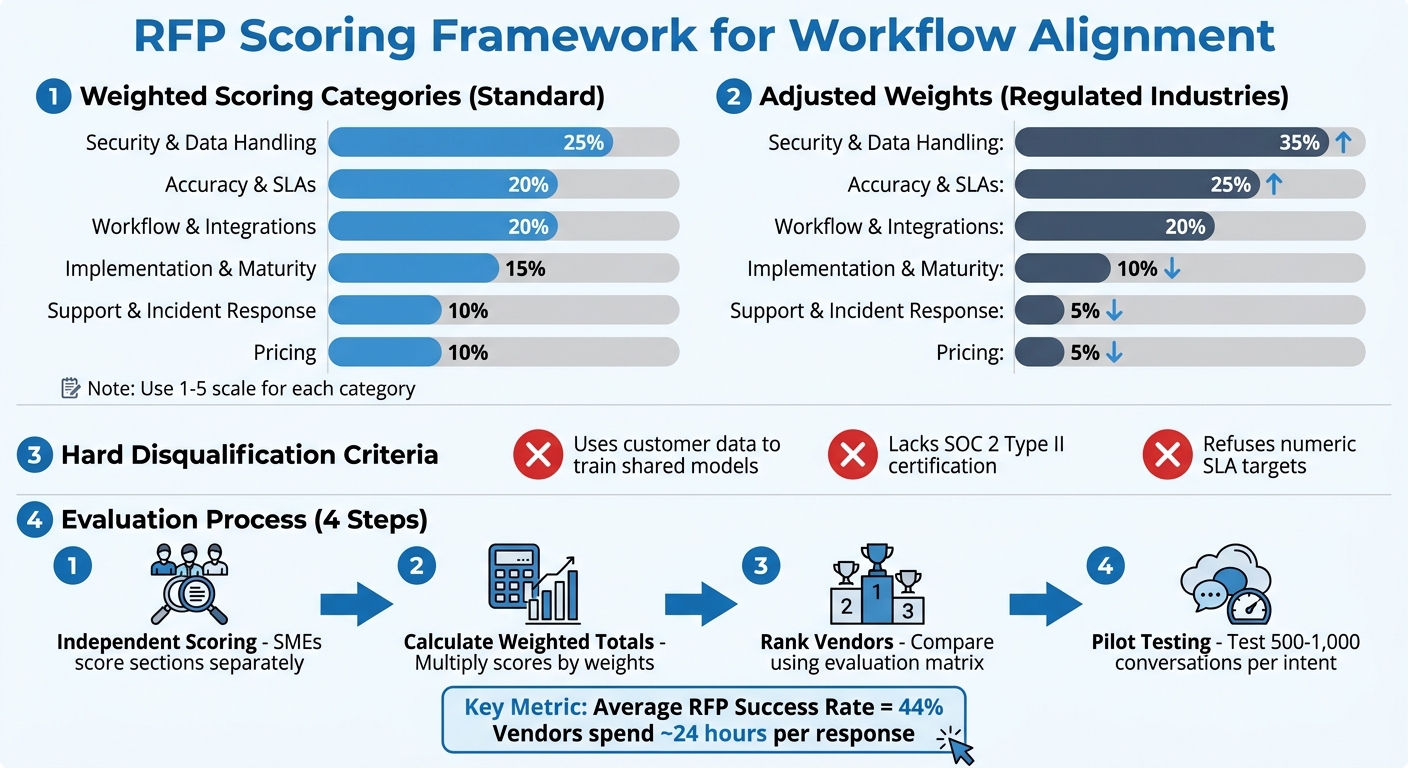
Evaluating RFP responses effectively is key to avoiding biases, like being overly impressed by a polished demo. Considering the average success rate for winning RFPs is just 44% [12], vendors typically dedicate nearly 24 hours to crafting each response [12]. A well-structured scoring framework ensures you get the most out of this effort.
Build a Scoring Framework
Start by designing a weighted scoring system that aligns with your organization’s priorities. Use a 1–5 scale for each category, where 1 signals a poor or problematic response, and 5 represents an excellent one [2].
Here’s an example of how to assign weights:
- 25%: Security & Data Handling
- 20% each: Accuracy & SLAs, Workflow & Integrations
- 15%: Implementation & Maturity
- 10% each: Support & Incident Response, Pricing [1]
If your organization operates in a regulated industry or deals with high volumes, adjust accordingly: increase Security & Data Handling to 35% and Accuracy & SLAs to 25%, while reducing Pricing to 5% [1].
Set hard disqualification criteria for non-negotiable requirements. For instance, automatically exclude vendors who:
- Use customer data to train shared models
- Lack SOC 2 Type II certification
- Refuse to commit to numeric SLA targets [1]
Adarsh Kumar, CTO & Co-Founder of Kommunicate, emphasizes the importance of these safeguards:
Selecting an AI customer support vendor is a risk management decision. The buyers who get it wrong don’t usually pick bad technology. They pick good technology without the contractual protections [1].
To avoid groupthink, have subject matter experts score sections independently before meeting as a group [13]. This ensures evaluations focus on technical expertise rather than being swayed by the loudest opinions.
Rank Vendors by Workflow Fit
After scoring, calculate weighted totals by multiplying each score by its assigned weight and summing the results. This helps rank vendors based on their overall fit.
If evaluators’ scores differ significantly for the same section, discuss whether the requirement was misunderstood or if the vendor’s response lacked clarity [13]. Use a spreadsheet-based evaluation matrix, organizing criteria in rows and vendors in columns, for an easy side-by-side comparison [12][13]. This approach highlights patterns, like a vendor excelling in AI capabilities but falling short on integration depth.
Avoid relying on vendor-provided scores. Instead, conduct your own review of sample responses against your accuracy benchmarks [1]. During pilot testing, ensure the AI processes at least 500–1,000 resolved conversations per intent category to draw statistically reliable conclusions about accuracy [1]. Additionally, model total cost of ownership at three volume levels – current, 0.5x, and 2x – to evaluate how pricing scales during peak demand [2].
This method keeps workflow alignment at the forefront, ensuring your final decision is well-informed and objective.
How to Execute and Follow Up on Your RFP
Once you’ve built your scoring framework, the next steps require focus and diligence. Running an RFP is more than just sending out a document and waiting for responses. It involves thorough preparation, strategic testing, and consistent follow-up to uncover details vendors might not readily share.
Audit Your Current Workflows
Before reaching out to vendors, take a hard look at your existing workflows and define what your AI support tool needs to achieve. Start by identifying the "Jobs to be Done": Are you aiming for agent assistance, customer-facing chatbots, ticket tagging, or full case automation? [3] This clarity ensures you won’t be distracted by generic sales pitches [14][3].
Make a list of key integrations your tool needs to support (like CRM, WFM, or help desks) and determine if your team can handle a code-heavy solution or needs a no-code option [14][3]. Keep in mind that a "self-serve" platform might require 1–2 full-time employees to manage, which could add to your total cost of ownership [2].
Think ahead to two possible scenarios: high-growth (your team expands) and high-efficiency (your team stays the same or shrinks). This ensures the software can scale no matter the direction your business takes [3]. Also, audit your knowledge base – list all policies, product details, and procedures the AI will need to access. Then, ask vendors how their tool identifies gaps or incorrect information in these sources [3].
These audits are essential for creating demo scenarios that reflect your real needs.
Create Demo Scenarios for Workflow Testing
A generic demo won’t give you the full picture of a platform’s capabilities. Instead, ask for live demos tailored to your specific use cases [4][14]. Provide vendors with detailed scenarios and stress tests so they can present practical solutions rather than generic pitches [6].
Focus on how the platform handles workflow orchestration – its ability to manage processes across multiple systems and teams, rather than just showing off isolated features [14]. Include challenging scenarios, like high-volume processing or situations where your knowledge base lacks an answer. A strong platform should admit when it doesn’t know something instead of fabricating a plausible but incorrect response [2].
Use the "double-check" strategy: ask vendors the same tough question in the written RFP and during the live demo [14]. As The Moxo Team advises:
Ask vendors the same hard question in both the written RFP and the live demo. See if the answers match. Inconsistencies are red flags [14].
Also, request that the team members who would work directly with your account participate in the demo. This helps you assess their expertise and whether they align well with your organization [4].
Whenever possible, go for a paid pilot with clear success criteria instead of a free trial. Free trials often lack structure and don’t get the attention they deserve internally [2].
Tailored demos pave the way for more meaningful follow-up questions.
Ask Follow-Up Questions to Uncover Limitations
Even after demos, it’s crucial to dig deeper to confirm the software fits your workflows. Follow-up questions can reveal hidden limitations. For example, ask about your exit strategy: How would data and services transition if you end the partnership? [4][7] This helps prevent vendor lock-in. Also, inquire about backward compatibility to ensure that updates won’t disrupt your custom integrations or workflows [14][5].
Request a detailed breakdown of costs, separating one-time startup expenses from recurring fees. This should include setup, training, and any premium support costs that might not be part of the base price [5][7]. Ask for the average "Time to Value" – how long it typically takes to see measurable results and analytics after signing the contract [7]. Instead of generic success stories, ask vendors to walk you through a recent implementation that faced significant challenges and how they resolved them [4].
Clarify how custom integrations, escalation processes, and data transitions are managed to avoid disruptions [14][5]. Given recent vendor acquisitions, it’s also wise to include a clause allowing you to exit if the vendor is acquired by a platform you don’t use [2].
Conclusion
When evaluating support software, focus on how it performs under your specific operational demands, not just on its theoretical capabilities. Standard RFP processes often assess what a system can do but overlook how well it fits into your workflows. This gap can lead to issues like AI hallucinations, endless escalation loops, and unexpected costs.
The questions you ask during the selection process play a huge role in determining whether you choose a platform that complements your workflows or one that forces your team to adapt to its constraints. By asking workflow-specific questions, you can uncover how a system handles operational complexities, such as inconsistent AI performance [1]. These insights are crucial for understanding the real benefits modern AI-native solutions can offer.
For B2B support teams, AI-native platforms bring tangible advantages: faster deployment times (30 minutes to 5 days compared to the typical 4–12 weeks), transparent pricing models based on tickets or resolutions, and responses grounded in retrieval-augmented generation (RAG) to minimize hallucination risks [2]. These systems also reduce the need for extra full-time employees to manage tasks like prompt tuning or quality reviews, making them an efficient choice for teams looking to scale without adding unnecessary overhead [2].
To avoid costly mismatches, use a structured evaluation process. This includes tailored demo scenarios, detailed follow-up questions, and testing failure modes during pilot programs. Insist on rollback rights and assess the total cost of ownership across different operational volumes [1][2]. By aligning your evaluation with operational risks, you can secure a platform that not only automates tasks but also integrates seamlessly with your workflows, adheres to SLA management policies, and acknowledges its limitations instead of fabricating answers.
Ultimately, precision in your RFP process is key to maintaining operational integrity. Choosing the right AI support software is as much about managing risk as it is about selecting technology. Most buyers who get it wrong don’t pick bad tools – they choose good ones without the necessary safeguards, security checks, or implementation strategies to ensure success [1]. Crafting a thorough RFP helps prevent these pitfalls and ensures your investment aligns with your needs.
FAQs
What scenarios should I use to stress-test AI-to-human handoffs?
When testing how well AI transitions to human support, prioritize scenarios that involve high-stakes or time-sensitive tickets, complex problems needing human expertise, and cases that require escalation due to factors like customer sentiment or potential risks. It’s also important to evaluate multi-channel handoffs – whether through chat, email, or other platforms – to ensure the process remains seamless and context is retained throughout. These tests are vital for spotting weaknesses in the AI’s ability to determine when human involvement is crucial, helping maintain strong support and customer satisfaction.
How can I verify an integration is truly bi-directional in real time?
To ensure real-time bi-directional integration works as intended, check if data moves smoothly between systems without delays or manual intervention. Conduct live tests by transmitting data from the source system to the integrated platform, and verify that updates are instantly reflected in both directions. It’s also a good idea to ask vendors for specific benchmarks on data latency and synchronization speeds during evaluations to confirm the integration’s real-time capabilities.
What hidden costs should I model before signing a support AI contract?
When budgeting for a project, it’s crucial to account for hidden costs that often come with it. These include expenses for implementation, training, integration, ongoing model tuning, and knowledge base preparation. Together, these can increase the total cost by an additional 35-50% on top of the license fee.
For example, implementation alone can be a major expense. On a $100,000 contract, implementation costs might exceed $60,000. Without careful evaluation, these added expenses can catch you off guard and strain your budget.
Related Blog Posts
- How do you run a helpdesk RFP for Canadian organizations (scorecard + requirements)?
- How do you write a helpdesk vendor evaluation checklist for Support Ops (2026)?
- What are the signs you’ve outgrown Help Scout (SLAs, tiers, escalations, reporting)?
- How to build a support software RFP that avoids vanity features






