



Rule-based automation isn’t outdated – it’s still a key part of B2B customer support systems. While AI excels at handling unstructured data and interpreting complex inputs, it struggles with consistency, compliance, and cost-efficiency in structured tasks. Rule-based systems, on the other hand, ensure predictable, repeatable outcomes, making them perfect for tasks like ticket routing, SLA management, and compliance tracking.
Here’s why rule-based automation remains indispensable:
- Consistency: AI’s probabilistic nature can lead to unpredictable results. Rule-based systems guarantee the same output every time.
- Compliance: Regulatory requirements demand clear, explainable decisions. Rule-based systems provide reliable audit trails, unlike AI’s black-box models.
- Cost-Effectiveness: For repetitive tasks, rule-based systems are cheaper and faster to deploy than AI, which incurs ongoing costs like token usage fees.
How AI Agents and Decision Agents Combine Rules & ML in Automation
sbb-itb-e60d259
Where AI Falls Short in B2B Customer Support
AI has made impressive strides in handling unstructured data, but it often stumbles when faced with the rigid demands of B2B workflows. The root of the problem lies in AI’s reliance on probabilistic outputs – meaning that the same input can yield different results at different times. For structured tasks like AI-powered ticket routing, SLA enforcement, or financial processes, this variability introduces risks that most businesses simply can’t tolerate. Below, we break down the key areas where AI falls short, from inconsistent decision-making to compliance headaches and cost inefficiencies.
Unpredictable Results in Structured Processes
AI doesn’t operate with the precision of a rule-based system. Its probabilistic nature means it doesn’t follow fixed scripts, leading to inconsistent outcomes. For example, a high-priority ticket routed by AI might be classified differently on separate occasions, even if the input remains the same. This lack of consistency is a major issue in B2B support, where enterprise clients expect uniform service every time they interact.
There’s also the risk of AI generating plausible but incorrect outputs. As highlighted in the NIST Generative AI risk profile, “confabulation (hallucination)” is a real concern [5]. AI might fabricate an invoice number, invent a policy clause that doesn’t exist, or provide contradictory classifications for the same issue. Without rule-based validation to catch these errors, they can cascade into other systems, disrupting billing, compliance, and customer trust. These inconsistencies make it even harder to meet strict compliance requirements.
Compliance and Audit Trail Challenges
Regulations like GDPR and CCPA demand clear explanations for automated decisions, often referred to as the “right to explanation” [1]. However, AI systems operate as black boxes, making it nearly impossible to provide the detailed audit trails that regulators require. When an AI system makes a decision, compliance teams can’t simply respond with, “the model said so.” This is where rule-based systems have the upper hand, offering the transparency and determinism essential for regulatory compliance.
AI also introduces unique security risks, such as prompt injection and sensitive data leaks, which can compromise the integrity of audit trails [5]. For high-stakes actions – like processing refunds, managing account credentials, or handling sensitive information – the absence of explicit verification steps makes AI-only solutions unsuitable for regulated B2B environments. Beyond compliance, AI can also drive up costs in areas where simpler systems would suffice.
Unnecessary Costs for Simple Tasks
Deploying AI for basic, repetitive tasks often doesn’t make financial sense. Rule-based systems, once set up, have minimal ongoing costs [5]. In contrast, AI incurs costs per query based on token usage. For instance, as of January 2026, a single 10-turn conversation using GPT-5.2 costs approximately $0.056 in inference fees [5]. For large-scale B2B support operations handling thousands of simple queries daily – like password resets or shipping status checks – these expenses can add up quickly.
AI also requires additional infrastructure, such as vector databases for retrieval-augmented generation, specialized monitoring tools, and ongoing maintenance to update evaluation sets and guardrails [5]. These costs don’t exist with rule-based systems. When tasks involve straightforward operations, like routing tickets to the right department or validating form inputs, deterministic systems are far more efficient and cost-effective. This highlights why rule-based solutions remain the better choice for handling high-volume, repetitive tasks in a predictable and economical way.
What Rule-Based Automation Does Best
When it comes to B2B support, rule-based automation offers a level of reliability that AI often can’t match. These systems thrive in environments where consistency and speed are non-negotiable. By following straightforward "if-then" logic, rule-based automation guarantees the same output for the same input every time [4]. This makes it ideal for handling repetitive, high-volume tasks that don’t require interpretation or judgment. Think of it as the backbone of support operations, managing essentials like automating customer support workflows, SLA monitoring, and compliance enforcement with precision.
Perfect for Repetitive and Predictable Tasks
Rule-based automation excels at managing tasks that are straightforward and repetitive, with clear criteria guiding the process. Take ticket routing as an example: tickets with "refund" in the subject line can be instantly directed to the billing team – no guesswork involved. If a VIP customer submits a request, the system ensures it bypasses the general queue and lands directly with a senior agent [6][8]. This kind of automation ensures tasks are handled quickly and accurately based on predefined rules.
Similarly, auto-tagging simplifies categorization. For instance, tickets can automatically be labeled "Product Bug" or "Billing" based on content like subject lines or dropdown menu selections. This creates consistent labeling across thousands of tickets [7][8]. Meanwhile, agent macros combine multiple actions into one click, streamlining repetitive tasks like password resets. These actions don’t require complex decision-making, making them perfect candidates for rule-based systems that avoid the overhead of AI.
Maintaining SLAs and Handling Escalations
Beyond routing and tagging, rule-based systems are invaluable for enforcing SLA standards. SLA compliance is all about precision, and rule-based automation monitors deadlines continuously. For instance, if a high-priority ticket is nearing its four-hour response time limit, the system can automatically escalate it to a manager – no manual intervention required [6][9]. This kind of threshold monitoring ensures that every ticket is handled on time, regardless of workload or time zone.
Transparency is another key advantage. As Eric Klimuk, Founder and CTO of Supportbench, points out:
A central rule set creates a traceable path for each decision. This makes enhancing compliance with automated decision-making more practical in regulated environments [6].
Unlike AI, which can sometimes feel like a "black box", rule-based systems provide a clear audit trail. This is especially critical in industries like healthcare or finance, where regulatory scrutiny is high. With this level of predictability, organizations can stay compliant while keeping costs under control.
Cost-Effective and Quick to Implement
One of the standout benefits of rule-based automation is how quickly and affordably it can be deployed. On average, these systems can be implemented 60% faster than AI-driven solutions – just 2.4 months compared to 6 months [4]. They also come with a 45% lower total cost of ownership [4]. Why? Because they don’t require extensive data preparation, model training, or specialized infrastructure. Many helpdesk platforms now include built-in triggers and automations, allowing teams to get started in minutes [8].
Once set up, rule-based systems run without incurring the ongoing costs associated with AI, such as per-query fees. For the 60–70% of support tasks that are repetitive and low in complexity [10], this approach is both faster and more cost-effective. Plus, non-technical teams can easily manage the logic themselves using no-code interfaces, removing the need for constant developer input [6]. By handling routine tasks efficiently, rule-based automation complements AI-driven insights to create a balanced, hybrid support system.
Combining Rule-Based and AI Automation
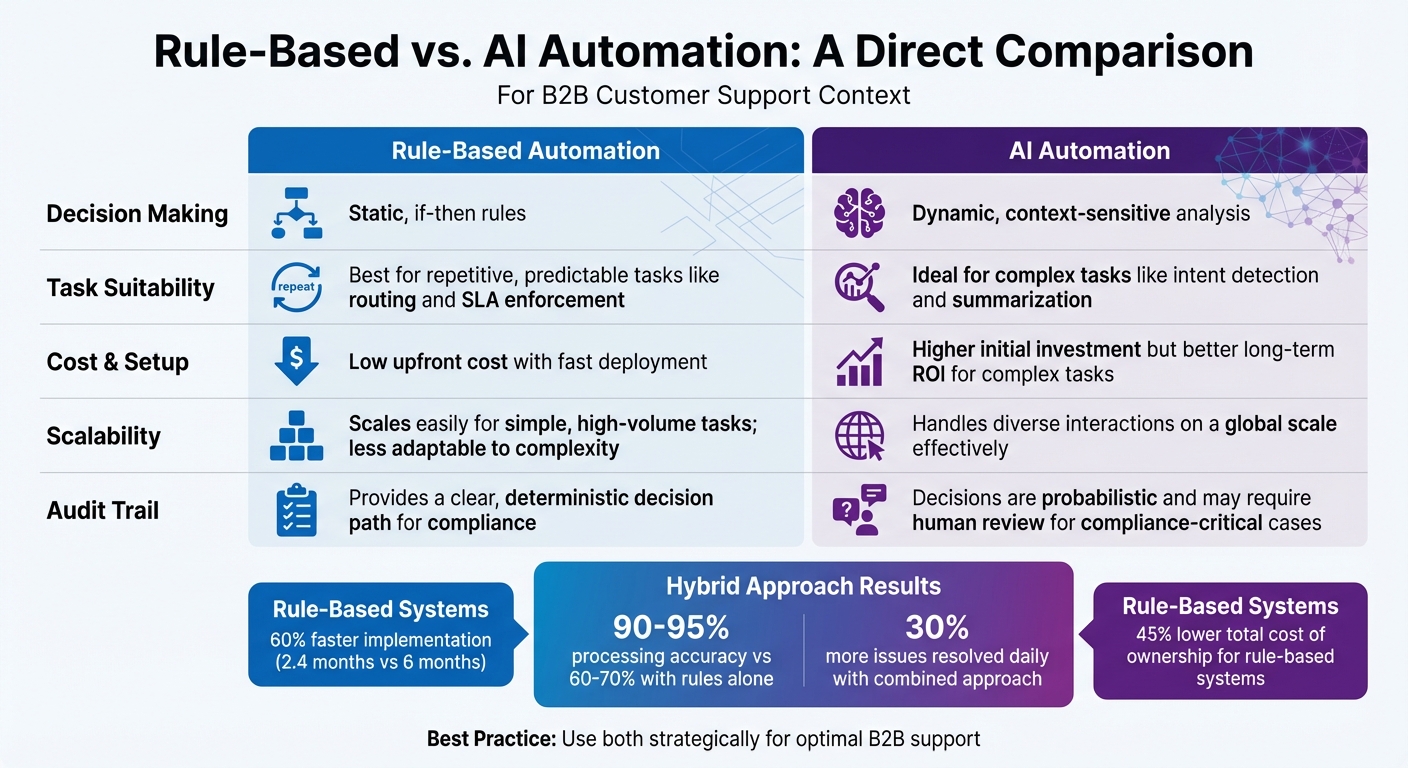
Rule-Based vs AI Automation in B2B Customer Support
In B2B support, combining rule-based automation with AI creates a system that balances efficiency and adaptability. Rule-based automation handles straightforward tasks like routing, escalations, and SLA tracking. Meanwhile, AI brings a layer of intelligence, diving into context analysis, detecting sentiment, and catching nuances that rigid rules might miss. Together, these methods bridge the gap between basic ticket handling and deeper issue analysis.
Rules for Triage, AI for Analysis
Rule-based systems excel at the initial triage of tickets. When a ticket arrives, predefined rules categorize it based on factors like customer tier, department choice, or keywords in the subject line. For example, tickets from enterprise customers might go straight to a priority queue, while those mentioning "billing" are routed to the finance team – this happens instantly and without error.
Once the ticket is routed, AI steps in to provide deeper insights. Using natural language processing (NLP), AI can detect sentiment, identify intent, and flag technical issues that simple keyword matching might miss. It can also generate ticket summaries, giving agents a head start with key details.
Using Both for SLA Management and Prioritization
When it comes to managing SLAs, the precision of rule-based systems is indispensable for effective SLA management. They monitor deadlines meticulously, ensuring that high-priority tickets are escalated to managers if they approach their SLA thresholds without resolution.
AI complements this by adding a layer of context-aware prioritization. It can analyze tickets to identify those requiring urgent human intervention. For instance, if a routine ticket contains language indicating frustration or urgency – like "system down" or "outage" – AI flags it for immediate attention. Combining these layers in real time ensures that critical issues don’t slip through the cracks. For example, if AI detects negative sentiment in a ticket nearing its SLA deadline, the system can escalate it directly to a senior agent.
Rule-Based vs. AI: A Direct Comparison
Deciding when to use rule-based automation or AI depends on the specific task at hand. Rule-based systems thrive on consistency, while AI shines in scenarios requiring flexibility and deeper understanding.
| Category | Rule-Based Automation | AI Automation |
|---|---|---|
| Decision Making | Static, if-then rules | Dynamic, context-sensitive analysis |
| Task Suitability | Best for repetitive, predictable tasks like routing and SLA enforcement | Ideal for complex tasks like intent detection and summarization |
| Cost & Setup | Low upfront cost with fast deployment | Higher initial investment but better long-term ROI for complex tasks |
| Scalability | Scales easily for simple, high-volume tasks; less adaptable to complexity | Handles diverse interactions on a global scale effectively |
| Audit Trail | Provides a clear, deterministic decision path for compliance | Decisions are probabilistic and may require human review for compliance-critical cases |
How to Implement Rule-Based Automation
Implementing rule-based automation can streamline operations, improve compliance, and reduce costs in AI-driven B2B support systems. By combining AI with rule-based processes, businesses can achieve precise and efficient support workflows. Here’s how to get started.
Use No-Code Automation Platforms
One of the quickest ways to introduce automation is by using no-code platforms, which allow teams to build workflows without needing developers. These tools provide visual builders for creating routing rules, SLA triggers, and auto-tagging workflows, putting control directly in the hands of support managers who understand daily operations best. This approach also helps maintain cost efficiency by reducing reliance on engineering resources.
When selecting a no-code platform, opt for one that includes a Business Rules Engine (BRE). A BRE separates decision logic from application code, empowering non-technical teams to update rules as needed. For instance, if you need to adjust VIP escalation thresholds or include a new product line in your routing logic, you can make those updates directly through a user-friendly interface.
"A Business Rules Engine is more than an automation tool – it’s a way to make decisions that are consistent, scalable, and easy to manage." – Eric Klimuk, Founder and CTO, Supportbench [6]
Before launching, test your rules with real or sample tickets to catch potential issues like misrouted cases or conflicting rules. This step ensures your automation operates smoothly under real-world conditions, minimizing disruptions.
Start with High-Return Tasks
Not all tasks are suited for rule-based automation. Begin with repetitive and predictable workflows where steps and conditions rarely change. Common examples include:
- Routing tickets based on customer tier or product line
- Enforcing SLAs with automatic escalations
- Auto-tagging tickets for better queue organization
A great example comes from Wolseley Canada, which handles 7,000 to 8,000 support emails monthly. In June 2025, under the guidance of Eilis Byrnes, Customer Service and Process Improvement Manager, the team transitioned from manual sorting to automated ticket routing using Supportbench. This change led to faster issue resolution and improved visibility into SLA adherence and agent performance [11].
"The ticketing system assisted us in resolving instances that were long overdue and in providing the staff with a smooth platform experience." – Eilis Byrnes, Customer Service and Process Improvement Manager, Wolseley Canada [11]
When mapping workflows, identify delays and process gaps before deploying automation. Ensure you have fallback paths – like default queues or overflow triggers – to catch tickets that don’t meet specific criteria. These safety measures prevent unassigned tickets and ensure smooth operations.
Once these foundational tasks are automated, you can move on to integrating AI for more nuanced cases.
Connect Rule-Based Systems with AI Tools
To maximize the value of rule-based systems, integrate AI tools to handle tasks requiring human-like judgment. Rule-based automation excels at execution, while AI adds intelligence. After setting up core rules for routing and escalation, AI can be layered in to address more complex tasks, such as AI-driven sentiment analysis, intent detection, and ticket summarization.
For instance, AI can categorize tickets using natural language processing, assigning tags like "Negative" sentiment or "Product Bug." These AI-generated tags then feed into the rule-based system, which routes them to the appropriate teams.
"By moving beyond rigid rules, AI analyzes the content and context of incoming requests, enabling faster, more accurate, and vastly more efficient workflow management." – Nooshin Alibhai, Founder and CEO, Supportbench [7]
Always include a rule-based fallback for cases where AI confidence is low. This ensures your system continues to function seamlessly, even when AI encounters ambiguity. Use dashboards to monitor reassignment rates and SLA compliance, and schedule regular audits to keep rules aligned with evolving team structures and customer expectations.
Conclusion
For effective B2B customer support, combining rule-based automation with AI isn’t just helpful – it’s essential. Rule-based systems excel at precise execution, ensuring compliance, enforcing SLAs, and maintaining predictable workflows. On the other hand, AI shines in interpreting unstructured data, identifying intent, and managing variability. Together, they address gaps neither could handle alone.
"The value is not in replacing automation with AI. The value is in orchestrating both." – Thayer Tate, CTO, SOLTECH [3]
The numbers back this up: a hybrid approach increases processing accuracy to 90%–95%, compared to just 60%–70% with rule-based systems alone. It also enables teams to resolve 30% more issues daily [1][2]. Meanwhile, rule-based automation keeps costs in check by handling repetitive, straightforward tasks without relying on AI.
The takeaway? Leverage the strengths of both technologies strategically. Use rule-based systems for tasks requiring precision and auditability, and let AI handle nuance and exceptions for a well-rounded, efficient support system.
FAQs
Which support workflows should stay rule-based?
Workflows that involve predictable and repetitive tasks – such as ticket routing, escalation management, and reporting – are best kept rule-based. This approach ensures steady performance, adherence to guidelines, and smooth operations, particularly when managing structured processes that don’t rely on AI for decision-making or flexibility.
How do you keep AI decisions compliant and auditable?
Ensuring that AI systems make decisions that are both compliant and auditable requires careful planning and specific strategies. One effective approach is using deterministic AI systems, which produce consistent, explainable, and traceable outputs. This predictability makes it easier to understand and verify how decisions are made.
Another key step is embedding compliance checks directly into workflows. For instance, regulations like GDPR or SOX can be enforced by integrating automated checks at critical points in the process. This ensures that regulatory requirements are consistently met without relying solely on manual oversight.
Additionally, incorporating human-in-the-loop models provides an extra layer of oversight for high-stakes decisions. This approach allows humans to review and intervene when necessary, ensuring that critical choices align with ethical and legal standards.
Together, these methods improve transparency, strengthen accountability, and make audits more straightforward. They also help minimize errors and ensure that systems operate within the boundaries of established regulations.
What’s the best way to combine rules and AI without increasing costs?
To merge rule-based automation with AI in a cost-efficient way, it’s essential to leverage their individual strengths. Rule-based systems are perfect for repetitive tasks like ticket routing or compliance reporting, as they are dependable and inexpensive to run. On the other hand, AI shines in handling more nuanced, context-heavy interactions, helping to cut down on escalations.
By layering these systems, you can let rule-based automation handle straightforward workflows, which frees up AI to focus on more complex, high-value tasks. Establishing clear escalation protocols further boosts efficiency, ensuring AI is only used when necessary. This approach helps reduce errors, control costs, and maintain customer satisfaction.
Related Blog Posts
- What is Customer Support Automation? FAQs Answered
- How do you design a support queue strategy (triage, routing, and ownership rules)?
- How do you recreate Kayako automations, SLAs, and routing in a modern platform?
- Automated Triage: Using Keywords to Route Tickets Without Humans
Evaluating help desks for a B2B team?
Supportbench is all-inclusive from $32 per agent per month, with migration and onboarding included. See pricing or book a 20-minute demo.






