


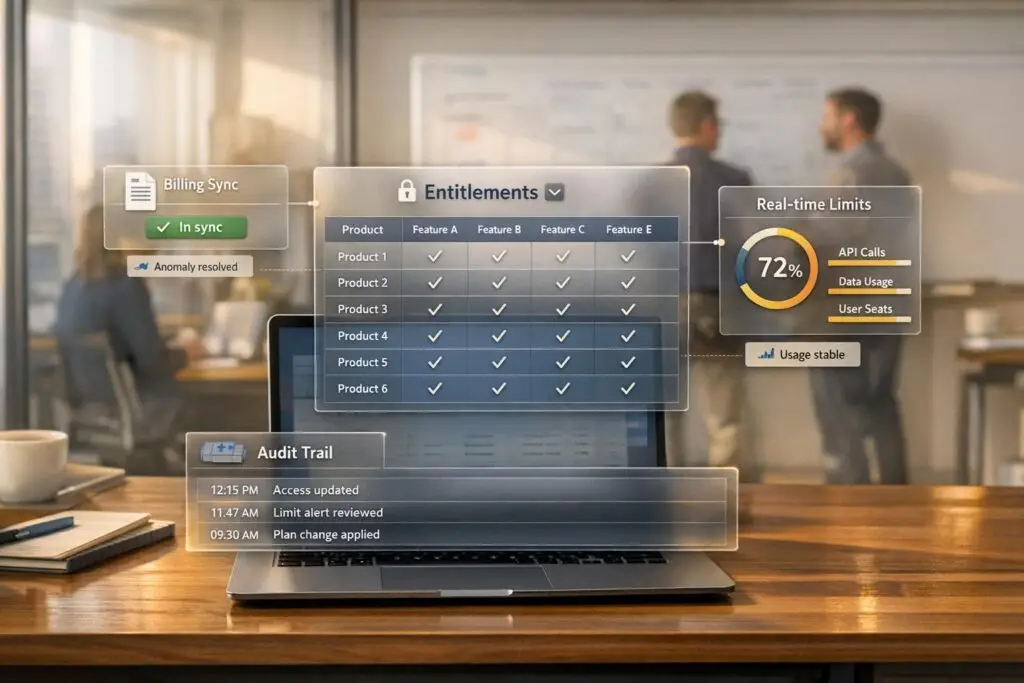
Managing entitlements is about ensuring customers receive the services and features they’ve purchased – nothing more, nothing less. Poor entitlement management can lead to lost revenue (up to 3%), wasted resources, and unhappy customers. With SaaS companies increasingly adopting complex pricing models, manual systems can’t keep up. Automating entitlement tracking and enforcement is the key to solving these challenges.
Key Takeaways:
- Clearly define what each subscription tier includes (features, limits, support levels).
- Centralize entitlement data to avoid confusion and errors.
- Automate entitlement updates by linking billing systems (e.g., Stripe) to your product.
- Use AI to monitor usage, send alerts, and enforce limits in real-time.
- Integrate entitlement checks into support workflows to ensure accurate service delivery.
- Regularly audit and track entitlement usage to prevent revenue leakage.
Step 1: Define Entitlements by Plan and Contract
The first step in managing entitlements is to create a clear and detailed definition of what each customer tier receives. Vague descriptions like "premium support" won’t cut it – you need to outline specific features, limits, and service levels. Without this clarity, you risk inconsistent customer experiences and support issues. Below, we’ll break down how to map standard entitlements and handle custom agreements effectively.
At its core, entitlements dictate what the company as a whole has purchased [2][3]. While individual permissions might govern actions like editing documents, entitlements determine access to advanced features and usage thresholds.
Map Entitlements to Each Subscription Tier
To start, group your entitlements into four main categories:
- Feature gates: Binary access to features (e.g., SSO or audit logs).
- Usage limits: Measurable thresholds like 10,000 API calls per month or 100GB of storage.
- Seat-based restrictions: The number of users allowed on the account.
- Configuration variables: Adjustable settings, such as data retention periods (e.g., 3 days vs. 30 days) [2][3].
Each subscription tier should have these elements clearly documented in a way that both your technical and customer-facing teams can easily interpret. For instance, your engineering team needs to understand how these rules translate into system behavior, while your sales and support teams need to communicate them to customers.
For support operations, define response time commitments by tier. For example, a basic plan might provide 24-hour response times during business hours, while an enterprise plan could include 2-hour response times, 24/7 live chat, and access to a dedicated customer success manager [10]. These aren’t just marketing perks – they’re contractual obligations that your support system must enforce automatically.
To manage this effectively, avoid embedding plan logic directly into your app. As Michal Petřík, Tech Lead at Phrase, explains:
It’s unrealistic to expect your finance team to sift through JSON metadata or understand technical terms like ‘boolean’ or ‘string’ to determine feature access for plans and add-ons [1].
Instead, store entitlements as structured data in a centralized system that bridges your billing platform and product runtime [5][3]. This setup allows for seamless updates to packaging without requiring engineering changes every time a sales team negotiates a custom deal. By centralizing this data, all teams operate from the same technical and contractual framework.
Handle Custom Agreements and Add-Ons
Enterprise deals often come with custom terms, which require an override layer. This layer allows you to attach specific customizations to individual accounts without creating new plan versions for each unique deal [5][3]. This approach prevents SKU sprawl, where your catalog becomes cluttered with unnecessary plan variations [3].
The best way to manage these customizations is by syncing your entitlement system with your CRM – such as Salesforce or HubSpot. This connection gives your go-to-market teams visibility into active limits and enables them to handle trial extensions or legacy plan adjustments without waiting for engineering support [2][3]. For example, if a sales rep closes a deal that includes extra API capacity or temporary access to beta features, the system should automatically reflect those changes, flowing directly from the contract through the CRM into the entitlement management system.
For temporary custom access – like a 30-day trial extension or promotional feature – set start and end dates in the system [5][9]. This ensures elevated privileges are automatically revoked when the period ends, avoiding revenue loss caused by customers continuing to use premium features after their trial expires [1]. A centralized system keeps everything organized, ensuring that all custom agreements are tracked and enforced consistently. This level of precision is essential for automating entitlement management as you move forward.
sbb-itb-e60d259
Step 2: Track and Automate Entitlement Management
Once you’ve clearly defined entitlements, the next step is ensuring that those definitions remain accurate – even as customers make changes to their plans. Relying on manual methods like spreadsheets or emails can lead to serious issues, such as granting access to features customers haven’t paid for or, worse, denying access to those who have. The best way to avoid these pitfalls? Automate entitlement tracking by directly connecting your billing system to your product. This type of integration allows automation to handle the complexities, ensuring seamless updates and accurate feature delivery.
Connect APIs and Billing Systems
Keeping entitlements accurate requires real-time synchronization between your billing platform and your product. For example, when a customer upgrades their plan, the system should automatically enable new features without needing a support ticket or manual intervention. Webhook listeners are a great way to handle events like plan upgrades, downgrades, payment failures, or cancellations [13].
Here’s how it works: If Stripe sends an active_entitlement_summary.updated webhook, your system can immediately adjust feature access and usage limits to reflect the change [13].
Josh Groves, Co-founder of Pod2, shared how this approach transformed his team’s workflow. Before adopting an API-first strategy, they relied on scattered custom JSON documents and manual notes. After switching to the Chargebee Entitlements API, he explained:
"Chargebee Entitlements API helps us find subscription-level feature entitlements instantly without any custom code… our codebase is much leaner" [12].
Automated workflows can also handle critical scenarios like payment failures. For instance, you can set up a grace period: start a countdown, send reminder emails, and revoke access automatically once the grace period ends [8].
Use AI for Monitoring and Alerts
Automation doesn’t stop with provisioning. Adding AI allows you to proactively monitor customer behavior and address potential issues before they escalate. AI systems can track usage patterns, send alerts when customers near their limits, or notify them when trials are about to expire [11].
For example, imagine a customer with a 10,000 API call limit per month. If they hit 8,500 calls with a week left in their billing cycle, automated alerts can notify both the customer and your sales team. This not only prevents service disruptions but also opens up opportunities for upselling. Similarly, if a premium feature trial is about to expire, timely alerts encourage customers to convert to a paid plan [7].
Phrase, a company specializing in translation technology, adopted this strategy using Chargebee Entitlements to manage their usage-based pricing model. Martin Konop, CFO of Phrase, highlighted the benefits:
"With Chargebee Entitlements, we have a centralized, scalable approach to feature provisioning and packaging. This is essential for meeting customer expectations in a usage-based pricing model" [12].
By automating these processes, Phrase reduced its reliance on manual checks, enabling their finance and product teams to manage feature access independently of engineering support [12].
To strike the right balance, establish both soft and hard limits. Soft limits act as warnings, notifying customers when they’re nearing their thresholds. This gives them time to upgrade or adjust their usage. Hard limits, on the other hand, enforce restrictions once thresholds are exceeded, protecting your infrastructure and preventing misuse [7]. This two-tiered approach ensures operational control while maintaining trust through clear and transparent communication.
Step 3: Enforce Entitlements in Support Workflows
Once you’ve set up automated entitlement tracking, the next step is to integrate these controls into your support workflows. Why? Because automation alone won’t cut it. The real challenge is ensuring these systems work seamlessly during actual customer interactions. Without proper enforcement at the point of contact, even the most advanced entitlement system can fall short. Support workflows must include validation checks to confirm that every ticket, request, and interaction matches what the customer has paid for through comprehensive ticket management. This not only safeguards your revenue but also helps maintain service quality and customer trust.
Add AI Validation at Ticket Creation
One of the best ways to enforce entitlements is at the very start – ticket creation. AI-driven validation can instantly check a customer’s subscription details, support credits, and feature access when a ticket is submitted. This ensures that unauthorized requests don’t make it into your queue, avoiding the awkward situation where an agent has to deny assistance after the fact.
Modern platforms make this possible by connecting directly to CRM, billing, and identity governance systems through APIs. For example, when a customer submits a request via email or chat, AI can scan the ticket details and compare them against predefined rules tied to the customer’s account. If the request exceeds their service level, the system can automatically redirect them to self-service options or suggest an upgrade [14][15][16].
The numbers back this up. Companies using autonomous AI systems to verify eligibility and manage transactions report 24% higher deflection rates compared to those relying on non-autonomous systems [16]. Additionally, 63% of these companies have seen improvements in their cost per resolution [16]. Considering that the average cost per support ticket in SaaS is $19, these savings can add up fast [16].
To further streamline workflows, you can set up automatic case blocking for customers who’ve exhausted their support limits [15]. For cases requiring human judgment, include callback mechanisms in your workflows. For instance, if an external AI tool handles validation, a "resume" API call can notify your main system once the check is complete [14]. This keeps everything running smoothly without the need for manual intervention.
Set Up Dynamic SLAs Based on Customer Data
Not every customer has the same service needs, and your SLAs should reflect that. Dynamic SLAs allow you to tailor response and resolution times based on factors like entitlement level, contract terms, or even behavioral signals (like an upcoming renewal). This approach ensures you’re delivering consistent service without overcommitting to lower-tier customers or underserving premium accounts.
Here’s how it works: link SLA records directly to entitlement records [15]. When a ticket is created, the system automatically applies the correct response and resolution times based on the customer’s plan. For instance, enterprise customers might get a two-hour response time, while standard-tier customers might wait 24 hours. SLAs can also vary by channel – one customer might have 80 hours of phone support but only 20 hours of email support [15].
For greater precision, use milestone-based timelines to track key steps like "First Response" or "Resolution Time" [17]. Automate milestone actions, such as marking the first response complete when an outbound email is sent, to keep SLA tracking accurate without manual updates [17]. If a case isn’t resolved within the set timeframe, the system can escalate the issue or alert a supervisor [17].
You can also automate default SLAs for B2B accounts with prepaid support hours or case limits [15]. Decide whether unused entitlements expire at the end of the term or roll over to the next period to balance service consistency with financial accuracy [11]. This dynamic SLA setup keeps support aligned with what each customer has purchased, ensuring fair and efficient interactions every time.
Step 4: Monitor Compliance and Audit Usage
Enforcement mechanisms are only effective if paired with ongoing monitoring. Without it, gaps can emerge – like customers continuing to access premium features after their trial ends or support teams unintentionally exceeding service limits. Real-time visibility into entitlement usage is crucial to safeguard revenue and prevent unnecessary losses.
Build Real-Time Usage Dashboards
To complement automated entitlement tracking, real-time dashboards provide a clear view of how customers are using your product. These dashboards should pull data from a centralized record of plans, limits, and overrides, ensuring the information aligns with the terms of your contracts. Integrating billing data from systems like Stripe with real-time product usage events offers a complete picture of what customers have purchased and how they’re engaging with your services [5][1].
Your dashboard should cover various entitlement types:
- Binary feature gates: Indicate simple yes/no access (e.g., SSO or audit logs).
- Quantity-based limits: Track usage of consumables like API calls or active user seats.
- Credit-based balances: Monitor prepaid amounts for platform usage [9][2].
Set up automated alerts to notify your team when customers approach or exceed their limits. This not only helps prevent revenue leakage but also creates opportunities to upsell additional services [18][11].
Pay close attention to enforcement points. Monitor data from API endpoints, user interfaces, and background processes to understand where access is being granted or denied in real time [5]. Configure your dashboards to detect unusual patterns, like sudden spikes in API calls or AI token usage, which may signal abuse or misconfigurations [5]. Additionally, link these thresholds to internal workflows, so your sales team receives automated alerts when customers hit 90% of their entitlement limits [11].
Regular audits of account-specific overrides are also crucial. Temporary concessions, especially for enterprise accounts, can unintentionally become permanent if left unchecked. Use your dashboard to regularly review these exceptions and ensure compliance is maintained [5].
Once real-time dashboards are in place, the next step is automating compliance audits with AI.
Automate Compliance Audits With AI
AI can take compliance monitoring to the next level by running continuous audits. Unlike manual checks, which are labor-intensive and prone to errors, AI can flag issues like unauthorized feature use or customers exceeding their contracted limits in real time. To support these efforts, maintain diagnostic logs across three key categories: access, metadata, and trace. These logs provide both immediate insights and long-term compliance records [19].
For effective data management, adopt dual storage systems: a real-time query engine for instant analysis and long-term storage for regulatory compliance. In industries with strict regulations, data retention may need to cover up to seven years (2,555 days) [19].
AI-driven systems can also streamline operational tasks. For instance, agent-based systems can break down tickets into smaller steps, automating AI-powered ticket routing and entitlement checks to handle up to 3X more tickets without increasing staff [21]. These AI agents can generate detailed audit trails for every system update, ensuring full traceability during compliance reviews [20]. They can even cross-reference structured contract databases with unstructured inputs, such as free-text service requests or uploaded documents, to verify customer eligibility automatically [20].
To balance automation with accuracy, implement confidence-based AI systems that flag uncertain cases for human review. This approach helps address customer concerns, as 60% of people believe companies prioritize cost savings over service quality when deploying AI [21]. By incorporating human oversight, you can maintain trust while ensuring compliance.
Finally, use infrastructure-as-code tools to enable diagnostic logging by default across all AI endpoints. This prevents gaps in monitoring API activity. Set up real-time queries to track error rates and monitor response times for various operations [19]. For cost efficiency, configure lifecycle management policies to move logs to lower-cost storage tiers, like "Cool" or "Archive", after 30–90 days, while still meeting compliance requirements [19].
Common Pitfalls in Entitlement Management and How to Avoid Them
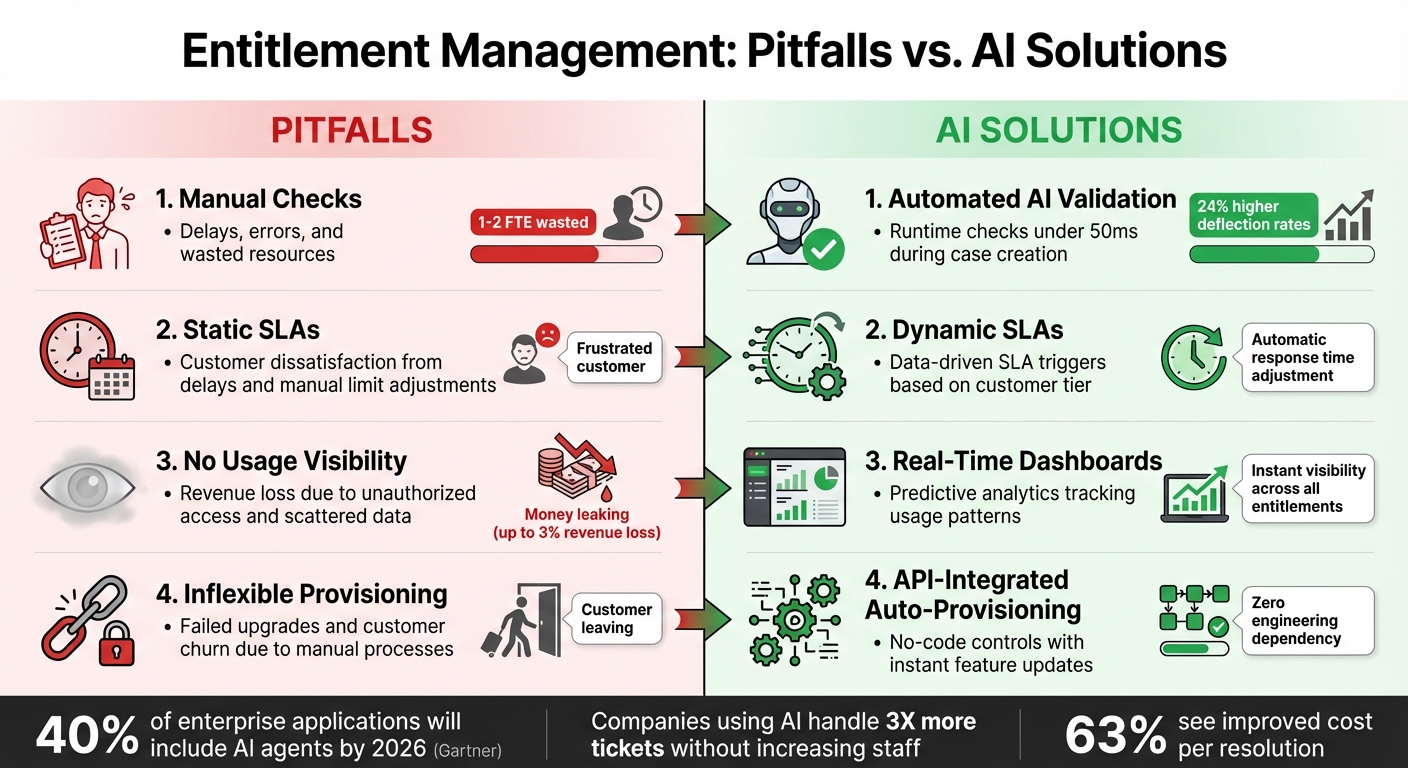
Common Entitlement Management Pitfalls vs AI-Driven Solutions
While automated entitlement tracking is essential, it’s equally important to identify and address common pitfalls that can derail these efforts. Issues like manual processes, rigid logic, and lack of visibility can lead to financial setbacks and unhappy customers.
Josh Groves points out that when entitlement data is scattered across emails, phone calls, and notes, it creates significant scaling challenges [4][1]. This disorganization can result in enforcement failures, such as trial extensions or temporary promotions not being revoked on time, causing revenue losses [6].
Relying on manual checks and hard-coded logic not only slows down operations but also introduces technical debt and misuses resources, often pulling 1–2 full-time employees away from their primary roles [4][3]. Michal Petřík emphasizes that expecting non-technical teams to navigate technical details is unrealistic [1]. This reliance on developers for entitlement checks delays deal closures, worsens support issues, and frustrates customers. To overcome these challenges, organizations must rethink how entitlement data is managed and shared. These obstacles underscore the need for AI-driven solutions to replace outdated manual methods.
Pitfalls vs. AI Solutions Comparison
| Pitfall | Impact | AI-Native Prevention Strategy |
|---|---|---|
| Manual checks | Delays, errors, and wasted resources [4] | Automated AI validation during case creation with runtime checks under 50ms (see Step 3) [7] |
| Static SLAs | Customer dissatisfaction from delays and manual limit adjustments | Dynamic, data-driven SLA triggers (see Step 3) |
| No usage visibility | Revenue loss due to unauthorized access and scattered data [4] | Real-time dashboards with predictive analytics tracking usage patterns (see Step 4) |
| Inflexible provisioning | Failed upgrades and customer churn due to manual processes [4] | API-integrated auto-provisioning with no-code controls (see Step 2) [7] |
Conclusion
Managing entitlements effectively safeguards revenue, improves operational efficiency, and strengthens customer trust. By ensuring customers receive exactly what they’ve paid for, businesses can eliminate revenue leaks and reduce the resources spent on maintaining outdated, fragile systems.
AI-powered workflows address common manual obstacles like disorganized data, delays in provisioning, and excessive reliance on engineering teams. These systems automatically handle tasks like trial expirations, usage limit alerts, and upsell triggers, allowing support teams to resolve access issues without needing developer assistance. These advancements not only simplify operations but also position companies to adapt to rapid changes in the industry.
Gartner estimates that by the end of 2026, 40% of enterprise applications will include task-specific AI agents [7]. Additionally, companies using consumption-based pricing models are already growing about 38% faster year-over-year compared to the broader SaaS market [6]. However, this growth is only achievable when entitlements are enforced accurately and in real time. This highlights the critical importance of automated, real-time solutions for entitlement management.
Supportbench addresses these challenges head-on with AI-driven features that dynamically adjust SLAs, automate ticket routing, and provide real-time visibility into entitlements – all while eliminating the need for engineering involvement [22]. With native integrations and a no-code configuration environment, Supportbench empowers GTM and support teams to manage entitlements independently, freeing developers to focus on core product innovations.
The decision is straightforward: stick with manual processes and accept the inefficiencies and revenue losses, or embrace AI-native tools that ensure accurate entitlement enforcement, reduce costs, and enhance the customer experience. The future of entitlement management is here – streamlined, automated, and ready to meet modern demands.
FAQs
What’s the difference between entitlements and user permissions?
The key distinction comes down to their focus and application. Permissions are tailored to individuals and dictate what specific actions a user can take, such as editing, viewing, or deleting content. On the other hand, entitlements operate at the account or organizational level, defining what features, resources, or limits are available based on a subscription plan or license agreement. Essentially, permissions control what a person can do, while entitlements regulate the broader access an organization has, ensuring access aligns with what’s been purchased.
How do I automate entitlements when customers upgrade, downgrade, or stop paying?
To streamline entitlements, leverage a management system that automatically adjusts access based on a customer’s active plan and payment status. These tools handle changes during upgrades, downgrades, or cancellations, ensuring access stays consistent with the customer’s agreement. They also handle permission enforcement, monitor usage, and set limits without manual intervention. This approach helps minimize errors, prevent revenue loss, and boost efficiency in daily operations.
How can AI enforce entitlements during support without hurting the customer experience?
AI ensures customers receive the right level of support by using real-time validation to confirm entitlements based on their purchases. This reduces delays and eliminates the need for manual checks, making the process smoother and more accurate. By dynamically evaluating plan limits or feature access, AI workflows help avoid both over-delivering and under-delivering services. Additionally, AI can anticipate potential issues and take proactive steps to uphold service quality without disrupting the customer experience.






