
Managing user roles and permissions in a B2B portal can be challenging, especially when dealing with multiple organizations and complex hierarchies. Here’s how you can simplify the process while ensuring security and scalability:
- Use Role-Based Access Control (RBAC): Assign permissions to roles instead of individual users. This approach reduces administrative overhead and aligns access with organizational needs.
- Define permissions (e.g., view reports, manage billing).
- Group permissions into roles (e.g., Admin, Finance Manager, Sales Rep).
- Use access hierarchies to manage inheritance (e.g., Owner > Admin > Member).
- Plan for Multi-Tenancy: Ensure users can have different roles across multiple organizations. For example, a user might be an Admin in one company but a Viewer in another.
- Design Customizable Dashboards: Tailor dashboards to show relevant data based on roles. For example:
- Sales Reps see leads assigned to them.
- Finance Managers access billing and payment details.
- Enable Self-Service Tools: Provide features like role management, knowledge bases, and real-time data access to reduce support requests and empower users.
- Focus on Security: Implement row-level security (RLS) to restrict data access, conduct regular access reviews, and automate provisioning and offboarding processes. This minimizes risks like permission creep and data exposure.
- Role-Specific Reporting: Build dashboards that deliver insights tailored to each role. For instance, procurement teams view order approvals, while sales teams focus on performance metrics.
Key Takeaway: Start with a simple role structure (e.g., Admin, Member, Viewer) and expand only when necessary. Use centralized identity management tools like Okta or Azure AD to automate and secure role assignments. By focusing on clear permissions, self-service capabilities, and strong security practices, you can create a scalable and user-friendly B2B portal.
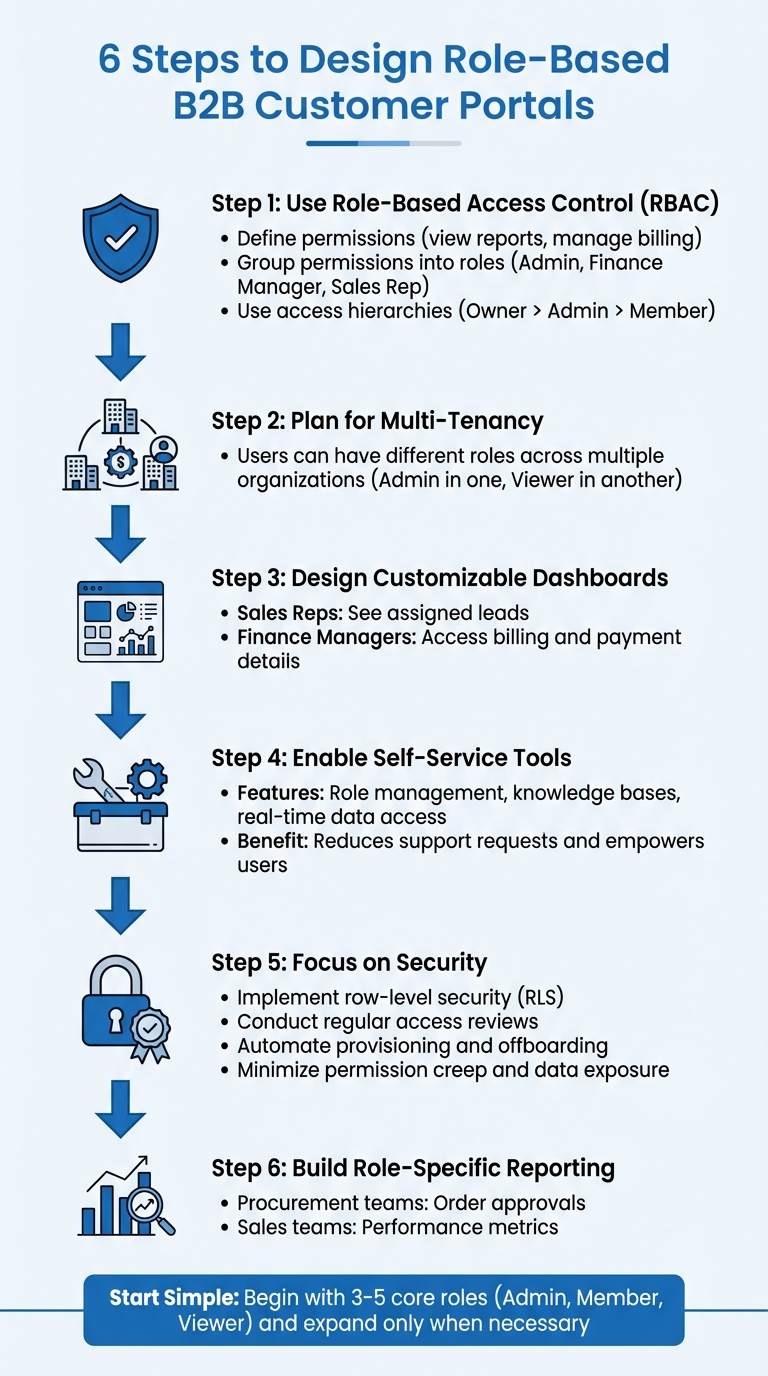
6-Step Guide to Designing Role-Based B2B Customer Portals
Understanding Role-Based Access Control (RBAC) in B2B Portals
What is Role-Based Access Control?
Role-Based Access Control (RBAC) is a system for managing user permissions by assigning them to roles rather than individual users. These roles act as labels that group specific permissions, like viewing product details or generating sales reports. The key components of RBAC are:
- Permissions: Define the specific actions a user can perform.
- Roles: Group these permissions under a single label.
- Access hierarchies: Create a structure where higher roles inherit permissions from lower ones (e.g., Owner > Admin > Member).
As PropelAuth puts it:
"Roles are for your users. Permissions are for your developers/code." [PropelAuth]
This framework simplifies handling complex access needs, especially in B2B portals.
How RBAC Solves B2B Complexity
B2B portals often deal with varied user roles within large, intricate organizations. For instance, a single customer account might have executives who need access to company-wide dashboards, support agents managing customer data, and regional managers focused on specific territories. RBAC tackles these challenges by:
- Supporting multi-tenancy: Users can have different roles in different organizations (e.g., Admin in one, Viewer in another).
- Enabling delegated administration: Tenant admins can manage their own users and assign roles without involving the service provider.
- Adapting to organizational structures: Permissions can be scoped to specific teams, departments, or projects, ensuring that users access only what’s relevant to them.
This level of control not only protects sensitive data but also simplifies operations by aligning access with organizational needs.
Benefits of RBAC for B2B Customer Portals
RBAC provides a dual advantage: improved security and streamlined operations. It ensures that users only access what they need – like preventing a Digital Store Supervisor from viewing marketing tools or restricting a billing manager from accessing engineering tickets. In multi-tenant environments, it isolates data, so users only see information relevant to their organization or team.
From an operational perspective, RBAC reduces the administrative burden. B2B customers can manage their own users, roles, and permissions, cutting down on support requests to the service provider. The system scales easily, allowing portals to adjust dashboards and views dynamically without backend changes. For instance, enterprise customers can create custom roles, such as "ReportOnly", without altering the underlying code.
Platforms like GitHub demonstrate the flexibility of RBAC with roles like Owners, Members, and Billing managers. Simpler structures, like those used by Slack and Mercury, show that starting with a basic role framework and adding complexity as needed is often the best approach.
sbb-itb-e60d259
Defining User Roles and Permissions for B2B Portals
Identifying Key User Roles
To build an effective B2B portal, start by matching portal functions to specific user roles. For instance, core modules like billing, reporting, product management, and customer data should have corresponding roles. Here’s how this might look:
- Administrative roles: These include positions like Customer Admin or Owner, responsible for inviting users and managing permissions.
- Financial roles: Roles like Finance Manager, tasked with handling invoices and payment methods.
- Operational roles: Examples include a Digital Store Supervisor who updates pricing or a Marketer managing campaigns.
- Analytical roles: A Customer Insights Analyst, for instance, would focus on accessing and analyzing reports.
A simple role structure is often the best starting point. For example, GitHub uses five roles (Owners, Members, Moderators, Billing Managers, Security Managers), while platforms like Slack and Mercury stick to just three primary roles. Simplifying at the outset makes it easier to expand later, rather than trying to untangle an overly complex structure. For enterprise clients, consider offering a role that allows custom role creation, which can significantly reduce the administrative workload.
Once roles are defined, the next step is assigning clear permissions to each.
Mapping Roles to Permissions
After identifying roles, create a detailed permission matrix that links each role to specific actions. It’s important to differentiate between roles, which are user-facing labels like "Admin", and permissions, which are developer-defined access points (e.g., billing::view, reports::export). PropelAuth puts it succinctly:
"Roles are for your users. Permissions are for your developers/code." – PropelAuth
In practice, your application should verify permissions, not role labels. Instead of a check like user.isRole("Admin"), use user.hasPermission("reports::export"). This approach keeps your codebase flexible as roles evolve. Store role assignments and permission mappings in a database rather than hardcoding them into the application. When users have multiple roles, their permissions should typically combine, giving them access to all actions allowed by their assigned roles.
Avoiding Common Mistakes in Role Definitions
Defining roles and permissions can be tricky, and some common pitfalls can create unnecessary headaches. Here’s what to watch out for:
- Role explosion: Creating too many granular roles early on can overwhelm administrators and complicate management. Stick with 3–5 core roles that cover broad organizational needs, and only add custom roles for specific edge cases.
- Hardcoding roles: Hardcoding roles into your application makes it rigid and difficult to update. Always rely on permission checks (e.g.,
can_view_reports) in your code instead of role names. - Permission creep: Over time, users may accumulate permissions they no longer need, increasing security risks. Regular access reviews – ideally conducted quarterly – can help prevent this. Automating offboarding processes is another effective strategy.
- Plan mismatch: If permissions don’t align with subscription tiers, users might access features they haven’t paid for, leading to revenue loss. Ensure permissions are tied directly to subscription plans.
Here’s a quick summary of these challenges and how to address them:
| Mistake | Impact | Mitigation |
|---|---|---|
| Role Explosion | Administrative overhead and confusion | Start with 3–5 core roles; use custom roles only for edge cases |
| Hardcoding Roles | Brittle code; difficult to update | Always check for permissions (e.g., can_view_reports) in code |
| Permission Creep | Increased security and compliance risks | Conduct quarterly access reviews and automate offboarding |
| Plan Mismatch | Revenue leakage/feature misuse | Map permissions directly to subscription tiers |
Designing Portal Features for Multi-User Workflows
Customizable Dashboards and Views
Dynamic dashboards are a game-changer when tailored to specific user roles. For instance, a Sales Rep’s dashboard should only display leads tied to their email login, while an Admin can access all records. This approach not only keeps data secure but also ensures each user sees what’s most relevant to them.
Consider role-specific dashboards: Finance Managers might need a summary of financial data, while Analysts require detailed trends with export options. Conditional logic can further refine the experience – like showing invoice management tools exclusively to users with "Finance" permissions, while basic order history remains accessible to all.
Persona-based templates also help streamline workflows. For example, team leaders could view high-level cost summaries, while developers see in-depth technical metrics. Filters that auto-adjust based on login – such as "My Open Tickets" or "My Team’s Services" – can declutter the interface and improve usability.
Finally, integrating self-service tools can enhance user autonomy and efficiency.
Self-Service Capabilities
Custom views are just the beginning. Adding self-service tools can significantly cut costs and improve user satisfaction. Solving a customer issue via phone costs an average of $230, but self-service reduces that to just $52. Even more telling, 90% of customers prefer using Google to troubleshoot technical problems.
A key feature for self-service is an AI-powered knowledge base. Instead of relying on keyword matches, these tools understand context. For example, as users type a ticket description, the system can suggest relevant articles to help them resolve issues on their own. Lucy Hussey, Customer Service Manager at Motel Rocks, sums it up:
"I think self-service is so important not only for keeping the workload down for our agents but for customers, too. When they can find an answer quickly and efficiently themselves, the whole shopping process is a better experience."
Beyond knowledge bases, users should have real-time access to order statuses, billing details, and usage history. A complete view of past support tickets and their resolutions can eliminate the need for direct contact. For enterprise-level portals, user impersonation tools are invaluable. These allow support teams to securely simulate the user’s experience, making it easier to troubleshoot complex issues, especially in B2B scenarios.
Collaboration and Communication Tools
As portals grow more personalized and self-service-oriented, robust collaboration tools are critical for managing diverse user needs. Community forums are an excellent addition – companies with active forums resolve about 20% of their support volume through these channels. By integrating discussion platforms, users can upvote helpful articles and collaborate with peers.
Portals should also serve as centralized communication hubs. Users can create tickets with all necessary context and track their status in real time, while agents handle requests in a unified workspace. For teams managing complex accounts, features like shared ticket views, internal notes, and @mentions can streamline collaboration, allowing multiple stakeholders to work together without switching platforms.
Another must-have is organization-aware routing. This feature automatically identifies user domains or slugs, ensuring they’re directed to the right organization-specific resources. It’s especially useful for users managing multiple client accounts, as it eliminates confusion and ensures they see the correct data for their context.
Build Role-Based Dashboard with React 19 & Next.js 16 | Authentication & Authorization
Building Reporting and Analytics for Role-Based Portals
Expanding on Role-Based Access Control (RBAC) principles, tailored reporting and analytics provide each user role with the specific insights they need to improve efficiency.
Role-Specific Reporting Dashboards
Each team within an organization relies on different types of data to perform their tasks effectively. For instance, procurement teams benefit from viewing reorder lists, available-to-promise (ATP) statuses by warehouse, and pending order approvals. On the other hand, accounts payable users need quick access to open balances, payment statuses, and details about active disputes. Field technicians often rely on tools like consumables usage trackers, serial/lot number lookups, and parts catalogs, while sales managers focus on team performance metrics and order totals.
To safeguard sensitive information, query-level filtering using SQL WHERE clauses ensures that users only retrieve data relevant to their role. For example, a Sales Rep’s dashboard should only display records where the owner_email matches their login credentials. This prevents unauthorized data from being fetched or exposed, even in the browser’s network activity tab.
Dynamic user interfaces further enhance security and usability by conditionally displaying widgets and controls based on role permissions. For enterprise clients managing multiple sites, dashboards should support parent-child account hierarchies, enabling procurement managers to view consolidated spending across departments.
By combining security with flexibility, these dashboards allow users to create customized reports tailored to their specific operational needs.
Customizable Reporting Features
A self-service document center can provide users with the ability to archive and export invoices, credit notes, and compliance documents, offering a more autonomous experience. This approach not only reduces customer service costs – by as much as 30% – but also saves B2B buyers between 30–60 minutes per purchase when using self-service portals.
Real-time integration with ERP systems like NetSuite or QuickBooks ensures that pricing and inventory data remain current, while audit trails document every change to maintain compliance. AI tools can boost efficiency even further by summarizing customer interactions, auto-tagging data for quick insights, and even generating custom dashboards from plain English descriptions.
However, these flexible features must be underpinned by strong security measures to maintain data integrity and compliance.
Ensuring Data Security in Reporting
Data security goes beyond restricting what users can see. Row-Level Security (RLS) ensures that only specific rows in a table are accessible based on user roles or identities. This method is most effective when applied to dimension tables rather than fact tables. In multi-tenant B2B environments, assigning roles within the context of a specific organization prevents accidental access to another customer’s data, a problem known as "permission bleeding".
The principle of least privilege is key here – users should only have access to the data they need for their tasks. For example, a "Viewer" role might only allow read-only access to reports. Using dynamic identity functions like USERNAME() or USERPRINCIPALNAME() ensures that security rules adapt automatically to the logged-in user.
For actions such as exporting data to CSV, server-side checks should verify that the user belongs to an authorized group (e.g., Retool_Admin). Additionally, integrating an Identity Provider through SAML or SCIM can automate role synchronization, simplifying role management. By implementing clear permission layers and automated compliance processes, organizations can cut security audit times by up to 50%.
Maintaining and Auditing Role-Based Portals
Once you’ve set up a role-based access control (RBAC) structure, the work doesn’t stop there. Keeping it secure and compliant over time requires consistent maintenance and thorough audits. Regular reviews, seamless onboarding and offboarding processes, and careful monitoring are all essential to prevent permission creep and reduce security risks.
Regular Permission Reviews
Automating access reviews can make it easier for managers to confirm whether users still need their current permissions. These reviews should happen on a set schedule, with extra attention given to high-risk groups or guest users.
Centralized identity management tools, like Okta or Azure AD, can simplify this process by consolidating permissions across systems. This not only makes tracking easier but can also cut audit times in half compared to manual methods.
"Implement roles as data, not code. Define a permission matrix… and store role assignments in your DB, not hardcoded logic." – WorkOS
For organizations following compliance frameworks like SOC 2, ISO 27001, or HIPAA, retaining audit logs for at least one to two years is often mandatory. These logs should go beyond just login activity to include permission changes, role updates, and sensitive data exports, ensuring a complete compliance trail.
Onboarding and Offboarding Users
Streamlining account creation is crucial, and Just-In-Time (JIT) provisioning can help by automatically setting up accounts during a user’s first SSO login. Tools that use SCIM (System for Cross-domain Identity Management) ensure that role changes sync instantly when users switch departments or responsibilities. Similarly, SCIM’s push-based model can revoke access immediately when someone leaves or transitions to a new role.
Instead of directly linking roles to user objects, consider using a membership table that ties user IDs to organization IDs and roles. This setup allows users to have different permissions across multiple organizations. When offboarding, a "soft delete" or "deactivated" state can block access while keeping historical records intact for audits.
In B2B environments, offering delegated administration – where client organizations manage their own users’ roles – can reduce your support workload while providing customers with the control they expect.
Monitoring for Permission Creep
Even with scheduled reviews and automated provisioning, ongoing monitoring is essential. Permission creep – where users accumulate unnecessary access over time – can occur due to outdated project roles or failed deprovisioning processes, such as broken webhooks. Regular data reconciliation can help identify and fix mismatches between portal permissions and identity provider (IdP) records.
Microsoft Entra ID provides a safeguard by automatically blocking and eventually deleting external identities after 30 days of inactivity. It’s also useful to maintain distinct user states – Active, Deactivated, and Soft Deleted – to immediately block access while preserving data integrity.
For added security, dynamic permission logic can evaluate real-time data, like team membership or on-call status, rather than relying solely on static roles. For high-risk actions, such as billing updates or bulk data exports, implementing multi-factor authentication – even for logged-in users – provides an extra layer of protection against unauthorized access.
Conclusion
Building a B2B role-based customer portal is all about finding the right balance between security, ease of use, and scalability. To keep things manageable, start with a straightforward structure – roles like Owner, Admin, and Member are often enough to meet initial needs. These roles act as user-friendly labels, simplifying the experience for everyone involved. This simplicity lays the groundwork for secure, automated workflows across your portal.
Using centralized identity providers like Okta or Azure AD can make a big difference. They streamline audits and ensure that when employees leave partner organizations, their access is revoked immediately.
The financial stakes of getting role-based access control (RBAC) right are hard to ignore. Research shows that effective RBAC implementation has saved the industry around $1.1 billion. On the other hand, breaches involving malicious insiders cost an average of $4.92 million – much higher than the average breach cost. These numbers highlight why enforcing the Principle of Least Privilege and avoiding permission creep are so crucial for safeguarding both your business and your customers.
"User management in B2B SaaS is integral to your product’s value. It affects your security posture, user experience, sales velocity, and ability to scale." – WorkOS
A well-thought-out portal doesn’t just enhance security – it also lightens your support workload. Delegated administration allows your partners to manage their own users and permissions, giving them the control and flexibility they need. By adopting these strategies, you’re not just protecting sensitive data; you’re also creating a scalable system that supports your customers’ success.
FAQs
How does Role-Based Access Control (RBAC) enhance security in B2B customer portals?
Role-Based Access Control (RBAC) improves security in B2B customer portals by assigning permissions based on users’ roles within their organization. This means each user only gets access to the data and tools they need to perform their job, reducing the chances of unauthorized actions or sensitive data being exposed.
RBAC also helps simplify access management. By centralizing control, it minimizes human error, makes permission audits easier, and bolsters data protection. This is particularly important in B2B settings, where many users and stakeholders often handle confidential information.
What are the advantages of using customizable dashboards in B2B role-based portals?
Customizable dashboards in B2B role-based portals are all about making work smoother and more focused. By tailoring the user experience to specific roles – like sales, support, or management – these dashboards let users display the metrics and data that matter most to them. This means they can monitor key performance indicators (KPIs), track progress, and address issues quickly, all from a single, personalized view.
Another big advantage is how these dashboards manage permissions and data security. Users only see the information relevant to their role, which reduces unnecessary distractions, keeps them focused, and protects sensitive data. Plus, AI-driven tools, like automated permission checks and customized reporting, take care of repetitive tasks, freeing up teams to work on bigger, strategic objectives.
In short, customizable dashboards help streamline workflows and boost efficiency, making them a powerful tool for managing complex B2B operations.
How can businesses avoid permission creep in role-based customer portals?
To keep permission creep in check within role-based customer portals, businesses need a well-organized strategy for managing user access. Start by conducting regular permission audits to confirm that users only have access tied to their current responsibilities. Any outdated or unnecessary permissions should be removed without delay to prevent overreach.
Using role-based access controls (RBAC) is another effective way to manage this. RBAC allows you to set clear boundaries for permissions based on specific job roles, making it easier to enforce limits and avoid granting excessive access.
For added efficiency, think about automating tasks like role assignments and permission reviews with AI-powered tools. Automation helps reduce human error and ensures that permissions stay in line with company policies as roles and responsibilities evolve.
Related Blog Posts
- What Is Customer Service? Definition, Examples, and Best Practices
- The 3 best help desk ticketing systems for 2026
- How do you set up a customer portal that supports role-based access and multiple customer teams?
- Which non-US helpdesk platforms include advanced SLAs, portals, and knowledge base without add-ons?